A new look and better features for Zoho CRM's Data Sharing Settings
Hello to my Zoho Enterprise Support family!
Data sharing is important for controlling who can access information in your CRM. It lets you set basic permissions and custom rules for sharing records among your users, roles, and groups.
Data sharing is important for controlling who can access information in your CRM. It lets you set basic permissions and custom rules for sharing records among your users, roles, and groups.
Previously, Zoho CRM's data sharing settings had some issues that made them hard to use. For instance, default permissions and sharing rules appeared together on one long page, forcing users to scroll to find specific rules. Even modules without sharing rules showed empty tables, cluttering the page and making important information harder to locate. Basic features like search and filters were also missing, making it difficult to manage and find rules quickly.

What's did we enhance?
We've redesigned Zoho CRM's data sharing settings with a fresh look and helpful new features. Let's explore what's changed!

Two tabs for easier navigation
We've split Default Permissions and Sharing Rules into two clear, separate tabs, making it easier to find what you need.

Default Organization Permissions
This tab lets you set access permissions across your entire organization for each module. Permissions are now displayed in a simple dropdown menu, making them clearer and easier to select.

This helps you manage default permissions clearly and easily.
Sharing Rules: New Detailed View
The biggest update is in the Sharing Rules tab, which now clearly organizes all your sharing rules by module.
Key enhancements in the Sharing Rules tab

A clearer, organized rule list
Sharing rules are now grouped neatly by module (like Leads, Contacts, Deals, and Accounts). This removes unnecessary spaces and makes navigation faster.
Sharing rules are now grouped neatly by module (like Leads, Contacts, Deals, and Accounts). This removes unnecessary spaces and makes navigation faster.
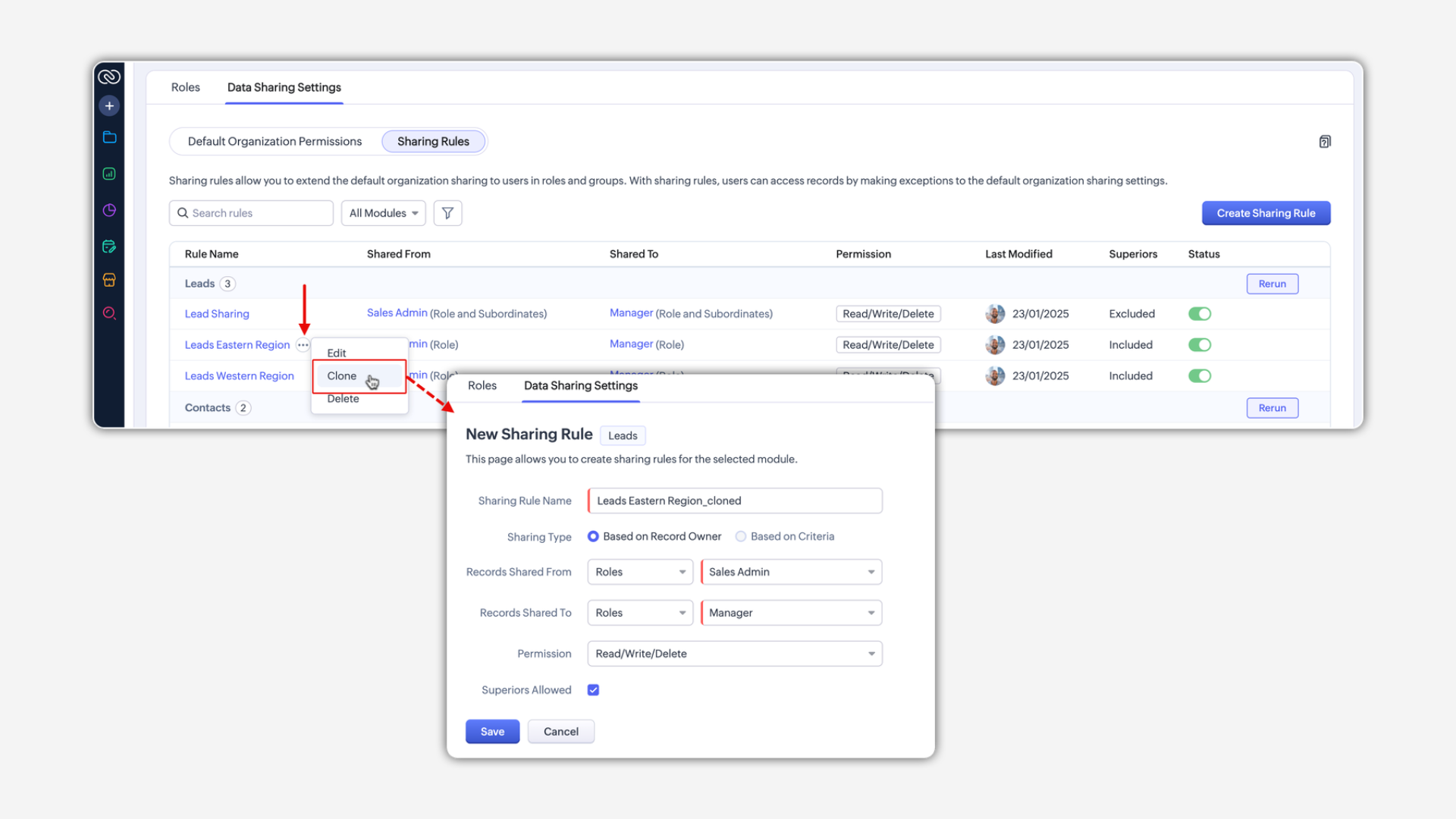
We've also added new columns and interactive features that quickly show important details, including:
- Who the records are shared from and to
- Permission levels
- Last modified user and date
- Current status
Now, you can easily review and manage rules without opening each one separately.
Instantly activate or deactivate rules
A new toggle button lets you quickly turn sharing rules on or off with just one click. This makes managing access easier, without needing to delete or recreate rules.
Easily clone sharing rules
You can now clone an existing rule within the same module. For example, if you already have a rule sharing leads from your eastern region and need a similar one for your western region, just clone the existing rule, change the details as needed, and you're all set.
Search and filter rules easily
Finding specific sharing rules is now quicker and simpler with new search and filtering tools:
- Search by rule name: Quickly type a rule's name into the search bar, and matching results appear instantly.
- Module filter: Choose to display rules from a specific module or all modules using a simple dropdown.
- Advanced filters: Narrow down results even more by:
- Who the records are shared from (specific roles or groups)
- Who the records are shared to (target roles or groups)
- Including or excluding superior roles
- Rule status (active or inactive)

See creation and modification details
Now, you can easily view when a rule was created or last updated directly on its configuration page. A new "Last Modified" column quickly shows the date, time, and user who made recent changes, so you don't have to open each rule separately.
What's staying the same?
These UI updates don't change the core features:
- Default permissions work exactly as before, with just minor visual improvements.
- Creating new rules follows the same steps, aside from small layout adjustments.
- Your existing sharing rules remain unchanged and continue working as usual.
- No action is required on your part.
These improvements offer more flexibility, easier navigation, and better control without changing the core functionality.

These improvements are rolling out gradually in the US.