Meet the new Zoho Analytics: The Agentic Analytics platform

Every major release of Zoho Analytics has changed what you can do with data. This one changes who does the work.
The new Zoho Analytics 2026 Release (7.0) collapses that chain. Zoho Analytics is now an agentic analytics platform, with AI agents that understand your business context and take on the work. They analyze your data deeply, build dashboards, and recommend what to do next, while you stay in control of every step.
With 50+ new features and enhancements across the analytics workflow, here is everything that is new.

Note:
- Features marked Preview are part of this release and will be rolling out progressively across all users and locations, in the coming weeks.
- Plan availability is shown as a tag beside each feature.
Agentic analytics with Ask Zia
Ask Zia, your super agent, now orchestrates six specialized agents across your analytics workflow. Ask a question or describe a task, and Ask Zia hands it to the right agent, in the chat or right where you do the work, such as Query Tables and Code Studio.
Analyze data All plans
Ask questions in plain language and uncover descriptive, diagnostic, and prescriptive insights. The Analysis Agent summarizes trends and outcomes from your workspace data, identifies the factors behind changes, recommends what to do next, and creates reports on request.
Build dashboards All plans
Describe your goal and get a complete dashboard with relevant charts and insights. The Visualization Agent also creates reports and widgets, and edits existing dashboards, including layouts.
Prepare data Premium and above
Describe what you need, and the Data Prep Agent builds pipelines to clean, transform, and enrich your data. Your data is ready for analysis in less time.
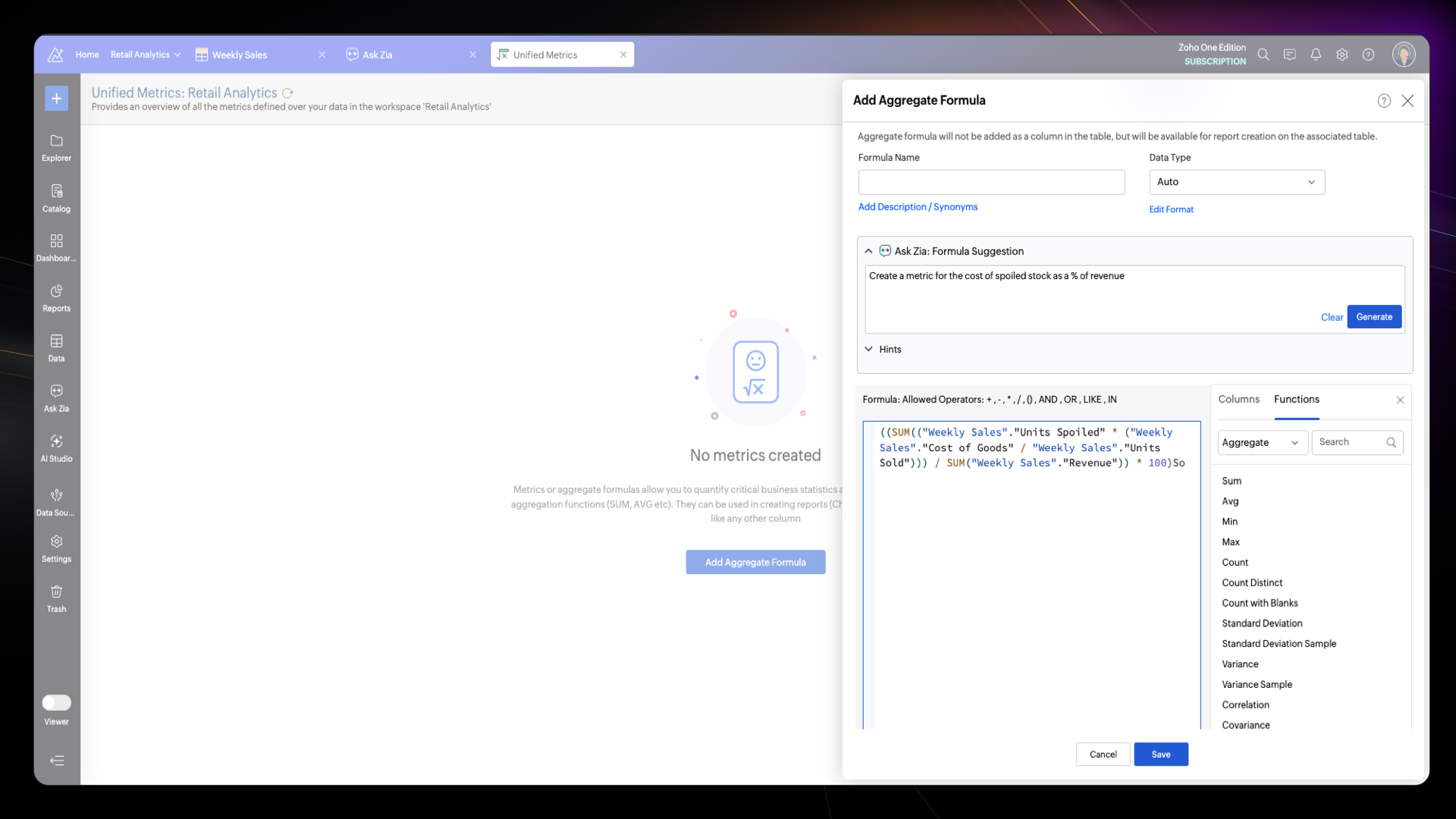
Create metrics and formulas All plans
Describe the metric you need in plain language, and the Formula Agent writes the formula column or aggregate formula behind it.
Write SQL All plans
Describe the data you need, and the SQL Agent writes a ready-to-run query table and explains each clause. Review the changes before you accept them, then ask for refinements, fixes, or optimizations in the same chat.
Write Python code Premium and above
Describe the model or transformation you want, and the DSML Coding Agent generates the Python in Code Studio, then explains, optimizes, and fixes bugs for you. It covers classification, regression, forecasting, and custom ML models.
Retain context with history and memory
Ask Zia remembers. It retains your past conversations, learns from them, and when you resume, it answers with that context already in mind, so you never have to repeat yourself.
Choose your LLM All plans
Run Ask Zia on Zoho LLM, or connect to OpenAI models. The Zoho Key System (ZKS) provides free AI credits, in all plans, to use the agentic features. Top up credits as add-ons when required. You can also integrate your own OpenAI model through Bring your own key (BYOK).
Manage AI in one place
GenAI Configuration is now Manage AI. Enable agents and AI features, choose the AI vendor for each, control who can use them, and track credit usage, all from one page available to the Account Admin.
Build Your Own Agents
Custom Data Agents turn your business objectives into coordinated analytical work. Define agents around your goals, analytical requirements, and operational workflows, or start with ready-made ones for common business domains.
Design custom agents Premium and above
In Zia Agent Studio, build each agent with its own instructions and model. Choose the tables, semantic model, and knowledge it can use. Equip it with tools or an MCP server so it can act beyond analysis. Version and deploy it when ready.
Start with pre-built agents Preview Premium and above
Pick a pre-built agent for your domain, connect it to your data, and it is ready to answer.
Ask questions in dashboard context Preview All plans
Keep every answer focused on the data that matters. With Dashboard Context, Ask Zia answers directly against the data and insights in the dashboard you are viewing.
Set the context for trusted AI
AI is only as reliable as the context behind it. Capture how your business is structured, describe what your data means, define your business metrics, and provide instructions for trusted outcomes. Define this context once and reuse it across Ask Zia and your custom agents.
Represent Your Business with Ontology Preview
Give AI a clear map of how your business is structured. Model your core business entities and define how they relate to one another. Together, they form the foundation AI uses to understand your business.
Define and standardize with the semantic layer Preview
Build a business glossary AI can rely on. A Semantic Model captures descriptions, synonyms, instructions, and standard metric definitions for your data, and you can create more than one to suit different teams or use cases.
Give Ask Zia your business context Preview
Point Ask Zia to a Semantic Model. It then answers using your business definitions and metrics instead of raw table and column names. Every response stays consistent with the context you defined.
Ground custom agents in context Preview
Give each custom agent the business context it needs. Attach a semantic model of your choice, and the agent works with trusted definitions and metrics in every task.
Intelligence everywhere with headless BI
Take Zoho Analytics beyond its own interface. MCP, REST APIs, and a command-line tool let you work with your data from AI assistants, agents, applications, and scripts.
Remote hosted MCP Server All plans
Let AI assistants and agents do more in Zoho Analytics. The Zoho Analytics MCP Server is now available as a remote hosted MCP server in Zoho MCP, with tools to create or edit dashboards and reports, folder management, edit formulas and query tables and many more.
Claude Connector and Plugins All plans
Use the Zoho Analytics Connector in Claude to query workspaces and build data visualizations in plain conversation. With the new Zoho Analytics Agent Plugin in Claude, you can create or edit dashboards, edit formulas, manage folders in workspaces, and more.
New tools in the MCP Server All plans
The Zoho Analytics MCP Server now lets you do more with your workspace. You can update reports, view report metadata, manage aggregate and custom formulas, create and edit lookup relationships between tables, and more.
Zoho Analytics CLI Preview All plans
Access Zoho Analytics through command line interface. The CLI supports the full range of analytics functions, so you can script and automate analytics workflows from your terminal.
Extending REST APIs capabilities All plans
55+ new REST APIs extend what you can build and manage programmatically. Here are a few of the things you can do with them:
- Reports and Dashboards: create and update dashboards, create new report types
- Tags: create and manage tags in workspaces
- Custom Roles: create, update, and delete custom roles
- Data Alerts: create, update, and enable or disable data alerts
- Linked Workspaces: link or unlink two workspaces, list the linked workspaces in your organization, and push reports and updates from one workspace to another
- Backup and Restore: start a workspace backup, download it, view backup versions, and restore
Customize your white label portal
Give your portal a look that is fully your own. In the CSS Editor, set the color scheme, typography, logos, and icons, and rearrange the left navigation. A new Manage Users page in Organization Settings lets you add users in bulk, manage their MFA, and control their status from one place.
Governed AI and Data administration
Keep analytics secure and accountable as it grows. Test changes before they go live, trace every asset, control who sees what, and audit how AI is used.
Manage every asset with the Catalog Preview
See all your assets, including data, reports, dashboards, agents, and users, in a single explorer. The Catalog helps you find them fast with Zia-powered search, filters, and tags, and check data quality at a glance. Use data lineage to visualize data flow and dependencies, so impact analysis is part of every change.
AI Observability
Every agent session is traceable. AI Observability records every session and execution, and breaks each run into steps, from prompt generation to LLM calls and tool runs. For every step, it shows the model used, the tokens and credits consumed, and the time taken.
Deploy changes in stages with Sandbox Premium and above
Build and test changes in a separate stage, then promote them to production when they are ready. Deployment Management tracks every change, logs each deployment, and keeps a version history. If something goes wrong, restore an earlier version of production.
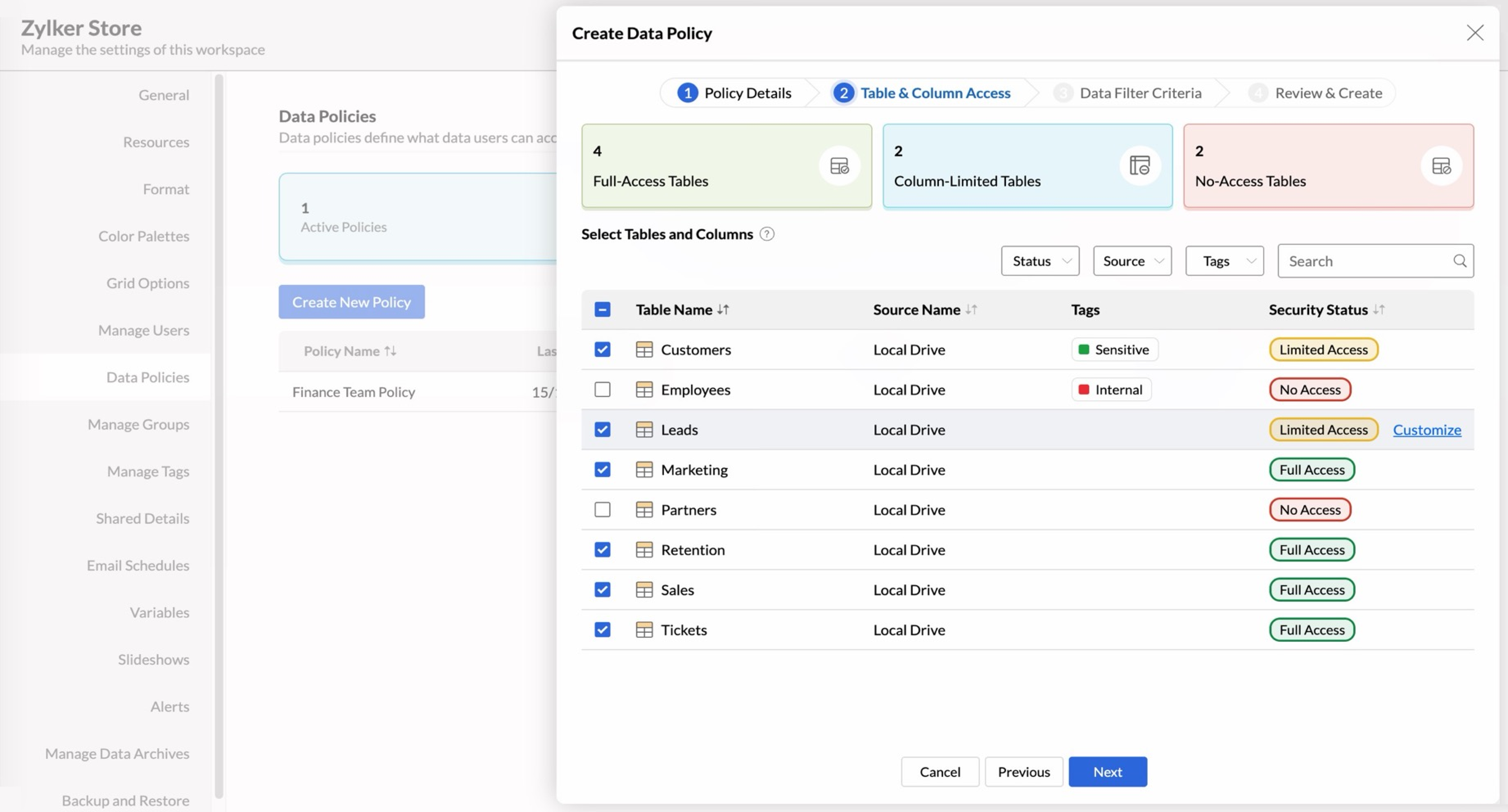
Control data access with policies Preview All paid plans
Give workspace admins centralized control over who sees what. Define a Data Policy once and assign it to the users who need it. It sets full, column-limited, or no access for each table and adds row-level filters, so restrictions hold consistently across reports and dashboards.
Search across your workspaces All plans
The revamped global search finds reports, dashboards, tables, and other assets across all your workspaces, using metadata such as owner, tags, and column names.
Strengthen your data foundation
Every insight starts from complete, reliable data. This release adds new business apps, databases, file types, and streaming sources, with more ways to bring your data in.
Connect more business apps Any paid plan
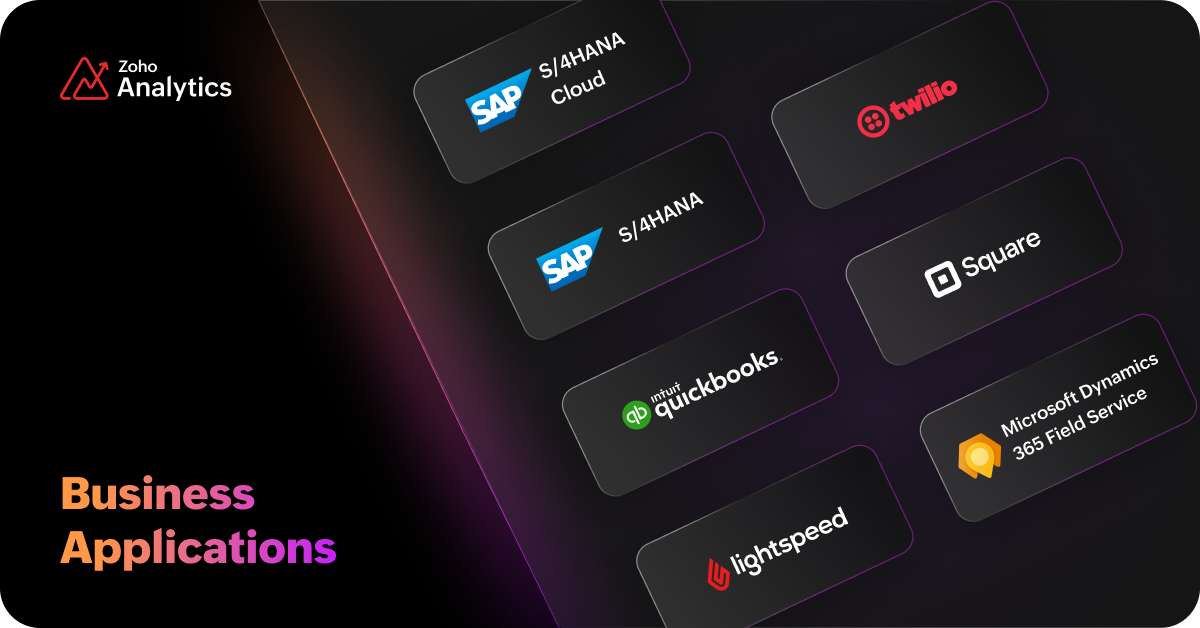
- Twilio
- Square POS
- Lightspeed POS
- QuickBooks IES
- SAP S/4HANA Cloud
- SAP S/4HANA On-Premise
Sync Zoho Projects in real time Enterprise
The Zoho Projects connector now supports real-time sync, so your project data reaches Zoho Analytics the moment it changes. It is included with Zoho Projects Ultimate edition and available as an add-on for other editions.
Add more databases Any paid plan
New database sources and connection options:
- New Database Sources: Supabase, Amazon DocumentDB, and AlloyDB
- Google BigQuery: Added Service account as new authentication method.
Live connect Premium and above
- Live connect support for Teradata.
- You can now create Query tables over live connect data. Learn more
Import more file types and feeds All plans
More ways to bring data files into Zoho Analytics:
- PDF: import data from PDF files across many sources.
- Local file: Import multiple files from a folder in one go.
- Intranet now supports the following file types: XLS, HTML, statistical, Avro, and Parquet files, and OData feeds. Learn more
- Databridge support in FTP: Pull files from FTP servers through Databridge, so files hosted inside your network can be imported on a schedule. Learn more
- OData: OAuth 2 is now supported as an authentication type.
Keep streaming history and add more sources Premium and above
What’s new in stream analytics:
- Historical data: store streaming data in a historical table and analyze it alongside live data.
- Retention period: set how long streaming data is kept, from 30 minutes to 24 hours
- New Sources: Google Pub/Sub, Kafka, PubNub and Amazon SNS
Blend live and synced data Premium and above
Data blending now works across live-connect and periodically synced data. You can blend data by defining lookups or by creating query tables across these sources.
Send pipeline output to existing tables Preview Premium and above
Point a data pipeline at a table you already have, and its output lands there. Reports and dashboards built on that table pick up the new data with no rework.
Trigger workflows from imports All plans
Use the result of a data import as a workflow trigger: success, failure, or partial success. A failed sync can alert your team, and a successful one can start the next step in your connected apps.
Enterprise reporting and visualization
Present data the way your audience needs to see it. Pixel perfect reports, new chart types, custom visuals, dashboard theme gallery and many more capabilities, to give you more ways to tell the story behind your numbers.
Deliver pixel-perfect reports Preview
Design boardroom-ready reports with complete control over every design element. Deliver personalized business reports in different formats, to stakeholders at scale, with scheduled bursting.
Build your own visuals Enterprise
When built-in charts aren’t enough, design exactly what you need. Code Custom Visualization in JavaScript, or generate them through MCP and APIs using AI assistants.
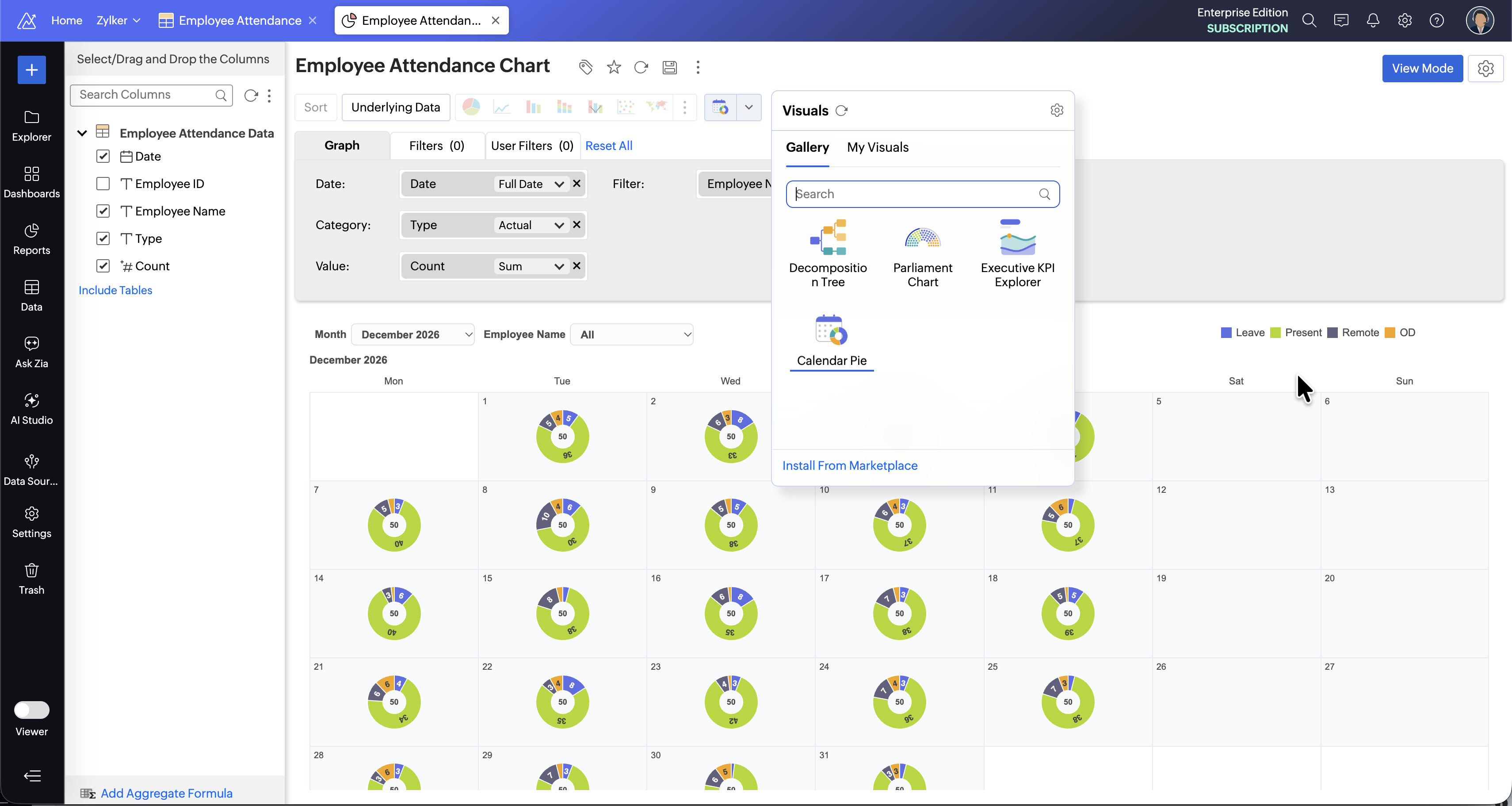
Pick visuals from the Gallery Preview All plans
The Custom Visuals Gallery offers a curated set of ready-to-use custom visuals from Zoho Analytics. Pick the one you need and add it to your reports and dashboards.
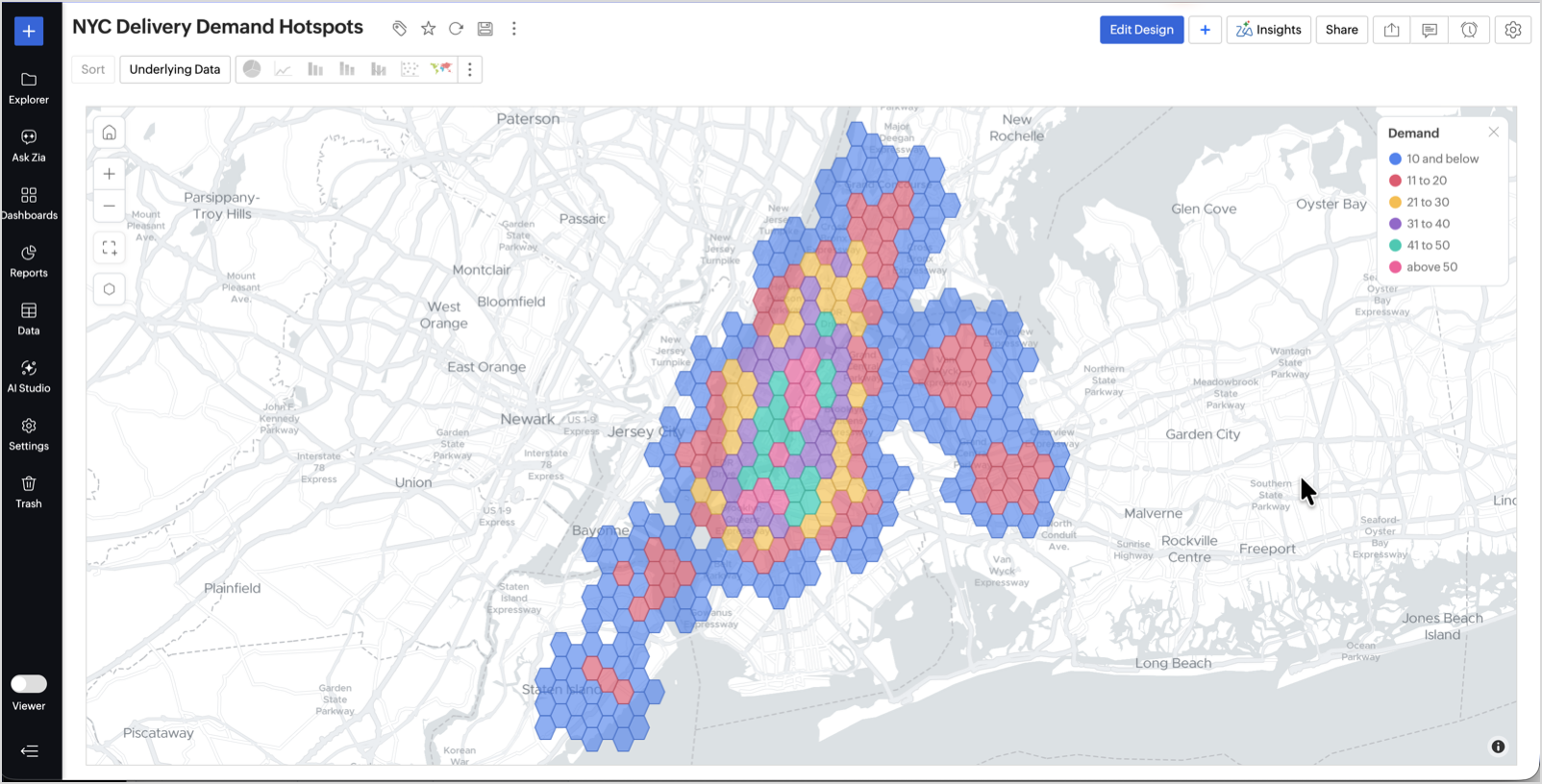
Map location patterns with spatial binning Preview All plans
Turn dense location data into a readable map. Spatial binning groups nearby points into cells and colors each cell by count or value, so patterns show at a glance.
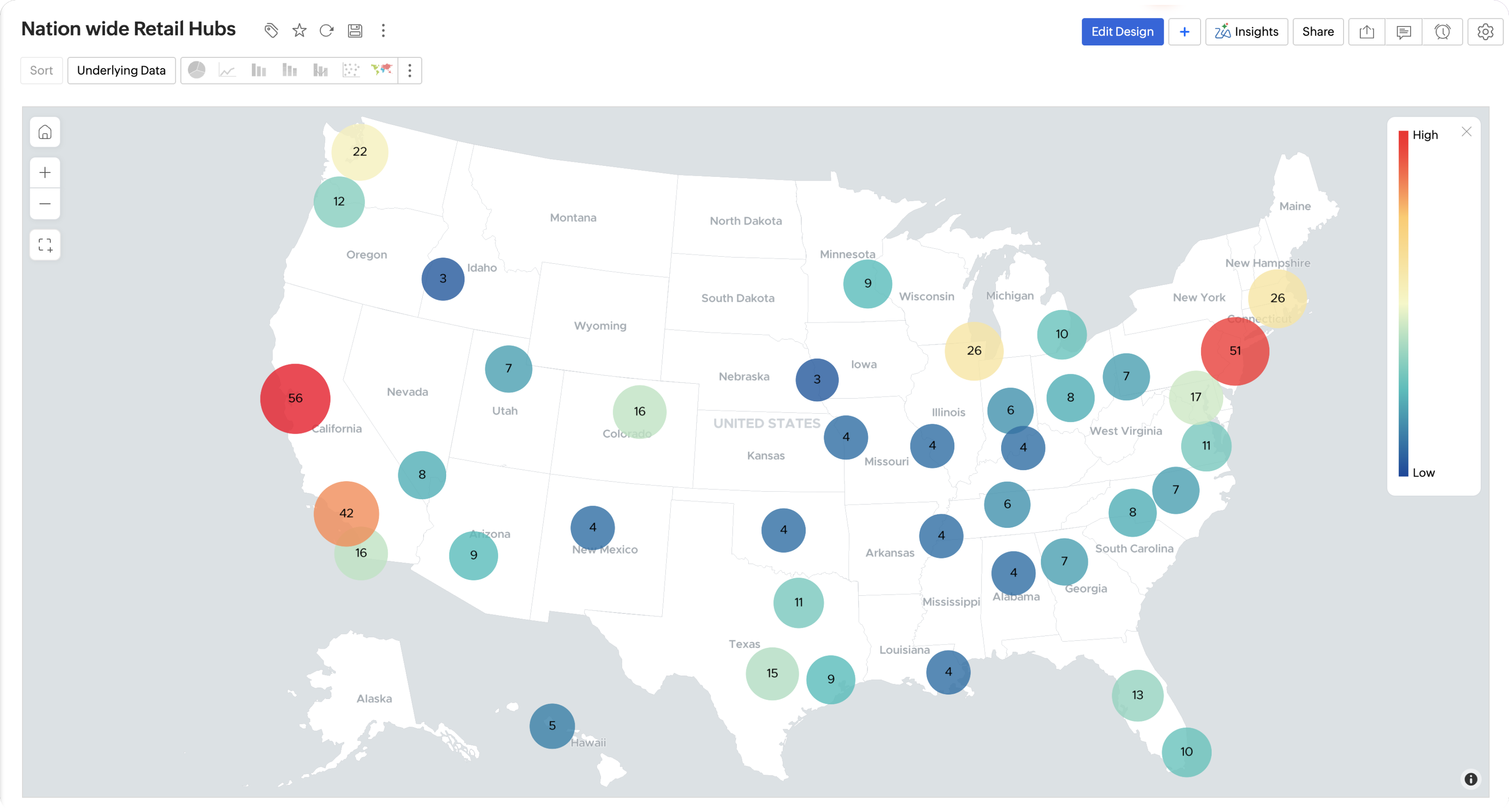
Cluster locations on a map All plans
The new Cluster map chart groups nearby markers into clusters that expand as you zoom in. Thousands of locations stay readable at any level.
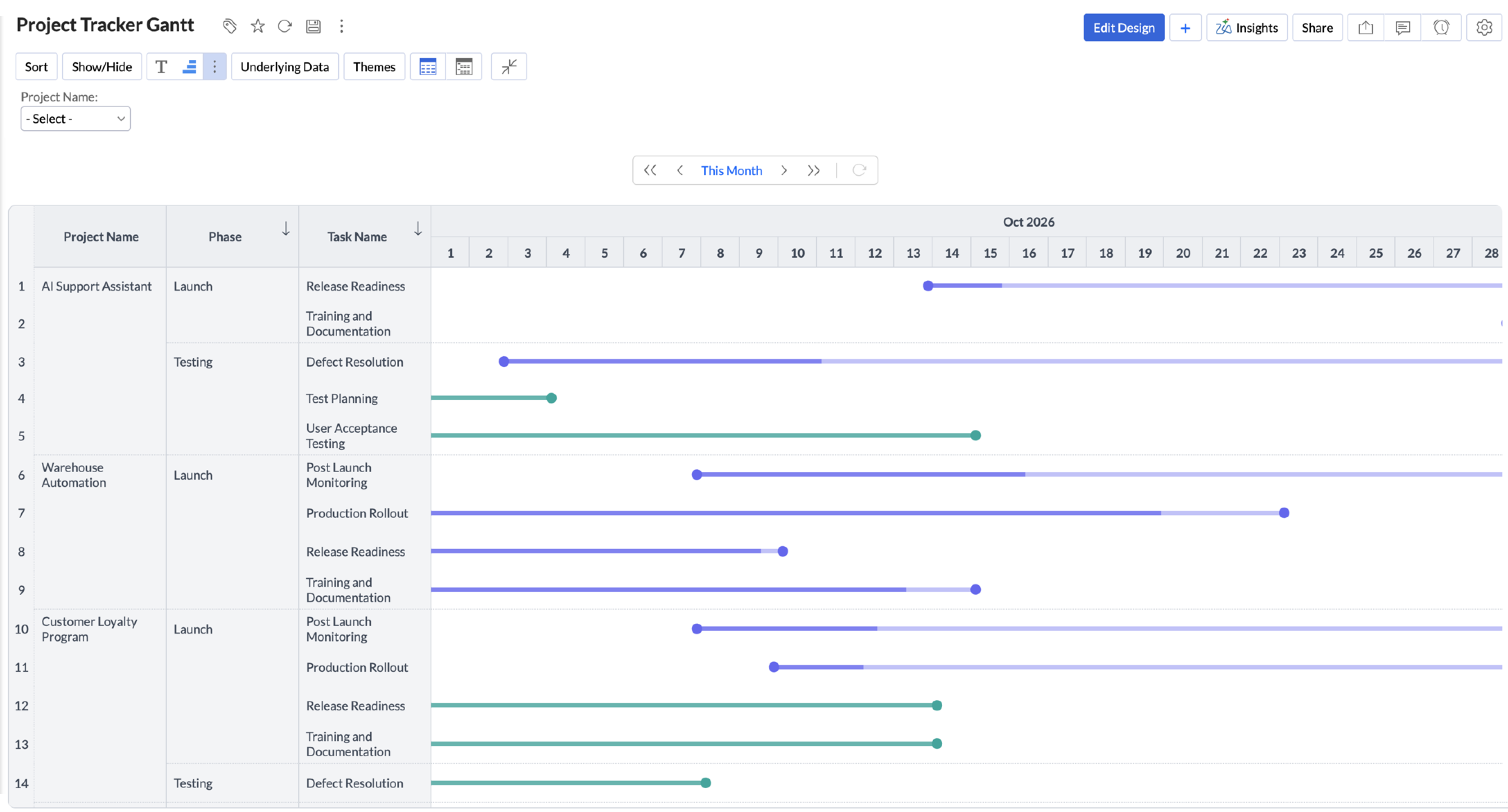
Plan timelines in pivot views All plans
Pivot views now support Gantt bars, so you can show start and end dates for tasks, orders, or projects right inside the pivot.
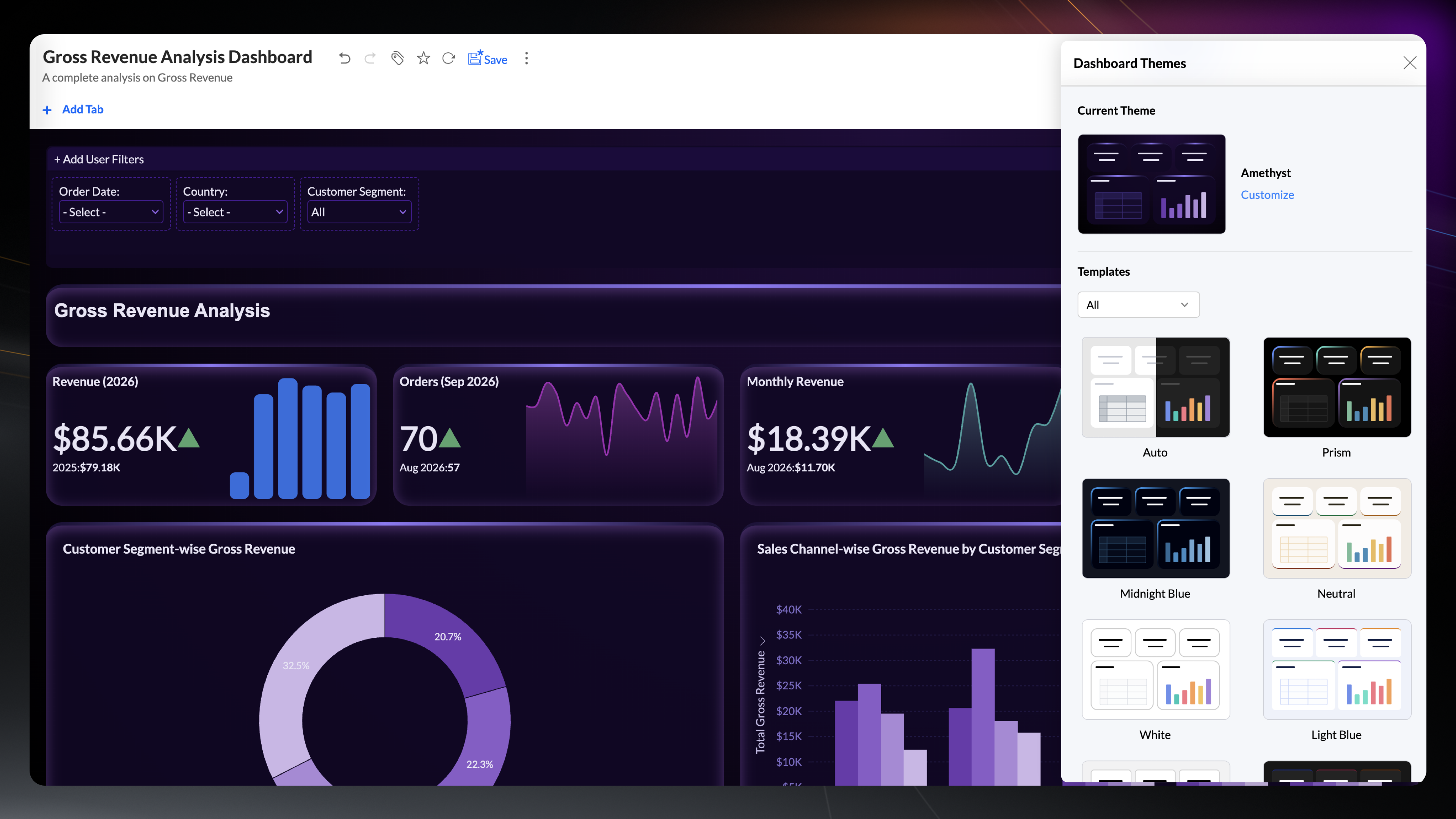
Style dashboards with themes and layouts All plans
Style a dashboard in one step with the new theme gallery: 50+ preset themes that combine backgrounds, card styles, and color palettes, plus layout presets to arrange your widgets.
Show trends in KPI widgets All plans
KPI widgets can now carry a sparkline as a line, area, or bar, so a single widget shows the current value and how it got there.
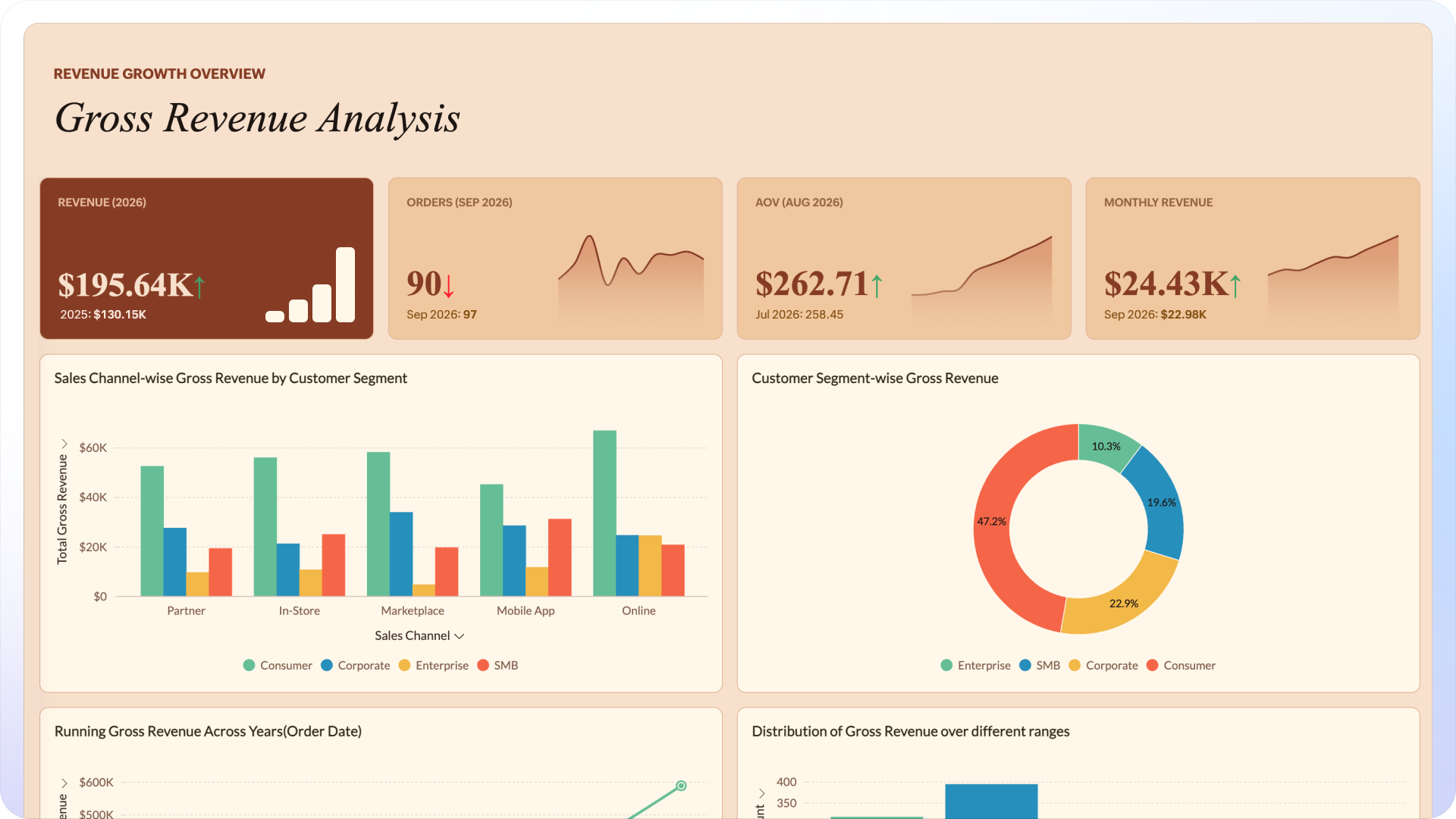
Undo and redo dashboard edits All plans
Experiment freely while building dashboards. Undo and redo step you back through edits and forward again, so a wrong move never costs you the layout.
Position user filters Preview All plans
Place user filters on the left, right, or top of a dashboard, and adjust their dimensions to fit the layout.
Scenario Analysis and Correlation Matrix in Predictive AI
Move from what happened to what could happen next. Scenario modeling, correlation analysis, and new forecasting models take your analysis further without leaving your reports.
Model what-if scenarios Preview All plans
Define scenarios using multiple adjustment criteria, and change values on the fly to see how results shift. Scenario analysis lets you compare outcomes side by side before you commit to a decision.
Measure how variables move together Preview All plans
Use the correlation matrix to see which metrics rise and fall together. Compare one variable against many (single-set) or several against each other (multi-set).
Forecast with external drivers PreviewAll plans
Forecasting in reports now includes the ARIMAX model, which uses external variables to improve the forecast.
VARX forecasting in pivot views All plans
Pivot views now support VARX forecasting. Project several related metrics together, with external drivers factored in, right inside the pivot.
Zia Insights
Zia Insights digs deeper this release, explaining more kinds of change in your reports and dashboards.
Diagnose a change from any data point Premium and above
Spot a sudden rise or dip, and ask why from the data point itself. Zia Insights explains what caused the change, with key driver and contribution analysis of the factors behind it.
Explain gaps in percentage metrics Preview Premium and above
Diagnostic insights extend to percentage metrics. Gap analysis explains the difference between two values of a percentage metric and shows which factors account for it.
Export dashboards with pinned insights Preview Premium and above
Pin the insights that matter to your dashboard, and they travel with it. Dashboard export includes pinned Zia Insights, so the explanation behind the numbers reaches everyone who receives the file.
Go deep with AI in DSML Studio
Data scientists get more to work with in DSML Studio, with more ways to build, bring in, and run models.
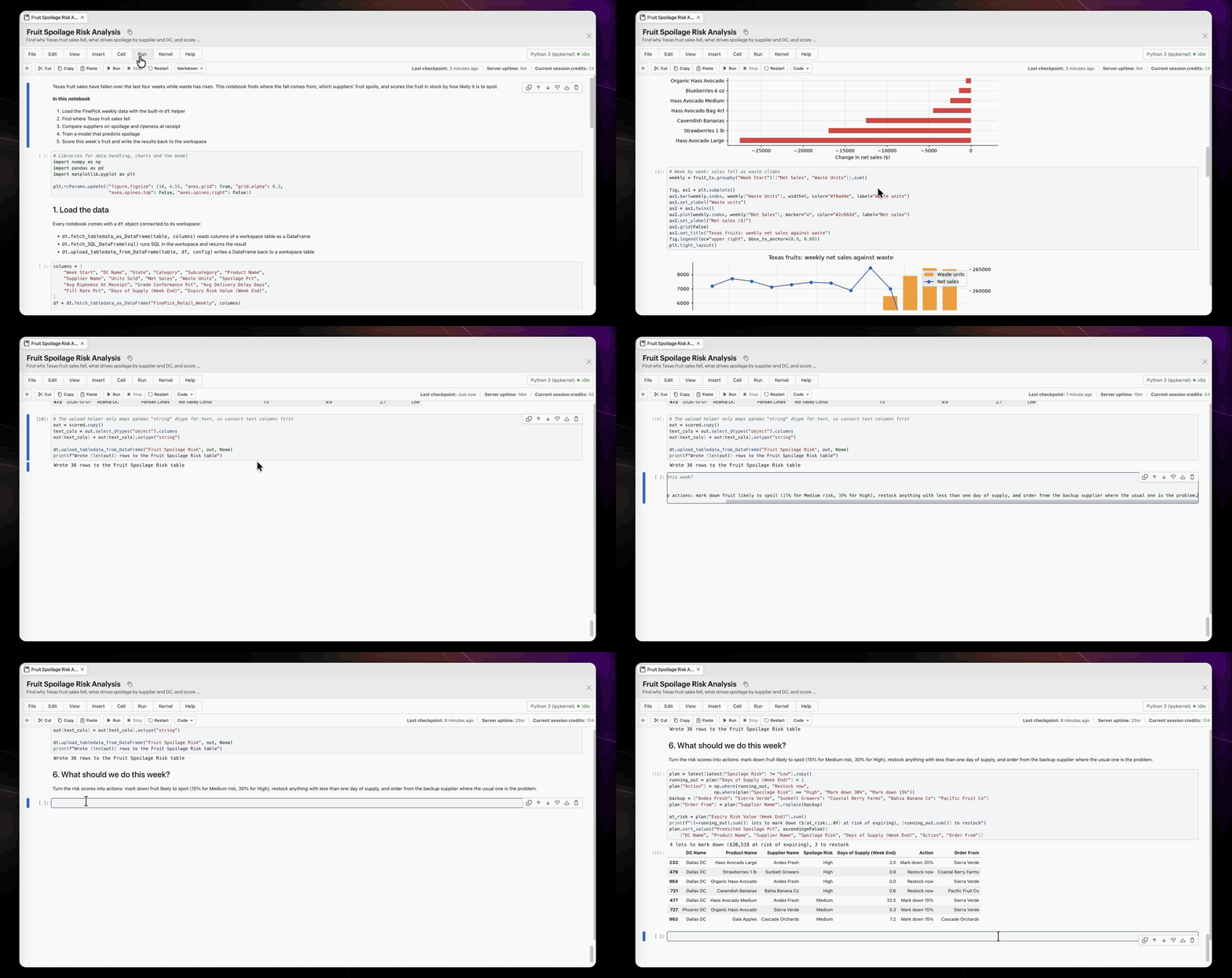
Explore Data with Jupyter Notebooks Preview Premium and above
Give data scientists room to explore. Jupyter Notebooks in Zoho Analytics combine code, models, results, and notes in one flexible workspace for data science.
Bring your own models with PMML Premium and above
Deploy ML models built in external tools to work in Zoho Analytics. Import them in PMML, an industry-standard format, then deploy them on your data and schedule predictions, with no retraining or code rewrites.
Sharpen time series forecasts Premium and above
Forecast any time series metric in AutoML, with gaps in the data filled automatically. Add related metrics and external drivers as influencing factors to sharpen the forecast.
Detect anomalies in AutoML Preview Premium and above
Anomaly detection comes to AutoML. Build a model that flags unusual patterns as new data arrives.
Pay for what you use with DSML credits Premium and above
The DSML add-on moves from a postpaid to a prepaid credit model. DSML credits are consumed per minute of compute, based on the compute size you choose when you train or schedule a model, and you can top up as usage grows.
Mobile Apps
The Zoho Analytics mobile apps are redesigned for the latest platform standards, and the agents come along.
Experience the redesigned mobile apps
The iOS app adopts Liquid Glass, and the Android app moves to Material 3, so both feel native to the latest versions of their platforms, with refreshed navigation and controls throughout.
Analysis Agent comes to mobile
Descriptive and diagnostic analysis is now in your pocket. Ask Zia in the mobile app answers what happened and why from your workspace data, powered by the same Analysis Agent as on the web.
AI credits
Agents and AI features run on credits, so you can start without any setup and scale when you need to.
Get free AI credits in every plan
Every plan includes monthly Zoho LLM credits. Paid plans also get a one-time pool of AI credits, which both Zoho LLM and external AI vendors such as OpenAI can use, valid for 180 days. For heavier usage, add-on credits renew every month. The Credit Usage tab in Manage AI shows where every credit goes.
What's changing
A few things look or work differently when you sign in. Here is what to expect.
- GenAI Configuration is now Manage AI. Agents, AI features, AI vendors, access control, and credit usage are all managed from this page. Learn more
- Create with AI, or build it yourself. The Create (+) menu now opens with two tabs. With AI lists the tasks an agent can take on, from analyzing data and writing SQL to preparing data, building dashboards, writing code, and creating a custom agent. Build holds the options for creating assets yourself.
- Ask Zia, Explorer, and Catalog are now workspace tabs. Switch between chatting with your data, browsing your views, and exploring the workspace catalog from the top of every workspace.
- AI Studio joins the left navigation. It brings Zia Agent Studio, Code Studio, AutoML, and Notebooks together under one menu.
- AI usage runs on AI credits. Agents and AI features consume AI credits through the Zoho Key System unless you bring your own OpenAI key. Learn more
- The DSML add-on moves from postpaid to prepaid DSML credits, consumed per minute of compute based on the compute size you choose. Learn more
- White label settings are reorganized under Organization Settings, with a Manage Users section for portal users.
- Data Sources has moved. It is no longer a left navigation item of its own. Click Data in the left navigation and select Data Sources to manage and sync your sources.
Resources
| Resource | What you will find |
|---|---|
| FAQs | Answers to common questions about the release |
| Webinars | Sessions that walk through the new features |
| Help documentation | Step-by-step help for every Zoho Analytics feature |
That wraps up what's new in Release 2026 of Zoho Analytics. Explore the features, and tell us what you think in the comments below or write to support@zohoanalytics.com. Happy analyzing!
Topic Participants
Pradeepkumar R
Sakis Oikonomou
Pradeepkumar R
reports
Rakesh Ramkumar B
Sticky Posts
Meet the new Zoho Analytics: The Agentic Analytics platform
Every major release of Zoho Analytics has changed what you can do with data. This one changes who does the work. For years, analytics meant a chain of hands. The engineer shaped the data, the analyst wrote the query, the designer built the dashboard,[Virtual launch event] Experience the agentic analytics platform | A sneak peek into Zoho Analytics 7.0
AI and agents are reshaping how businesses operate, and teams that can act on contextual, real-time intelligence are the ones best placed to adapt. Analytics platforms are evolving fast to meet that need. Join us for a live walkthrough of Zoho AnalyticsWhat's New in Zoho Analytics - August 2026
Hello Users! This month puts you in control of how your analytics moves: promote content safely between workspaces with Deployment Management, govern data access and sign-in more precisely, and make your forecasts smarter with external drivers. There'sWhat's New in Zoho Analytics - June 2026
Hello Users! This month is about meeting your data wherever it lives: reaching it from AI assistants, bringing it in from more sources, and keeping it flowing with less manual effort. Here's what's new across Ask Zia and AI, data import, integrations,What's New in Zoho Analytics - February 2026
Hello Users! We're back with another round of updates for Zoho Analytics. This month's release focuses on giving you greater flexibility in how you visualize, manage, and act on your data - with new features like custom visualizations, remote MCP server,
Recent Topics
Tool Parameter UI - Freeze Header
When one has a number of tools with a number of parameters, scrolling down hides the heading information, forcing one to scroll back up to get confirmation which radio button is which: Seems like simply freezing the header would eliminate that issue.KB Articles - Can't See Content or Trigger Immediate Sync
Once a file has been submitted to the KB, there's no way to check what it actually contains. There's also no way to force an immediate sync with the source document. These are issues when one is developing and testing an agent. It makes troubleshootingCannot replace custom tools
This is so incredibly frustrating. Create a tool group. Add your custom schema to create your custom tools. Attach to an Agent. Now you need to update your schema to make an adjustment? You can't edit the schema or even re-upload a new schema. It blocksTesting Tools - Can't View Response
When adding a custom tool and trying to test it, one can see whether or not the test has a successful http response, but the actual payload cannot be viewed to verify the tool's performance. I thought that's what the little hover link was for, but mousingmore native app support for linux
Dear zoho,pls build additional apps like zoho valt,zoho sheets,zoho show,zoho authenticator apps for linux ,because more and more people are increasing switching to linux this days,Quick Reference Guide on join.zoho.com
Joining a remote session can be difficult for the people who need it the most. Please add a quick reference guide and better documentation that my Grandma can read on the join.zoho.com site. It's not uncommon to spend 10minutes or longer in a sessionZoho Projects - Auto Populate Project on Project Invoices
Hi Projects team, I noticed that when creating an invoice from a Project in Zoho Projects, the project is not selected on the invoice. Is this something which you would consider as a feature request? It seems silly that when you create an invoice fromTimes prepopulating in Date/Time field on deal records
Support tells me that there is no workaround to having the time auto-fill on a date/time field in our deal records -- that is HUGELY inconvenient and creates massive opportunity for error. Our deals involve several parts over various days/times, noneEmail-Data Synchronization with Zoho Analytics
Hello, Enterprise Support Community! We're excited to announce the availability of Email Data Synchronization with Zoho Analytics! This highly requested enhancement allows you to sync email data from Zoho CRM into Zoho Analytics, making it easier to analyzeMulti-Day Installations
We schedule technicians on multi-day installations. A single appointment from Monday 8 AM through Friday 5 PM counts as 105 working hours, causing false overbooking. We need one appointment spanning five days but only 40 hours counted toward technicianMaking shared forms available offline
Hi, We used to be able to have our forms available offline even if it was a shared form. now we can't. Is this a new bug?Zoho Forms API
Is there any way to get all form entry list using API? Looking forward to hear from youDocuments greater than 40MB Preview
hello, Documents bigger than 40 MB cannot be previewed in WorkDrive Web App or Mobile App. would it be resolved in future?Calendar Booking - Related Deal
Is it possible to automatically associate a Calendar Booking with an existing Deal in Zoho CRM? We're trying to use the native Calendar Booking feature. Our goal is to send a booking link to a customer from an existing Deal record, so that when the customerApproval Process configuration is now more flexible and fully customizable
Hello everyone! Approval Process is back with a better user experience that makes it easier to add rules to your processes. This enhancement includes some UI updates that help you create highly structured approval stages—and more. Let's look at the enhancementsKaizen #268: Using Zoho MCP to Build and Configure Zoho CRM Cadences
Hi everyone! Welcome back to the Kaizen series! In the previous Kaizen posts, Kaizen #265 and Kaizen #266, we explored how Zoho MCP can be used to work with Zoho CRM records, retrieve metadata, customize CRM, configure automation, and even coordinateDeliverability Update: Impact of the Ongoing Microsoft 365 Service Disruption on Email Delivery
Zoho Campaigns is operating normally. Microsoft is still recovering from a global incident that affects multiple Microsoft 365 services, including Exchange Online and Outlook. If your mailing lists include Microsoft-hosted addresses (@outlook.com, @hotmail.com,Duplicate Record Creation
Hello Team, I would like to check whether there are any options available in Zoho FSM to prevent duplicate record creation in the following modules: Assets Companies Contacts Ideally, we would like the system to check for existing records before allowingTrigger a Workflow Function if an Attachment (Related List) has been added
Hello, I have a Case Module with a related list which is Attachment. I want to trigger a workflow if I added an attachment. I've seen some topics about this in zoho community that was posted few months ago and based on the answers, there is no triggerZoho Inventory - Imporoved Order Fulfillment Reporting
Hi Inventory Team, i've tried to contact you through support@eu.zohoinventory.com but haven't received a response. I am contacting you on behalf of a client. Our client is a car parts wholesale business and we set them up on Zoho Inventory earlier thisSay Hello to Telephony in Zoho FSM
Zoho FSM now brings complete telephony support so your team can manage inbound and outbound calls without switching tabs. Faster responses, smarter routing, and total call visibility—all in one place. Choose the telephony setup that works for you Zoho’sIncreasing API Credits
Hello everyone! Organizations consume Zoho CRM APIs for various business needs, and it's a show-stopper when you exhaust your API credits before the 24-hour rolling window replenishes your credits. To meet your growing needs and help you keep your business[Online Training] Zoho RPA masterclass: Fundamentals, SAP® automation, & AI workflows
Hello everyone! Greetings from the Zoho RPA Training Team! We're excited to announce our upcoming Online Training on Zoho RPA. Manual, repetitive tasks like entering data, updating spreadsheets, managing files, and extracting information from documentsZoho Inventory | Can't uncheck/turn off Advance Tracking
Hi, I wanted to know if there's a way to turn off Advanced Tracking (such as Serial Number or Batch Tracking) for an item in Zoho Inventory. I’ve read that you might need to delete associated transactions and clear the opening stock to disable these features.CNIL - Suivi de Pixel
Bonjour à tous, À la suite de la nouvelle recommandation de la CNIL sur les pixels de suivi dans les e-mails, savez-vous si Zoho Campaigns permet : de conditionner le suivi des ouvertures au consentement de chaque contact ; de proposer un lien permettantJoin Zoho Meeting only via Web browser and not with Zoho Meeting App
Dear Zoho team, according to the documentation [1], Zoho Meeting only offers web view for Chrome and Firefox on a desktop. For other browsers and devices, participants can only join a Zoho Meaning with the Zoho Meeting App installed. This is a big hurdleGetting an error when trying to use the Zoho Desk Resources with our Zobot chat
Hello, When I try to set our Zobot AI Card Training to Zoho Desk resources I get an error when testing it and it bypasses the bot completely. When I try to switch it to the Zoho SalesIQ resources option in there it will list some articles but not giveKB Articles from Zoho Learn - Import as .md
I love the concept of being able to use articles from Zoho Learn as knowledge base articles for Zia Agents. This will absolutely help with proper documentation and organization of company processes and SOPs. This was a great concept. However, even whenRequest for Zoho Desk Version and Module Details
Kindly help us confirm the version of Zoho Desk currently being used in our portal, along with the module/edition name. We require this information urgently for our internal documentation.Cannot reorder fields in Page Layout in Expenses and Purchase Requests
It is very inconvenient that the custom fields in Page Layout cannot be re-ordered. The only way is to remove the fields and re-create them; however, it is impractical. This would affect the reports and dashboards we are having. Not able to re-order thePurchase Requisition in Zoho Books
I want to understand if Zoho Books is having the following workflow: PR ( Purchase Requisition ) >> PO ( Purchase order) >> GRN/SRN ( Goods/Services receipt note) >> BillTips & Tricks #8 | Zoho Mail: Seguridad, privacidad y control para tu empresa
El correo electrónico sigue siendo una herramienta fundamental para cualquier organización. Por él circulan comunicaciones internas, información de clientes, documentos confidenciales y datos esenciales para el negocio. Por eso, elegir un proveedor dePersonalize Email Campaigns using CRM Data
Recently, few of our CRM users wanted to send an email campaign with personalized sender details and signature so that recipients can instantly recognize the sender. We are happy to announce the new enhancement in campaign creation through which you can personalize your email campaign using CRM Contact/Lead Owner's data. Let’s see how we can use those data to send emails. Personalize sender details Using Zoho Campaigns, you can send an email campaign with a personalized sender name and email address集めて終わりにしない。― Zoho FormsからCRMへデータをつなぐ
ユーザーの皆さま、こんにちは。ゾーホージャパンの友田です。 Zoho Formsで問い合わせや資料請求を受け付けた後、その情報をどうしていますか? 例えば、 フォームから届いた氏名や会社名、メールアドレスを確認して、Zoho CRMにも同じ情報を入力している。 そんな作業が発生している場合、FormsとCRMをつなぐことで、その手間を減らせるかもしれません。 Formsに入力された情報をCRMへ Zoho Formsは、Zoho CRMと連携できます。 例えば、Webサイトから資料請求を受け付ける場合、Sheet co-edit: no live presence — also on Collaborate demo?
Two Sheet co-edit sessions open OK (same document_id, document.edit: true), but there’s no real-time collaboration: no cell highlights, Group Chat → Users stays empty. Writer co-edit works on the same Office Integrator setup. We see the same on the officialShort product videos on Zoho Commerce product pages: what works?
Short product videos are becoming a normal part of online store pages, and I have been thinking about how to use them well on a Zoho Commerce store. A few points that seem to matter: Keep them short. 6 to 15 seconds showing the product from a few anglesHow to embed Google Analytics GA4 tracking on a standalone Public Page (outside Customer Portal)?
Hi, Is there an official or recommended way to embed Google Analytics (GA4) tracking directly onto a standalone public Zoho Creator Page (outside of a Customer Portal)? I’m considering using an invisible Custom JS Widget as a workaround, but I’d loveUnable to integrate Whatsapp Messaging into Zoho CRM - Business Messaging
Hello, I want to set up Business Messaging in our Zoho CRM and am struggling to set it up. I have logged into the account and our facebook business page, our business shows in the dropdown for WhatsApp Business Account but does not for WhatsApp BusinessZoho CRM calendar merge with outlook
Hi Zoho team! I did the steps for syncing the zoho CRM calendar with outlook. Everything works well as long as the user creates meetings inside the newly created Zoho CRM calendar in outlook, but I need a way to also display the meetings which are receivedThunderbird cannot authenticate Zoho on android
I keep getting a message from Thunderbird on Android that it could not authenticate for my account, dadashton@zoho.com., and to update my server settings. Now the settings are exactly the same for my other devices (1 Windows, 1 Mac and 2 Linux) Can anybodyNext Page