Automating leave alerts in Zoho Cliq

Automating leave alerts in Zoho Cliq


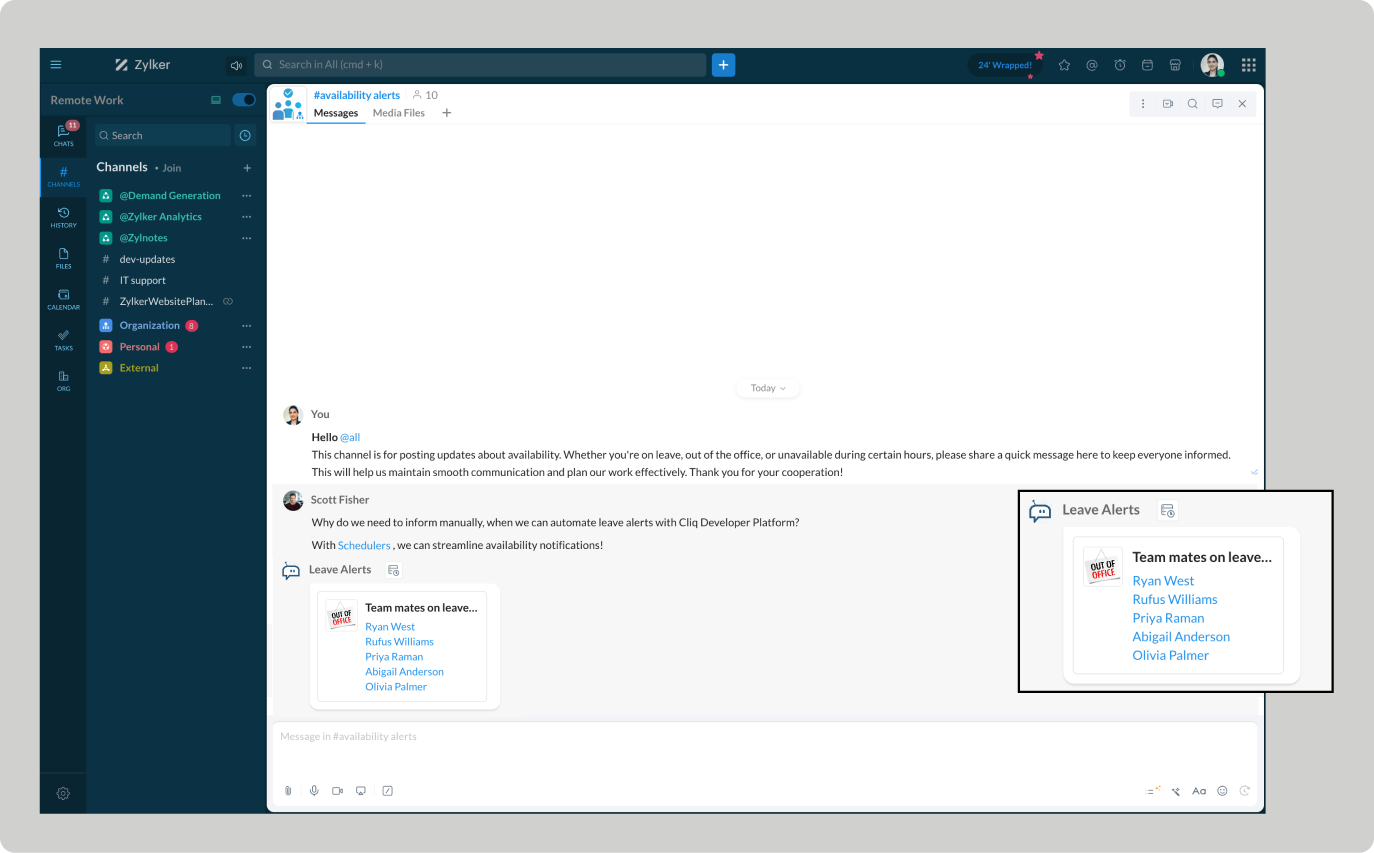
The constant ebb and flow of employee absences can disrupt projects and hinder productivity. With Zoho Cliq's leave alert automation, you can easily keep your team informed. Real-time notifications can be sent to team chats, ensuring that everyone stays connected.

This enhances communication and workflow management by making all team members aware of colleague absences, while minimizing miscommunication and potential scheduling conflicts.


Pre-requisites:  

Before beginning to script the code below, we must create a connection in Cliq with Zoho People. Once a connection is created and connected, you can use it in Deluge integration tasks and invoke URL scripts to access data from the required service.

Create a Zoho People default connection with a unique name "getemployeeinfo" with the scope - ZOHOPEOPLE.leave.ALL and ZOHOPEOPLE.dashboard.ALL

ⓘ Document for reference : Connections in Cliq 

How to obtain the bot unique name?


To use the postToChannelAsBot deluge task, the bot's unique name is essential, and the bot must be a participant in the channel.
  1. Create a bot with channel participation settings enabled to allow users to add the bot to any channel, send messages, listen to messages, and auto-follow threads.
  2. Click on the bot to open its details on the right-hand side. Locate the bot's incoming endpoint, and find the unique name of the bot in the URL after /bots.


Example : If the API Endpoint is:  https://cliq.zoho.com/company/242424/api/v2/bots/leavealerts/message
The unique name of the bot is 'leavealerts'.
  1. Add the bot to the preferred channel of your choice where you want the alerts to be posted.
ⓘ Document for reference :  Adding participants to a channel

Implementation :

Setting up the Zoho Cliq Scheduler

  • Open Zoho Cliq, click your profile picture, select Bots & Tools, and navigate to Schedulers.

  • Under Schedulers, create a new scheduler with the recurring period set to weekly and choose the days from Monday to Friday.

  • Specify the time name, description, and time of execution according to your needs.

ⓘ Document for reference : Schedulers  


Sample Leave alerts script

After providing the scheduler details, click "Save and Edit Code" to add the script below.
  1. currentDate = zoho.currentdate;
  2. currentDateString = currentDate.toString("dd-MMM-yyyy");
  3. info currentDateString;
  4. note = "";
  5. isRestrictedHoliday = "false";
  6. try
  7. {
  8. holidayResponse = invokeurl
  9. [
  10. url :"https://people.zoho.com/people/api/leave/v2/holidays/get?shift=General&employee=1&from=" + currentDateString + "&to=" + currentDateString + "&dateFormat=dd-MMM-yyyy"
  11. type :GET
  12. connection:"getemployeeinfo"
  13. ];
  14. info holidayResponse;
  15. holidayResponse = holidayResponse.toMap();
  16. if(holidayResponse.containsKey("data"))
  17. {
  18. holidayResponseData = holidayResponse.get("data").toList();
  19. if(holidayResponseData.size() > 0)
  20. {
  21. currentDayStatus = holidayResponseData.get(0);
  22. isRestrictedHoliday = currentDayStatus.get("isRestrictedHoliday");
  23. if("true".endsWithIgnoreCase(isRestrictedHoliday))
  24. {
  25. name = currentDayStatus.get("Name");
  26. note = "\nOptional holiday - " + name;
  27. }
  28. }
  29. }
  30. }
  31. catch (ex)
  32. {
  33. exceptionString = "exception occurred during restricted holiday check:  " + ex.toString();
  34. info exceptionString;
  35. }
  36. response = invokeurl
  37. [
  38. url :"https://people.zoho.com/api/v2/leavetracker/leaves/records?from=" + currentDateString + "&to=" + currentDateString + "&dateFormat=dd-MMM-yyyy&approvalStatus=[APPROVED]"
  39. type :GET
  40. connection:"getemployeeinfo"
  41. ];
  42. //info response;
  43. members = response.get("records");
  44. leaveMembers = "";
  45. membersSize = 0;
  46. for each member in members
  47. {
  48. membersSize = membersSize + 1;
  49. leaveMembers = leaveMembers + "[" + member.get("Employee") + "](zohoid:" + member.get("ZUID") + ")\n";
  50. }
  51. info "leave members : " + leaveMembers;
  52. if(leaveMembers.length() > 0)
  53. {
  54. data = {"card":{"theme":"7","title":"Team mates on leave (" + membersSize + ")" + note,"thumbnail":"https://thesoftwarepro.com/wp-content/uploads/2019/12/outlook-out-of-office.jpg"},"text":leaveMembers.trim(),"bot":{"name":"Leave Alerts","image":"https://www.pngfind.com/pngs/m/220-2200933_portfolio-alert-bot-by-symphony-alert-bot-hd.png"}};
  55. info data;
  56. }
  57. else
  58. {
  59. data = {"card":{"theme":"7","title":"Team mates on leave 0" + note,"thumbnail":"https://thesoftwarepro.com/wp-content/uploads/2019/12/outlook-out-of-office.jpg"},"text":"All Present Today.","bot":{"name":"Leave Alerts","image":"https://www.pngfind.com/pngs/m/220-2200933_portfolio-alert-bot-by-symphony-alert-bot-hd.png"}};
  60. }
  61. zoho.cliq.postToChanneAsBotl("CHANNEL_UNIQUE_NAME","BOT_UNIQUE_NAME",data);

Customize and deploy


Utilizing the data received from the invoke URL task (i.e., leavetracker/leaves/records GET request), construct a leave report card with Cliq's message builder and post it in the preferred chat or channel.


How to obtain the channel unique name?

  1. Go to the channel where you want the alerts to be posted.

  2. Hover over the three dots in the top right corner of the channel and select "Channel Info."

  3. In the Channel Info menu, go to the "Connectors" section to find the Channel Unique Name.


Troubleshooting :

  • Ensure your Zoho People pricing plan includes access to employee leave details.  

  • Verify whether the necessary administrative permissions are granted. Limited access can result in "Permission Denied" errors.

Empower automated workflows and stay ahead of absences

Automating leave alerts in Zoho Cliq boosts efficiency by minimizing disruptions from employee absences. Teams can benefit from real-time leave updates, allowing them to adjust plans, reassign tasks, and maintain the continuity of the project schedule.

    • Sticky Posts

    • Automating Employee Birthday Notifications in Zoho Cliq

      Have you ever missed a birthday and felt like the office Grinch? Fear not, the Cliq Developer Platform has got your back! With Zoho Cliq's Schedulers, you can be the office party-cipant who never forgets a single cake, balloon, or awkward rendition of
    • Customer payment alerts in Zoho Cliq

      For businesses that depend on cash flow, payment updates are essential for operational decision-making and go beyond simple accounting entries. The sales team needs to be notified when invoices are cleared so that upcoming orders can be released. In contrast,
    • Accelerate Github code reviews with Zoho Cliq Platform's link handlers

      Code reviews are critical, and they can get buried in conversations or lost when using multiple tools. With the Cliq Platform's link handlers, let's transform shared Github pull request links into interactive, real-time code reviews on channels. Share
    • App Spotlight : PagerDuty for Zoho Cliq

      App Spotlight brings you hand-picked apps to enhance the power of your Zoho apps and tools. Visit the Zoho Marketplace to explore all of our apps, integrations, and extensions. In today's fast-paced world, seizing every moment is essential for operational
    • Automate your status with Cliq Schedulers

      Imagine enjoying your favorite homemade meal during a peaceful lunch break, when suddenly there's a PING! A notification pops up and ruins your moment of zen. Even worse, you might be in a vital product development sprint, only to be derailed by a "quick
    • Recent Topics

    • Invoice Discount Account

      Is there a way to change the account used for Discounts applied to an invoice? The current Discount account (ZB native account) type is an "Income" type. I would like to change it to "Other Income", but that is not possible, I am assuming because it contains
    • Need Inactive accounts to be visible in Reports in Zoho Books

      I N=need Inactive accounts to be visible in Reports in Zoho Books to do recons of the accounts but when i see the same they are not visible in the Accountant - Account Transactions report
    • API Support for Creating Invoices with Batch-Tracked Items

      Hi Zoho Community, I am working on an integration where we create invoices in ERPNext and push them to Zoho Books. I need to send batch-tracked items (batch numbers) when creating invoices. I could not find any reference in the Zoho Books API documentation.
    • javax.mail.authenticationfailedexception 535 authentication failed

      Hi, I am facing 535 authentication failed error when trying to send email from zoho desktop as well as in webmail. Can you suggest to fix this issue,. Regards, Rekha
    • Phantom Opening Balance

      While experimenting w/ creating a composite item, Zoho added funds to Petty Cash and added Bank Account equal to previous day's balance. I'm unable to undo the adding of funds. Attaching screenshots of both bank account and petty cash transactions.
    • Importing customer comments and multiple shipto addresses

      I am evaluating Zoho Books and have most of my data imported with two exceptions: (1) Import customer comments - in my current system I have several comments of different types, and I need to bring these into Zoho. Preferably Books customer records, but
    • Detailed Account Reports - Add Running Balance

      When one clicks into an account from a report (say P/L or Balance Sheet), the default reports have the Debit, Credit, and then the Amount. The Amount column (last one) is duplicate information. It would be far better and fit more peoples' use cases if
    • How to Billed from two different GST Numbers

      How to Billed from two different GST Numbers. Suppose ABC & Co had GST registration in Delhi and Haryana and Zoho account is created with Delhi GST Registration number. Now i also want to issue invoice from Haryana GST Registration number. How can i proceed ?
    • Payment system for donations management

      I manage an organization where we receive donations from payers. Hence, there is no need to first create invoices and then create payments received against the invoices. What are the recommended best practices to do this in ZohoBooks?
    • How do I associate pricebooks to a customer?

      I setup a few pricebooks, that worked fine. But now the only thing I can do with it, when I enter a quote or sales order, I can select which pricebook to use, but I have to do this product by product every time I add one. Is there a way to connect a pricebook
    • Zoho IP blocked by SpamHaus

      ERROR CODE :550 - 5.7.0 Your server IP address is in the SpamHaus SBL-XBL database, bye
    • IMAP Communication Problems - IMAP Down Again

      We are experiencing the same problems over the last week or so that were supposedly 'solved' according to this thread. Zoho Imap Down Again This is affecting attempts to use IMAP on multiple ISPs and users so is definitely narrowed down to Zoho problems.
    • Can't login to Zoho mail

      I'm logged into Zoho but when I try to go in zoho mail I get: Invalid request! The input passed is invalid or the URL is invoked without valid parameters. Please check your input and try again. I just set up my mx records and stuff with namecheap a few
    • Hotmail is STILL blocking the zoho mail IP

      Greetings, as I already mentioned in my last message, my Zoho IP has been blocked by Hotmail for more than 15 days. Although someone said that the issue was "solved," it still isn't, and this amount of time seems neither normal for a "serious" company,
    • Keyboard shortcut M key

      I'm trying to customize my keyboard shortcuts and assign the "m" key. But it says the key is already assigned. I've looked through all my shortcuts and can't see any assigned "m". When I select an email and press the M key, nothing happens. What is the
    • Manage customer access across multi-brand help centers

      Hello everyone! Managing customer's access across multiple brands has been streamlined with the ability to invite, reinvite, approve, reject, and deactivate contacts individually for each help center brand . This enhancement gives administrators precise
    • White Label certificate

      Hi all, About 72 hours ago, we fulfilled all steps for white labeling (CNAME to point to mail.cs.zohohost.eu), but since then the configuration page is now stuck at "generating certificate" since 3 days. When I execute an NSLOOKUP mail.webfoundry.be it
    • Unusual activity detected from this IP. Please try again after some time

      When i try to create new addresses on my account i am getting this error, it has been 24 hours now and i am still getting this error can anyone help
    • How to add a new domain in my account?

      Probably zoho has the worst UI in the market. Cannot add a new domain to manage a new email address.
    • Territory Assignment Issues (Lead to Account + Contact)

      1. Lead → Account & Contact Territory Assignment on Conversion A Lead is automatically assigned one or more territories using a workflow and Lead Assignment Rules. This works as expected, and we are able to assign multiple territories to a Lead automatically.
    • Create static subforms in Zoho CRM: streamline data entry with pre-defined values

      Last modified on (9 July, 2025): This feature was available in early access and is currently being rolled out to customers in phases. Currently available for users in the the AU, CA, and SA DCs. It will be enabled for the remaining DCs in the next couple
    • Ability for admin to access or make changes in zoho form without asking for ownership

      Currently in zoho form only form owner can make the changes in the form and if someone else has to make changes then we have to transfer the ownership to them and even admin also cant access it . So i think admin must have the ability or option to access
    • Why does Zoho’s diff viewer highlight parts of unchanged lines?

      Hi everyone, I’ve noticed something odd in the Zoho editor’s diff view. When I delete a single line, the diff doesn’t just mark that line as removed. Instead, it highlights parts of the next line as if they changed, even though they are identical. Example:
    • Report sorting not working

      I make extensive use of Summary reports and Pivot Tables. Most of these reports are structured such that I have several columns of "information" data that I want displayed, followed by one or more "Data" summarizations. For example, I have the following
    • How to convert MBOX to PDF

      I have a my zoho mail data stored in MBOX format how can i convert it into PDF?
    • New Enhancements in Wizards

      Dear All, Wizards help you break a long form into a series of smaller forms on different screens, making it less overwhelming. We are thrilled to introduce a couple of enhancements to wizards in Zoho CRM: Enhancements for conditional rules in Wizards
    • Microsoft Teams now available as an online meeting provider

      Hello everyone, We're pleased to announce that Zoho CRM now supports Microsoft Teams as an online meeting provider—alongside the other providers already available. Admins can enable Microsoft Teams directly from the Preferences tab under the Meetings
    • Find and Merge Duplicates to trigger webhook

      My sales team uses the Find and Merge Duplicates feature often to cleanup records in the CRM. We use webhooks to signal to our internal tools database when new Contacts are created, updated, or deleted, in order to keep our DB in sync with Zoho CRM. However,
    • Charting the 2025 Voyage: Zoho Invoice's Year in Review

      2025 has been a year of progress, productivity, and purposeful growth for Zoho Invoice. From expanding into new regions to refining everyday workflows, each update was designed to help businesses stay compliant, get paid faster, and work with confidence.
    • How to Hide System-DefinedTemplates in Service Report

      Is there any option available to hide system-defined templates? these templates are causing confusion for field users.
    • WhatsApp Report in Bigin CRM

      Reporting feature for Bigin CRM’s integrated WhatsApp that provides insights such as: Number of WhatsApp conversations closed Number of messages sent and received Number of conversations replied to Response and closure metrics for WhatsApp chats More
    • Auto tracking URL generation based on Carrier

      Hi, While creating a shipment order for a package in Zoho Books, I have a requirement that for example, if the carrier is Delhivery and tracking number is 1234, then can automatically the tracking link/URL be generated as www.delhivery.com/1234. Similary,
    • Issue with Azure DevOps Integration in Zoho Flow

      Hello, All workflows between Zoho Flow and Azure DevOps have stopped working for several days now. Upon further investigation, it seems that the connection to Azure DevOps is no longer directly supported. Indeed, Microsoft has deprecated the Azure DevOps
    • Narrative 16: Simplify with workflows

      Behind the scenes of a successful ticketing system: BTS Series Narrative 16: Simplify with workflows What is a workflow? A workflow organizes business tasks in a defined sequence that makes each step clear to all participants. This ensures work is completed
    • Zoho Invoice Customer Login Portal

      Are there any plans for a customer portal to Zoho Invoice, ala Freshbooks?  I would like customers that I invoice to be able to login to review invoices and invoice history.  I have not switched from Freshbooks for this very reason.
    • Random Leads are being created

      Hi, Every few days I am getting random leads that are being created with no form interactions at all. The email addresses are from obvious spam, such as 'Easymerchantsx'. When I look at the timeline, there is a Visit record and then a Lead Created record,
    • Print a price list or price book

      Hi Community. Am I right in concluding that Zoho has no functionality to print a price list from either Zoho CRM, Zoho Inventory or Zoho Books? I won't get stuck on the fact that Zoho doesn't sync price books between Zoho CRM and Books/Inventory (more
    • Bar Chart -- sort X-axis

      Hi! I created a bar chart ("Top 10 Products by Revenue") X-axis: Product Name Y-axis: Revenue Filter: Revenue - Top 10 Here's a picture: http://screencast.com/t/ZTJlZTdkNz The x-axis is sorted alphabetically by Product Name. How can I force it to sort numerically by Revenue?
    • Syncing with Google calendar, Tasks and Events

      Is it possible to sync Zoho CRM calendar, task and events with Google Calendar's tasks and events. With the increasing adoption by many major tool suppliers to sync seamlessly with Google's offerings (for instance I use the excellent Any.do task planning
    • ZoHo Flow Custom Function not Processing JSON

      JSON is being escaped and converting all the quotes in the JSON to '"' Here's the Code: void InsertRowInE123EligibitySheet(map input) { rawData = get("data",""); decodedData = rawData.htmlDecode(); data = decodedData.toMap(); sheet_id = "ID GOES
    • Next Page