Hello Everyone,
Introducing a custom function that automates the process of adding new portal users to Help Center user groups, making user management effortless!
By default, Zoho Desk allows you to assign new portal users to groups manually. But with this custom function, the process is completely automated, ensuring seamless categorization.
Why User Groups?
Zylker Techfix was dedicated to helping customers through their Help Center. While they actively supported users, there was one challenge: everyone received the announcements, irrespective of their requirements.
Zylker Techfix wanted a smarter way to engage their users by sending targeted announcements based on individual interests, such as gadgets, office equipment, and operations.
To make this happen, they created user groups and assigned new users accordingly. But manually adding users to the right groups was time-consuming.
So, they automated the process! With a custom function, they streamlined operations, ensuring every new portal user was automatically assigned to the right Help Center user group. More relevance, better engagement, zero manual effort.
Let’s walk through the steps to incorporate this custom function into your workflow.
Prerequisites
1. Create a connection
1.1 Go to Setup(S) and choose Connections under Developer Space.
1.2 Click Create Connection.
1.3 Select Zoho Desk under Default Services.
1.4 Set the connection name as zohodesk.
1.5 Disable the toggle for User Credentials of Login User.
1.6 Under Scope, choose the below scope values:
Desk.contacts.READ
Desk.contacts.UPDATE
1.7 Click Create and Connect.
1.8 Click Connect and click Accept.
Connection is created successfully.
Create a Workflow Rule
1. Go to Setup, choose Workflows under Automation.
2. Under Workflows, click Create Rule.
In the Basic Information section,
3. Select Contacts from the drop-down menu under Module.
4. Enter a Rule Name and Description for the rule.
5. If you want to activate the rule right away, select the Active checkbox. Else, create the rule and activate it later.
6. Click Next.
In the Execute on section, follow these steps:
7. Select Field Update. Select field isPortalUser.
8. Click Next.
9. In the Criteria section, add isPortalUser is and select the checkbox. click Next.
10. In the Actions section, click the + icon and select New next to Custom Functions.
11. Enter a Name and Description for the custom function. Choose Contacts under Module.
12. Under Argument Mapping, give a desired Method Name. Map the arguments as below:
12.1 In the Argument Name field, type contactId and select Contact ID under the Contacts Section.
13. In the script window, insert the Custom Function given below:
- // ---------------User inputs------------------------------------------
- deskUrl = "https://desk.zoho.com/api/v1/"; // replace based on user dc
- groupId = "<<GROUP ID>>"; // replace the group id in your desk portal
- //---------------------------------
- logs = Map();
- try
- {
- getContactStatus = invokeurl
- [
- url :deskUrl + "contacts/" + contactId + "/helpCenters"
- type :GET
- connection:"zohodesk"
- ];
- contactUserId = getContactStatus.get("data").get(0).get("userId");
- if(contactUserId != null)
- {
- addUserToGroup = invokeurl
- [
- url : deskUrl + "groups/" + groupId + "/users/add"
- type :POST
- parameters:"" + {"users":{{"id":contactUserId}}}
- headers:{"Content-Type":"application/json"}
- detailed:true
- connection:"zohodesk"
- ];
- info "addUserToGroup" + addUserToGroup;
- }
- }
- catch (errorInfo)
- {
- logs.insert("errorInfo":errorInfo);
- }
- info "logs: \n" + logs;
- if(logs.containKey("errorInfo"))
- {
- throws "Error happen in the CF execution";
- }
User Inputs
a. In Line 2, replace .com in the URL based on your DC.
b. In Line 3, enter the group ID to which you would like to add your new portal users. To access group ID, go to Setup >> Help Center >> Select the Department having your preferred User group >> choose User Groups on the left panel >> Select the user group >> The Id in the address bar is the required Group ID.
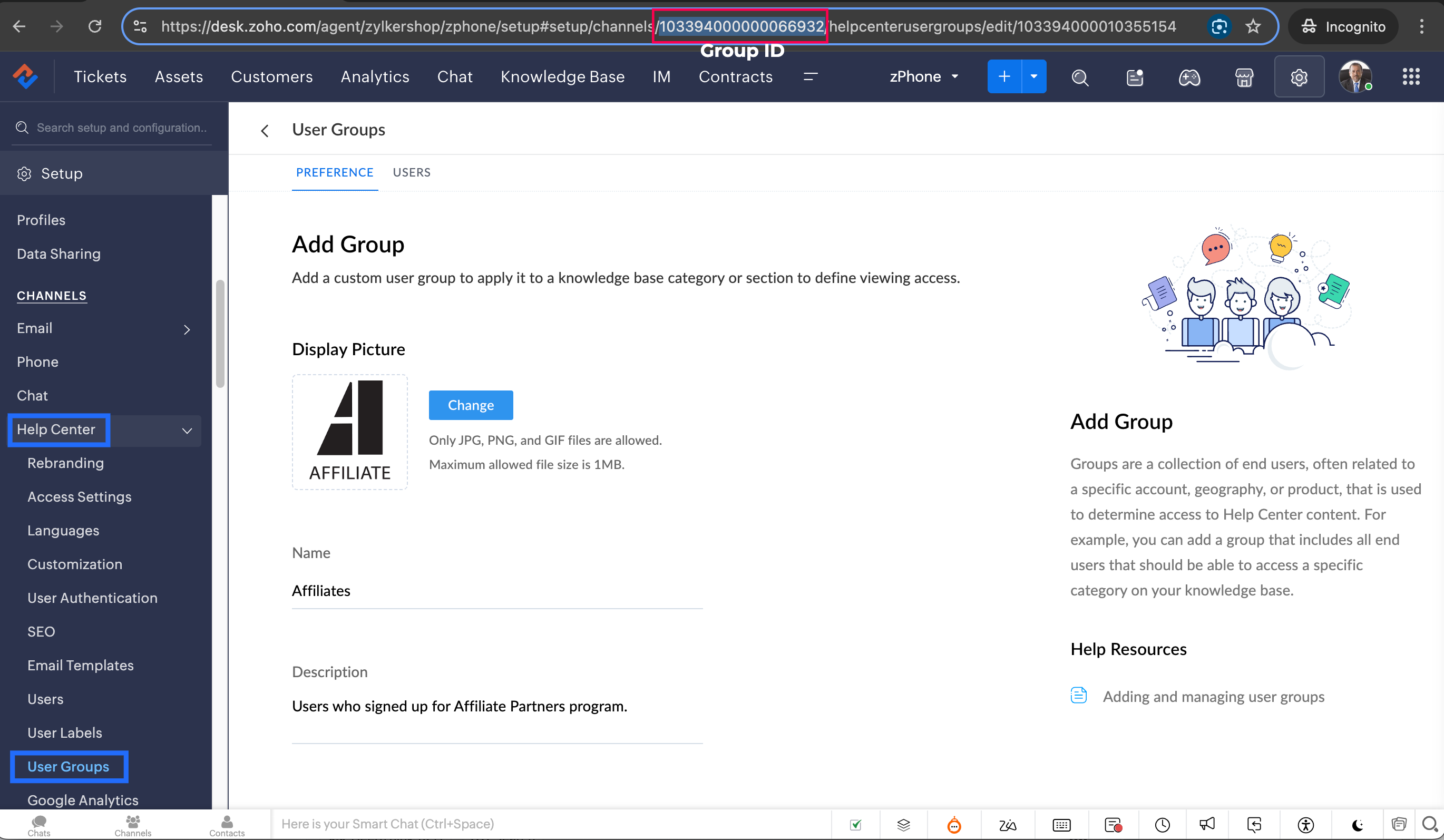
Note: Configure the Workflow for the contacts module in the respective department where you want to add portal users to be added to the User group.
14. Click Save to save the custom function.
15. Click Save again to save the workflow.
Share with us how this custom function helps you in your operations! Drop a comment below or reach out to us at
support@zohodesk.com, we’re just an email away!
Meet you in the next post!
Regards,
Lydia | Zoho Desk
Recent Topics
Layout Rules Don't Apply To Blueprints
Hi Zoho the conditional layout rules for fields and making fields required don't work well with with Blueprints if those same fields are called DURING a Blueprint. Example. I have field A that is used in layout rule. If value of field A is "1" it is supposed to show and make required field B. If the value to field A is "2" it is supposed to show and make required field C. Now I have a Blueprint that says when last stage moves to "Closed," during the transition, the agent must fill out field A. Now
How to record GST amount for Value of Service on Inward remittance charged by bank
Hi please advice I have a situation. 1. I have HDFC bank account 2. I have a customer who has done inward remittance for purcahses from overseas. 3. HDFC is showing Value of Service say $100 and GST @ 18%. 4. Value of Service is not charged. But CGST
Resources - Sort by rows consumed
Please add the ability to sort by the total rows consumed in the Resources section of Settings. I would like to see which table is consuming the most rows by sorting from high to low.
Zoho Books - France
L’équipe de Zoho France reçoit régulièrement des questions sur la conformité de ses applications de finances (Zoho Books/ Zoho Invoice) pour le marché français. Voici quelques points pour clarifier la question : Zoho Books est un logiciel de comptabilité
Editing a bundle
How can I edit a bundle?
Referral module for our Zoho People employees
I have been requested to create a user in Zoho Recruit for each Zoho People user to allow them to refer a candidate in Zoho Recruit. Only the interviewer and guest profiles are free. The use of a custom profile is on the paid basis. Any user linked to
Conflicts on zoho project Tasks
Hi We want to use ZOHO Project for scheduling our technicians. We have maintenance contract with our customers. We schedule interventions on customer sites. So we created projects for each contract and task for interventions. So if a technician need to go to customer I create task and schedule them after depending of availibility. When I need to assign a date I use start Date and due date on the task. But I realized there is no conflict management. I called support and they told me it is not developped.
Zoho Books | Product updates | June 2026
Hello users, Welcome to this month's roundup of what's new in Zoho Books! We have an exciting line-up this time. The highlight is the launch of the all-new France Edition with full ISCA compliance. We're also introducing features such as Layout Rules
Upcoming webinar : Build high-converting sales pipelines with Zoho LandingPage and Bigin
For small businesses, generating leads is only half the battle. The real challenge is staying organized, following up consistently, and turning those leads into customers. Join us for this webinar to learn how Zoho LandingPage and Bigin can help you create
New UX Improvements in the Zoho Expense iOS and Android Apps
Hello users, We're excited to share the latest updates and enhancements we've made to the iOS and Android apps of Zoho Expense. These updates have been designed to make your day-to-day expense and travel management even simpler. Note: We will be rolling
What's New in Zoho Billing | May 2026
We're back with another round of updates in Zoho Billing! This month brings new capabilities designed to give you more flexibility and control over your billing operations. From associating price lists with business locations, and including annexures
ZOHO SURVEY to ZOHO CRM integration
I am trying to use the ZOHO SURVEY to ZOHO CRM integration but the integration won't allow me to choose a record layout and that means there is a erquired field that i cannot input, is there any way around this?
Why don't Zia agents support file uploads?
I am trying to build a Zia Agent that allows uploading of a PDF file and uses the GLM5 model to process it and extract information. But agents.zoho.com has no way to enable file uploads on the agent. Additionally, GLM5 based agents keep outputting their
Re-Apply SLA When Ticket Reopened from Closed Status?
If you have an SLA applied, timers are deactivated when going to "On Hold" status type and reactivated when going back to an Open status type. What we discovered is when a customer replies to a closed case and it reopens, the SLA is not applied and timers
Quebec Canada Tax GST and QST
Hello Expert, Whenever we I create invoice for Quebec, Canada, it calculating wrong tax amount, can you please validate Attached the screenshot, which is calculating wrong tax amount on QST
How to get Monday as 1st day of the week?
Hi, The first day of the week is Sunday in Zoho Creator calendar.So it is hardly usable as in Europe the 1st of the week is always Monday. How can I get Monday as 1st day of the week? Best regards, Chris
Associate project with timer on iPhone
When I start the timer without first associating a project (on my iPhone), its starts fine but now when I need to associate a project, and click on the link, I get a list of EVERY project I've ever put into Zoho Books. It used to just show active projects.
Zoho Forms - Failed CRM Sync Improvement
I'd like to suggest an enhancement to the Zoho Forms and Zoho CRM integration. Currently, once a form entry has been submitted, there is no simple way to push that individual entry to CRM again if needed. Before anyone mentions it, I am aware that the
How to show product cards in your chatbot
Hey everyone, If you are using Guided Conversations to help customers find products, you have probably run into this problem: the bot gives customers a list of options, but they still have no idea which one to pick. There will be no images, no specs,
"Make online" not clearing previously downloaded files from disk
I downloaded a large folder via "Make offline" so I could copy it to another location. This worked. When I was done I hoped that "Make online" would restore it to the previous state where those files are not stored locally in TrueSync. This did not work—Finder
Bullet Charts Stuck Loading Without Data
I have a dashboard with some widgets in bullet chart format, but some of them do not have data. Since there is no data, they keep loading indefinitely instead of displaying “No Data,” as happens with the percentage widget next to them. This issue prevents
Importing Tasks
Few suggestions that would make creating project templates more efficient. 1. Having the ability to import tasks from a spreadsheet within the Project Template Task section. You can do this when creating a "new project." 2. When importing Tasks from a spreadsheet, to be able to associate a milestone to a tasklist, just as I can associate a tasklist to a task. This would alleviate a very tedious, time consuming process. 3. Another feature that would be very helpful is rather than a start and end
GSTIN Public Search API
Does zohobooks have an api using which i can search GST numbers and get their details?
Zoho Books | Product updates | April 2026
Hello users, Welcome to our April 2026 product updates roundup! Highlights include profit margin for sales transactions, insights in reports, recording deposits from undeposited funds in banking, and faster production workflows with improved assembly
Deleted User Emails
I need to delete a user as I need to re-use their license, but I'd like to keep all their emails that are attached to various contacts in the CRM. Their emails are hosted externally on an M365 license. Anyone any idea how best to engineer this? TIA
Spell Check Red Underlines Keep Appearing Even After Disabling
Hello Zoho Support, I'm facing an issue in Zoho Writer where red spell-check underlines keep appearing even after I disable Spell Check. I have already: Turned OFF Spelling Errors Turned OFF Grammar Turned OFF Writing Quality Turned OFF browser spell
Its 2022, can our customers log into CRM on their mobiles? Zoho Response: Maybe Later
I am a long time Zoho CRM user. I have just started using the client portal feature. On the plus side I have found it very fast and very easy (for someone used to the CRM config) to set up a subset of module views that make a potentially extremely useful
Truco del mes: Zoho Desk - Cómo mostrar tarjetas de producto en tu chatbot
¡Hola a todos! Si utilizas Conversaciones Guiadas (Guided Conversations) en Zoho Desk para ayudar a los clientes a encontrar productos, probablemente te hayas encontrado con este problema: el bot ofrece una lista de opciones, pero los clientes siguen
Cliq iOS can't see shared screen
Hello, I had this morning a video call with a colleague. She is using Cliq Desktop MacOS and wanted to share her screen with me. I'm on iPad. I noticed, while she shared her screen, I could only see her video, but not the shared screen... Does Cliq iOS is able to display shared screen, or is it somewhere else to be found ? Regards
Retail Payment Receipt
Hi, So "payment receipts" have a "Retail" template for thermal printers, but the template is configured at A4 paper size!!! How is this retail guys? On the other hand, Invoices have 3 Retail templates which have 3 and 4 inch paper size, perfectly fitting
Assign default Location + warehouse to Customer / Vendor
Hello there. With the introduction of Locations I'm having to enter the warehouse for every single transaction which is getting really tiring and causes errors (easy to fix, but still). Does anybody know if there's a way to assign a default Location and
SalesIQ : Allow Operators to Manually Set Company Names in Visitor Info
Hi SalesIQ Team. We have identified an issue where the Company name displayed in Visitor Info is sometimes incorrect or not displayed at all. Currently, there is no way for operators to manually edit or specify the company a visitor belongs to. I understand
How to charge Convenience fee OR payment gateway charges to the end client who is paying the invoice?
Hello, I am creating this topic after having discussions with various sets of users and have understood that with people moving more and more to digital payments, it is important for the client to enable the "Convenience fee" kind of scenario. I have
404 error at checkout
Our customers are getting a 404 error at checkout. Anyone else with the same problem?
Enhancement in Zoho CRM: Introducing New Return Types for String Fields Based on Character Length
Dear Customers, We hope you’re well! In Zoho CRM, formula field with string return type is used in various scenarios where text is involved like concatenating customers’ first and last names, trimming characters from texts, performing find and replace
BUG and HANGUP - Add Row with Fields DOUBLES the amount of rows instead of Adding Just 1 Row
As it says in the title, there is a bug with forms generated with Zoho Writer where the Add Row With Fields ends up DOUBLING the amount of rows instead of Adding just 1 row.
Import and Export of website.
Hi, i have raised this ticket regarding challenges i am facing while importing a website on zoho sites. I have created my website on Squarespace and now i want to move it to zoho sites so i want to know what i am supposed to do whats the correct step
Zoho Analytics "Esc" key problem
I frequently use the Escape (Esc) key while building dashboards, reports, and writing SQL queries. Since the recent updates to Zoho Analytics, the Esc key no longer behaves as expected. When writing SQL queries, pressing Esc to dismiss a suggestion now
Client Script | Update - Client Script Support For Custom Buttons
Hello everyone! We are excited to announce one of the most requested features - Client Script support for Custom Buttons. This enhancement lets you run custom logic on button actions, giving you greater flexibility and control over your user interactions.
All new Address Field in Zoho CRM: maintain structured and accurate address inputs
Availability Update: 29 September 2025: It's currently available for all new sign-ups and for existing Zoho CRM orgs which are in the Professional edition exclusively for IN DC users. 2 March 2026: Available to users in all DCs except US and EU DC. 24
Next Page