Workflows vs Macros in Zoho Desk: Key Differences, Use Cases & Best Practices

Workflows vs Macros in Zoho Desk: Key Differences, Use Cases & Best Practices

Workflows vs Macros in Zoho Desk: Choosing the right help desk automation
InfoThis post is part of the "Desk Automation Series," Chapter 1. Through this series, we will help you choose the right automation type in Zoho Desk by comparing commonly confused automations through real scenarios and business processes, so you can clearly see what to use, when, and why.
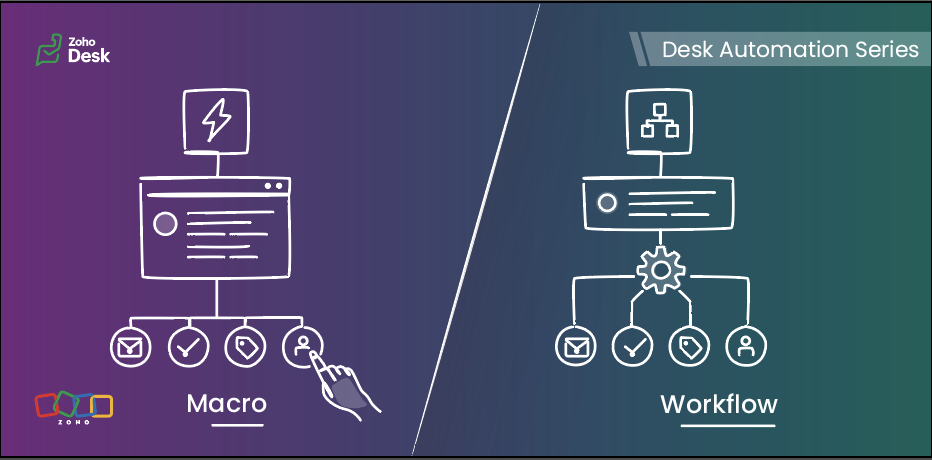

When you are running support at scale, not every task should be handled manually, and not every action should be fully automated either. Some steps need to happen instantly in the background, while others are better left to agents after they review the ticket.

That is exactly where workflows and macros in Zoho Desk make a difference.

In simple terms, workflows are meant for automatic actions based on ticket data, whereas macros help agents complete repeated actions faster after reviewing the ticket.

This guide will help you understand the difference between the two, so you can decide:

  • what your system should handle automatically 
  • what your agents should trigger while working on a ticket 
Quote


Workflows run automatically when defined criteria are met, while macros are applied by agents as they work on a ticket.

Workflows  

Workflows help businesses bring structure, accountability, and momentum to support operations. When defined conditions are met, Zoho Desk executes actions automatically in the background, enabling teams to handle volume with more control, fewer process gaps, and stronger execution quality.

How workflows work  :

A workflow consists of three parts:

When — the trigger
 (ticket created, ticket edited, field update, etc)

If — the criteria

(The criteria used to filter records that meet specific conditions)

Then — the actions
(update fields, assign tickets, send notifications, change status, call custom functions)

Once active, the workflow runs for tickets that meet its criteria.


When to use workflows
  

Use workflows when:

  • An action must run whenever specific conditions are met
  • The action should not depend on an agent remembering to do it
  • Needs to be ensured that the same action is taken for every similar scenario
  • Trigger actions the moment conditions are met, without waiting for manual input 
  • Reduce operational load and keep processes moving without adding effort 
  • Keep critical actions running reliably in the background 

Typical examples:

  • Assigning tickets based on category or department
  • Setting priority for specific customer types
  • Updating fields when a ticket is modified
  • Reassigning tickets to another team based on defined rules
  • Using Zia actions in the workflow to predict field values from ticket context or extract details such as order IDs, dates, or product names and map them to ticket fields. 

Macros  

Macros allow agents to perform multiple actions on a ticket in a single click. They are available inside the ticket and are applied manually. These operations can be performed on mass tickets as well.

Macros help your agents complete repeated actions quickly, with better speed and consistency, once they know what the ticket needs.


How macros work
  

A macro can:

  • Update fields
  • Send an alert
  • Add tasks
  • Execute custom functions
  • Move ticket to specific department

When to use macros  

Use macros when:

  • Agents need to perform the same manual actions across similar tickets
  • The ticket needs to be reviewed before any action is applied
  • The same set of actions needs to be applied to multiple tickets at once
  • The next set of actions depends on a deeper understanding of the ticket context 

Typical examples:

  • Applying a follow-up response after troubleshooting
  • Ticket transfer to a different department based on agent’s manual interpretation
  • Sending emails and updating ticket fields in a single manual action 
  • Creating follow-up tasks while updating ticket details after review 
  • Applying the same set of field updates across similar tickets  

Macros help agents complete routine updates without performing each step manually.

Key differences at a glance  

Feature

Workflows

Macros

Primary purpose

Automate actions based on predefined conditions to reduce manual effort and standardize processes.

Enable agents to execute a set of actions (emails, tasks, field updates) together after reviewing a ticket.

Triggered by

System-driven events such as ticket creation, updates, replies, or specific field changes.

Manually triggered by agents from within tickets or in bulk view.

Agent involvement

Not required

Required for every execution

How actions are executed

Runs automatically in the background when conditions are met

Runs as per manually selected action

Best suited for

Routing tickets, updating fields, sending alerts, and handling rule-based or event-driven actions

Applying repeated actions such as sending acknowledgement emails, creating tasks, and updating fields during ticket handling

Decision basis

Based on ticket data, conditions, and system events

Based on agent review and ticket context

Choosing the right automation tool  

Use a workflow when:  

  • The action must always run for certain tickets 
  • The criteria matches the ticket context 
  • The action is triggered by ticket events such as creation, updates, or replies 

Use a macro when:  

  • Agents perform the same set of actions frequently 
  • The action is applied after reviewing the ticket 
  • The update depends on agent confirmation before execution

A practical scenario  

Let’s look at how both tools work together in a realistic business scenario using a fictional organization, Zylker Travel.

Zylker Travel handles support for hotel bookings, holiday packages, cancellations, airport transfers, and special stay requests.


New ticket created for a booking with check-in within 24 hours  

Use: Workflow

When the ticket is created and the check-in date falls within the next 24 hours, the workflow:

  • Sets the priority to High
  • Assigns the ticket to the urgent reservations team
  • Sends an internal notification

This happens automatically based on ticket data.


Customer asks to cancel a reservation

Use: Macro

The agent:

  • Reviews the booking type
  • Confirms eligibility
  • Applies the cancellation macro

The macro:

  • Send an email alert to the customer 
  • Update the ticket status 
  • Update a refund-related field, such as refund percentage, if that is available as a ticket field 
  • Move the ticket to the Finance department for the next step
     

Special request completed (late check-out, airport transfer, or room upgrade)  

Use: Macro

After confirming the request is fulfilled, the agent applies a closure macro that:

  • Sends the confirmation message
  • Updates the status to Closed


Refund request crosses a defined value threshold

Use: Workflow
When a ticket is created or updated and the refund amount exceeds a defined threshold, the workflow can:

  • Set the priority to High 
  • Assign the ticket to a senior support or finance queue 
  • Notify the relevant internal team 

This is a workflow because the action is based on ticket data and should happen consistently without waiting for agent action.


Manual transfer after review  

Use: Macro

Sometimes, the right department cannot be determined from the initial ticket data alone. After reviewing the conversation, the agent can apply a macro that:

  • then moves the ticket to the right department 
  • creates a follow-up task 


Booking upgrade request
  

A customer asks to upgrade a confirmed booking.

Use: Workflow and Macro

Workflow:

When the ticket is created with upgrade or booking modification, the workflow can:

  • Assign it to the booking changes team 
  • Set priority based on travel date 
  • Add or update tags for categorization (for example, “Upgrade request”) 
  • Send an internal notification to the team 
  • Update initial ticket fields such as request type or category 

Macro:
After the agent checks availability and pricing, they can apply a macro to:

  • Send the upgrade response 
  • Update the ticket status to Waiting for customer confirmation
  • Update review-based ticket fields such as upgrade status
  • Move the ticket to the next department if required

Why both:
The workflow handles routing and priority automatically. The macro helps the agent complete the response after review.


Workflows vs Macros in common business scenarios  

Scenario

Best-suited automation

Why

Order status replies in e-commerce

Macro

The agent selects the reply after reviewing the ticket

Internal approval escalation for refunds

Workflow

Based on defined criteria

Closing resolved tickets with a standard note

Macro

Triggered when the agent confirms resolution

Follow-up message after troubleshooting

Macro

Sent after agent confirmation


Guidelines for quick selection
  

  • A rule must always run when defined conditions are met Workflow
  • Routing based on ticket data or ticket events Workflow
  • The action is triggered by ticket events such as creation, update, or reply Workflow
  • Repeated manual ticket actions Macro
  • An action needs to be applied after the agent reviews the ticket Macro
  • The next step depends on agent judgment or confirmation Macro

Best practices  

For workflows  

  • Keep conditions specific and business-driven
  • Avoid multiple workflows updating the same field unless required
  • Document the purpose of each workflow
  • Test in a limited scope before enabling for all tickets
  • Review workflows after process changes

For macros  

  • Create team-specific macros
  • Keep response templates easy to edit
  • Use clear naming so agents can find them quickly
  • Remove unused macros periodically
  • Do not use macros for actions that must run automatically


The verdict  

In Zoho Desk, workflows bring control. Macros bring speed.

Put them together, and you get the best of both worlds: structured automation for your business, effortless execution for your teams, and a smoother experience for every customer.

    • Sticky Posts

    • Register for Zoho Desk Beta Community

      With the start of the year, we have decided to take a small step in making the life of our customers a little easier. We now have easy access to all our upcoming features and a faster way to request for beta access. We open betas for some of our features
    • Share your Zoho Desk story with us!

      Tell us how you use Zoho Desk for your business and inspire others with your story. Be it a simple workflow rule that helps you navigate complex processes or a macro that saves your team a lot of time; share it here and help the community learn and grow with shared knowledge. 
    • Tip #1: Learn to pick the right channels

      Mail, live chat, telephony, social media, web forms—there are so many support channels out there. Trying to pick the right channels to offer your customers can get pretty confusing. Emails are most useful when the customer wants to put things on record. However, escalated or complicated issues should not be resolved over email because it's slow and impersonal.  When you need immediate responses, live chat is more suitable. It's also quick and convenient, so it's the go-to channel for small issues. 
    • Welcome to Zoho Desk Community - Say hello here!

      Hello everyone! Though we have been here for a while, it’s time to formally establish the Zoho Desk Community; we’re really happy to have you all here! This can be the place where you take a moment to introduce yourself to the rest of the community. We’d love to hear all about you, what you do, what company or industry you work for, how you use Zoho Desk and anything else that you will like to share! Here’s a little about me. I am Chinmayee. I have been associated with Zoho since 2014. I joined here
    • Webinar 1: Blueprint for Customer Service

      With the launch of a host of new features in Zoho Desk, we thought it’ll be great to have a few webinars to help our customers make the most of them. We’re starting off with our most talked about feature, Blueprint in Zoho Desk. You can register for the Blueprint webinar here: The webinar will be delivered by our in-house product experts. This is a good opportunity to ask questions to our experts and understand how Blueprint can help you automate your service processes. We look forward to seeing
    • Recent Topics

    • Custom Portal URL causing SAMEORIGIN error with embedded Page snippet

      In my app, I have a page that embeds another page. The URL that I have for the embedded page starts with https://creatorapp.zoho.com but the custom domain I have set up is https://kors.kerndell.com. Because the user logged into the app at https://kors.kerndell.com,
    • Recent enhancements made to workflow rules

      Greetings, I hope all of you are doing well. We're happy to announce a few recent enhancements we've made to Bigin's workflows. We'll go over each one in detail, but for now these updates can be broadly categorized into two parts: Enhancements to workflow
    • How do I get my cell height to auto adjust?

      I'm evaluating Zoho Sheet as a replacement for Google Spreadsheet. Using latest version of Safari, and experiencing the same issues in Chrome. A few bugs/things I can't figure out: Auto adjusting cell height when importing from Google Docs or creating a new document Turning off the auto date formatting for X.Y.Z where they are all integers.. (This is extremely important, as our requirements are written as outlines.. "X.Y.Z" corresponds to a requirement ID.. which is then turning into a date) The
    • Zia Agent activation in Zoho Desk forces new Organization creation instead of deploying to existing one

      While attempting to complete the deployment and activation sequence of a new Zia Agent within our existing Zoho Desk environment, the activation process failed on the user interface, throwing a generic error (see print). However, despite the activation
    • Marketing Tip #36: Optimize your online store for AI search

      Search is changing fast. Along with traditional search engines, AI-powered search and recommendation experiences are becoming a bigger part of how customers discover products online. Stores that are well-organized, descriptive, and consistent are more
    • Create a "My saved custom themes" section in Zoho Forms

      Hi! I created lots of forms for my company that we embed on the website with a custon design. It is a pain not to be able to save a custom layout as a template and just not to have to do it again! So could you add a gallery like : "My saved themes" ?
    • Automating CRM backup storage?

      Hi there, We've recently set up automatic backups for our Zoho CRM account. We were hoping that the backup functionality would not require any manual work on our end, but it seems that we are always required to download the backups ourselves, store them,
    • Zoho CRM Kiosk question – Passing Screen Fields to a Function

      I am building a Kiosk in Zoho CRM to create new Supplier (Vendors) records. Current setup: Screen 1 contains user input fields: Supplier Name (Vendor_Name) First Name (First_Name) I created a Deluge function: createSupplier(vendor_name, first_name) The
    • Introducing Spotlight Forms

      Hey form builders! If someone opens your form, sees the wall of fields ahead, and quietly closes the tab. It may not be because the questions were hard. It could be because the experience felt like too much. Which is why we have now introduced a new form
    • Client Script Button in Related List become invalid

      Hi, I am the admin of our organization. And I setup a client script button in related list to raise payment refund request While this button become non selectable recently. I believe there is something wrong from zoho as this button had run for a year.
    • BUG and HANGUP - Add Row with Fields DOUBLES the amount of rows instead of Adding Just 1 Row

      As it says in the title, there is a bug with forms generated with Zoho Writer where the Add Row With Fields ends up DOUBLING the amount of rows instead of Adding just 1 row.
    • Delivery Note without services

      Hi all, It there a possibility to create a delivery note from an invoice without the listed services "idem type: service"? Thank you in advance, Michel
    • Forms cannot be accessed.

      https://forms.zoho.com/ is not available, please help to fix
    • Digest Mai - Un résumé de ce qui s'est passé le mois dernier sur Community

      Chers utilisateurs, Un nouveau mois se termine au sein de la communauté Zoho France. Découvrons ensemble un résumé des activités du mois de mai. Quatre ans après son lancement, Zoho Marketing Plus continue d’évoluer avec une ambition claire : offrir aux
    • [URGENT] Cannot access Functions tab in CRM

      Navigating to /settings/functions/myFunctions gives this error message: "Sorry, something went wrong. Please try again later." I raised this issue with Zoho Support on Monday (3 days ago) but have not heard back. I'm sure it's clear how important it is
    • Important changes to note for Zoho Sign users in Saudi Arabia

      Dear Zoho Sign users, If your Zoho Sign account is hosted in our Saudi Arabia data centre, here's an important update on digital signature certificates in the Kingdom of Saudi Arabia. What's changing Going forward, the "Sign via Zoho Sign" option will
    • Zoho Desk MCP doesn't expose all functions

      Hello, I'd like to be able to draft (rather than send) ticket replies using Claude Cowork. However, the Zoho Desk MCP doesn't currently offer that, despite it being available in the API (https://desk.zoho.com/DeskAPIDocument#Threads#Threads_DraftEmailReply).
    • Number of Reopn

      Hi Zoho, Is there any appropriate API call for This URL "http://support.zoho.com/api/v1/dashboards/reopenedTickets?...." what I thought is the resulting output of this call has data for number of reopen... "https://desk.zoho.com/api/v1/tickets/" + Ticket_ID
    • Can I use merge tags with a conditional clause?

      Similar to Mailchimp's "IF / ELSE / ENDIF" functionality, I want to be able to display a sentence with a personalised field only if that merge tag is not empty for the given record. Is this possible on Zoho Campaigns? See http://kb.mailchimp.com/article/how-do-conditional-smart-merge-tags-work for how it works on Mailchimp. Thanks Phil
    • Question - why no way to input a 'tool description' and 'tree of 'tools'

      Every business is different, with different business processes. To be truly useful Zoho MCP needs to have user editable tool descriptions (or ruleset) and a 'tool tree' so that the LLM is context aware when being used. For example, the tool description
    • Personalize your booking pages with Custom CSS

      Greetings from the Zoho Bookings team! We’re introducing Custom CSS for Zoho Bookings, designed to give you complete control over the look and feel of your booking pages. With this new feature, you can upload your own CSS file to customize colors, fonts,
    • CRM API v9?

      v8 has been around for a while. any plans / estimates for v9?
    • Calendar report with order options and more quick view templates

      I think many of us regularly work with calendar-style reports. It would be great to be able to customize the quick view with new templates and have options to sort the entries for each day of the calendar by different criteria. I think this is an interesting
    • Kaizen #125 Manipulating Multi-Select Lookup fields (MxN) using Zoho CRM APIs

      Hello everyone! Welcome back to another week of Kaizen. In last week's post in the Kaizen series, we discussed how subforms work in Zoho CRM and how to manipulate subform data using Zoho CRM APIs. In this post, we will discuss how to manipulate a multi-select
    • Zoho Books and TRAINING SALES receipt label for eTims?

      Hi, Can Zoho Books implement TRAINING SALES receipts and push them to eTims for test? In other words how can we send to Zoho or even create in Zoho training mode invoices and TEST the workflow POS>Zoho Books>eTims and back without actually registering
    • Workflow Assistance in Zoho CRM

      Our client's sales team visits customers on-site and currently fills a physical paper form to capture customer details, and then separately re-enters the same data into Zoho CRM via the mobile app — resulting in double data entry. We want the salesperson
    • How do I post a new question in Zoho Community forums?

      Hi everyone, I’m new to the Zoho Community and I’m trying to figure out how to properly create and publish a new topic in the forum. When I visit the community page, I can’t clearly find the option like “Add Topic” or “Post Question.” Could someone guide
    • Any Zoho Books users in the Kenyan Hospitality industry? How to set service items for eTims?

      Hello, We are opening a coffee shop in Kenya and would like to know if there are any Zoho books users in hospitality service industry in Kenya? We would love to know: 1. how do you cope with the absence of the mandatory Tourism Levy 2% tax option? 2.
    • Cloning Item With Images Or The Option With Images

      Hello, when I clone an item, I expect the images to carry over to the cloned item, however this is not the case in Inventory. Please make it possible for the images to get cloned or at least can we get a pop up asking if we want to clone the images as
    • Zoho Books | Product updates | May 2026

      Hello users, We're back with the latest updates and enhancements we've rolled out in Zoho Books. From sales tax automation to scanning receipts for free, explore the updates designed to upgrade your bookkeeping experience. Sales Tax Automation [US & Canada
    • Zoho Books | Product updates | June 2026

      Hello users, Welcome to this month's roundup of what's new in Zoho Books! We have an exciting line-up this time. The highlight is the launch of the all-new France Edition with full ISCA compliance. We're also introducing features such as Layout Rules
    • [Product Update] Locations module migration in Zoho Books integration with Zoho Analytics

      Dear Customers, As Zoho Books are starting to support an advance version of the Branches/Warehouses module called the Locations module, users who choose to migrate to the Locations module in Zoho Books will also be migrated in Zoho Analytics-Zoho Books
    • Does Zoho Learn integrate with Zoho Connect,People,Workdrive,Project,Desk?

      Can we propose Zoho LEarn as a centralised Knowledge Portal tool that can get synched with the other Zoho products and serve as a central Knowledge repository?
    • Request to Update Billing Information and Payment Method

      Hello, I’m using Zoho and I would like to update the billing information and change the payment card to our company card. Could you please let me know how I can do this? Thank you in advance for your help.
    • Zoho Analytics "Esc" key problem

      I frequently use the Escape (Esc) key while building dashboards, reports, and writing SQL queries. Since the recent updates to Zoho Analytics, the Esc key no longer behaves as expected. When writing SQL queries, pressing Esc to dismiss a suggestion now
    • Zoho Analytics Filter Bug

      I encountered a bug where typing the letter "A" in the drop-down filter of a table or query table causes the drop-down to close unexpectedly. For example, when typing "Today", the drop-down list closes as soon as "a" is entered. I tested this on another
    • Using Email Triggers on Zoho Flow

      Hello, I'm sending the email to create the variables as this article says: https://help.zoho.com/portal/en/kb/flow/user-guide/create-a-flow/articles/email-trigger#How_email_trigger_works But the collection of the variables only seems to work when the
    • How to customize the "Placeholder Text" separately from the "Field Label" on the Booking Form?

      Hi, I am currently customizing the Booking Form for one of my Workspaces in Zoho Bookings, and I need some help adjusting a custom text field. Right now, when I create a custom text field, the gray "placeholder text" inside the text box automatically
    • What's New in Zoho Inventory | April & May 2026

      Hello users, We're excited to roll out the latest Zoho Inventory updates for April and May 2026. These enhancements are designed to make your daily operations smoother and more efficient, from advanced inventory management and flexible pricing to automated
    • Why don't Zia agents support file uploads?

      I am trying to build a Zia Agent that allows uploading of a PDF file and uses the GLM5 model to process it and extract information. But agents.zoho.com has no way to enable file uploads on the agent. Additionally, GLM5 based agents keep outputting their
    • Next Page