Automation Series: Assign Subsequent Task Owner on Completion

Automation Series: Assign Subsequent Task Owner on Completion

When a project progresses, tasks get piled up over time. As new tasks are created, tracking ownership and assigning them can become time consuming. In Zoho Projects, this can be addressed by automating task assignment using Custom Function, so that ownership is assigned once the previous task is Closed.

Use-case

In a pharmaceutical manufacturing unit, the procurement phase involves a set of tasks such as raw material sourcing, quality checks, approvals etc. These tasks are often repetitive and handled within the task list. Even if tasks are added by different teams based on requirements, and the list continues to expand, task ownership might remain unassigned until a user is assigned manually. This delays the other upcoming tasks and project timelines.

With this automation, a workflow rule is triggered when a task is marked as Closed. When a Custom Function is associated with the rule, it automatically assigns the next task to a particular user. This ensures related tasks continue with the same owner without manual intervention.

To configure this flow in your Zoho Projects portal,

      1. Navigate to the upper-right corner of the page.
      2. Click  → Developer Space → Connections.
      3. Click Create Connection and add the following scopes:
  1. ZohoProjects.users.READ
  2. ZohoProjects.tasks.READ
  3. ZohoProjects.tasks.UPDATE


      4. Navigate to Custom Functions under Developer Space.
      5. Click on the Tasks tab in the upper navigation panel.
      6. Create a new custom function and add the below Deluge script.
Notes
Ensure that the portal URL aligns with your data centre. If not, the function may not execute as expected.
  1. // scopes: ZohoProjects.users.READ, ZohoProjects.tasks.READ, ZohoProjects.tasks.UPDATE
  2. // replace userEmail - ["alex@abc.com","bob@abc.com"] with your next task owner email id
  3. userEmail = ["alex@abc.com","bob@abc.com"];
  4. projectsV3Endpoint = "https://projectsapi.zoho.com/api/v3/portal/";
  5. params = Map();
  6. params.put("filter",{"criteria":{{"field_name":"status","criteria_condition":"custom_condition","value":{"${ALL_OPEN}"}}},"pattern":"1"});
  7. params.put("sort_by","ASC(created_time)");
  8. getTasks = invokeurl
  9. [
  10. url :projectsV3Endpoint + portalId + "/projects/" + projectId + "/tasks"
  11. type :GET
  12. parameters:params
  13. connection:"connectionprojects"
  14. ];
  15. nextTaskId = getTasks.get("tasks").get(0).get("id");
  16. owners = List();
  17. for each email in userEmail {
  18. userEmails = List();
  19. userEmails.add(email);
  20. params = Map();
  21. params.put("type",1);
  22. params.put("page",1);
  23. params.put("view_type",1);
  24. params.put("per_page",50);
  25. params.put("filter",{"criteria":{{"cfid":"4","criteria_condition":"contains","value":userEmails}},"pattern":"1"});
  26. getAllUsers = invokeurl
  27. [
  28. url :projectsV3Endpoint + portalId + "/projects/" + projectId + "/users"
  29. type :GET
  30. parameters:params
  31. connection:"connectionprojects"
  32. ];
  33. userId = getAllUsers.get("users").get(0).get("id");
  34. zpuids = Map();
  35. zpuids.put("zpuid",userId);
  36. owners.add(zpuids);
  37. }
  38. updateTaskParameter = Map();
  39. updateTaskParameter.put("owners_and_work",{"owners":owners});
  40. updateTaskResponse = invokeurl
  41. [
  42. url :projectsV3Endpoint + portalId + "/projects/" + projectId + "/tasks/" + nextTaskId
  43. type :PATCH
  44. parameters:updateTaskParameter.toString()
  45. connection:"connectionprojects"
  46. ];
  47. return "success";
Info
Line 3: Add the user email IDs to whom the tasks should be assigned.
Line 4: Modify the data centre URL to match your Zoho Projects portal.
Lines 13, 31 and 45: Replace "connectionprojects" with your Zoho Projects connection name.
      7. Add the following arguments during configuration.


      8. Navigate to   → Automation → Workflow Rules.
      9. In the upper navigation panel click on Tasks Tab → New Workflow Rule.
      10. Select the execution condition as Based on User Action and execute the rule when a task is Updated.
      12. Click Add Criteria+ and set this trigger Task Status Is Closed from the drop-down
      11. Click +Add Action and select Associate Custom Function and select the previously created custom function.
      12. Click Save Rule.
      13. Toggle the Workflow Rule Status on to enable it.
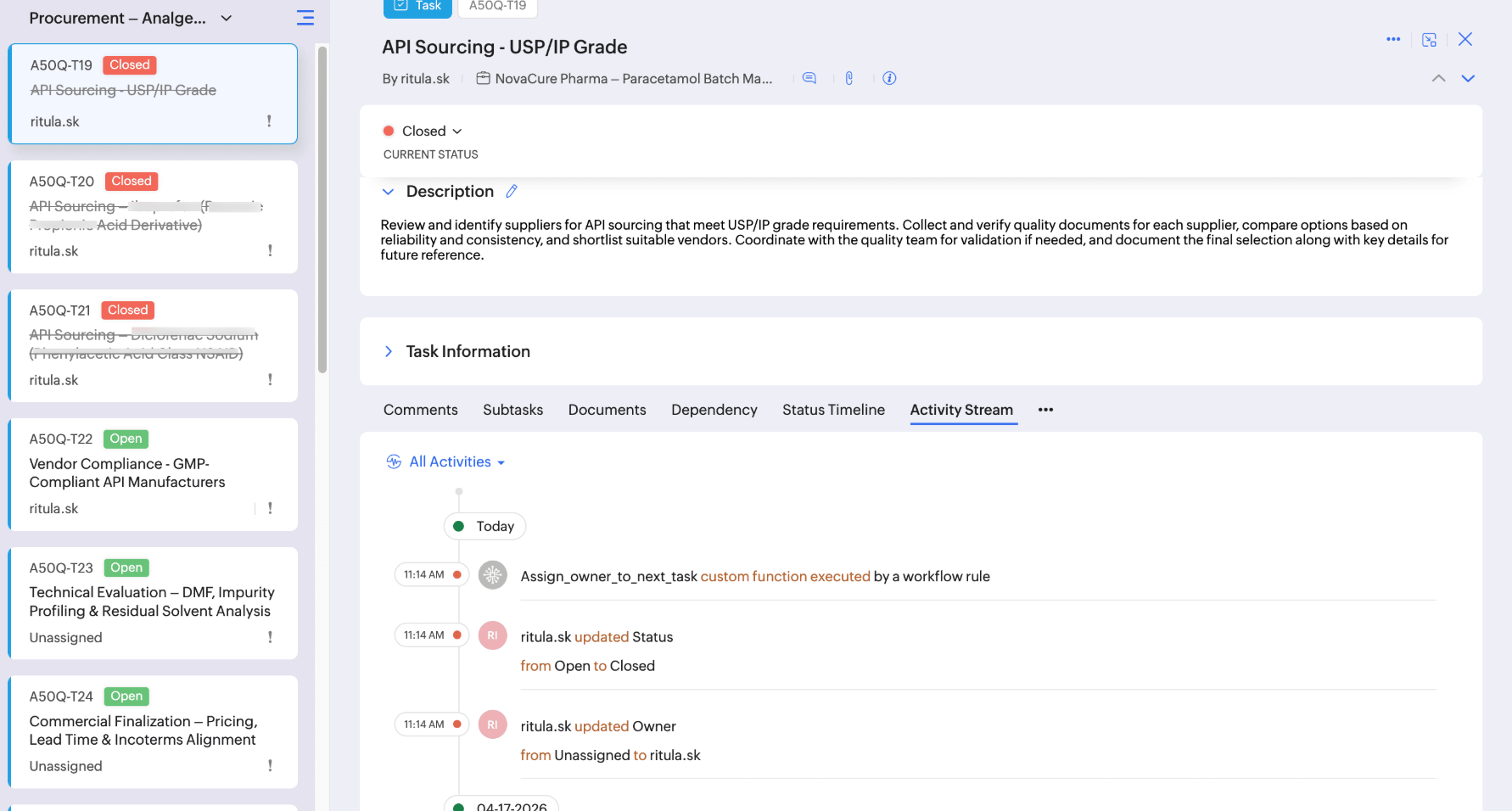


With this automation in place, ownership assignment becomes effortless, ensuring tasks are taken up as ongoing ones are complete.

If you have any questions, feel free to drop a comment below or reach out to us at support@zohoprojects.com.
    • Sticky Posts

    • Enhanced Collaboration and Global Web Tabs

      Hello Users, We are rolling out two key enhancements in Zoho Projects that will be part of our November release. Here’s what to expect: 1. Collaboration Section in the Left Navigation Panel What’s new? All communication and interactive tools will be grouped
    • Choosing the Right Automation in Zoho Projects

      In any project, different types of actions are needed at different points. Some projects require control on how tasks move, some require reacting to updates, and some require executing additional actions beyond the task. Automation in Zoho Projects is
    • Introducing Version-3 APIs - Explore New APIs & Enhancements

      New Update - The end of life timeline for V2 APIs has now been extended to 30th June, 2026 Happy to announce the release of Version 3 (V3) APIs with an easy to use interface, new APIs, and more examples to help you understand and access the APIs better.
    • CodeX Scripts for Enforcing Custom Project Logic

      Every organization has a defined way of executing projects. There are clear expectations around how tasks should move, when projects should progress, and which actions require validation. When these rules are consistently followed, projects remain structured
    • Automation Series: Auto-create Dependent Task on Status Change

      In Zoho Projects, you can automatically create and assign a dependent task when a task’s status is updated. This helps teams stay aligned, ensures reviews happen on time, and reduces manual effort. In this post, we’ll walk through an easy setup using
    • Recent Topics

    • Zoho Projects Roadshows 2026 - APAC

      Dear Users, Building on the amazing response to our roadshows in 2025, we are excited to announce our next set of roadshows in the APAC region. To start with, our team of experts will conduct these events in Singapore and Manila. They will walk you through
    • how do i add more than one google my business location?

      they are connected to one account, but while connecting social channels it makes me pick one location. I have 3 and growing.
    • Notes - Reaction Buttons

      Using the native notes option within CRM is fine, it works and the RTF features are great, however, would it be possible - if there isnt already something in place, where we can add a reactions button, similar to teams/whatsapp to show that its been read
    • Zoho Analytics: Clarification on Email Schedule Limits in Basic Plan

      Hi Team, I have a question regarding the email scheduling limits in the Zoho Analytics Basic Plan. The plan shows that I can create 4 email schedules. However, I understand that schedule consumption is calculated based on recipients (i.e., 1 schedule
    • Zoho → ShipStation Integration – Sales Order–Driven Fulfilment Workflow

      Hello All, I’m reaching out to explore the best way to integrate a shipping tool into our inventory which will speed our process up. We are looking to integrate ShipStation into our existing order-to-fulfilment workflow, as we’re keen to standardise on
    • Updating Sales orders on hold

      Surely updating irrelevant fields such as shipping date should be allowed when sales orders are awaiting back orders? Maybe the PO is going to be late arriving so we have to change the shipment date of the Sales order ! Not even allowed through the api - {"code":36014,"message":"Sales orders that have been shipped or on hold cannot be updated."}
    • Lost the ability to sort by ticket owner

      Hi all, in the last week or so, we have lost the ability to sort tickets by Ticket Owner. Unlike the other columns which we can hover over and click on to sort, Ticket Owner is no longer clickable. Is it just us, or are other customers seeing this too?
    • Custom button for list page

      Why is my 'List Page - Bulk Action Menu' button in the Packages module not autopopulating the List argument with selected record IDs?
    • Rename system-defined labels in Zoho CRM

      Renaming system-defined labels is now available across all DCs. Hello everyone, Zoho CRM includes predefined system fields across modules to support essential CRM operations. Until now, the labels of these fields were fixed and could not be edited from
    • Exclude Email or Domain From New Ticket Notification

      Hi, we utilize the new ticket notification feature in Zoho Desk. However, it would be great if there was a way to exclude certain email addresses or domains from receiving the automatic notification. This would be particularly helpful for automated alerts
    • Anyone have a working connection with CRM and shipstation via Flow

      Just wondering if anyone has successfully integrated shipstation and Zoho CRM.  I know there’s code to do it but am hoping to find out all the pitfalls before I jump on!! Scenario: SalesOrder gets created in CRM with multiple line items. I want this pushed to shipstation. On shipping via shipstation I want to push the tracking # back to CRM.  Many thanks in advance
    • ShipStation and Zoho Inventory

      Hello, I am looking to sync zoho inventory with shipstation ZOHO INVENTORY           SHIP STATION Sales Order  ==>  create ORDERS INVOICE  <==    Shipments What exactly does BETA mean on the Shipstation connector?  This is required for me to sign-on in the next month. Thanks in advance for your efforts
    • Connect to Shipstation's API

      Shipstation is a very big service, with lots of users, tons of order data.....and poor un-customizable reporting. This is perfect for Zoho analytics.  The Shipstation API is modern and efficient.  Today I think many people pay Zapier to get Shipstation data into Reports/CRM/Books - why not have  a direct connection?  -can pull in shipments via webhook or polling.  -also nice to pull in order data along with shipment data
    • What’s the Correct Integration Flow Between Zoho Inventory, ShipStation, and Multi-Channel Sales Platforms?

      Hi Zoho Community, I’m currently implementing Zoho One to manage all of my business processes, and I’d appreciate some guidance on the correct integration flow for the tools I’m using. Here’s my current setup: Zoho Inventory is my central system for managing
    • Remove Zoho Header from Portals

      I have a portal page with custom domain. But when I print directly from a webpage, the Zoho CRM header shows. It kind of kills the branding aspect. Is there a way to get rid of this?
    • Setting defaults for "Find and Merge Duplicate for..."

      To remove some of the extreme tedium from Zoho's poorly implemented merge function, I would like to set defaults.  Currently I am defaulted to match "ANY" when I would never do that, so I always have to click "ALL". Then it makes me click on several totally irrelevant drop boxes to turn off phone, mobile and other useless match criteria. Is there a way I can set: Match to default as "ALL" Firstname to default to "IS" Lastname to default to "IS" every other match field default to "-NONE-" This will
    • Clone a Module??

      I am giong to repurpose the Vendors module but would like to have a separate but very similar module for another group of contacts called Buyers. I have already repurposed Contacts to Sellers. Is it possible to clone (make a duplicate) module of Vendors
    • Let's bring Manufacturing Resource Planning (MRP), Material Requirement Planning (MRP), and Production Planning/Management module / feature in Zohobooks

      Let's bring Manufacturing Resource Planning (MRP), Material Requirement Planning (MRP), and Production Planning/Management module / feature in Zohobooks
    • CLIENT PORTAL (If clients can place orders directly on the portal)

      Zoho client portal is excellent. Everything is there except one thing. Client should be able to place orders directly on the portal. This would enhance the portal and end users will be extremely happy. This suggestion infact came from one of our client.
    • Zoho Inventory Feature Roadmap Visible To All

      Hello, please consider making your feature roadmap visible to us users so that we know what to expect in future. This may appease current users who are seeking clarification on feature implementation dates, so that they can make an informed decision whether
    • アナリティクスで商談中のパイプライン(ステージ)の件数比較

      アナリティクスで商談中のパイプライン(ステージ)の件数を前週と前々週で比較したい。前々週の件数が更新することで変動してしまう。対象方法をご教授ください。
    • How do I remove a data source from Zoho Analytics?

      I am unable to find a delte option on a datasource that i put in the system as an error. On teh web it refers to a setup icon but I do not see that on my interface?
    • Identify and clean hard bounce lists in Automation 2.0

      Hello. 1. I want to know how I can identify hard bounces in the lists I created to clean them before sending an email, given that the bounce rate has increased and it is necessary to clean the lists. 2. How can I exclude hard bounces and invalid emails
    • Enhanced Sign-in UI and OTP-Based Password Reset for Portals

      As of 5th December, 2024, we are introducing enhanced sign-in interfaces and One-Time Password (OTP) based verification for password reset in an effort to improve security and stream the user journey across all portals. What's changing New Interface for
    • Trigger workflows from SLA escalations in Zoho Desk?

      Hey everyone, I’m currently working with SLA escalation rules in Zoho Desk and ran into a limitation that I’m hoping someone here has solved more elegantly. As far as I can tell, SLA escalations only support fairly limited actions (like changing the ticket
    • Delete a department or category

      How do I delete a Department? Also, how do I delete a Category? This is pretty basic stuff here and it's impossible to find.
    • Zoho Webinar - Sharing System Audio (NOT AVAILABLE)

      Hi, We are having a serious problem with Zoho Webinar. In the webinars we run, we very often share the audio from a video we are streaming directly from YouTube or other applications. Until recently we were using Zoom, but as we use other Zoho applications
    • Big Time HELP

      I am old, disabled and need to speak to a person. I needed to use a service to copy my zoom contacts to. I think I signed up for a security service, which I do not need. I don't know enough to choose from your many lists or how to see what I have and
    • Cancellation Fees

      Hi, It really would be good if Billing could take subscription management further with cancellations & being able to apply or set a cancellation fee for a plan that is either fixed or prorated. It is not uncommon in subscriptions for cancellation fees
    • Custom Field for Subscription

      Hi, I can't find a way to add a custom field (to contain a license key generated from our software) against a subscription? Is the only place to add this information in the Invoice module (as custom field for invoice)? When a customer views his subscription
    • Zoho CRM Meetings Module Issues

      We have a use-case that is very common in today's world, but won't work in Zoho CRM. We have an SDR (Sales Development Rep) who makes many calls per day to Leads and Contacts, and schedules meetings for our primary Sales Reps. He does this by logging
    • How to get the campaingns key?

      Reading the documentations of the API, I see that is necessary have the campaign key, but I don't see how can I get it. For example to get the campaign details we need to do the request: https://campaigns.zoho.com/api/getcampaigndetails?authtoken=[API Authentication Token]&scope=CampaignsAPI&campaignkey=[campaignkey] I have the API Authentication Token but I don`t see how to generate the campaignkey
    • Unable to switch existing AWS RDS connection to DataBridge after moving RDS behind VPN

      Unable to switch existing AWS RDS connection to DataBridge after moving RDS behind VPN Hi everyone, I’m facing a problem with an existing Zoho Analytics setup and would like to know the best migration path. Originally, my Zoho Analytics connection to
    • [Bug] WebAuthn passkey registration blocked on rpIds with TLDs longer than 6 characters (.accountant, .technology, etc.) — isValidDomain regex too strict

      Hi, Filing on behalf of an enterprise customer where Zoho Vault is deployed across the company. The Chrome extension blocks WebAuthn passkey registration on legitimate sites whose Relying Party ID (rpId) has a TLD longer than 6 letters. This affects every
    • Native QuickBooks integration for Zoho CRM: Connecting sales and finance

      Greetings, I hope all of you are doing well. We're excited to announce Zoho CRM's integration with QuickBooks Web, which is designed to synchronize your CRM data with your QuickBooks accounting records and bridge the gap between sales and finance. This
    • Syncing zoho books into zoho crm

      I was wondering how I can use zoho books in crm as I have been using them separately and would like to sync the two. Is this possible and if so, how? Thanks
    • Feature Request — Allow updating Status / Bounced_Time / Bounce_Reason on emails created via actions/associate_email (v8)

      Summary Emails created through the v8 POST /{module}/{record}/actions/associate_email endpoint are returned by View Email with "editable": false and reject every update method (PUT, PATCH) with INVALID_REQUEST_METHOD. There is no way via the public API
    • ZohoBooks_add_expense_attachment Fails

      I'm working MCP in Claude to automate bookkeeping. Claude cannot seem to attach and reciept to an expense. The 'add expense attachment' tool is added to the server and enabled in Claude. I asked Claude to give me the calls he performed and this is what
    • ZohoBooks_create_chart_of_account

      I'm setting up Claude to do my bookkeeping workflows using a Zoho MPC server I setup. He does not seem to be able to create a chart of account. The 'create chart of account' tool is added to the server and enabled in Claude. I asked Claude to give me
    • Zoho Books Product Road Map

      I am planning to look into Zoho Books to maintain my Company's Account Books. Is the roadmap of Zoho Books Development available online? What happens if you product dies, without an export feature to other popular Accounting softwares like Tally or Quickbook. Are we going to be left in lurch? Do you have a product road map? Regards, Vishal.
    • Next Page