Bidirectional sync between Zoho Bookings and Zoho CRM - Part 2
Hey community members,
Welcome again!
This post continues our discussion of the bidirectional sync between Zoho Bookings and Zoho CRM, focusing on how to reschedule appointments in Zoho Bookings from Zoho CRM. If you've arrived at this community post directly, we recommend checking out Part 1 of this topic for a better understanding. You can access Part 1 through the following link: Bidirectional sync between Zoho Bookings and Zoho CRM - Part 1
How we're approaching this reschedule action:
Whenever a meeting initially scheduled through the Zoho Bookings application is rescheduled either within the Meetings module or through the CRM calendar, the changes are recorded and the corresponding appointment within Zoho Bookings is also rescheduled.
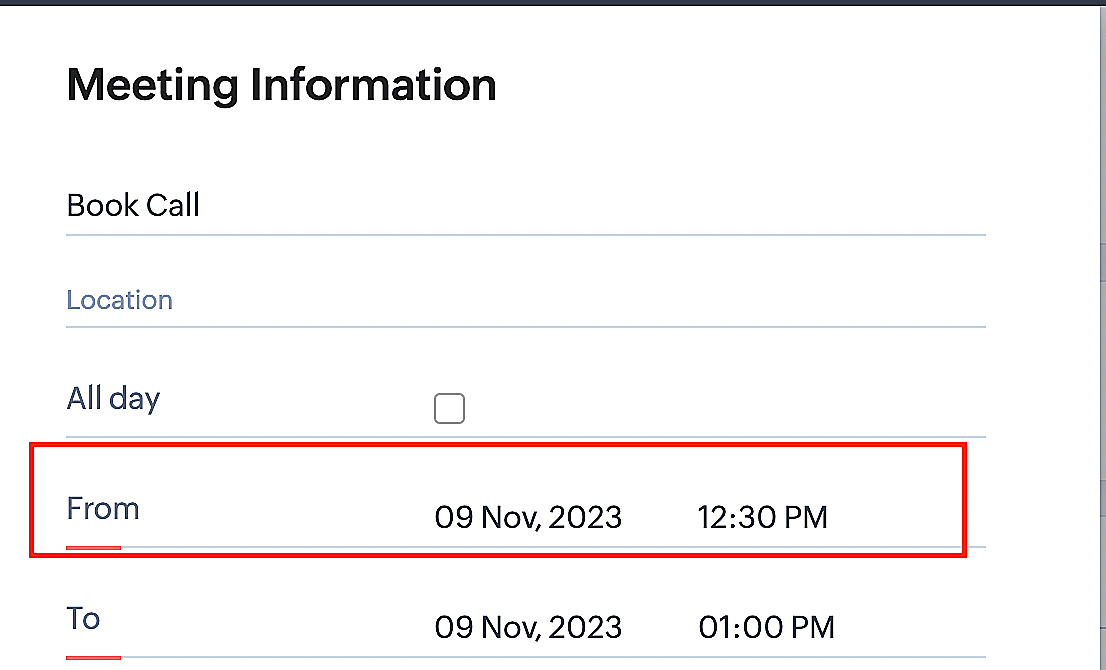
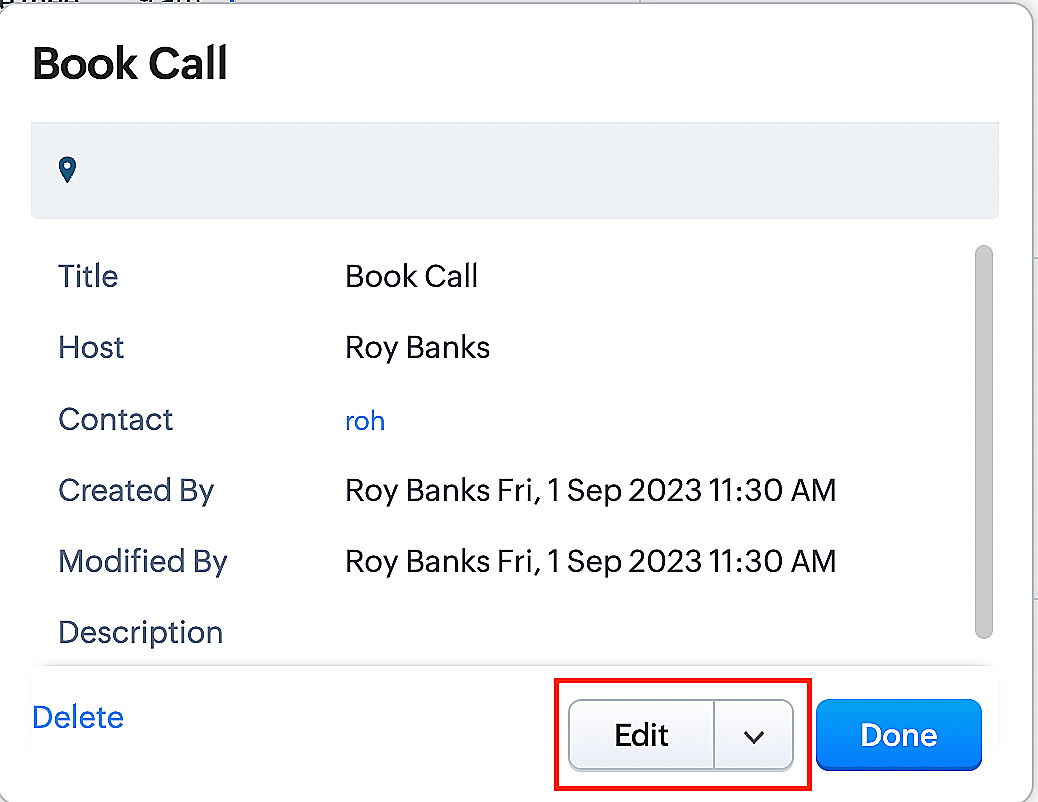
Create a function for rescheduling appointments
Complete these steps in Zoho CRM.
Step 1: Creating connections
You don't need to create a separate connection for the reschedule action. You can utilize the same connection name that we established in Part 1 of the Zoho Bookings - Zoho CRM bidirectional sync.
Step 2: Creating functions
Configuring a function that reschedules appointments differs slightly from the functions we discussed in Part 1 of the Zoho Bookings - Zoho CRM bidirectional sync.
Note: Here, we'll fetch the time zone in which the customer scheduled the appointment so that when we reschedule the booking, it will be rescheduled within the same time zone the customer initially chose.
Here are the steps:
1. Go to Setup > Developer Space > Functions.
2. In the Functions page, click + Create New Function.

3. Configure the function name, display name, and description.
4. Set the category as automation.
Reference
Reference
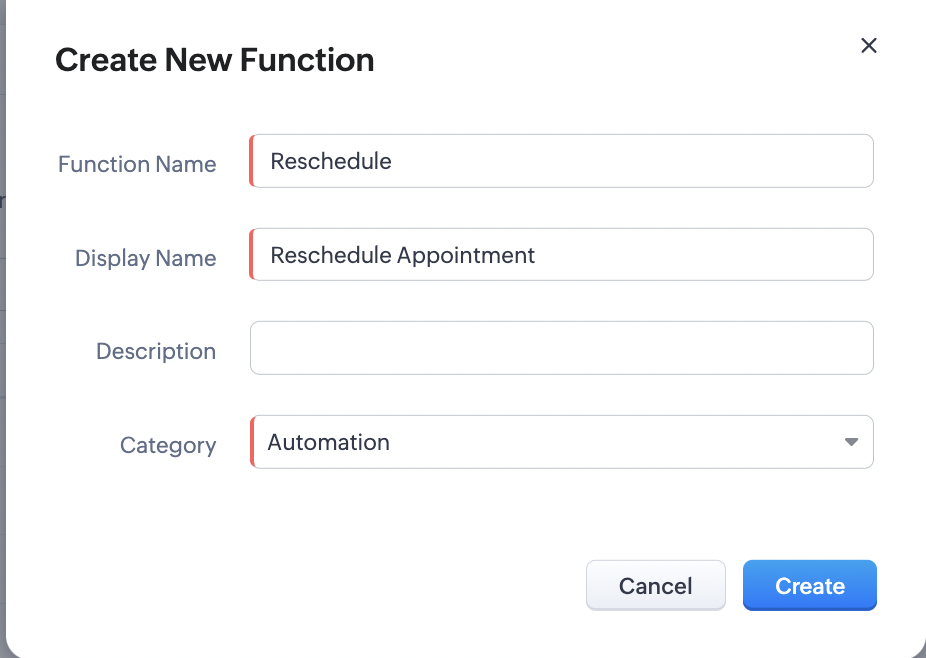
5. Next, configure the function's arguments. For the reschedule function, we'll have to pass two arguments: bookingID
as a string, and from as a date.
a. Click on Edit Arguments on the Deluge script page.

b. Set the Parameter Name as bookingID. (Please note that the "bookingID" value is case sensitive and must match
the term used in the code).
c. Set the type as string.
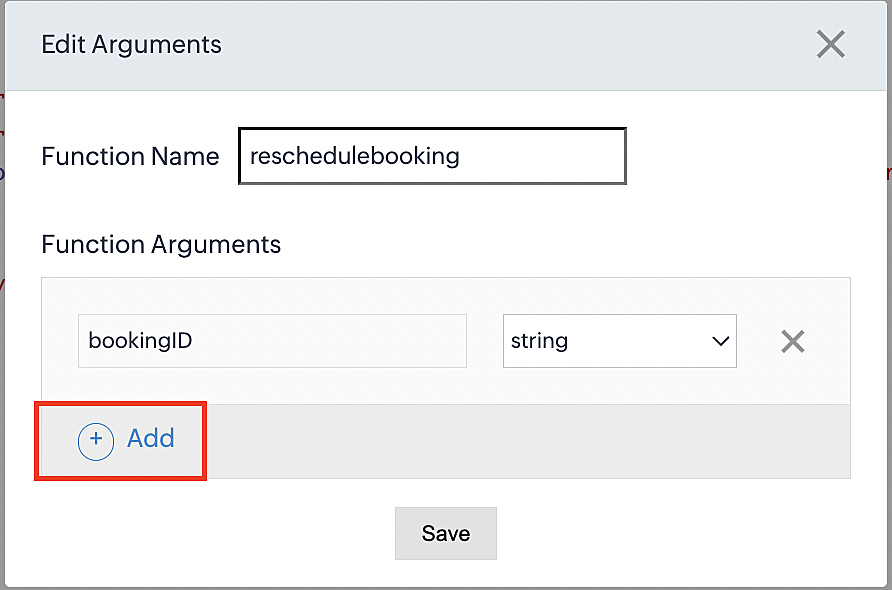
d. Click the +Add button to add a second argument.
e. Set the Parameter Name as from and its type as date.
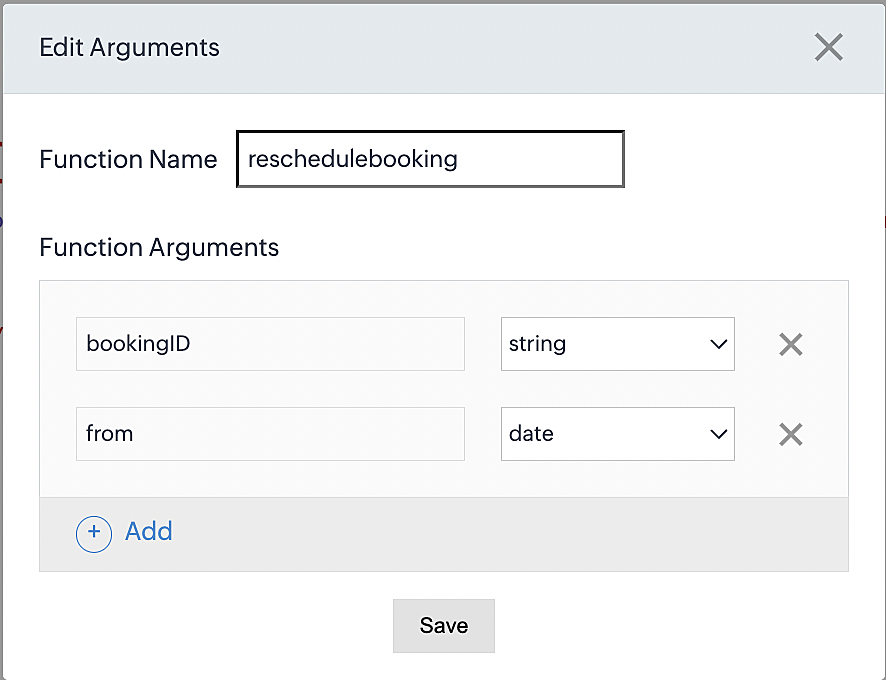
Here, we're using the reschedule appointment API. The term "from" specifically denotes the appointment's start time. In the reschedule API, the booking ID is a required parameter, and we must provide either the staff ID or the start time. Given that we're rescheduling based on the start time, we'll pass the start time as an argument and use "from" as the reference point.
More details: Reschedule Appointment API
Please configure the following code on the Deluge script page.
Code link: Rescheduling an appointment
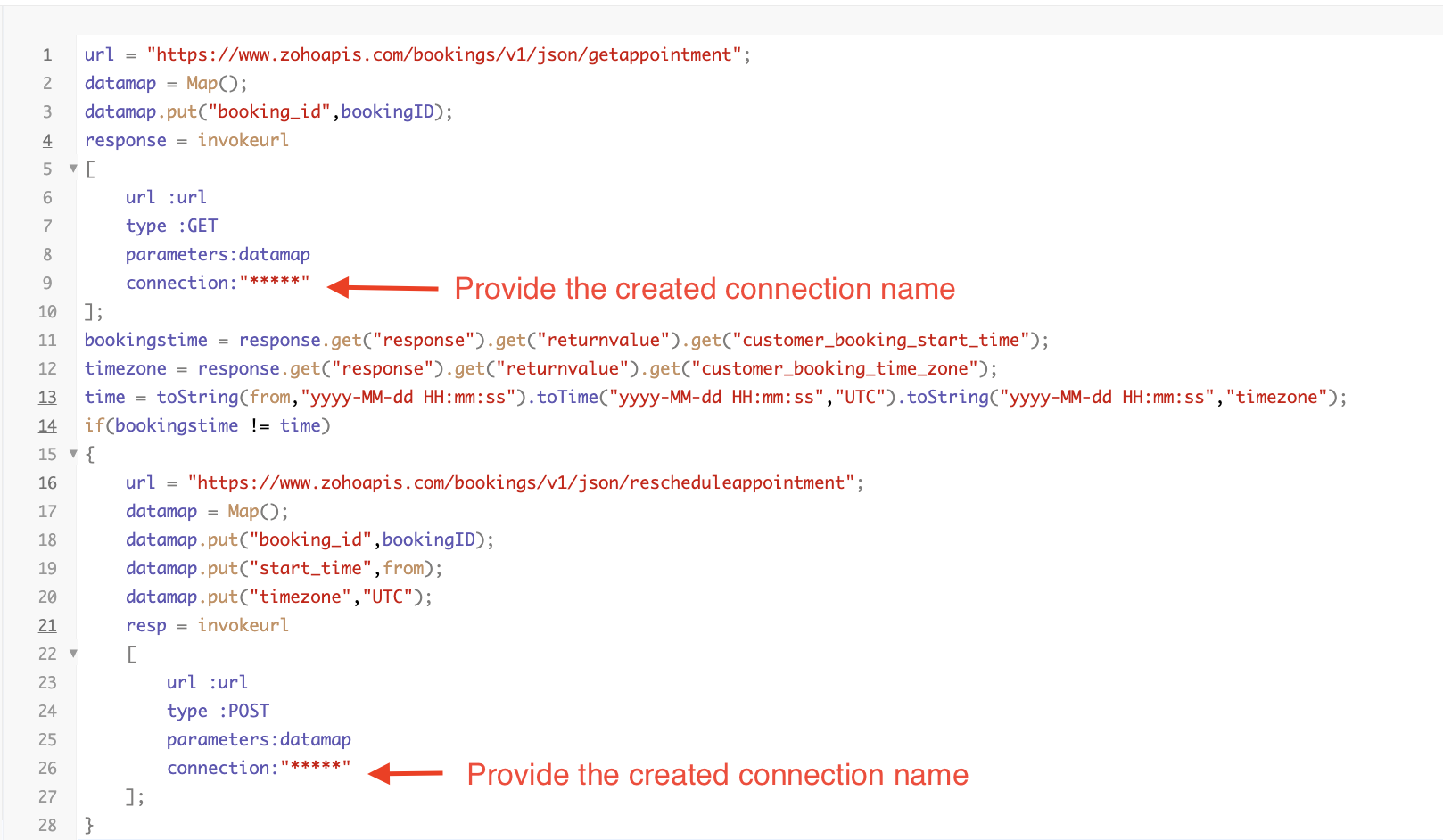
Here's an explanation of the code used for the reschedule function, split into three parts for purposes of clarity:
Lines 1-10 serve to invoke the "get appointment" API to retrieve the relevant booking ID and obtain the associated details. The purpose behind fetching this booking data is to access the actual booking start time and the time zone in which the customer initially scheduled the appointment using the Zoho Bookings application. This information is essential for comparing it with the rescheduled date and time.
- Line 1: Based on the Zoho Bookings account's data center, we'll set up the API endpoint URL configuration. More
details: Domain-specific API URLs
- Line 3: To obtain appointment details, we utilize the GET Appointment API. In this API, the booking ID is a mandatory
field, so we retrieve the booking ID from the Meetings module and subsequently pass it into the code to
retrieve the corresponding booking details.
- Lines 4-10: We use the invokeURL task for API calls. To learn more about the invokeURL task, please refer to the
following document: InvokeURL task for API calls
In lines 11-13, we execute booking data retrieval and date-time format conversion operations.
- Line 11: Here, we're fetching the booking's exact start time as scheduled by the customer.
- Line 12: Here, we're fetching the time zone in which the customer scheduled the appointment.
- Line 13: We perform the date-time format conversion to ensure compatibility with the reschedule appointment API. This API requires the appointment's start time to be in the format dd-MMM-yyyy HH:mm:ss. We retrieve the start time from the Zoho CRM Meetings module, match it to your CRM application's date and time format, and convert it to the format Zoho Bookings' reschedule appointment API supports.
Lines 14-27 serve to perform comparison and rescheduling operations.
- Line 14: Here, we're implementing an "if" condition to compare the actual booking start time (bookingstime) and the rescheduled time (time). We do this in order to execute the reschedule API function only if there is any change in the appointment's start date and time. If we don't implement the "if" condition to compare both inputs, the reschedule API function would enter a loop, continuously executing and potentially exceeding the API count limit.
- Lines 15-27: We use the reschedule appointment API, which requires the booking ID as a mandatory parameter, along with either the staff ID or start time. In this case, as we're rescheduling appointments based on the start time, we provide both the booking ID and the start time. The reschedule appointment API functions similarly to the APIs we've previously discussed, such as the cancel, mark as completed, and no-show APIs.
By reaching the end of these final steps, we've successfully created a function that executes rescheduling actions.
Now, let's proceed with creating a workflow and linking the reschedule function to it. This enables us to automate the syncing of appointment rescheduling actions from Zoho CRM to Zoho Bookings.
Creating a workflow
Create a workflow that handles appointment rescheduling in Zoho Bookings whenever a corresponding meeting is rescheduled within the Zoho CRM application
Part 1: Creating the rule
1. Go to Setup > Automation > Workflow Rules.
2. In the Workflow Rules page, click Create Rule.

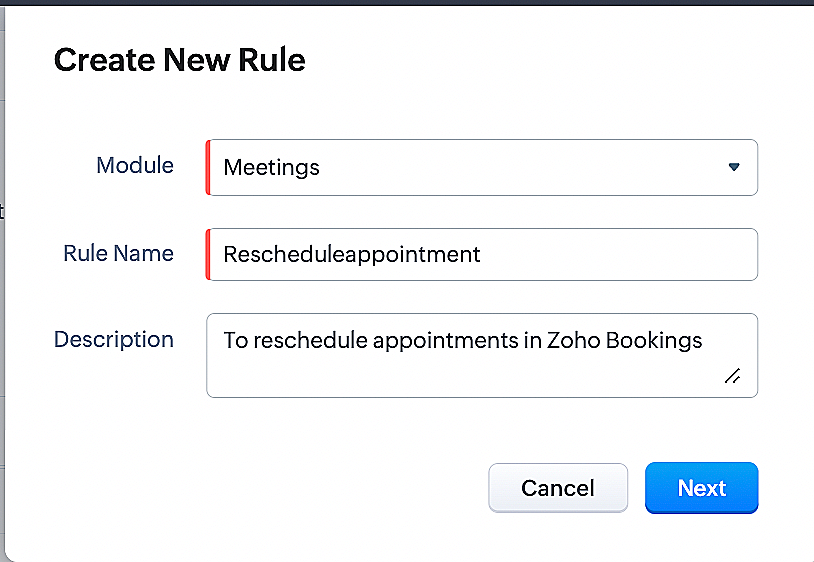
3. Select Meetings under Module and configure the rule name and description as required.
Reference:
Part 2: Specifying the rule trigger
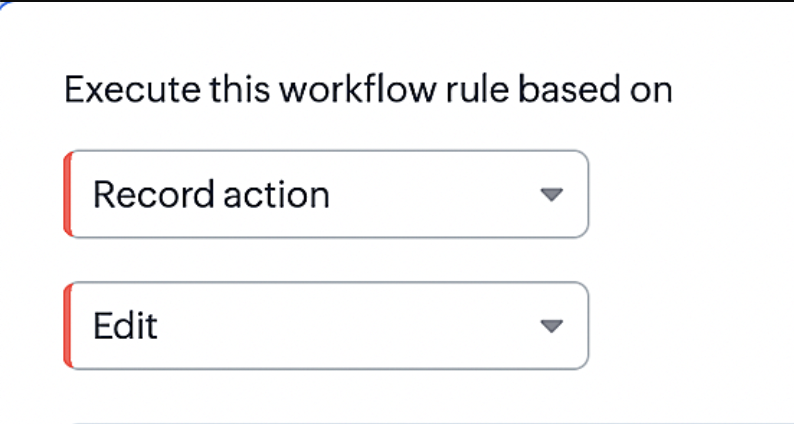
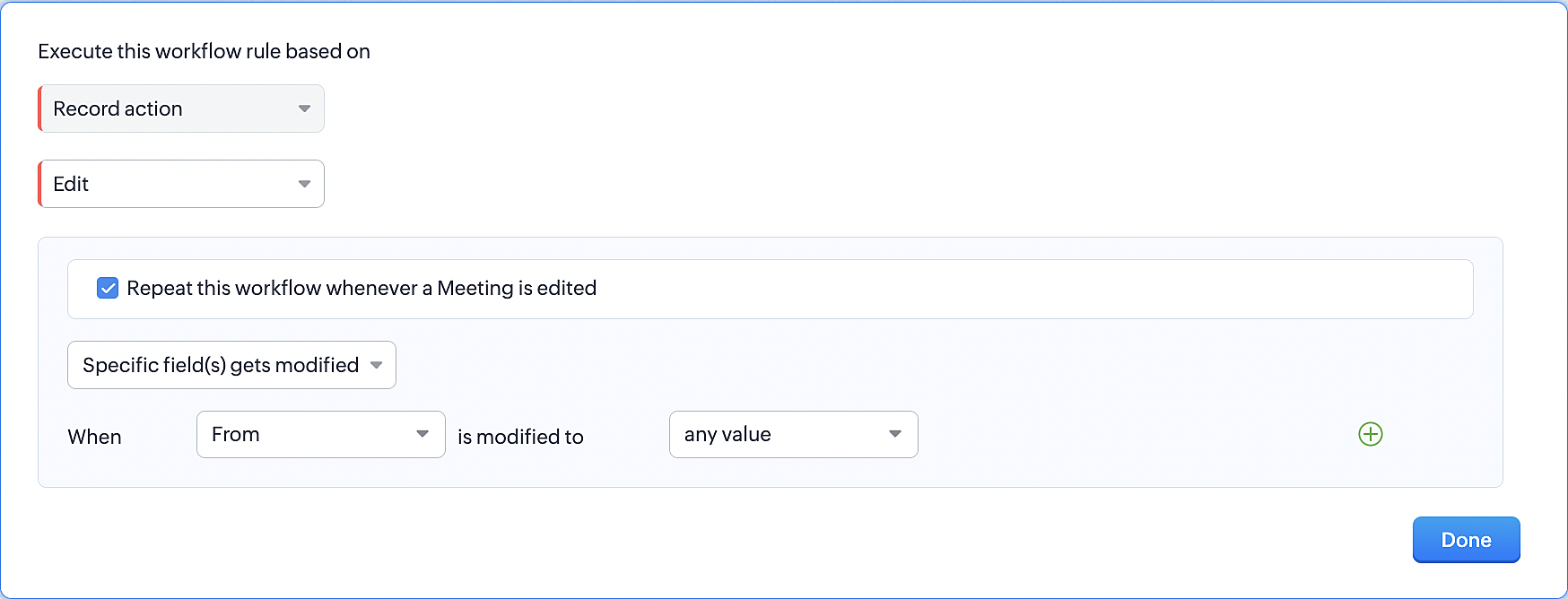
1. Record Action > Edit.
2. Enable the Specific field(s) gets modified setting and configure it per the screenshot below.
This serves to ensure that the workflow is executed only when the "From" field of the meeting is edited.
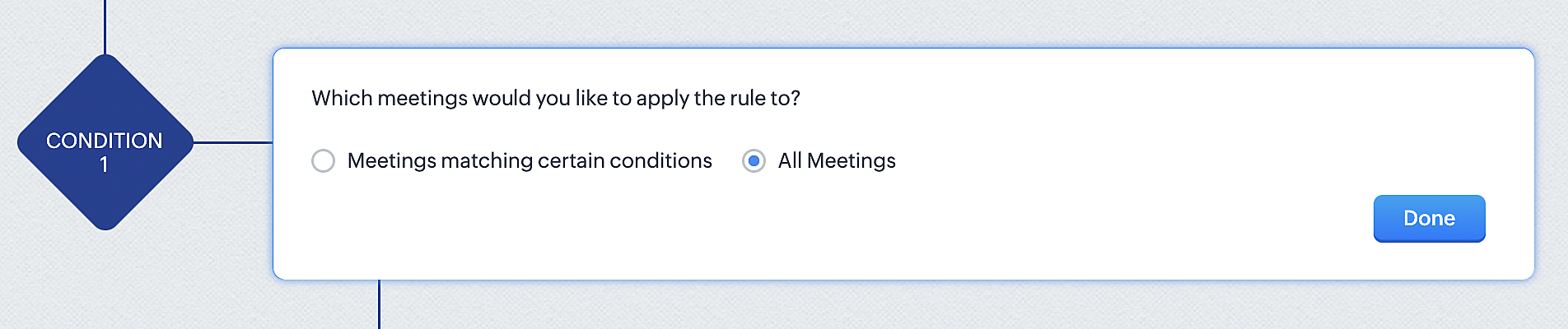
3. Configure condition > All Meetings.
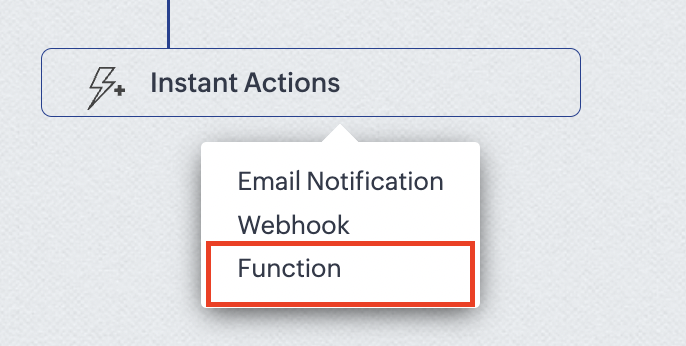
4.Instant Actions > Function.
5. Click the New Function button.

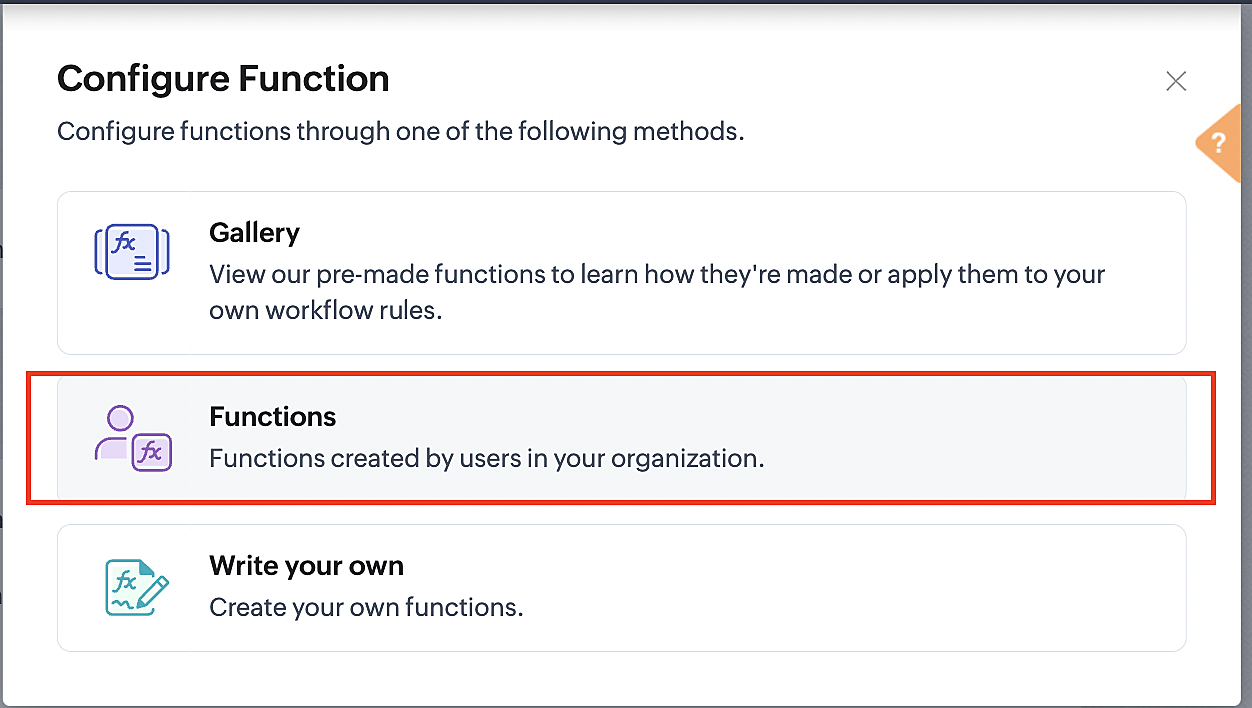
6. In the Configure custom function page, select the "reschedule" function you created from among the functions users in your organization have created.
More details: Specify rule triggers
Part 3: Argument mapping
1. Press # to choose an argument value.
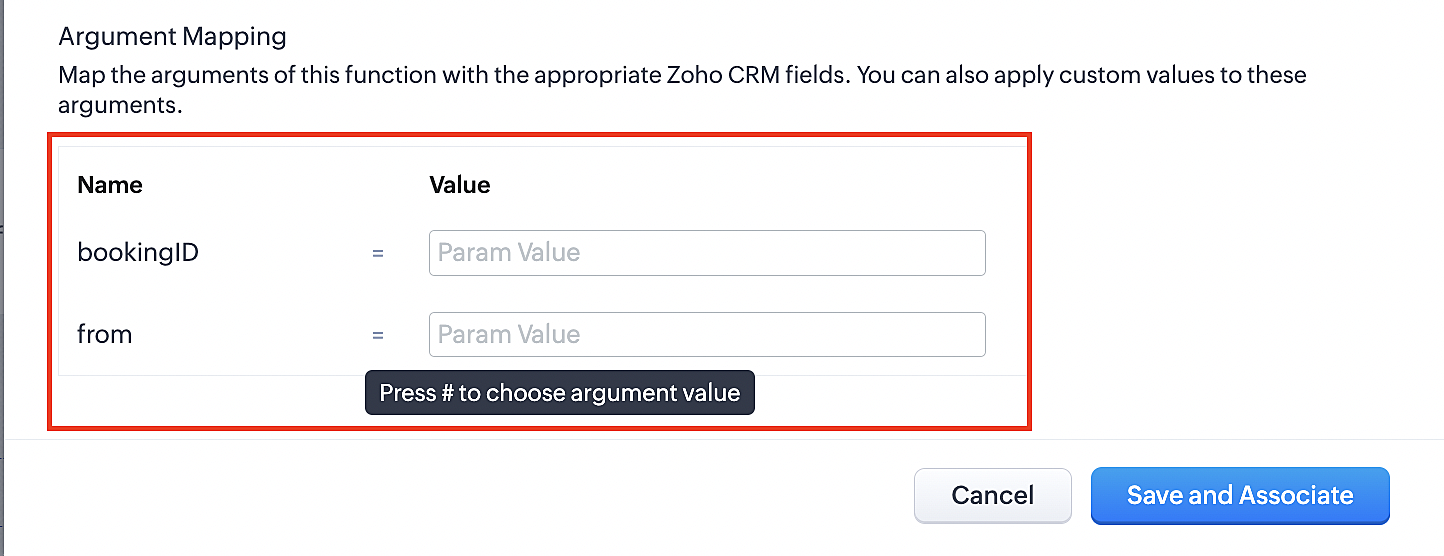
2. Select Meetings under Module and configure the field as "BookingId".
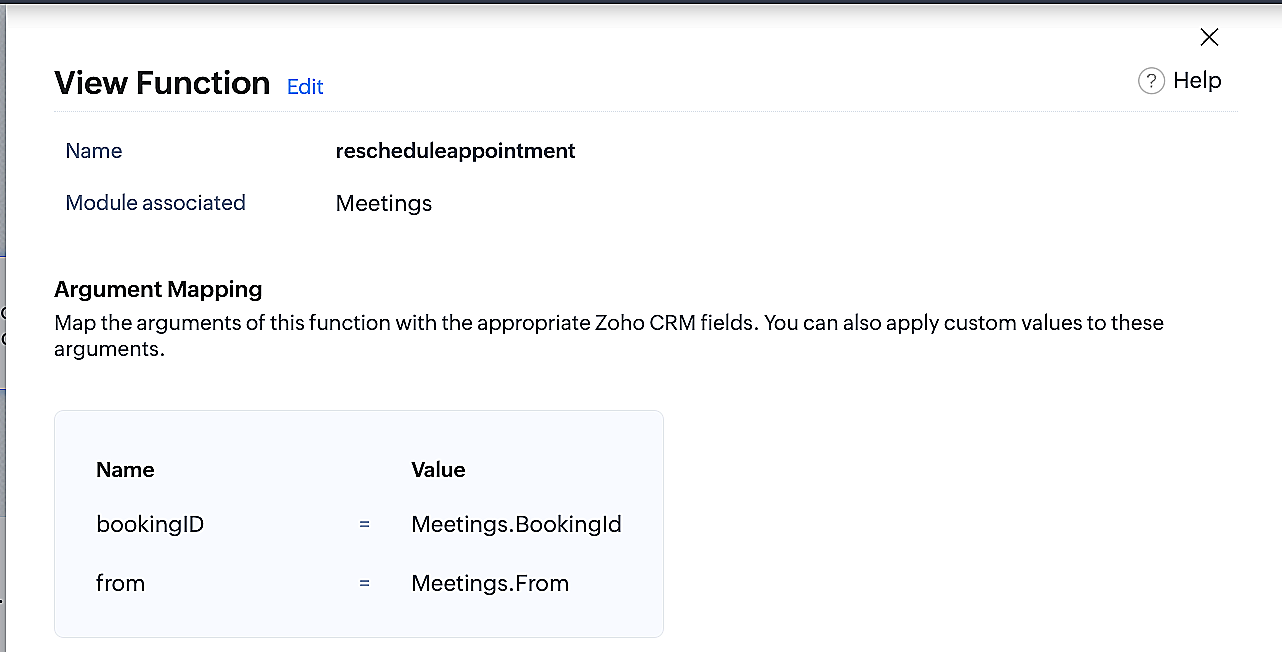
3. Select Meetings under Module and configure the field as "From".
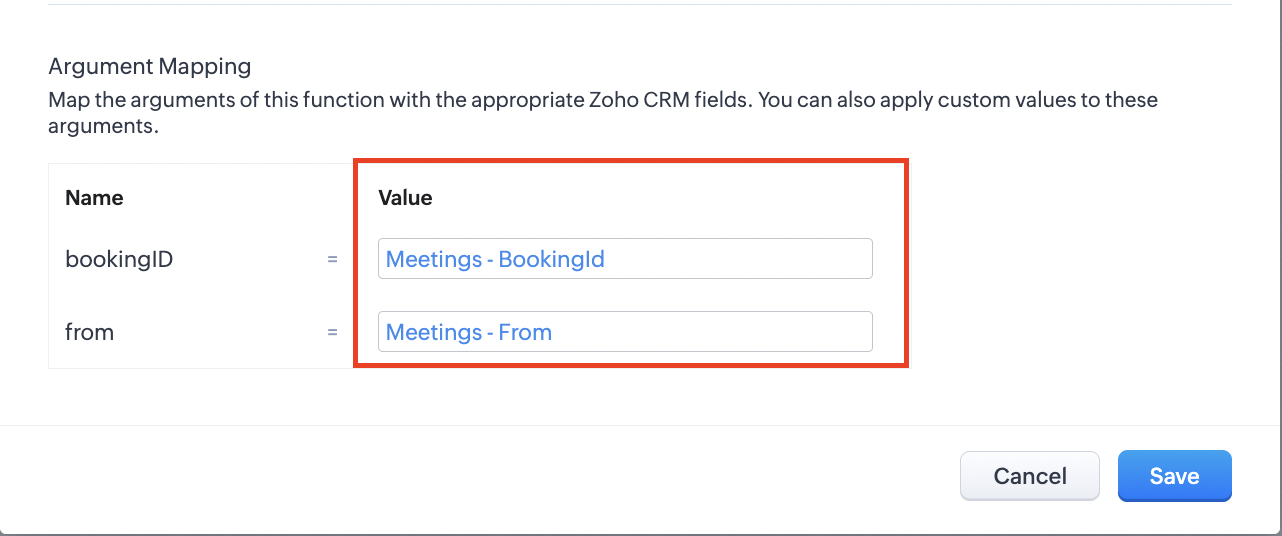
4. Click the Save and Associate button.
Reference:
Below is the final flow of the reschedule appointment workflow:
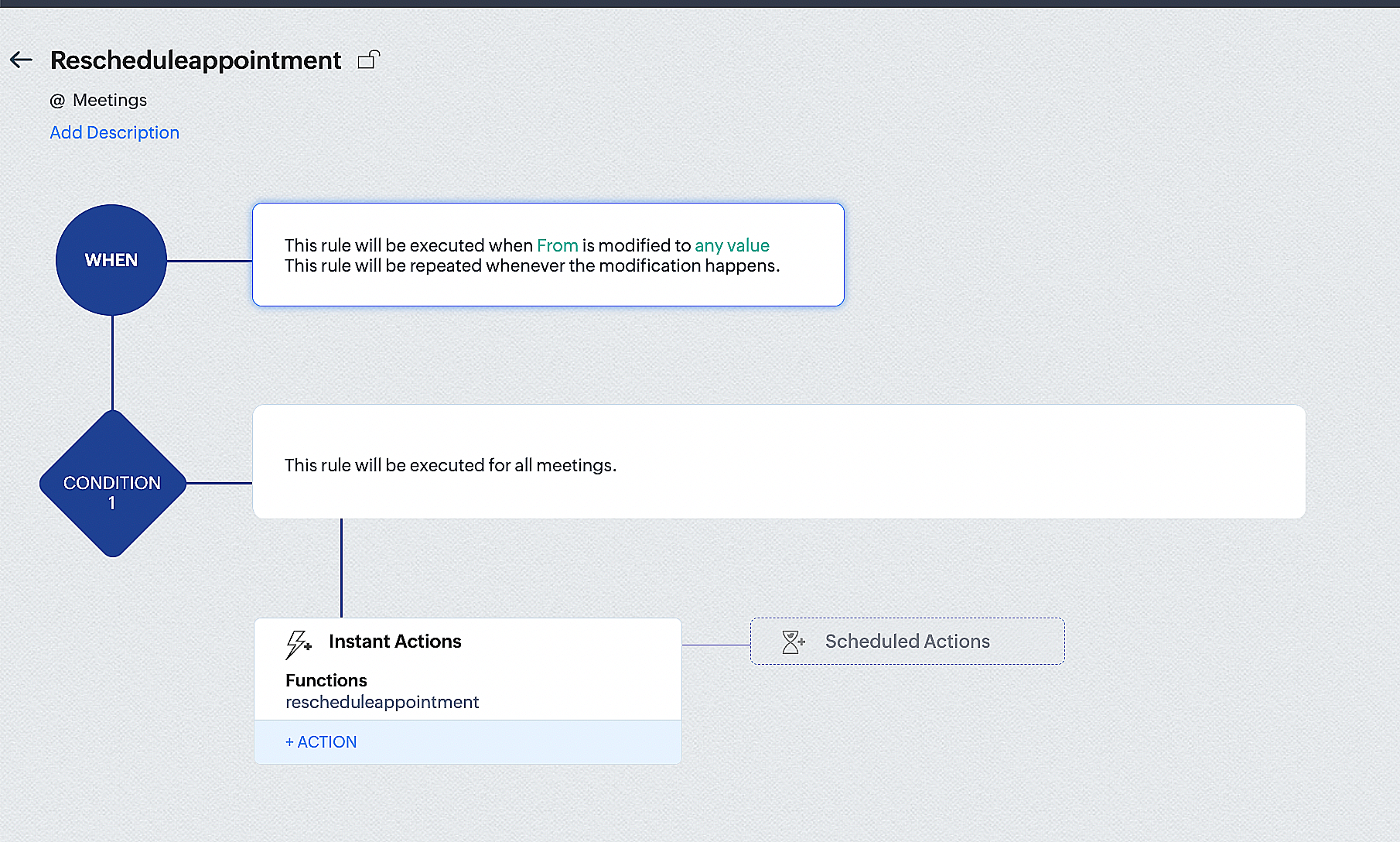
By the end of this process, we will have created a workflow that automatically executes when the "From" field in the Zoho CRM Meetings module is edited with a new date and time. As a result, this workflow will also reschedule the associated bookings for that meeting to the new date and time in Zoho Bookings.
Conclusion
We've arrived at the end of the community post. As mentioned in Part 1 of the Zoho Bookings—Zoho CRM bidirectional sync community post, with all of these configurations in place, you'll be able to book, cancel, reschedule, and update the status of appointments in Zoho Bookings directly from your Zoho CRM application. Which will make your appointment management easier.
If you have any questions or need assistance with your configuration, please email us at hello@zohobookings.com or support@zohobookings.com.
Topic Participants
Kaushik S
Recent Topics
Ensure every user starts right with Welcome Email Templates
Adding a new user to your organization extends beyond account creation–it requires delivering the right information at the right time to ensure a productive start. New users typically require key details upon joining, such as login instructions, securityHow to change the format for phone numbers?
Mobile phone numbers are currently formatted (###) ###-####. How can I change this to a more appropriate forms for Australia being either #### ### ### or (#)### ### ###?Adding Images to a Quote in Zoho CRM
We are currently preparing to use Quotes in Zoho CRM and we are building out our Quote templates. We came across an issue of not being to add Images of the products to the Quote - specifically in the body of the Quote templates. This is a problem,IMPORTANT: It doens´t show full article name on search - Should add line break
When we search for articles, it doesn´t show the full name. There should be a line break so the user can see the full article name, otherwise the user can´t know if that´s the article he/she is looking for. This is very important, otherwise the user hasIMPORTANT: It doesn´t search for letters with portuguese characters.
Some of my articles have for example the word "vídeo". But if I search for "vídeo" it doesn´t find them. If I search for "video" it does find them. Idealy, it should find the articles either way. But if I have to choose, it would be better to find theHow to hide Activity Side Panel
How do you hide the activity side panel? Clicking on the link and reviewing the activity does not remove it and it does not seem to timeout. I have any activity that have been listed there since January. Thank you.Need a Universal Search Option in Zohobooks
Hello Zoho, Need a Universal Search Option in Zohobooks to search across all transactions in our books of accounts. Please do the needful ThanksZoho Mail Android app update: UI revamp
Hello everyone! We are excited to share that the first phase of the Zoho Mail Android UI revamp is now live. In this update, we have redesigned navigation bar at the bottom to quickly access the Email, Calendar, Contacts, and Settings modules. Also, theAdd Support for Authenticator App MFA in Zoho Desk Help Center
Hello Zoho Desk Team, We hope you are doing well. We would like to request an enhancement related to security for the Zoho Desk Help Center (customer portal). Currently, the Help Center supports MFA for portal users via SAML, JWT, SMS authentication,Resubscribe with Zoho Campaigns
Hi, I am new to Zoho Campaigns and sent a campaign to a contact list with only my email address. I wanted to see what the footer links did, so clicked unsubscribe and now can't include my email address into any more campaigns. I don't have a sign up form on my website to resubscribe and can't find how to resubscribe anywhere else. Can you help?Add a way to connect Log360 Cloud logs with Zoho analytics
Hi, Several month ago Log360 Cloud was added to zoho one - and this is great. But as far as I see there is no prebuilt way to connect Zoho analytics to the logs we have in Log360 Cloud. Please add a prebuilt connection like we have for so many other zohoDynamic Multi-Staff Selection for Ad-Hoc Bookings
Summary Allow customers or internal schedulers to select specific staff members at the time of booking, with Zoho Bookings automatically surfacing only the time slots where all selected members are simultaneously available. Current Behaviour Zoho BookingsShare Edit while in Workflow
There are times that while a writer document is in the middle of a workflow the user that's responsible for that stage of the workflow needs to bring in other people to work on the document. Currently there is no way for the user to be able to allow other'sHow can I use the API to add a drop-shipping address to a sales order for one-time use?
I need to be able to add a drop-shipping address for one-time use to a sales order via the API. Adding every such address to the contact (customer), then feeding the shippingaddress_id into the sales order, is not an acceptable approach; we have someAuto sync Photo storage
Hello I am new to Zoho Workdrive and was wondering if the is a way of automatically syncing photos on my Android phone to my workdrive as want to move away from Google? ThanksMajor journey crash and not loading. Zoho Marketing Automation
Hi all. Last night (19MAR, 2026) Marketing Automation for a specific journey completely crashed, and since the crash the specific journey has failed to load at all (blank journey canvas, no journey appears, no menu accessible) but other separate journey'sIzettle or Sumup Integration for Zoho Books.
The Stripe & Square clearing works great in Zoho Books. Any further integrations planned in the future for Izettle or Sumup? These card processors are very common for taking payments with a card reader.Is anyone experience missing functions in the new UI until hard refresh?
The set of functions including search is almost always missing upon loading an app in the new UI. If you refresh, the functions return. (see second screenshot) Anyone else experiencing this?Mail Search should allow grouping by conversation like Gmail.
Having switched from gmail I have found the search function hard to use. Mostly because mail is not grouped by conversation in search. If I search for a word when looking for a conversation had with someone then sometimes 10 emails will come up from theServer-based Appication API access for Social, Sites, Flow, Pages.
Hello, I am trying to hook up API access for a number of apps and I have hit a wall trying to add these scopes to the API feed. We cannot find the correct way to list the scope for these Zoho apps; Social, Sites, Flow, Writer. Error on web-page comesZoho Landing Page "Something went wrong" Error
Hello, Every time I try to create a new landing page, I receive a "Something went wrong" error with no explanation. I cannot create any new pages, which means we cannot use this application. I did create one landing page successfully over a month ago,Sync desktop folders instantly with WorkDrive TrueSync (Beta)
Keeping your important files backed up and accessible has never been easier! With WorkDrive desktop app (TrueSync), you can now automatically sync specific desktop folders to WorkDrive Web, ensuring seamless, real-time updates across devices. Important:Zoho → ShipStation Integration – Sales Order–Driven Fulfilment Workflow
Hello All, I’m reaching out to explore the best way to integrate a shipping tool into our inventory which will speed our process up. We are looking to integrate ShipStation into our existing order-to-fulfilment workflow, as we’re keen to standardise onNewby Questions - Vendors, Customers, and Income vs. Other Income Clarifications
Q1. For Deposits, there does not seem to be an option for "Income". "Other Income" is an option however. What is the process to add the option to assign a deposit to type "Income"? Q2. In many cases Vendors and Customer are the same. Vendors may purchaseZoho Booking - TIN vs ATIN & ITIN
Zoho Booking Vendors allows for TAX ID values of SSN, EIN, ATIN an ITIN. There is no option for TIN. What is the method to properly add TIN to the list of taxable values for companies? For reference: Social Security Numbers (SSN) Individual Taxpayer IdentificationBank Feed shows redacted description numbers (xxxx)
Hi All, Is there any way to change this behaviour? Either Zoho or Yodlee is redacting important numbers from the transaction description, preventing us from being able to easily recognise and reconcile transactions. For example, a transaction with a descriptionHandling large product migrations in Zoho?
Hi everyone, How do you usually manage large product catalog migrations (10K+ SKUs) into Zoho One? Main concerns I’m thinking about: Avoiding downtime Preventing data loss Keeping supplier and product relationships intact Do you prefer bulk imports orReassign Partially Saved Entries
Hi, I would like to be able to go to Partially Saved Entries and like the option to delete them I would like the option to multi-select and be able to reassign them to another user to complete (Such as when a user has left the company). Thanks DanPreventing auto-redirect to Parent Record on Save...
Our users often create records from the related list on th left side of the screen. They click the blue "plus" button to create the record. This is handy, but for some modules, or situations, they would like to remain on the record AFTER clicking "Save",Introducing Version-3 APIs - Explore New APIs & Enhancements
New Update - The end of life timeline for V2 APIs has now been extended to 30th June, 2026 Happy to announce the release of Version 3 (V3) APIs with an easy to use interface, new APIs, and more examples to help you understand and access the APIs better.Correlated subqueries not supported in Zoho Analytics. This creates huge limitations
Running into a major limitation in Zoho Analytics: correlated subqueries simply don’t work, even in completely standard SQL patterns inside a JOIN. Example: LEFT JOIN "Bills" b ON d."Id" = b."Deal ID" AND EXISTS ( SELECT 1 FROM "BillUnknown table or alias 'A1'
I would like to create a subquery but i am getting the following error: Unknown table or alias 'A1' used in select query. This is the sql statement: SELECT A1.active_paying_customers, A1.active_trial_customers, A1.new_paying_signup, date(A1.date_active_customers),Feature announcement - Introducing recipient authentication via Didit in Zoho Sign
Hi everyone! Zoho Sign already integrates with trusted providers like IDology (US), eID Easy (EU), and Stripe Identity. Today, we're excited to add another powerful option: Didit. Some benefits of using Didit: Unified ID verification Streamlined eKYCCRM x WorkDrive: File storage for new CRM signups is now powered by WorkDrive
Availability Editions: All DCs: All Release plan: Released for new signups in all DCs. It will be enabled for existing users in a phased manner in the upcoming months. Help documentation: Documents in Zoho CRM Manage folders in Documents tab Manage filesSuper Admin Logging in as another User
How can a Super Admin login as another user. For example, I have a sales rep that is having issues with their Accounts and I want to view their Zoho Account with out having to do a GTM and sharing screens. Moderation Update (8th Aug 2025): We are workingRegarding the integration of Apollo.io with Zoho crm.
I have been seeing for the last 3 months that your Apollo.io beta version is available in Zoho Flow, and this application has not gone live yet. We requested this 2 months ago, but you guys said that 'we are working on it,' and when we search on GoogleMessage as bot
I would like to be able to send a Cliq message truly as a bot. the current implementation of this function, while it sends the message as a bot it sends that message inside a chat from the user how authenticated the flow cliq connection instead of directlyUsing a custom single line External ID form as merge fields in templates
Hey everyone, We're looking to integrate a few external systems better with our Zoho CRM, and we had hoped to use external fields for this purpose. In this case, it would mean being able to use our own inoice system's invoice numbers are a direct id compatibleBuild an approval management system with Custom Modules
Dear users, Task management is at the heart of project management. But not all tasks are created equal. You can have your tasks reviewed before any work begins, to improve transparency or stay within budget or as part of your process. Zoho Projects allowsCRM's sandbox now supports the Zoho Desk integration
Hello everyone, Sales and customer support teams often collaborate to solve tickets and identify pain points. In Zoho's suite of products, sales teams primarily use Zoho CRM while customer support teams work in Zoho Desk. These two tools are often integratedNext Page