Creating a Gmail integration using custom connectors
Hello everyone!
Greetings from Deluge. Following up on our series aimed at exploring the capabilities of Deluge, today we'll take an in-depth look into the Deluge custom connections that can be created across Zoho services.
Deluge boasts an extensive range of over 260 built-in integrations spanning more than 35 Zoho services. These integrations streamline data access and modification with these services, from a single point in Zoho, without having to toggle between services. However, we understand that the needs of our users vary widely, and sometimes existing integrations may not cover every scenario.
That's where custom connections come in. Think of them as the Swiss Army Knife of integrations, enabling connections with hundreds of services—such as Gmail and Outlook—and seamlessly integrating them with your favorite Zoho services. With custom connections, you have the power to build your own integrations with virtually any third-party service and tailor them to meet your requirements. Moreover, since the custom connections use the OAuth 2.0 authentication mechanism, you're getting best-in-class security while integrating with third-party services.
What are connections?
Before we dive into the details of custom connectors, let's take a glimpse at what connections are in Deluge. Connections are a means to connect your Zoho account and any third-party accounts you wish to integrate with. Once a connection is created and connected, you can use it in Deluge integration tasks or invokeURL scripts to perform REST operations on the target service from the required Zoho service. For more information, visit our Connections help doc.
Use case
Assume the sales team of an organization uses Zoho CRM for managing leads, customer retention, and customer acquisition, and uses Gmail for communication purposes, like following up with potential clients via email. While the system works as is, it's time-consuming and prone to error, so an integration between Gmail and Zoho CRM is necessary to improve efficiency.
A custom connection to your Google account will enable you to sync your Zoho CRM and Google accounts, allowing you to perform actions related to your Google account from Zoho CRM. For example, you can invoke the connection using the invokeURL task in Zoho CRM and send an email to your leads from your Gmail address.
Steps to configure the Google custom connection
Configuration video
Configuration steps
Creating Google OAuth credentials
- Visit https://console.cloud.google.com/.
- Click the dropdown and choose the required project.

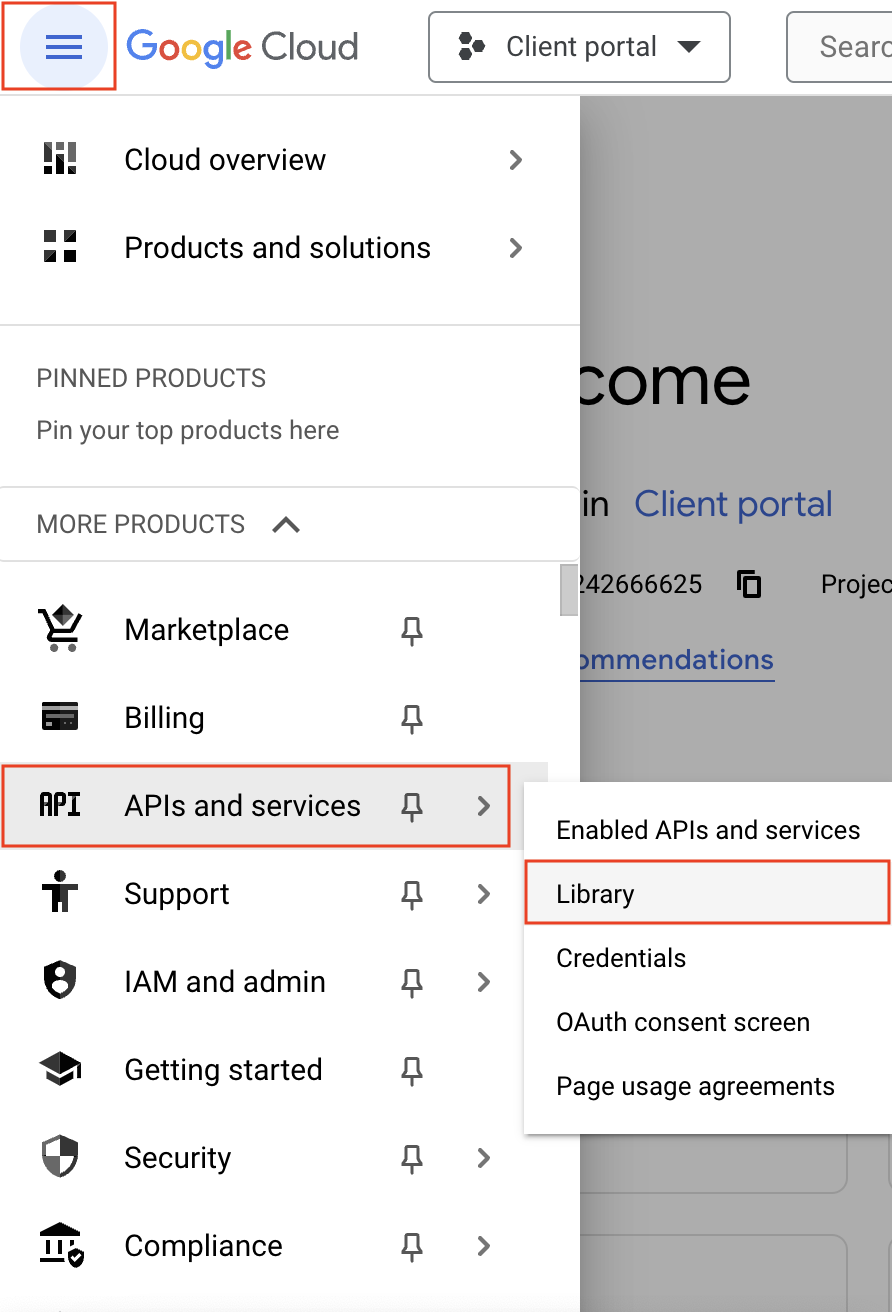
- Navigate to the hamburger menu on the left and click APIs and services -> Library.
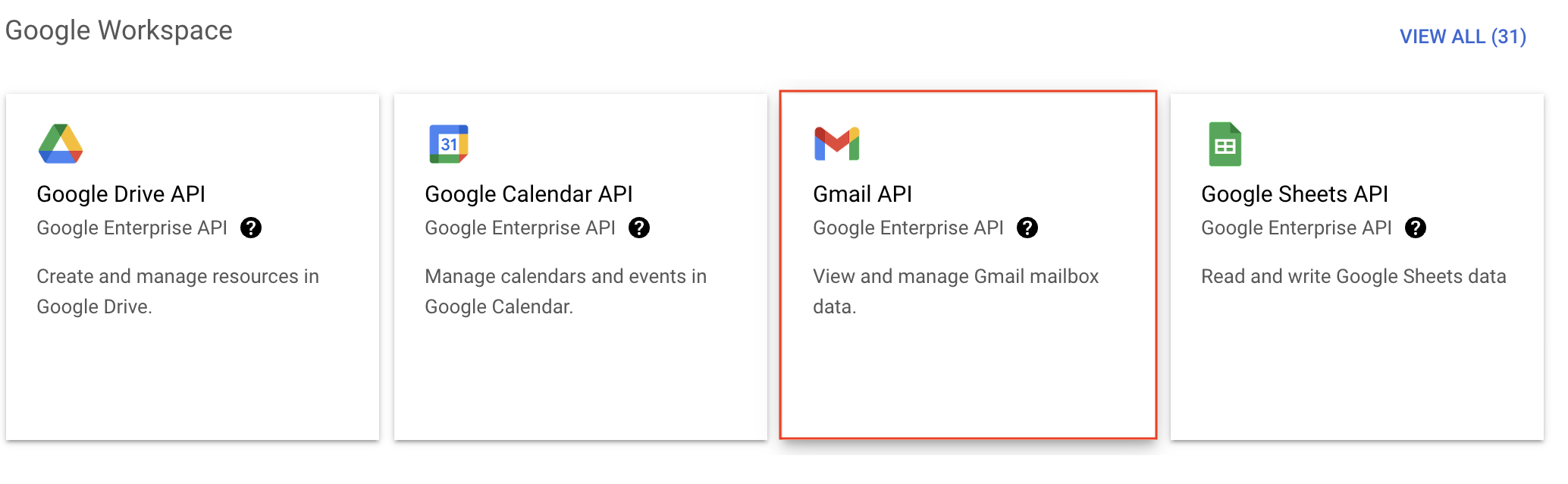
- You'll be taken to the API library page. Navigate to the Google Workspace section and click Gmail API.
- Next, click Enable on the Gmail API product details page.
- In order to use this API, you'll need to create credentials. Click CREATE CREDENTIALS.

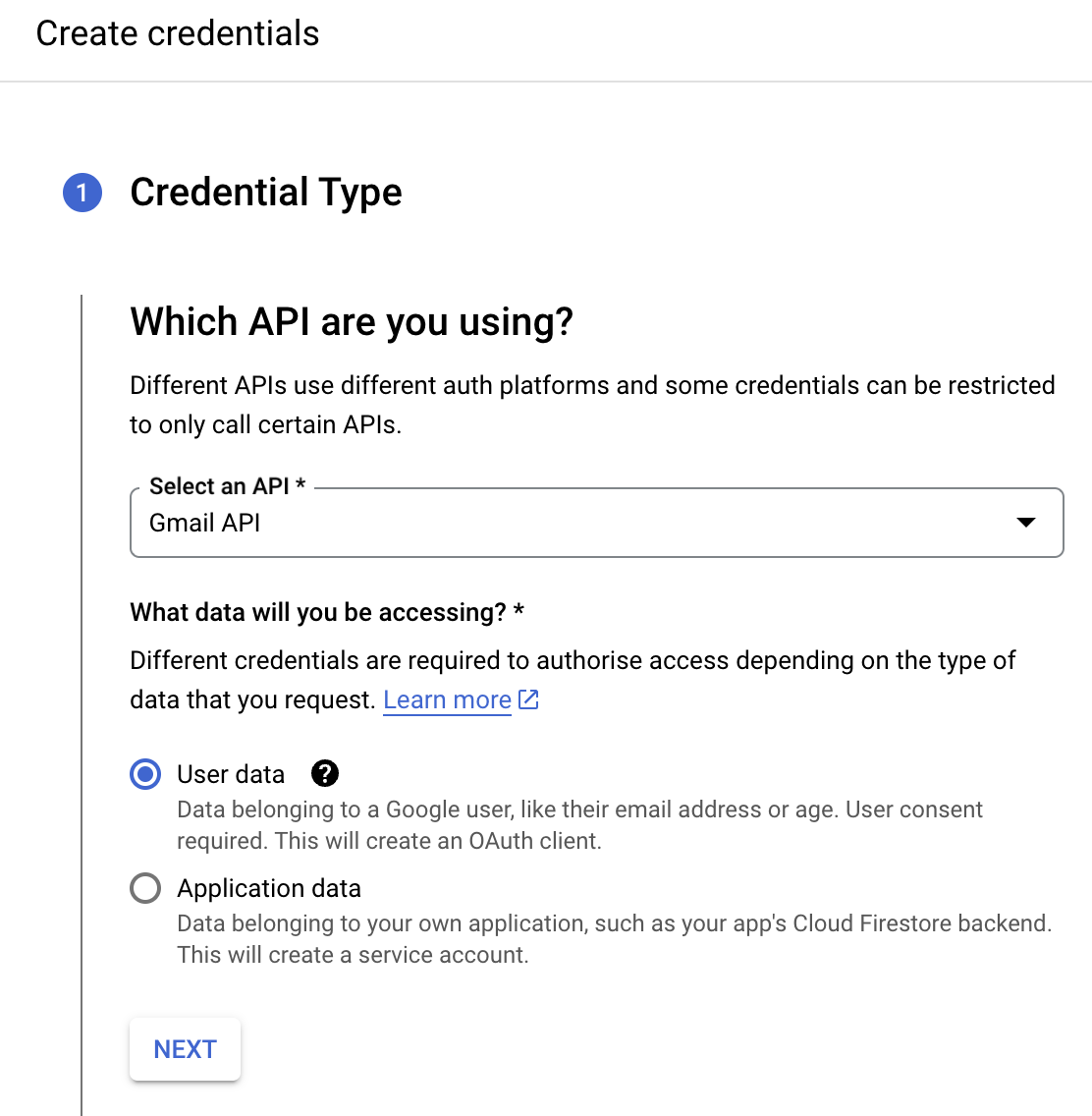
- On the Create credentials page, choose Gmail API in the Select an API dropdown and User Data under the What data will you be accessing? section. Click Next.
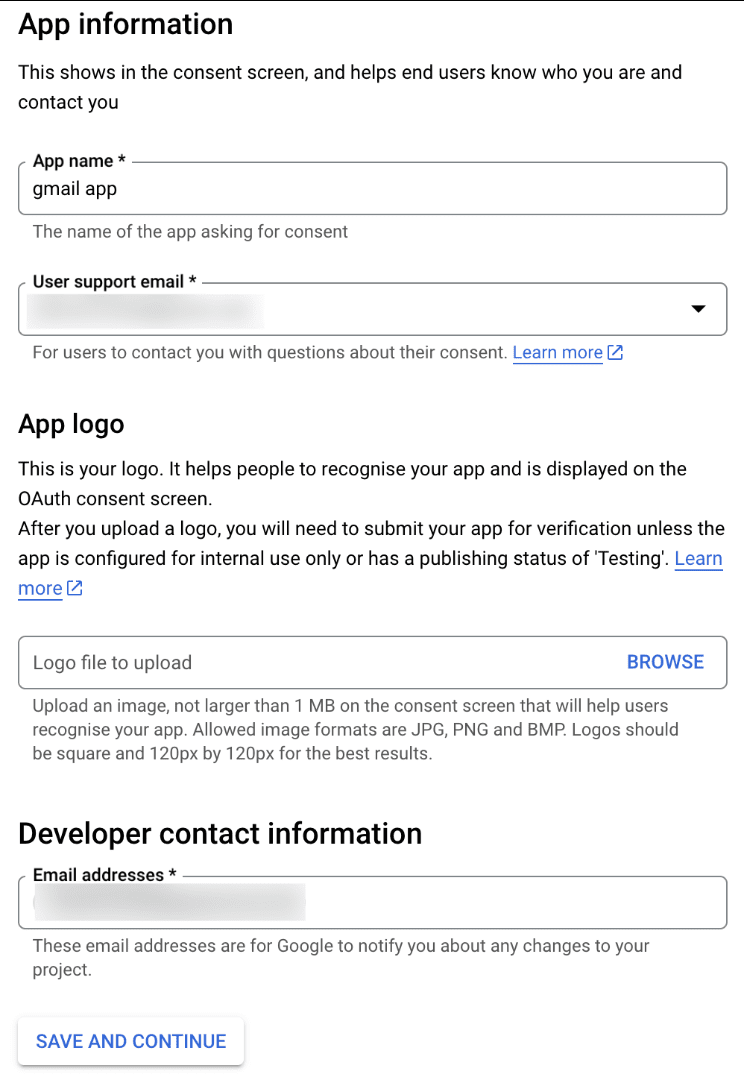
- Next, on the OAuth consent screen, enter the App name, User support email, and Developer contact email address. Then click Save and Continue.
- Next, under the Scopes section, click the ADD OR REMOVE SCOPES button.
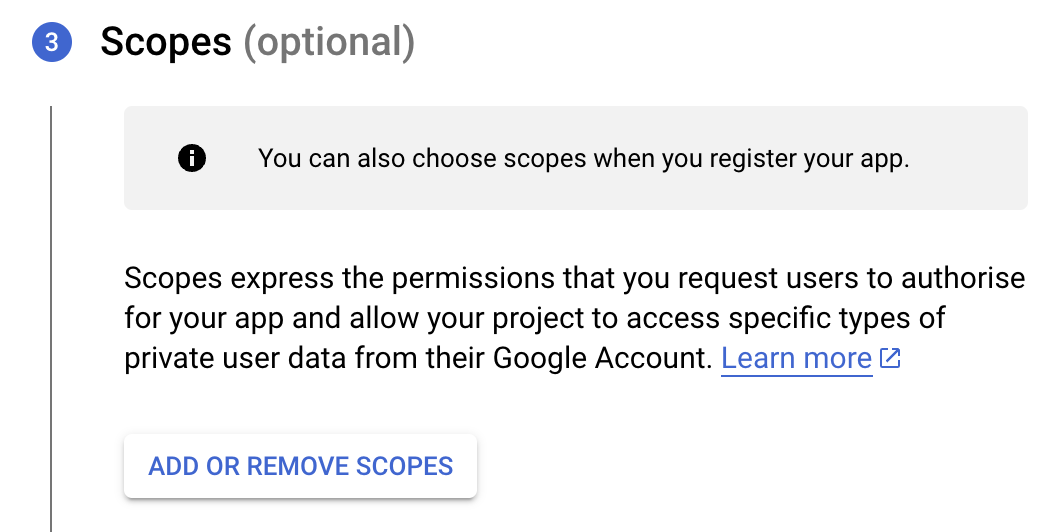
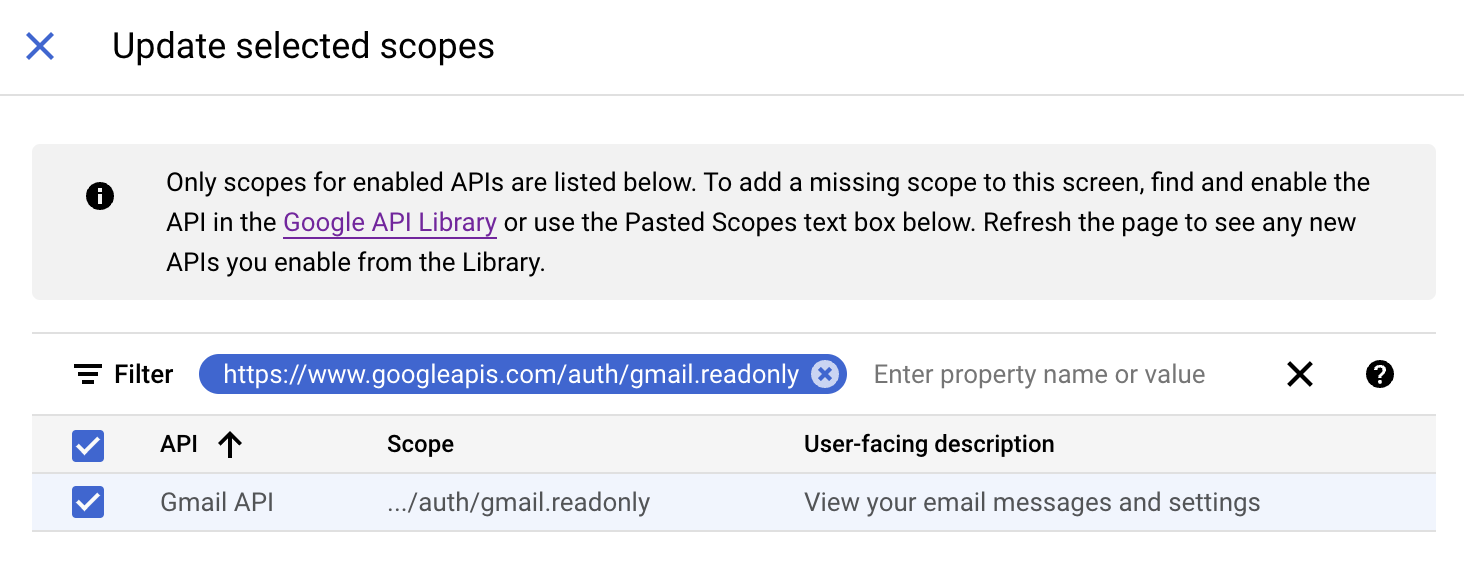
- In the Update selected scopes pane, search and select the gmail.readonly scope. Click Update, and then click Save and continue.
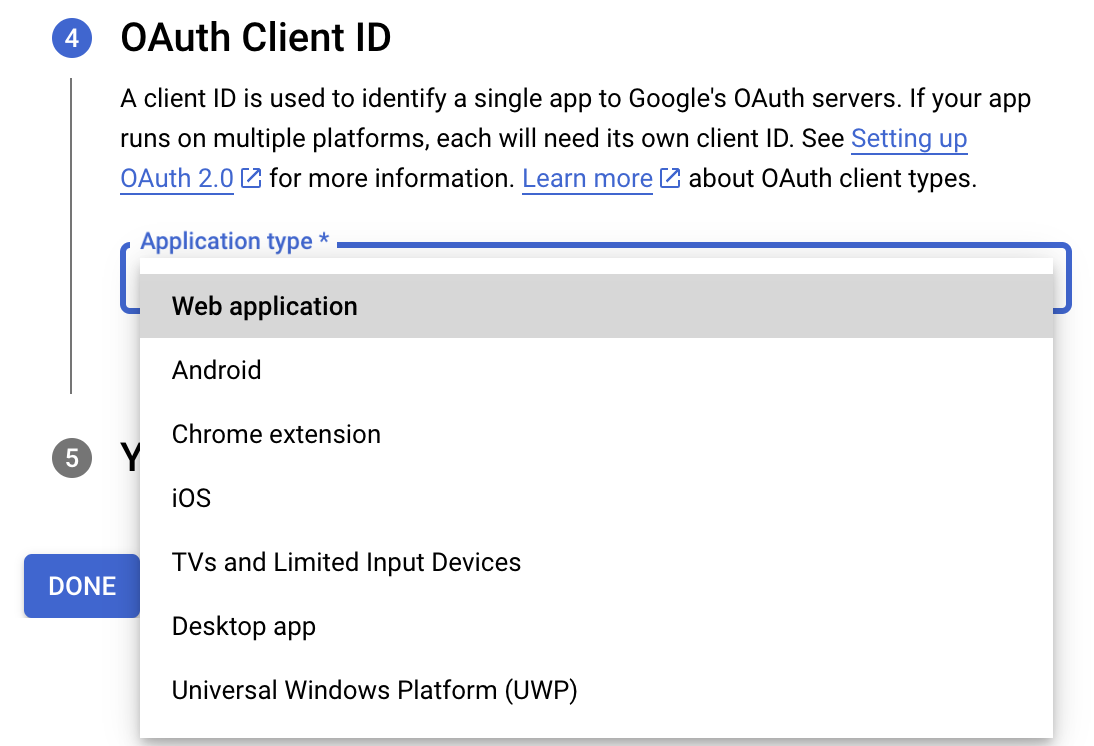
- Now, under the OAuth Client ID section, choose Web application in the Application type dropdown. Then name your app.
- Enter https://deluge.zoho.com/delugeauth/callback as the Authorized redirect URI.
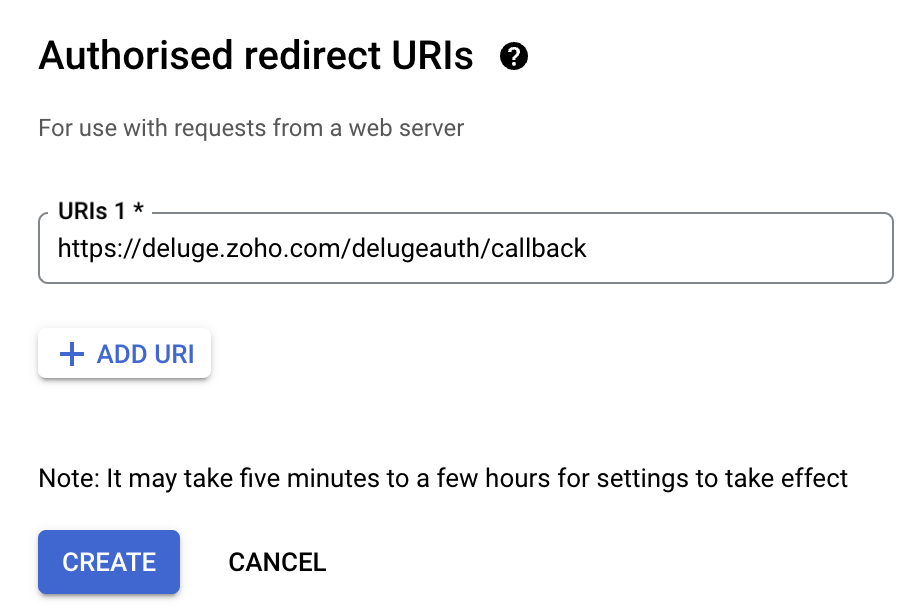
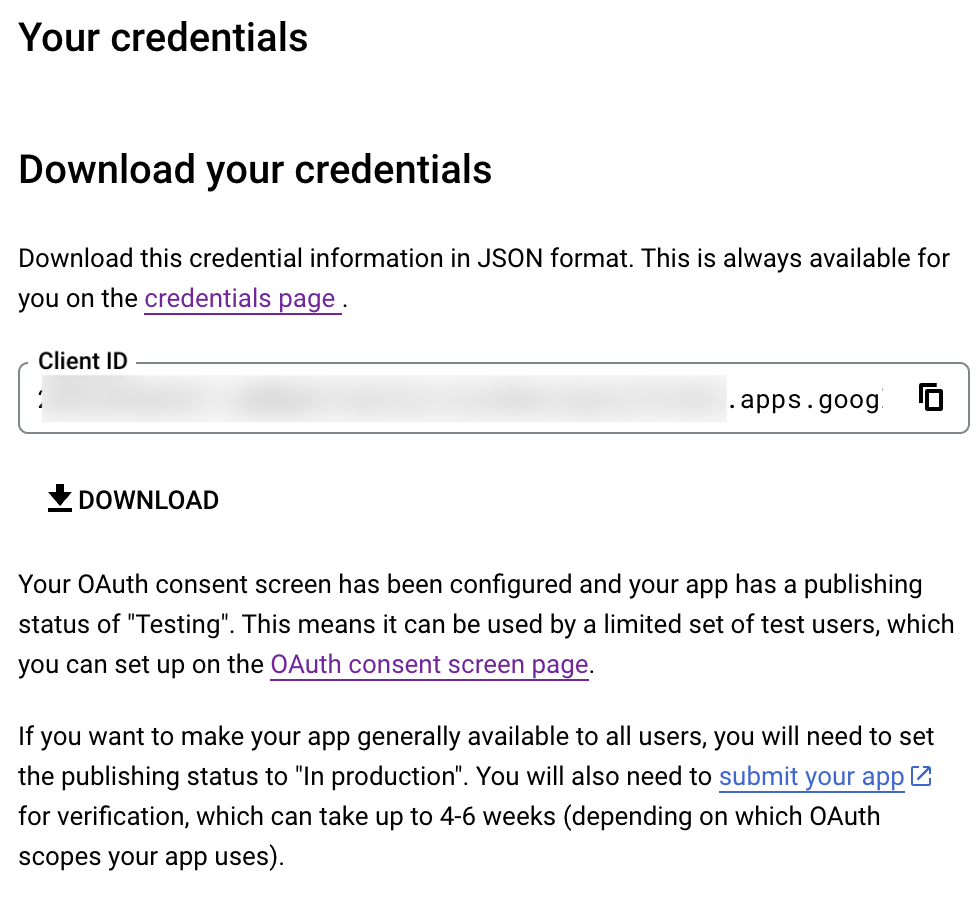
- Click Create and download your credentials. This Client ID and others will be required later, while creating a connection in Zoho CRM.
- Navigate to the OAuth consent screen and click Add users under Test users. Enter the user's email address and click Save.
Creating a custom connector for Gmail
- Now the action shifts to Zoho CRM. Navigate to crm.zoho.com -> Settings -> Connections.
- Choose Custom Services and click Create Service.
- On the Create Service screen, choose OAuth 2.0 as the Authentication type and Header as the Parameter.
- Enter the Client ID, Client Secret, and Authorize URL generated from Google as shown in step 12 above.
Tip: Having the Offline access type will allow your application to refresh tokens even when the user is not actively using the application. - Then enter https://oauth2.googleapis.com/token as the Access token URL and Refresh token URL.
- Specify the necessary scopes like read and create, etc. and then click Create Service.
- On the next page, click Create Connection. Give the connection name and choose the scopes. Then click Create and Connect.
- Finally, authenticate the connection on the Google accounts page. Your custom connection will be created, and the two services can be integrated!
Now that the connection between Zoho CRM and Gmail has been established, you can use the invokeURL task to access and modify data in Gmail using the different APIs.
Sample
You can use the below code in invokeURL task to get the latest emails from Gmail.

userId = "emailaddress@gmail.com";
get_gmail = invokeurl
[
url: "https://gmail.googleapis.com/gmail/v1/users/"+userId+"/messages"
type: GET
connection : "connectionname"
];
messageID = get_gmail.get("messages").get(0).get("id");
get_gmail_withID = invokeurl
[
url: "https://gmail.googleapis.com/gmail/v1/users/"+userId+"/messages/"+messageID
type: GET
connection : "connectionname"
];
Content_of_the_mail = get_gmail_withID.get("snippet");
info "Mail Content : " + Content_of_the_mail;
gmail_values = get_gmail_withID.get("payload").get("headers");
for each headers in gmail_values
{
if ( headers.get("name") == "Subject" )
{
info "Subject of the Mail : " + headers.get("value");
}
if ( headers.get("name") == "From" )
{
info "From Address : " + headers.get("value");
}
}
get_gmail = invokeurl
[
url: "https://gmail.googleapis.com/gmail/v1/users/"+userId+"/messages"
type: GET
connection : "connectionname"
];
messageID = get_gmail.get("messages").get(0).get("id");
get_gmail_withID = invokeurl
[
url: "https://gmail.googleapis.com/gmail/v1/users/"+userId+"/messages/"+messageID
type: GET
connection : "connectionname"
];
Content_of_the_mail = get_gmail_withID.get("snippet");
info "Mail Content : " + Content_of_the_mail;
gmail_values = get_gmail_withID.get("payload").get("headers");
for each headers in gmail_values
{
if ( headers.get("name") == "Subject" )
{
info "Subject of the Mail : " + headers.get("value");
}
if ( headers.get("name") == "From" )
{
info "From Address : " + headers.get("value");
}
}
References
----
And that's a wrap for today! We hope you found this post informative and start using custom connections to experience the full capabilities of Deluge and Zoho.
Kindly let us know if you have any questions, feedback, or suggestions in the comments, or write to us at support@zohodeluge.com!
Regards,
The Deluge Team
Topic Participants
Ashwin Vishal R
Kaushal
Anand M B
Recent Topics
5 small changes to Recruit that make a big difference
Sometimes, the biggest improvements aren’t new features, they’re small changes that make everyday actions feel smoother. Over the past few weeks, we’ve made a few such updates across Zoho Recruit. They’re subtle, but together, they remove friction fromProject Management Bulletin: March, 2026
We are passionate about equipping our users with efficient solutions that help them run their businesses successfully. Our collective efforts over the past 2 years have culminated in the launch of Sprints 3.0— built with reliable features, impactful integrations,New security enhancements for portal users: MFA and password management
Hello everyone, We are excited to announce three major security enhancements that are now available to portal users in Zoho CRM: Organization-wide multi-authentication for portal users - Admins can enforce multi-factor authentication across the entire[Free Webinar] Learning Table Series 2026 – Customer agreement & contract management using Zoho Creator
Hello everyone, We’re excited to announce the next session in Learning Table Series 2026, where we will continue with our purpose-driven approach—focusing on how Zoho Creator’s features help solve real-world business challenges. Each session in this seriesZoho Payroll's USA and KSA editions are available in Zoho One!
Greetings! We’re excited to share that Zoho Payroll, currently available only in India and the UAE, is now introducing the KSA (Kingdom of Saudi Arabia) edition and the USA (United States of America) edition, and these editions are now available in ZohoLooking for Guidance on Building a Zoho Website
I'm exploring the possibility of building a custom website with specific features using Zoho as an alternative platform. My goal is to create something similar to https://gtasandresapk.com , with the same kind of functionality and user experience. I'dMultilingual website feature
Would be a great feature to have. I saw that this feature was available for backstage. I think it could be done for zoho sites too.[Webinar] Modernize your sales engine with agentic analytics
Traditional sales decision-making methods aren't cut out for modern businesses. Leveraging AI in sales helps businesses actively respond to the changing dynamics of the market. Agentic AI is letting sales teams across industries make better decisionsBuilt-in Date Functions in Zoho Analytics Query Tables
I have a doubt about whether Zoho Analytics Query Tables provide built-in functions for start date, end date, and the current monthZoho Commerce in multiple languages
When will you be able to offer Zoho Commerce in more languages? We sell in multiple markets and want to be able to offer a local version of our webshop. What does the roadmap look like?Nimble enhancements to WhatsApp for Business integration in Zoho CRM: Enjoy context and clarity in business messaging
Dear Customers, We hope you're well! WhatsApp for business is a renowned business messaging platform that takes your business closer to your customers; it gives your business the power of personalized outreach. Using the WhatsApp for Business integrationConnectivity issues with Google Calendar and third-party integrations
Description: We are currently experiencing a critical failure with Zoho CRM third-party connections. This issue is heavily affecting our primary workflow. Symptoms: Sync Failure: Existing Zoho CRM to Google Calendar connections have been failing for approximatelyDynamic image in form works in the app but not on the customer portal.
img = frm_Fichas[ID == input.Nombre].Foto; imgno = Nophoto[ID2 = 1].Image; if(len(img) > 1) { img = img.replaceAll("/sharedBy/appLinkName/",zoho.appuri); img = img.replaceAll("viewLinkName","Fichas_de_personal_public"); img = img.replaceAll("fieldName","Foto");Incorrect Functioning of Time Logs API (Version 3)
We need to fetch the list of time logs for each task for our company internal usage. We are trying to achieve it by using the next endpoint: https://projects.zoho.com/api-docs#bulk-time-logs#get-all-project-time-logs Firstly, in the documentation theHow can I export all Deluge code across the application?
I’m working on a application with multiple forms, reports, and HTML views, where Deluge scripts are used across workflows, field actions, and custom functions. Is there a way to export all Deluge scripts into a single file for easier search?First Name in Mail
While sending a mail/message to the user, I want only the first name to be displayed—for example: “Hi John” instead of the full name using "Hi ${Name_Field}"Can you import projects into Zoho Projects yet?
I see some very old posts asking about importing project records into Zoho Projects. But I can't find anything up to date about the topic. Has this functionality been added? Importing tasks is helpful. But we do have a project where importing projectsDeleting unwanted ticket replies
Hello, In a Zoho Desk Ticket thread, sometimes one of the recipients has auto-reply activated. This creates a new message in the Ticket thread that not only pollutes the thread, but most importantly cannot be replied properly because usually auto-reply e-mails don't do "reply all", so the other recipients are not included. I want to delete such a message in the Ticket thread. I searched the help of Zoho Desk, but only found a way to mark as Spam (https://help.zoho.com/portal/kb/articles/marking-support-tickets-as-spam)Issue updating Multi-Select Picklist via API (saves as string instead of checking boxes)
Hi everyone, I'm hoping someone can point out what I'm doing wrong here. I'm stuck trying to update a custom multi-select field via the Desk API and it's driving me a bit crazy. I have a multi-select picklist called "Buy years" with options like 2023,Page variable not receiving URL parameter in Creator 6 HTML snippet Deluge — Canada DC
I have a Creator 6 app on Canada DC. I'm trying to pass a URL parameter to an HTML snippet page via Deluge but the variable always returns empty. Setup: Page: MYC_Meeting_Tool Page variable declared: submission_id, type Text Page Script tab contains:Zoho Campaigns API endpoint for contact details
there is some REST API support for Zoho Campaigns, however, I am not able to find an endpoint for "get contact details". in particular, I'd like to access contact's subscription status and also their topic. ideally there is all profile available includingMigrating Documentation from Notion to Zoho Help Centre
Hi there, We have a large chunk of documentation that currently sits on Notion. However, we are eager to move this into our Zoho Help Centre/Knowledge Base. What is the most efficient way of achieving this?Can't add attachment on email template
The attachment does show up. This is my template. Hi ${Cases.Assigned Programmers}, Please be reminded about the following task that has been assigned to you. Subject : ${Cases.Subject} Description : ${Cases.Description} Ticket # : ${Cases.Request Id}Custom CSS for Zoho CRM Team Bookings embeded widget
Hello, we are adding Zoho CRM Team Bookings (crm.zoho.com) in our public website. We know that we can change Theme Color, Font Color and Background Color: Zoho CRM Booking Styling But is it possible to change other CSS attributes e.g. Font Family, likeStandard practice rerun updated deluge function over existing recordes
Hi folks, we have a function which is triggered via webhook from a third-party solution which then calls another api with a contact-id and gets a json payload back and then parses that data to custom fields in our CRM to the record id. As requirementsSpecifying time increments on a Date/Time field
Hi all, Im using a Date/Time field in my CRM module. At the moment the increments are 30 minutes. How can I change these to be 15 minutes? ThanksSort by Project Name?
How the heck do you sort by project name in the task list views??? Seems like this should be a no-brainer?Maximum limit of bank accounts
I'm currently setting up Zoho Books in order to migrate at the start of our next financial year (April) and while adding bank accounts I've tried to add a second account from the same bank and receive an error about the maximum limit of bank accounts.Zoho Sprints iOS and Android app update: Global view. Screen capture control, file encryption, tags enhancement(iOS)
Hello everyone! We are excited to introduce new features in the latest version(v2.1) of the Zoho Sprints iOS app update. Let’s take a quick look at what’s new. 1. Global view Global view brings all your project items into one centralised space. You canCreating Restaurant Inventory Management on Zoho
Hi, We run a small cloud kitchen and are interested to use Zoho for Inventory and Composite Item tracking for our food served and supplied procured to make food items. Our model is basically like subway where the customer can choose breads, veggies,Price Managment
I have been in discussions with Zoho for some time and not getting what I need. Maybe someone can help explain the logic behind this for me as I fail to understand. When creating an item, you input a sales rate and purchase rate. These rates are justHow do I create an update to the Cost Price from landed costs?
Hi fellow Zoho Inventory battlers, I am new to Zoho inventory and was completely baffled to find that the cost price of products does not update when a new purchase order is received. The cost price is just made up numbers I start with when the productonly 100 entry download entries in Zoho Form
Is there a way to download more than 100 entries in a form at a time? It is capped (unless I am not doing the export correctly). This is very frustrating as I want to make sure I don't miss a record when downloading data. Thanks!Zoho FSM Premium Edition is Here
As your field service operations grow, so do the complexities — managing large distributed teams, keeping sensitive data secure, generating the right reports at the right time, and ensuring every technician dispatched is the right fit for the job. TheSeeking a WhatsApp Business App (not API) Zoho CRM integration
We have a business need to integrated WhatsApp Business App (not API) into Zoho CRM to centrally manage communications between our Sales team and Leads & Contact. Is there a reputable integration available for this scenario of ours? Core features we wouldAuto-sync field of lookup value
This feature has been requested many times in the discussion Field of Lookup Announcement and this post aims to track it separately. At the moment the value of a 'field of lookup' is a snapshot but once the parent lookup field is updated the values diverge.How are other Books users integrating crypto and digital assets into Books?
If my company owns some digital assets I would want those to exist in Books as assets, and also be able to change the value as needed when generating reports. My company would also be receiving payment in cryptocurrencies and may sell at the time of paymentLets Talk Recruit: Key takeaways from our India community meetups
Welcome back to Let's Talk Recruit — the series where we bring you real stories, product insights, and community highlights from the world of recruitment. Our last post covered how Resume Harvester can take the follow-up out of hiring. This edition isUnable to create new finance account in Zoho Books Android app due to missing account number field.
Free plan I have enabled a setting via the website requiring unique account codes to be specified for all accounts. When using the android app, go to expenses, new expense, select account, new account. Promoted to enter the Account name and description.How to Fetch data from Sales Order and Insert into Purchase Order with Deluge
Hello, I am wanting to write a Deluge script that would take the shipping address on a Sales Order and upon conversion to a Sales Order automatically insert it into that corresponding PO. I am new to Deluge but understand that it has great capabilities.Next Page