Solution of the Week: Financial Reports with Impactful Visuals
Finance reporting is a critical part of understanding an organization’s financial health. With Zoho Analytics, you can easily create dynamic reports such as Balance Sheets, Budget Statements, and Profit and Loss Statements.
Now, with the release of Zoho Analytics 6.0, the platform offers even more advanced tools to optimize the financial report view. While Zoho Analytics has always enabled comprehensive financial reporting (through its integration connectors for Zoho Books, QuickBooks, Xero, Sage), the latest version enhances this with powerful visual features like Data Bars, which provide clearer insights into performance trends.
This document outlines how these reports can be generated using simple drag-and-drop functionality and customizable features in Zoho Analytics.
Creating a Balance Sheet Using Finance Data
Generating a Balance Sheet in pivot using Zoho Analytics allows you to visualize your organization’s financial position in a comprehensive and structured way.
- Drag and Drop the Data: Start by selecting the Balance sheet base type, Account group, Balance Sheet Account Type, and Balance Sheet Account Name from the Accounts table and drop them into the Rows shelf. Drag and drop the Credit Amount, Debit Amount, and Balance Sheet Total from the Accrual Transactions table into the Data shelf.
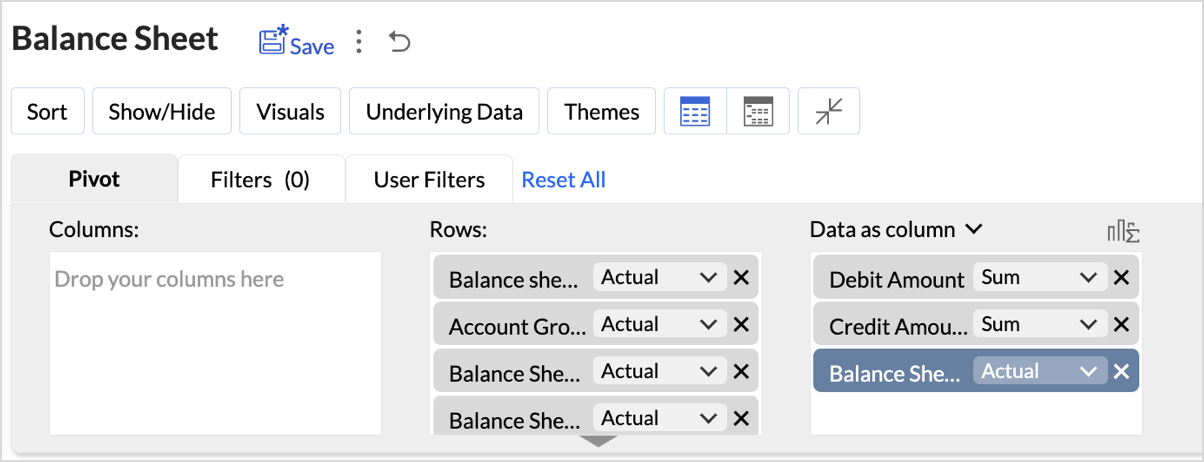
- Layout Adjustments:
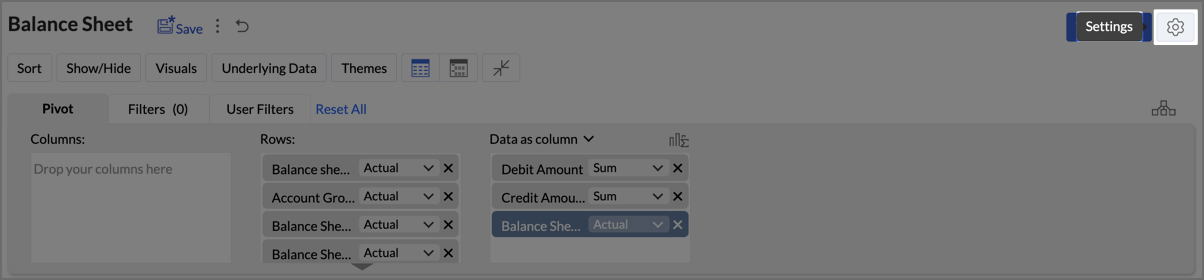
- Navigate to Settings > Layout.
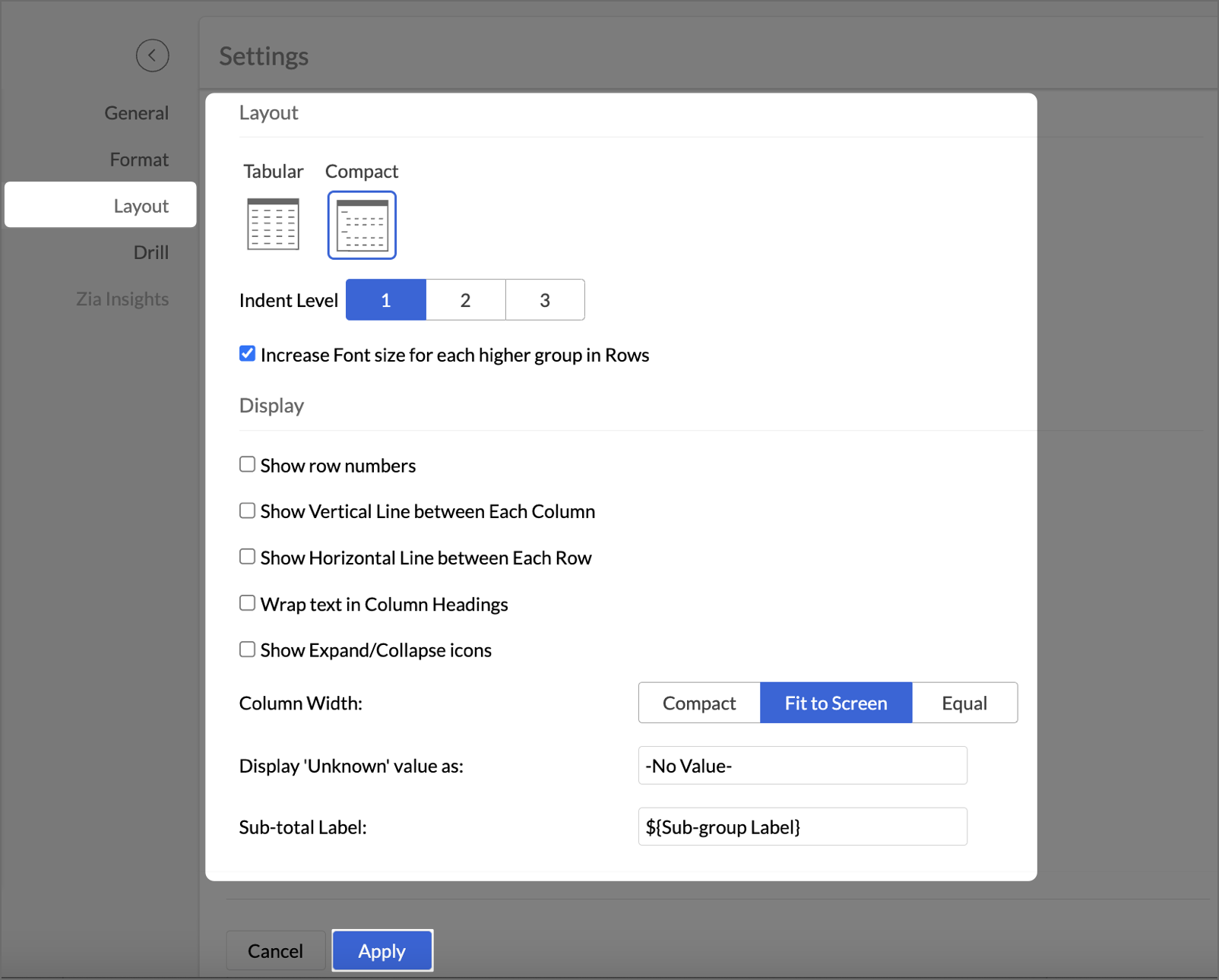
- Change the Layout to Compact.
- Check Increase Font Size for each higher group in Rows.
- Uncheck Show row numbers.
- Uncheck Show vertical lines between them.
- Set Column Width to Fit to Screen.
-
After making layout adjustments, click Apply to finalize the formatting.
-
Go to Visuals and select Data Bars With Data to improve the presentation of financial data, making it easier to interpret key insights visually.
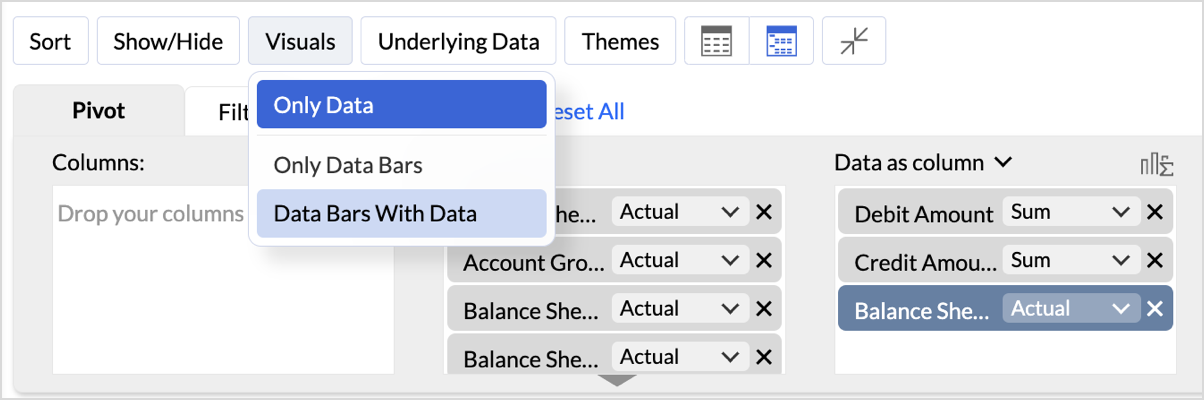
By following these steps, you will generate a clear and structured Balance Sheet that highlights your organization's assets, liabilities, and equity.
Key Features of the Balance Sheet Report
- Increased Font Size for Key Categories:
Emphasizes important financial categories like Assets, Equity, and Liabilities, improving readability and focus. - Compact Layout:
Ensures a clear, organized display of financial data, enabling efficient consumption of the report. - Line Removal for Clean Aesthetics:
Removal of vertical and horizontal lines results in a cleaner visual presentation, improving the user experience. - Data Bars for Quick Insights:
Visual data bars provide a quick snapshot of financial status, allowing users to identify key trends at a glance. - Timeline Filter for Flexibility:
Filters allow users to view financial data across different periods, making it easier to analyze financial trends over time.
In Zoho Analytics, utilizing the Timeline Filter allows users to transform static financial data into a time-based, dynamic report. The formulas used in creating this filter enable detailed insights into financial performance over a selected period. Below, we explain the key aggregate formulas and how they enable users to achieve greater flexibility and customization, going beyond the typical app potential.
-
Opening Balance Formulasum_if("Accrual Transactions"."Transaction Date" < ${system.timeline.date.from},if("Accounts"."Account Base Type" in ('Asset') OR ("Accounts"."Account Base Type" in ('Equity') and "Accounts"."Account Name" in ('Drawings')),"Accrual Transactions"."Debit - Credit","Accrual Transactions"."Credit - Debit"),0)This formula calculates the Opening Balance for a selected period by summing transactions that occurred before the specified date (timeline.date.from).This approach allows users to view the Opening Balance as of a given date, making it highly flexible for periods that differ across user's datasets.
 if("Accounts"."Account Base Type" in ('Asset') OR ("Accounts"."Account Base Type" in ('Equity') and "Accounts"."Account Name" in ('Drawings')),"Accrual Transactions"."Debit - Credit","Accrual Transactions"."Credit - Debit")This part of the formula can be customized based on the unique financial structure you follow.
 -
Period Balance Formulasum_if("Accrual Transactions"."Transaction Date" > ${system.timeline.date.from} and "Accrual Transactions"."Transaction Date" <= ${system.timeline.date.to},if("Accounts"."Account Base Type" in ('Asset') OR ("Accounts"."Account Base Type" in ('Equity') and "Accounts"."Account Name" in ('Drawings')),"Accrual Transactions"."Debit - Credit","Accrual Transactions"."Credit - Debit"),0)The Period Balance formula calculates the net balance of transactions within a specific time range, defined by the timeline filter. The formula sums transactions between the start date (timeline.date.from) and the end date (timeline.date.to). This provides users with a snapshot of their financial activity for any custom date range they select.

-
Closing Balancesum_if("Accrual Transactions"."Transaction Date" <= ${system.timeline.date.to},if("Accounts"."Account Base Type" in ('Asset') OR ("Accounts"."Account Base Type" in ('Equity') and "Accounts"."Account Name" in ('Drawings')),"Accrual Transactions"."Debit - Credit","Accrual Transactions"."Credit - Debit"),0)The Closing Balance formula calculates the final balance as of a selected date (timeline.date.to). It works by summing all transactions up until the specified date, following the same account type distinctions used in the previous formulas.This formula is essential for determining the financial standing of an organization at the end of a reporting period, such as the end of a quarter or year.

Follow the below steps to create opening and closing balances with timeline filters:
- Drag and drop the created aggregate formulas into the data shelf.
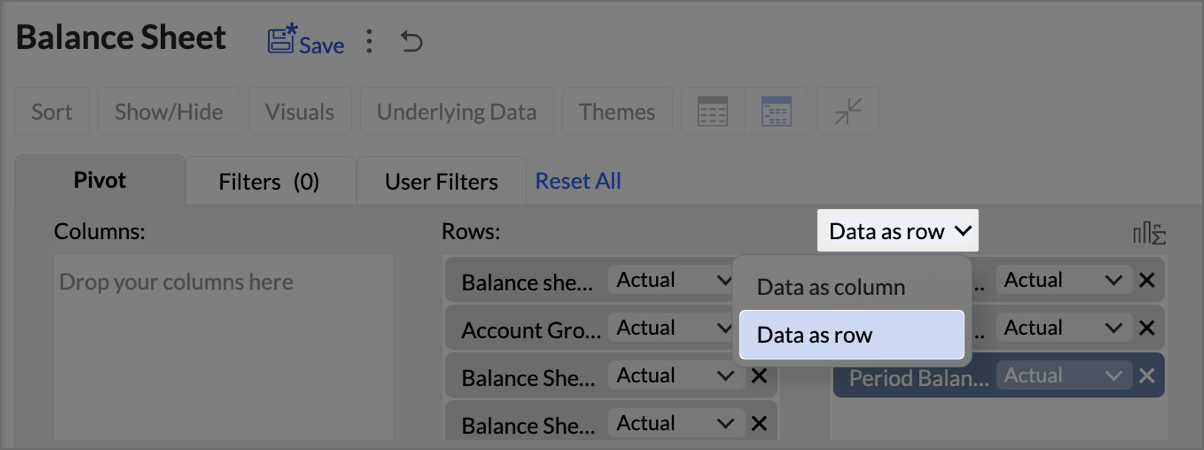
- Select Data as row from the drop-down.
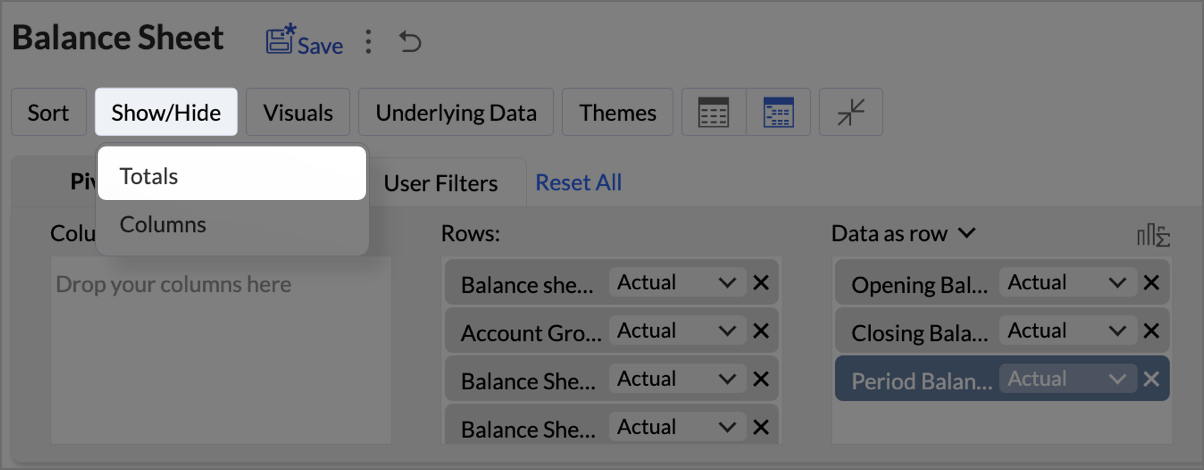
- Click on Show/Hide, then select Totals.
-
Click on Columns drop-down, then set the Opening Balance as Top.

- Navigate to Settings > Layout and set Column Width as Equal. Provide Width value as required in px.
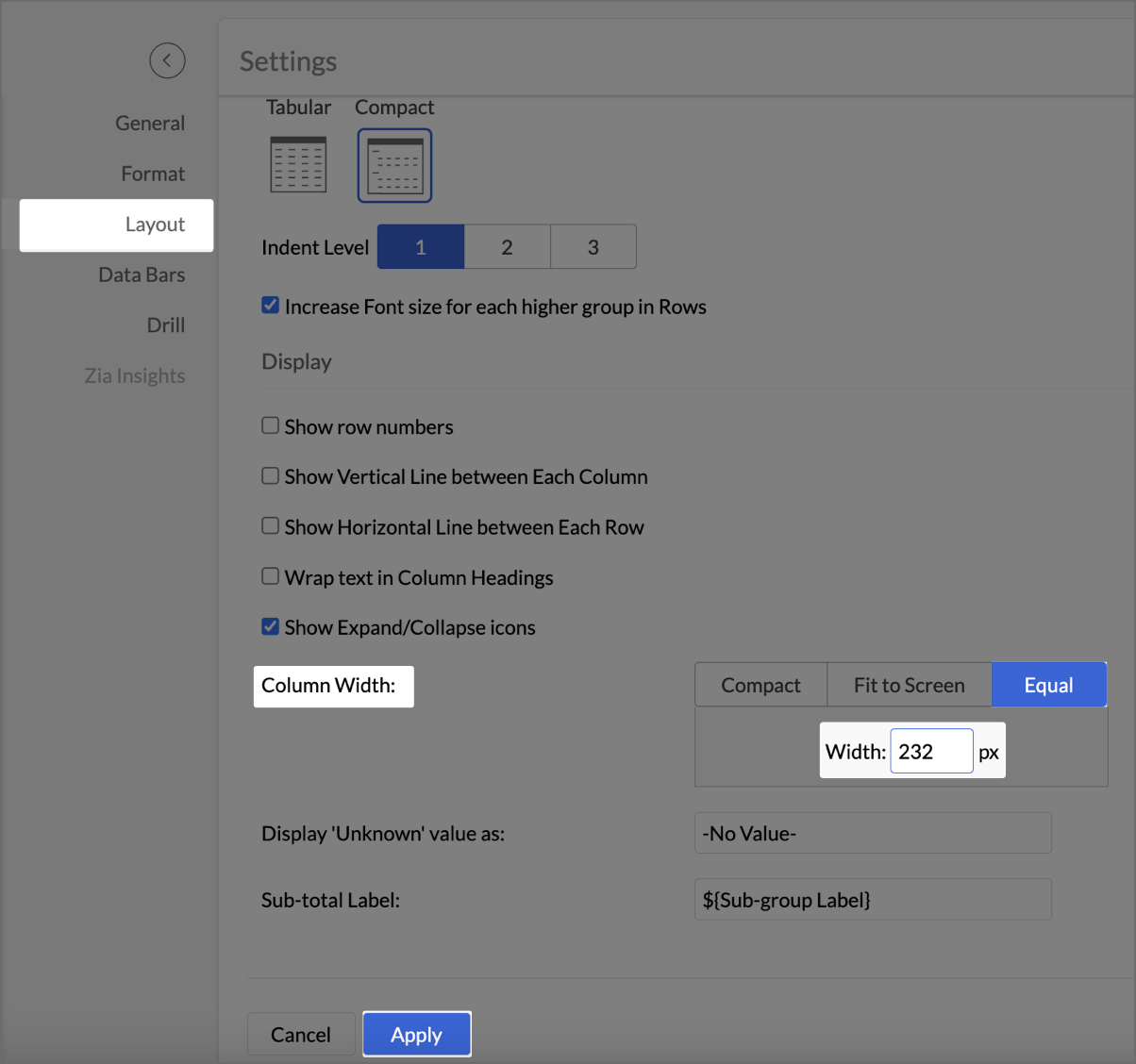
- Click Apply.
- Check Include Timeline Filter.
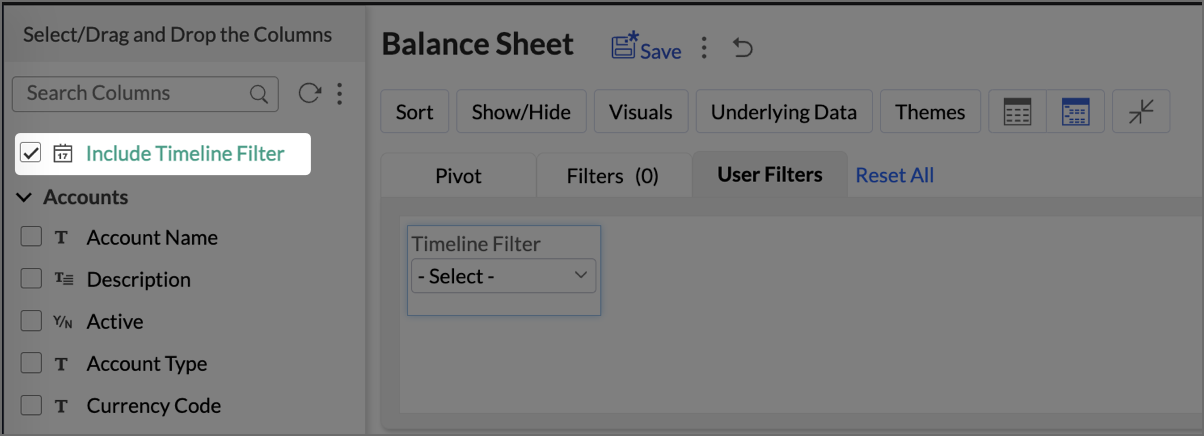
The Timeline Filter is now enabled, and users can apply time-based filters to their data.
By utilizing these timeline-based formulas, Zoho Analytics allows users to move beyond static, historical reporting and into dynamic financial analysis. With the Timeline Filter, users can interact with their data in a more flexible way, selecting custom periods to analyze financial trends over time.
Click here to access the sample workspace.
Creating a Budget Statement
A Budget Statement helps compare actual financial performance against projected budgets, identifying variances and areas of concern. This visually enhanced report is designed to help businesses quickly assess deviations between expected and real expenditures, allowing for better budget management and financial decision-making.
-
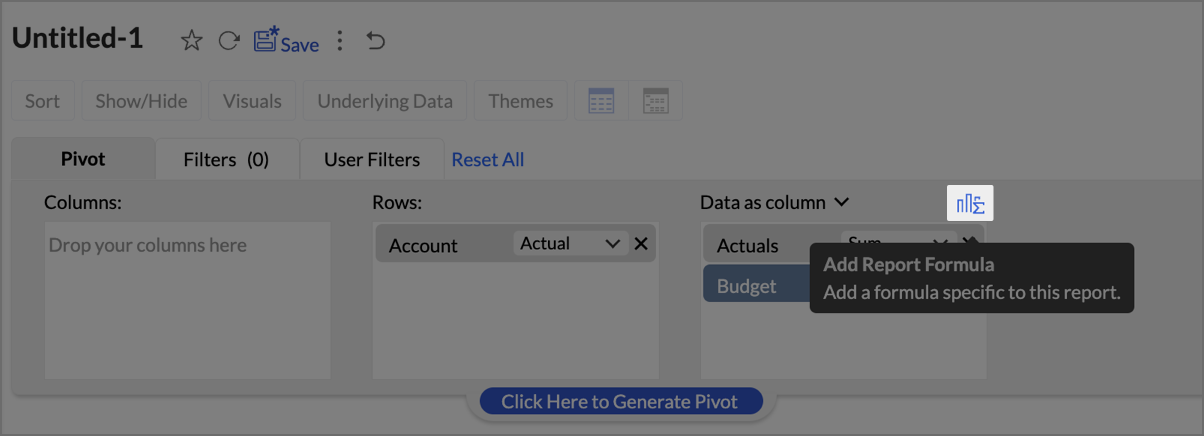
Drag and drop Account into the Row shelf, and Actuals and Budget into the Data shelf from the Budget vs Actual table.

- Add Report Formula:
- Click Add Report Formula to create custom calculations.
- Name the formula column appropriately (e.g., “Deviation”).
- Set Data Type as Decimal Number
- Create a formula to calculate the difference between actuals and budget as shown in the image.
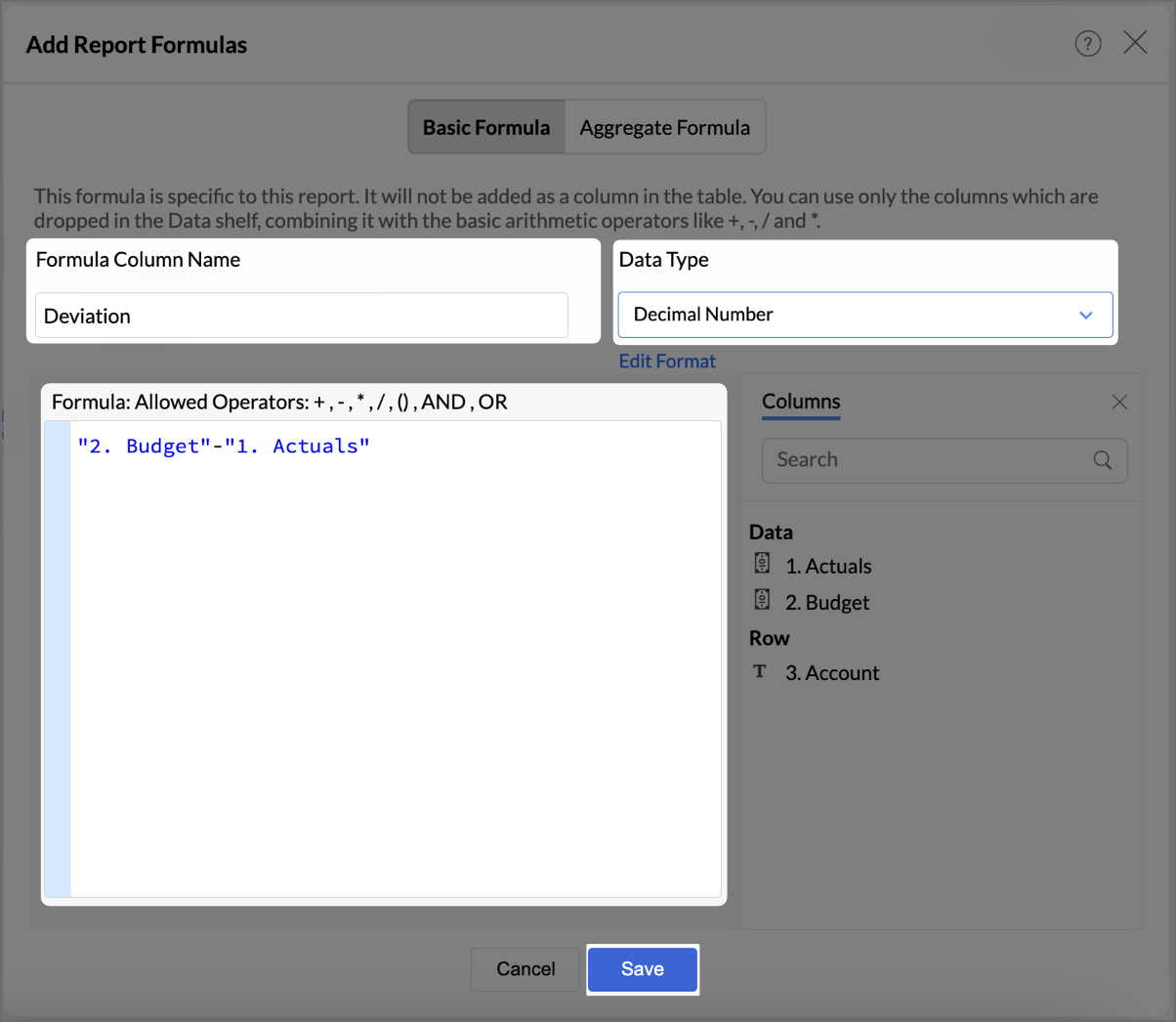
- Click Save.
- By following the same steps mentioned above, create one more formula to calculate the percentage difference between actuals and budget as shown in the image.
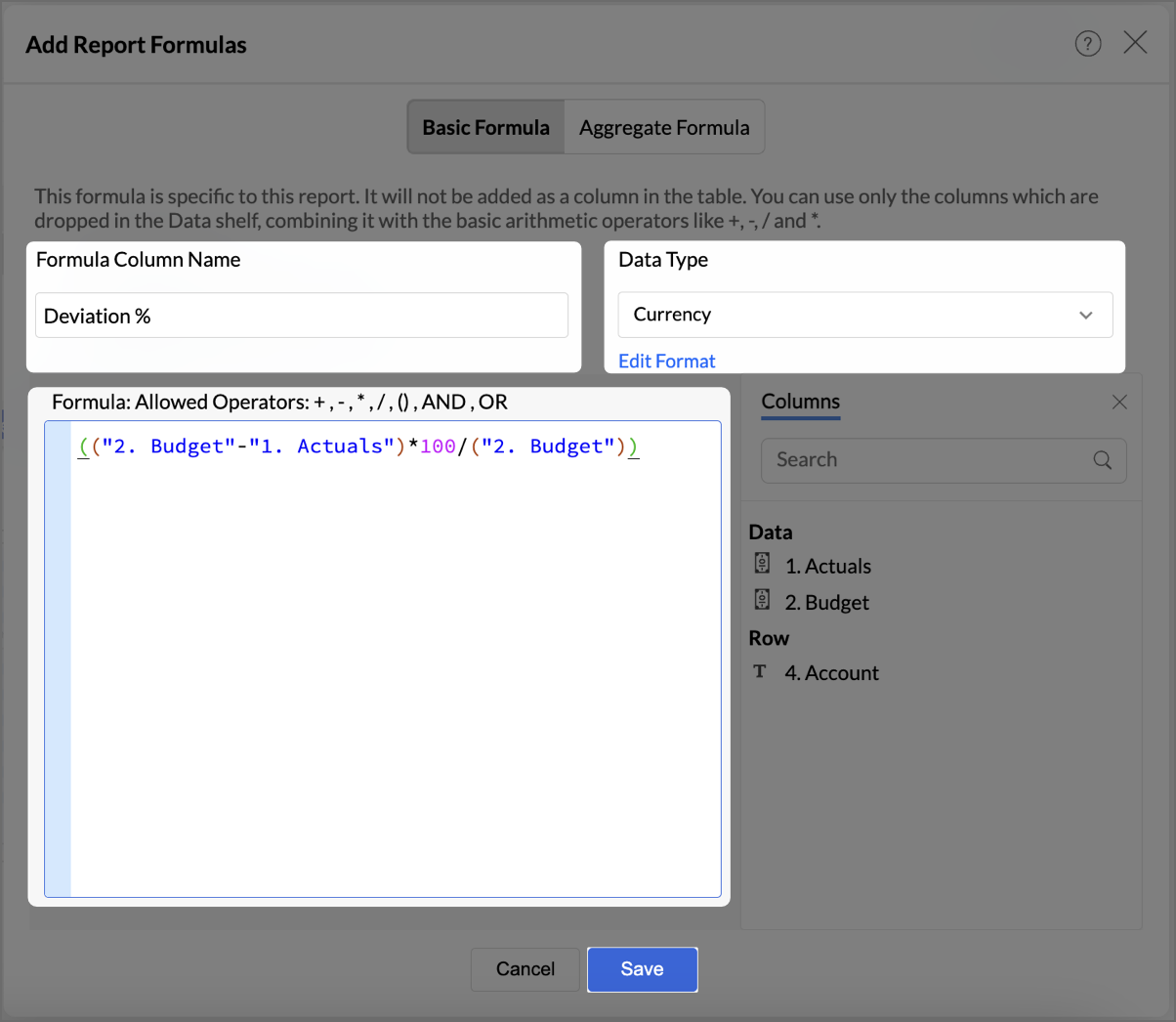
- Click Save.
The created formulas will appear in your data shelf and columns, reflecting in the report.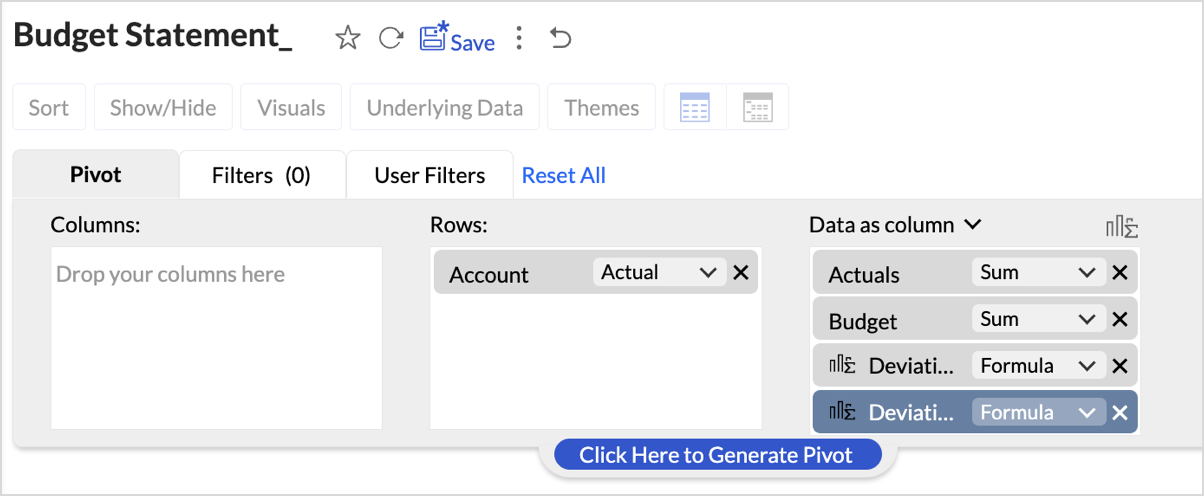
- Go to Visuals and choose Data Bars With Data for a more intuitive understanding of budget performance.
By following these steps, you will have a detailed Budget Statement that compares actual spending to the budget, highlighting deviations.
Report Structure and Visuals
- Account Breakdown
The report is organized by account categories, such as Bank Fees, Cost of Goods Sold, and more, showing both Budgeted and Actual amounts for each category. - Key Columns
The report includes the following key columns: - Total Budget - Displays the budget allocated for each account.
- Total Actuals - Shows the actual amount spent or earned for each account.
- Variance (Deviation) - Represents the difference between the budgeted amount and the actuals.
- Variance Percentage (Deviation %) - This column shows the percentage difference between the budgeted and actual amounts, highlighting under- or over-expenditure.
- Data Bars for Clarity
- Green Bars indicate favorable performance (within or under budget).
- Red Bars highlight overspending or budget deviations (e.g., Office Expenses or Rent).
Key Features of the Budget Statement Report
- Visual Representation of Deviations
Data bars visually indicate how spending aligns or deviates from the budget, enabling quick identification of problem areas. - Concise Overview of Financial Performance
The report provides a clear overview of actual versus budgeted performance, allowing decision-makers to assess financial health efficiently. - Enhanced Usability with Percent Deviations
Percentage-based deviation columns allow users to understand the scale of over- or under-performance relative to the budget, making it easy to identify areas that are significantly off track.
Click here to access the sample workspace.
Creating Profit and Loss report
A Profit and Loss (P&L) report in Zoho Analytics helps businesses assess their revenue, expenses, and profitability over a specific period. By following these steps, you can create a detailed and visually engaging P&L report.
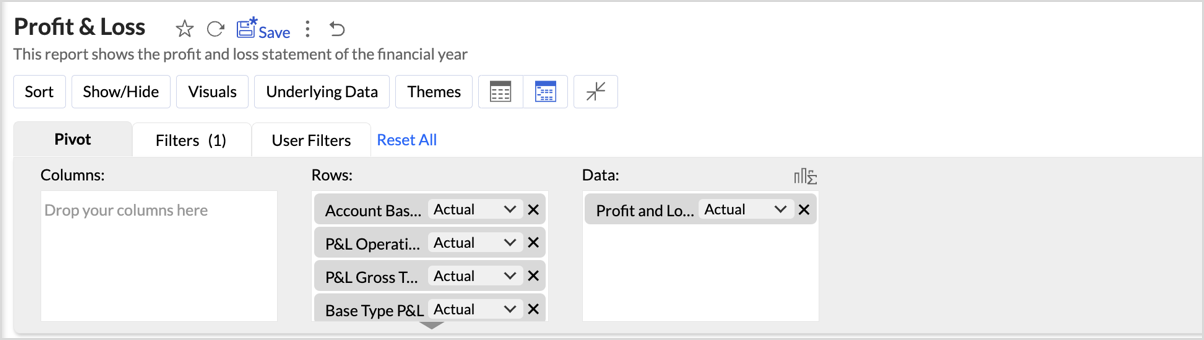
- Drag and drop Account base type, P&L Operating Profit Type, P&L Gross Type, Base type P&L, and Account Name into the Columns shelf from the Accounts table and Profit and Loss Balance into the Rows from Data shelf from the Accrual Transactions table.
- Layout Adjustments:
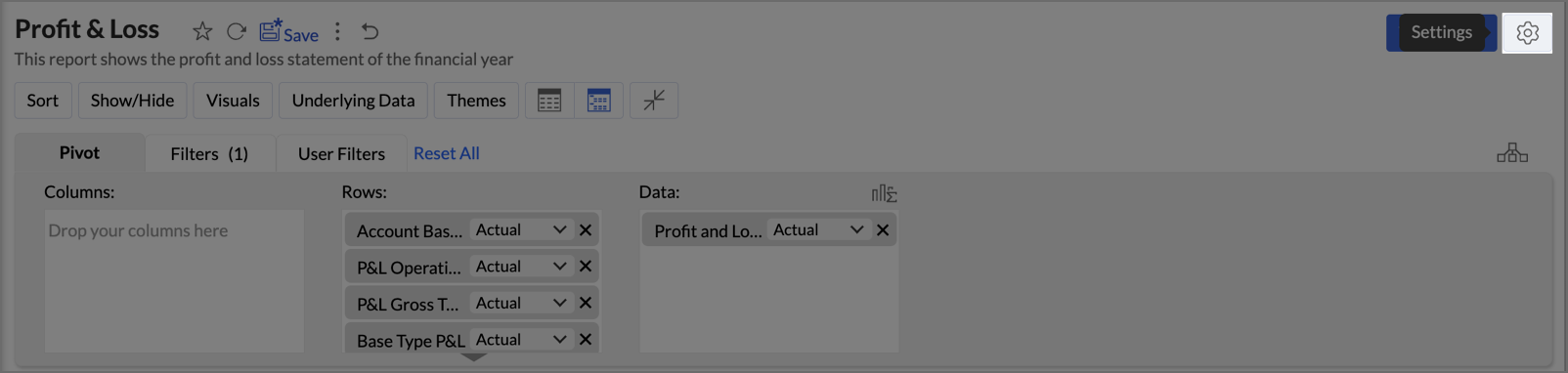
- Navigate to Settings > Layout.
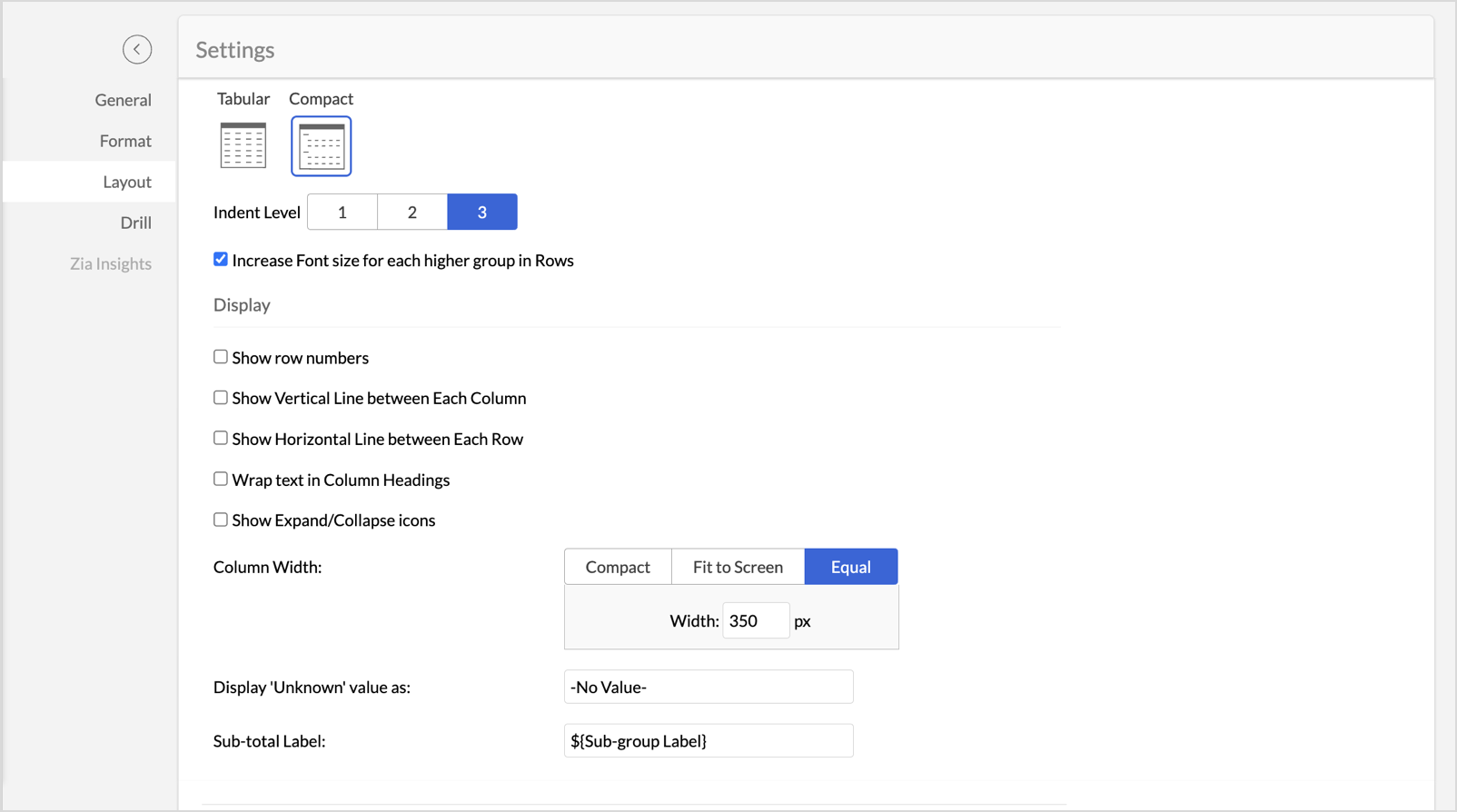
- Change the layout to Compact.
- Set Indent Level to 3.
- Check Increase Font Size for each higher group in Rows to make key categories more visible.
- Uncheck Show row numbers for a cleaner report.
- Uncheck Show Vertical Line between Each Column to streamline the visual presentation.
- Set Column Width to Equal and specify the width as required in px.
- Once the layout adjustments are made, click Apply to lock in the formatting.
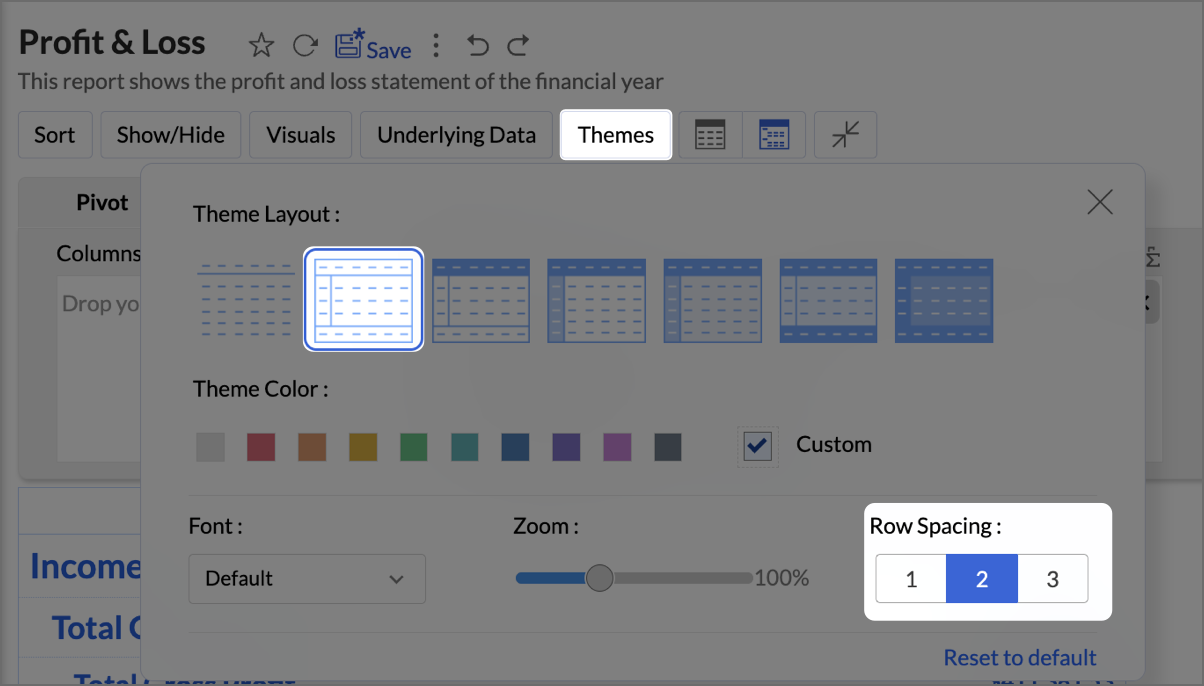
- Click Themes, and select the second theme. Set Row Spacing as 2.
- Navigate to Visuals and select Data Bars With Data to provide a quick and clear visual representation.
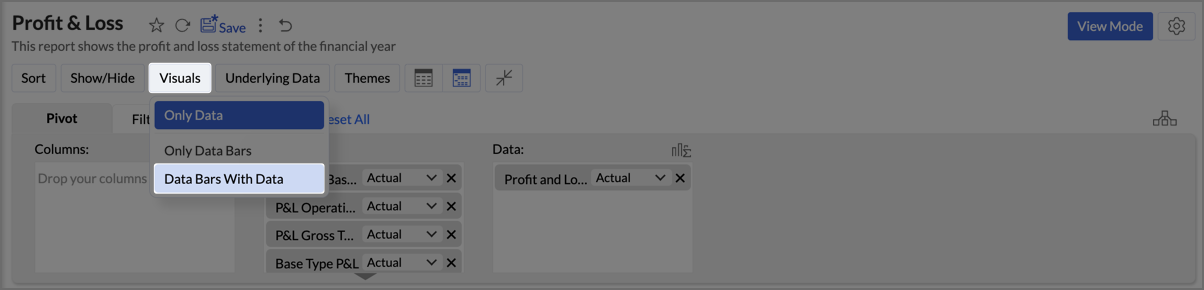
By following the above steps, you will create a Profit and Loss report which provides a concise and structured view of your business’s financial performance, making it easy to track profitability over time and identify key financial trends.
Click here to access the sample workspace.
Zoho Analytics provides an intuitive and customizable platform for generating comprehensive Balance Sheets, Budget Statements, and Profit & Loss reports. With its drag-and-drop functionality and powerful visual tools, Zoho Analytics transforms finance reporting into a data-driven process that improves decision-making, forecasting, and resource management.
Start leveraging Zoho Analytics today to create reports that provide actionable insights, helping your organization thrive financially!
Topic Participants
Pradeepkumar R
Storytelling BeanCounter - www.storytellingbeancounter.com
Inform
Pradeepkumar R
Recent Topics
Insurance Agencies
I am reaching out to see if anyone has any experience in the Insurance Agency world with using Zoho exclusively for the CRM and commissions side of things. Lots of strong features like drip campaigns, meeting, calendars, emails, can all be found in here.Problem with Egyptian internet ISP
Dears, We have problem with our ADSL internet SP, That your site not working with. So, we contact them and they asking us to contact you to solve this problem. The problem that when we are connecting to Tedata ADSL your website not working (Business Email). BR,, Mohamed OmarEmails not being received from a particular domain
Cannot receive any emails sent from atco.com Domain is in the spam whitelist so should be no reason for it not to be coming through. Have filed a ticket and besides a generic response of we are looking at it - it seems there is no actual support workersMail Not Showing In Inbox or Sent Box
Hi, there are mails that are not displaying in both my inbox and sent box. I just tried the iPad app and it is the same but there is a blank field where a mail should be and it refers to a server error. Please fix this.Possible to bold or indent text in the description field?
As part of one item, I often have a detailed description that would be much easier to read if there was the ability to have a bulleted list or bold text and the like. Is this possible? My last invoicing software allowed markup in the field so, for example, an asterisk meant a bullet. I haven't been able to find any documentation related to this. Any information would be appreciated. Thank you.Marketing Automation List Entry Criteria is no longer an option
For a couple of years now we have used the "List Entry Criteria" option to filter our Journey recipient list. All of a suddent the option no longer exists for New Lists and I can only delete the option from existing lists but can no longer edit it. AnyoneGCLID arrives not in CRM with iframe integrated ZOHO Form
Hello amazing community, I enabled Adwords integration in ZOHO CRM. I have a ZOHO Form integrated in a wordpress. I tested iframe and Javascript. I enabled the "handover" GCLID in the ZOHO Form. When I add a GLID with http://www.example.com/?gclid=TeSter-123.How to overcome Zoho Deluge's time limit?
I have built a function according to the following scheme: pages = {1,2,3,4,5,6,7,8,9,10}; for each page in pages { entriesPerPage = zoho.crm.getRecords("Accounts",page,200); for each entry in entriesPerPage { … } } Unfortunately, we have too many entriesAdd Webhook Response Module to Zoho Flow
Hi Zoho Flow Team, We’d like to request a Webhook Response capability for Zoho Flow that can return a dynamic, computed reply to the original webhook caller after / during the flow runs. What exists today Zoho Flow’s webhook trigger can send custom acknowledgementsBidirectional sync between Zoho Bookings and Zoho CRM - Part 1
Hey, community members! The default integration between Zoho CRM and Zoho Bookings is unidirectional, which means that any appointments booked, rescheduled, or deleted in Zoho Bookings will be reflected in Zoho CRM. However, any modifications made toIs it possible to edit placeholder text?
In the master slides I want to make sure my templates have more meaning for the users and want to replace the standard placeholder text with something more instructional. Instead of "Click to edit Mast subtitle styles" I want to have "Click to enter reportingDelay function execute
I've got a workflow which uses a webhook to send information to Flow, which in return updates a record in Creator. Problem is, by the time this has executed, the rest of my script has run and can't find the (yet to be) updated info in the record. Is thereHow to allow download of a file AFTER information is collected?
I can't find this anywhere. Can someone help with what seems to be a pretty basic web function today? - File is stored in Workdrive - Prospect goes to a URL where the file is located - System requests prospect to enter "Name" and "Email" - An email isAdd Baseline methods to API
There are no API methods for creating or querying baselines, Use case: Customer is notified of the current project start date according to plan via another product/integration. We would like to auto create a baseline (Automated via API) at the pointBulk Fill In & Edit PO/Bill/SO/Invoice
Hello, I am adding stock in bulk on a PO, the system is automatically populating the Rate (price) and Tax from the item data. Problem is that the bill rate is different from the rate on the item data, so I have to manually erase each and enter the price.Fixed Assets beg balance
Hello, I trust you are well I'm a new zoho books user and I find it difficult to plug in the fixed assets balance and here's what I have done: 1- I imported the fixed assets data into the fixed assets module as per the instructions 2- the import processSyncing with Google calendar, Tasks and Events
Is it possible to sync Zoho CRM calendar, task and events with Google Calendar's tasks and events. With the increasing adoption by many major tool suppliers to sync seamlessly with Google's offerings (for instance I use the excellent Any.do task planningCRM Deluge how can link attach file with workdrive file.
Hi, We have create file at workdrive and would like to link to attachment at crm module by deluge. Right now can only upload it to attachment but can not link the file from workdrive. Thank youFeature announcement: AI-powered document generator in Zoho Sign
Hi there! We recently announced manual document creation by offering an editor within Zoho Sign. Today, we are excited to announce AI-powered document generation to help you draft agreements, purchase orders, and other important business documents inPermanently deleted files
Is there a way to get back permanently deleted files from your account if they were accidentally deleted and no longer recoverable from the recycling bin? I know I am probably screwed but I just figured I would ask.Shared Mailbox in iOS app
Hi, On the desktop I am using a Shared mailbox for our company's general mailbox that somebody else should be able to view. In the iOS app however I can't find it? Old sources on the internet says this isn't possible but that can't be right? SomebodyTip #41- Simplify Compliance and Efficiency with Zoho Assist’s Data Cleanup Feature- 'Insider Insights'
Managing device data efficiently is just as important as securing remote access. With Zoho Assist’s Data Cleanup feature, admins can easily remove outdated or unnecessary device records, keeping the console organized and secure. This action is carriedRevenue Management: #6 Revenue Recognition in Professional Services Industry
If you run a consulting firm, agency, or any service-based business, you have a situation where you have signed the contract, maybe even sent the invoice, and have received some initial payments. So, can you consider this as revenue? What if the projectZoho fsm scheduled maintenance dispatch
Hi, I'm reaching out regarding an issue I'm encountering with the Scheduled Maintenance feature in Zoho FSM. I’m trying to configure it so that it automatically dispatches all maintenance jobs scheduled within the next 150 days, starting from today. However,Template modifiactions
Hello, I am struggling with the templates in ZOHO Books. Especially with the placement of some items, like company address, ship to, bill to etc. For example: One item I like from template X (placement of ship to and bill to next to each other in thezoho.inventory.getRecords returns no records
I running a custom function (Deluge) in Zoho Flow with a connection to Zoho Inventory. To debug the problem, I created the test function below. It returns "Number of contacts fetched: 0". This confirms that there's no issue with the org ID or connectionZoho Campaigns Event timestamps do not propagate to Zoho CRM
We have integrated Zoho CRM and Zoho Campaigns. But when looking at Contact records, the Campaign event data is missing the actual timestamps: especially when a particular email was sent. They're not in the Campaigns related list, and the cannot be foundFeature announcement - Simplifying document creation with Zoho Sign
Hi there, We are pleased to announce the release of our document creation feature, enabling you to create, edit, and finalize documents like agreements, purchase orders, and contracts without relying on external tools or applications. <br> ThisIntegrating File Attachments in Zoho Flow Email Notifications
Hi, I would like to be able to send an email once an entry is made in a form, and in this email, I would like to attach a file that has been added to the form using the ImageUpload (or FileUpload) widget. So, I started by creating a flow that will triggerZoho Mail SMTP IP addresses
We are using Zoho Mail and needs to whitelist IP for some redirections from your service to another e-mails. You can provide IP address list for Zohomail SMTP servers?Zoho project purchases
Hi Folks, I think having a purchase module in projects will help in putting together a project p and L. Project wise purchases and expenses. Do let me know your thoughts.Create Tasklist with Tasklist Template using API v3
In the old API, we could mention the parameter 'task_template_id' when creating a tasklist via API to apply a tasklist template: https://www.zoho.com/projects/help/rest-api/tasklists-api.html#create-tasklist In API v3 there does not seem to be a way toHow can I restore all the deleted Time entries of a Task in Zoho Projects
How can I restore all the deleted Time entries of a Task in Zoho Projects? Query: In Zoho Projects, I cloned a task and deleted the time entries from the cloned task. However, this also deleted the time entries from the original task. How can I restoreIs there a way to make an account inactive in ZoHo Desk
We have a few Clients "Accounts" that we no longer do business with. It would be beneficial for them to not show up in lists. However, we want to go back and view tickets, time, etc.How to set the value of the Phone field importing contacts in Zoho Desk
Hi everyone, i'm new in Zoho Desk, we're setting up the environment and i'm importing contacts from another CRM using a file CSV and i'm getting a problem with phone numbers (italian): the leading zero is cut away, also if the value is inside double quotes.Set Custom Icon for Custom Modules in new Zoho CRM UI
Deprecation Notice: OpenAI Assistants API will be shut down on August 26, 2026
I recieved this email from openAI what does it means for us that are using the integration and what should we do? Earlier this year, we shared our plan to deprecate the Assistants API once the Responses API reached feature parity. With the launch of Conversations,How to center a field inside a section?
I’ve been trying to center a field inside a section in Zoho Canvas. When I align it visually, it looks centered in the editor, but after clicking Save, the field appears misaligned on the actual canvas. I also tried setting the field to full width, butKaizen #192 - Implementing Custom Token Persistence in Python SDK
Welcome back to another week of Kaizen! Last week, we discussed how to implement Login with Zoho using OAuth 2.0 and saw how to bring it to life in a real-world application with the Zoho CRM Python SDK. We also discussed how Zylker Academy built a customShowing the map along with mileage expense
When you use the GPS to track mileage, it shows you the map of the actual path travelled. It would be very useful and practical to save that map with the mileage expense, so that when the report is created, it provides a map of each mileage expense associatedNext Page