Gestion de suivi des expéditions
Gestion de suivi des expéditions


Le suivi des expéditions est un élément indispensable à une gestion réussie de la chaîne d'approvisionnement. Aussi bien le fournisseur que le client peuvent bénéficier de la transparence et de la responsabilité apportées par le système ; ce dernier fournit des informations sur la localisation des commandes tout au long du processus d'expédition et de livraison.

Avantages du suivi des expéditions pour votre entreprise :

Il ne fait aucun doute que le suivi des expéditions ne peut qu'améliorer votre chaîne d'approvisionnement, notamment grâce à une meilleure visibilité. Au-delà de la visibilité, un logiciel de suivi va :
  • Limiter les tickets de support client.
  • Vous rassurer sur la traçabilité de vos expéditions lorsqu'elles sortent de votre entrepôt.
  • Réduire le nombre de clients mécontents de la livraison de leur colis.
  • Identifier les possibilités de réduire les coûts en optimisant les parcours.
  • Fournir une preuve de livraison à des fins comptables.
  • Intégrer le système d'e-commerce pour centraliser les processus.

Avantages pour vos clients du suivi des expéditions :

À l'autre bout du processus d'expédition, vos clients bénéficient de :
  • La possibilité de tracer leur colis à tout moment de la journée.
  • Notifications instantanées sur l'état d'avancement de l'expédition de leur colis.
  • L'expérience positive des acheteurs avec votre entreprise.
  • La preuve de livraison à des fins d'archivage.

Suivi des expéditions avec Zoho Inventory

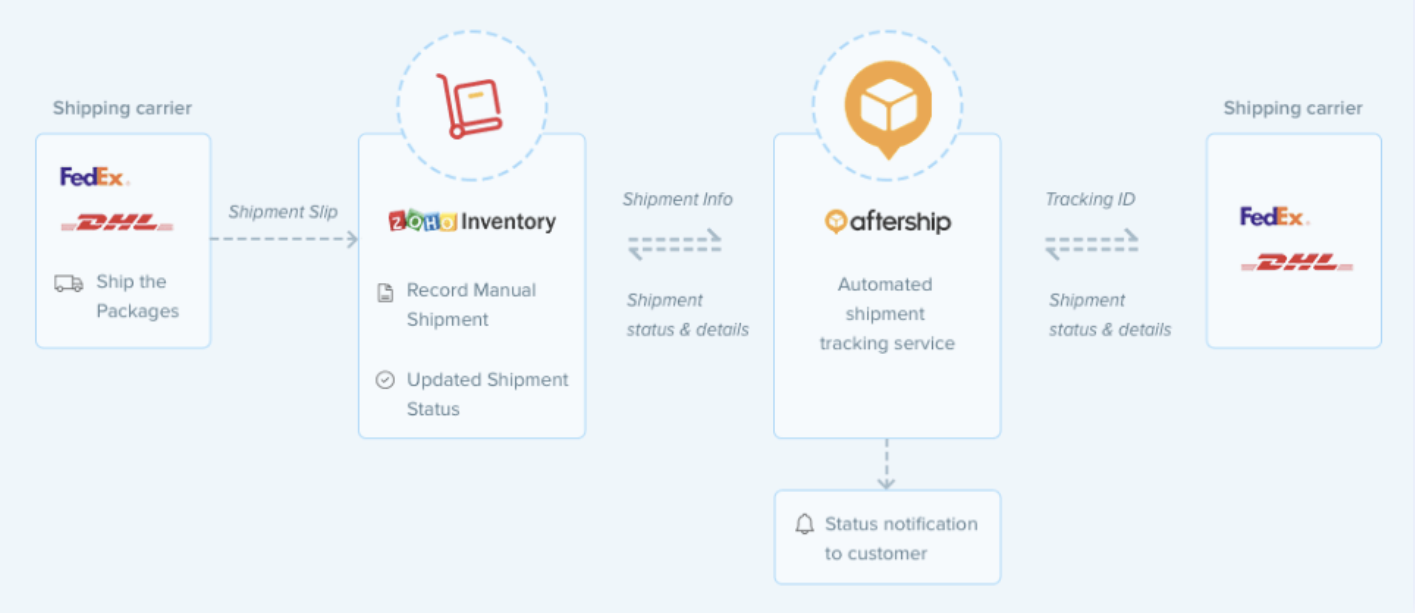
AfterShip est un service tiers de suivi des expéditions qui s'intègre à Zoho Inventory pour récupérer et mettre à jour le statut en temps réel de vos expéditions auprès des transporteurs. Cette fonctionnalité de Zoho Inventory peut être utilisée pour suivre les ordres de transfert, les expéditions manuelles et les réceptions d'achats. 

Avantages de l'intégration avec AfterShip :

  • Support du suivi de plus de 400 expéditeurs internationaux dans le monde entier.
  • L'expéditeur et le destinataire sont informés de l'état de la livraison par e-mail ou SMS.
  • Récupération et mise à jour le statut de la livraison dans Zoho Inventory en temps réel.

Comment fonctionne l'intégration d'AfterShip

  • Une fois que vous avez activé le suivi en temps réel de votre transaction, AfterShip transmet l'ID de suivi au transporteur approprié qui reçoit le statut de la livraison et le met à jour dans Zoho Inventory.
  • En même temps, il notifie vos clients par e-mail et par SMS de la position de leur livraison.

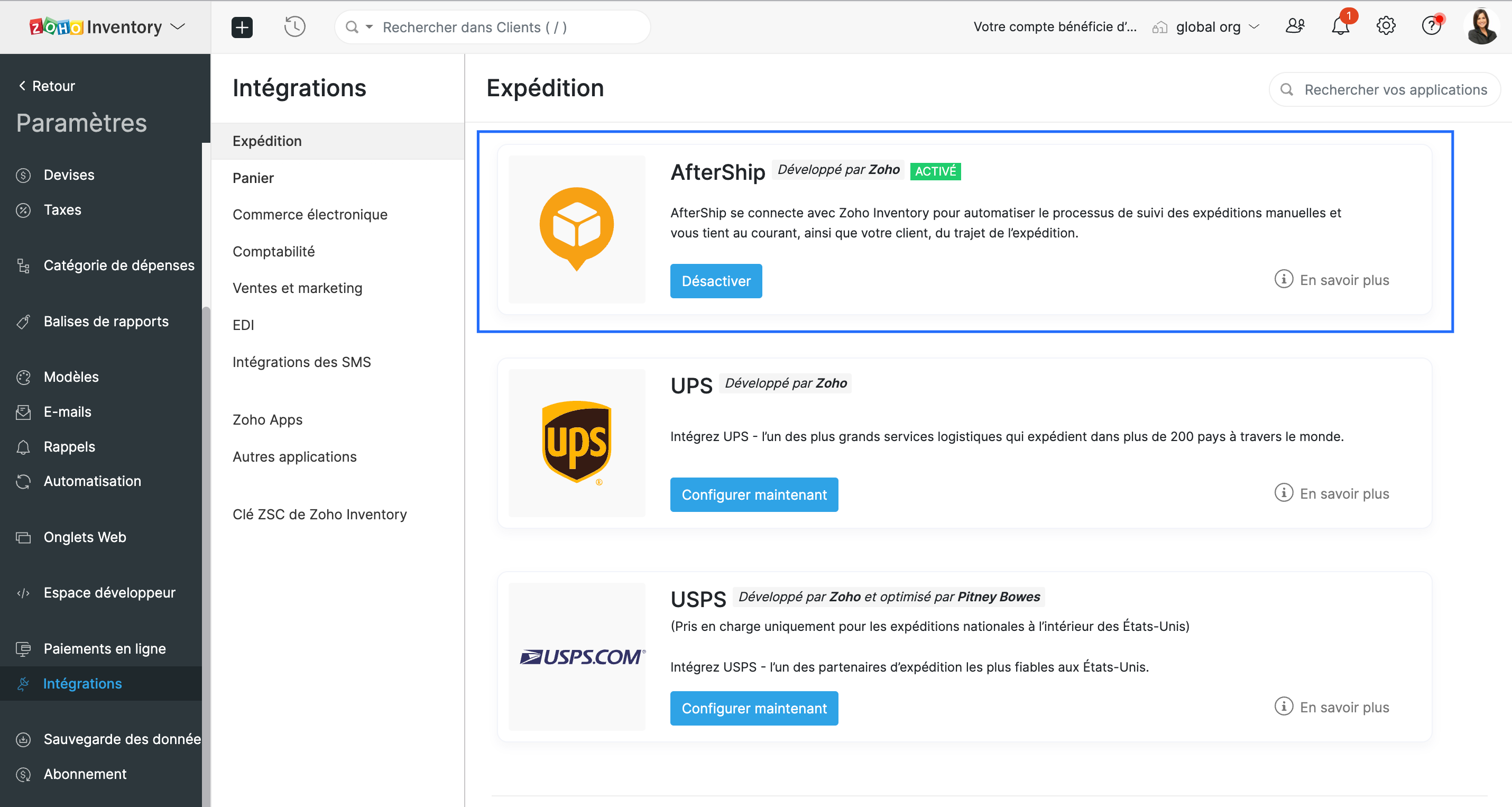
Configurer l'intégration

  • Accédez à Paramètres >> Intégrations >> Expédition

Suivre la livraison

  • Sélectionnez une commande client confirmée.
  • Passez à Créer >> Expédition >> Expédition manuelle. Une nouvelle page d'expédition s'affiche.
  • Cochez l'option "Suivre cet envoi en temps réel". Cette option fait apparaître tous les transporteurs professionnels supportés par AfterShip. 
  • Sélectionnez le fournisseur approprié et saisissez l'identifiant de suivi qu'il vous a fourni.
  • Indiquez les coordonnées du client auquel les notifications de statut doivent être envoyées, enregistrez.
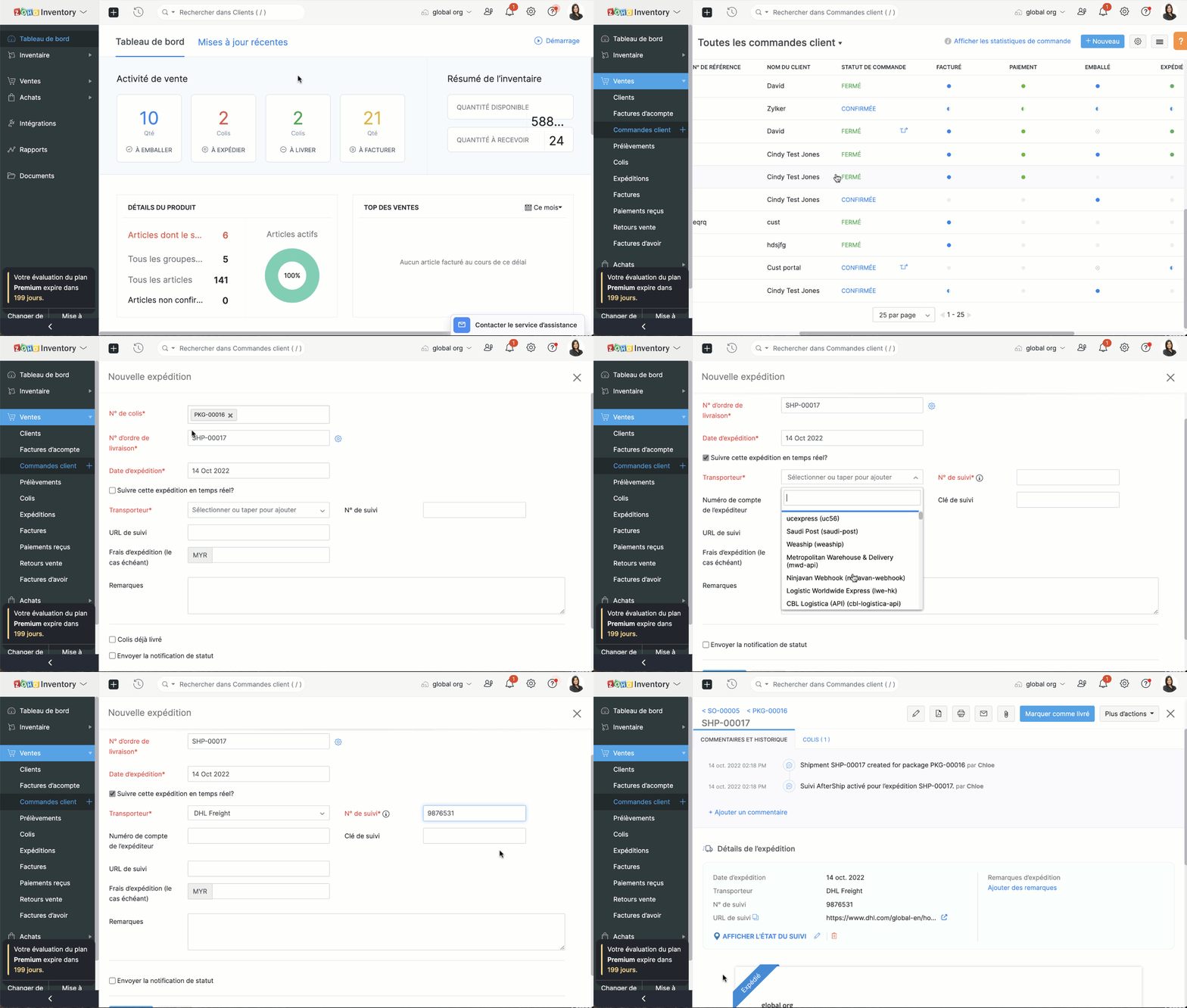


Consulter l'état de l'envoi

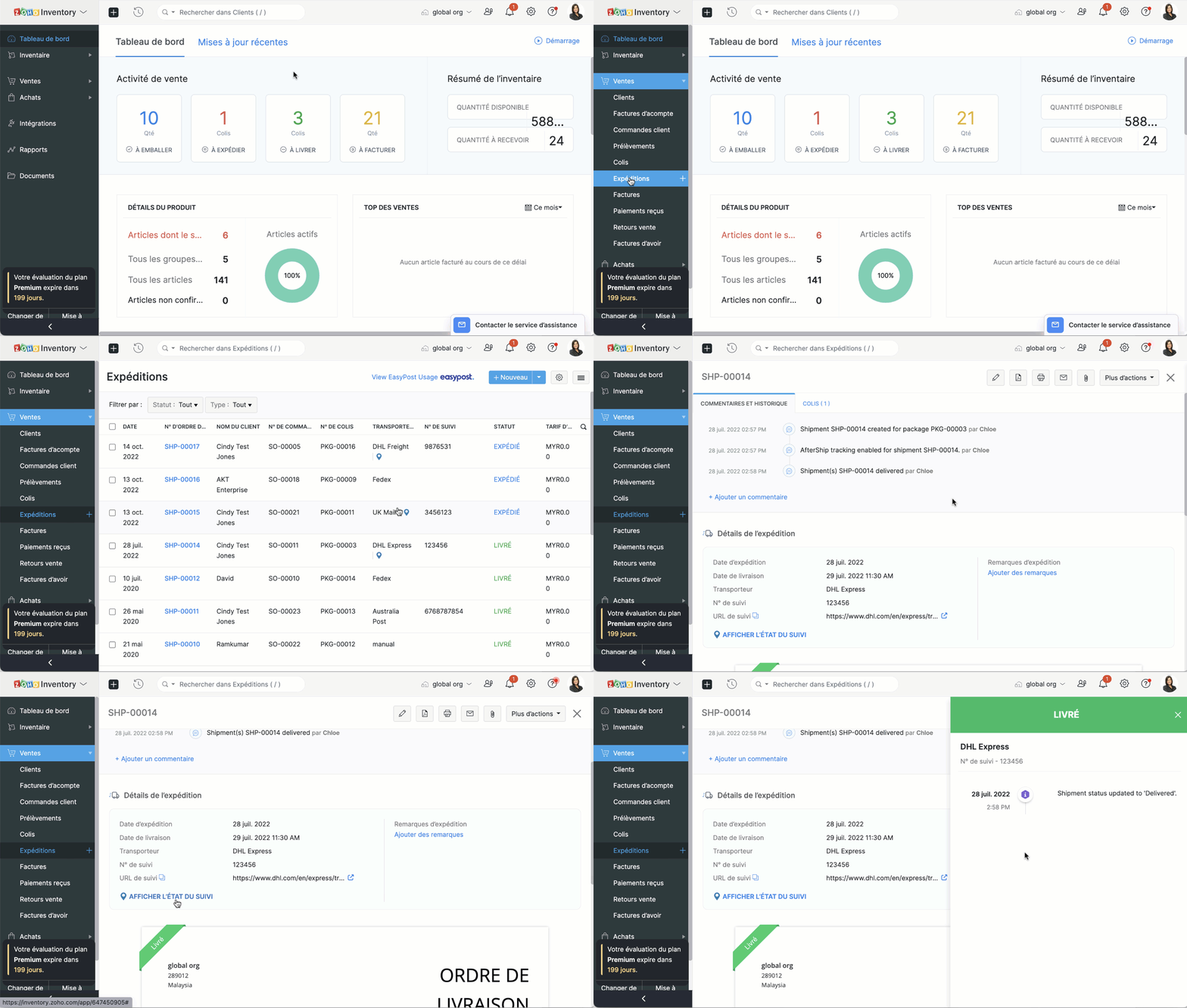
  • Depuis l'onglet "Expéditions", accédez une expédition suivie. 
  • Sélectionnez l'option "Afficher le statut du suivi"
  • Un écran apparaît à la droite où vous pouvez consulter l'emplacement actuel et la chronologie complète d'un envoi.
  • Vous pouvez également cliquer sur l'URL de suivi pour afficher le statut de votre expédition directement sur le site Web du fournisseur.

L'équipe Zoho France

    • Sticky Posts

    • Collaboration sans faille avec Zoho One

      Bonjour à tous, Dans cet article nous allons voir comment Zoho One permet une collaboration à différents niveaux .       La façon dont nous travaillons évolue. À mesure que les entreprises se mondialisent, la plupart des activités sont menées en équipe.
    • Recent Topics

    • What's New in Zoho Billing | March 2026

      March is here with a fresh wave of updates to Zoho Billing. From making compliance easier, reporting more flexible, to making day-to-day workflows smoother across the board. Here's everything that's new this month. Introducing Usage-Based Billing Reports
    • Subforms in Creator-Lookup Price

      I've got a modular called Price List with items and prices. Ive got another module called Estimates with a subform that looks up that Price List. I am trying to get the "Price" to auto-enter based on the Lookup field of the item name. Anyone know how
    • Feature request - pin or flag note

      Hi, It would be great if you could either pin or flag one or more notes so that they remain visible when there are a bunch of notes and some get hidden in the list. Sometimes you are looking for a particular name that gets lost in a bunch of less important
    • Tip #20 - Three things you probably didn't know you can do with picklists

      Hello Zoho Sheet users! We’re back with another quick tip to help you make your spreadsheets smarter. Picklists are a great tool to maintain consistency in your spreadsheet. Manually entering data is time-consuming and often leaves typos and irregular
    • Map Dependency Upgrades in Zoho CRM

      Map Dependency Fields enhancements are available in CA, SA, JP, CN, UAE, AU and EU DCs. Latest update: Also available in IN and US DCs. Hello everyone, We’ve introduced a set of enhancements to Map Dependency Fields to make setup simpler, faster, and
    • CRM to FSM Setup

      Good Afternoon, I am trying to connect CMS to FSM. My current field mapping is: Companies ↔ Accounts Contacts ↔ Contacts Service And Parts ↔ Products I'm setting this up for an elevator service company. The idea is that: Accounts represent Companies.
    • All new Address Field in Zoho CRM: maintain structured and accurate address inputs

      Availability Update: 29 September 2025: It's currently available for all new sign-ups and for existing Zoho CRM orgs which are in the Professional edition exclusively for IN DC users. 2 March 2026: Available to users in all DCs except US and EU DC. 24
    • Collapsible Sections & Section Navigation Needed

      The flexibility of Zoho CRM has expanded greatly in the last few years, to the point that a leads module is now permissible to contain up to 350 fields. We don't use that many, but we are using 168 fields which are broken apart into 18 different sections.
    • Create custom rollup summary fields in Zoho CRM

      Hello everyone, In Zoho CRM, rollup summary fields have been essential tools for summarizing data across related records and enabling users to gain quick insights without having to jump across modules. Previously, only predefined summary functions were
    • Inventory batch details

      Hi there, I'm trying to get the batch details of an item, here's what I've done so far. I've sent cUrl request to the below endpoint and I get a successful response. Within in the response I find the "warehouses" property which correctly lists all the
    • How do I edit the Calendar Invite notifications for Interviews in Recruit?

      I'm setting up the Zoho Recruit Interview Calendar system but there's some notifications I don't have any control over. I've turned off all Workflows and Automations related to the Calendar Scheduling and it seems that it's the notification that is sent
    • Unable to send emails from iPhone and iPad

      Curious, all of a sudden I'm unable to send emails from iPhone and iPad. I keeps asking for my password again and again. No problems from my MacBook Pro.
    • Journal Entries Do Not Show Multiple Entries to the Same Account

      Another basic accounting function that Books ... Accountants sometimes write journal entries, debiting and/or crediting the same account in the same entry. This is due to the need to record specific activity in an account when we pull reports especially
    • Create static subforms in Zoho CRM: streamline data entry with pre-defined values

      Last modified on (9 July, 2025): This feature was available in early access and is currently being rolled out to customers in phases. Currently available for users in the the AU, CA, and SA DCs. It will be enabled for the remaining DCs in the next couple
    • Partial customer Refund via customer Credit Card used to pay invoice

      How can we process a partial refund through the same credit card that a customer used to pay the initial invoice? - In other words, say a customer was sent an invoice for $1200.00 and they paid it through Zoho with our online credit processor, PayFlow
    • Partial refunds

      I am trying to process refund for a one item invoice, however the refund is partial: i am getting this error while creating credit note, can anyone share some wisdom about this
    • How in the heck do i record a (partial) refund???

      I have a client. wrote an invoice for 3 services totalling $520. He paid it online (we use zoho to authorize.net) We went out and couldn't do one of the services I didn't see a way to initiate a refund through zoho books, so i did a $250 refund through authorize.net. Tried to edit the payment on zoho books, but it won't let me b/c "this payment was made on line" When i try to edit the invoice i get a popup about it no longer matching the payment. What do I do??? And why is it so hard to do something
    • Action Required: Update your Zoho Projects – Zoho Analytics integration

      Dear Zoho Projects integration users, We would like to inform you about an upcoming update to the Zoho Projects–Zoho Analytics integration. Read the full migration announcement here. As shared in the announcement, we are updating the integration to support
    • Mirror Component in Zoho CRM: Access real-time related data without leaving your record

      Hi everyone, This feature is now available for the JP, CA, SA, UAE, and AU DCs. We're excited to bring to you Zoho CRM's mirror component, which presents relevant data on a record's details page and keeps everything users need in one place without having
    • Workflows fail silently in Zoho CRM and there is no native way to know

      Workflow automation is honestly one of the biggest reasons my clients choose Zoho. But there is one problem I keep running into across almost every implementation. When a workflow fails, nobody finds out. Email alerts hit daily limits and just stop. Custom
    • Office365(outlook emails) Zoho CRM integration

      Hi guys We're looking to buy Zoho CRM and are currently trialling. I'm working from a MacBook fyi. I've so spent 3 hours on live chat today with Zoho as we couldn't get the two to integrate properly, even with the plug in installed but finally managed
    • When adding subform records, how do I access member fields of a name field

      I have the following code (runs when a record is added to a form) if (input.P_liza != null) { input_deal = input.P_liza; rec = form_mapping[deal_name == input_deal]; id = input.N_mero_de_documento_de_Identificaci_n_Alfanum_rico; contact = -----redacted------.get_crm_contact_by_id(id);
    • Making "All Day Events" not default

      When I go to schedule an event, the All Day checkbox is ticked by default. Generally, I don't plan all day events, so is there a way to make that not checked by default? I couldn't find a setting for this...
    • Create custom field in multiple modules

      I am trying to create some custom fields that will be in both leads and contacts module without having to create them separately and then mapping them. How is that performed? it is too time-consuming to create 20+ fields and then do the same thing in a different module when they carry the same info. The idea is that when we get a lead from web site, there are items that we capture and once that lead is a client and moved to Contacts, that info should come over. So trying to find an easy way to create
    • Compensation | Salary Packages - Hourly Wage Needed

      The US Bureau of Labor Statistics says 55.7% of all workers in the US are paid by the hour. I don't know how that compares to the rest of the world, but I would think that this alone would justify the need for having an hourly-based salary package option.
    • In Desk KB article, how do include an image in a numbered list without using a number or bullet?

      We need to include images in our KBA steps as a numbered list. Here I have numbered steps. I want the image no numbering or bullet. Open Purchase Order Entry. Select the mail icon: Select the Save button. I see your own articles have images in number
    • Video Interview features

      I tested the video interview feature. It's supported only on desktop version of chrome/firefox. Most of the times, the candidates are available on their cellphone. Need to have this for mobile devices too.
    • POS and payments

      Have i missed the point can i not use zoho POS as a payment terminal back into stripe like we can in Books?
    • Delugeサーバーページ(HTML)での関数の使用方法

      Zoho Creator、Deluge並びに初心者です。 題名の通りDelugeサーバーページ(HTML)で関数が使用する方法を教えて頂きたいです。 ざっくりと説明します。 現在、1週間だけカレンダーを表示するページをelugeサーバーページ(HTML)内で作っております。 カレンダー内のボタンには翌週や先週を表示するボタンを追加しようとしています。 それらのボタンを押下した際、現在の日時に±7日をしてページを表示しなおす処理が走るようにさせたいです。 ボタンが押下されたとき、用意していた関数でその処理を実行する想定です。
    • Automatically remove commas

      Team, Please be consistent in Zoho Books. In Payments, you have commas here: But when we copy and paste the amount in the Payments Made field, it does not accept it because the default setting is no commas. Please have Zoho Books remove commas autom
    • Why does my salesiq dashboard doesn't look like the one on the admin guide?

      https://help.zoho.com/portal/en/kb/salesiq-2-0/for-administrators/setup-brand/articles/setting-up-the-website-channel#Launcher
    • ENDPOINT ZOHO CREATOR

      I created a function to perform the action of POST, GET and PUT in order to use it outside our portal and create more dynamic forms using a cloud server. Params = “qAvhbBBJJsQysd45DdkvTR34A” Curl = “https://www.zohoapis.com/creator/custom/admin2844/vallesalud_julaje_private?publickey=”;
    • MCP > Creator connection failing with Claude

      I'm trying to get claude to access any of my Zoho Creator apps and it keeps failing. I have enabled all tools for creator and ensured in claude settings that everything is authorised. Here is what claude says : Unfortunately, the error messages I'm receiving
    • Gantt Chart - Multiple Projects

      Hello, I have about 6 projects set up in Zoho and I am looking to see if it is possible to see all my projects on one gantt chart? Thanks Alex
    • milestone dependencies

      It would be exceptionally useful to be able to assign dependencies on milestone/tasks. For example, if within a project I have three milestones for creating three ads for publication, but each ad also requires the logo to be finished by the graphic designer (a separate milestone), it would be useful to have the start dates of the later items dependent on another prerequisite component. That way, not only would I not have to enter the logo creation as a separate task for each of the three milestones,
    • Need Easy Way to Update Item Prices in Bulk

      Hello Everyone, In Zoho Books, updating selling prices is taking too much time. Right now we have to either edit items one by one or do Excel export/import. It will be very useful if Zoho gives a simple option to: Select multiple items and update prices
    • Notebook Al

      Why was our organisation's Notebook AI disabled, even though our admin said it wasn't done on their side?
    • Dashboard Filtering with 2 query tables using one filter field

      Hi There, I have been using user filters on the dashboard and for the most part they are fine. However I have one issue I would like to see if there is a fix for it. I have a main query that most of my widgets use. Then I have a second query for another widget. The dashboard uses the field "brand" in the main query for the filter.  The second query uses the main_query.brand field alongside fields from a second table. I have set the widget to use main_query.brand as a filter, but when the dashboard
    • How to get static reports via Desk API

      Hello, we are hoping to use the Desk API to automatically export the default static reports in Zoho Desk, or reconstruct them via other API calls. What's the best way to do this? For example, if I want to recreate the Response Time static report via the
    • What's New in Zoho POS - April 2026

      Hello everyone, Welcome to Zoho POS’s monthly update, where we share our latest feature updates, enhancements, events, and more. Let’s take a look at how April went. Access and manage other web applications in Zoho POS with Web Tabs You can now access
    • Next Page