Important Update: New Fields Addition in Zoho Sprints Integration

Important Update: New Fields Addition in Zoho Sprints Integration

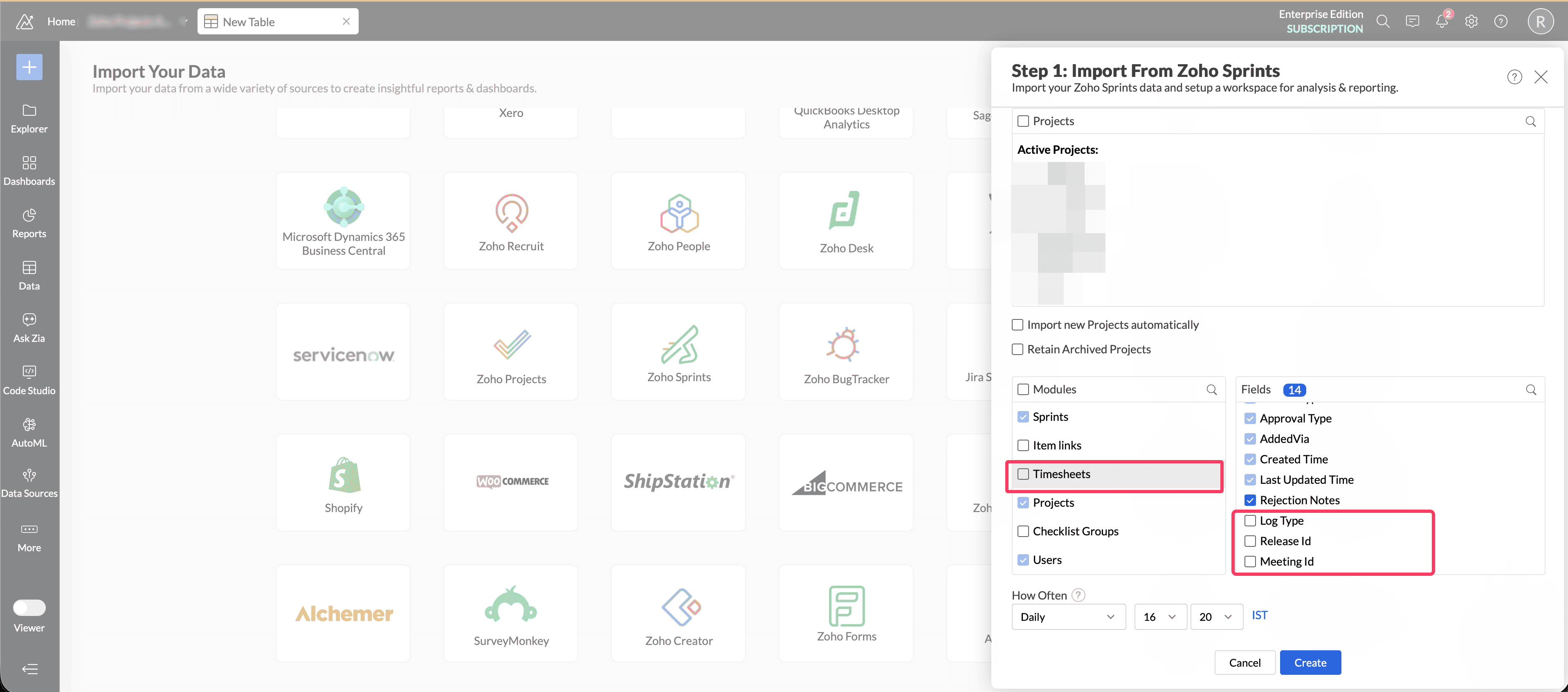
We'd like to inform you of an upcoming update to the 'Timesheets' module in the Zoho Sprints integration from June 3, 2026.  To enhance time tracking and reporting accuracy for the Zoho Sprints integration, three new fields - Log Type, Meeting ID, Release ID have been introduced in the 'Timesheets' module.

Whats Changing

Previously, only item-based timesheets were imported into Analytics. With this update, meeting timesheet entries will also be synchronized and made available for reporting under 'Timesheets' module.

As part of this update, the following new fields are added to the existing Timesheet table:

  • Log Type

  • Meeting ID

  • Release ID


Item timesheet entries will continue to be stored against Item ID. Meeting timesheet entries will be stored against Meeting ID.

The Log Type field helps identify whether a time entry is associated with an item or a meeting.

Action Required  

To ensure data consistancy, we have now enabled Log Type field across all Zoho Sprints integrations.
Meeting ID and Release ID fields will be enabled from June 3. We request you to validate your existing timespent reports and make required changes to filter or segregate the timespent data between meetings and items using the Log Type field. 
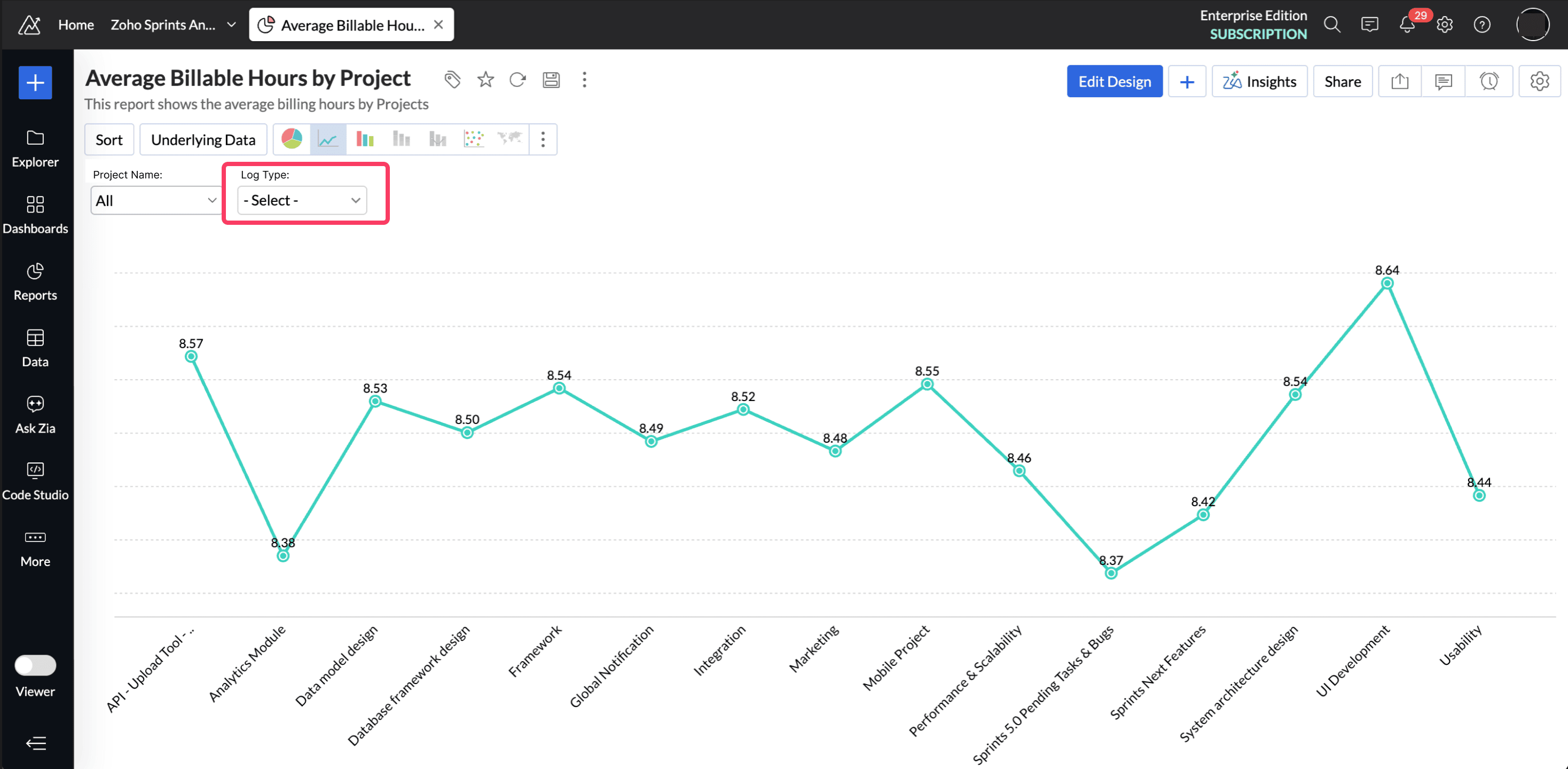


Once the Meeting ID and Release ID fields are enabled and synced by June 3, 2026, you can view the segregated timespent reports.

Changes After June 3, 2026

  • The new fields Meeting ID and Release ID will be enabled automatically in your setup.

  • A full data fetch will be performed based on your sync schedule.

  • Item-based timesheets will be mapped to Item ID.

  • Meeting timesheets will be mapped to Meeting ID.

  • The Log Type field will help identify the source of each time entry.

  • Meeting history date will also be synced.


Prepare Before June 3,206  

We recommend taking these steps before the change goes live:

  1. Validate your existing time spent reports, query tables and dashboards that use the Timesheets table.

    To check the dependant timespent reports: Open the TimeSheets table. Click the More options icon next to the table name and select Dependency Details. This gives you a consolidated list of all dependent reports, dashboards, and query tables.
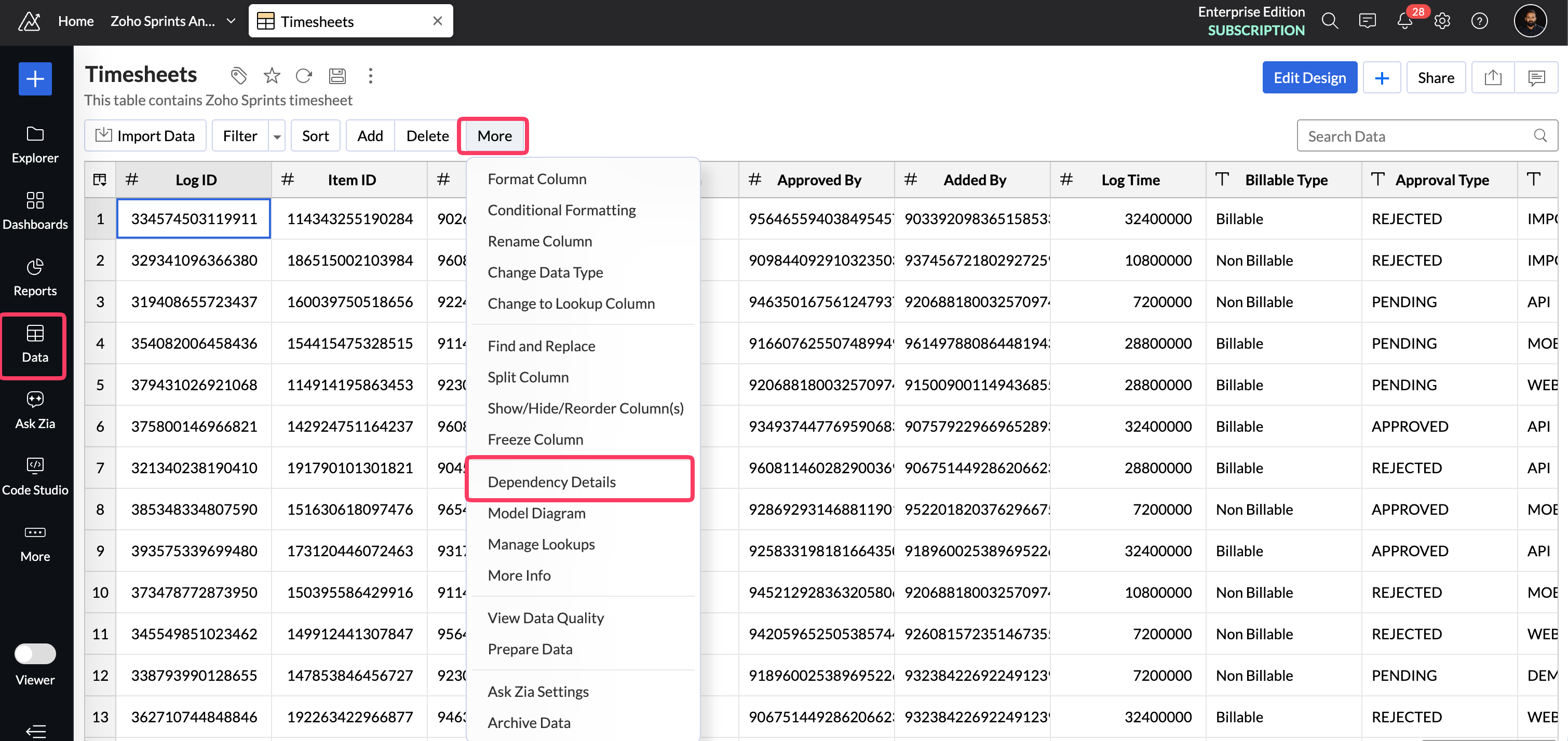


  1. Identify any reports that may need updated filters to separate item time and meeting time. Use the Log Type field to filter your time spent reports data.

If you have questions, feel free to write to support@zohoanalytics.com and we would be happy to help.

 
Regards,
Jaivin Joy Eapen
Zoho Analytics


    • Sticky Posts

    • What's New in Zoho Analytics - June 2026

      Hello Users! This month is about meeting your data wherever it lives: reaching it from AI assistants, bringing it in from more sources, and keeping it flowing with less manual effort. Here's what's new across Ask Zia and AI, data import, integrations,
    • What's New in Zoho Analytics - February 2026

      Hello Users! We're back with another round of updates for Zoho Analytics. This month's release focuses on giving you greater flexibility in how you visualize, manage, and act on your data - with new features like custom visualizations, remote MCP server,
    • What's New in Zoho Analytics - May 2026

      Hello Users! We're back with another round of updates for Zoho Analytics. This month's release focuses on giving you greater flexibility in how you visualize, manage, and act on your data. We are introducing richer data visualizations, smarter AI-powered
    • What's New in Zoho Analytics - January 2026

      Hello Users! We are starting the year with a strong lineup of updates, marking the beginning of many improvements planned to enhance your analytics experience. Explore the latest improvements built to boost performance, simplify analysis, and help you
    • What's New in Zoho Analytics - November 2025

      We're thrilled to announce a significant update focused on expanding your data connectivity, enhancing visualization capabilities, and delivering a more powerful, intuitive, and performant analytics experience. Here’s a look at what’s new. Explore What's
    • Recent Topics

    • Onboarding process

      I urgently need onboarding support. My account still shows trial period.
    • Detailed General Ledger - Display Transaction Description in Reports

      Hi Zoho Team, I'm currently using Zoho Books and have a question regarding the Detailed General Ledger report. When we enter a description or narration in transactions (Bills, Journal Entries, Expenses, etc.), the report does not display this description.
    • Which Zoho CRM tasks would you want an AI assistant to handle?

      I’ve started delegating my Zoho CRM work to AI – and many tasks now take me half the time. It has been so useful that we’re now working to make it available to everyone. Instead of clicking through records and tabs, I simply describe what needs to be
    • Zoho Mail Does Not Integrate with Analytics

      Hello everyone, Just wanted to make a quick post about the problem with zoho mail. Currently it does not connect to Zoho Analytics, which I think is crazy considering both of these applications have existed for a long period of time. Even zoho voice a
    • Net ##th Terms (e.g. due on the following 15th)

      I have a client who pays me twice monthly per our contract. It would be helpful to have terms on my invoices where the invoice is due on the 15th or the 30th of the same or the following month.
    • Project status update visibility within a project

      Currently the only place within Zoho projects to see status updates for a given project is actually not in the project it's self it's in the Collaboration section and then by searching for a given project and clicking on the status tab. It would be great
    • Using custom CRM fields

      I have created a series of fields in the Deals module that need to be linked to fields in a contract I have customized. I can only see how to map standard fields, not the custom ones. How do I do this?
    • Como limitar o Zia Agent?

      Geralmente quando estamos criando um agente de IA no ZIa Agent Studio, colocamos o que ele deve fazer, utilizando as instruções que colocamos no Knowledge Base. Mas como colocamos limites que não devem ser ultrapassados? Para isso utilizamos os Guardrails,
    • An important update for Zoho Cliq desktop users

      The latest version of the Zoho Cliq desktop app (v1.8.0) will no longer be supported on macOS 10.15 Catalina and earlier versions. This is because the framework we use (Electron) no longer supports some older macOS versions. If you’re using macOS 10.15
    • Zoho Flow - Zoho Desk trigger "Ticket created or updated" overrides Department

      Just in case anyone else has this issue. We had a Zoho Flow with the Zoho Desk trigger "Ticket created or updated". In the trigger I had selected a Department (Sales). What happens is that the Department ID (Sales) is submitted as part of the request
    • 2026 Product Roadmap and Upcoming Features

      This is your guide to what is coming in Zoho Vertical Studio throughout 2026. We’ll update this post throughout the year as items move from development to release, and as and when new initiatives are added. Once a feature is released, it will be reflected
    • Introducing Canvas templates: Design once, apply everywhere

      Greetings all! We're happy to introduce Canvas templates, a Forms view enhancement that enables you to design form layouts just once and apply them seamlessly across multiple modules. Imagine you use five CRM modules (Contacts, Deals, Leads, and more),
    • Why cant i see the Campaigns module in my Zoho app

      I am on the ZOHO CRM Standard edition. I can clearly see and use the Campaign module when viewing the ZOHO CRM desktop. When I switch to my phone, the Campaign Module does not show. I have gone through all the settings I can think of, but I still can't
    • 📣 Ask the team behind Zoho SalesIQ: Summer '26 Q&A

      Hi everyone! Following our recent webinars, Summer '26 Release: What's New in Zoho SalesIQ—where we walked you through all the new features, what they do, and how they work—and Driving the AI Evolution: Building Smarter Customer Experiences with Zoho
    • Always display images from this sender – Is this feature available?

      In Zoho mail, I had my "Load external images" setting set to "Ask me", and that's fine. That's the setting I prefer. What's not fine though is I always need to tick "Display now" for each email I get, regardless if I've done that multiple times from several
    • Set Custom Icon for Custom Modules in new Zoho CRM UI

    • Displayed sample tracking for multi branch setup.

      We have multiple branches and one of the biggest challenges for us to be able to track if a particular item is in display or not. I am shooting in the dark but I am wondering if there is a solution for the following : Each product used for display is
    • How do I migrate from Office 365 to Zoho Mail?

      Check out Advik Email Migration Wizard, this software is specially developed to move mailboxes from Office 365 to Zoho Webmail. In addition you can migrate from Gmail, Yahoo, Rediffmail and 80+ webmail servers to ZOHO MAIL. Isn't it amazing? This is an all in one email migration solution. Steps to export emails from Office 365 to Zoho Webmail are as follows; Run Advik Email Migration Tool in your system. Select Office 365 as source and enter its login credentials. Select mailbox folders and choose
    • Connection Issues

      Morning. Seems like a few of my colleagues that are offsite are having issues with connection to cliq, even when their internet is working perfectly fine and only 1 person onsite has issues. Can you please explain? Thanks
    • Backorder process review - Automating Removal of Sales Order from "On Hold" When PO is Received

      Hello Zoho Inventory Team, Currently, sales orders in On Hold status are released only when the bill for the purchase order is created. In our workflow, it would be much more efficient if the sales order could automatically move out of On Hold as soon
    • Cliq iOS can't see shared screen

      Hello, I had this morning a video call with a colleague. She is using Cliq Desktop MacOS and wanted to share her screen with me. I'm on iPad. I noticed, while she shared her screen, I could only see her video, but not the shared screen... Does Cliq iOS is able to display shared screen, or is it somewhere else to be found ? Regards
    • Which Is the best online store to buy office furniture in Australia ?

      The most important part of your office is the office furniture. Your office is not complete when you have not put the required furniture in place. You need a furniture in your office so that you and your employees have desks, tables, and chairs which
    • Add "Product Code" as available column and search criteria for Assemblies

      Hi Zoho Community. For product (item) assemblies, it would be helpful to be able to create a custom view search criteria that limits the view by product code or perhaps product category. Currently, Product Code is not an available option to display as
    • What's New - July 2026 | Zoho Backstage

      Hello everyone, We hope you’re having an expectation-exceeding event experience! We’ve been hard at work bringing you a bunch of enhancements designed to make event management even easier. Let’s take a look at what’s new in Zoho Backstage. Export delivery
    • Delete Field that is used in a Zoho Flow connection

      I'm trying to delete a Field used in a Webhook created by Zoho Flow with CRM Connection and i get the following alert: When going to the alert i get to the following issue, can't edit it since its been deployed by a pluggin But yes i have here the prompted
    • Q3 USA ZUG Meetups - Build AI Agents with Zoho

      Hi everyone! What if you could build your own AI agent from scratch in just one session? That's exactly what we're going to do at the upcoming ZUG Meetups across the United States, where you'll get hands-on experience with Zia Agents and explore how AI
    • Data Export is forcing Creation/Modified date just like reports

      The data export now forces you to select a created or modified date. There is not an All-Time option. This severely cripples the whole function of data export for audit purposes. If the data export (or reports for that matter), requires a date, there
    • Default ticket template in helpcenter

      Hello, I have a web form and a ticket template created. How can I make that my default ticket template? If an user clicks New ticket or create a ticket, I want that template to be the default one. Thank you for the time and info.
    • Zia Agents looks promising, but I still cannot deploy my first agent or connect WhatsApp after weeks of support tickets

      Hi Everyone, I am posting here because I am stuck and need practical help from someone who has successfully deployed a Zia Agent with WhatsApp. Zia Agents looks like a very promising product. I have watched the platform expand quickly, and I have noticed
    • Valid characters for use in email addresses using Zoho's apps/APIs

      We have found an issue with the + sign character in zoho subs - we are allowed to create a customer with an email address that has a plus sign but the API doesn't allow the + so the billing portal is not created. We are going to prevent users from using
    • Feature Request – Per-Channel Pre-Chat Form Controls

      We'd like the ability to enable/disable the pre-chat form on a per-channel basis, rather than having a single global setting. On the website widget, asking for name and email before chat starts makes sense. On WhatsApp, however, email isn't necessary
    • Copy + Paste in Notes: Text color and text background are not retained

      I've recently started using Zoho Notebook as an Evernote replacement. When copying and pasting text within Zoho Notes, I notice that the formatting of the text (text color and background color) is not retained when pasting. Only the attributes "Bold"
    • Need to show discount before total after subtotal

      Need to show discount before total after subtotal on my estimate template (see attachment)
    • Google Ads Data is Publicly available in Zoho CRM

      We recently discovered that ALL of the following Google Ads fields are visible to all users in our CRM that have access to either Leads or Contacts modules. Not only is this troubling and inconvenient, it should be unacceptable. It also creates a mess
    • Zoho Books bill pay option not available with zoho one

      Why isn't Zoho Books bill pay add-on not available for Zoho one customers not even as a purchasable option. I think this is very inconvenient for companies wanting to use this feature all in one system
    • Bounce rates

      Where can I see my bounce rates for: 1. Each email I send out, and 2. in total?
    • Appointment- colour code

      This is a real world problem for many companies. We track several employees appointments and this is done by one person so one account. The calendar layout is not great but if we could just colour code appointments to make it easier to see and then what about printing out the diary. I know in the IT world everybody is connected but so many of use still use old technology- paper.
    • Add a Parameter to the ZOHO CRM Deluge sendmail to denote priority (defaulting to normal if unspecified)

      Hello! There is a similar thread for Creator out there that is 2 years old, but I'd like to raise it in the ZOHO CRM category as well. Would you kindly update the existing Deluge sendmail function to allow a priority parameter? The parameter should allow
    • Email outbox is now available in the sandbox

      Hello all! Testing emails without visibility has always been a blind spot in the sandbox. With the new Outbox, that gap is closed. You can now view and verify every email triggered from your sandbox, whether it’s through workflows, approvals, or mass
    • Transform your line of items into line items: ICR can now record your table values as subform values

      Enhancement in Zoho CRM Dear Customers, We hope you're well! Zia Vision’s ICR capability can now recognize, extract, and store tabulated values in your subforms. An ideal example is a university application form. It has printed fields and handwritten
    • Next Page