Introducing Data Bars: Graphically represent changes in data within the cells
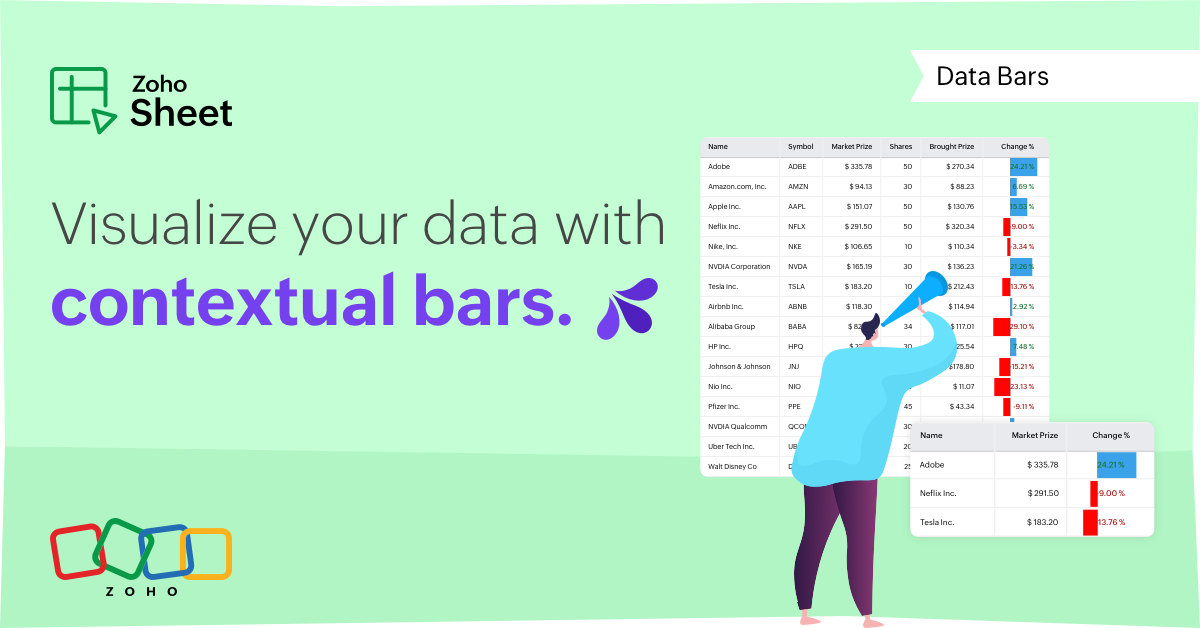
Conditional formatting has helped millions of spreadsheet users analyze and highlight their data more efficiently. In addition to the classic rules, color scales, and icon sets available in Zoho Sheet, you can now apply Data Bars, a convenient method of visually analyzing the values in a cell range.
What are Data Bars?
Data Bars are cell-level bars that can be used to visually represent the position of a value in a given range, with longer bars representing higher values. This helps users summarize data sets at a glance. Let's say you have a monthly sales report and wish to see which months have the highest and lowest sales figures. Find these results in an instant using Data Bars!
Customizations
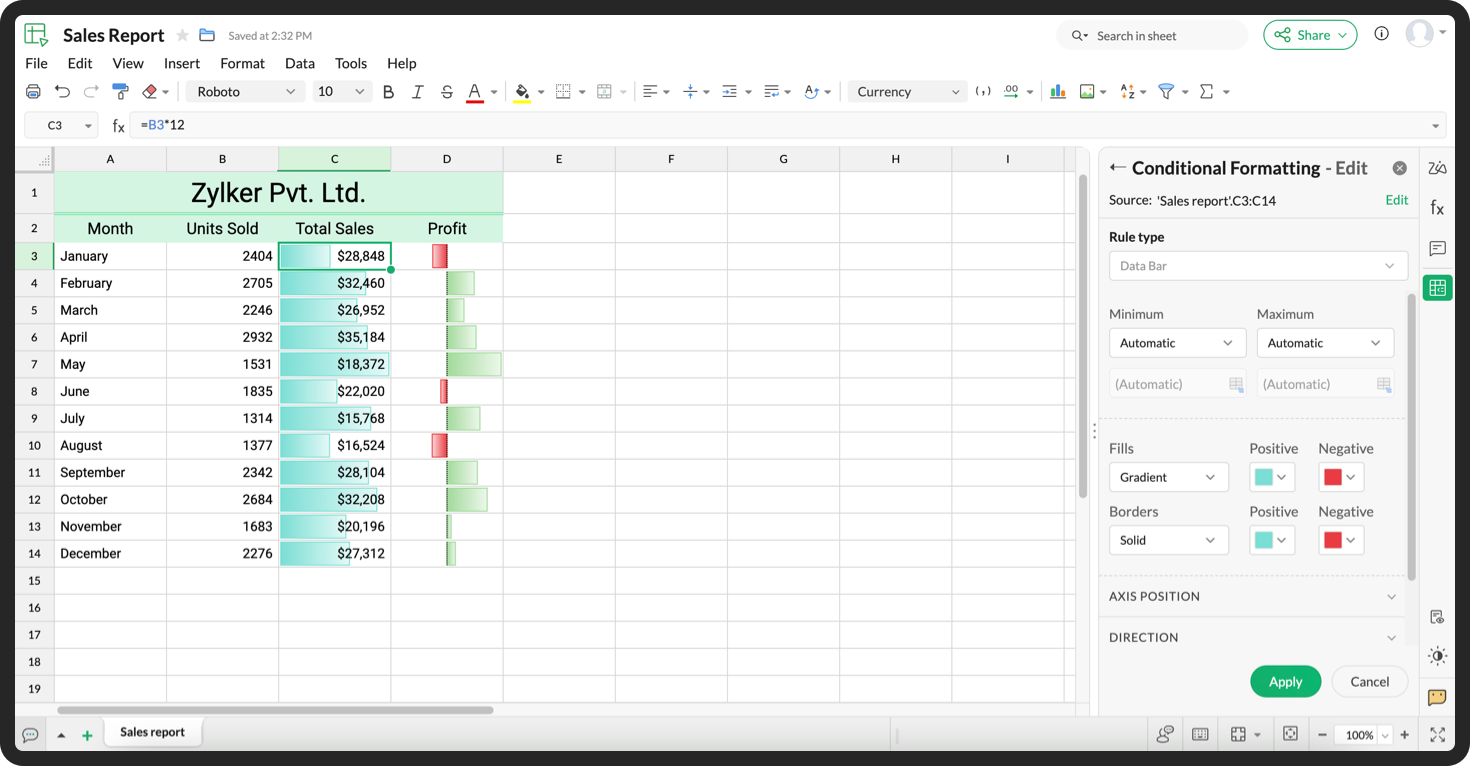
Customize your data bars, by adjusting the border, color, and gradient of your bars. You can also choose the direction of the bars and the axis position in the cell, and hide cell content so that only your bars are displayed.
You can also use Data Bars in combination with other conditional formats, like color scales, to analyze your data. Not sure how to get started? Zia now offers suggestions on conditional formatting too!
Read more
Hello, Zoho Sheet community! Last year, our team was focused on research and development so we could deliver updates that enhance your spreadsheet experience. This year, we’re excited to deliver those enhancements—but we'll be rolling them out incrementally
We hereby bring you the power of forms in Zoho Sheet. Now, build and create your own customized forms using Zoho Sheet. Be it compiling a questionnaire or rolling out a survey, Zoho Sheet can do it all for you. Forms is an excellent feature that helps you collect information in the simplest of ways and having it in Zoho Sheet takes it a notch higher. Build Simple yet Powerful forms Building forms using Zoho Sheet is fairly simple. The exclusive 'Form' tab lets you create one quickly. Whether you
At Zoho Sheet, we diligently track user requests and feedback. In line with this, based on extensive user requests, we've integrated Slicers to pivot tables and are delighted to announce its release. Slicers are interactive visual filters that have add,
Conditional formatting has helped millions of spreadsheet users analyze and highlight their data more efficiently. In addition to the classic rules, color scales, and icon sets available in Zoho Sheet, you can now apply Data Bars, a convenient method
Hello Sheet users, We're excited to announce a new feature enhacement, shaped directly by your valuable feedback! As you might know, conditional formatting is a great tool for anyone dealing with large data sets. Previously, if you’ve ever wanted to draw
My organisation subscribed to Zoho One looking at the opportunity to integrate Amazon.in with Inventory. But during the configuration, we understood the integration has severe limitations when it involves multiple warehouses in the same Organisation.
Hi All, I am reaching out today because of a big issue we have at the moment with Zoho Analytics and Zoho Invoice. Our organization relies on Zoho Analytics for most of our reporting (operationnal teams). A few days ago we observed a sync issue with the
Hello all, We’re excited to introduce a major productivity boost to your CRM experience: Workqueue, a dynamic, all-in-one workspace that brings every important sales activity, approval, and follow-up right to your fingertips. What is Workqueue? Sales
Hello Zoho Creator Team, We hope you are doing well. Zoho Creator recently introduced the option to set a client’s display name in the Client Portal settings, which is very helpful for providing a personalized portal experience. However, there is currently
Hi Zoho CRM Team, It would be very useful if we could set default values for meeting parameters. For example, if you always wanted Reminder 1 Day before. Currently you need to remember to choose it for every meeting. Also being able to use merge tags
Hi, I have a workflow that fires when a deal reaches a stage. This then sends out a contract for the client to sign. I have connected this up through Actions by Zoho Flow. Unfortunately this fails to send out. I have tracked it down to the date fields.
How can I add a second “lookup” field in Zoho? I’m trying to create another lookup that pulls from my Contacts, but the option doesn’t appear in the module customization sidebar. In many cases, a single work order involves multiple contacts. Ideally,
Release plan: Gradual rollout to customers without file storage add-ons, in this order: 1. Standalone CRM 2. CRM Plus and Zoho One DCs: All | Editions: All Available now for: - Standalone CRM accounts in Free and Standard editions without file storage
Hello, I am having an issue finding a way to sort a related list within a canvas detail view. I have sorted the related list on the page layout associated with the canvas view, but that does not transfer to the canvas view. What am I missing?
Support Team, Can you submit the following request to your development team? Here is what would be optimal in my opinion from UX perspective: 1) In the "Application Menu", add a menu item to Exit the app, as well as an alt-key shortcut for these menus
Currently in zoho form only form owner can make the changes in the form and if someone else has to make changes then we have to transfer the ownership to them and even admin also cant access it . So i think admin must have the ability or option to access
We are facing issues while creating and using WhatsApp message templates through Zoho Bigin, and we request your clarification and support regarding the same. 1. Utility Template Approval Issue Until December, we were able to create WhatsApp templates
Hello Zoho team, We need desperately a calendar view next to list, kandan and other views. I think it should be easy to implement as you already have the logic from Projects and also from Kanban View in CRM. In calendar view when we set it up - we choose
I can sign on to a meeting and see the other participants, but my screen is dark. The instructions for Zoho "Camera Settings" say "click on lock icon in address bar," but I don't see that icon! Suggestions?
Hi I want to ask for a feature on Zoho inventory I own a warehouse and I've gone through different management software solutions with no luck until I found Zoho, it has been a game changer for my business with up to the minute information, I'm extremely happy with it. It's almost perfect. And I say Almost because the only thing missing for me (and I'm sure I'm not alone) is the need of being able to identify the lot number of my inventory and where it is located in the warehouse. Due to the nature
According to the knowledge base, I should be able to add Sender addresses with the Basic Plan. But whenever I try to add an email, it takes me to a search window and I cannot find any emails in the list. Even mine, which is the admin. email.
I would like to request support for conditional field visibility within Bigin CRM. This feature should allow administrators to configure show/hide rules for fields based on predefined criteria (e.g., field values, picklist selections, stage changes,
Hi I am looking for 3rd-party options for bill automation in zoho which are economical and preferably have accurate scanning. What options do I have? Zoho's native scanning is a bit pricey
We've been using reporting tags for years (before itemizing was available) and now we are finding reporting these tags are impossible to track. Reports have changed in the customization and our columns of reporting tags no longer show up. We do not use
Hello everyone, and welcome back to our series! We have previously provided custom functions for calculating the profitability of a quote and a sales order. There may be instances where the invoice may differ from its corresponding quote or sales order.
I am currently using Zoho Books for my hospitality business, which includes lodging and restaurant services. We purchase many items in bulk for storage and consumption as needed. I'd like these items to be recorded as inventory when purchased and categorized
Every business has roles, responsibilities, and workflows. While roles help define structure, responsibilities within those roles are rarely the same. As your team grows, some members need access to only a specific set of features. Others require visibility
Hdfc and sbi both are very popular bank if zoho books become partner with this banks then many of the zoho books users will benefit premium features of partnered banks.
Hi there, I created a Mail Merge template for the Deal module. I would like Deal owners to mail merge their Deal records, download the Mail Merge document as a Word doc and make a few changes before sending it to the customer. Thing is, neither the "Merge
Our bookkeeping practices make extensive use of the "clone" feature for bills, expenses, invoices, etc. This cuts down significantly on both the amount of typing that needs to be done manually and, more importantly, the mental overhead of choosing the
We have multiple schedulers that send emails to customers in batches. Currently, we are maintaining the same code across several schedulers. Is it possible to use a custom function inside a scheduler script? If yes, how can we invoke the custom function
I really like the idea of the Workqueue generally - it will be really useful. What it seems to lack however, is the ability to customise it properly. I want to be able to show a custom view rather than just "My Leads" and "Leads Assigned in Last 3 hours".
Hi, We just completed a trade show and one of the bits of information we collect is tool style. The application supplied by the show set this up as individual questions. For example, if the customer used Thick Turret and Trumpf style but not Thin Turret,
Hey everyone, We are currently dealing with a probably encoding issue when we populate a field (mostly but not exclusively, 'Last Name' for Leads and Contracts). If the user manually inputs special characters (like ä, â, á etc.) from Scandinavian languages,
I am trying to adjust the column widths in Portals tabs. Columns that don't need to be wide are wide and longer ones are very short. I thought adding more to the digits box in Edit would widen them, but it doesn't. Anyone know how to adjust these?
The address field will be available exclusively for IN DC users. We'll keep you updated on the DC-specific rollout soon. It's currently available for all new sign-ups and for existing Zoho CRM orgs which are in the Professional edition. Latest update
Hello Everyone, We are excited to unveil phase one of a powerful enhancement to CRM for Everyone - Connected Records, available only in CRM's Nextgen UI. With CRM for Everyone, businesses can onboard all customer-facing teams onto the CRM platform to
Hello all, We are introducing the Notes badge in the list view of all modules as a quick action you can perform for each record, in addition to the existing Activity badge. With this enhancement, users will have quick visibility into the notes associated
I'd like to set up a workflow that triggers if an incoming email has been flagged as "high importance" but I'm not seeing any way to do that. Hopefully I'm just missing something obvious...?