Last modified on (9 July, 2025):
- This feature was available in early access and is currently being rolled out to customers in phases.
- Currently available for users in the the AU, CA, and SA DCs.
- It will be enabled for the remaining DCs in the next couple of weeks.

Update (26th September 2025):
This feature is now enabled for all the users in the US DC.
Hello everyone,
Traditionally, Zoho CRM's subform capabilities have enabled users to dynamically add, edit, and manage additional data linked to their main records. However, until now, all subform fields were subject to data entry or updates, both on the record's page and through the API.
What's new?
We're excited to introduce the static subform option, designed to offer a more controlled and consistent approach to data entry in Zoho CRM. Administrators can now pre-define certain fields and the exact number of rows in a subform.
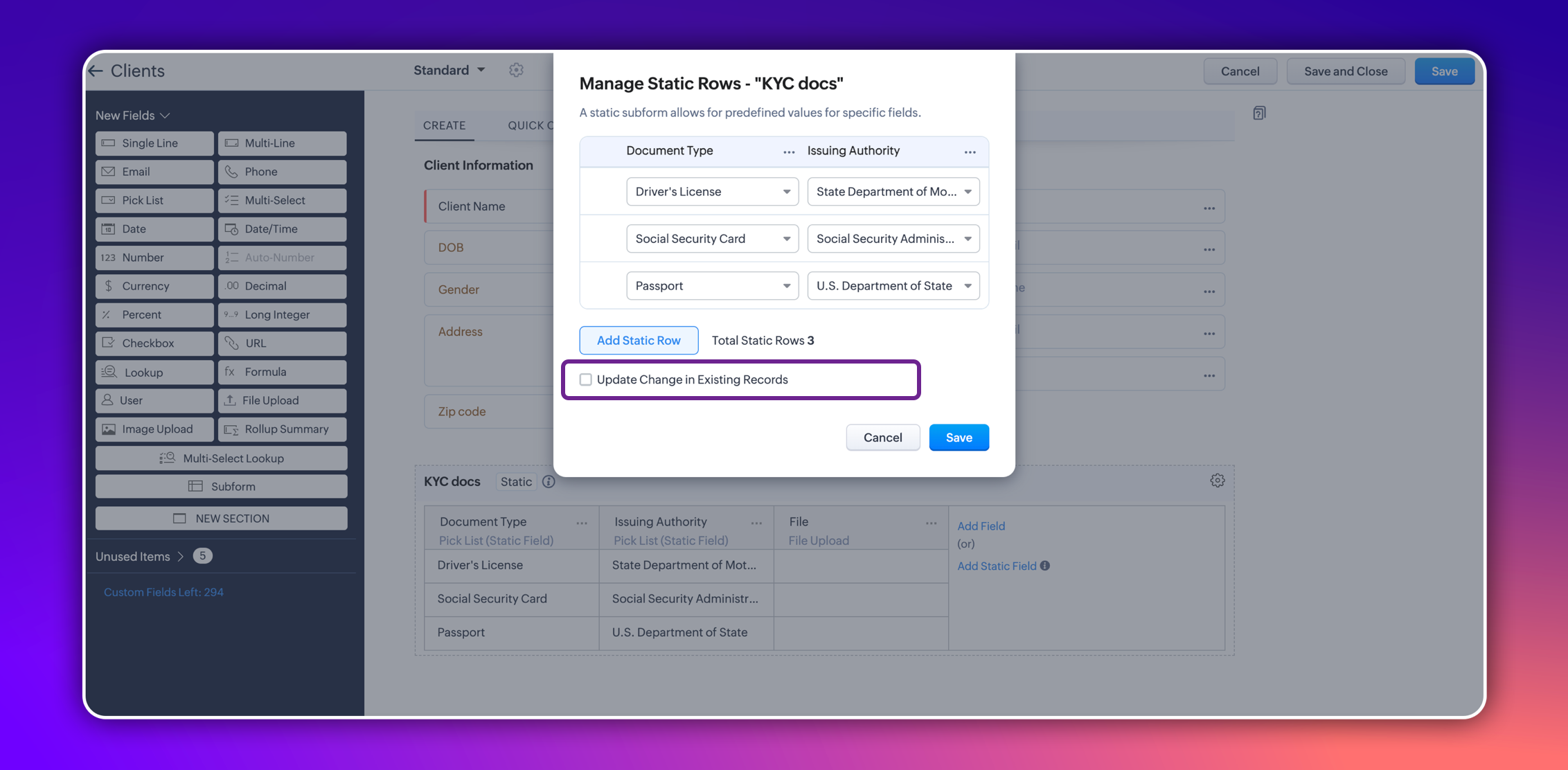
In certain scenarios, a subform should maintain a fixed number of rows with fixed values across all records. For example, a subform could be set up to include specific columns consistently, such as "Document Type" and "Issuing Authority." The rows for these columns could remain constant and feature values like "Driver's License," "Social Security Card," and "Passport" for "Document Type," and "State Department of Motor Vehicles," "Social Security Administration," and "U.S. Department of State" for "Issuing Authority." Unlike a standard subform, where users can dynamically add or remove rows, a static subform ensures these rows are consistent across all records.
This ensures consistency and eliminates the need for users to manually enter or maintain these rows in each record, thereby saving time.
How does static subform address this need?
Static subforms enable administrators to define specific fields and a fixed number of rows within a subform.
For example, consider the aforementioned use case of a client's details in KYC records, which might always consist of documents like a driver's license, passport, and social security card. Other fields within the subform may vary, which allows for customization as needed when creating or editing records.
Consider job applications, for example. With static subforms, HR departments can standardize the collection of essential documents such as resumes/CVs, educational certificates, and proofs of residence. This ensures that every applicant's profile is complete and consistent, making the data management process more efficient and reliable.
This approach not only streamlines the application process but also ensures companies receive thorough and consistent candidate profiles.
Key highlights
- Administrators can easily set up a static subforms by configuring rows with static values.
- Admins have the option to automatically update all existing record entries with static values while mapping the static values in the configuration pop-up.
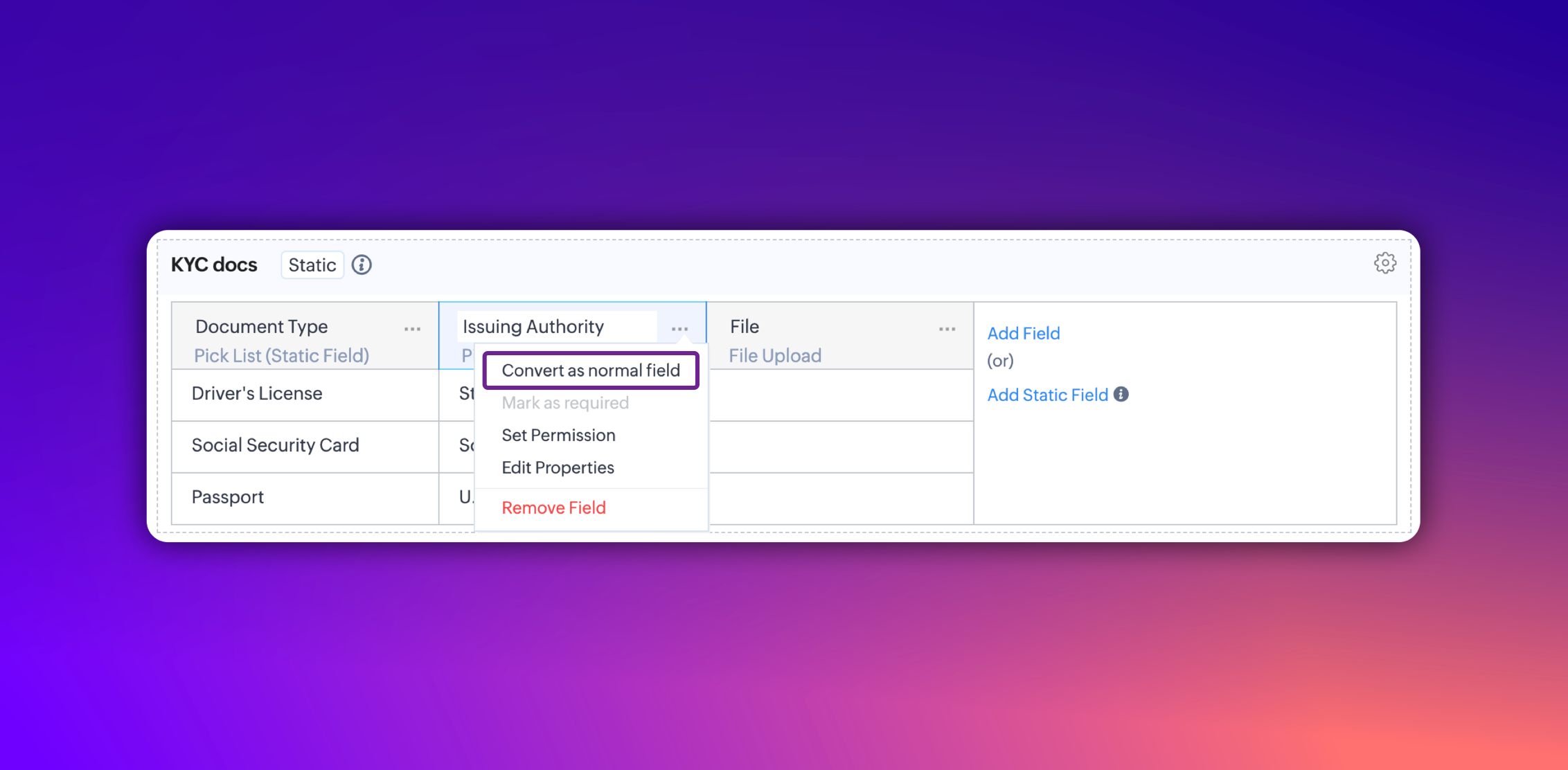
- Additionally, you can convert a static subform field into a normal field at any point. However, it's not possible to convert a normal subform into static subform.
Notes:
- These fields are static across all the layouts in a module and synced across all associated records.
- Changes will be applied to all existing records only if the admin checks the option to update existing records in the static value mapping pop-up.
- Transforming regular subform fields into static fields is not possible.
- Once a subform is designated as static, its type cannot be changed.
- Static subform feature is currently available only in web. They're unavailable on mobile devices and for API versions below 5.1.
Thanks,
Nizamuddin
Recent Topics
What is the difference between "Reply" and "Public Comment" in a ticket?
Hey, my company is thinking about switching to Zoho Desk but we do not understand the difference between the "Reply" and the "Public Comment" feature. When should we use which? And why? What is the difference between them? Thank you for your help! Kindest
Comments Vs. Replies
I'm curious as to the difference between a "Reply" and a "Comment" on a ticket. It appears that "Replies" are what's used to determine response time SLA's and there are also used to automatically re-open tickets. I'm just trying to understand the key differences so I can educate both our clientele and our back-end users on which function/feature to use to better improve the ticket lifecycle. If anyone has any insight it would be appreciated. Thanks!
Widget Height were destroyed
All widget heights in the Details Canvas view are broken.
CRM Address Field - States with Countries in brackets
Hi, Could you please remove the country in brackets from the Global State List, or at least allow us to edit these entries? It looks like the brackets were added during the initial data population, perhaps by someone building the list in a spreadsheet
What's New in Zoho Inventory | July & August 2026
Hello users, The July and August 2026 releases bring a range of new features and improvements across the product. From the Nigeria Edition and Super Admin enhancements to Sri Lanka IRD-compliant invoicing, Loyalty Program Management, and improvements
Forms data export bug
The export csv with a password has changed for the worst. It is less secure by not allowing complex passwords. Just last week and the last year (at least) I was able to use a complex, secure password. Export CSV moreover doesn't even work if I use a simple
Fax and email questions
Does Zoho offer faxing capability? If so, how to do it? And, why is has my email inbox stopped in 2019? There are no more emails since then. Also if I delete all of those emails, will they delete it from my gmail account (I'm linked to a gmail email address).
Create a single record from multiple images with ICR
Hello all, Zia's Intelligent Character Recognition can now create a single record from multiple images. Users can upload up to three images at once, such as an ID, a passport, and a business card, and Zia will extract the relevant information from all
How to present an Analytic on a CRM dashboard and filter it on loginuser id
How to present an Analytic on a CRM dashboard and filter it on loginuser id? I want to display an Analytics pivot table (as a widget) on a CRM dashboard and have the pivot filtered on the loginuser. I want additional user-filters available, such as date,
CNIL - Suivi de Pixel
Bonjour à tous, À la suite de la nouvelle recommandation de la CNIL sur les pixels de suivi dans les e-mails, savez-vous si Zoho Campaigns permet : de conditionner le suivi des ouvertures au consentement de chaque contact ; de proposer un lien permettant
Convert MBOX to PST File Using Free Methods
MBOX is a mailbox format that is used by various email clients and services, such as Thunderbird, Apple Mail, Eudora, and Google Takeout. Yet, in order to be able to open your MBOX emails in Microsoft Outlook, you have to convert them from MBOX to PST
Live connection to DS files in Zoho Creator / ChatGPT
As an idea, we are using ChatGPT to build with Zoho Creator (outside of Zia), which is works brilliantly to assist write deluge, provide test suggesitons etc. Currently we are uploading the DS files which are very point in time, it would be great to have
Setting default From address when replying to request
At the moment, if I want to reply to a request, the From field has three options, company@zohosupport.com, support@company.zohosupport.com, and support@company.com. The first two are really internal address that should never be seen by the customer and
Zoho Payroll: Product Updates - Q3, FY2026
Over the past quarter, Zoho Payroll has added several updates to make payroll easier to process, configure, and manage. The most notable improvements cover bank integrations, reimbursement support, payslip enhancements, employee exit documentation, payroll
Convert OLM to PST on Mac and Windows Using Free Methods
When your Outlook for Mac data is stored in an OLM file and you want to use it with Outlook for Windows, the simplest approach to transfer your emails and other mailbox information is to convert the OLM file to a PST file. OLM is primarily associated
Add Payment Information (like Bank details)
I am using the Free plan of Zoho Books. I need to add the bank details/ UPI details on the invoice. How can I do that. I have added the details in the Bank Section.
Placeholders for Multi-Level Discount
I am using custom templates for Invoices and all other modules. Since i have activated multi-level discount (an early-access feature from zoho) "discount at line-item and transaction level", I need placeholders for using them in my custom templates. With
Running Balance
Please add automatically Running balance in ledger view. Taking lot of time, every time to add manually
Accounting on the Go Series-47: Effortless GSTIN Management- Auto Populate TaxPayer Details in Zoho Books Mobile App
Hello everyone, Welcome back! Today, we're focusing on a feature specifically designed for our Indian users in the Zoho Books-Indian edition, particularly those who deal with GST compliance regularly. We understand the importance of accurate and efficient
URGENT: Stalled DC Migration >72 Hours - Records Locked [Ticket #: 167813877
The DC migration was started on 1st October at 6 pm and we were informed migration period as 48 hours but even after more than 72 hours, the migration seems still in progress. We sent two emails to check the status but no responses. We need the migration
Zoho Webinar - Sharing System Audio (NOT AVAILABLE)
Hi, We are having a serious problem with Zoho Webinar. In the webinars we run, we very often share the audio from a video we are streaming directly from YouTube or other applications. Until recently we were using Zoom, but as we use other Zoho applications
Cash Recipt
You can not receive cash more than 10000 from one party in a day and two lakh in a year. In statement you can't differentiate cash or bank receipt. zoho does not support this
Need to set workflow or journey wait time (time delay) in minutes, not hours
Minimum wait time for both Campaigns workflows and Marketing Automation journeys is one hour. I need one or the other to be set to several minutes (fraction of the hour). I tried to solve this by entering a fraction but the wait time data type is an integer
Concern Regarding Stock Validation in Inventory Management
Hi Zoho Team, We would like to highlight a concern regarding stock validation in the inventory system. As per standard inventory management practices, if the stock level is zero, the system should not allow users to create a shipment, packing slip, or
Change from OST to PST on Windows 10/11 Using Free Method
There is an advantage in converting OST files to PST format if you need to access your Outlook data on a different computer, want to keep a local copy, or are trying to recover items from an old Outlook profile. The good point is that users of Windows
Meet PageHealth by Zoho PageSense: a free way to find out what's holding your page back
We all know the feeling. You've spent days tweaking headlines, moving buttons, and rewriting copy, and you're still not sure why visitors aren't sticking around. Revamping your website is hard, and figuring out what's actually getting in the way is even
Important: Whitelist new proxy outgoing IPs for IN, SA, and UAE data centers
Hello everyone, We're expanding the pool of proxy outgoing IP addresses for our IN, SA, and UAE data centers by introducing new IPs alongside the existing ones. This helps ensure high availability, optimal load distribution, and redundancy for outgoing
Zoho Flow Custom Function Issue
I have a use case where I will be needing to post data to a wordpress site. Specifically to a custom post type with a bunch of ACF fields. I have setup trigger event correctly for Tookan and can receive data from the webhook. In order to post the data
How to Open .mbox file in Gmail with Attachments?
Gmail offer users to backup INBOX folder in .mbox file format via Google Takeout Feature. Howver there is no such option to Restore Gmail MBOX. Thus I would like to suggest you to choose an alternate approach i.e. MBOX to Gmail Wizard. This utility will open .mbox file in Gmail with attachments. Steps to open MBOX file in Gmail are; Run MBOX to Gmail Wizard Click Add File and add .mbox file. Enter your Gmail login credentials. Click Convert button. Finished! This is how you can open MBOX file in
Custom Validation for On Duty
Hi Team, We would like to have custom validation support for the On Duty form in the Attendance module. We need to apply some restrictions, such as: Limit the number of On Duty requests per month. Restrict On Duty requests on selected days. Allow employees
Integrating FaceBook Ads into MarketingHub
I would like to track the clicks from a FB Ad campaign into my website via marketinghub. I cannot currently add a MH form directly to my FB page, as I receive an error telling me I need at least 2000 subscribers on FB to be allows to do that (yikes!) What is the best way to set up MH so I can track which FB are converting well? I know I can reach the FB reports directly, but these do not track conversions from the MH forms on my website. Best regards, Joe
Migration from GoDaddy to Zohomail
Hi All, I am trying to migrate all the emails from Go Daddy to zohomail account using the migration tool. i tried with imap method, its not working. when i try it with pop method, then only the emails from the go daddy account inbox ( not other folders), is getting transferred, how can i transfer all the folders in the email account from go daddy to zoho. and also the emails which are coming from go daddy are like new unread emails ( is there any where i can differentiate from read and unread emails)
How do I migrate from Office 365 to Zoho Mail?
Check out Advik Email Migration Wizard, this software is specially developed to move mailboxes from Office 365 to Zoho Webmail. In addition you can migrate from Gmail, Yahoo, Rediffmail and 80+ webmail servers to ZOHO MAIL. Isn't it amazing? This is an all in one email migration solution. Steps to export emails from Office 365 to Zoho Webmail are as follows; Run Advik Email Migration Tool in your system. Select Office 365 as source and enter its login credentials. Select mailbox folders and choose
How to Backup Zoho to PST?
I'm looking for a simple way to backup Zoho Mail emails to PST format. I tried the IMAP method with Outlook, but it seems slow and complicated for large mailboxes. I need a solution that can: Export Zoho emails to PST Preserve attachments and folder hierarchy
Shopify connector – product cost ("Cost per item") not synced, so COGS/gross margin can't be calculated
Hi Zoho Analytics team, I use the native Shopify connector in Zoho Analytics (cloud) to build reporting dashboards for Shopify stores. As far as I can tell, the connector does not sync product cost, so there's no way to calculate Cost of Goods Sold (COGS),
Zoho Sprints - Q3 Updates for 2026
Another quarter, another set of productive features. This time our focus was mainly to simplify in-app navigations and control all your work related activities within Zoho Sprints. We delivered 7 major features and 9 enhancements, which include Zoho Sprints
Which Zoho CRM tasks would you want an AI assistant to handle?
I’ve started delegating my Zoho CRM work to AI – and many tasks now take me half the time. It has been so useful that we’re now working to make it available to everyone. Instead of clicking through records and tabs, I simply describe what needs to be
The Social Wall: August 2024
Hi everyone, We're thrilled to bring you the latest updates, features, and improvements to help you get the most out of Zoho Social. Let's see what was new for us at Social in August. Post documents on LinkedIn You can now reach a lot more people and
Free PST Password Recovery Tool
Recoveryfix PST Password Recovery is a specialized standalone utility designed to instantly unlock encrypted Microsoft Outlook PST files . It provides an efficient way to recover, reset, or entirely remove passwords when access credentials are lost or
How can I add a Custom Field (or Customer_name) to a picklist?
Our workflow is Shopify-->SO -->Picklist-->Package-->Shipment. We would like to have the Picklist template to include a custom field "Customer_Notes" (we have created this field already). This way we get alerted when a customer has notes on their account.
Next Page