Customer service is one of the categories where efficiency and quality of service have to run in parallel, and your team's experience with their helpdesk goes a long way ensuring these aspects are uncompromised.
Introducing DOT Design for Zoho Desk - our new design philosophy to redefine your customer service experience.
This new design philosophy is built on a multi-pronged approach that enables superior communication and navigation for agents, while enhancing scalability without limiting flexibility for the management. This is also a step in the direction to make Zoho Desk a fully inclusive platform that is friendly for our differently abled friends. Our DOT design
system has opened up a new library of components for Desk that can be accessed by developers, solution provider partners and software SIs of Zoho. The design system will additionally be externally shared for all the development and designing that relies on the Zoho Desk platform.
While the overall look and feel has been refreshed, the changes are not limited to being skin-deep. There has been a conscious effort to unify the navigation throughout the product, so the end user gets to experience a consistent, seamless experience. The design specifics are aimed at delighting our users with new themes, controls and performance attributes. Agents spend quite some time shuffling between various screens to scout for the right information and serve customers, and changes like these make everyday work easier for them.
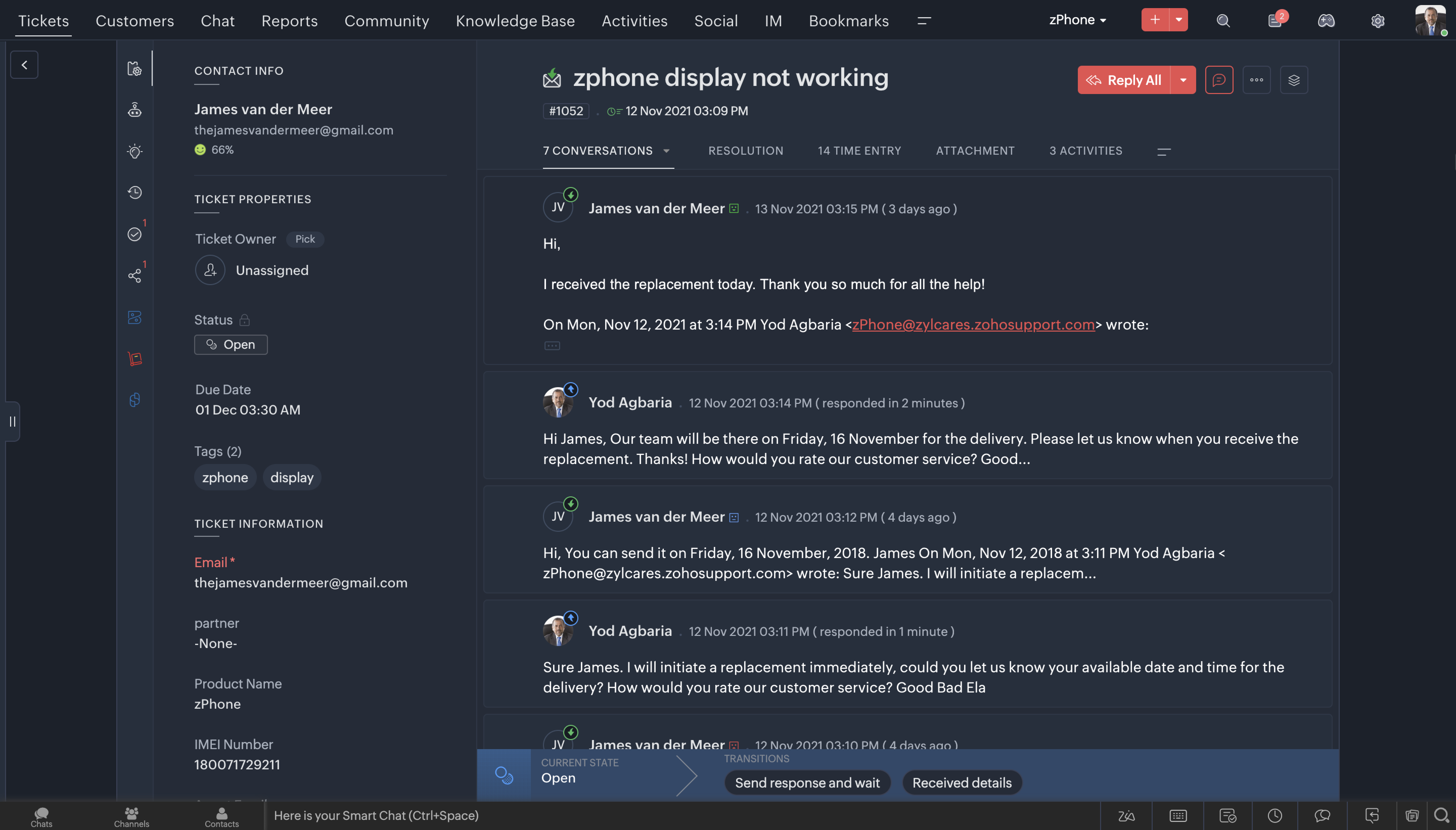
The latest overhauled Ticket Queue view
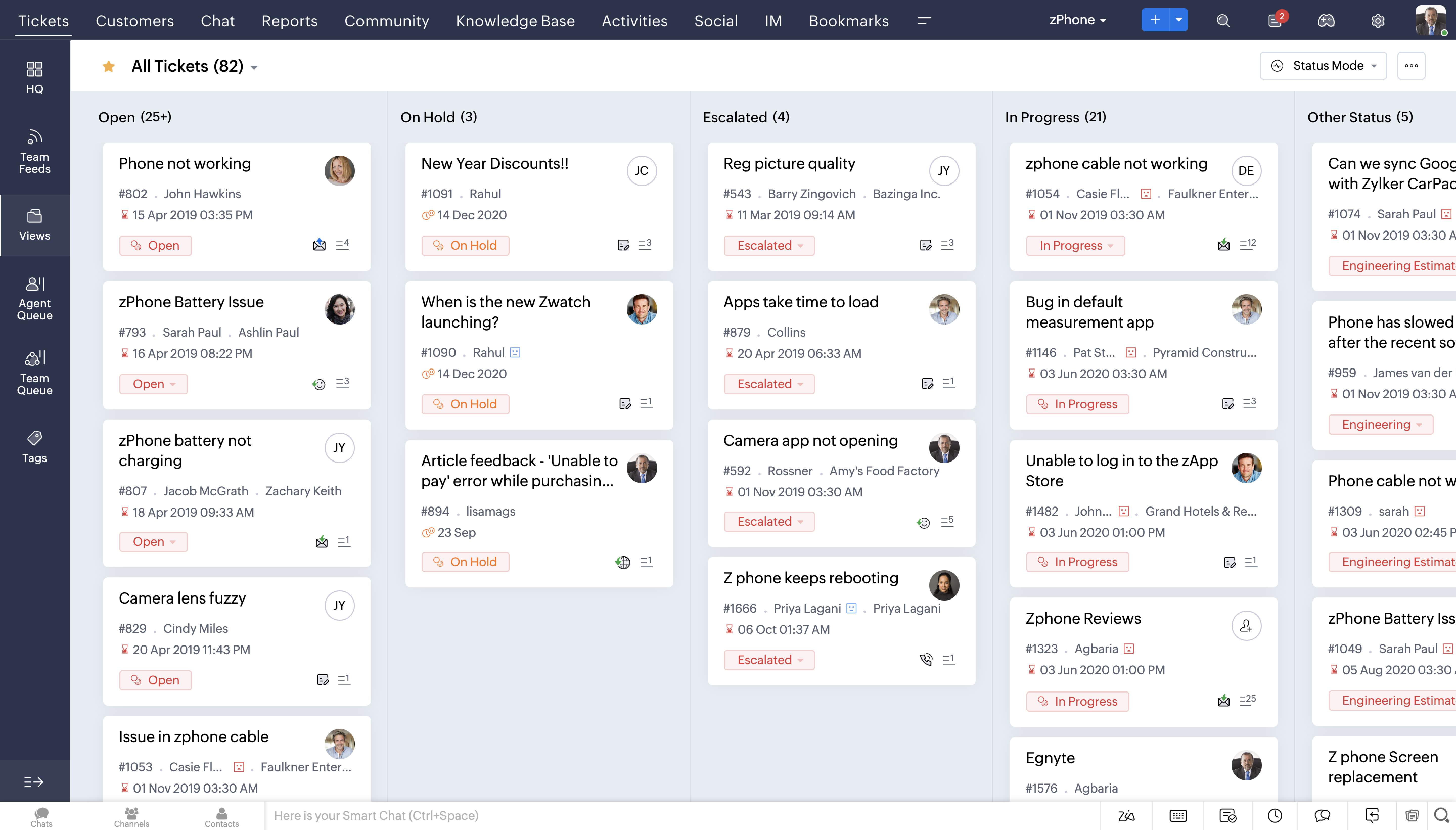
Detailed Contact View
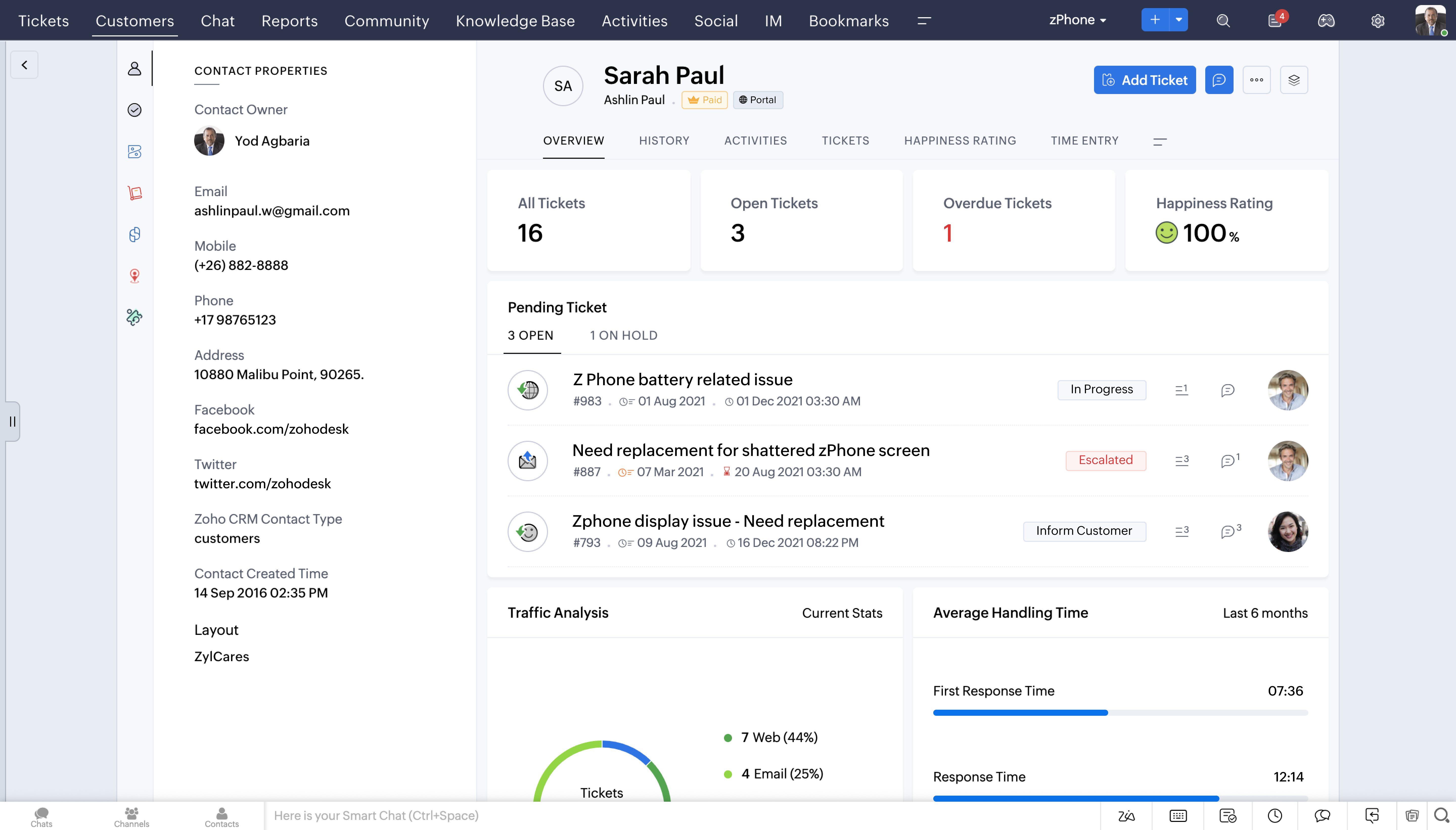
Detailed Ticket View
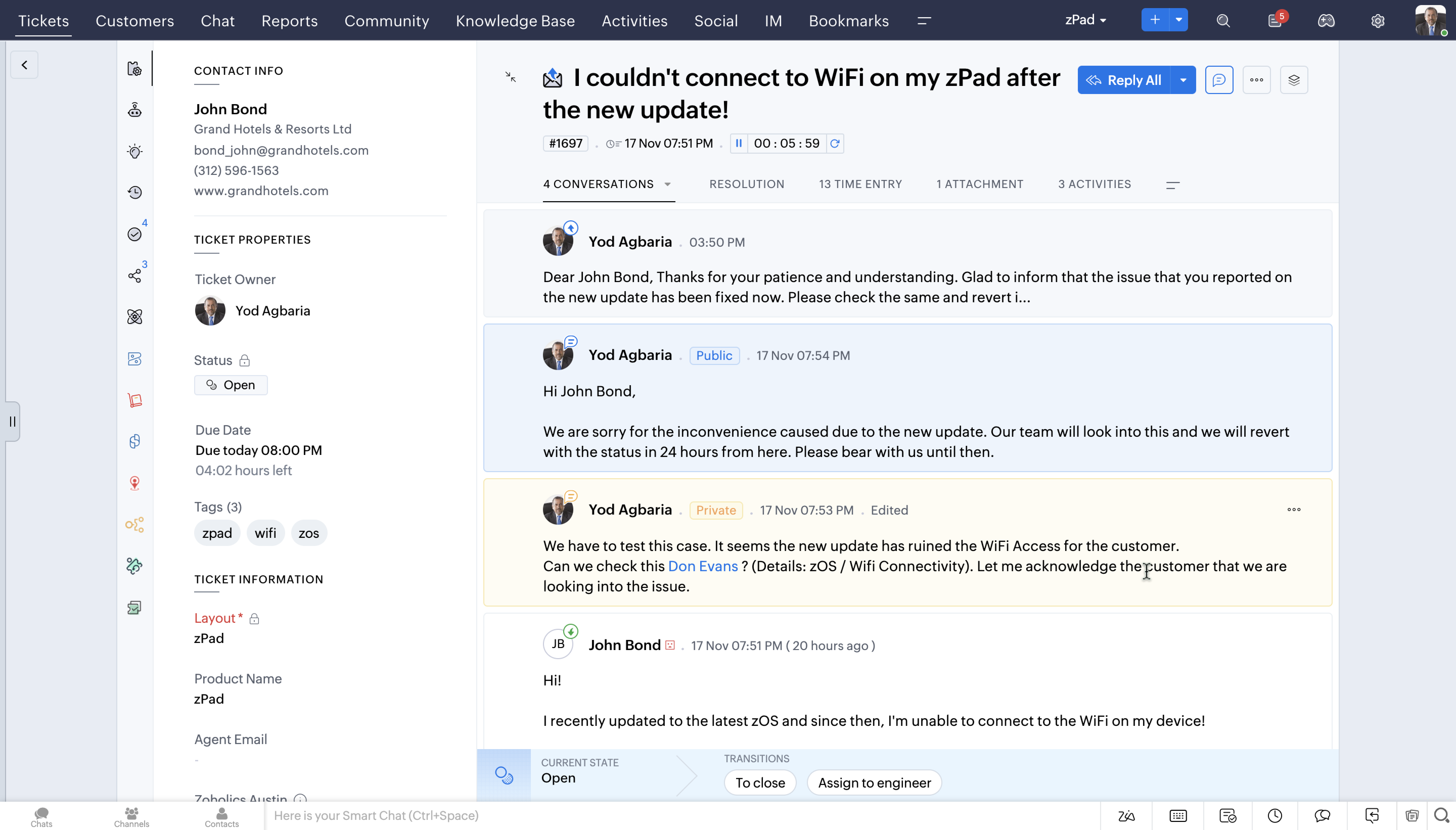
Latest Headquarters view
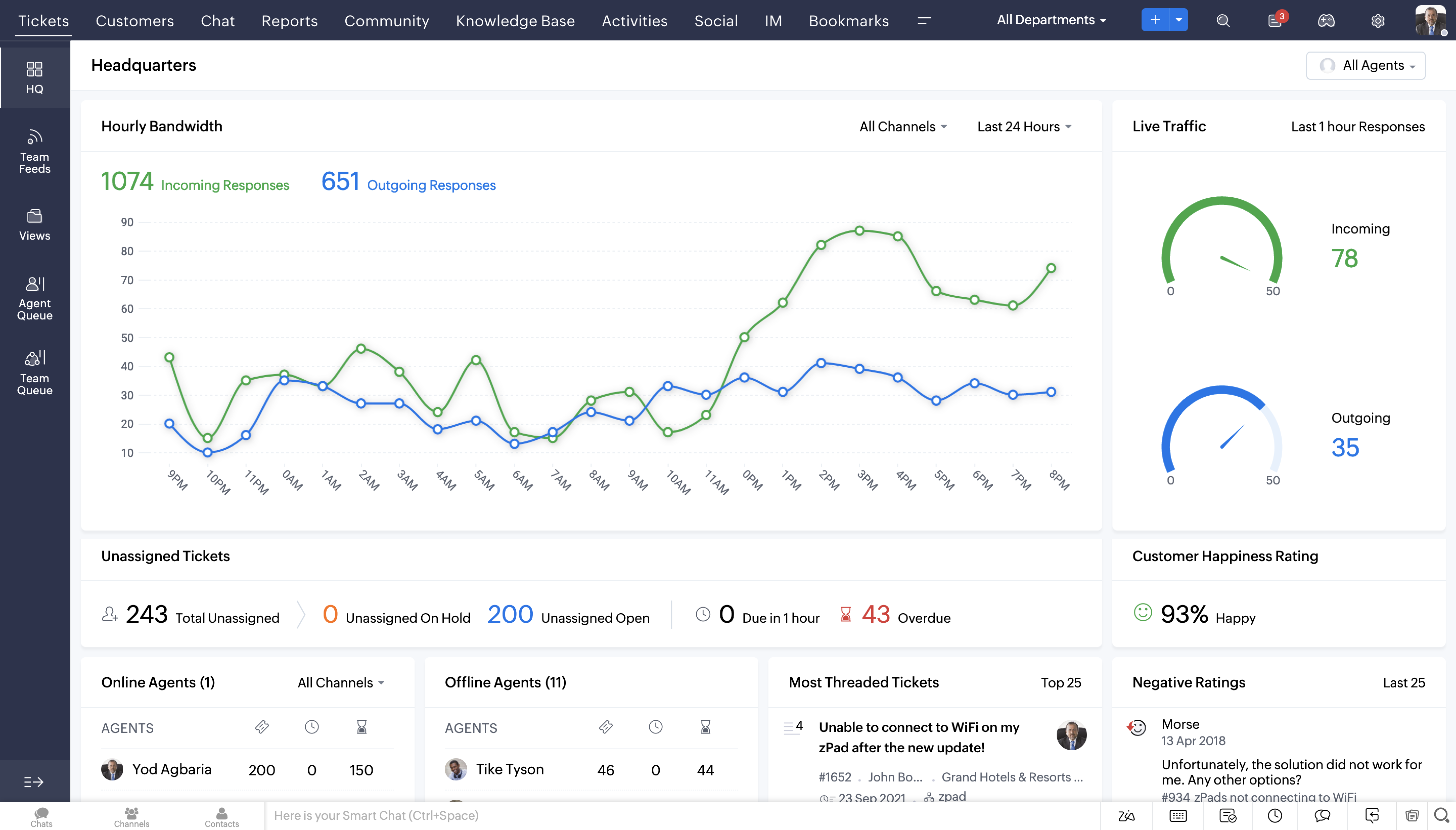
Feature Highlights
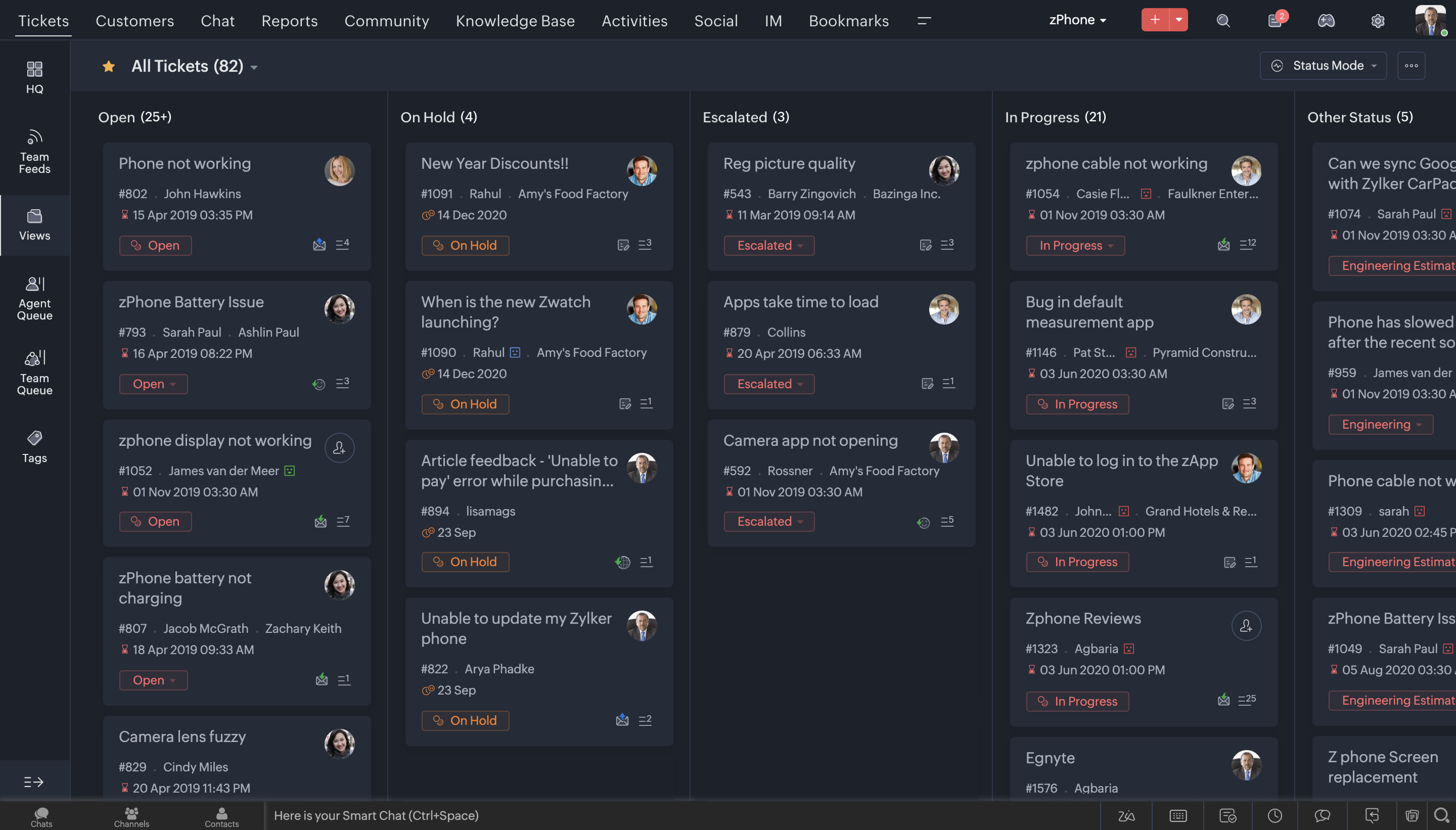
1. Dark Mode
One of the most sought after features these days across most consumer apps is the Dark Mode. We've brought that experience to Desk now. After all, that's where your team is going to spend a considerable amount of time through the day, so it is essential that they love it's experience.
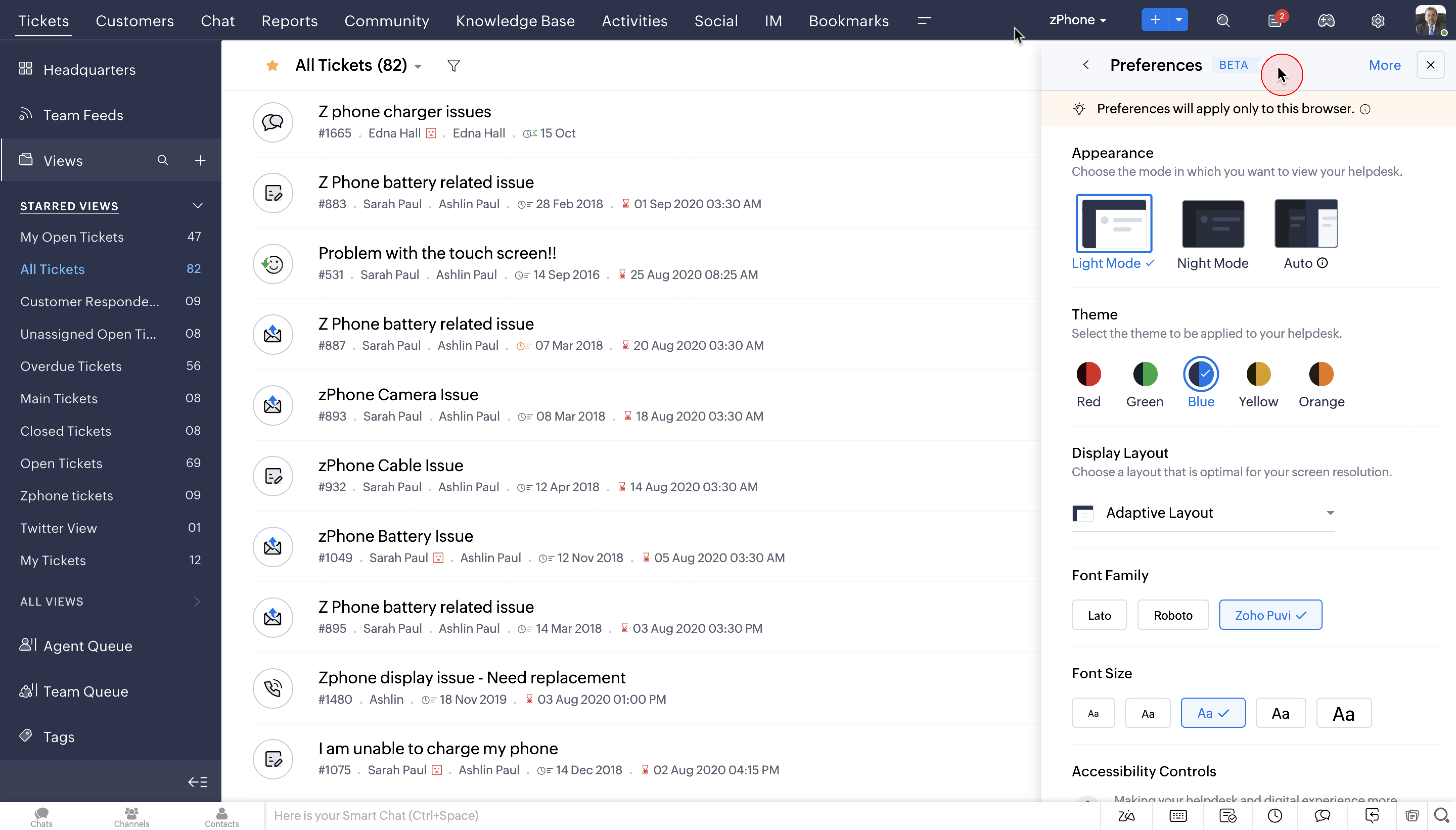
2. Themes
You can now choose from a wide range of themes to work on your favourite help desk application. Using your favourite colours on the app can make the whole help desk experience a lot more enjoyable.
Watch Video:
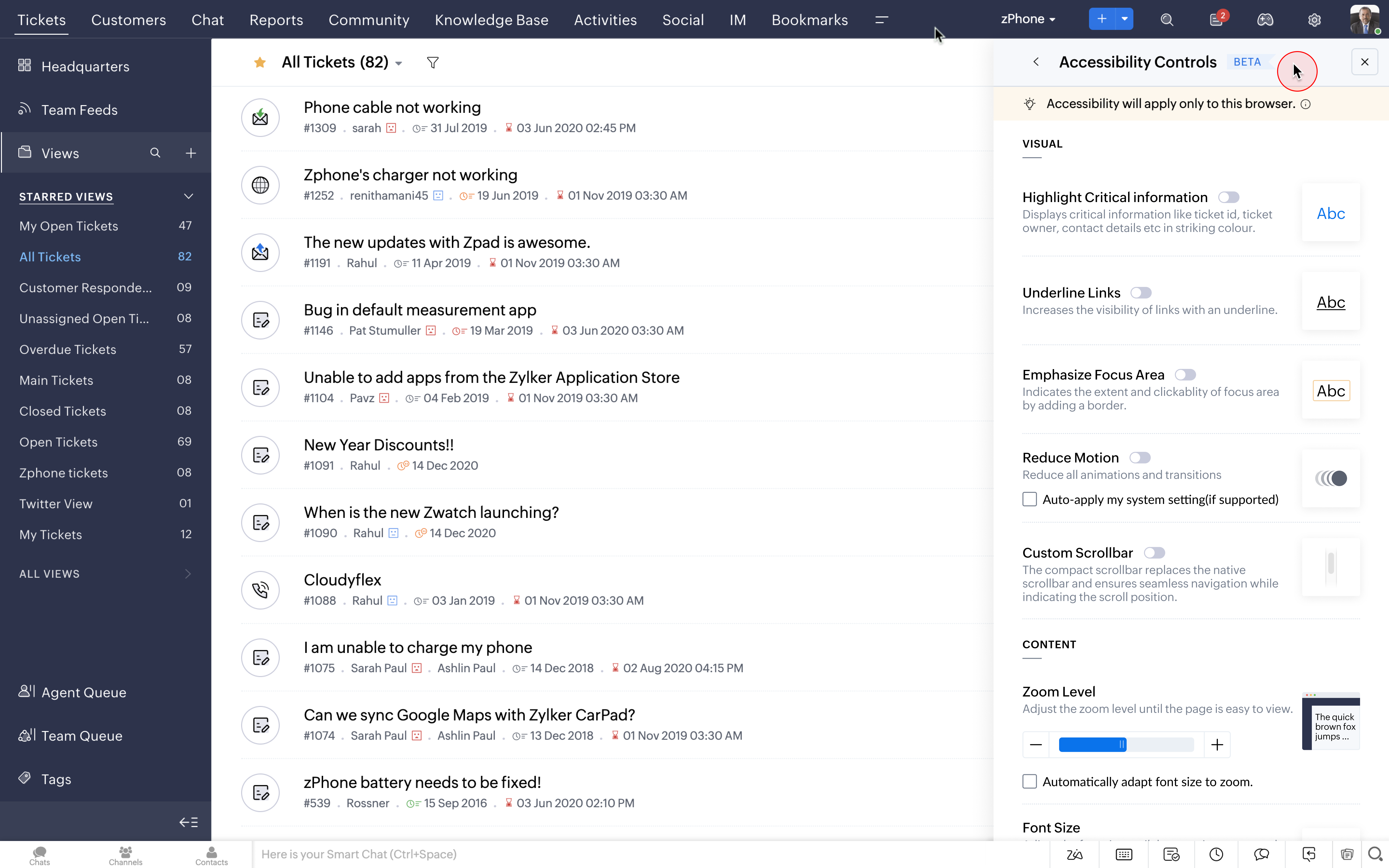
3. Accessibility Controls
The new Accessibility Controls allow users to set preferences according to their choice and convenience. We have given deep user-level personalization to our users in terms of appearance, controls, font choices and layout.
Watch Video:
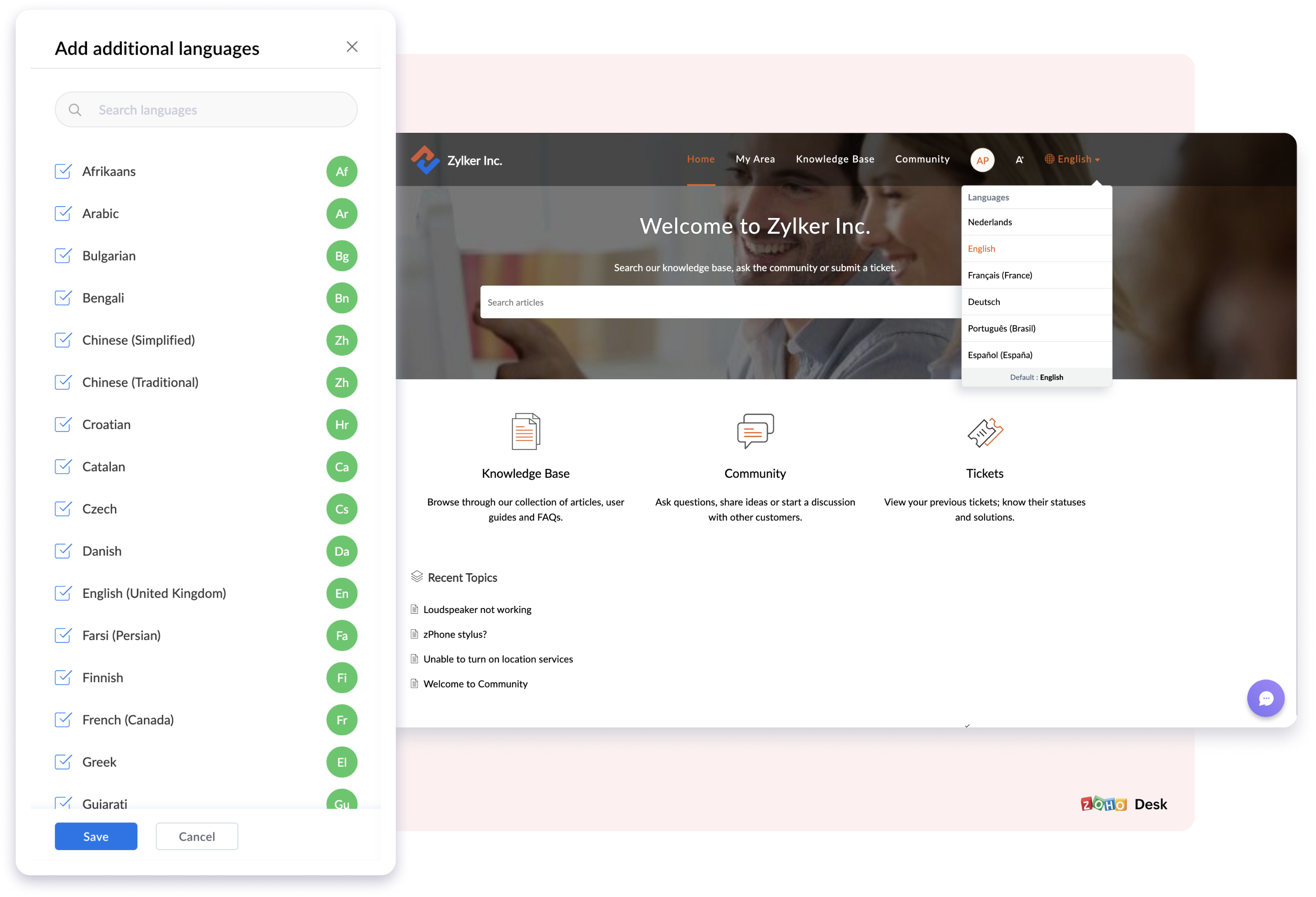
4. Multi-lingual support in Knowledge Base
The new Multilingual Support in the Knowledge Base will help you translate, publish, and update self-service content in more than
35
different
languages now. This will help customers access self service in their native language and can be a super time saving feature for the agents too.
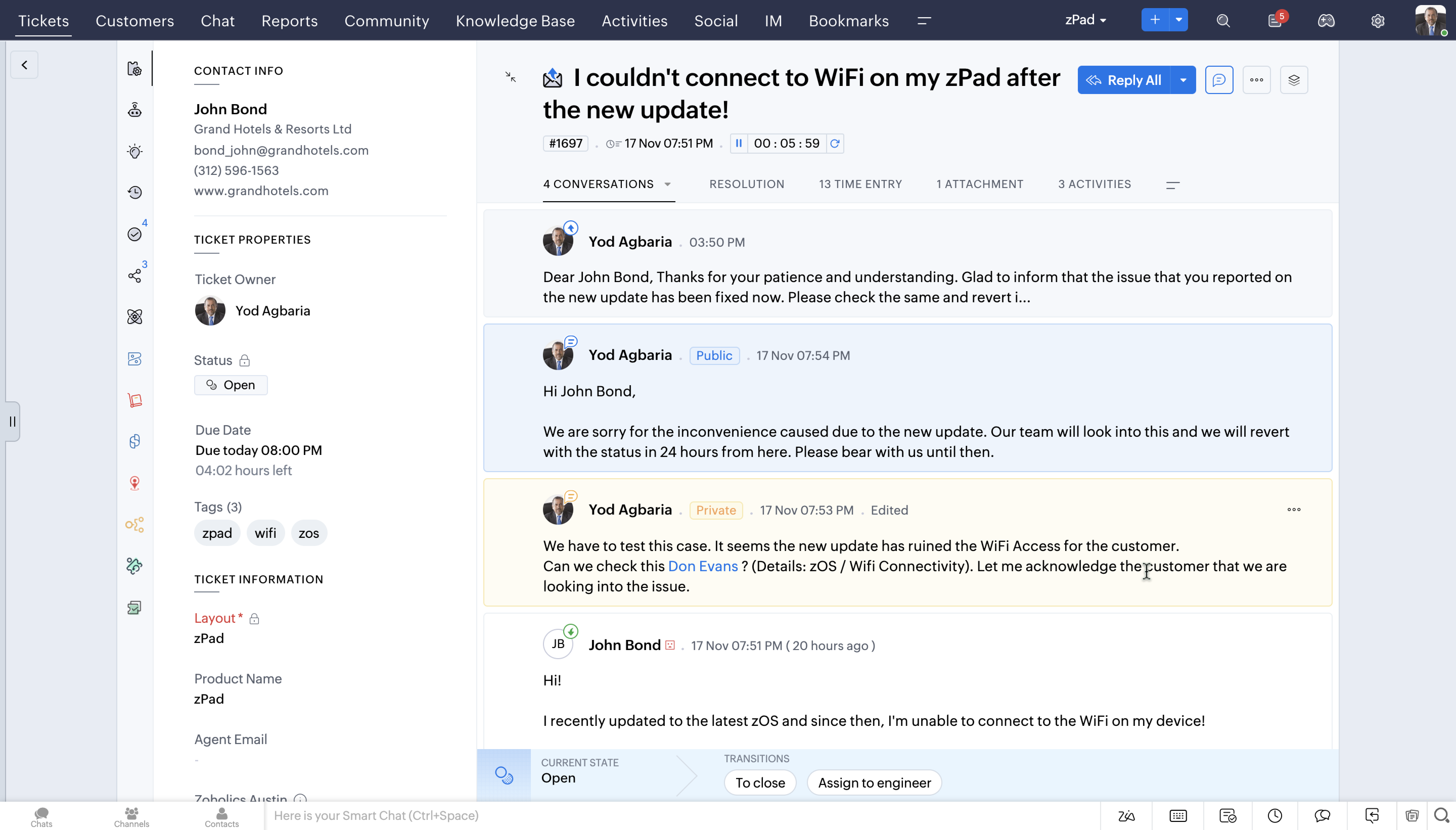
5. Conversation Colouring (Private & Public Comments)
You can now reply contextually to your customers' public and private comments based on the new colour coded conversations.
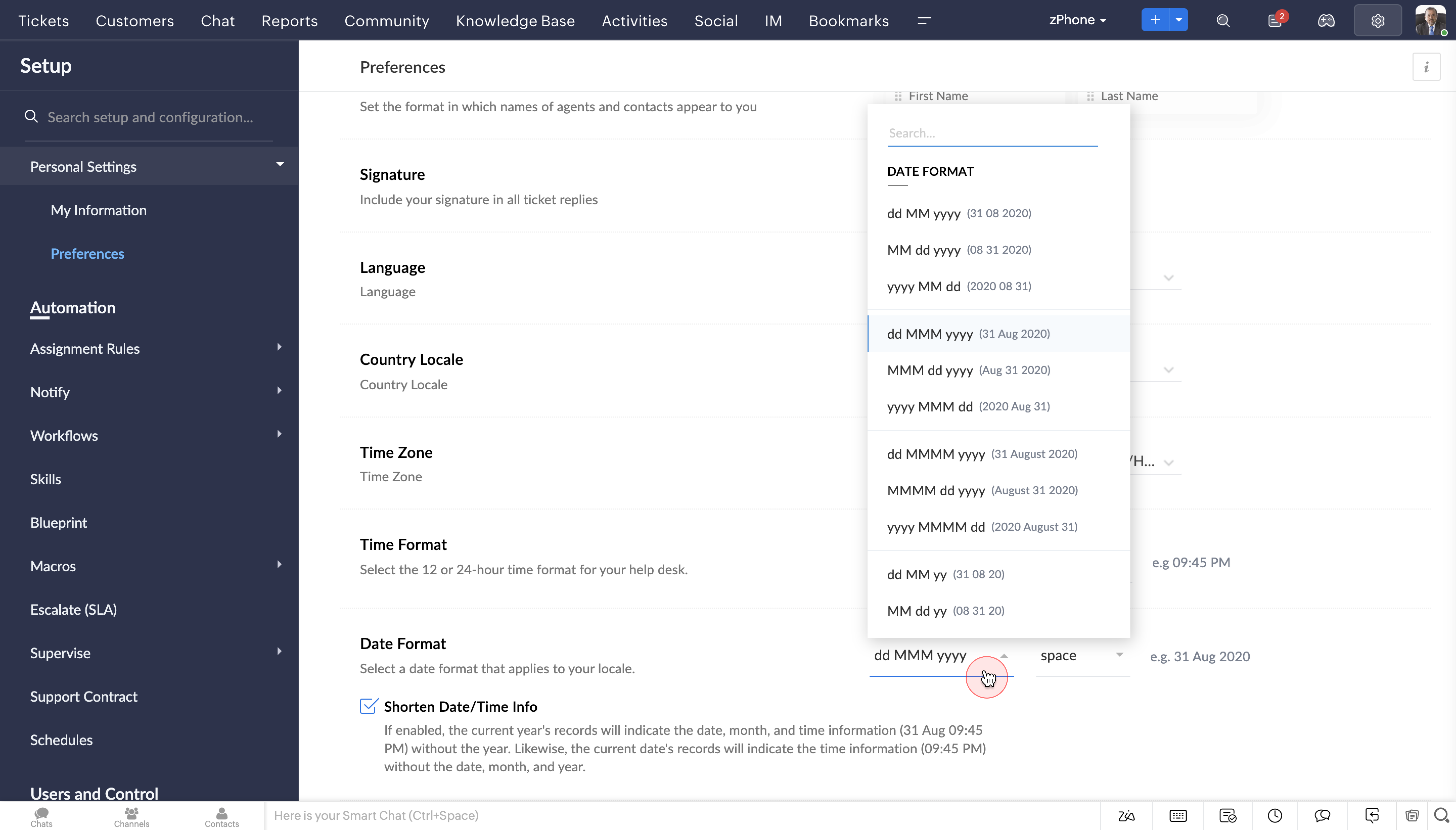
6.
Date & Time Format
The new Date and Time format will help agents to perceive data in the format of their choice, either in 24 hours or 12 hours. Its a great way to analyse tickets based on location and the corresponding time.
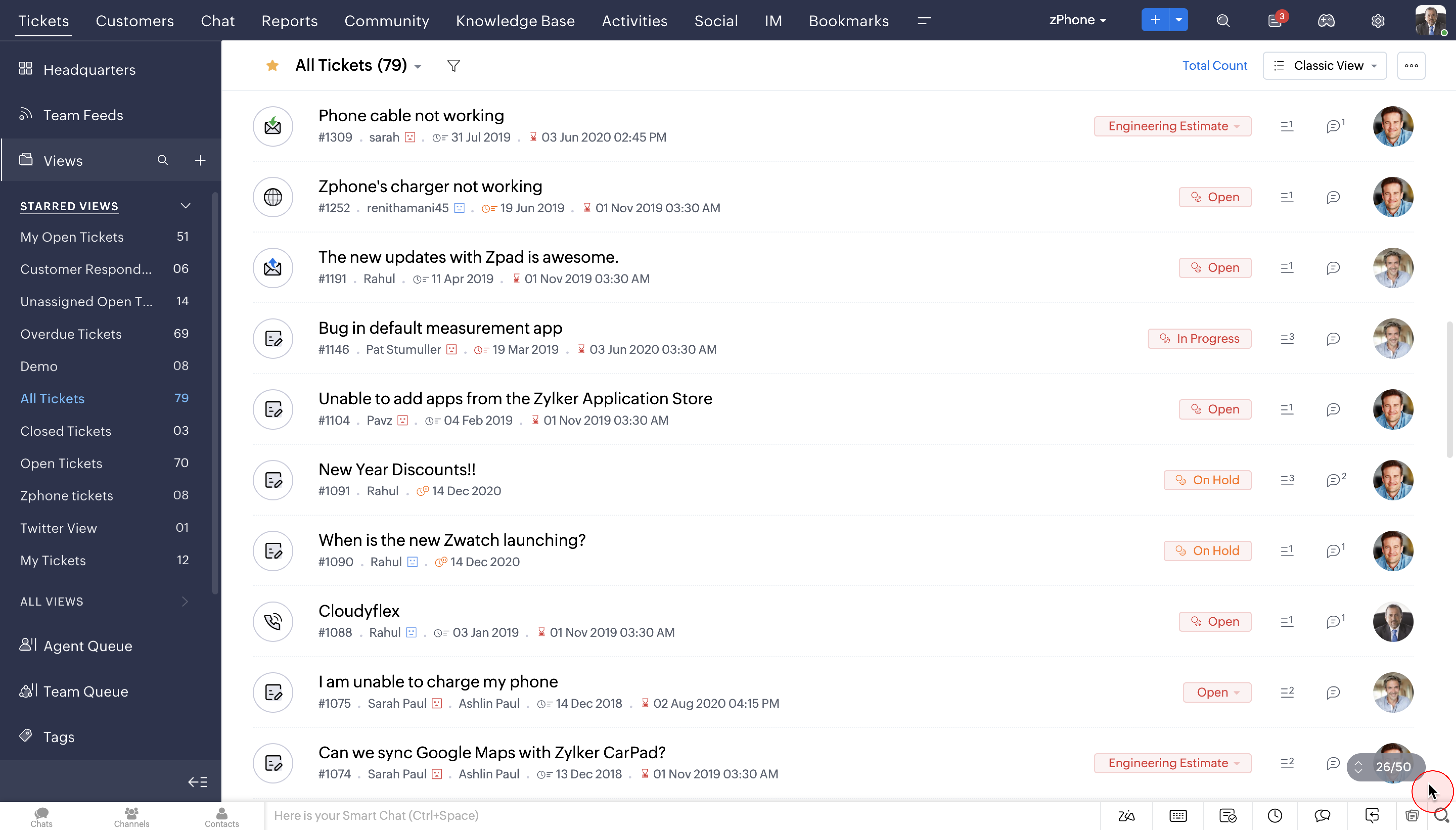
7. Infinite Scrolling and no pagination
You can now save time and monotony of endless clicking with the brand new Infinite scroll option. With improved product performance, navigating tickets from the entire lot would be a breeze.
So that was an overview of our new design direction, which we'd like to call DOT. We would love to hear your opinion on it. So please request access using this link
here and we will enable it soon.
For you to have a complete overview of all the UI/UX updates, we have put together a change set deck. You can access the presentation
here
Please note that the set up and configuration process in Desk are also under revamp and will be updated to the new version, subsequently.
Early access community:
We are also hosting a private early access community for our customers for drilled down product conversations and feedback. You will be automatically added to the group once you're given access to the new UI.
Here's a trivia:
5 years ago, today...
This day, 5 years ago was when we rolled out our largest UI overhaul. Since then, the customer service domain has evolved, so have all of you as businesses, and so has Zoho Desk as a product. What hasn't changed though, is our cause - to help you deliver unmatched customer service.
Note: We are not stopping here! As you dive into the compelling UI upgrades that can boost your customer service experience, we have another exciting announcement lined up. Stay tuned and watch this space for further developments.
Recent Topics
How to Rank Tables by Row Count in Descending Order
I am trying to understand the consume of lines that grow up so fast in the last week. Is there any way to create a pivot table or query to get TABLE NAME LINES in descending order?
Error AS101 when adding new email alias
Hi, I am trying to add apple@(mydomain).com The error AS101 is shown while I try to add the alias.
Can we do Image swatches for color variants?
We want to do something like the attached screenshot on our new zoho store. We need image swatches instead of normal text selection. We want to user to select an image as color option. Is this doable? I don't see any option on zoho backend. Please h
Export your notes from Notebook!
Dear users, The long awaited feature is now live. Yes, you can now export your notes from Notebook app in bulk. But the feature has just started with web app alone for now. You can try the export feature as mentioned below: Go to our web app, https://notebook.zoho.com Go to 'Settings' > 'Export' Now, select the format: You can select either ZNote or HTML Once done, you can use the same to import or can have this a local backup of your notes. Note: Export for other platforms are in development and
Can we add custom fields to portal community profiles?
How do we add custom fields to our profile pages in our portal community? If we have the ability to add custom fields, will we be able to access those fields via API? We want to use our Desk community in our help portal as our primary community and would
Canva Integration
Hello! As many marketing departments are streamlining their teams, many have begun utilizing Canva for all design mockups and approvals prior to its integration into Marketing automation software. While Zoho Social has this integration already accomplished,
Prepopulating Fields
Hello, I have a form (Assets) with 2 lookup fields: Client (from Clients) Site (from Client Sites) I modified the code (highlighted in red below), so the Site dropdown shows the list of sites related to the Client. must have Client_Site ( type = picklist
CRM x WorkDrive: File storage for new CRM signups is now powered by WorkDrive
Availability Editions: All DCs: All Release plan: Released for new signups in all DCs. It will be enabled for existing users in a phased manner in the upcoming months. Help documentation: Documents in Zoho CRM Manage folders in Documents tab Manage files
What is the difference between Zoho Campaigns and marketing hub?
Zoho Campaigns is a permission-based email marketing tool for sending marketing emails and mass emails. Marketing Automation is a multichannel marketing automation tool that caters to organizations looking for tools to engage their users across multiple
Ask the Experts 26: Brighten every customer interaction with Zoho Desk all year long
Hello everyone, Greetings and welcome to Ask the Experts 26. As we wrap up 2025, we are excited to invite you to the 26th episode of our Ask the Expert series. 🎄The Merry Metrics Edition = Best of Zoho Desk [Best Practices + Holiday Automation + Year-End
Sync Zoho Marketing Automation with Zoho Forms
I can't find a section where the integration between Zoho Marketing Automation and Zoho form is explained. And how form subscription works with opt-in and consents.
REPORT THAT SHOWS SOH FOR ITEMS THAT HAVE ZERO SALES
When we started Zoho we imported a lot of inventory lines directly off our suppliers price list and have never ordered / sold. I want to clean up our data base and remove all these lines. What reeport will show me what lines have zero sales as well as
Automation series : Close all tasks once the project is completed
When a project is marked as Completed, it might still have open tasks such as recurring tasks that were not marked as complete, tasks that are no longer relevant, or tasks that no longer need attention after closure. To ensure the project reflects its
Converting Sales Order to Purchase Order
Hi All, Firstly, this code works to convert a sales order(SO) to a purchase order (PO) via a button, however I am running into an issue when I convert the SO where the values from the line items are not pulled across from the SO to the PO. The ones in
HTML Tags added to Reports with Notes
Recently Zoho added the ability to markup text within notes. That way, users can change font size, colors, etc. It's a great change. However, since the change, reports that include a column for "Note Content" are printing HTML tags within the report.
All new Address Field in Zoho CRM: maintain structured and accurate address inputs
The address field will be available exclusively for IN DC users. We'll keep you updated on the DC-specific rollout soon. It's currently available for all new sign-ups and for existing Zoho CRM orgs which are in the Professional edition. Latest update
Horrible Connectivity!
I have used Meetings several times, but most of the time the connection is horrible. The video freezes, the audio freezes, and we end up cancelling the meeting. I am on a high speed internet connection, and Zoom works fine, so I know it's not a problem
Is it really true that I can't set the default 'deposit to' account in 2025?
I've been using Books for 7 years and the default account has never been a problem. I usually manually reconcile invoices and have never had a thought about which account. It has always been my account. However, I recently noticed that for the past 4
Zoho DataPrep switching Date Format
When using a pipeline that is importing Zoho Analytics data into Zoho DataPrep, the month and day of date fields are switched for some columns. For example, a Zoho Analytics record of "Nov. 8, 2025" will appear in Zoho DataPrep as "2025/08/11" in "yyyy/MM/dd"
Using Another Field Value for Workflow Field Update
I'm trying to setup a Workflow with a "Field Update" action on the Lead module, but I would like the new value to actually be taken from a DIFFERENT Field's on the Lead record (vs just defining some static value..) Is this possible? Could I simply use
Auto-Invite Users to Portals in Zoho CRM based on Conditions
Hello Everyone, You can now automate portal invitations in Zoho CRM with the new Auto-Invite users feature in Portal management. No more manually enabling portal access one by one. With this enhancement, you can automatically send invites for users to
Greek character in Deluxe script
Hi, We have been using a script since 2022 which replaces characters in Greek contact names using replaceAll. Since this morning, all the Greek characters used in the script have turned to question marks. I tried retyping the characters, copy-pasting
Tax information
Hello, I need help/guidance on how to add my organization's Tax/VAT information. Thank you Pavly
Build smarter Guided Conversations with Fork Blocks
When your customers arrive on your support channel, they're not there to explore. They are usually confused and stuck while trying to fix something important. We understand how stressful that moment can feel and we want your bot to make things easier,
Custom item field won't allow decimal.
Hello, I have a custom item field that needs to be able to have a value with a decimal place such as 6.7 or 6.18. I have tried custom formatting the input format but can not get the correct syntax to allow this. Is this possible in Zoho?
Free webinar: Zoho Sign unwrapped – 2025 in review
Hey there! 2025 is coming to an end, and this year has been all about AI. Join our exclusive year-end webinar, where we'll walk you through the features that went live in 2025, provide answers to your questions, and give you a sneak peek on what to expect
Customer ticket creation via Microsoft Teams
Hi all, I'm looking to see if someone could point me in the right direction. I'd love to make it so my customers/ end users can make tickets, see responses and respond within microsoft teams. As Admin and an Agent i've installed the zoho assist app within
HubSpot CRM to Zoho Creator Integration
I'm trying to create an integration between HubSpot CRM and Zoho Creator with HubSpot being the push source (if a contact is created or updated in HubSpot, it pushes the information to Zoho Creator). I have two questions: 1- Is it best to use Zoho Flow
Zoho Sign - Zoho CRM extension upgrade
Hi everyone, We've updated Zoho Sign extension for Zoho CRM with significant internal changes. Impact on existing Zoho Sign extension users Users using the extension without customization If you are using the integration without implementing Zoho Sign's
Custom Fields
There is no way to add a custom field in the "Timesheet" module. Honestly, the ability to add a custom field should be available in every module.
Contact data removes Account data when creating a quote
Hi, Our customer has address fields in their quote layout which should be the address of the Account. They prefill the information, adding the account name - the address data is populated as per what is in the account - great. However when they then add
Gain control over record sharing with portal users through our new enhancement: criteria-based data exposure
Dear Customers, We hope you're well! Portals is a self-service avenue through which your clients can access and manage their direct and related data in Zoho CRM. This empowers them to be more independent and enables them to experience a sense of transparency
Best-practice setup in Zoho One for managing combined candidate pools and exporting anonymised CVs
We are new users of the Zoho One bundle and operate a consulting and engineering company. Our workforce model includes a mix of permanent employees, active job applicants, and freelance/independent consultants. All three groups need to be searchable,
Meet Canvas' Grid component: Your easiest way to build responsive record templates
Visual design can be exciting—until you're knee-deep in the details. Whether it's aligning text boxes to prevent overlaps, fixing negative space, or simply making sure the right data stands out, just ironing out inconsistencies takes a lot of moving parts.
hard-bounced email list
Hi, Below pops up when I try to send an Email to some of my customer. Please guide me how to take it out from hard-bounced list? I am not sure how they were marked in hard-bounced list
Register the 'Contact Role' addition and change as a Potential edition so it can trigger Workflows
We are trying to use "Contact Roles" in Potentials. Contact Roles are special and different than the other Related lists, so, it may have a special behavior. Something to keep in mind is that you will never have 100 Contact Roles as you can have 100 Tasks, Calls, or any other Related list. In our case we will have 2 in average and up to 4 or 5 maximum. The problem is that we need to bring information from 3 key Contact Roles to the Potential and adding a Contact to the Contacts Roles area never trigger
How to check task starting time in zoho mobile app?
I am using the Zoho mobile app on my iPhone, and I am not able to see the task's starting and finishing times. When opening the Task information / Details, I can only see the Task start date and due date, but not the time. Is there any way to check a
Can I change the format of the buttons in the email templates?
Hi all! We have been working hard trying to brand our email templates, and have some way to go yet. One of the things we can't seem to edit is the green ${Cases.CUSTOMER_PORTAL_BUTTON} button and the font of the View Ticket text. Is there any way of doing
Best practice to structure reporting to include events covering multiple months / quarters.
Hi, I'm new to Zoho, have some experience of more "enterprise" tools, looking for some input from the community. I'm looking to create a report that includes events that cover a long period, each event has a start / end date and I'm struggling undertanding
Marketing Tip #11: Turn features into benefits that sell
We all love talking about our products, but here’s a secret: customers don’t just buy features, they buy benefits. Instead of just saying "Made from 100% organic cotton," try "Soft, breathable comfort that lasts all day." Benefits tell shoppers how your
Next Page