Announcing Early Access to the next generation of Zoho Desk UI

Announcing Early Access to the next generation of Zoho Desk UI

Customer service is one of the categories where efficiency and quality of service have to run in parallel, and your team's experience with their helpdesk goes a long way ensuring these aspects are uncompromised.

Introducing DOT Design for Zoho Desk - our new design philosophy to redefine your customer service experience.  


This new design philosophy is built on a multi-pronged approach that enables superior communication and navigation for agents, while enhancing scalability without limiting flexibility for the management. This is also a step in the direction to make Zoho Desk a fully inclusive platform that is friendly for our differently abled friends. Our DOT design system has opened up a new library of components for Desk that can be accessed by developers, solution provider partners and software SIs of Zoho. The design system will additionally be externally shared for all the development and designing that relies on the Zoho Desk platform.

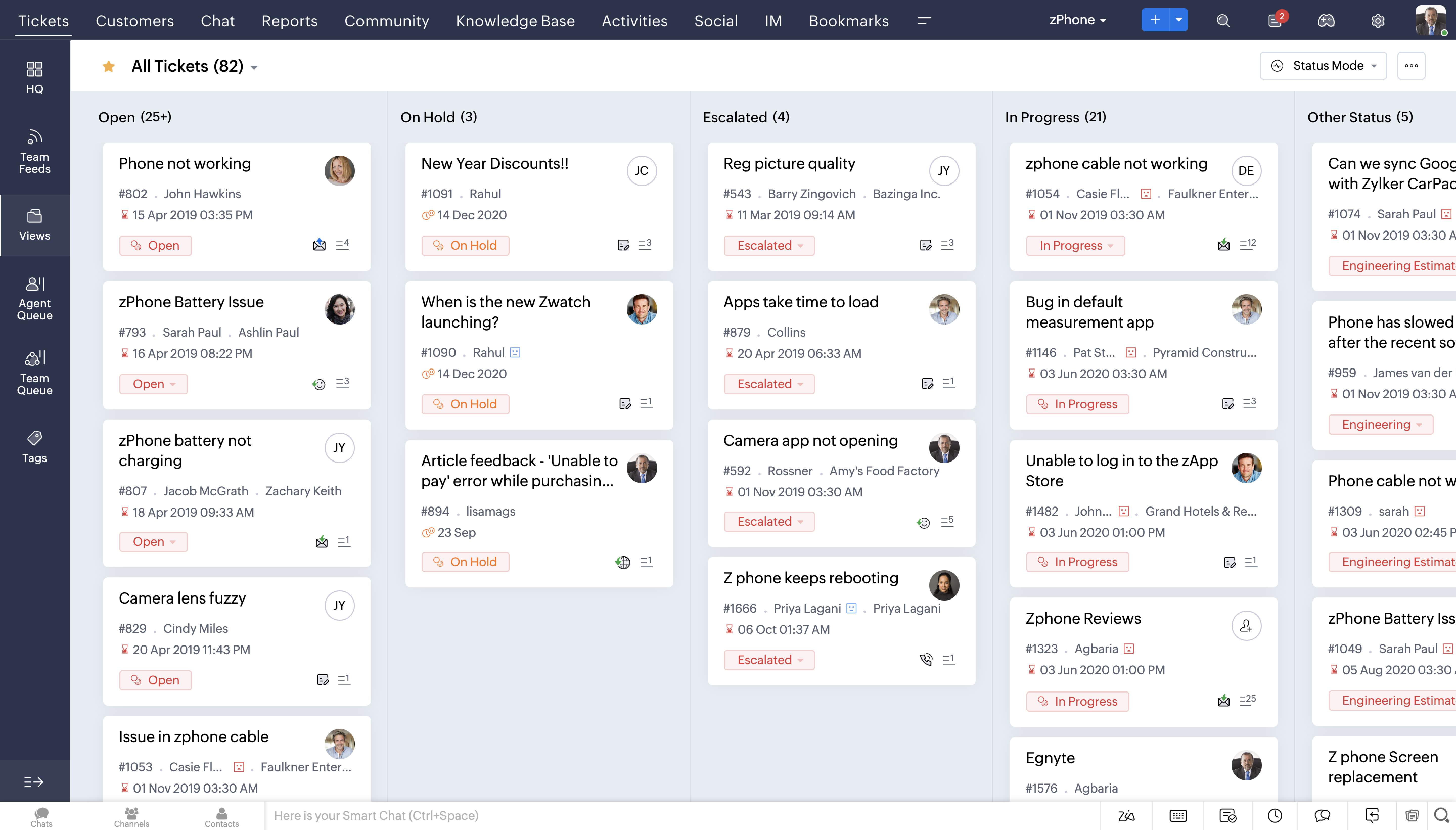
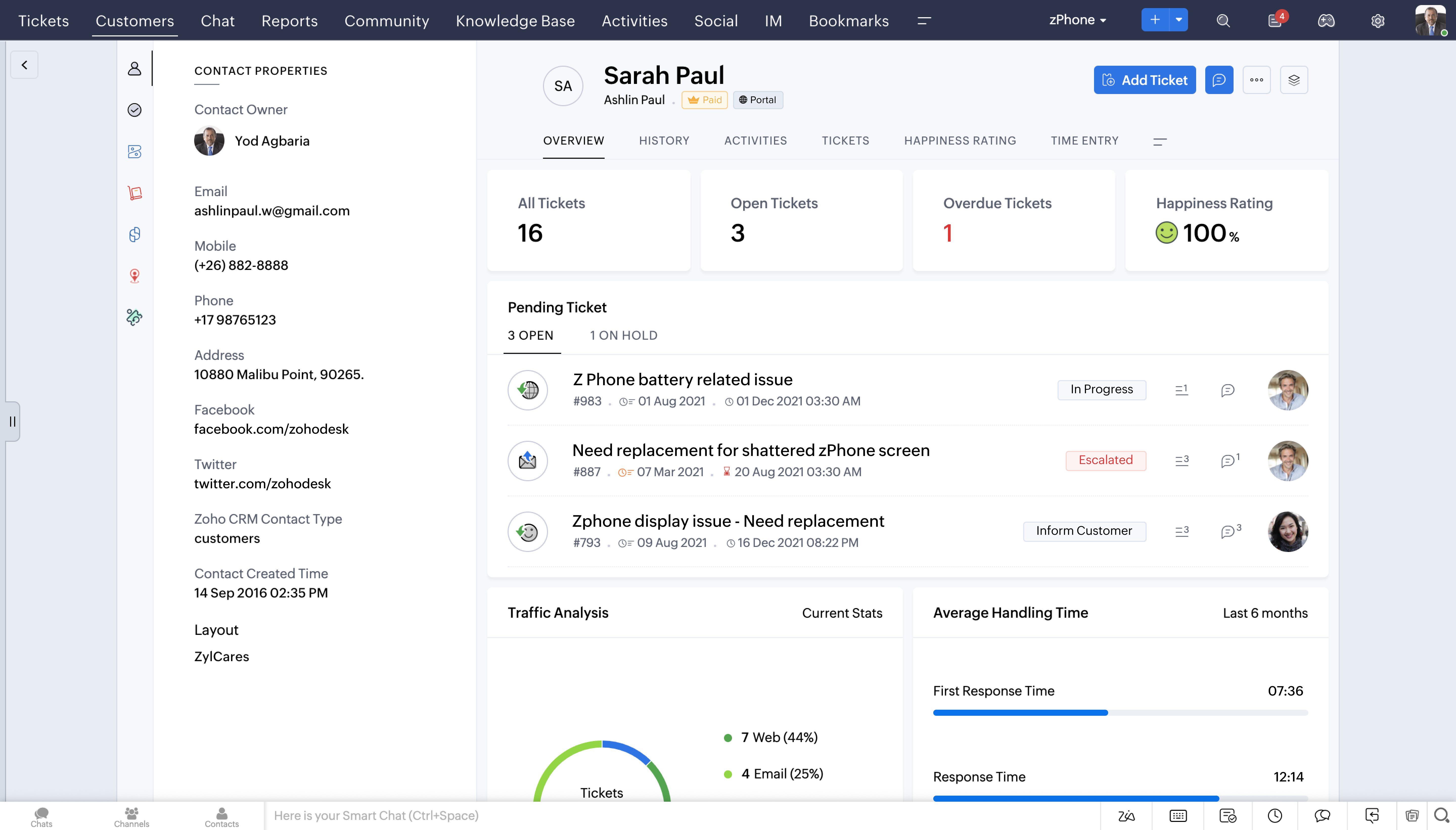
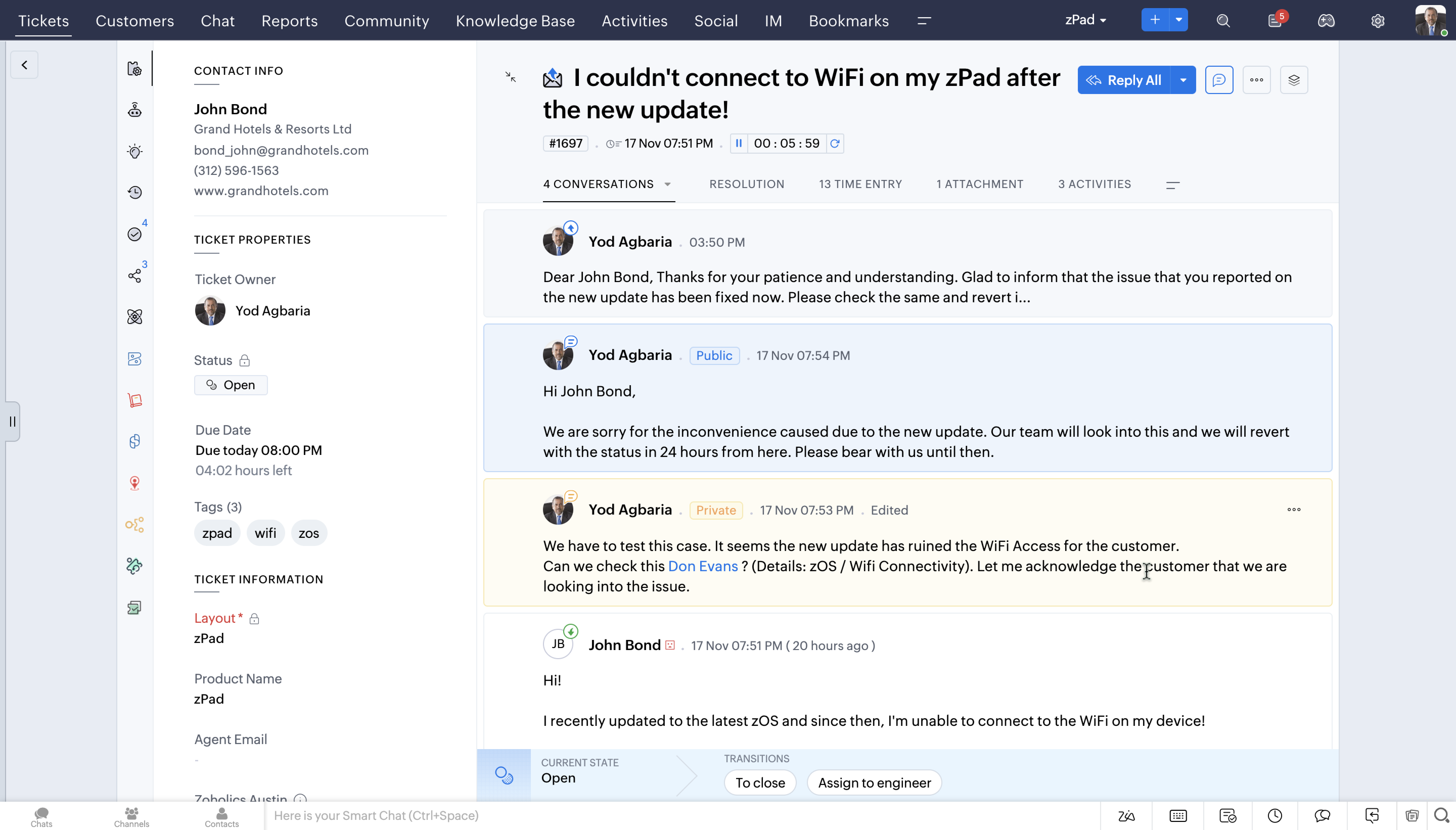
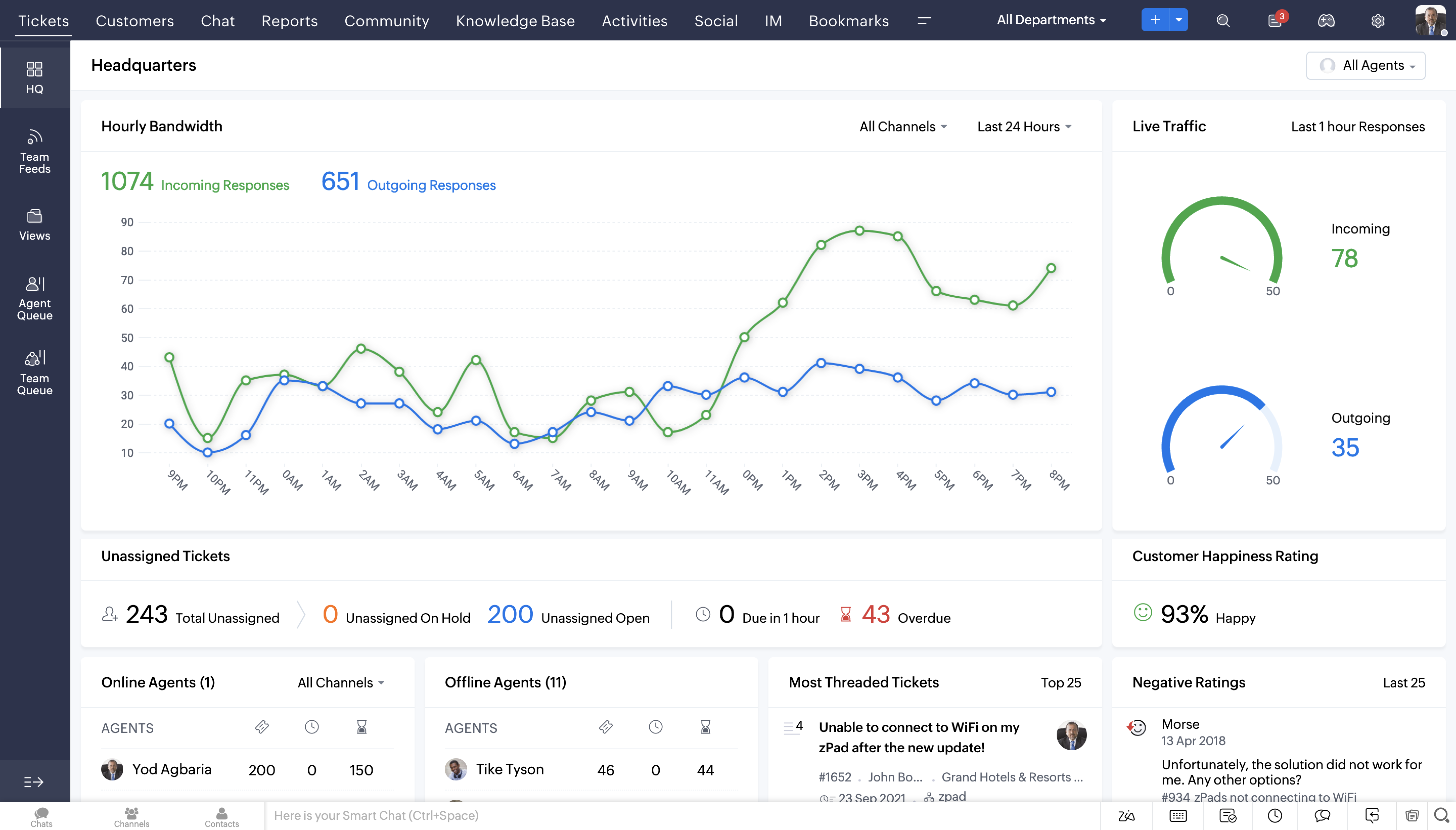
While the overall look and feel has been refreshed, the changes are not limited to being skin-deep. There has been a conscious effort to unify the navigation throughout the product, so the end user gets to experience a consistent, seamless experience. The design specifics are aimed at delighting our users with new themes, controls and performance attributes. Agents spend quite some time shuffling between various screens to scout for the right information and serve customers, and changes like these make everyday work easier for them.

The latest overhauled Ticket Queue view


Detailed Contact View


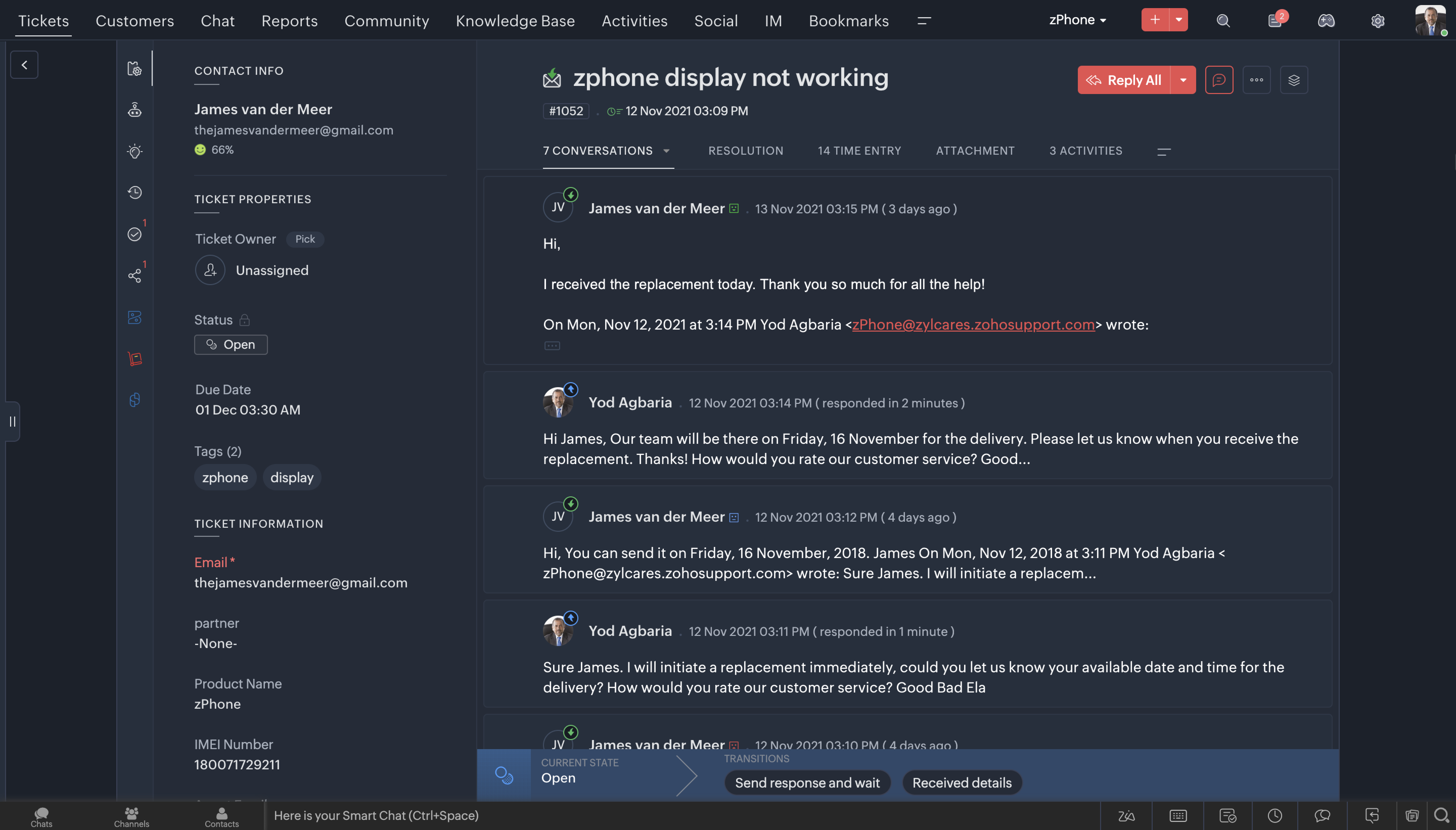
Detailed Ticket View


Latest Headquarters view


Feature Highlights
 
 
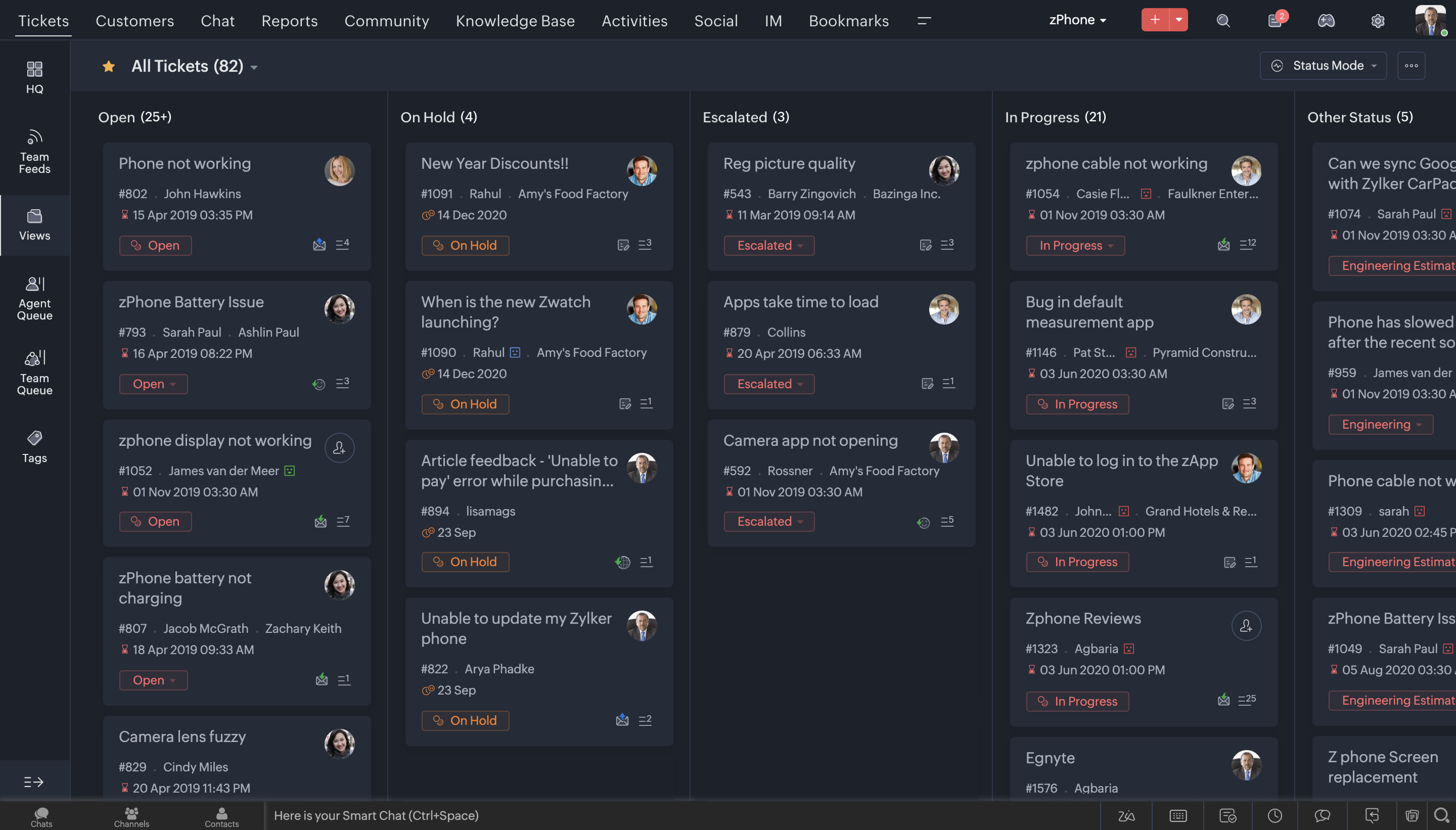
1. Dark Mode 
One of the most sought after features these days across most consumer apps is the Dark Mode. We've brought that experience to Desk now. After all, that's where your team is going to spend a considerable amount of time through the day, so it is essential that they love it's experience.


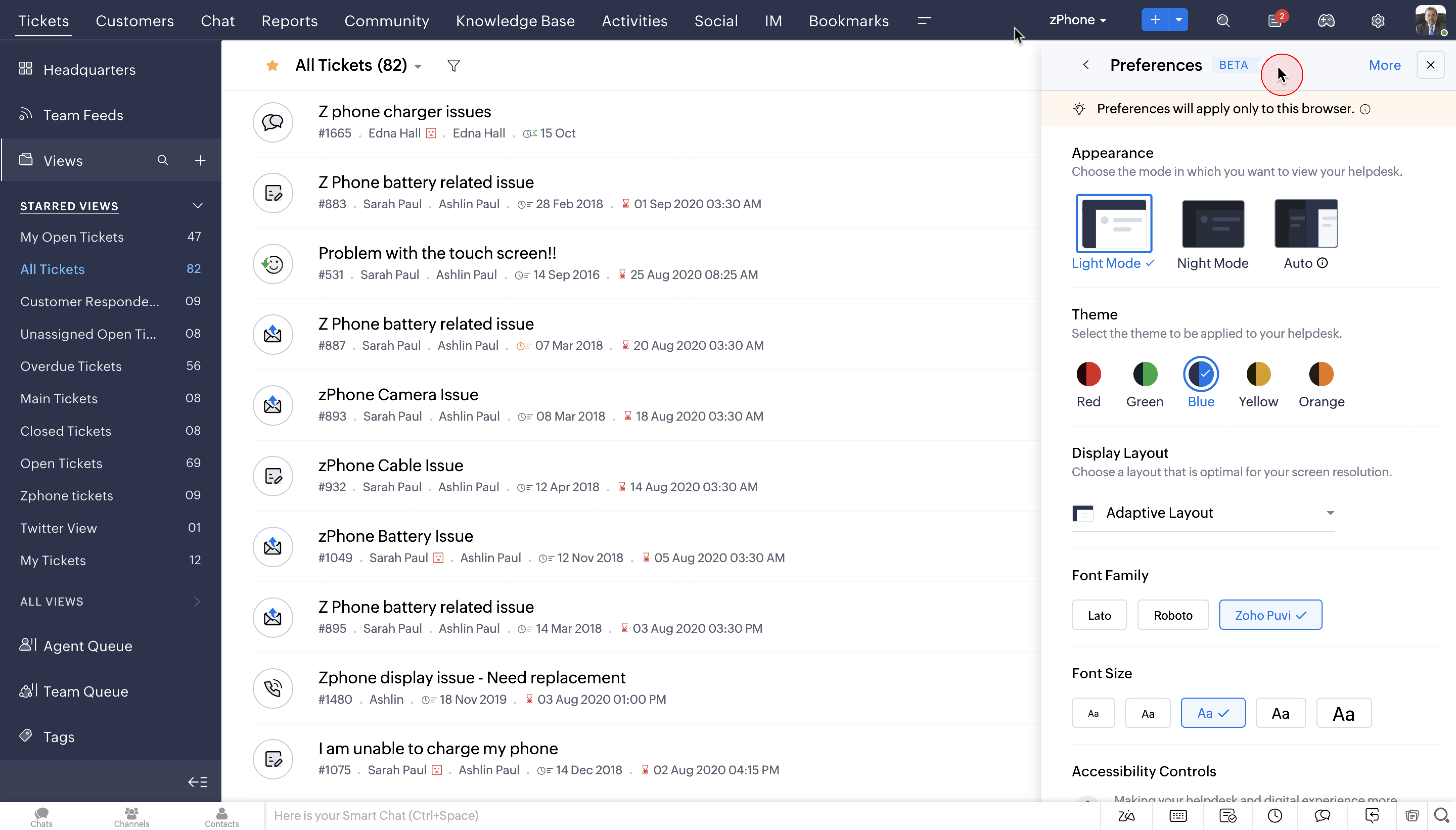
2. Themes
You can now choose from a wide range of themes to work on your favourite help desk application. Using your favourite colours on the app can make the whole help desk experience a lot more enjoyable. 


Watch Video:


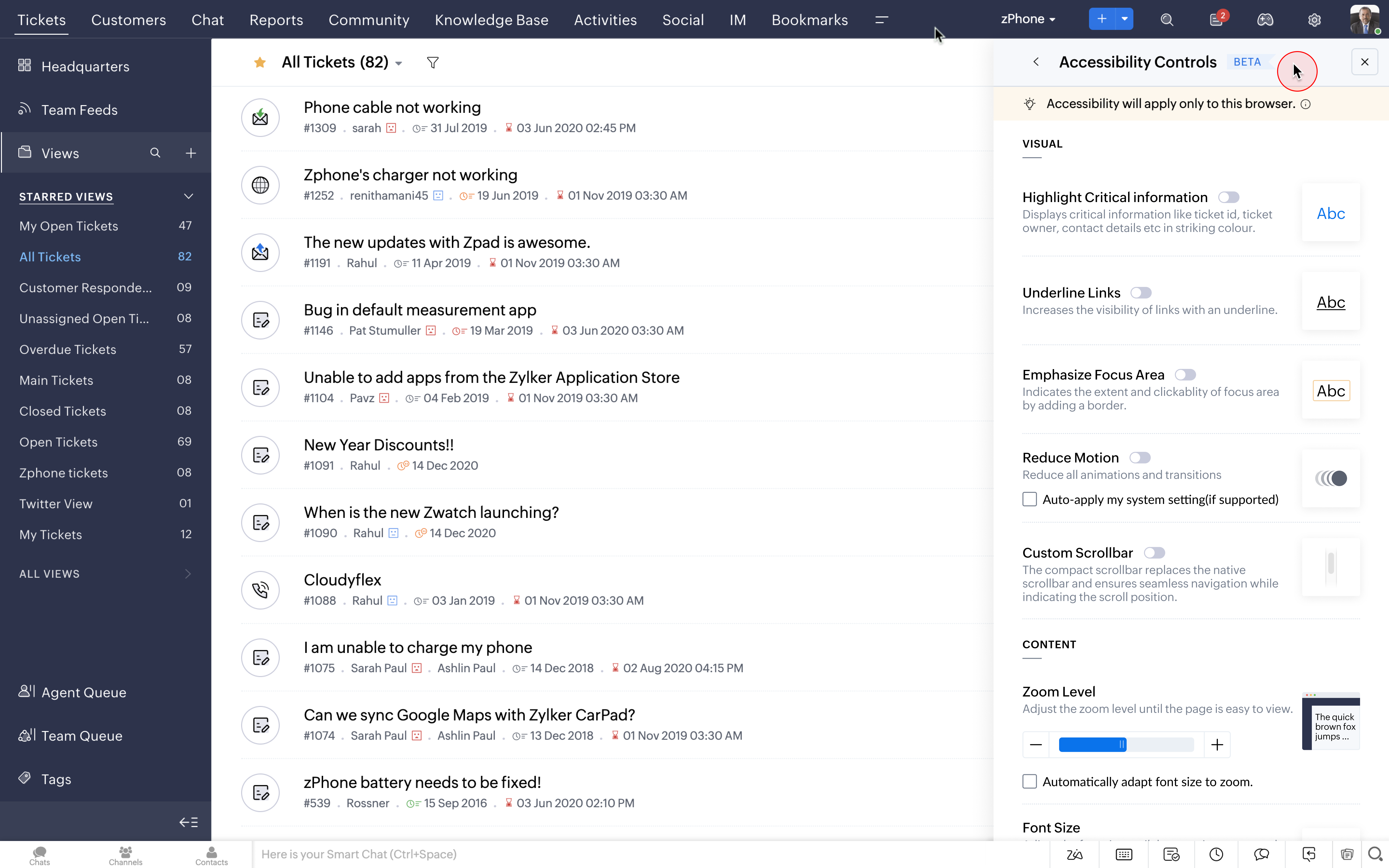
3. Accessibility Controls
The new Accessibility Controls allow users to set preferences according to their choice and convenience. We have given deep user-level personalization to our users in terms of appearance, controls, font choices and layout.


Watch Video:


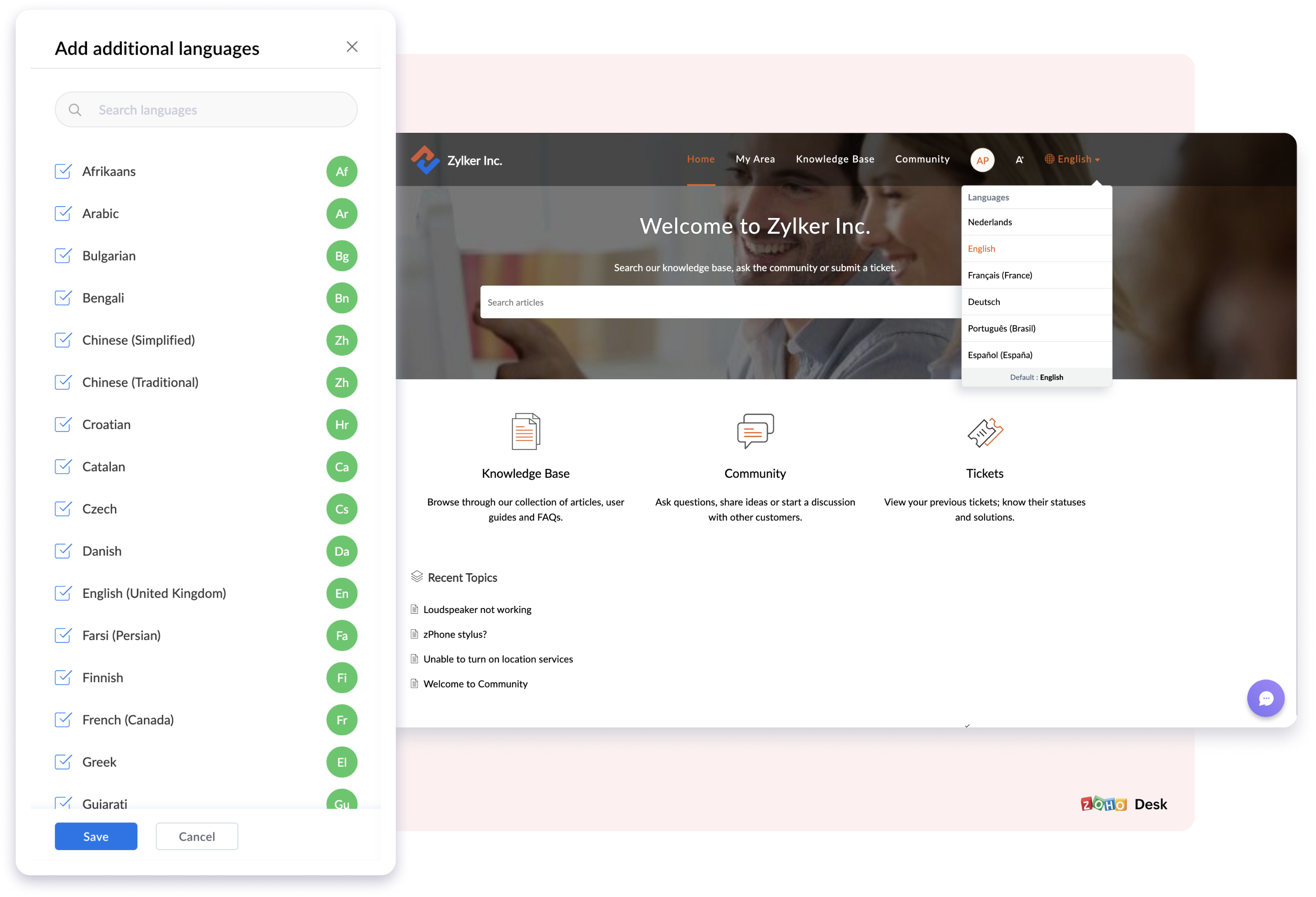
4. Multi-lingual support in Knowledge Base
The new  Multilingual Support in the Knowledge Base will help you translate, publish, and update self-service content in more than  35  different languages now.  This will help customers access self service in their native language and can be a super time saving feature for the agents too. 


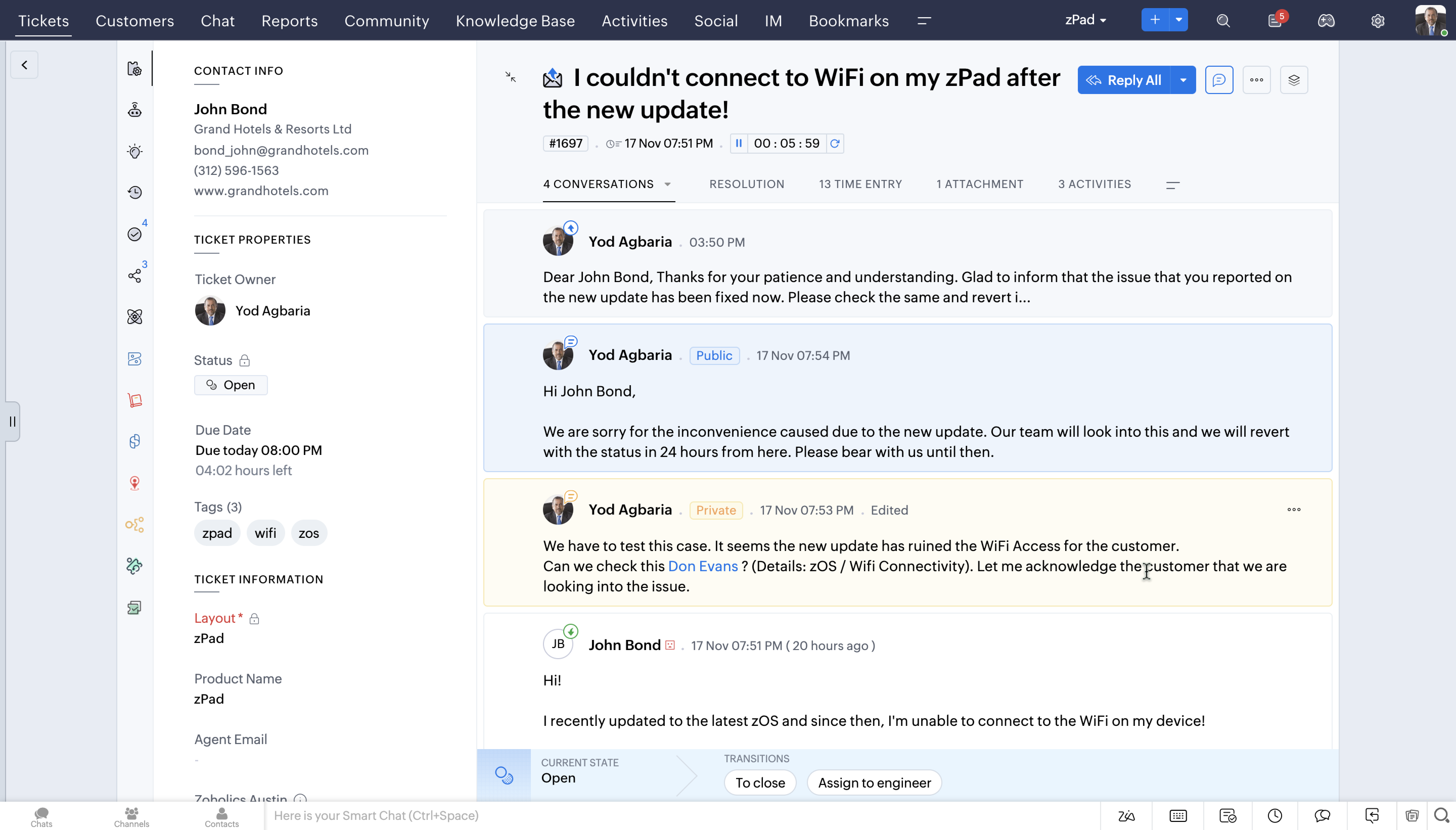
5. Conversation Colouring (Private & Public Comments)
You can now reply contextually to your customers' public and private comments based on the  new colour coded conversations.


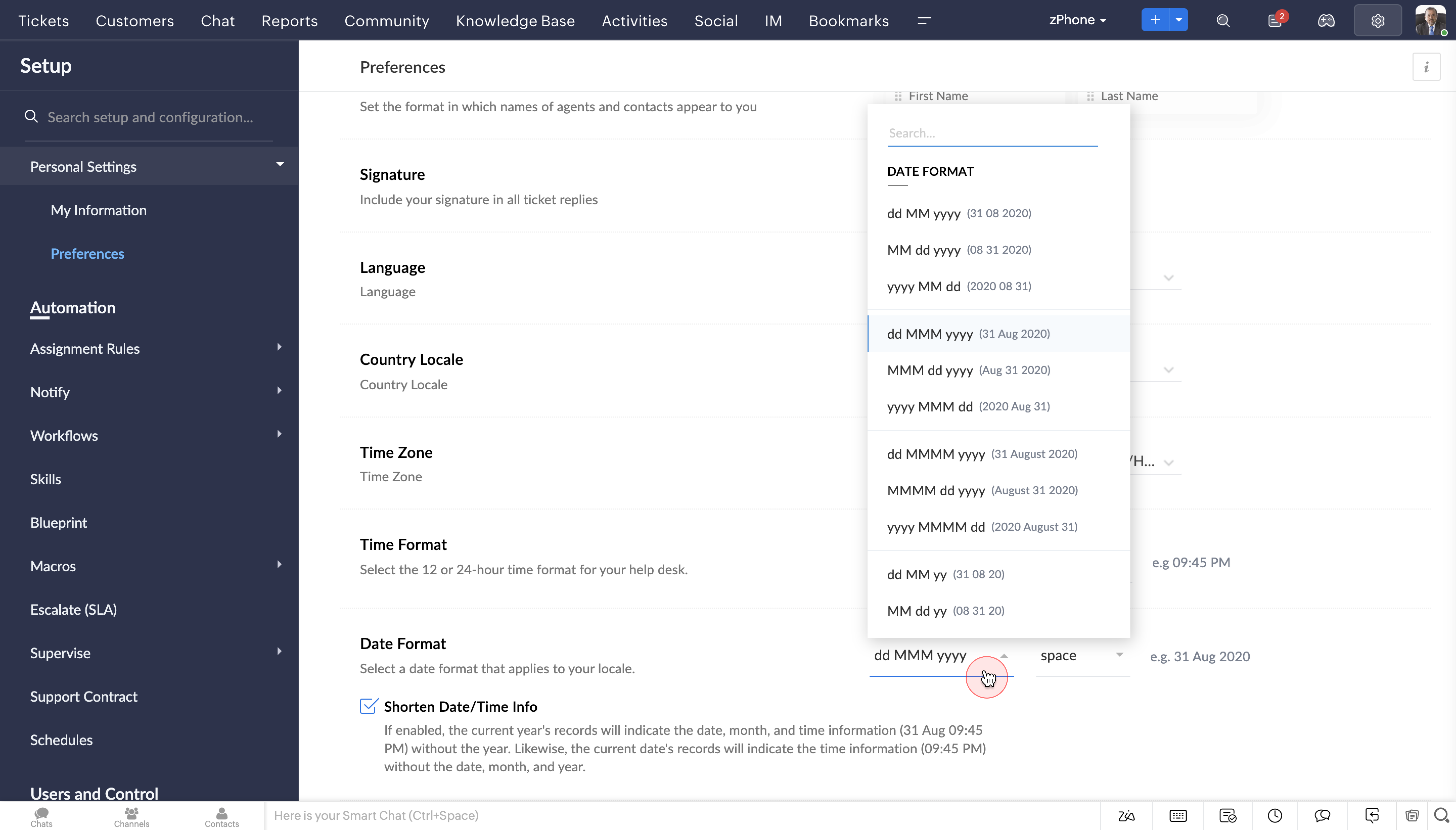
  6. Date & Time Format
The new Date and Time format will help agents to perceive data in the format of their choice, either in 24 hours or 12 hours. Its a great way to analyse tickets based on location and the corresponding time.


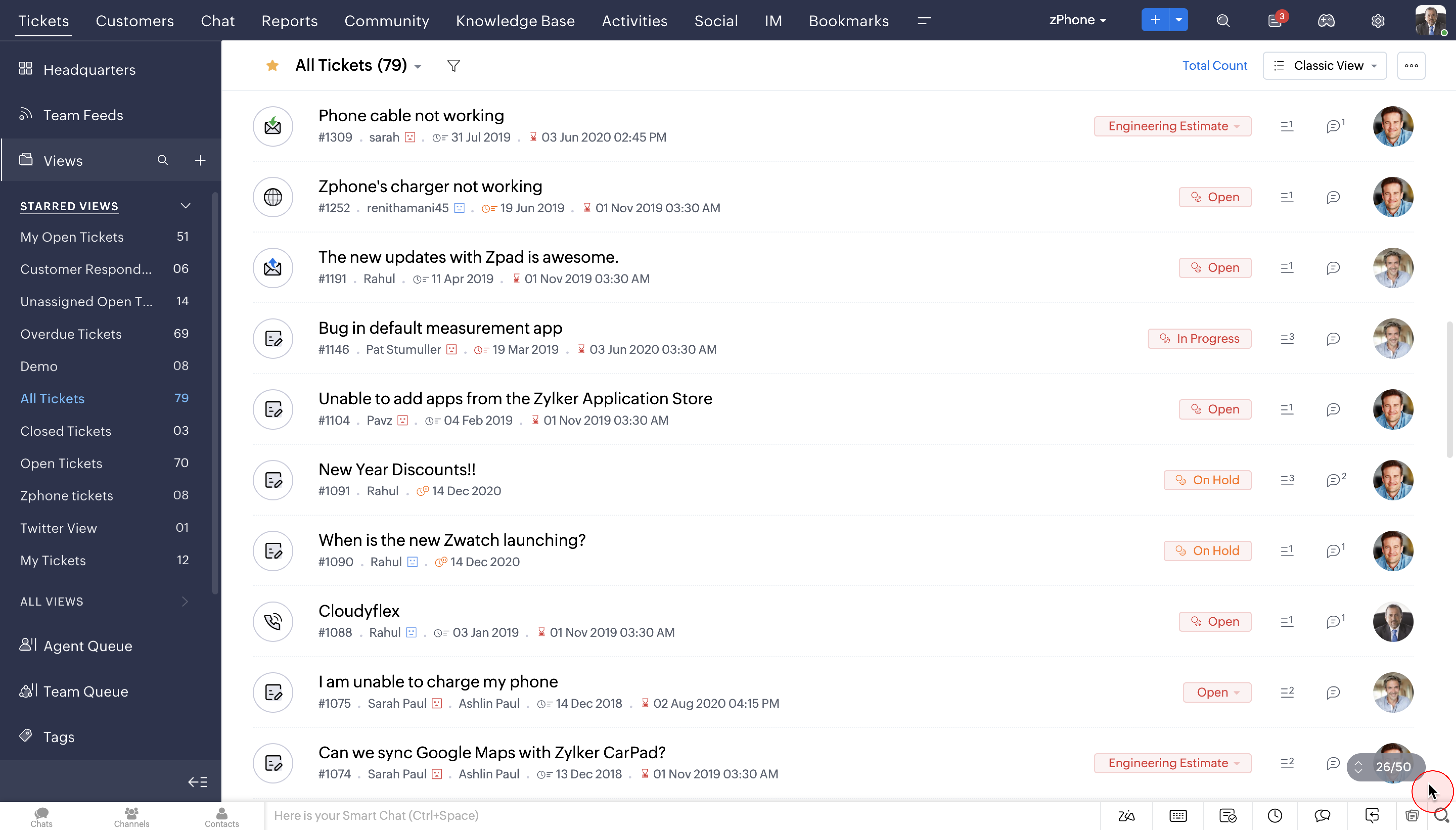
7.  Infinite Scrolling and no pagination
You can now save time and monotony of endless clicking with the brand new Infinite scroll option. With improved product performance, navigating tickets from the entire lot would be a breeze.


 So that was an overview of our new design direction, which we'd like to call DOT. We would love to hear your opinion on it. So please request access using this link here and we will enable it soon.
 
For you to have a complete overview of all the UI/UX updates, we have put together a change set deck. You can access the presentation here  

Please note that the set up and configuration process in Desk are also under revamp and will be updated to the new version, subsequently.

Early access community:
We are also hosting a private early access community for our customers for drilled down product conversations and feedback.  You will be automatically added to the group once you're given access to the new UI.

Here's a trivia: 5 years ago, today...

This day, 5 years ago was when we rolled out our largest UI overhaul. Since then, the customer service domain has evolved, so have all of you as businesses, and so has Zoho Desk as a product. What hasn't changed though, is our cause - to help you deliver unmatched customer service.
                  
Note: We are not stopping here! As you dive into the compelling UI upgrades that can boost your customer service experience, we have another exciting announcement lined up. Stay tuned and watch this space for further developments.


    • Sticky Posts

    • Zoho Desk Partners with Microsoft's M365 Copilot for seamless customer service experiences

      Hello Zoho Desk users, We are happy to announce that Zoho Desk has partnered with Microsoft's M365 to empower customer service teams with enhanced capabilities and seamless experiences for agents. Microsoft announced their partnership during their keynote
    • WhatsApp pricing changes: Pay per message starting July 1, 2025

      Starting July 1, 2025, WhatsApp is shifting from conversation-based pricing to per-message billing. That means every business-initiated message you send will count. Not just the first one in a 24-hour window. Pricing updates on the WhatsApp Business Platform
    • Live Webinar - Work smarter with Zoho Desk and Zoho Workplace integration

      Hello customers! Zoho Desk and Zoho Workplace are coming together for a webinar on 14th May, 2024. Zoho Workplace is a suite of productivity apps for email, chat, docs, calls, and more at one single place. Zoho Desk is closely integrated with a few tools
    • Apple iOS 17 and iPadOS 17 updates for Zoho Desk users

      Hello Zoho Desk users! Apple recently announced the release of iOS 17 and iPad OS 17. These latest OS updates will help you stay productive and efficient, through interactive and seamless user experiences. Zoho Desk has incorporated the updates to help
    • Zoho Desk Cheat Sheet For The Year-End

      Check out these Zoho Desk best practices to end this year on a high and have a great one ahead! #1 Set Business (Holiday) Hours - If you have limited working hours, please make sure you restrict your business hours or set them as holidays for the coming days. Let your customers know when you will, and won't, be available. #2 Update the Annual Holiday List - Check the holidays for the new year and update the holiday schedule. Usually, holidays from the current year will be carried over for the next
    • Recent Topics

    • RFQ MODEL

      A Request for quotation model is used for Purchase Inquiries to multiple vendors. The Item is Created and then selected to send it to various vendors , once the Prices are received , a comparative chart is made for the user. this will help Zoho books
    • Delegate Access - Mobile iOS/iPad

      We’re over the moon that delegate access is now available in Zoho Mail as we were nearly ready to switch platforms because of it! Is there a timeline on when delegate mailboxes will be accessible from the iOS and iPad OS applications? Thanks, Jake
    • Request For Quotation (RFQ) module

      Hello, Do you have any plans to implement a RFQ module in to ZOHO Inventory? I would like to chose items that I require a price for, select a number of different suppliers to e-mail and have them submit there pricing online. I would then like to see a
    • Unable to change Lookup field from Multi Select to Single Select

      I am trying to change a Lookup field in my Zoho Creator form from Multi Select to Single Select, but I am unable to find any option to do this.
    • Support for Developing Zoho Recruit Extensions via Zoho Sigma

      Hi, I’m interested in building an extension for Zoho Recruit using Zoho Sigma. However, when I navigate to Sigma and attempt to create a new extension (via the "New Extension" option), Zoho Recruit does not appear as a listed service—only options like
    • FOLDER DISAPPEARED

      Hello Zoho Community. I recently found a problem with no explanation: a folder in Zoho Analytics just disappeared, but the tables and SQL sentences still existed, the folder was not deleted. The solution for me in this case was to create a new folder,
    • How to create estimates/Invoices with sub-totals

      Every other accounting package can create estimates and invoices with Sub-totals. How can I do that in ZohoBooks?
    • Deluge scripts

      Why is there not a search function to make it easier to find the script of interest when modifications are required.
    • Social media simplified with Zoho Social: Why should brands have a Threads profile?

      Just over a year ago, Instagram launched Threads, the all new social media app primarily focusing on sharing text online. It was welcomed by people worldwide with more than 10 million users in just seven hours, and it currently has over 175 million active
    • Auto tracking URL generation based on Carrier

      Hi, While creating a shipment order for a package in Zoho Books, I have a requirement that for example, if the carrier is Delhivery and tracking number is 1234, then can automatically the tracking link/URL be generated as www.delhivery.com/1234. Similary,
    • New Beginnings with Zoho Desk mobile app best practices: Part 3

      In focus: Scaling consistency, intelligence, and customization In our third installment, we'd like to share tips to help you elevate your customer experience as you handle support operations seamlessly on mobile. Let's reconnect with Omniserve, the field
    • Develop and publish a Zoho Recruit extension on the marketplace

      Hi, I'd like to develop a new extension for Zoho Recruit. I've started to use Zoho Developers creating a Zoho CRM extension. But when I try to create a new extension here https://sigma.zoho.com/workspace/testtesttestest/apps/new I d'ont see the option of Zoho Recruit (only CRM, Desk, Projects...). I do see extensions for Zoho Recruit in the marketplace. How would I go about to create one if the option is not available in sigma ? Cheers, Rémi.
    • Highlights of 2025: Milestones and moments

      Hey everyone! As we step into 2026, it’s a great time to look back at everything 2025 brought to Zoho Social. This year was big, packed with powerful new features, smart enhancements, exciting events, and a major milestone: a whole decade of Zoho Social.
    • Override Auto Number field?

      We are preparing to migrate from Salesforce. In Salesforce, we auto-generate a unique number on our Opportunities (Potentials). If the Opportunity results in a contract, we use that unique number as the Contract number. There are some situations where
    • Introducing the sandbox environment in Zoho Sign

      Hey there! Customer and partners across the globe have been requesting a testing environment—also called a sandbox—for quite some time. Sandboxes help you try out document workflows before using them in your production setup. This new year, we are excited
    • Zoho CRM for Everyone's NextGen UI Gets an Upgrade

      Hello Everyone We've made improvements to Zoho CRM for Everyone's Nextgen UI. These changes are the result of valuable feedback from you where we’ve focused on improving usability, providing wider screen space, and making navigation smoother so everything
    • Zoho Desk - Zoho FSM Integration issue on Mobile and iPad

      Hello Team, I am trying to create a Work Order (WO) using the Zoho FSM integration (Add-on Service) that is integrated with Zoho Desk. The issue is that the integration is not working on mobile devices and iPads. While I am able to create the WO, Request,
    • Can I share the drive with another Windows user?

      We use the WorkDrive Sync application on a server with several remote desktop users. Our question is: Can the drive created by WorkDrive Sync be shared from one of these remote users with the other users so they can access the files, or do we need to
    • Syncing Bills in Zoho Books to Zoho CRM

      Is there any way to sync the Bills in Zoho Books in Zoho CRM
    • Zoho Books Items Categorisation/Grouping/Folder

      Is there a way to do items categorisation? a folder structure? Product Type A - Option 1/2/3 Product Type B - Option 1/2/3 Current problem : I have more than 50 items on the list, its hard for team to navigate.
    • Auto CheckOut Based On Shift.

      This Deluge script runs on a scheduled basis to automatically set the 'Actual_Check_Out' time for employees who haven't manually checked out. If the current time is past their scheduled 'Shift_End_Time', the script updates the check-out time to match
    • Formula working in MS Excel , is not working in Zoho Sheets, Filter fuction which is working in MS sheets per the attached workbook / Daily update.

      Filter function , which is working in MS Excel is not working in Zoho sheets. Please help on function of filter of particular class sheets and extract students name who has more than 3.5 hours of study hours on particular day depending on date in D7 cell.
    • CRM gets location smart with the all new Map View: visualize records, locate records within any radius, and more

      Hello all, We've introduced a new way to work with location data in Zoho CRM: the Map View. Instead of scrolling through endless lists, your records now appear as pins on a map. Built on top of the all-new address field and powered by Mappls (MapMyIndia),
    • ERROR: Product type cannot be changed for Items having transactions.

      I have mistakenly added a product type as goods for an item that was a digital service. Now when HSN/SAC became mandatory, this brought my attention to this error I did. So I tried changing the product type but it displayed this error message Product
    • Automate pushing Zoho CRM backups into Zoho WorkDrive

      Through our Zoho One subscription we have both Zoho CRM and Zoho WorkDrive. We have regular backups setup in Zoho CRM. Once the backup is created, we are notified. Since we want to keep these backups for more than 7 days, we manually download them. They
    • Boost your CRM accuracy with smart Data Enrichment

      Hello all! In this post let's look at data enrichment from a holistic perspective to gain more clarity on how you can use it. So, here's a quick recap of what data enrichment is and how you set it up it to enhance your existing module data! What is data
    • Is Zoho One Desktop more secure than Zoho One Web SaaS?

      Is Zoho One Desktop more secure than using Zoho One in browser? Inherently, it seems desktop would be unless you don't do things like share your pw or leave pc on. I am concerned about data being on the cloud or someone else's server and database.
    • Is it possible to set a region lookup table so that my deal country can lookup this lookup table

      Hi there, I would like to be able to add a data lookup table with the following fields: Country, Region. And then in my deal report, i can then lookup this table to fish out the region in my report. This will be important for my sales process to categorise
    • Test Emails Show Sent "via zcsend.net" in My Gmail Account

      I noticed the following info... However, a few email service providers such as Outlook and Gmail will display that the email was sent by zcsend.net (Zoho campaigns’ server) on your behalf instead of just your from email address.  In order to prevent this, you can go for either of these options: Do not select the check box meant for DomainKey Signature which is listed under Unverified sender domains. Include our mail servers by advanced authentication method such as SPF/ Sender ID and DomainKey/ DKIM.
    • Improved Contact Sync flow in Google Integration with Zoho CRM

      Hello Everyone, Your contact sync in Google integration just got revamped! We have redesigned the sync process to give users more control over what data flows into Google and ensure that this data flows effortlessly between Zoho CRM and Google. With this
    • 'UnAuthenticated Connection: zbooks_connection'

      I have a zoho connection in Zoho Books, the link name es zbooks_connection, but I like to validate if exist, by example if I use this line in my code: response=zoho.books.getTemplates("", "","zbooks_connection"); But I don't  have the connection I like
    • Calling the new 'Custom API' feature from within a Custom Widget

      From what I've learned it is not possible to call an endpoint from the new "Custom API" feature within a Creator Widget. The SDK's doesn't support it yet, when calling it natively you end up with CORS issues or at least I couldn't get it working even
    • Cannot post to Instagram. I get the error: Insufficient permission to publish on this page. Check with your page Admin to update permissions.

      We had another admin that left the company. Since he left, we get this error when posting to Instagram.
    • Enhance productivity with the revamped Zoho Sheet View

      Hello folks, For some time now, you've been able to use the Zoho Sheet View to quickly edit multiple records or to insert a batch of new records. Its tabular interface allows users to engage in these tasks productively. Despite this, the existing Sheet
    • Zoho desk desktop application

      does zoho desk has a destop applicaion?
    • Ability to re-order Workflow Rules

      We really need the ability to re-order workflow rules within departments.  Either the ability to drag/drop them into a different order or something.
    • Setting up property management in Zoho Books

      Hi, I run a property management business that manages property complexes. There are multiple owners, some owning more than one property on the same complex. My role is to manage the fees they pay for maintenance of common areas, such as the swimming pool
    • Ticket to article and Ticket to template

      Hello! I would like to know if it is possible (and how) to do the following actions: 1. To generate an article from a ticket (reply + original message) 2. Easy convert an answer to an email template
    • Create an article template

      I have a question concern the Knolwedge Database from Zoho Desk. There is any possibility to create an article template ? Exemple of what I research : TODAY : I want to create a lot af articles with the same baseline > I create one article > I copy/paste
    • Persisting email signals to contact timeline?

      Hello there. Regarding the email signals that are logged when a contact opens an email, am I correct that these signals are not logged to a contact's timeline? Ideally, I would like to have this context available for future follow-ups, if the contact
    • Next Page