Introducing Zoho's own SMS gateway
We're thrilled to announce the launch of our own SMS gateway feature within Zoho Marketing Automation! This new feature enables seamless SMS campaign management alongside your email marketing initiatives, providing a more integrated and efficient way to reach your audience.
Our SMS gateway currently supports Canada, India, and the US. For other countries, we continue to offer integrations with third-party services to ensure you can still run successful SMS campaigns globally.
In addition to this exciting development, we've implemented several enhancements to optimize your overall user experience.
What is an SMS gateway?
An SMS gateway essentially acts as a bridge between your marketing platform and mobile networks. When you send an SMS campaign through a platform with its own gateway, messages travel directly from the platform to the recipient's phone without the involvement of a third party.
Here's why it matters:
Manage all your marketing efforts—including SMS campaigns—from a single platform to eliminate the need to juggle multiple tools or logins.
Improve your user experience by making it easier to create, track, and analyze the effectiveness of your SMS campaigns.
Power your SMS marketing with Zoho Marketing Automation
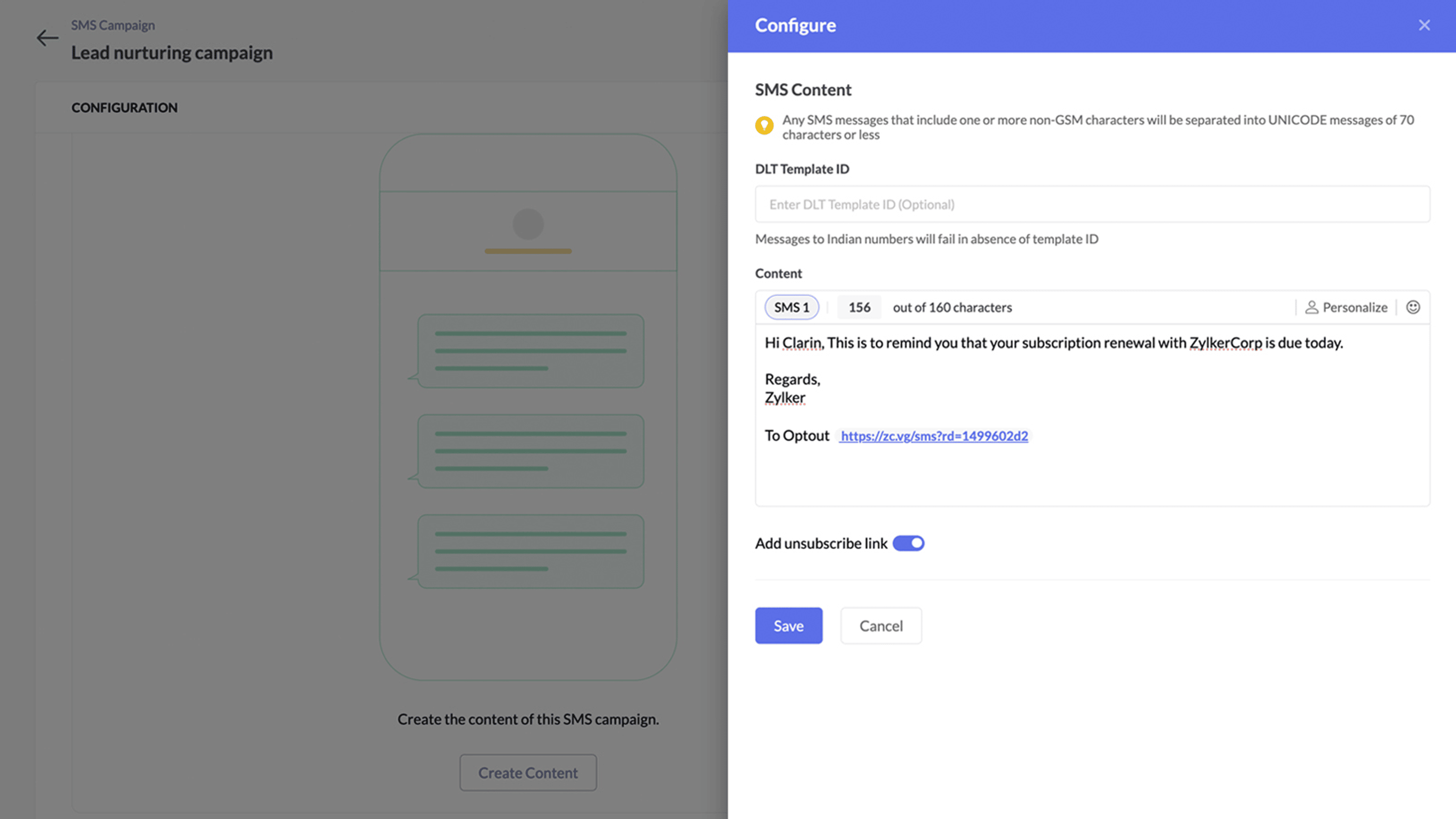
Zoho Marketing Automation enables its users to manage multiple channels, including email, SMS, and WhatsApp, all within a single platform. With SMS marketing, users can easily tailor their campaigns, deliver them at optimal times, and track their performance.
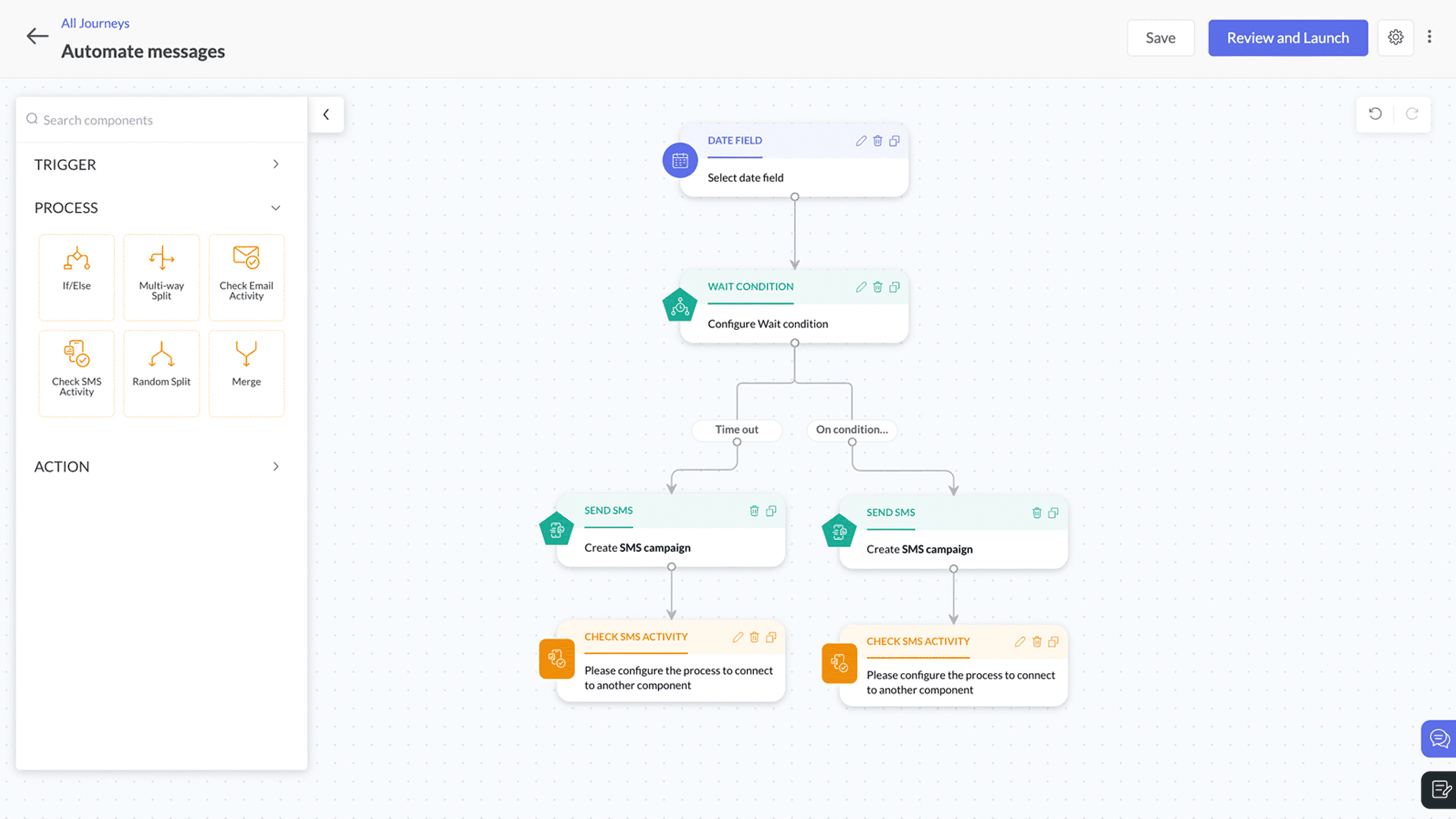
Here's a quick walkthrough of the features we offer:
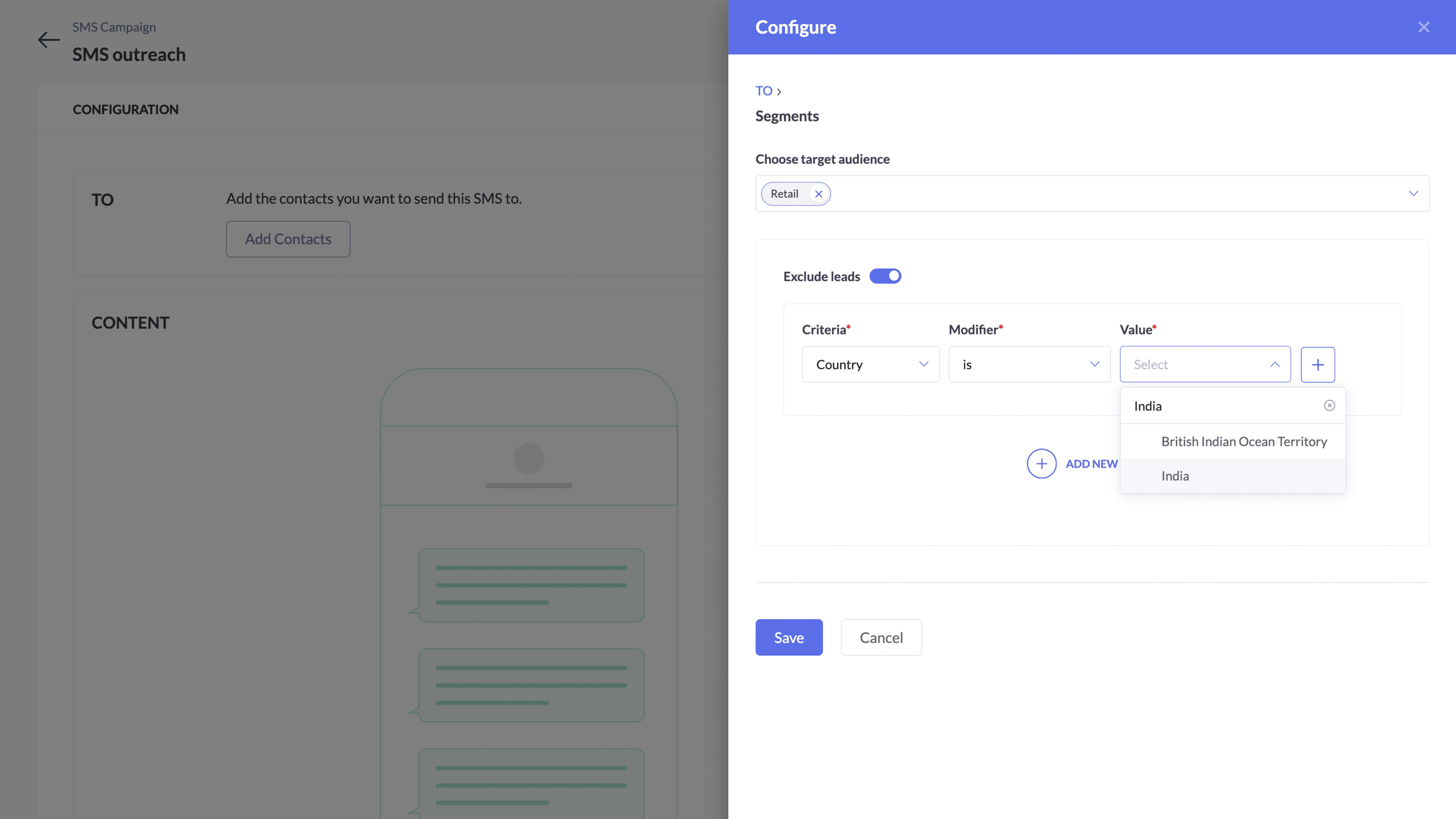
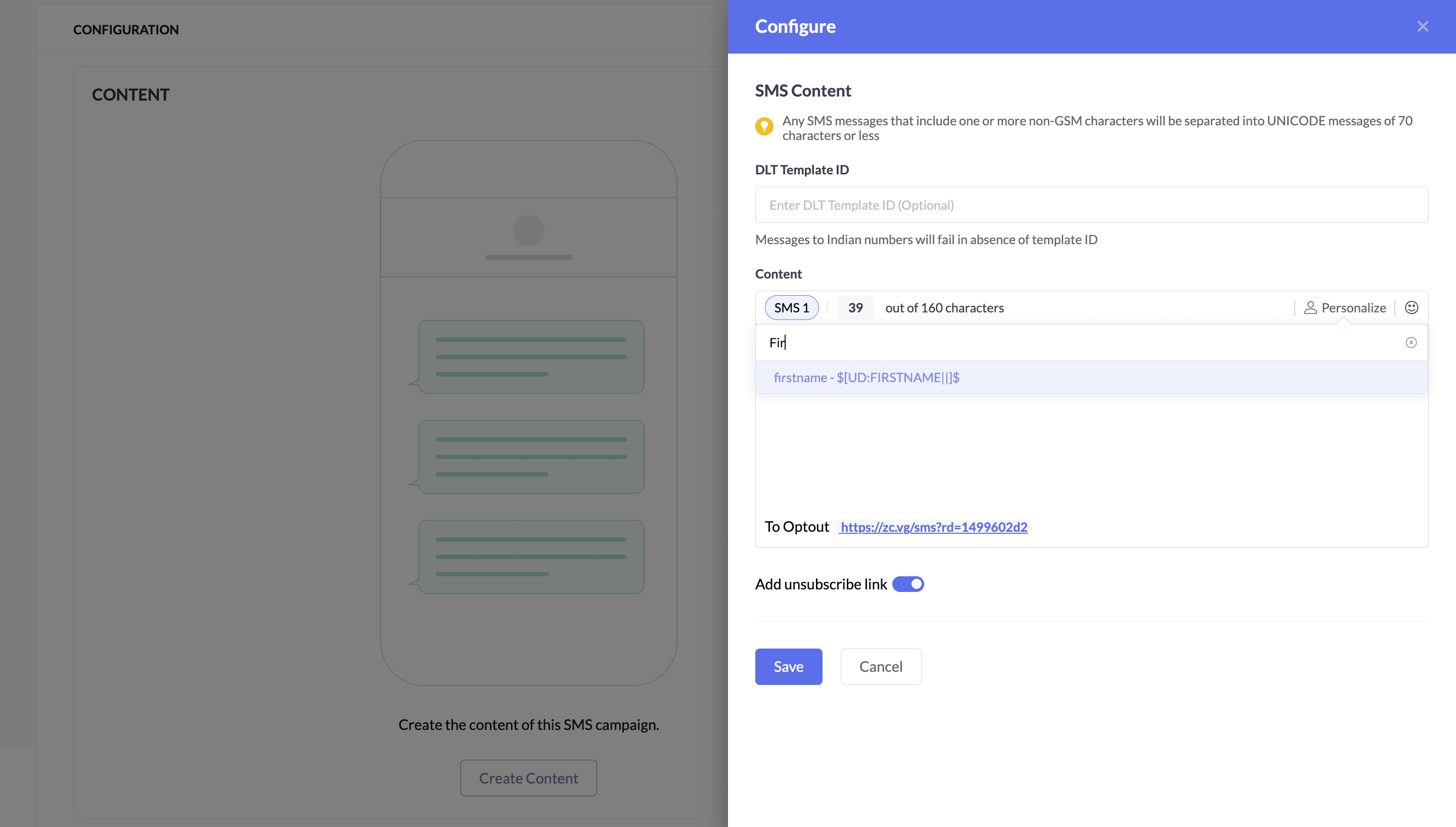
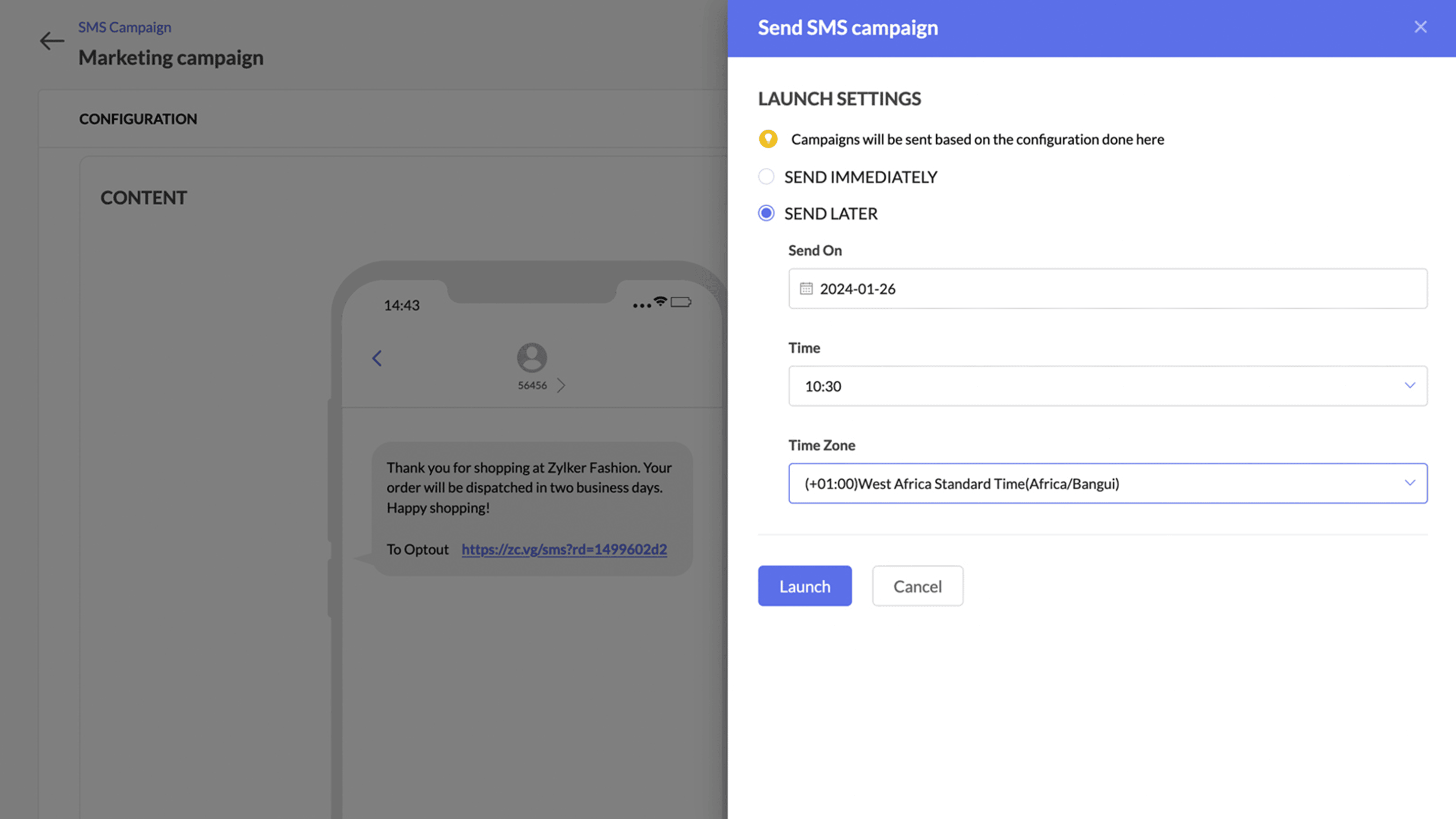
Contact numbers will be mapped to the mobile number field
Your contacts' numbers are crucial for running successful SMS campaigns. To ensure there's a single dedicated place to store and retrieve contact numbers, we've set the mobile number as the default field. This means users don't have to select a phone number during the SMS creation process.
Before: Multiple marketers import contact numbers into Zoho Marketing Automation, each using a different custom field without a standard field name. During every SMS creation process, they have to select each phone number manually.
Now: With the default mobile number field, all marketers store contact numbers in a single default field, making it much easier to identify and retrieve contact numbers.
Also, Zoho Marketing Automation ensures that email recipients have complete control over accepting or rejecting email campaigns through the unsubscribe option.
What's new with this gateway?
At Zoho, we're committed to upholding data integrity and complying with all regulations. To solidify this commitment, we adhere to 10DLC standards in the US and Canada and DLT standards in India when introducing our own SMS gateway. This enhances Zoho Marketing Automation by improving your marketing campaigns, maintaining a good reputation with your contacts, and strengthening customer engagement.
This system ensures businesses sending mass SMS messages use approved long codes, improves deliverability rates, and ensures your messages reach your intended audience.
Benefits of 10DLC registration
Registered long codes are less likely to be blocked by carriers.
Sending messages from verified numbers builds trust with customers.
10DLC ensures users adhere to best practices for SMS marketing.
Top benefits of switching to Zoho's own SMS gateway
Instantly setup campaigns without any additional integration.
Superfast delivery.
Automate SMS communications using journeys with real-time action based triggers.
Cost-effective messaging
Detailed reporting with campaign metrics and credit-to-cost analysis
Supports latest compliance - 10 DLC and DLT
SMS pricing will be an add-on pricing model and will be available on all the subscription plans. You can see the detailed pricing over here.
Level up your marketing!
Topic Participants
Moncy Samuel
Yaali Bizappln Solutions
Nagaraj S
CARMEN KARLOVICH
John
Sticky Posts
How to Add Users to your Organization in ZohoMail?
A better clarity so you can create other users to start using Zoho Mail. You can directly Add Users from the Control Panel to your Organization. You can invite users with the existing email address. If the person (user) already uses ZohoCRM, then you can import users from Zoho CRM. You can also import them using a .csv file. (if you are planning to add them in Bulk) In this topic, We will be discussing on how to Add and Invite users only. The Import options are self explanatory. ____________________________________________________________________________________________________________
Recent Topics
Invoice status on write-off is "Paid" - how do I change this to "Written off"
HI guys, I want to write off a couple of outstanding invoices, but when I do this, the status of the invoices shows as "Paid". Clearly this is not the case and I need to be able to see that they are written off in the customer's history. Is there a wayEstablishing new Zoho email account on laptop
Good Morning: I am very long time Outlook business user and decided to try your email service last night and had established an account. I am trying to verify my account; how do I establish my Zoho email account on my laptop? I opened the account withunable to send message reason 550 5.4.6 unusual sending activity
My email account can't send message. It shows unable to send message reason 550 5.4.6 unusual sending activity detectedhow to add email to existing organization i w
I am already registered my organization and i have an email id. I need one more email id but i can't find anywhere .i want the cheapest email id . how to add ?e-mail bloqueado
Estou com meu e-mail lucas@peplus.me bloqueado, preciso desbloquear para retorno de usos em minhas atividades.zoho labels api not working
We're using n8n to automte email reply using zoho api. I'm facing issue with label api. I added the required scopes but its not working. i followed zoho api documentation but didn't work. also, where do i find/how do i create zoho oauth token mentioneeedDesk DMARC forwarding failure for some senders
I am not receiving important emails into Desk, because of DMARC errors. Here's what's happening: 1. email is sent from customer e.g. john@doe.com, to my email address, e.g info@acme.com 2. email is delivered successfully to info@acme.com (a shared inboxStreams/Shared email doesn't show up in windows trident app. It works fine on MAC. Is there any difference between 2 install ?
I can see streams/share email boxs on my MAC version of trident app but i can't see them in windows version of trident app. Is there any difference between 2 install? I try to find setting but not able to see any setting to add stream/share email boxes.add zoho account
How to add a zoho mail to previous zoho account? I have twoZoho Desk Mobile App Year-End Roundup - 2025
Dear Zoho Desk users, Greetings! As you gear up for the festive season, we are excited to share a quick journey into all that is released in 2025! Zia's generative AI capabilities Zia insights can be highly beneficial in helping agents manage daily supportNarrative 17: The role of Zia AI in customer support
Behind the scenes of a successful ticketing system: BTS Series Narrative 17: The role of Zia AI in customer support Overview Zia in Zoho Desk is a layered AI assistant that combines generative AI, prediction, and automation to support agents, automateDomain Transaction
I have purchased a domain name called trainedworkforce.co.in I made the payment got the receipt but the domain is still not purchased after successful transaction .Ability to Set a Unified Tab Order/View for All Users in Zoho Projects
Hello Zoho Projects Team, We hope you are doing well. We would like to submit a feature request regarding tab/menu organization in Zoho Projects. Current Behavior: The tab (module) order in Zoho Projects is user-specific. Each user (internal or external)Zohomail - The "All Messages" vs "In Box"
Why do some new email message appear under the all messages view but not in my inbox? That's really annoying but to be fair I've experienced the same with gmail.error while listing mails
I can't access email in any of my folders: Oops, an error occurred - retry produces the second error response: error while listing mails (cannot parse null string). I've signed in and out of Zoho, restarted my iMac.Introducing the Zoho Projects Learning Space
Every product has its learning curve, and sometimes having a guided path makes the learning experience smoother. With that goal, we introduce a dedicated learning space for Zoho Projects, a platform where you can explore lessons, learn at your own pace,Where to show Customization Field ?
Dear Sir, I have made some New Field in Item Field Customisation. Now I don't require that field in Estimate, Sales Orders etc. I just wants that field in Sales Invoice to Show/Hide... Is that possible ?Zoho Desk 2025 round-up: Key highlights on feature releases
Hello everyone, As we gear up for 2026, here is a detailed round-up of all feature releases in Zoho Desk web throughout the year. For consolidated information on releases check out the What’s New page You can also watch these webinars. Zia in web ZiaPrint Sales Orders, Purchase Orders or Invoices from API
Hello, Is it possible to use the print option that is available in Sales Orders Purchase Orders and Invoices with the API?. I don't see any information in the docs about this. ThanksHow to show a hided report??
in CRM Report , I clicked Hide incidently , how to show the floder again? Nowhere I can find the hided report floder...Converting Customer Invoice to Purchase Bill
Hi, In my service-based business, I sometimes create the customer invoice first, and later I receive the purchase bill from the vendor for the same job. Is there any option in Zoho Books to: Convert a customer invoice into a purchase bill, or Link/associateEmail tracking inquiry
I am trying to track when my emails are opened and clicked like I previously did in HubSpot. HubSpot pretty much did the entire process automatically. After digging through, I finally found in settings --> emails --> BCC Dropbox there is an email I canMass Update of Lookup Fields not possible
Hello List I've created a custom field for Leads and Contacts 'Current Campaign'. This is very Handy as I can filter leads and then related them to a campaign. Everything ready, but then I realized that mass update doesn't work for lookup fields... aCollapsible Sections & Section Navigation Needed
The flexibility of Zoho CRM has expanded greatly in the last few years, to the point that a leads module is now permissible to contain up to 350 fields. We don't use that many, but we are using 168 fields which are broken apart into 18 different sections.Download Attached Files
Hi everyone, Brand new to Zoho Creator. I have a form with a subform. The subform has a field for "File Upload" I have this in a subform to allow multiple files to be uploaded to the parent form. Once the files are uploaded, how can i download or view them? Is this a setting I am just not seeing? If there isn't a way to download them, could i create another form field that dynamically creates the file's URL? That way a user can click the URL to get to the file? Any help with this would be greatlyTicket layout based on field or contact
Hi! I want to support the following use-case: we are delivering custom IT solutions to different accounts we have, thus our ticket layouts, fields and languages (priority, status field values should be Hungarian) will be different. How should I setupNo funcionan correctamente el calculo de las horas laborales para informe de tickets
Hola, estoy intentando sacar estadísticas de tiempo de primera respuesta y resolución en horario laboral de mis tickets, pero el calculo de horas en horario laboral no funciona correctamente cree los horarios con los feriados : Ajusté los acuerdos deZoho Mail Android app update: Set out of office response exclusively for organization members and external users, response interval
Hello everyone! We have now introduced an option to configure out of office messages exclusively for organization members and external users within the Zoho Mail app. Additionally, now you can also customize response intervals for the Out of office messages.Feature Request: Detailed View - Related Block Links!
Desperately need a view record link option on records displaying in the related blocks on a Detail View. For the love of god, please add this feature. Thank you!Sub-Form Padding in CSV Export
Hi, When you use the Sub-Form, and for example you have a Date Field on the Main Page, then Option 1 and Option 2 fields on the Subform, when you export this to CSV the Date column will only have the Date in 1 row, the first row, it would be nice to padDependent / Dynamic DropDown in ZohoSheets
Has anyone figured out a way to create a Dropdown, the values of which is dependent on Values entered in the other cell ?How do I change the order of fields in the new Task screen?
I have gone into the Task module layout, and moving the fields around does not seem to move them in the Create Task screen. Screenshot below. I have a field (Description) that we want to use frequently, but it is inconveniently placed within the MoreZoho → ShipStation Integration – Sales Order–Driven Fulfilment Workflow
Hello All, I’m reaching out to explore the best way to integrate a shipping tool into our inventory which will speed our process up. We are looking to integrate ShipStation into our existing order-to-fulfilment workflow, as we’re keen to standardise onIA ou je peux trouver comment utiliser IA
Je voudrais utiliser IA dans l'interface zoho pour m'aider quand j'ai des questions de rôle partage ou autre configuration d'automatisation, j'utiliser ChatGPT externe mais il ne connait pas toujours l'interface zoho et les réponses sont parfois longueData Processing Basis
Hi, Is there a way to automate the data processing for a candidate every time an application arrives from job boards, without requiring manual intervention? That is, to automatically acquire consent for data processing. I've seen a workflow that allowsDisable Zoho Inventory Tracking / Delink Zoho Books & Inventory
We have integrated zoho inventory with zoho books? Now after a long time, we want to disable inventory tracking and delink these 2 modules. Zoho says we cant do it. Anybody else going thru the same ? Any possibility at all? Why does zoho not allow toZoho vault instal on windows
I am trying to use Zoho Vault Desktop for Windows, but I am unable to complete the sign-in process. Problem description After logging in to my Zoho account and clicking Accept on the authorization page, nothing happens. The application does not proceedZOHO GLITCHES
Ok, you guys have done a great job at building a platform that has the potential to surmount the competition but these glitches are becoming more than frustrating! This is beyond annoying, I'm trying draft lawsuits and type up privacy and refund policiesNotification to customers when I use a Zoho function
Hi all, I tried searching the community but couldn't find anything about it. I noticed that the customer receives the notification of reopening the old ticket but does not receive the notification of opening a new ticket when I use the function: "separateDate Filters in Zoho Desk Dashboard
Hello Team, Currently, in the Zoho Desk dashboard, the date filter is available only for daily, weekly, and monthly views. Could we also add a yearly date filter to allow filtering by an entire year? Additionally, in the custom date filter, it is currentlyNext Page