Introducing Zoho's own SMS gateway
We're thrilled to announce the launch of our own SMS gateway feature within Zoho Marketing Automation! This new feature enables seamless SMS campaign management alongside your email marketing initiatives, providing a more integrated and efficient way to reach your audience.
Our SMS gateway currently supports Canada, India, and the US. For other countries, we continue to offer integrations with third-party services to ensure you can still run successful SMS campaigns globally.
In addition to this exciting development, we've implemented several enhancements to optimize your overall user experience.
What is an SMS gateway?
An SMS gateway essentially acts as a bridge between your marketing platform and mobile networks. When you send an SMS campaign through a platform with its own gateway, messages travel directly from the platform to the recipient's phone without the involvement of a third party.
Here's why it matters:
Manage all your marketing efforts—including SMS campaigns—from a single platform to eliminate the need to juggle multiple tools or logins.
Improve your user experience by making it easier to create, track, and analyze the effectiveness of your SMS campaigns.
Power your SMS marketing with Zoho Marketing Automation
Zoho Marketing Automation enables its users to manage multiple channels, including email, SMS, and WhatsApp, all within a single platform. With SMS marketing, users can easily tailor their campaigns, deliver them at optimal times, and track their performance.
Here's a quick walkthrough of the features we offer:
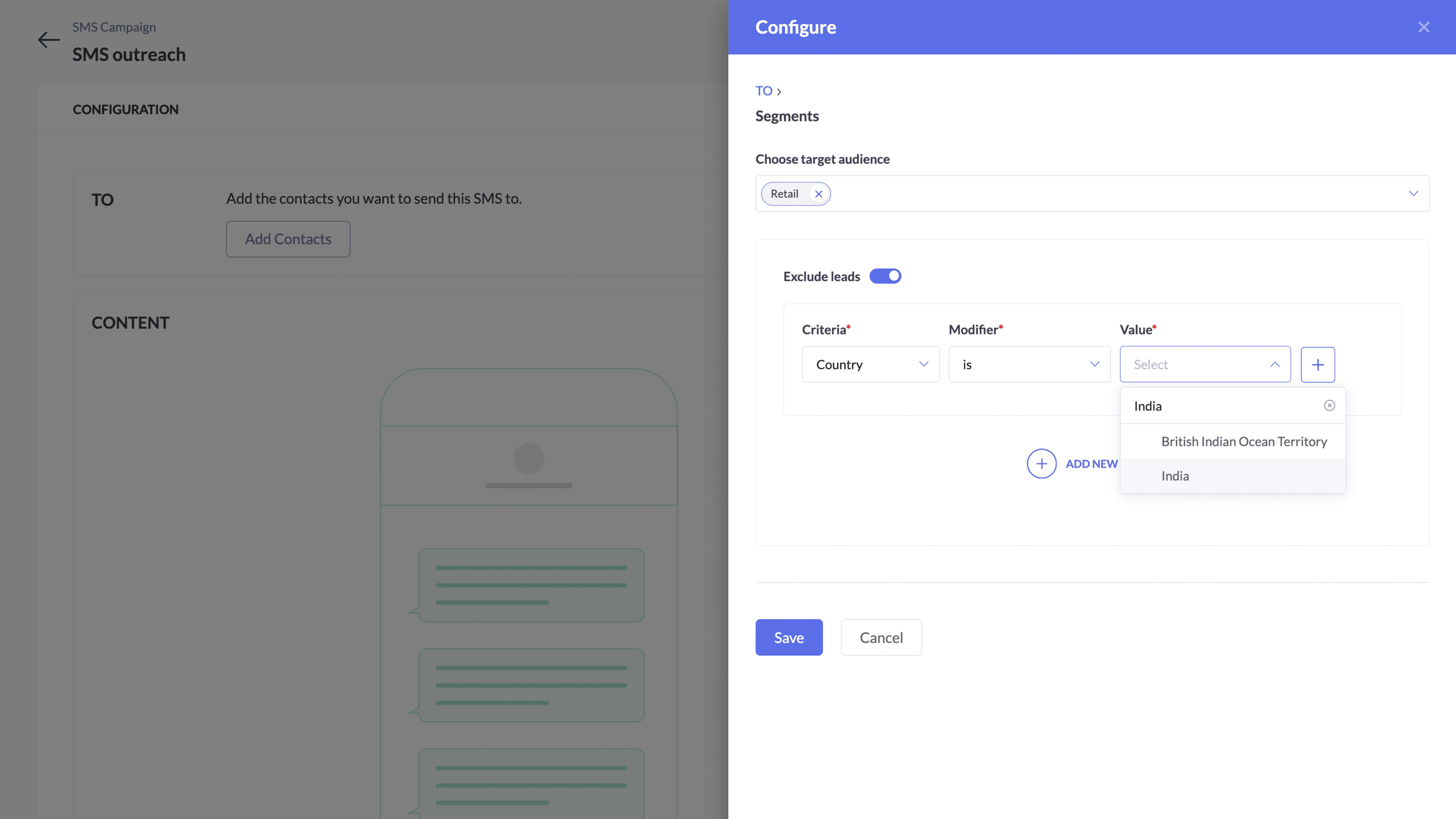
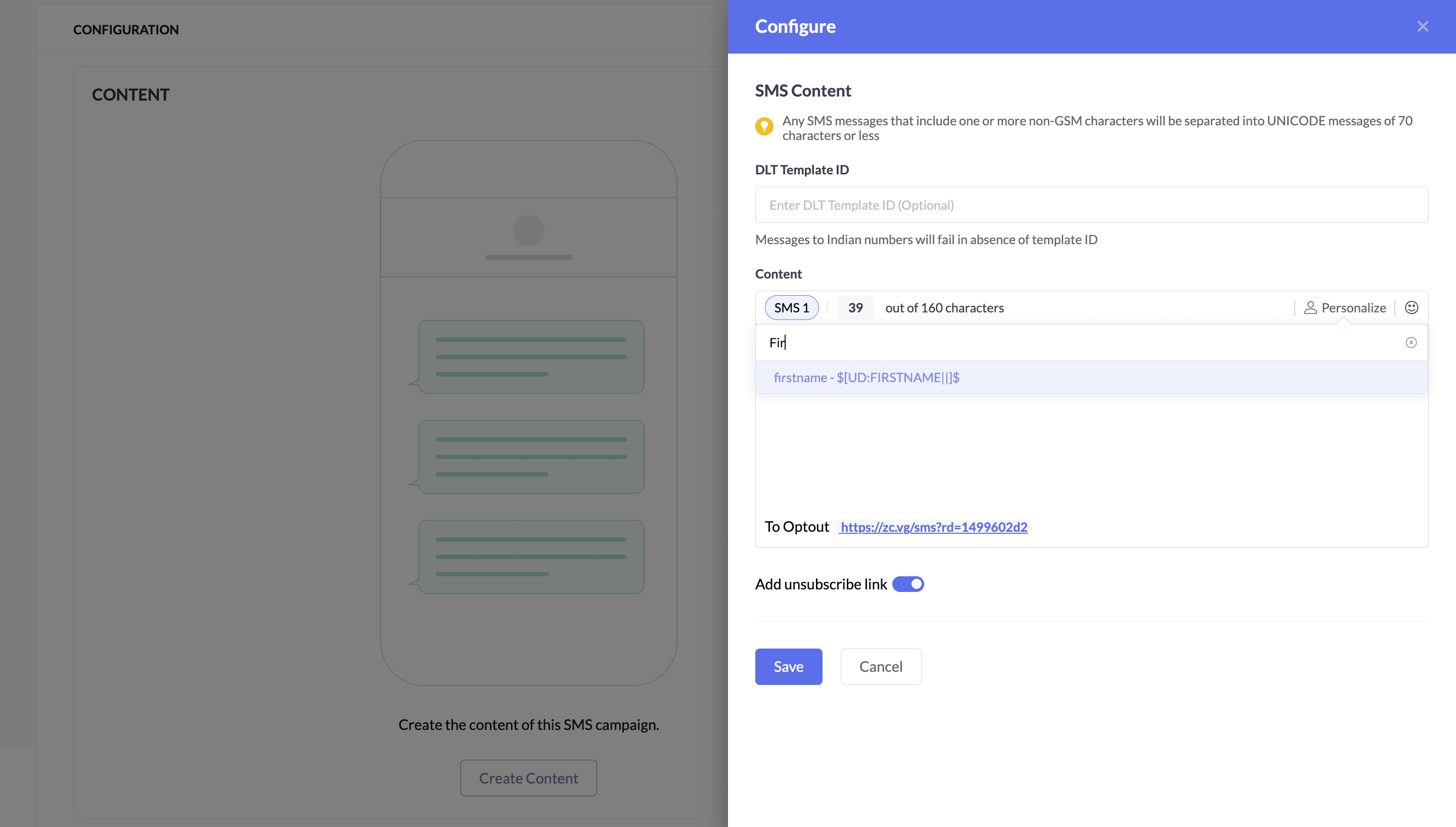
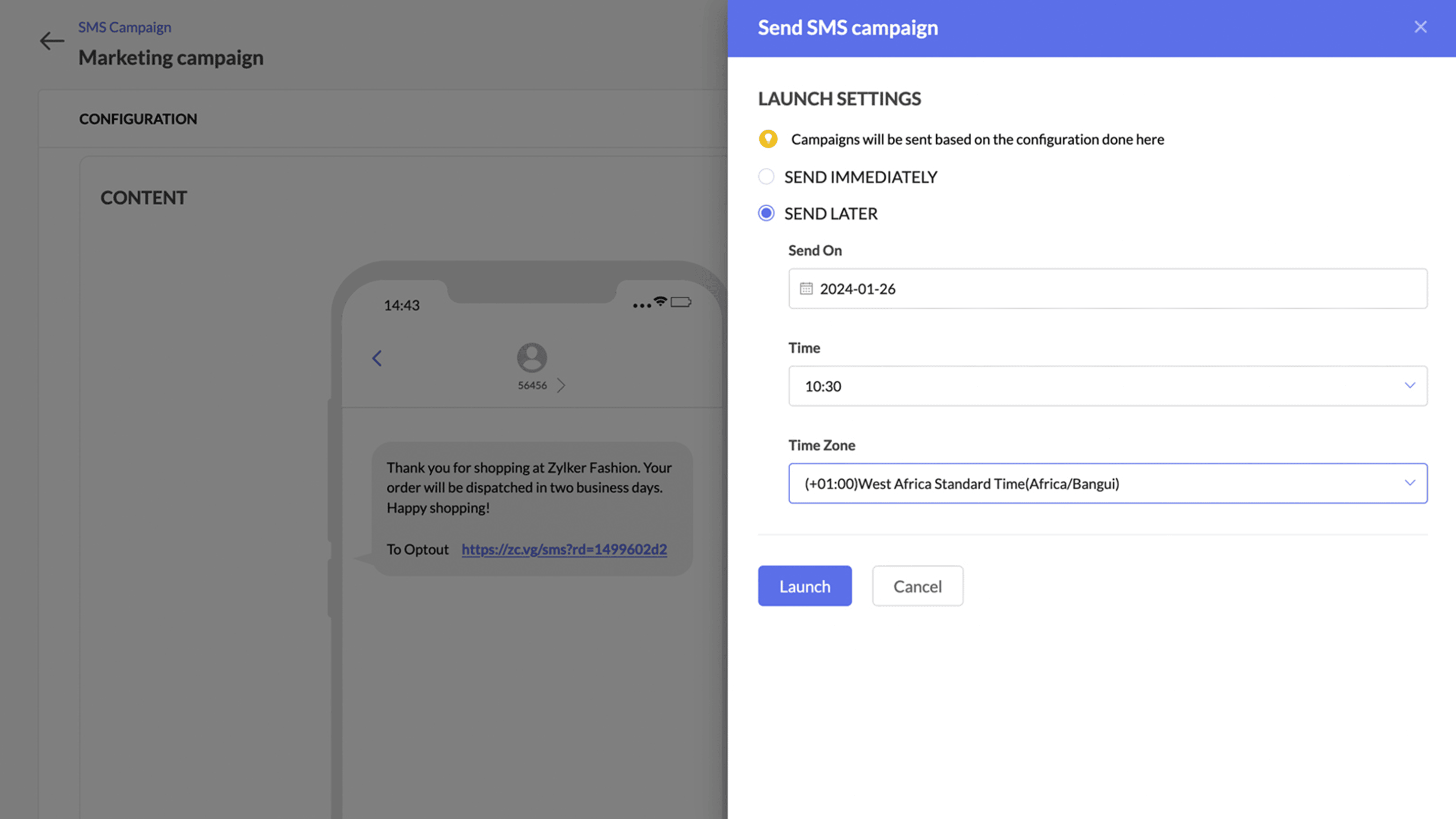
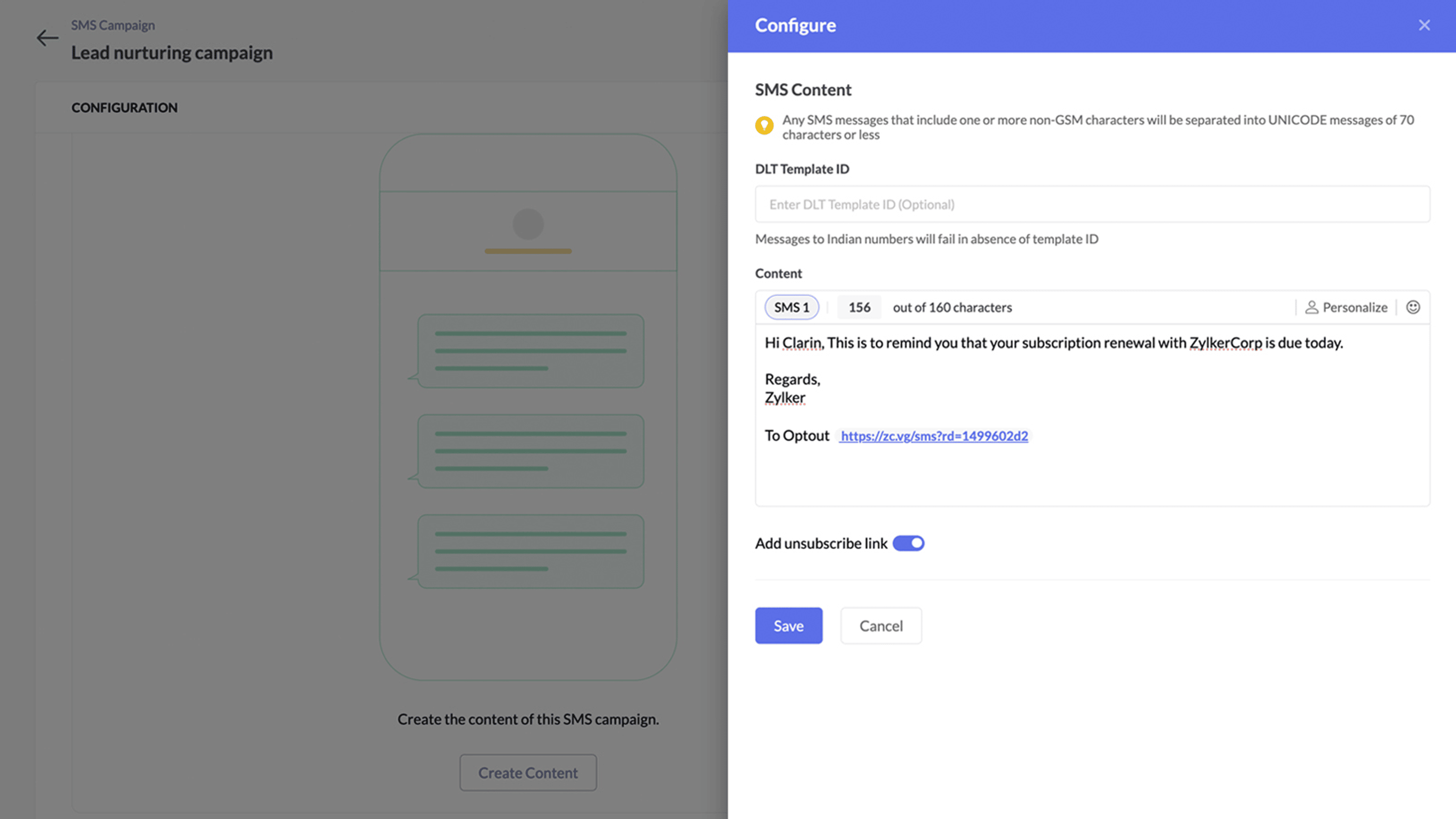
Contact numbers will be mapped to the mobile number field
Your contacts' numbers are crucial for running successful SMS campaigns. To ensure there's a single dedicated place to store and retrieve contact numbers, we've set the mobile number as the default field. This means users don't have to select a phone number during the SMS creation process.
Before: Multiple marketers import contact numbers into Zoho Marketing Automation, each using a different custom field without a standard field name. During every SMS creation process, they have to select each phone number manually.
Now: With the default mobile number field, all marketers store contact numbers in a single default field, making it much easier to identify and retrieve contact numbers.
Also, Zoho Marketing Automation ensures that email recipients have complete control over accepting or rejecting email campaigns through the unsubscribe option.
What's new with this gateway?
At Zoho, we're committed to upholding data integrity and complying with all regulations. To solidify this commitment, we adhere to 10DLC standards in the US and Canada and DLT standards in India when introducing our own SMS gateway. This enhances Zoho Marketing Automation by improving your marketing campaigns, maintaining a good reputation with your contacts, and strengthening customer engagement.
This system ensures businesses sending mass SMS messages use approved long codes, improves deliverability rates, and ensures your messages reach your intended audience.
Benefits of 10DLC registration
Registered long codes are less likely to be blocked by carriers.
Sending messages from verified numbers builds trust with customers.
10DLC ensures users adhere to best practices for SMS marketing.
Top benefits of switching to Zoho's own SMS gateway
Instantly setup campaigns without any additional integration.
Superfast delivery.
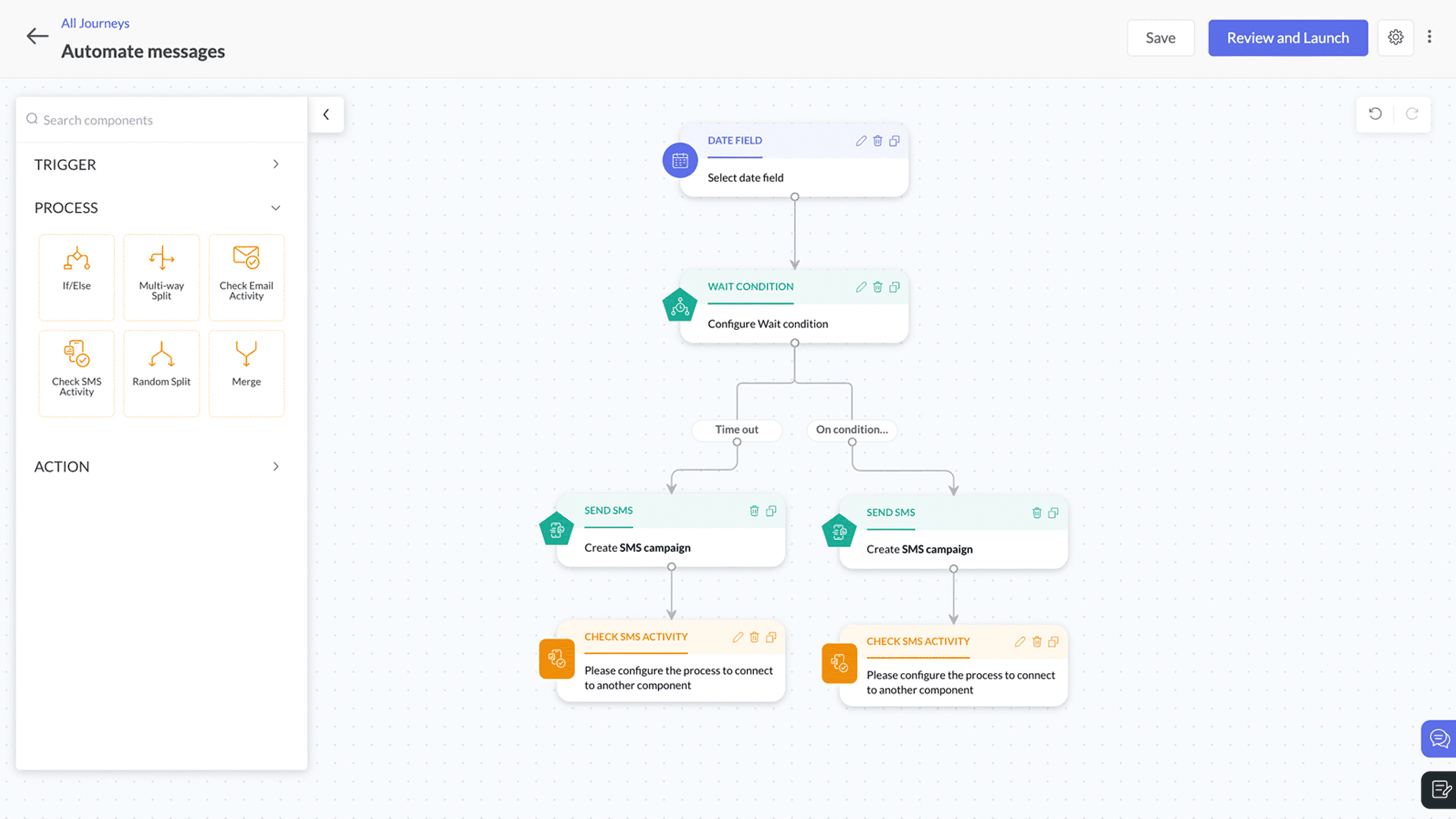
Automate SMS communications using journeys with real-time action based triggers.
Cost-effective messaging
Detailed reporting with campaign metrics and credit-to-cost analysis
Supports latest compliance - 10 DLC and DLT
SMS pricing will be an add-on pricing model and will be available on all the subscription plans. You can see the detailed pricing over here.
Level up your marketing!
Topic Participants
Moncy Samuel
Yaali Bizappln Solutions
Nagaraj S
CARMEN KARLOVICH
John
Sticky Posts
How to Add Users to your Organization in ZohoMail?
A better clarity so you can create other users to start using Zoho Mail. You can directly Add Users from the Control Panel to your Organization. You can invite users with the existing email address. If the person (user) already uses ZohoCRM, then you can import users from Zoho CRM. You can also import them using a .csv file. (if you are planning to add them in Bulk) In this topic, We will be discussing on how to Add and Invite users only. The Import options are self explanatory. ____________________________________________________________________________________________________________
Recent Topics
What is the difference between the free plan and the mail lite plan?
What is the difference between the free plan and the mail lite plan? How many emails can I send per day?Unblock email
Hi The outgoing mail from a client of me is blocked. I already made tickets and tickets are send to the EU desk but nobody is responding. The problem is already 4 days! There is absolutely no help from the support. I am really not satisfied at all! CanDomain verification failure
Hello Zoho Support, I purchased my domain directly through Zoho Mail, but the domain verification keeps failing with the message “TXT verification failed.” I’ve already waited and retried several times, but it still won’t verify. Could you please manuallyUnable to send message;Reason:554 5.1.8 Email Outgoing Blocked.
My email account is unable to send emails, and I urgently need to use it. How can I resolve this?If there is anything we have done wrong, please let us know in advance so we can actively cooperate to improve. User ID: 850482493URGENT: Email stopped workin - can't access admin panel
For some reason email sending stopped working. When I try to send an email it fails with "Unable to send message;Reason:451 4.7.1 Temporary system error" I can receive email just fine I see in my notifications some errors about the MX records, howeverCan I associate an invoice to a Project after the fact?
We have generated an invoice but would like to assoicate it to a Zoho Project after the fact. Is there any way to accomplish that? Thanks, ScottEmails I send as a cc or bcc NEVER GO THROUGH TO THA RECEIVER !!
every time i send a cc or bcc copy of an email to anyone when I’m using my zohomail.com email - no one ever gets the cc of bcc copy if the email: why???? And i triple check that the email addresses are correct; then i get back an email message (EVERYTIME)Add Support for Authenticator App MFA in Zoho Desk Help Center
Hello Zoho Desk Team, We hope you are doing well. We would like to request an enhancement related to security for the Zoho Desk Help Center (customer portal). Currently, the Help Center supports MFA for portal users via SAML, JWT, SMS authentication,Auto-fill Contacts in Zoho Mail not working for me
We just switched to Zoho Mail for our company, and I am noticing that the "auto fill" feature when composing an email -- where the "to" field is autofilled (like in the attachment) from Contatcts works for everyone except me. Any way I might have madeHow to unlink a SAML user from the existing Zoho Desk user (domain change case)
Hi everyone, I’m trying to understand how to handle a situation where a customer changes their company domain. In our setup, users authenticate via SAML, so when the domain changes, the SAML system treats them as a new user. However, in Zoho Desk, I’dRelated to zoho survey
Hi team. I want to know something regarding zoho survey question builder. I have two questions each of dropdown (One answer) - question type. In the first question, there are 16 answer choices and in the second question, there are 3 answer choices. ForText Message
When trying to sent a text message, it says its an error i should contact a zoho agentZoho POS is now available for Canadian retailers
Hey everyone, We're excited to introduce the all-new Canadian edition of Zoho POS, which helps retail businesses simplify and manage their end-to-end business operations. Start by signing up and exploring the 15-day free trial. Sign up now How does ZohoPayroll In Canada
Hi, When can we expect to have payroll in Canada with booksMass update to change or shift all project dates and keep project structure + shift all sub-tasks dates with main tasks
Most users would expect that if they change the start date of their project then that will be reflected inside the actual project and any project structure would be retained. Additionally if a task list with associated sub-tasks is moved, most users would expect that those sub-tasks would also be moved along with their parent task. This is not the case. For a total Project shift of dates: * the start and end date from > "Edit Project" page can have a radio button added to "shift all project tasksClosing Accounting Periods - Invoice/Posting dates
Hi, I have seen in another thread but I'm unsure on how the 'transaction locking' works with regards to new and old transactions. When producing monthly accounts if I close December 24 accounts on 8th Jan 25 will transaction locking prevent me from postingIn-person ZUG Meetups for Real Estate Professionals - US Q1 2026
The Real Estate Zoho User Group is going on a multi-city, in-person meetup tour across the US, and we’d love to see you there! These meetups are a great opportunity to: Connect with fellow real estate professionals using Zoho Share challenges and discoverZoho CRM custom fields not showing in zoho creator
Hi Team, I have created a Products form with Zoho CRM integration and connected it to Products module of CRM. But when I see the reports of Products in Zoho creator then I am not able to see custom fields of Products module. Only standard fields of ProductsSending email notifications based on language
Hello. I would like to know how we can bypass the default notifications (which are just in English) for when a ticket is created/replied to/closed, to be in other languages, based on the language field in the ticket? I can create other email templates,Zoho Error: This Operation has been restricted. Please contact support-as@zohocorp.com for further details
Hello There, l tried to verify my domain (florindagoreti.com.br) and its shows this error: This Operation has been restricted. Please contact support-as@zohocorp.com for further details. Screenshot Given Below - please check what went wrong. ThanksDownload a file from within a zoho creator widget
I have a widget running in Zoho Creator , it displays uploaded documents in a table file, and I have added a download link in the view. ( The widget is created with html, css and javascript). I do not succeed in getting the download working. Do I haveZoho / Outlook Calendar sync
The current Marketplace -> Microsoft -> Meetings integration needs 2 changes. 1. The current language for the Two-Way sync option should be changed. It currently states, "Sync both your Zoho CRM Calendar and Office 365 Calendar meetings with each other."Email content just contain 'OK' ,not what we expect
create campaign API URL: https://campaigns.zoho.com/api/v1.1/createCampaign req params: {'campaignname': 'General_Outreach_d0cfc415-43aa-4b96-bb09-558e76a3dda3_50_20251117_214806_660', 'from_email': 'admin@allinmedia.ai', 'subject': 'ALL IN MEDIA', 'list_details':Reopen ticket
Hello! Can I reopen a ticket just using the API ticket/sendReply ? What's the rules to do it? I'm trying but it doesn't reopen the ticket, it just send the replyAllow Admins to Transfer Ownership of Their Own Files & Folders
Hi Zoho WorkDrive Team, Hope you are doing well. We would like to request an important enhancement to the ownership-transfer functionality in Zoho WorkDrive, specifically regarding administrator capabilities. As administrators, we have the ability toTip#46: Capture accurate log hours
Hello everyone, Use the newly introduced timer settings that will streamline the usage of timers and help admins or workspace owners to manage the time entries of the workspace users better. Check out the below mentioned timer settings added to the TimesheetMoving to app-specific authentication for Google integrations
Hello everyone, We’re making an important change to how Google integrations work in our platform. Until now, we used a common Google project across Zoho to enable integrations like Google Drive, Calendar, and more. Going forward, we’ll be moving to anLost the ability to sort by ticket owner
Hi all, in the last week or so, we have lost the ability to sort tickets by Ticket Owner. Unlike the other columns which we can hover over and click on to sort, Ticket Owner is no longer clickable. Is it just us, or are other customers seeing this too?How Can i put a form in Zobot
Hi,how can i integrate a form which has a multiple options to choose from.the form should be opened or displayed by zobot after it meets a requirement in the conversation. Thanks in advance !Playback and Management Enhancements for Zoho Quartz Recordings
Hello Zoho Team, We hope you're all doing well. We would like to submit a feature request related to Zoho Quartz, the tool used to record and share browser sessions with Zoho Support. 🎯 Current Functionality As of now, Zoho Quartz allows users to recordZoho Analytics - Feature Request For Time Based Data Source Fetch
Hi Analytics Team, I have a client using Zoho CRM and they want a weekly report at 4:30pm every Friday, emailed to the sales team showing a pie chart of Closed Won Deals for that week. This is easy to achieve in Analytics but not so easy to ensure theWhich user's capacity is used for Shared Mailbox storage?
We use shared mailboxes at our company, and their size is increasing daily. Which user(s)'s total mailbox limit is being used up by this space?Inserting the current date / time
I'd like to use Zoho Notebook as a log - so it would be great to be able to insert the current date and time at the beginning (or end) of each my log/journal entries - or wherever I want. Something simple, like pressing a button/icon to insert it wherever my text cursor is. It could be formatted like "Mon Dec 11, 2017 - 11:43p".Campaign editor overrides href value
I've been trying to insert a deep link in an email campaign so recipients can directly open a native app on their device. My deep link looks something like "myapp://". The options to insert links in the campaign editor are limited to strict urls, emails,Bug Report and Suggestions for Improvement in Zoho Applications
Hi Zoho Team, I’d like to report a few bugs and improvement suggestions I’ve noticed while using Zoho products: Zoho Cliq Video Call: The camera sometimes turns off automatically during video calls. This seems to be a bug — please check and fix it. ZohoCanvas Flex Box containers should not require a width/height.
Flexbox containers are often used as organizational concepts, to ease re-flow on mobile etc. - I cannot use % for flexbox W or H - I cannot omit W or H This means that the content cannot dictate, and a Flexbox container cannot be used merely as an organizationalZoho Desk Android app update: Filter enhancement, Save Filters
Hello everyone! We have now enhanced the filter section on the ticket listing screen of Zoho Desk Android app as it is on the web(desk.zoho.com). Also, we have introduced an option to save filters for tickets on the mobile app. You can easily apply, rename,Very long loading times | bad performance [ZOHO DC: EU]
Hello there, we have recently noticed that the loading times have become extremely long when retrieving tickets and ticket details. For example, I open any ticket and get the following view. The subject and standard information (ticket owner, status etc.)Zia Profile Summary now supports six languages and responds faster
After numerous customer requests, we’ve expanded Zia Profile Summary to do more than just summarize resumes quickly. It can now summarize them in six different languages and deliver results even faster. What’s New 1. Extended language support Zia canIntroducing Zoho Show Android 3.0
Good ideas need the right space to grow. They deserve tools that move as fast as your thoughts and make creating feel effortless. And that is why we are bringing you Zoho Show Android 3.0! From a brand-new look and smoother navigation to improved collaborationNext Page