Introducing Zoho POS for Restaurants
Hello Community,
We’re thrilled to announce the launch of Zoho POS for Restaurants, unveiled at the 30th milestone edition of Zoholics India 2026.
Running a restaurant involves multiple teams and workflows. A single table journey, from seating a guest to closing the bill, involves the host, server, kitchen staff, and cashier. When these hand offs are disconnected, they can lead to delays, errors, and a poor customer experience.
Zoho POS for Restaurants is built around these workflows. It connects your front-of-house and back-of-house operations in a single system. Orders entered by servers at the table can be sent directly to the kitchen, eliminating the need for paper tickets or verbal communication. Kitchen staff can also update order statuses, allowing floor staff to stay informed about the progress of each order without having to leave the dining area.
Menu management
A well-structured menu is an essential part of running a restaurant. Before creating a menu, you can add the food items and ingredients required for your business operations.
Food items can be managed in different ways depending on how your restaurant operates. For example, if you directly sell a packaged or ready-to-sell food product, you can add it as an item and include it in your menu. You can then track its stock based on its availability.
If your business involves preparing food, you can add the ingredients used in the preparation process, such as oil, vegetables, and other raw materials. These ingredients don't need to be displayed on the menu. Instead, you can associate them with a composite item, which represents the final food product that is added to your menu. The stock of the composite item is determined based on the availability of its associated ingredients.
You can also create modifiers to provide customers with additional options when ordering food. For example, you can create modifiers for pizza toppings, beverages, seasonings, and more. Modifiers can have their own prices, associated items, and stock levels, and can be added to your menu as required.
Once you've created your food items and modifiers, you can create a customized menu for your restaurant. Menus can be assigned based on locations, sales channels, and specific dates or times.
You can organize food items into groups and subgroups based on your business requirements. You can also configure different prices for the same menu, which can be useful when you want to maintain separate pricing for offline and online sales.
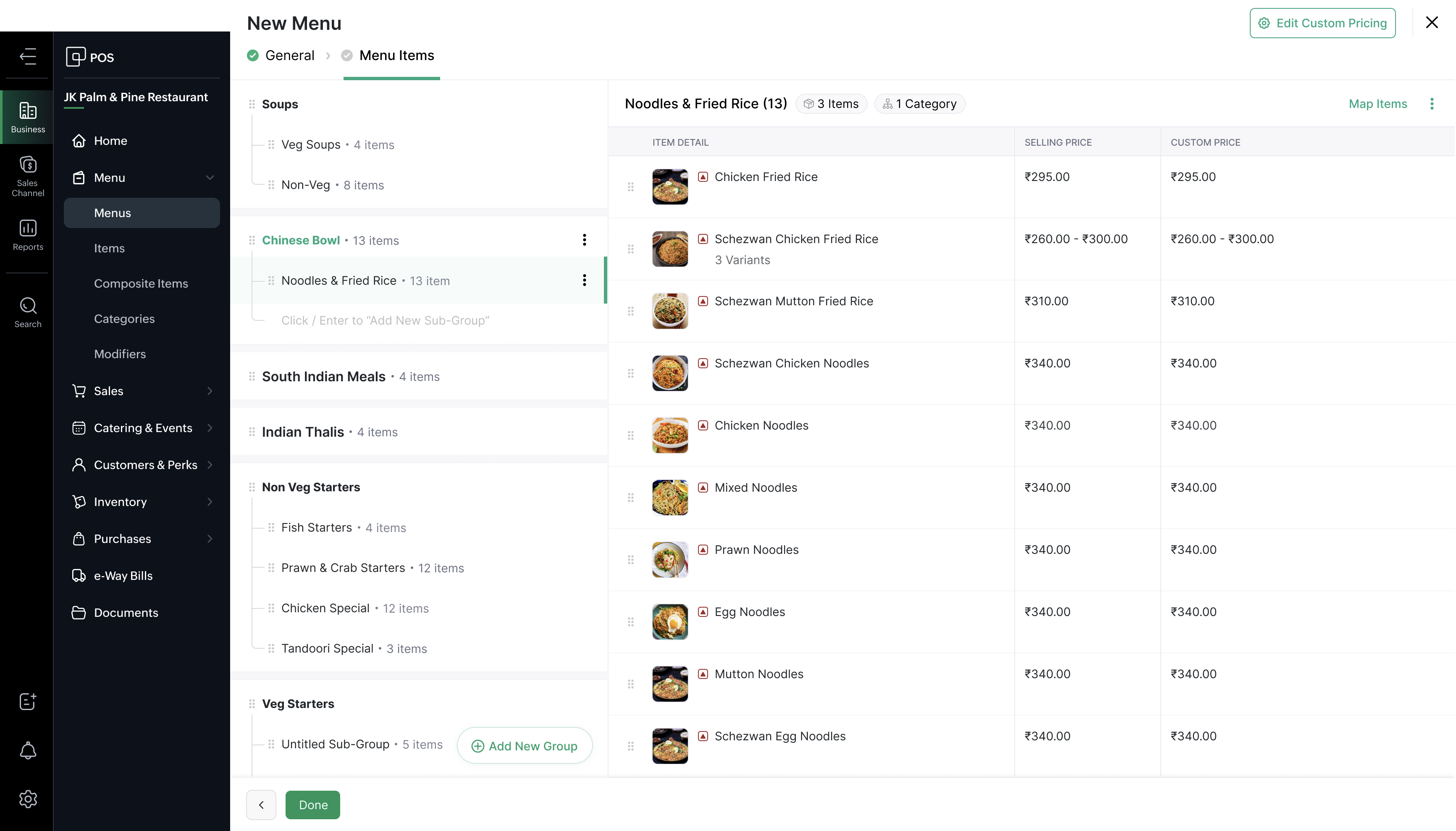
You can even host your menu online and share it with customers using a QR menu, making it easy for them to browse your offerings from their own devices.
Order and billing management
Your order and billing workflow can vary depending on your restaurant's business model. Zoho POS provides dedicated sales channel devices—including the POS Register, Waiter App, and Self-Ordering Kiosk to support different ordering and billing scenarios.
You can configure these sales channels based on your restaurant's requirements and use them individually or together.
POS Register
The POS Register is suitable for a wide range of restaurant business models and supports both ordering and billing workflows.
For example, if you operate a QSR without dining facilities, you can use the POS Register to add items and bill customers. Once the order is placed, the Kitchen Order Ticket (KOT) can be sent directly to the kitchen for preparation.

If your restaurant offers dine-in service, you can create dining areas and tables, along with their seating capacities. When taking an order, you can select the relevant table, specify the number of guests, and add the customer's order. KOTs can then be sent to the kitchen for preparation.

Waiter App
The Waiter App is designed specifically for waiters to take orders directly from tables.
You can create waiter profiles and assign devices to them. You can also restrict waiters to specific tables based on your restaurant's requirements.
Waiters can select a table, enter the number of guests, add items to the order, and send KOTs directly to the kitchen. Multiple KOTs can be sent for the same table as customers place additional orders.
Once the customers finish dining, the sale can be completed and sent for billing through the appropriate billing workflow.

Kiosk
The Self-Ordering Kiosk is designed primarily for self-service restaurant models, where customers can place their own orders, make payments, and collect their food.
If you operate with limited staff or want to manage customer queues more efficiently, you can install self-ordering kiosks and allow customers to complete the ordering process themselves.
The workflow is simple: Customers browse the menu, add items to their cart, complete the payment, and place the order. The KOT is then sent to the kitchen, where the order is prepared. Once the food is ready, the customer can collect it.
All these sales channels can work together in the same restaurant, supporting both online and offline operations. You can create registers based on your business requirements and assign unique billing sequences to help identify transactions.
You can also control access to each sales channel using user roles and permissions. Session management helps you track users' activities across these sales channels on a daily basis.

Food aggregator
If you want to take your restaurant online and reach customers beyond your physical location, you can integrate Zoho POS with hyper local food aggregators such as Swiggy and Zomato.
If you're already using these platforms, you can connect them to Zoho POS using your dedicated aggregator ID and partner portal URL. If you're new to these platforms, you can complete their onboarding process first and integrate them with Zoho POS afterward.
During the integration process, you can configure the store location, menu, order-receiving device, and deposit account. Once the integration is complete, orders from the food aggregator can be received and managed directly from your configured order-receiving device.
You can also configure preferences such as preparation time, order actions, and automatic order acceptance.
If a particular food item is temporarily unavailable, you can disable it from the POS Register. You can also configure a time after which the item is automatically made available again.

Payments
Billing in a restaurant context is rarely straightforward. Zoho POS for Restaurants handles scenarios that come up every service: splitting a bill between guests, merging two tables that have been seated together, applying item-level or order-level discounts, and processing payments across multiple methods in a single transaction. A table of four can settle their bill with two cards, one cash payment, and a gift voucher applied to the remainder, and the system will record each payment method against the same order.
Zoho POS Indian edition supports multiple payment providers, including Paytm, PhonePe, Pine Labs, Razorpay, and more. Depending on the payment provider, you can accept different payment methods such as cash, cards, wallets, UPI, and more.

Catering & events management
If your restaurant handles large food orders for events or catering, you can manage these orders using the Catering & Events module.
You can manage bulk orders through Sales Orders. If an order requires shipping, you can use the Packaging and Shipment sub-modules to manage the fulfillment process.
You can also manage returns through the Returns module.

Multi-outlet management
If you operate more than one restaurant location, Zoho POS for Restaurants lets you manage all of them from a central configuration. Menus, pricing, staff roles, and permissions can be set at the organization level and applied to individual outlets, or each outlet can be configured independently depending on how your business is structured.

Users, roles, and permissions
Zoho POS for Restaurants lets you define what each staff role can see and do within the system. A billing staff member may have access to the payment screen but not to the configuration settings. A supervisor may be able to apply discounts above a set threshold that a server cannot. A store manager may be able to view reports that are not visible to front-of-house staff. These permissions can be configured per role and applied consistently across your team, reducing the risk of unauthorized changes and keeping each person focused on their part of the workflow.

Dashboard and reports
Zoho POS stores the information generated through your day-to-day operations, including users, items, transactions, payments, inventory, and more.
You can use the Reports module to analyze this data and gain insights into your business performance. The reporting tools in Zoho POS for Restaurants give you a view of your operation beyond the current service.
Some of the key reports include:
- Sales by Customer
- Sales by Item
- Profit by Item
- Inventory Valuation Summary
- FIFO Summary
- Table Performance Summary
- Inventory Aging Summary
- Stock Summary
- Payments Summary
- Activity Logs
- Audit Trail

You can also get a quick overview of your business through Dashboards. Dashboards are displayed when you log in to Zoho POS, giving you access to important business insights at the start of your day.

Key dashboard insights include sales summaries, sales by sales channel, inventory aging, item trends, and other statistics that can help you monitor your daily operations and make informed decisions.
Availability and Specifications
Zoho POS for Restaurants is available in four plans: Free, Essential, Signature, and Premium, each offering a different set of features and capabilities.
To support budding restaurateurs in India, the Free plan supports invoices of up to ₹12 lakhs in annual value.
Zoho POS for Restaurants supports both online and offline operations. Zoho POS Web is the cloud-based administrative application that requires an internet connection and is used as the back-of-house system.
The following sales channel front-of-house applications support both online and offline operations:
Sales Channel | Platform |
POS Register | |
Waiter App |
From managing menus and table orders to streamlining kitchen operations, payments, online orders, and business insights, Zoho POS for Restaurants brings your restaurant's essential operations together in one place.
Whether you're running a café, QSR, bakery, dine-in restaurant, or catering business, you can configure Zoho POS to suit your business model and scale as your business grows.
Ready to simplify your restaurant operations? Explore Zoho POS for Restaurants and discover how it can help you serve your customers better and run your business more efficiently.
Topic Participants
Raghav Krishna E
harsh yadav
Kiran Kumar B
Sticky Posts
Introducing Zoho POS for Restaurants
Hello Community, We’re thrilled to announce the launch of Zoho POS for Restaurants, unveiled at the 30th milestone edition of Zoholics India 2026. Running a restaurant involves multiple teams and workflows. A single table journey, from seating a guest
Recent Topics
CC'd User Receiving Both Regular Email Chain Response & Reply Notification
Hi, I am trying to set up the notifications for users and I'm a bit confused. I'm testing with personal accounts and my Desk agent, and I'm noticing that CC'd users are receiving both the regular email chain that the requester (contact) receives, butKB Articles - Can't See Content or Trigger Immediate Sync
Once a file has been submitted to the KB, there's no way to check what it actually contains. There's also no way to force an immediate sync with the source document. These are issues when one is developing and testing an agent. It makes troubleshootingEnable Screen Recording in Zoho WorkDrive Mobile Apps (Android & iOS)
Hi Zoho WorkDrive Team, How are you? We are enthusiastic Zoho One users and rely heavily on Zoho WorkDrive for internal collaboration and content sharing. The screen-recording feature in the WorkDrive web app (similar to Loom) is extremely useful- however,Ability to Set Text Direction for Individual Cells in Zoho Sheet
Dear Zoho Sheet Team, We hope you are doing well. We would like to request an enhancement in Zoho Sheet that allows users to set the text direction (right-to-left or left-to-right) for individual cells, similar to what is available in Google Sheets. UseSharedmail box access via an api
Hi, I am trying to access a sharedmailbox via an API. I am the moderator and creator of this shared mailbox. I have created a self client but when when i try to get list of all emails, it does not list the sharedmailbox. Help me to resolve this or provideAdd Comprehensive Accessibility Features to Zoho Writer
Hello Zoho Writer Team, We hope you are doing well. We would like to submit a feature request to enhance Zoho Writer with a full set of accessibility tools, similar to the accessibility options already available in the Zoho Desk agent interface. 🚧 CurrentProblem with currency field in Zoho CRM
Hi Guys Zoho Books has a feature in currency fields that automatically converts decimal numbers with commas ( , ) to period format ( . ) when pasting them. For example: R$ 2,50 --> R$ 2.50 Is this behavior available in Zoho CRM? I couldn't find any configurationAbility to Attach Images When Reporting Issues to Zoho Projects from Zoho Desk
Hi Zoho Desk Team, Hope you’re doing well. We’re using the Zoho Desk–Zoho Projects integration to report bugs directly from support tickets into the Zoho Projects issue tracker. This integration is extremely useful and helps us maintain smooth coordinationMake Camera Overlay & Recording Controls Visible in All Screen-Sharing Options
Hi Zoho WorkDrive Team, Hope you are doing well. We would like to request an improvement to the screen-recording experience in Zoho WorkDrive. Current Limitation: At the moment the recording controls are visible only inside the Zoho WorkDrive tab. WhenVENDORS ARE NOT SYNCHED WITH CONTACTS IN CRM
Hello, While the ACCOUNTS and CONTACTS (Including the primary contact) are synced with the CONTACTS module in CRM, the vendor's CONTACTS are not synced with CRM - which basically forces the users to re-enter all vendor's contacts twice and then updateProperly Capture Dropdowns & Hover Elements When Recording a Window/Tab
Hi Zoho WorkDrive Team, Hope you are doing great. We encountered a limitation when recording a selected window or browser tab: Certain UI elements, such as dropdown lists, hover menus, and overlays, are not captured unless we record the entire screen.Add Camera Background Blur During Recording
Hi Zoho WorkDrive Team, Hope everything is well. We would like to request an enhancement to the video recording feature in Zoho WorkDrive. Currently, the camera preview displayed during a recording does not support background blur. This is an essentialWorkDrive Desktop Sync Is Being Deprecated: Move to WorkDrive TrueSync for a Smarter Experience
Hi everyone, We are excited to share a better, smarter way to access and manage your files directly from your computer! We’re transitioning from our legacy Desktop Sync app to WorkDrive TrueSync, designed to give you faster performance,greater flexibility,Support Uploading YouTube Videos Longer Than 60 Minutes
Hi Zoho Social Team, How are you? We would like to request support for uploading YouTube videos longer than 60 minutes directly through Zoho Social. Your support team informed us that Zoho Social currently cannot upload videos over 60 minutes due to “APICaso de Éxito: ACKstorm transforma la gestión de personas con Zoho People
"Con Zoho People hemos centralizado la gestión de personas y facilitado la autonomía de la plantilla." Equipo de ACKstorm ACKstorm es una empresa especializada en consultoría y servicios cloud que trabaja con el ecosistema de Zoho para optimizar sus procesosDuplicate Record Creation
Hello Team, I would like to check whether there are any options available in Zoho FSM to prevent duplicate record creation in the following modules: Assets Companies Contacts Ideally, we would like the system to check for existing records before allowingZoho Books Sandbox environment
Hello. Is there a free sandbox environment for the developers using Zoho Books API? I am working on the Zoho Books add-on and currently not ready to buy a premium service - maybe later when my add-on will start to bring money. Right now I just need aAction required: Authenticate your sender domain in Zoho Marketing Automation before December 14, 2026
Starting December 14, 2026, Zoho Marketing Automation will enforce a daily sending cap for unauthenticated custom sender domains. If you're sending email campaigns from your own domain but haven't authenticated it yet, you'll only be able to send up toAsk the Expert: Unlock the Power of AI and Zia Agents in Zoho CRM
Are you using Zoho CRM to manage your sales processes and customer relationships, and wondering how AI can help you work smarter, automate more, and take your CRM capabilities to the next level? We have great news: the “Ask the Expert” session is comingWhat's new in Zoho Desk 2026 - A decade of ideas brought to life
Hello everyone, 2026 marks a special milestone for us as we celebrate 10 years of Zoho Desk. A decade into business, there is always something new to keep up with, new expectations to meet, and new ways to make customer support better. Zoho Desk continuesManual categorisation of bank transactions
Good Day I am hoping someone here can assist me. I have a lot of catching up to do with some bank transactions. I imported all my bank statements manually. Where possible i created a rule to have the transactions auto categorised. However there are someIdea: Upload your own letterhead and design PDF templates freely (like Lexware Office and sevDesk)
Your own letterhead on every invoice and quote, uploaded in two clicks, no HTML, no public image links. Tools like Lexware Office (formerly lexoffice) and sevDesk already offer this. Zoho Books is more powerful in almost every other way, so let's closeFeature Request: Add Sort by Cell Color and Text Color functionality
Hello Zoho Sheet Development Team, I am writing to suggest a feature enhancement for Zoho Sheet. Currently, the platform supports "Filter by Color," which is incredibly useful. However, there is no native option to "Sort by Color" (by cell fill or textMulti-Day Installations
We schedule technicians on multi-day installations. A single appointment from Monday 8 AM through Friday 5 PM counts as 105 working hours, causing false overbooking. We need one appointment spanning five days but only 40 hours counted toward technicianRebrand your CRM with the all-new custom domain mapping setup
UPDATES TO THIS FEATURE! 19th Jan, 2024 — Custom domain mapping has been made available for portal users in Zoho One and CRM Plus. 23rd June, 2023 — Custom domain mapping has been made available for all users, in all DCs. Hello everyone! We are elatedHow to manage additional required address information for Customers and Vendors.
Has anybody figured out a way to incorporate relevant delivery information in the limited address fields for customers and vendors? For example, most carriers have an additional 'delivery instructions' field to add important information like deliveryAction required: Authenticate your sender domain before December 14, 2026
Starting December 14, 2026, Zoho Campaigns will enforce a daily sending cap for unauthenticated custom sender domains. If you're sending email campaigns from your own domain but haven't authenticated it yet, you'll only be able to send up to 5,000 emailsChange default "Sort by"
Is there a way to change the default "sort by" when searching across modules?" in Zoho CRM? Currently the default sort method is "Modified time" but i would like to utilize the second option of "relevance" as the sort by default and not have to changeEnhanced access controls and smoother authentication for organization emails
Available to customers in all DCs. Hello everyone, We've improved how organization emails work in Zoho CRM, which are used when multiple users need to send emails from a common address, like sales@company.com or support@company.com. Admins can set upNew Search Function
Hey Team, The search function updated in our CRM about a week ago, so I assume it was an automated update across Zoho. It no longer displays leads/deals etc in Chronological order so that the most recently created or updated is the first to display whichError AS101 when adding new email alias
Hi, I am trying to add apple@(mydomain).com The error AS101 is shown while I try to add the alias.Transaction rules for "Owner's Contribution" ?
I have a bank account where a lot of the deposits are "Owner's Contributions" (i.e., the business owner investing money in the company). Is it possible to create a Transaction Rule to automatically recognize these? They all have the same verbiage fromPrint a price list or price book
Hi Community. Am I right in concluding that Zoho has no functionality to print a price list from either Zoho CRM, Zoho Inventory or Zoho Books? I won't get stuck on the fact that Zoho doesn't sync price books between Zoho CRM and Books/Inventory (moreThe Social Wall: October 2026
Hello everyone This month, we're making it easier to organize your monitoring workspace with Monitor Groups in Zoho Social. Organize your monitor columns into groups You can now organize your monitor columns into custom groups based on your preferences.Field of Lookup - 5 Field Association Limit.
This query relates to the post at: https://help.zoho.com/portal/en/community/topic/introducing-the-field-of-lookup-in-crm-public-early-access-2023 My simple (and common) scenario: I select an account / customer lookup and want their address pulled intoFeature Request - Electronic submission of tax returns in Canada
Allow the user to submit Canada Revenue Agency GST/HST returns with NETFILE. Provide the same functionality for provincial revenue agencies for PST/RST remittances. Today Zoho Books only provides the math required to calculate each line, requiring theAbility to translate Zoho CRM Kiosks
Hi team, Is support for translating kiosk text and screen names in the Zoho CRM translation tool planned on the roadmap? Thanks,Files in Teamspaces: keep your team's documents where the work happens
Release Note: This feature is available for all accounts across all DCs Hello Everyone, A Teamspace is built around a specific team and a shared objective, and it holds the modules and projects that team works with every day. The document that team dependsHow to download multiple files in Creator?
I'm trying to download multiple files from a creator report using a for loop but it only seems to be downloading one file. It seems like no more code can be run after downloading this one file. Is there a way to download multiple files? I'm currentlyRequest for Zoho Desk Version and Module Details
Kindly help us confirm the version of Zoho Desk currently being used in our portal, along with the module/edition name. We require this information urgently for our internal documentation.Next Page