Kaizen #142: How to Navigate to Another Page in Zoho CRM using Client Script

Kaizen #142: How to Navigate to Another Page in Zoho CRM using Client Script

 
Hello everyone!

Welcome back to another exciting Kaizen post. In this post, let us see how you can you navigate to different Pages using Client Script. 


In this Kaizen post,
  1. Need to Navigate to different Pages
  2. Client Script ZDKs related to navigation
         A. navigateTo()
         B. navigation_data
  3. Use Case
  4. Solution
  5. Summary
  6. Related Links


1. Need to Navigate to different Module's Pages in Zoho CRM

Often navigation between Module pages is required for improved user experience and streamlined workflows. Seamless transitions between related modules ensure quick access to relevant data and actions, enhancing productivity. For example, whenever the status of Account is updated to "Deal Creation", you can open the Deal Create Page. 

2. ZDKs to navigate to different pages

A. navigateTo()

Using this ZDK method, you can open any modules' detail/create/clone/edit page in a new tab or in same tab. Here is the syntax.
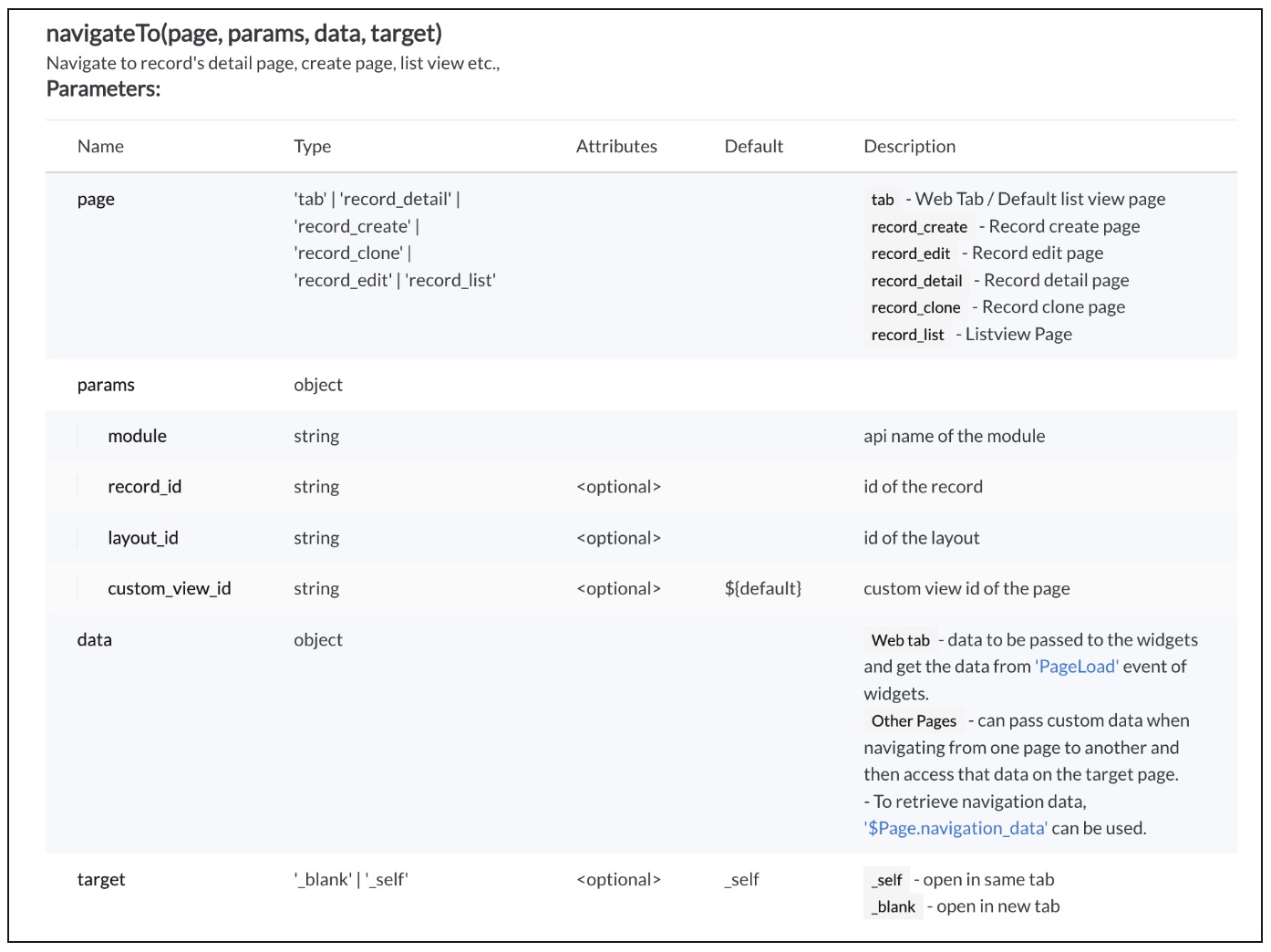


Click here to know more details.

B. navigation_data

Using The Constant , $Page.navigation_data, you can get the data passed from navigateTo() method.
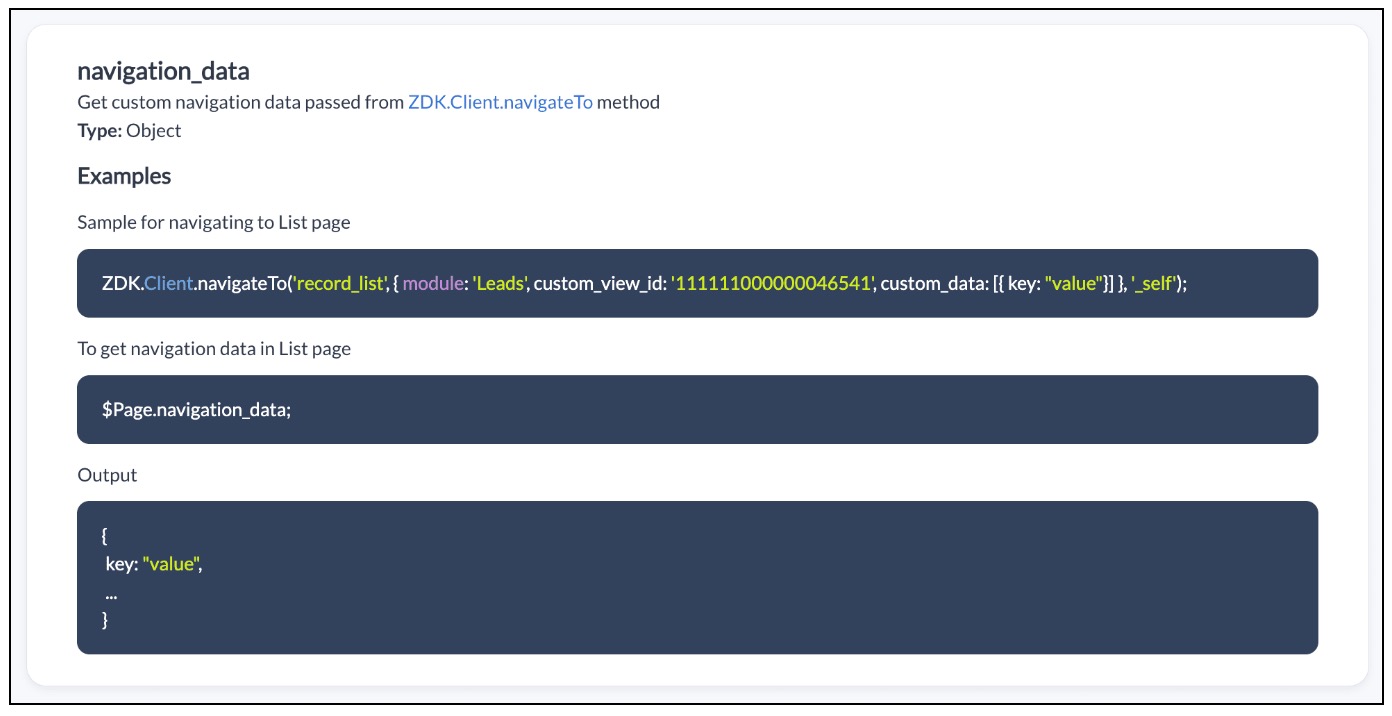


Click here to know more details.

3. Use Case

Zylker is a manufacturing organisation uses Zoho CRM. The admin wants to automatically open the Deal Create Page whenever the status in the Detail Page of Account is "Deal Creation". Also Deal Create Page should have the "Account Name"  prefilled from the Detail Page of Account record."

4. Solution

If the user updates the status to "Deal Creation" in Accounts module you need get confirmation from the user and  open a new Deal Create Page automatically with Account Name prefilled. 

To accomplish this using Client Script, you need to create two Client Scripts. 

A. Client Script for Accounts Module
B. Client Script for Deals Module

A. Client Script for Accounts Module

Create a Client Script for Detail Page of "Accounts" module with the following details and click "Next". To know more about Creating Client Script, click here.
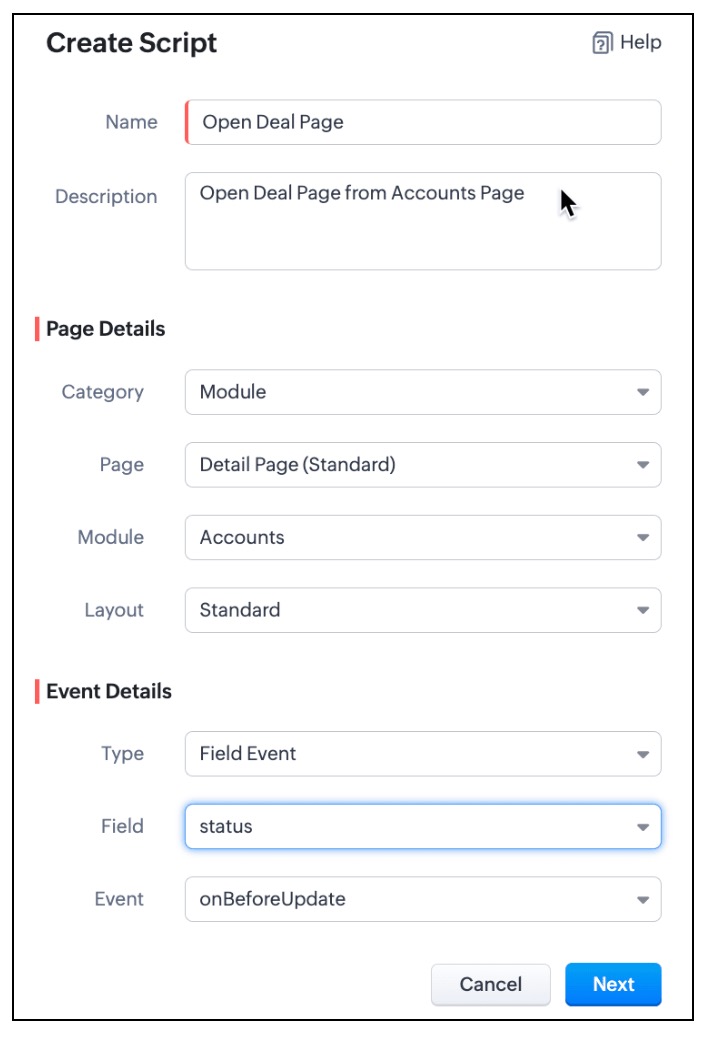

  • In the Client Script IDE, enter the below script and click Save.
  1. var a_name = ZDK.Page.getField("Account_Name").getValue();
  2. var rec_id = $Page.record_id;
  3. if (value == "Deal Creation")
  4. {
  5.     var resp=ZDK.Client.showConfirmation("Do you want to update the status as Deal Creation?");
  6.     if (resp)
  7.     {
  8.         var rec = $Page.record;
  9.         var rec_id = $Page.record_id;
  10.         rec.status = "Deal Creation";
  11.         var response = ZDK.Apps.CRM.Accounts.updateById(rec, rec_id);
  12.         log(response);
  13.  ZDK.Client.navigateTo('record_create', { module: 'Deals', custom_data: {data: a_name,data_id :$Page.record_id}}, '_blank')
  14.     }
  15. }

  • Whenever the status is updated to "Deal Creation" , you can show a Confirmation box using showConfirmation() asking whether the user wants to update the status as "Deal Creation"
  • Then, update the current record's status using updateById(). You can use the $Page, to get the current record id.
  • Then using  navigateTo() method you can open the Deal Create Page from Account Detail Page.
  • As per the following syntax, you should pass the required parameters, which includes the data needed for the Client Script on Deal Page. In this case the data being passed is the Account Name and Id.
  • Syntax : navigateTo(page, params, data, target)
    • page :  record_create denotes that you want to open Create Page.
    • params :  You need to mention the name of the module for which the Create Page has to be opened. In this case it is "Deals". You can also mention the layout_id and record_id in params. For more details, click here.
    • data : "custom_data" hold the data that you want to pass to the Deals Page.
    • target: You can open the page in same tab or in a different tab using "_self" and "_blank" respectively.
B. Client Script for Deals Module

Now, create another Client Script for "Deals" module with the following details and click "Next".
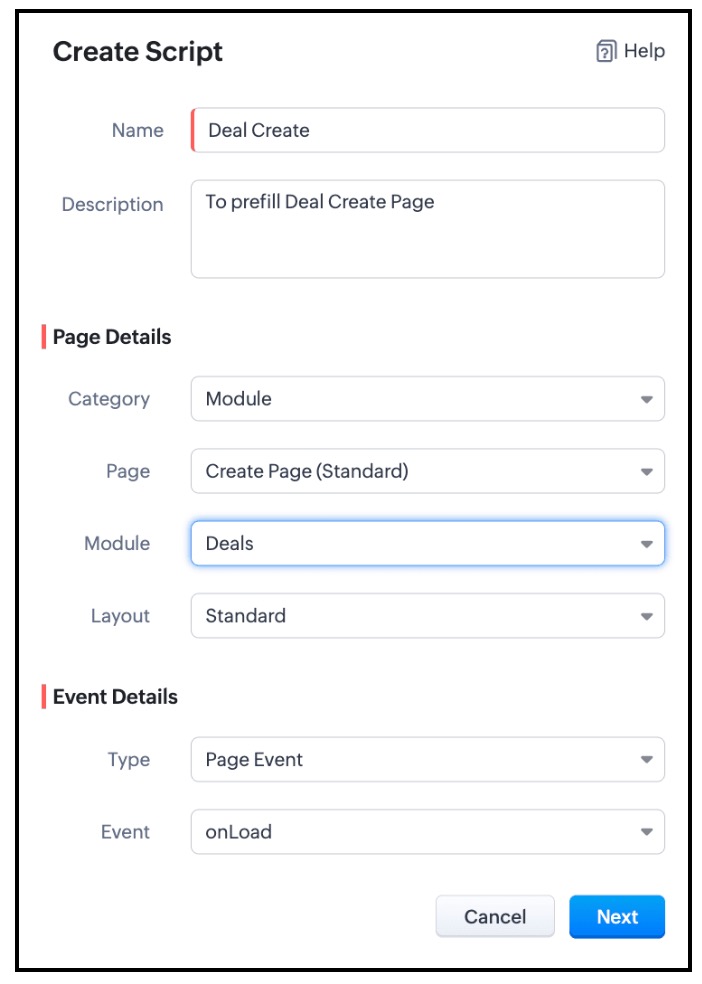


In the Client Script IDE, add the following script and click "Save"

  1. var a = $Page.navigation_data;
  2. if (a!=null);
  3. {
  4. var field_obj1 = ZDK.Page.getField('Account_Name');
  5. field_obj1.setValue({ "id":a.data_id , "name":a.data });
  6. }

To get the data passed in Account Detail Page, you need to use "$Page.navigation_data". In this script you can use setValue() and mention the id and name of "Account Name". As Account Name is a lookup field, you should mention the Id of the Account along with the Account Name.

Here is how the Client Script Works.
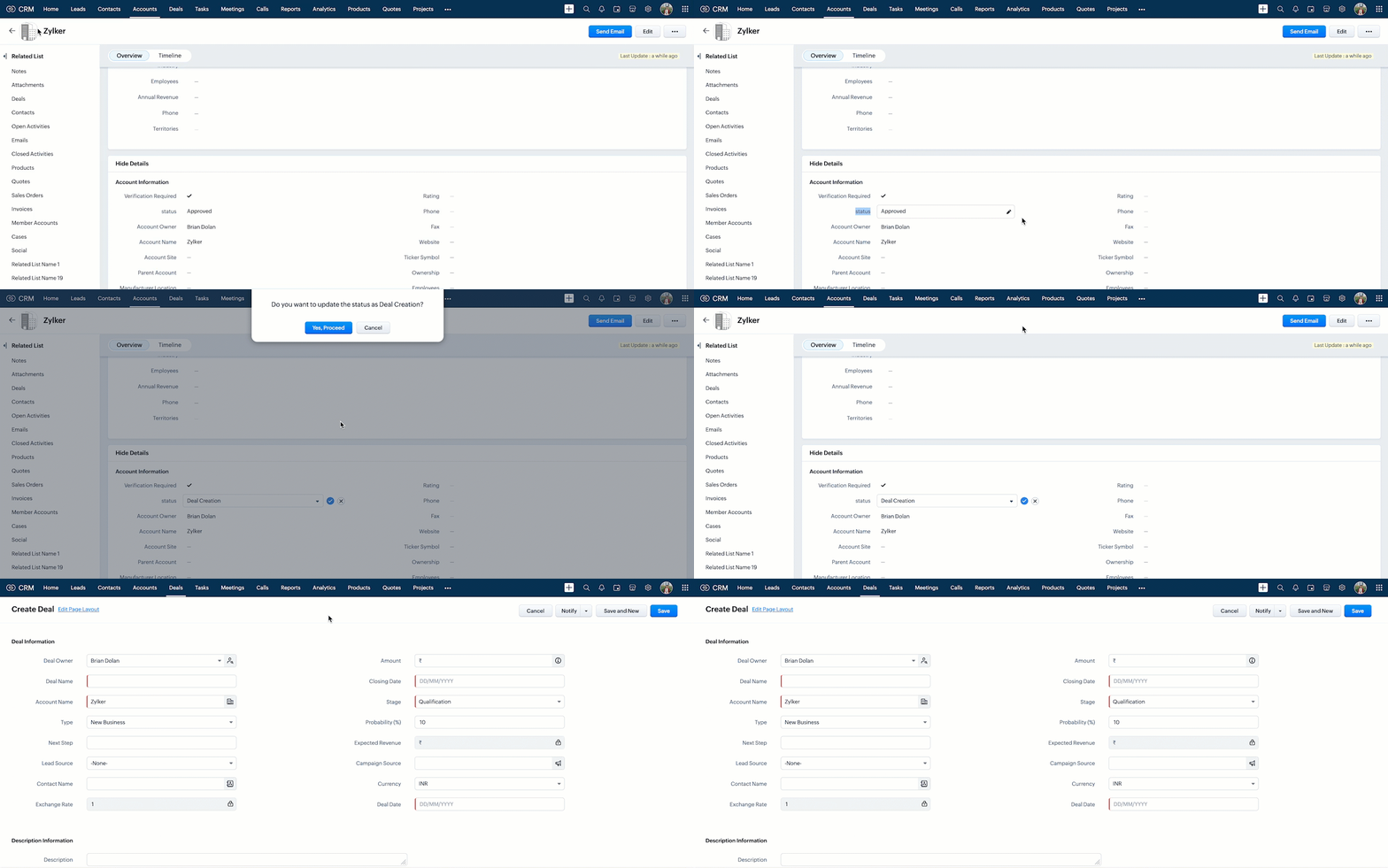

Click here to know more details.

Notes
Note:

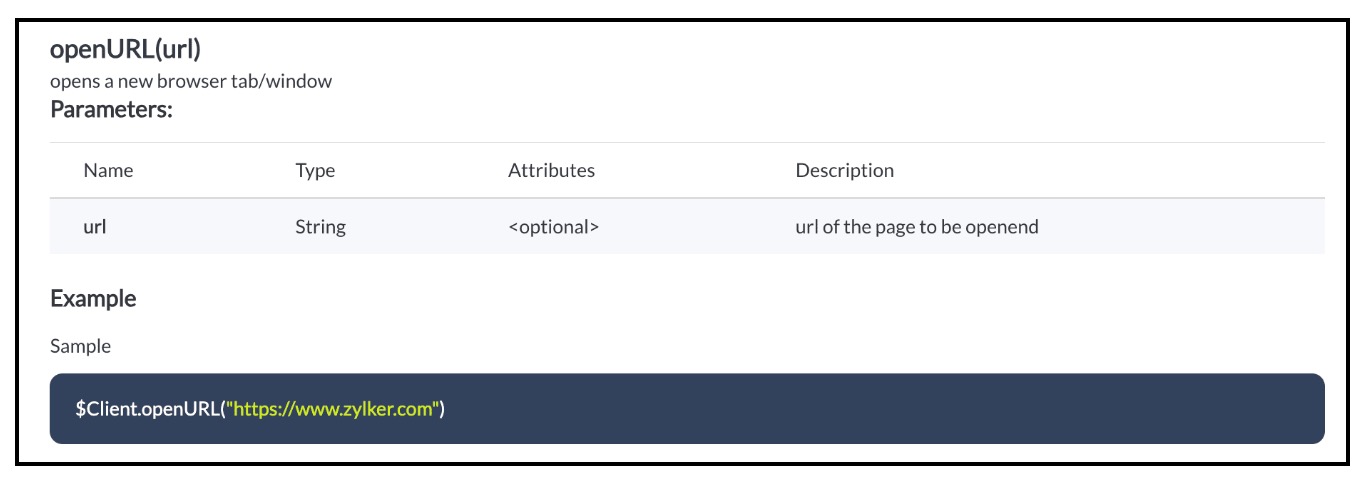
You can open any external URL using Client Script in a new tab using openURL().
Notes

Click here to know more details.

5. Summary :

In this post we have discussed,
  • How to pass data from one page to the other using Client Script.
  • How to perform actions after a record is updated.
  • How to update a record using Client Script without clicking on Save button.
  • How to open external URLs using Client Script.
-------------------------------------------------------------------------------------------------------------------

6. Related Links :


-------------------------------------------------------------------------------------------------------------------

Previous Post: Kaizen #141 - Zoho CRM's API Collection in Postman     |     Kaizen Collection: Home
Alert
Join us for our upcoming Zoho CRM Developer Series: Zoho CRM APIs, where you can explore more about Zoho CRM APIs. Register Now!  


    • Sticky Posts

    • Kaizen #198: Using Client Script for Custom Validation in Blueprint

      Nearing 200th Kaizen Post – 1 More to the Big Two-Oh-Oh! Do you have any questions, suggestions, or topics you would like us to cover in future posts? Your insights and suggestions help us shape future content and make this series better for everyone.
    • Kaizen #226: Using ZRC in Client Script

      Hello everyone! Welcome to another week of Kaizen. In today's post, lets see what is ZRC (Zoho Request Client) and how we can use ZRC methods in Client Script to get inputs from a Salesperson and update the Lead status with a single button click. In this
    • Kaizen #222 - Client Script Support for Notes Related List

      Hello everyone! Welcome to another week of Kaizen. The final Kaizen post of the year 2025 is here! With the new Client Script support for the Notes Related List, you can validate, enrich, and manage notes across modules. In this post, we’ll explore how
    • Kaizen #217 - Actions APIs : Tasks

      Welcome to another week of Kaizen! In last week's post we discussed Email Notifications APIs which act as the link between your Workflow automations and you. We have discussed how Zylker Cloud Services uses Email Notifications API in their custom dashboard.
    • Kaizen #216 - Actions APIs : Email Notifications

      Welcome to another week of Kaizen! For the last three weeks, we have been discussing Zylker's workflows. We successfully updated a dormant workflow, built a new one from the ground up and more. But our work is not finished—these automated processes are
    • Recent Topics

    • Project Notifcatiion Emails - Milestone

      Hello: I cannot get myself, or most importantly my portal client user to recieve an email upon completion of a milestone. I have set up our 1st project. I have set up a test client user. (accepted the invitation and is listed in the system as a client
    • Zoho Forms - Feature Request - Year Field

      Hi Zoho Forms Team, You currently have the following date and time fields: Date Time Date and Time Year and Month It would be useful if you could include a "Year" field For example a recent application I completed said "What year was your house built?"
    • Integrate Excel or Zoho Sheet functions / calculations to CRM product module

      Hello Community, I hope someone more experienced can help me with this question. Our price / payment plan calculations are in an Excel spreadsheet and I would like to use all those functions / calculations in my Products module. So when we send a quote
    • Sync CRM Contacts to USER'S contacts on Office 365

      I can see that the O365 sync is transferring contacts backwards and forwards between Zoho CRM and Office365. But it has created a separate address book in Office 365 called "Zoho CRM Contacts". This address book is not used by Office/Outlook's email function
    • How can I link Products in a Deal Subform to the Products Module

      Hello, I have a pricing subform on our Deals page and use a lookup field to associate a product with each line. I want to be able to look at a product page within the Products module and see a list of the deals connected to that product. I have this working
    • Manage Every Customer Conversation from Every Channel inside Zoho SalesIQ

      Your customers message you from everywhere. But are you really able to track, manage, and follow through on every conversation, without missing anything? With interactions coming in from websites, mobile apps, and messaging platforms like WhatsApp and
    • Zoho Books | Product updates | February 2026

      Hello users, We’ve rolled out new features and enhancements in Zoho Books. From Advanced Reporting Tags to the ability to mark projects as completed, explore the latest updates designed to improve your bookkeeping experience. Introducing Advanced Reporting
    • Update latitude & longitude address field API

      How do I update the coordinates of an address field from a widget? I can't modify the latitude and longitude of the address field. I think the problem is how I'm writing formdata variable. zoho_init.then(function (data) { var queryParams = ZOHO.CREATOR.UTIL.getQueryParams();
    • Zoho Forms - Feature Request - Past Into Scanning/OCR Field

      Hi Zoho Forms Team, You recently introduced the OCR/Scanning field which I have found great use for with one client who receives work orders as a screenshot from one customer. I want to raise a feature request here which would make that field even more
    • inability to use different primary address on invoice per location

      my company operates in two different locations with different email address. The problems then is the inability to edit the primary to suite the invoice for the second location.
    • Zoho Books - Breaking A Working App

      We've been using Zoho for many years now. Across all apps, entering phone numbers in standard formats was enabled in all apps. These formats are: xxx.yyy.zzzz xxx-yyy-zzzz (xxx) yyy-zzzz and we were able also to add extension numbers in these formats:
    • No Need To Fix Something That Is Working

      Zoho Books is a great financial tool which helps businesses to become more efficient and productive with day-to-day operations. As such, every change, upgrade, improvement needs to be carefully thought before implemented in the software and I'm sure Zoho
    • Use Zoho Creator as a source for merge templates in Zoho Writer

      Hello all! We're excited to share that we've enhanced Zoho Creator's integration with Zoho Writer to make this combination even more powerful. You can now use Zoho Creator as a data source for mail merge templates in Zoho Writer. Making more data from
    • Anyone in Australia using Zoho Books AND has their account with NAB?

      Hi I have an account with both NAB and Suncorp. Suncorp transaction come in the next day however NAB transactions take 4-5 business days to appear. eg: A deposit made today in my Suncorp will be imported into Zoho tomorrow. A deposit made today to the NAB account will be imported maybe Saturday (Friday overnight). I have contacted both Zoho and NAB but noone seems to know why. I was just wondering if anyone else in Australia uses NAB and has this issue (or doesn't) maybe we could compare notes and
    • Detailed Balance Sheet for tax preparer

      I'm using the free edition of Zoho Books. My tax preparer is asking for "detailed" Profit & Loss and Balance Sheet reports which include all the activity and transactions within the various categories. The default reports do not include these details.
    • On Edit Validation Blueprint

      Hello, I have a notes field and a signature field. When the Approve button is clicked, the Signature field will appear and must be filled in. When the Reject button is clicked, the Notes field will appear and must be filled in. Question: Blueprint will
    • Zoho Projects - Cloning a task does not trigger task workflow when created

      Hello! I have a Project where my team uses a set of tasks from a tasklist as templates, so we could simply clone it and drag it to another list in kanban view to avoid creating a new one from scratch. The process works well, but after cloning it the new
    • Host Group Appointments Online in Zoho Bookings

      Greetings from the Zoho Bookings team! We’re excited to announce a new enhancement to Group Booking that makes hosting online group events smoother and more professional than ever. You can now conduct online group events with auto-generated meeting links
    • Can't rename groups on Mac desktop app

      I'm working on an up-to-date Mac with a freshly downloaded Notebook app. I'm trying to rename a group within a notebook. Here I have, left to right, a note, a group, and a note. I select the group. On the top left, I select Action. On the dropdown, "Rename"
    • Workdrive Collaboration with an External User

      I would like to know if I can setup a collaboration space with an external user in workdrive or do I need to add them as a user on my system? If I need to add them, can I add them on Workdrive only and give limit access to our space only?
    • Delete button

      Hi, The delete button were hide into the three dot button. Can I display outside? why Zoho make this update?
    • FSM integration with Books

      Hi, I have spent a few months working with FSM and have come across a critical gap in the functionality, which I find almost shocking....either that, or I am an idiot. The lack of bi-directional sync between Books and FSM on Sales Orders/ Work Orders
    • Marketing Tip #23: Help customers with how-to guides and usage tips

      Customers don’t stop needing you after they place an order. Helping customers use your product correctly and confidently can improve satisfaction, reduce returns, and increase repeat purchases. Sharing simple how-to guides, usage tips, or care instructions
    • Powering Customer Support with our women

      In Zoho Desk support, women make up 50% of our team. We see this as one of our strengths, reflecting the spirit of this year’s theme, "Give to Gain". Our women find their balance Women carry many responsibilities — they represent frontline support, lead
    • Function #25: Automatically generate purchase orders from a sales order

      We kicked off the "Function Fridays" series with the goal of helping you automate your everyday accounting tasks. As we delve into today's post, I'm delighted to announce that we're here to present the 25th custom function in this series. While it is
    • Looking for Guidance on Building a Zoho Website

      I'm exploring the possibility of building a custom website with specific features using Zoho as an alternative platform. My goal is to create something similar to https://gtasandresapk.com , with the same kind of functionality and user experience. I'd
    • Auto-publish job openings on my Zoho Recruit Careers Website

      I have developed a script using the Zoho Recruit API that successfully inserts new jobOpening records to my Zoho Recruit website, but my goal is to auto-publish to the Careers Website. The jobOpening field data shows two possible candidates to make this
    • ZOHO Reports are taking longer time to get refresh

      Hi Team, Since last few days, I'm facing issues in getting updated reports. For eg: right after making an expense entry or even posting a journal, it is taking longer then expected for the updated reports. Refer below: "You are viewing the report that
    • Invalid scope choice: Workdrive integration in CRM

      Bug: There is an invalid option in the permission choices for Workdrive integration in CRM. If the entry "WorkDrive.teamfolder.CREATE" is selected, it will return a message indicating invalid OAuth scope scope does not exist.
    • Sales IQ chat is not working in signed android apk

      I have integrated ZOHO sales IQ support chat and i have followed each step and its working fine in my development build but when i create signed APK for it. Chat does not work in it and showing awaiting for detail. I previously asked the same query but
    • How to add line breaks in zoho.cliq.postToUser(...) message?

      In a CRM function using Deluge I'm sending this message and attempting to add some line breaks but they are ignored. Is there another way to add these breaks? My message: message: New urgent task\nDescription \nThis is a fake description.\n A new line?
    • Enable Free External Collaboration on Notecards in Zoho Notebook

      Hi Zoho Notebook Team, I would like to suggest a feature enhancement regarding external collaboration in Zoho Notebook. Currently, we can share notes with external users, and they are able to view the content without any issue. However, when these external
    • Problem with CRM Connection not Refreshing Token

      I've setup a connection with Zoom in the CRM. I'm using this connection to automate some registrations, so my team doesn't have to manually create them in both the CRM and Zoom. Connection works great in my function until the token expires. It does not refresh and I have to manually revoke the connection and connect it again. I've chatted with Zoho about this and after emailing me that it couldn't be done I asked for specifics on why and they responded. "The connection is CRM is not a feature to
    • Update Existing Records greyed out in Free Version

      Trying to update records from an Excel sheet, and not getting the option to update. Only option is to add as new accounts. All documentation I can see says update should be an option! Accounts, Leads, Contacts, all the same.
    • In Lesson Video

      Can anyone help me with this? I'm not sure what happened. It suddenly became like that. I tried to reupload. I tried create a new lesson. Still the same. Please help!
    • emailing estimates

      Shows up in the customer mail logs as sent but nobody is receiving them, even when I send them to myself I don't get them ??? Something wrong with the mail server or my end ?
    • Help with deluge script

      Hi Community, this is my first Deluge script. I've pieced it together from reading various articles I want to use it in a workflow to 1 Convert a lead to a contact 2. Create a record in a custom module Below is what I have got so far but it does not fire
    • How to use OR when filtering using two fields

      I want to create return a list of Account Names by filtering on Field1 = "yes" OR Field 2 = "no" I can't see how to use the OR in the filter.
    • Mobile phone version not working well

      I am working on the Zoho Site Builder. In the preview the desktop version looks okay, but in the mobile phone preview many words are cut off in the weirdest (wrong) way. How can I fix that?
    • Zoho - Please explain difference between Thread view and Conversation view on Ticket

      I have reviewed the help document here but am still not clear on the difference between the two views. As an example, I just had a back and forth on a ticket: - Customer emails support email. - I email back from Desk. - Customer responds back. - I email back from Desk. On the upper left drop down box on the ticket Zoho Desk now says this is "4 Threads" and "4 Conversations" . How is that 4 threads?? By my count it is 1 thread and 4 conversations (assuming by "conversation" Zoho means number of total
    • Next Page