Kaizen #142: How to Navigate to Another Page in Zoho CRM using Client Script

Kaizen #142: How to Navigate to Another Page in Zoho CRM using Client Script

 
Hello everyone!

Welcome back to another exciting Kaizen post. In this post, let us see how you can you navigate to different Pages using Client Script. 


In this Kaizen post,
  1. Need to Navigate to different Pages
  2. Client Script ZDKs related to navigation
         A. navigateTo()
         B. navigation_data
  3. Use Case
  4. Solution
  5. Summary
  6. Related Links


1. Need to Navigate to different Module's Pages in Zoho CRM

Often navigation between Module pages is required for improved user experience and streamlined workflows. Seamless transitions between related modules ensure quick access to relevant data and actions, enhancing productivity. For example, whenever the status of Account is updated to "Deal Creation", you can open the Deal Create Page. 

2. ZDKs to navigate to different pages

A. navigateTo()

Using this ZDK method, you can open any modules' detail/create/clone/edit page in a new tab or in same tab. Here is the syntax.
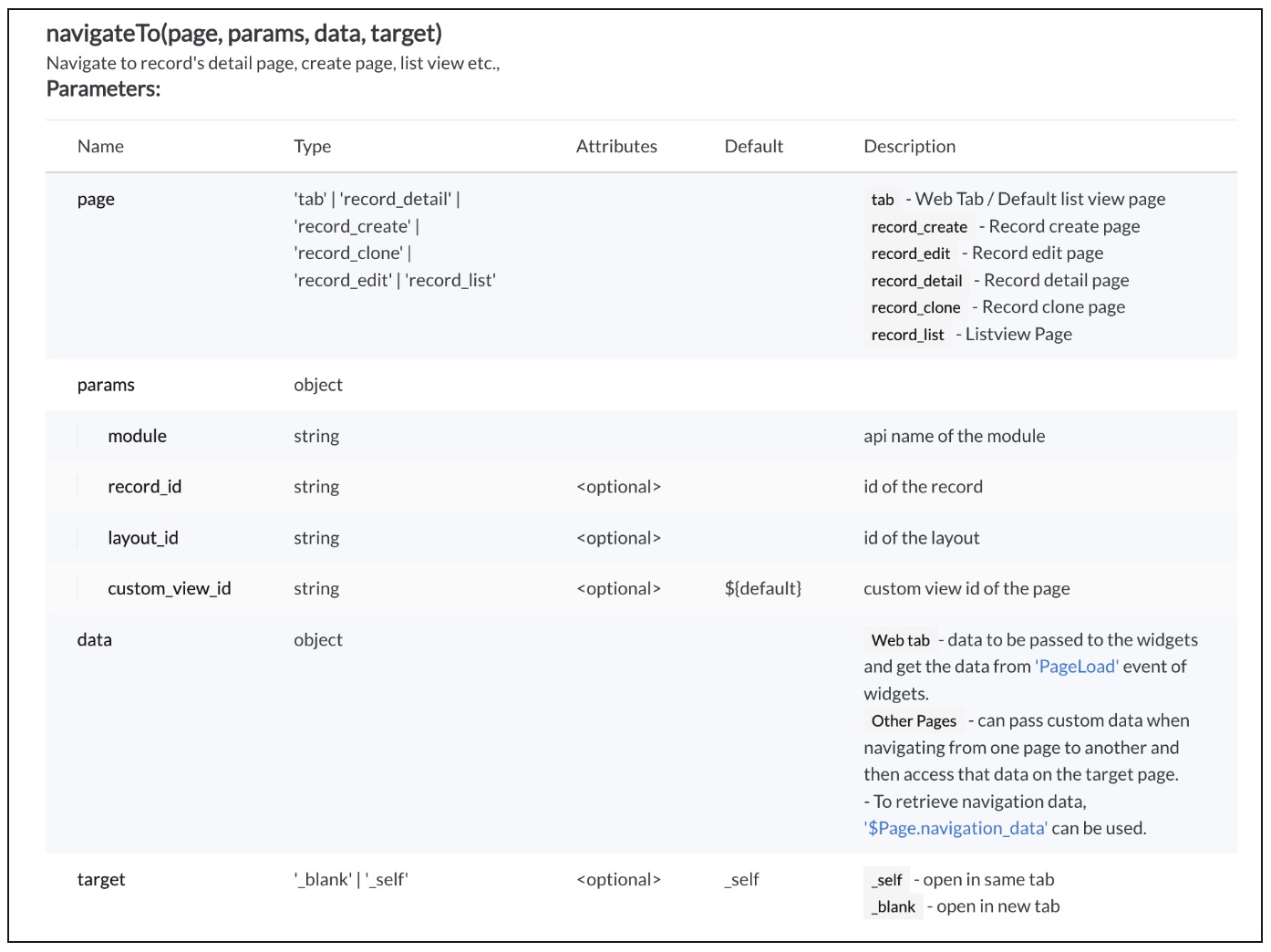


Click here to know more details.

B. navigation_data

Using The Constant , $Page.navigation_data, you can get the data passed from navigateTo() method.
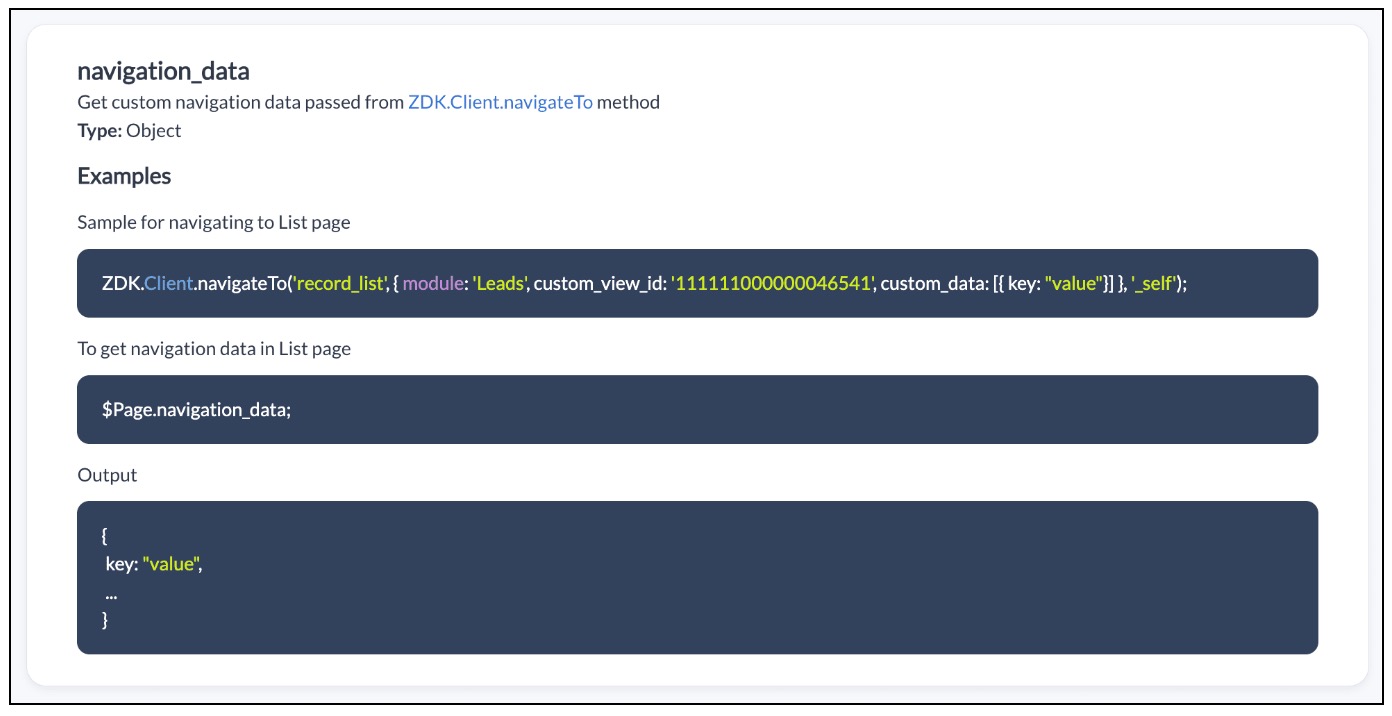


Click here to know more details.

3. Use Case

Zylker is a manufacturing organisation uses Zoho CRM. The admin wants to automatically open the Deal Create Page whenever the status in the Detail Page of Account is "Deal Creation". Also Deal Create Page should have the "Account Name"  prefilled from the Detail Page of Account record."

4. Solution

If the user updates the status to "Deal Creation" in Accounts module you need get confirmation from the user and  open a new Deal Create Page automatically with Account Name prefilled. 

To accomplish this using Client Script, you need to create two Client Scripts. 

A. Client Script for Accounts Module
B. Client Script for Deals Module

A. Client Script for Accounts Module

Create a Client Script for Detail Page of "Accounts" module with the following details and click "Next". To know more about Creating Client Script, click here.
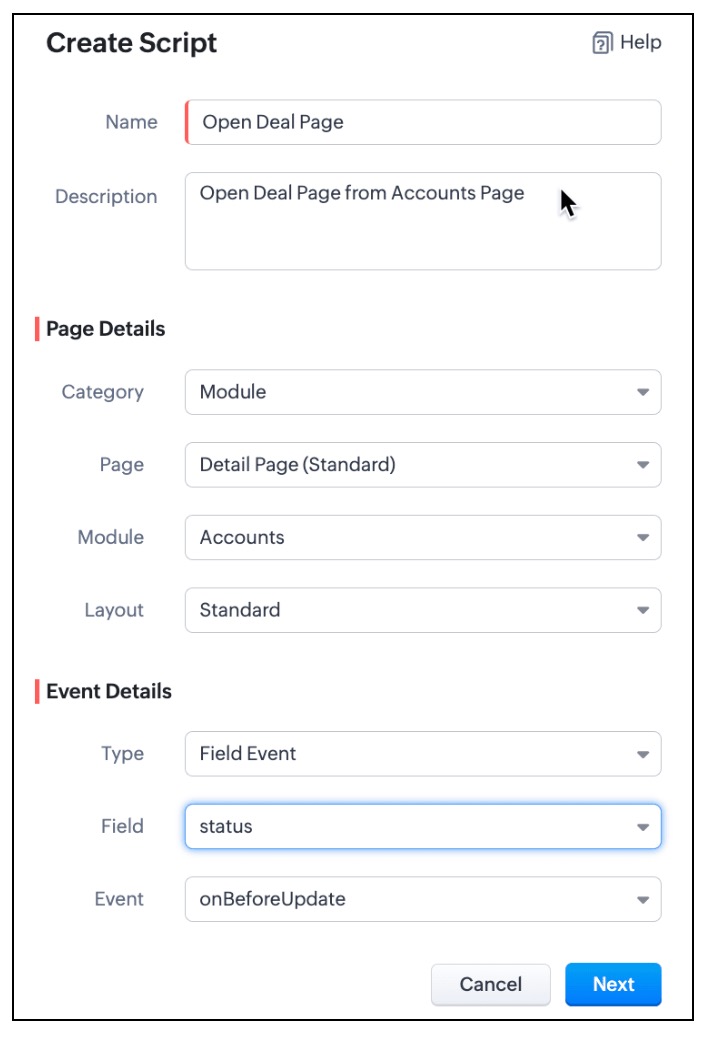

  • In the Client Script IDE, enter the below script and click Save.
  1. var a_name = ZDK.Page.getField("Account_Name").getValue();
  2. var rec_id = $Page.record_id;
  3. if (value == "Deal Creation")
  4. {
  5.     var resp=ZDK.Client.showConfirmation("Do you want to update the status as Deal Creation?");
  6.     if (resp)
  7.     {
  8.         var rec = $Page.record;
  9.         var rec_id = $Page.record_id;
  10.         rec.status = "Deal Creation";
  11.         var response = ZDK.Apps.CRM.Accounts.updateById(rec, rec_id);
  12.         log(response);
  13.  ZDK.Client.navigateTo('record_create', { module: 'Deals', custom_data: {data: a_name,data_id :$Page.record_id}}, '_blank')
  14.     }
  15. }

  • Whenever the status is updated to "Deal Creation" , you can show a Confirmation box using showConfirmation() asking whether the user wants to update the status as "Deal Creation"
  • Then, update the current record's status using updateById(). You can use the $Page, to get the current record id.
  • Then using  navigateTo() method you can open the Deal Create Page from Account Detail Page.
  • As per the following syntax, you should pass the required parameters, which includes the data needed for the Client Script on Deal Page. In this case the data being passed is the Account Name and Id.
  • Syntax : navigateTo(page, params, data, target)
    • page :  record_create denotes that you want to open Create Page.
    • params :  You need to mention the name of the module for which the Create Page has to be opened. In this case it is "Deals". You can also mention the layout_id and record_id in params. For more details, click here.
    • data : "custom_data" hold the data that you want to pass to the Deals Page.
    • target: You can open the page in same tab or in a different tab using "_self" and "_blank" respectively.
B. Client Script for Deals Module

Now, create another Client Script for "Deals" module with the following details and click "Next".
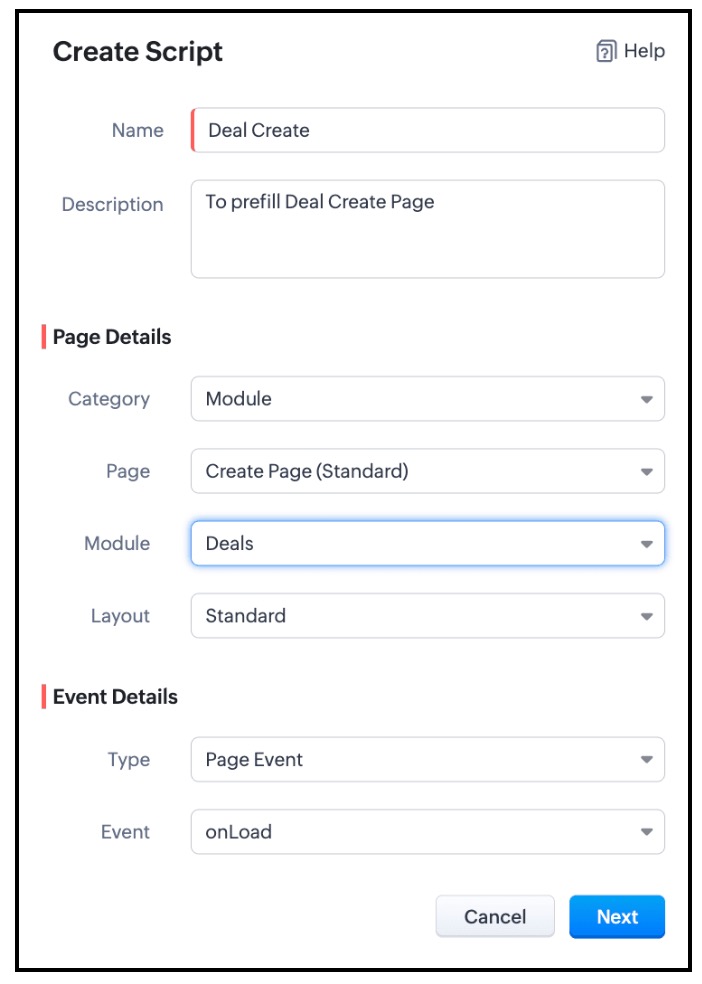


In the Client Script IDE, add the following script and click "Save"

  1. var a = $Page.navigation_data;
  2. if (a!=null);
  3. {
  4. var field_obj1 = ZDK.Page.getField('Account_Name');
  5. field_obj1.setValue({ "id":a.data_id , "name":a.data });
  6. }

To get the data passed in Account Detail Page, you need to use "$Page.navigation_data". In this script you can use setValue() and mention the id and name of "Account Name". As Account Name is a lookup field, you should mention the Id of the Account along with the Account Name.

Here is how the Client Script Works.
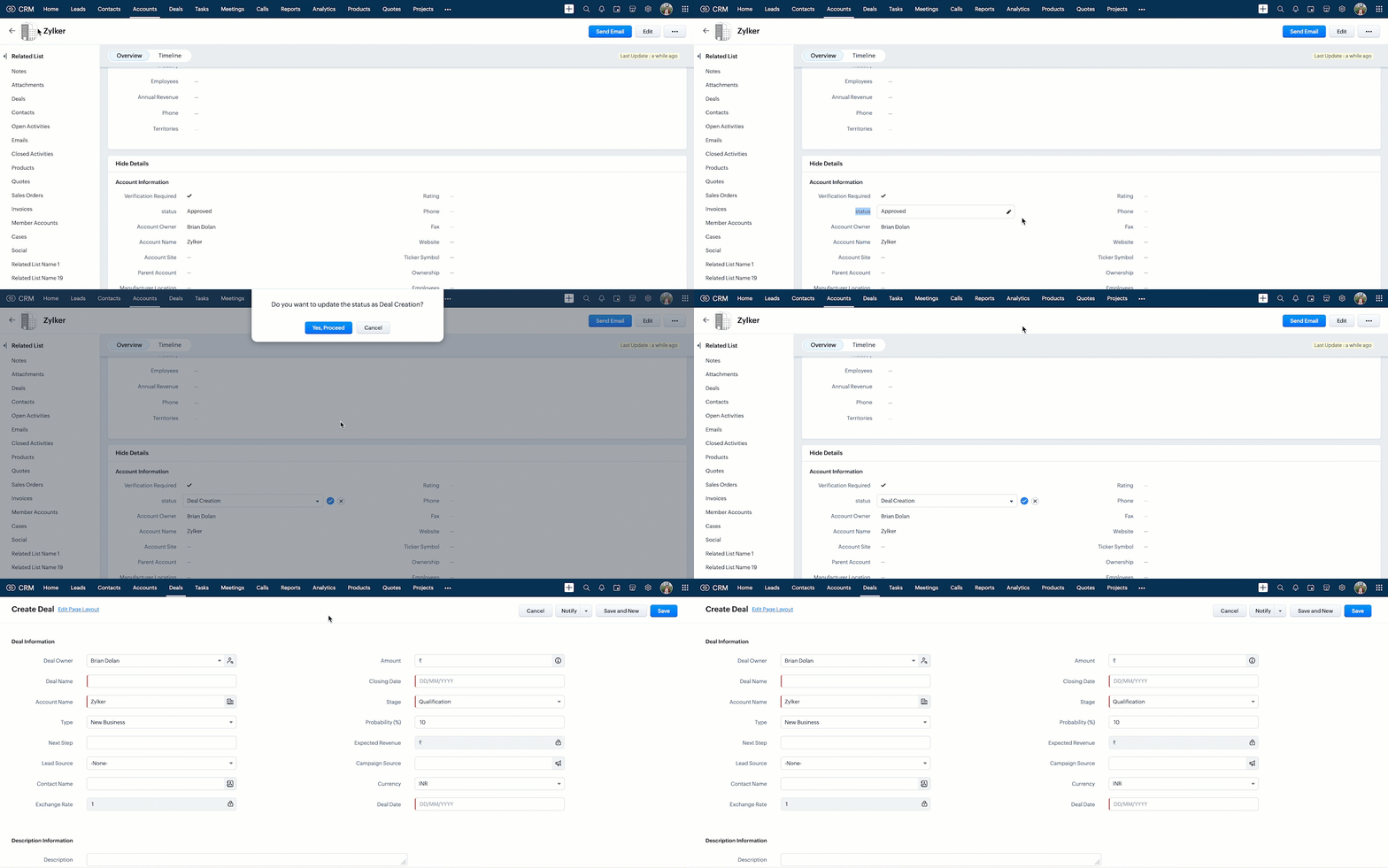

Click here to know more details.

Notes
Note:

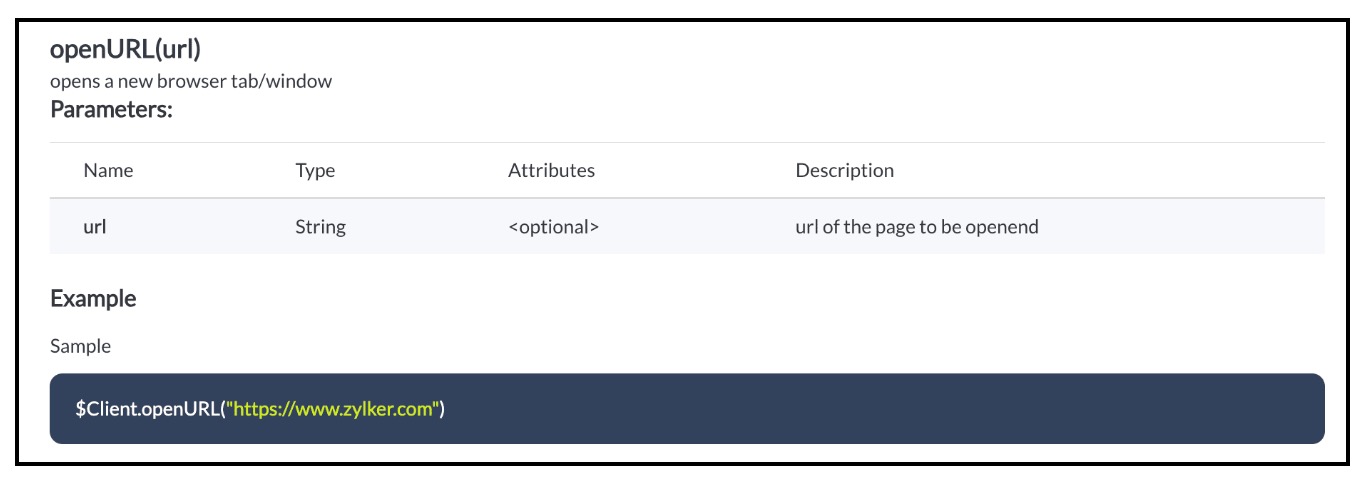
You can open any external URL using Client Script in a new tab using openURL().
Notes

Click here to know more details.

5. Summary :

In this post we have discussed,
  • How to pass data from one page to the other using Client Script.
  • How to perform actions after a record is updated.
  • How to update a record using Client Script without clicking on Save button.
  • How to open external URLs using Client Script.
-------------------------------------------------------------------------------------------------------------------

6. Related Links :


-------------------------------------------------------------------------------------------------------------------

Previous Post: Kaizen #141 - Zoho CRM's API Collection in Postman     |     Kaizen Collection: Home
Alert
Join us for our upcoming Zoho CRM Developer Series: Zoho CRM APIs, where you can explore more about Zoho CRM APIs. Register Now!  


    • Sticky Posts

    • Kaizen #198: Using Client Script for Custom Validation in Blueprint

      Nearing 200th Kaizen Post – 1 More to the Big Two-Oh-Oh! Do you have any questions, suggestions, or topics you would like us to cover in future posts? Your insights and suggestions help us shape future content and make this series better for everyone.
    • Kaizen #226: Using ZRC in Client Script

      Hello everyone! Welcome to another week of Kaizen. In today's post, lets see what is ZRC (Zoho Request Client) and how we can use ZRC methods in Client Script to get inputs from a Salesperson and update the Lead status with a single button click. In this
    • Kaizen #222 - Client Script Support for Notes Related List

      Hello everyone! Welcome to another week of Kaizen. The final Kaizen post of the year 2025 is here! With the new Client Script support for the Notes Related List, you can validate, enrich, and manage notes across modules. In this post, we’ll explore how
    • Kaizen #217 - Actions APIs : Tasks

      Welcome to another week of Kaizen! In last week's post we discussed Email Notifications APIs which act as the link between your Workflow automations and you. We have discussed how Zylker Cloud Services uses Email Notifications API in their custom dashboard.
    • Kaizen #216 - Actions APIs : Email Notifications

      Welcome to another week of Kaizen! For the last three weeks, we have been discussing Zylker's workflows. We successfully updated a dormant workflow, built a new one from the ground up and more. But our work is not finished—these automated processes are
    • Recent Topics

    • Make Rich Text fields available in Canva Print Views

      Everything is on the title. I don't really understand why this is not already possible as Rich Text Fields are available in Canva Detailed Views for example.
    • How to RSVP an invite using the Zoho API

      Perhaps I am missing something, but I don't see any way to use the Zoho API to RSVP an Invite. This what I've tried: PATCH https://calendar.zoho.com/api/v1/calendars/{cal}/events/{event} ?attendeedata={"attendees":[{"email":"me@example.com","status":"ACCEPTED"}],
    • FSM service call view

      "Why can't we sort by assigned service resource in the service call view?"
    • Zia Agents looks promising, but I still cannot deploy my first agent or connect WhatsApp after weeks of support tickets

      Hi Everyone, I am posting here because I am stuck and need practical help from someone who has successfully deployed a Zia Agent with WhatsApp. Zia Agents looks like a very promising product. I have watched the platform expand quickly, and I have noticed
    • Marketing Tip #46: Run flash sales the right way

      A flash sale can do a lot for your store. It can clear slow-moving inventory, spike revenue on a slow day, or reward your most loyal customers. But if done carelessly, flash sales can backfire. Customers start expecting discounts, stop buying at full
    • Send Notify on new Ticket to a Team based on customers email address AND only on these addresses

      Hi ZohoDesk, I would like to have Team A receive a Notification on every ticket created. I would like Team B to receive a Notification email only if the incoming ticket contains elements of a certain group of customer's email addresses only.  They should
    • Inventory API - Retrieve all uploaded product / item images

      I know that I can get the primary image for each product / item or composite item, by using the /image endpoint.  https://inventory.zoho.com/api/v1/compositeitems/<item-id>/image?authtoken=<TOKEN> This will return only one photo, even if the item has multiple images uploaded. Is there a way to retrieve all images stored for an item via the Zoho Inventory API?
    • Change Last Name to not required in Leads

      I would like to upload 500 target companies as leads but I don't yet have contact people for them. Can you enable the option for me to turn this requirement off to need a Second Name? Moderation update (10-Jun-23): As we explore potential solutions for
    • Setting checkbox value on template in Sign from Creator

      Good day, Please help me understand how do I set a tick from a checkbox in Creator into a checkbox on a Sign template. Below is the only values on the Sign template and the code from Creator, "field_boolean_data": {}, "field_date_data": {}, "field_radio_data":
    • How to Delete, Disable, or Remove Streams from the Mail App?

      Is there a way to remove Streams from the mail app sidebar? I get too many notifications, it doesn't add any value to Zoho's functionality (especially since you can just make comments inside an email), and is distracting. I do not want notifications/alerts
    • Remove the mandatory Name Card buttons (or at least make them optional)

      Please remove the mandatory Name Card buttons (or at least make them optional) A recent change to the Name Card in Zoho SalesIQ (currently affecting WhatsApp) introduced mandatory buttons before a visitor can provide their name. I believe this change
    • Zoho Wont Login

      Can anyone tell me why my password stops logging in all the time? Is it a ploy to make you change your password? I have to use OTP all the time. I dont want to change passwords all the time. Over the last couple of years I've found myself using Zoho (as
    • Frustrated with Zoho Assist QuickSUpport

      Trialling Zoho Assist and I have a variety of clients. A lot are computer illiterate. Some have poor vision. The current support sessions are using apps which have desktop icons for the appropriate apps. I either connect on demand then the client approves
    • HR Helpdesk Cases

      We have Zoho One Enterprise. I'm trying to find HR Helpdesk Cases, but my UI does not match the documentation. I'm not sure how to move forward.
    • CRM x WorkDrive: We're rolling out the WorkDrive-powered file storage experience for existing users

      Release plan: Gradual rollout to customers without file storage add-ons, in this order: 1. Standalone CRM 2. CRM Plus and Zoho One DCs: All | Editions: All Available now for: - Standalone CRM accounts in Free and Standard editions without file storage
    • Zoho Projects - Will there ever be a send email feature in Zoho Project?

      Hi team, Are there plans to or will there ever be a sendemail feature in Zoho Projects, brining it in line with other similar platforms like Asana, ClickUp and Monday? I know that you can add comments via email to a specific task, but I believe this only
    • Introducing Microsoft Word Integration in Zoho Contracts

      We are excited to announce a new feature that brings contract authoring and negotiation in your familiar environment — the Microsoft Word Integration. What This Integration Brings The Microsoft Word Integration connects Zoho Contracts with the Microsoft
    • Share Video Response Card ion Zobot

      I am using the zobot codeless bot builder in SalesIQ. I want to share a video but delay the next response card until after the video has finished playing or has been stopped. Is this possible?
    • Customer image field

      I created a custom image field for estimates, and it works as expected. The only issue I have is that I want to be able to place the custom image field in the estimate invoice. Is there a way I can do that, the field does not give the option to display
    • Sub Folders

      It would be great if there could be sub-folders in reports. We have a ton of individual reports and folders that would be easier to navigate this way 
    • Goals API - Zoho People

      Hi Team, I would like to get the API details for retrieving organisation-wise Goals from Zoho People. Currently, I am able to retrieve individual employee goals using the following API: https://people.zoho.com/api/v3/performance/goal/{emp_id} However,
    • Question and responses disapear

      I have a form where several people have had issues where the questions, responses or submission simply disappear when trying to complete the form. It seems to be random with no pattern of question, browser or OS. Hopefully there is a fix in the platform
    • Unable to send message;Reason:553 Relaying disallowed. Invalid Domain

      Hi, Now when I try to reply to an email, I see the Unable to send message;Reason:553 Relaying disallowed. Invalid Domain voicemessagedownloader.com error. I tested sending an email when I set it up in the past and it worked. I have checked the Zoho Organization
    • Guide customers to the right booking page with routing forms

      Greetings from the Zoho Bookings team! We're excited to introduce Routing Forms in Zoho Bookings. Routing forms let you collect information from customers before they schedule an appointment and automatically direct them to the most appropriate booking
    • Analytics Dashboard User Filters Default Value

      User Filters on Dashboard do not allow Unknown to be set as a default filter value. I have to include NULL values in my dashboard among other values but I can't include NULL/Unknown by default in Dashboard User Filters.
    • Horrible download speed

      Using a trial of Zoho Assist and downloading a 316 MB file on a 500/500 fibre connection to a remote computer on the same network took 7 mins to complete. On AnyDesk it took 1 min or so.
    • How to Backup Zoho to PST?

      I'm looking for a simple way to backup Zoho Mail emails to PST format. I tried the IMAP method with Outlook, but it seems slow and complicated for large mailboxes. I need a solution that can: Export Zoho emails to PST Preserve attachments and folder hierarchy
    • Zoho Books | Product updates | August 2026

      Hello users, July has been an exciting month for Zoho Books! This month, we're excited to introduce HTML PDF Templates, Placeholders as Pills, expanded approval workflows for Sales Returns and Journals, and significant compliance updates across the India,
    • Action required: WhatsApp now uses BSUID as the primary identifier

      Important If your support team uses WhatsApp to engage with customers, there is an important platform change you need to know about. BSUID support is now mandatory for all WhatsApp Business Platform partners and businesses. WhatsApp is introducing usernames,
    • Tip #83- Give Customers a Faster Way to Reach You with the Quick Support Plugin – 'Insider Insights'

      Hello Zoho Assist Community! Think about the last time a customer needed urgent support. They emailed in, waited for a response, got a session link, couldn't find it in their inbox, called back, and by the time the session actually started, a good chunk
    • Final Notice: Migrate Your ASAP Mobile SDK by August 31

      Alert August 31, 2026 is the deadline. After this date, older ASAP Mobile SDK versions will no longer work with the ASAP Help Widget. If your app hasn't been migrated to a supported SDK version, users will no longer be able to access the ASAP Help Widget
    • Approval Process configuration is now more flexible and fully customizable

      Hello everyone! Approval Process is back with a better user experience that makes it easier to add rules to your processes. This enhancement includes some UI updates that help you create highly structured approval stages—and more. Let's look at the enhancements
    • Kaizen #255 - Building a Real-Time Operational Dashboard with Zoho CRM Queries

      Hello Everyone, Welcome back to another edition of the Kaizen series, where we uncover powerful ways to extend and customize Zoho CRM. In the previous Query Kaizens, we explored how Queries can retrieve CRM data, invoke REST APIs, and even update CRM
    • 【Zoho CRM】キオスクに「ループ機能」が追加|同じ処理を繰り返し実行可能に

      ユーザーの皆さま、こんにちは。 コミュニティグループの中野です。 Zoho CRMのキオスクに、同じ処理を繰り返し実行できる「ループ機能」が追加されました。 これまでは、同じ処理を複数回実行したい場合、同じ設定を繰り返し作成する必要がありました。 ループ機能を使うと、処理を一度設定するだけで、指定した回数や 取得したデータ数に応じて自動的に繰り返すことができます。 目次 ループ機能とは 設定方法 注意点 1. ループ機能とは ループ機能を使うと、キオスク内の画面や処理を指定した条件に応じて繰り返し実行できます。
    • Es posible cambiar el lenguaje de los modulos del ASAP?

      Es posible cambiar el lenguaje de estos textos? Tengo Zoho configurado en español pero aun así me muestra estos textos en ingles:
    • Where do I edit the "Welcome to [portal name]" message

      I am looking for a way to edit the "Welcome to" part of the message that is seen on the landing page (ex: https://help.zoho.com/portal/en/home). When I use the French interface, it doesn't make sense... I want to change it from "Bienvenue chez" to" Bienvenue au". Thanks!
    • Shared Snippets Everyone

      Hi, Now that the Shared Snippets have been released and I think will be the most used feature implemented in 2023 :) Creating and Using Snippets in Ticket Responses - Online Help | Zoho Desk Maintain consistency in ticket responses with shared snippets
    • Multi-currency and Products

      One of the main reasons I have gone down the Zoho route is because I need multi-currency support. However, I find that products can only be priced in the home currency, We sell to the US and UK. However, we maintain different price lists for each. There
    • Remove "Subject" as a required field on quotations

      Not sure why, but Zoho has made 'Subject' a system defined required field. I'm not entirely sure why subject would be required as a key field (i.e. you cannot deactivate it or change it from required). It doesn't make much sense on many product quotations,
    • Displaying only unread tickets in ticket view

      Hello, I was wondering if someone might be able to help me with this one. We use filters to display our ticket list, typically using a saved filter which displays the tickets which are overdue or due today. What I'd really like is another filter that
    • Next Page