Event Management System using ZDK CLI

Hello Everyone,
Welcome back to yet another post in the Kaizen Series!
As you already may know, for the Kaizen #200 milestone, we asked for your feedback and many of you suggested topics for us to discuss. We have been writing on these topics over the past few weeks. One of the feedbacks asked us to cover "more on ZDK CLI". In this post, we will discuss building an Event Management System in Zoho CRM Using ZDK CLI.
Consider the case of Zenith, a Zoho CRM partner who is also partner for Zoho's competing products. Zenith is hosting a conference in which their representatives are inviting speakers from Zoho and also other competing products. The attendees of the conference will be either external attendees or leads or contacts of Zenith. For this purpose existing meetings module of Zoho CRM (previously called Events) can not be used as it is not a good fit for this case. Custom modules and fields are required for this. In this post, we’ll discuss how to create a Event Management System that is complimentary to Zoho CRM using ZDK CLI.
Why Use ZDK CLI?
ZDK CLI allows developers to:
- Create and edit CRM metadata (modules, fields, roles, profiles, and widgets)
- Define relationships between modules (lookups, multi-select lookups)
- Push and sync metadata changes to sandbox.
- Resolve conflicts when multiple users work on the same metadata.
This makes it ideal for building reusable CRM systems such as event management.
Initial Setup
As the initial setup, initialize the ZDK CLI project directory using zdk init command and create a new ZDK Project folder "Zenith".
zdk init |

Then, login to the sandbox environment for Zenith using zdk auth:login command.
| zdk auth:login |

When you execute zdk auth:login, you can either select any org that is already signed in or select NEW LOGIN to visit the login page and select the sandbox org you will be working on.

After logging in to Zoho select the sandbox environment and give required permissions.

For the current beta release, ZDK CLI is exclusively available for Sandbox environment and is not operational in Production environments.

You will be redirected to the terminal after successful login and you can start working on ZDK CLI.

Change the api_version to 8 in zdk-project.json file.
Step 1: Define the Modules
For an event management use case, we will need the following custom modules:
- Conference – Stores details of each event.
- Attendees – Tracks participants, whether leads, contacts, or external.
- ConferenceAttendees (Linking Module, not created) – Connects conferences and attendees with registration status.
- Venues – Captures details of event locations.
- Speakers – Stores details of invited speakers.
This has been visualized in the data model below.

To create a module, use the command
| zdk meta:create modules |

This creates the json file for module metadata : Conference.modules-meta.json in the path Zenith/crm/meta/modules/Conference
Conference.modules-meta.json content
{ "singular_label": "Conference", "plural_label": "Conferences", "api_name": "Conference", "profiles": [ { "api_name": "Administrator" } ], "display_field": { "api_name": "Conferences" }, "show_as_tab": true } |
Similarly create modules Attendees , Venues, and Speakers modules
Step 2: Customize Fields
To create a field, use the command
| zdk meta:create fields |
Conference module:
Conference modules's fields are:
- Attendees (multiselectlookup to Attendee module)
- Speakers (multiselectlookup to Speakers module)
- Venue (lookup to Venue module)
- Date (datetime)
- Duration(double)
- Description (textarea)
- Status (picklist: Planned, Ongoing, Completed)
Attendees field
Let us check how to create the field attendees of type multi-select lookup (to Attendee module)

The json file Attendees.fields-meta.json created in the path Zenith/crm/meta/modules/Conference/fields will look like this

To provide dependent details for the multi select lookup, add the multiselectlookup json object to the Attendees.fields-meta.json file as below:
{ "field_label": "Attendees", "display_name": "Attendees", "api_name": "Attendees", "type": "used", "data_type": "multiselectlookup", "multiselectlookup": { "connected_details": { "module": { "api_name": "Attendee" }, "field": { "field_label": "AttendingConference" } }, "linking_details": { "module": { "plural_label": "Conferences_X_attendees" } } } } |
Speakers (multi-select lookup to Speakers module)
Similar to Attendees field, create Speakers field and modify the json file Speaker.fields-meta.json created in the path Zenith/crm/meta/modules/Conference/fields:
{ "field_label": "Speaker", "display_name": "Speakers", "api_name": "Speakers", "type": "used", "data_type": "multiselectlookup", "multiselectlookup": { "connected_details": { "module": { "api_name": "Speaker" }, "field": { "field_label": "AttendingConference" } }, "linking_details": { "module": { "plural_label": "Speakers_X_attendees" } } } } |
Venue (lookup field to Venue module)
Similarly, create the Venue field with type as "lookup" The json file Venue.fields-meta.json created in the path Zenith/crm/meta/modules/Conference/fields will look like this

To provide dependent details for the lookup, add the lookup json object to the json as below.
{ "field_label": "Venue", "display_name": "Venue", "api_name": "Venue", "type": "used", "data_type": "lookup" "lookup": { "display_label": "Venue", "api_name": "Venue", "module": { "api_name": "Venue" } } } |
Description (textarea)
After create a textarea field Description using zdk meta:create fields command, add textarea json object to the field meta json file as below :
{ "field_label": "Description", "display_name": "Description", "api_name": "Description", "type": "used", "data_type": "textarea", "textarea": { "type": "rich_text" } } |
The possible values for text area are small, large and rich_text.
Status (picklist)
After create a picklist field Status using zdk meta:create fields command, add pick_list_values json array to the field meta json file as below:
After create a picklist field Status using zdk meta:create fields command, add pick_list_values json array to the field meta json file as below:
{ "field_label": "Status", "display_name": "Status", "api_name": "Status", "type": "used", "data_type": "picklist", "pick_list_values": [ { "display_value": "Planned", "actual_value": "Planned" }, { "display_value": "Ongoing", "actual_value": "Ongoing" }, { "display_value": "Completed", "actual_value": "Completed" } ] } |
Date and duration fields of type datetime and double does not require any edits to the created meta.json file.

Attendees Module
Similarly, add fields for attendees modules
- Phone (phone)
- Company (text)
- EventsAttended (multi-select lookup to Conference module)
- Attendee Type (picklist with options Lead, Contact, External)
- Leads (lookup to Lead module)
- Contacts (lookup to Contact module
Venue Module
- Location (text)
- Capacity (integer)
- Contact erson (text)
- ContactNumber(phone)
- Description(textarea)
Speakers Module
- Phone (phone)
- Company (text)
- SpeakerStatus (picklist with options Confirmed, Pending, Canceled)
Step 3: Create a Custom Role
To create a field, use the command
| zdk meta:create roles |

This ensures event managers have the right access without interfering with other CRM operations.
Pushing changes to the sandbox environment
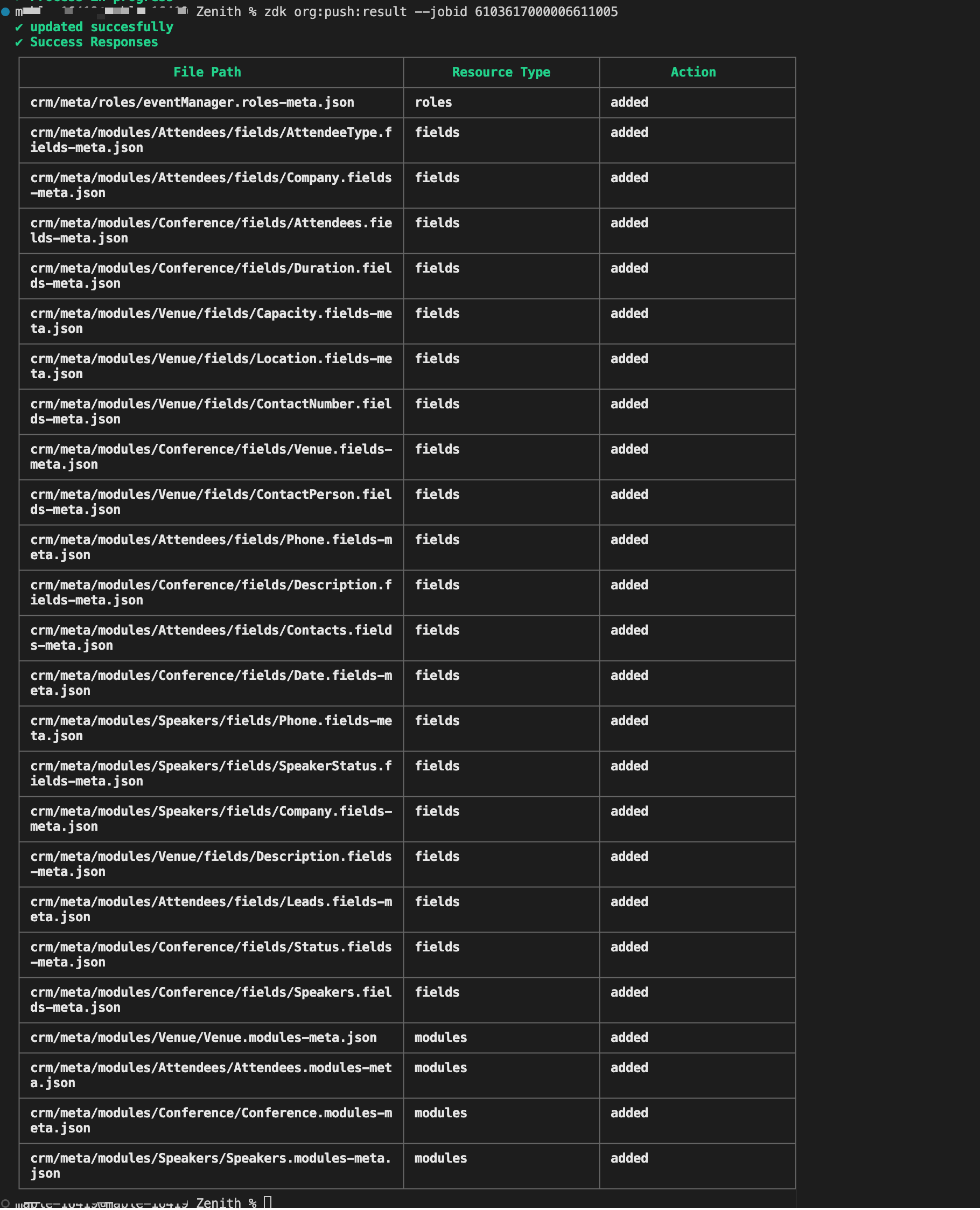
Once all changes are done execute zdk org:push and zdk org:push result --{jobId} command to deploy the changes to the sandbox environment. Once the changes are verified in your sandbox environment you can deploy it to the production environment.

You can extract this metadata zip file, that is created using zdk org:export command to your own ZDK project directory and try pushing the changes to your sandbox environment.
Building the Event Management System for "Zenith" illustrates the core strength of ZDK CLI. It brings software engineering best practices to Zoho CRM customization. By defining modules/fields/roles as json files directly or creating them using the command, the source truth of the metadata is available in local system. The same can be tracked via version control systems like GIT for better collaboration among the team.

Topic Participants
Mable Mary M P
Ishwarya SG
Sticky Posts
Announcing the new SKILL.md for Zoho CRM and the updated OAS repository!
We are introducing a new zoho-crm skill to make working with Zoho CRM Developer tools (like APIs, functions, widgets, client scripts, queries etc) easier and faster, with the help of AI in your preferred AI harness like Claude Code, Codex, Cursor, VSCodeKaizen #261 : Using Zoho CRM Skill to generate complex COQL queries
Hello everyone, In the previous Kaizen posts, we introduced the zoho-crm SKILL.md and discussed how it can help you when you are working with Zoho CRM APIs and Client Script. In this Kaizen, we will focus on using the Zoho CRM `SKILL.md` with GitHub CopilotKaizen #256 - Build an Arrival Readiness Web Tab in Zoho CRM
Hi everyone! Welcome back to the Kaizen series! In the post, we discuss a use case in hospitality industry: how an Arrival Readiness web tab widget can be used to let reception staff identify and resolve issues before arrival of guests. Use case In theKaizen #198: Using Client Script for Custom Validation in Blueprint
Nearing 200th Kaizen Post – 1 More to the Big Two-Oh-Oh! Do you have any questions, suggestions, or topics you would like us to cover in future posts? Your insights and suggestions help us shape future content and make this series better for everyone.Kaizen #226: Using ZRC in Client Script
Hello everyone! Welcome to another week of Kaizen. In today's post, lets see what is ZRC (Zoho Request Client) and how we can use ZRC methods in Client Script to get inputs from a Salesperson and update the Lead status with a single button click. In this
Recent Topics
Ability to translate Zoho CRM Kiosks
Hi team, Is support for translating kiosk text and screen names in the Zoho CRM translation tool planned on the roadmap? Thanks,Files in Teamspaces: keep your team's documents where the work happens
Release Note: This feature is available for all accounts across all DCs Hello Everyone, A Teamspace is built around a specific team and a shared objective, and it holds the modules and projects that team works with every day. The document that team dependsHow to download multiple files in Creator?
I'm trying to download multiple files from a creator report using a for loop but it only seems to be downloading one file. It seems like no more code can be run after downloading this one file. Is there a way to download multiple files? I'm currentlyRequest for Zoho Desk Version and Module Details
Kindly help us confirm the version of Zoho Desk currently being used in our portal, along with the module/edition name. We require this information urgently for our internal documentation.ZohoMail_get_mail_attachment corrupts binary attachments (PDFs) over MCP
Hi all, The Zoho Mail MCP tool ZohoMail_get_mail_attachment returns binary attachments as UTF-8 text, so PDFs come back corrupted and an AI client can't read or save them. What we see: - The response header is content-type: application/octet-stream;charset=UTF-8.Request: Custom CSS Theme
I would really like a custom CSS theme that enables me to completely customize the look and feel of the survey page based on the typography of my company brand. Unfortunately, there does not appear to be complete customization with existing themes. ThisDécouvrez le nouveau Zoho Analytics : l’analytique agentique pour toutes les entreprises
Nous sommes ravis de vous annoncer le lancement du tout nouveau Zoho Analytics ! Cette nouvelle version marque un tournant majeur dans l’évolution de la plateforme. Initialement conçue comme une solution de BI en libre-service permettant de créer desZia Agents in Zoho CRM: a better way to set up digital employees
Hello everyone, If you've been using Zia Agents in Zoho CRM, so far using Connections was the only deployment method you're familiar with. You create an agent in Zia Agents (define its objective, write instructions, use tools, add knowledge base) andKeeping phone number text format exporting from Books to Sheet
We have a custom function that copies data from our customers in Books to Sheets. In the process the customers' phone numbers (unless they contain a space) get treated as numeric values, so leading zeros get stripped off, and in some cases scientificAdmin Logging in as another User
How can a Super Admin login as another user. For example, I have a sales rep that is having issues with their Accounts and I want to view their Zoho Account with out having to do a GTM and sharing screens. Latest Update (27th April 2026): With the earlyTool Parameter UI - Freeze Header
When one has a number of tools with a number of parameters, scrolling down hides the heading information, forcing one to scroll back up to get confirmation which radio button is which: Seems like simply freezing the header would eliminate that issue.Cannot replace custom tools
This is so incredibly frustrating. Create a tool group. Add your custom schema to create your custom tools. Attach to an Agent. Now you need to update your schema to make an adjustment? You can't edit the schema or even re-upload a new schema. It blocksTesting Tools - Can't View Response
When adding a custom tool and trying to test it, one can see whether or not the test has a successful http response, but the actual payload cannot be viewed to verify the tool's performance. I thought that's what the little hover link was for, but mousingmore native app support for linux
Dear zoho,pls build additional apps like zoho valt,zoho sheets,zoho show,zoho authenticator apps for linux ,because more and more people are increasing switching to linux this days,Unbundle feature for composite items
We receive composite items from our vendors and sell them either individually or create other composite items out of them. So, there is a lot of bundling and unbundling involved with our composite items. Previously, this feature was supported in formQuick Reference Guide on join.zoho.com
Joining a remote session can be difficult for the people who need it the most. Please add a quick reference guide and better documentation that my Grandma can read on the join.zoho.com site. It's not uncommon to spend 10minutes or longer in a sessionZoho Projects - Auto Populate Project on Project Invoices
Hi Projects team, I noticed that when creating an invoice from a Project in Zoho Projects, the project is not selected on the invoice. Is this something which you would consider as a feature request? It seems silly that when you create an invoice fromTimes prepopulating in Date/Time field on deal records
Support tells me that there is no workaround to having the time auto-fill on a date/time field in our deal records -- that is HUGELY inconvenient and creates massive opportunity for error. Our deals involve several parts over various days/times, noneEmail-Data Synchronization with Zoho Analytics
Hello, Enterprise Support Community! We're excited to announce the availability of Email Data Synchronization with Zoho Analytics! This highly requested enhancement allows you to sync email data from Zoho CRM into Zoho Analytics, making it easier to analyzeMaking shared forms available offline
Hi, We used to be able to have our forms available offline even if it was a shared form. now we can't. Is this a new bug?Zoho Forms API
Is there any way to get all form entry list using API? Looking forward to hear from youDocuments greater than 40MB Preview
hello, Documents bigger than 40 MB cannot be previewed in WorkDrive Web App or Mobile App. would it be resolved in future?Calendar Booking - Related Deal
Is it possible to automatically associate a Calendar Booking with an existing Deal in Zoho CRM? We're trying to use the native Calendar Booking feature. Our goal is to send a booking link to a customer from an existing Deal record, so that when the customerApproval Process configuration is now more flexible and fully customizable
Hello everyone! Approval Process is back with a better user experience that makes it easier to add rules to your processes. This enhancement includes some UI updates that help you create highly structured approval stages—and more. Let's look at the enhancementsKaizen #268: Using Zoho MCP to Build and Configure Zoho CRM Cadences
Hi everyone! Welcome back to the Kaizen series! In the previous Kaizen posts, Kaizen #265 and Kaizen #266, we explored how Zoho MCP can be used to work with Zoho CRM records, retrieve metadata, customize CRM, configure automation, and even coordinateDeliverability Update: Impact of the Ongoing Microsoft 365 Service Disruption on Email Delivery
Update (November 16, 2026): This incident is resolved. In its final update on November 14, Microsoft confirmed that all affected services have fully recovered and the backlog of email messages has been processed. Microsoft lists the end of impact as NovemberTrigger a Workflow Function if an Attachment (Related List) has been added
Hello, I have a Case Module with a related list which is Attachment. I want to trigger a workflow if I added an attachment. I've seen some topics about this in zoho community that was posted few months ago and based on the answers, there is no triggerZoho Inventory - Imporoved Order Fulfillment Reporting
Hi Inventory Team, i've tried to contact you through support@eu.zohoinventory.com but haven't received a response. I am contacting you on behalf of a client. Our client is a car parts wholesale business and we set them up on Zoho Inventory earlier thisSay Hello to Telephony in Zoho FSM
Zoho FSM now brings complete telephony support so your team can manage inbound and outbound calls without switching tabs. Faster responses, smarter routing, and total call visibility—all in one place. Choose the telephony setup that works for you Zoho’sIncreasing API Credits
Hello everyone! Organizations consume Zoho CRM APIs for various business needs, and it's a show-stopper when you exhaust your API credits before the 24-hour rolling window replenishes your credits. To meet your growing needs and help you keep your business[Online Training] Zoho RPA masterclass: Fundamentals, SAP® automation, & AI workflows
Hello everyone! Greetings from the Zoho RPA Training Team! We're excited to announce our upcoming Online Training on Zoho RPA. Manual, repetitive tasks like entering data, updating spreadsheets, managing files, and extracting information from documentsZoho Inventory | Can't uncheck/turn off Advance Tracking
Hi, I wanted to know if there's a way to turn off Advanced Tracking (such as Serial Number or Batch Tracking) for an item in Zoho Inventory. I’ve read that you might need to delete associated transactions and clear the opening stock to disable these features.CNIL - Suivi de Pixel
Bonjour à tous, À la suite de la nouvelle recommandation de la CNIL sur les pixels de suivi dans les e-mails, savez-vous si Zoho Campaigns permet : de conditionner le suivi des ouvertures au consentement de chaque contact ; de proposer un lien permettantJoin Zoho Meeting only via Web browser and not with Zoho Meeting App
Dear Zoho team, according to the documentation [1], Zoho Meeting only offers web view for Chrome and Firefox on a desktop. For other browsers and devices, participants can only join a Zoho Meaning with the Zoho Meeting App installed. This is a big hurdleGetting an error when trying to use the Zoho Desk Resources with our Zobot chat
Hello, When I try to set our Zobot AI Card Training to Zoho Desk resources I get an error when testing it and it bypasses the bot completely. When I try to switch it to the Zoho SalesIQ resources option in there it will list some articles but not giveKB Articles from Zoho Learn - Import as .md
I love the concept of being able to use articles from Zoho Learn as knowledge base articles for Zia Agents. This will absolutely help with proper documentation and organization of company processes and SOPs. This was a great concept. However, even whenCannot reorder fields in Page Layout in Expenses and Purchase Requests
It is very inconvenient that the custom fields in Page Layout cannot be re-ordered. The only way is to remove the fields and re-create them; however, it is impractical. This would affect the reports and dashboards we are having. Not able to re-order thePurchase Requisition in Zoho Books
I want to understand if Zoho Books is having the following workflow: PR ( Purchase Requisition ) >> PO ( Purchase order) >> GRN/SRN ( Goods/Services receipt note) >> BillTips & Tricks #8 | Zoho Mail: Seguridad, privacidad y control para tu empresa
El correo electrónico sigue siendo una herramienta fundamental para cualquier organización. Por él circulan comunicaciones internas, información de clientes, documentos confidenciales y datos esenciales para el negocio. Por eso, elegir un proveedor dePersonalize Email Campaigns using CRM Data
Recently, few of our CRM users wanted to send an email campaign with personalized sender details and signature so that recipients can instantly recognize the sender. We are happy to announce the new enhancement in campaign creation through which you can personalize your email campaign using CRM Contact/Lead Owner's data. Let’s see how we can use those data to send emails. Personalize sender details Using Zoho Campaigns, you can send an email campaign with a personalized sender name and email addressNext Page