Kaizen #59 - Creating alerts and custom messages using Client Script

Kaizen #59 - Creating alerts and custom messages using Client Script

Hello everyone! 
We are happy to resume our Zoho CRM Developer Community series - The Kaizen series!
Welcome back to the new start of Kaizen!
This post is about Client Script and its simple use cases involving ZDK Client functions.

What is Client Script?

The Client Script feature gives you a seamless platform for achieving and extending your business cases in Zoho CRM by allowing Java Script code execution in your browser. It enables you to configure events for the UI components and define the actions once those events are triggered. 

The ZDK Client Functions available in Client Script are,

ZDK Client Function
Description
showMessage 
To display a text message on create/clone/edit/detail(canvas) page.
showConfirmation
To display a confirmation box with accept and reject message on  create/clone/edit/detail(canvas) page.  
showAlert 
To show alert message on create/clone/edit/detail(canvas) page.
openMailer
To open mailer component from detail(canvas) page.

Use Case

Let us consider that you want to achieve the following using Client Script.
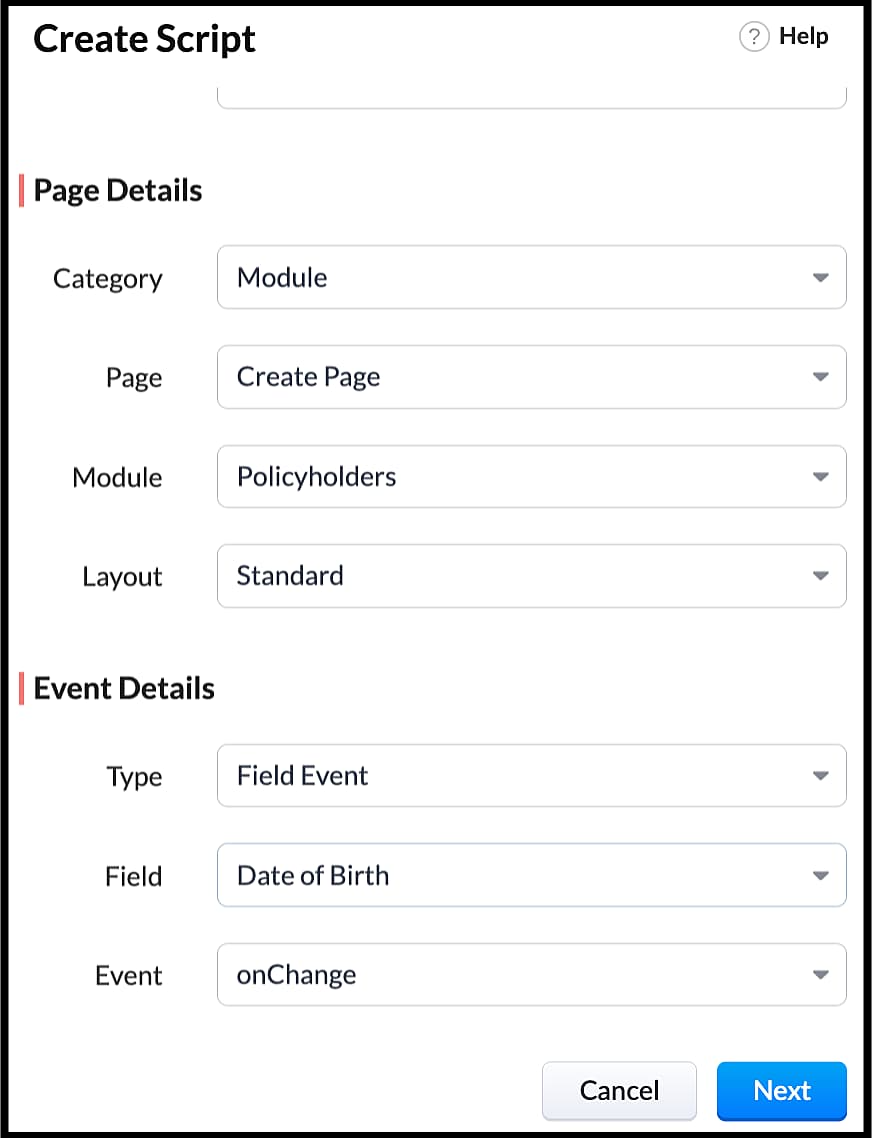
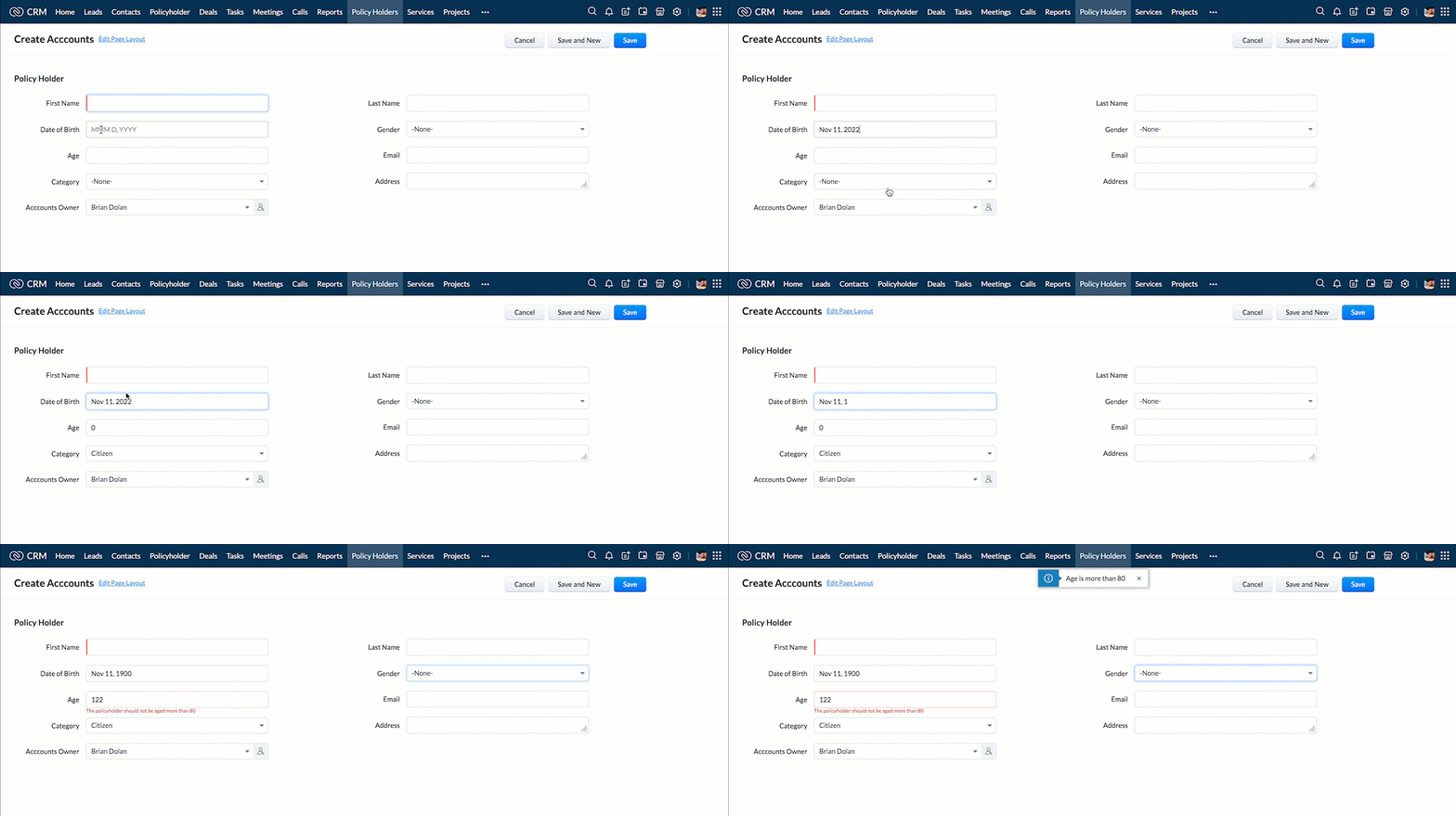
  1. Calculate age based on Date of Birth and display the message "Age is more than 80" whenever the age is above 80 in create page of Policyholder module.
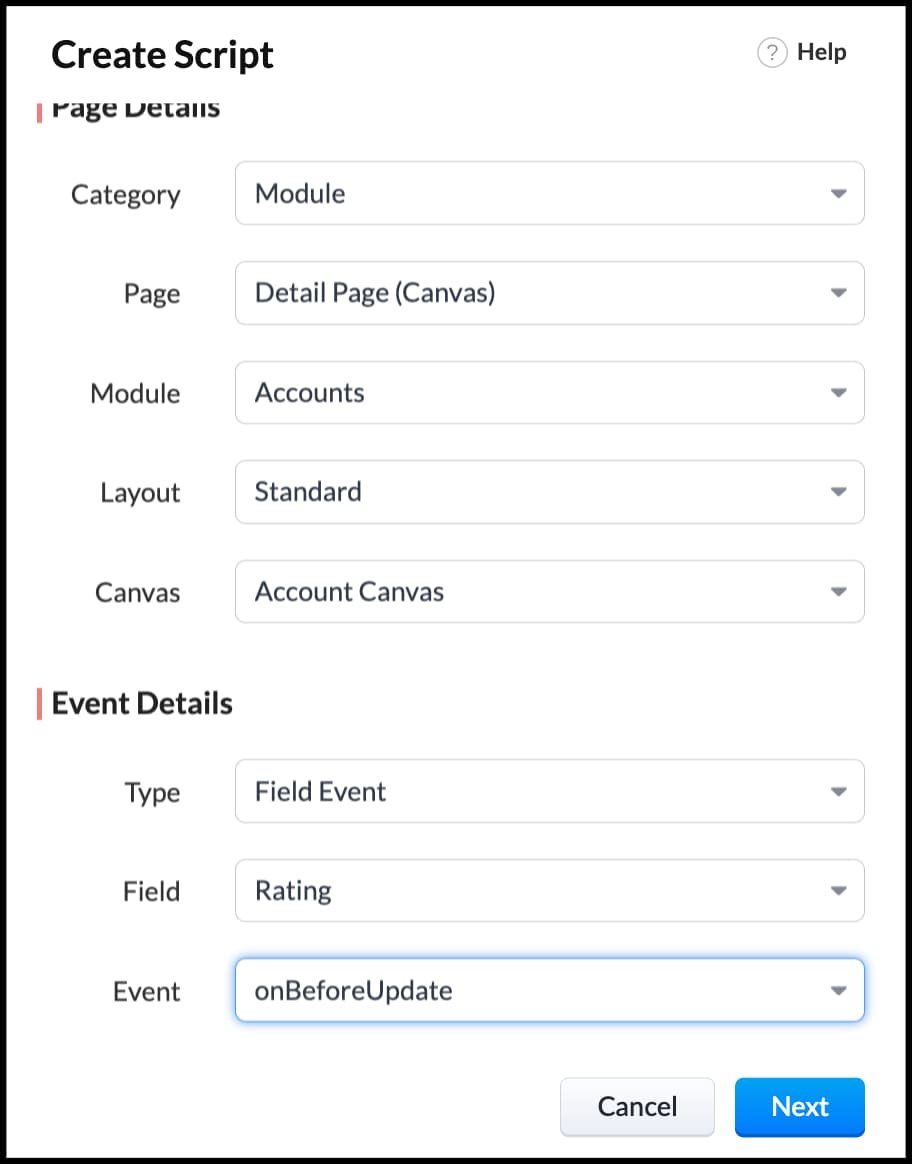
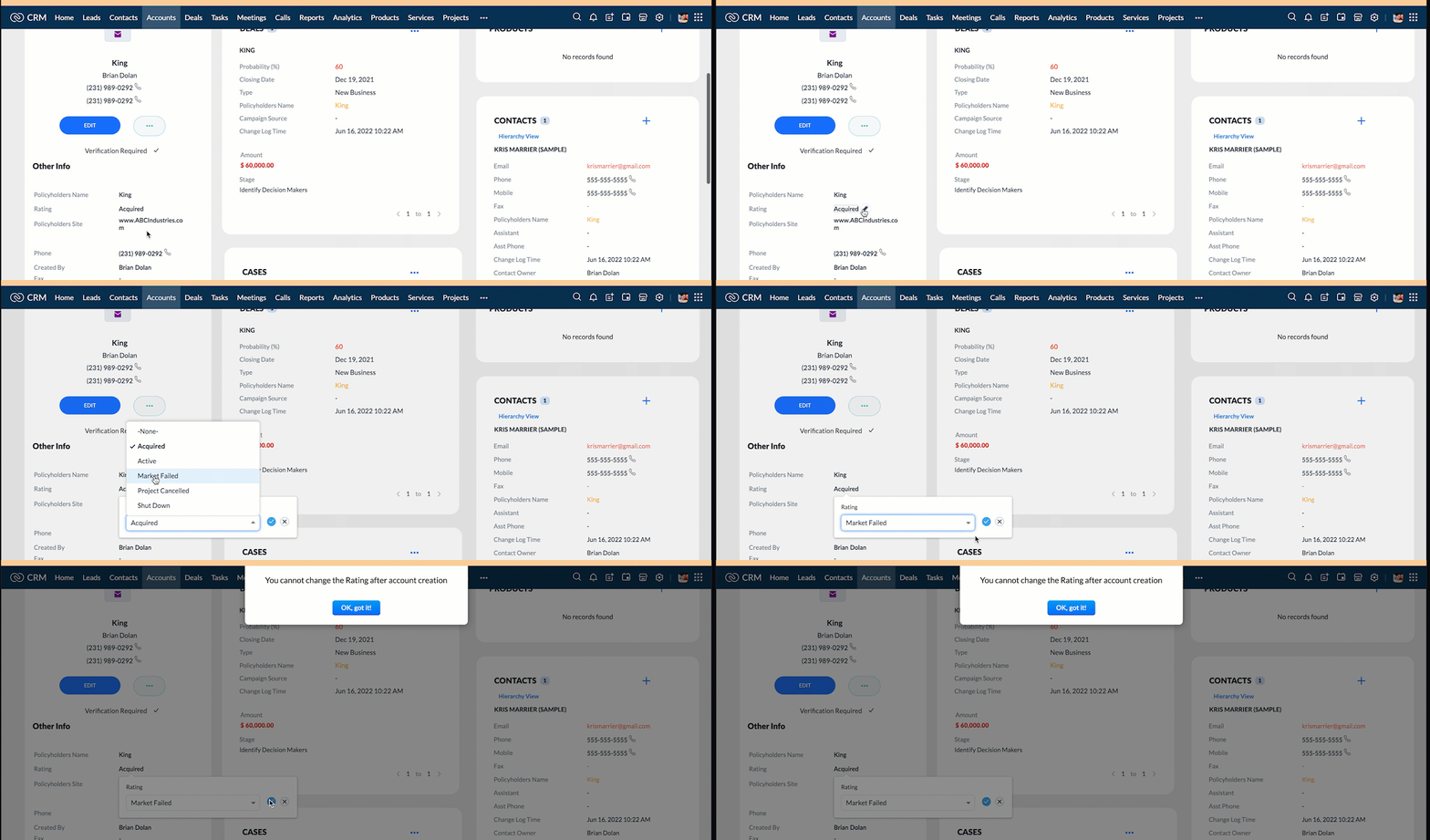
  2. Show the alert message "You cannot change the Rating of a verified account" whenever you try to update the field Rating in Accounts module.
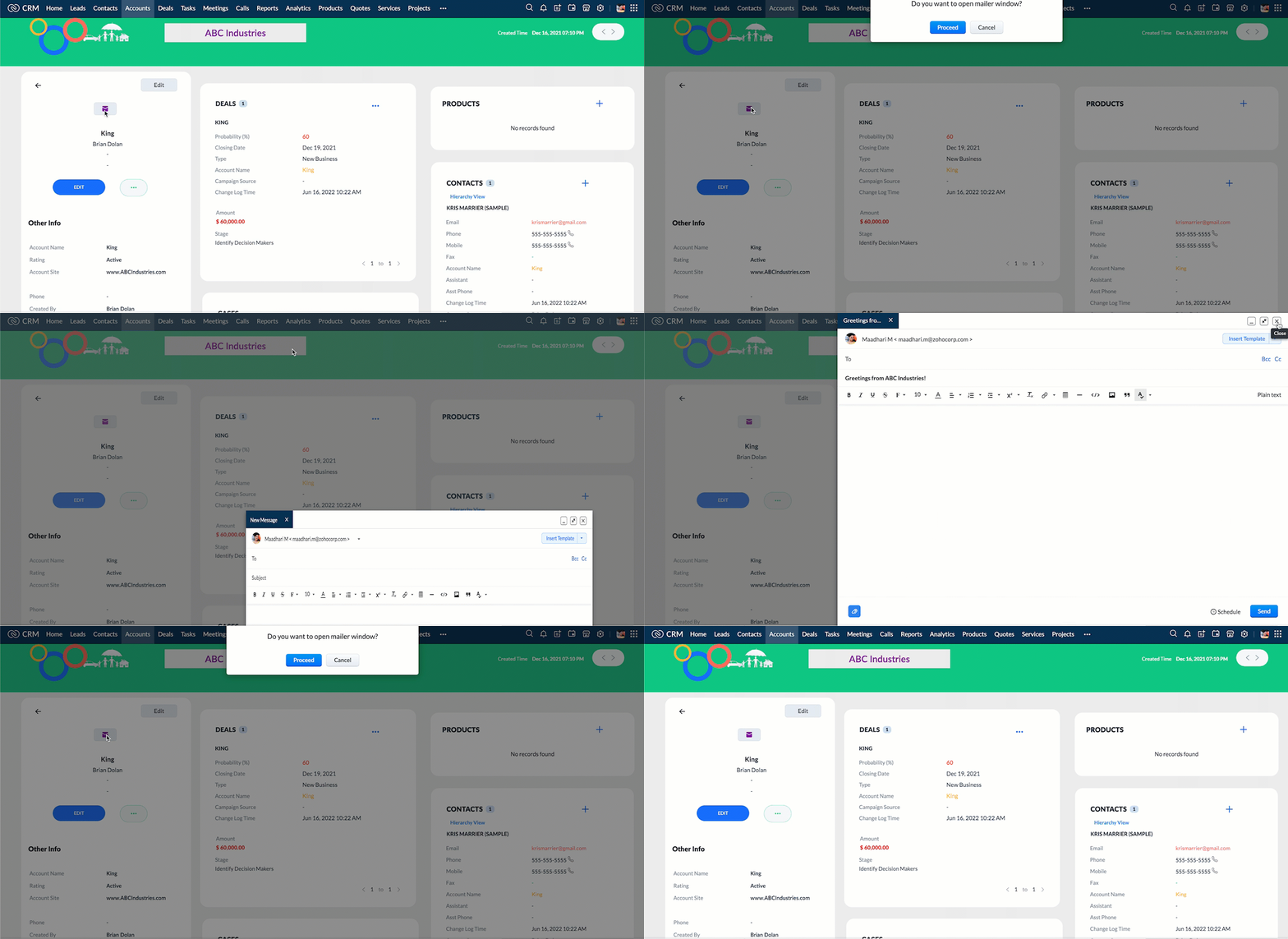
  3.  When you click the mail button on detail(canvas) page, ask for confirmation and open a mailer window.

Solution using Client Script

Note:

The solution listed in this post includes detail(canvas) page and create page.
To create a canvas page, 
  • Go to Setup > Customization > Canvas
  • Click Create Record Detail Page. 
  • On the Create a Custom Record pop up that appears, select the module as "Accounts" and select the required layout for the canvas page
  • Choose a template from the gallery and click Select.
  • Enter a name and save the canvas page.
  • Click Canvas Assignment and assign the page to the required profiles.
  •  Click here for more details on creating a canvas page(Customizing the record detail page).
1. Calculate age based on Date of Birth and display the message "Age is more than 80" whenever the age is above 80 in create page of Policyholder module

  • Go to Setup > Developer Space > Client Script. Click +New Script.
  • Specify the details to create a script and click Next.
  • Enter the following script in the Client Script IDE and click save.
  1. function  getAge(dateString) 
  2. {
  3. var today = new Date();
  4.  var birthDate = new Date(dateString);
  5. var age = today.getFullYear() - birthDate.getFullYear();
  6.  var m = today.getMonth() - birthDate.getMonth();
  7.  if (m < 0 || (m === 0 && today.getDate() < birthDate.getDate())) 
  8. {
  9.    age--;
  10. }
  11.  return age;
  12. }
  13. let age = getAge(value);
  14. var age_field = ZDK.Page.getField("Age");
  15. var category_field = await ZDK.Page.getField("Category");
  16. age_field.setValue(age);
  17. if (age > 80) {
  18. ZDK.Client.showMessage('Age is more than 80', { type: 'info' });
  19. }
  • You can see the code working from the create page.  You can also see how the client script works using the Run component of the Client Script IDE.
  • You can use any of the following types in showMessage() function
Possible 'type'
Script
info
ZDK.Client.showMessage('message', { type: 'info' });


warning
ZDK.Client.showMessage('message', { type: warning });

error
ZDK.Client.showMessage('message', { type: error });

success
ZDK.Client.showMessage('message', { type: success });

2. Show the alert message whenever you try to update the field Rating

  • Go to Setup > Developer Space > Client Script. Click +New Script.
  • Specify the details to create a script and click Next.
  1. ZDK.Client.showAlert('You cannot change the Rating after account creation');
  • Here is how the Client Script works. You can also see how the client script works using the Run component of the Client Script IDE.
3. Configure the mailer box with the click of a button

First of all, you need to add the button to the detail(canvas) page.
  • Go to Setup > Customization > Canvas.
  • Right click on the Canvas page for Accounts module and click Edit.
  • Click Elements, drag and drop the button wherever required and specify a label for the button.
  • Right click on the button, select Add Element ID and enter the ID of the button in the pop up that appears.
  • Once the button is created, you can configure Client Script in two ways:
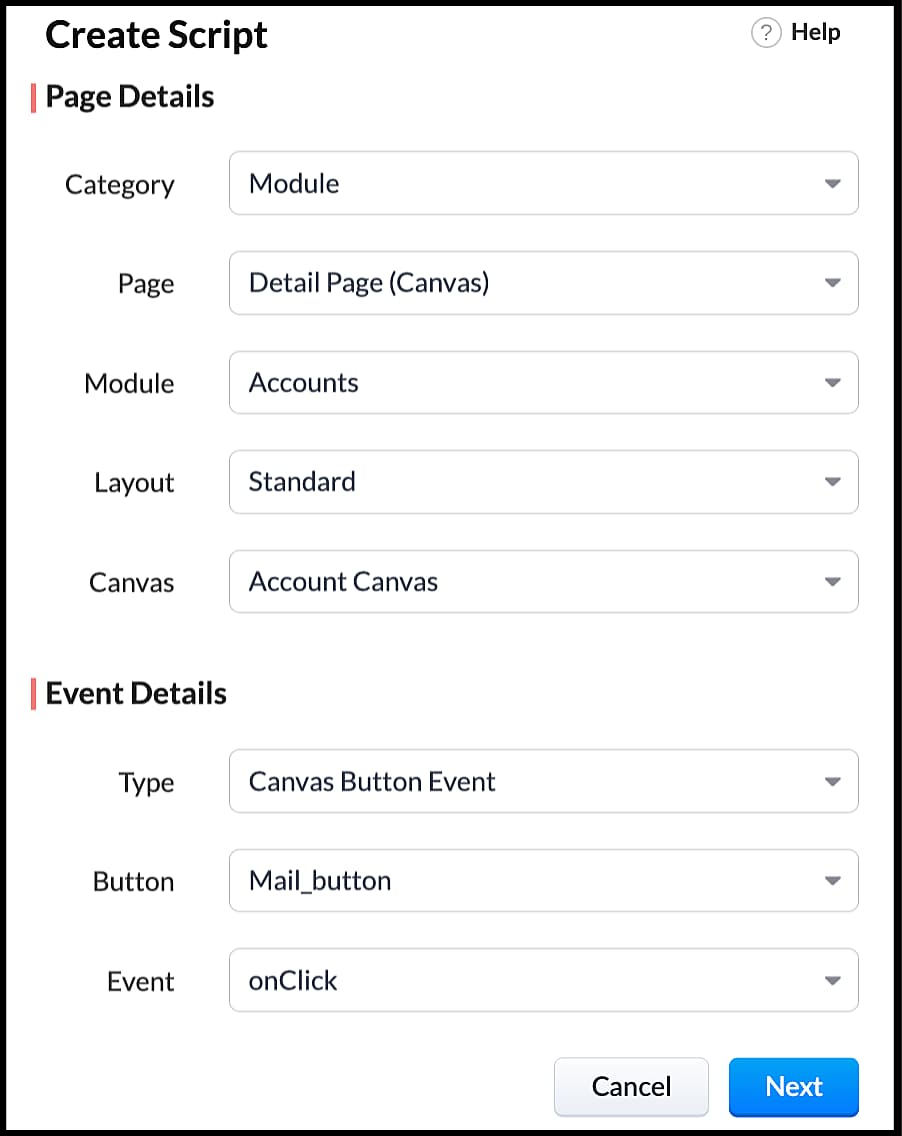
  • Right click on the button--> Add Client Script-->onClick. The Client Script IDE appears with the event type as Canvas Button Event.
                                                             (or)
  • Go to Setup > Developer Space > Client Script. Click +New Script.
  • Specify the details to create a script and click Next.
  • Enter the following script and click save.
  1. var isProceed = ZDK.Client.showConfirmation('Do you want to open the mailer window?','Proceed','Cancel');
  2. //If user clicks Proceed button
  3. if (isProceed) {
  4. ZDK.Client.openMailer({ from: '', to: [{ email: '', label: 'ABC Industries' }], cc: [{ email: '', label: 'ABC Industries' }], subject: 'Greetings from ABC Industries!', body: ' ' });
  5. }
  • The showConfirmation() function will return a boolean value based on the user selection. You should capture this boolean value using a variable and write the actions based on the boolean value returned. Here the variable isProceed will capture the user response and based on that boolean value, the mailer box will get displayed.
  • Here is how the client Script works,

We hope you found this post useful. We will meet you next week with another interesting topic!
If you have any questions let us know in the comment section.
Cheers!

Click here for more details on Client Script in Zoho CRM.

Related Links


    • Sticky Posts

    • Zoho CRM Community Digest - February 2026 | Part 2

      In this edition, we’re highlighting a few more product enhancements, along with some helpful community discussions that explore everyday CRM scenarios from automating reminders and managing lead outreach to making the most of APIs and client scripts.
    • How to reach the official Zoho Support channels and avoid fake ones.

      Dear Customers, Thanks a lot for choosing Zoho! Our applications are built to help achieve your day-to-day business goals. We are committed to engaging with you, to understand and develop solutions that enhance your productivity.  We are happy and ready to help you use our services effectively. Understanding and avoiding fake support Just like using popular bank names and financial applications for phishing purposes, using Zoho and claiming to be providing Zoho Support or services with false numbers
    • Function #35: Close all tasks associated with a lead and create a new task.

      Welcome back everyone! Last week, we learnt how to close all tasks of a deal depending upon the deal stage. This week, let's look at a custom function that lets you close all of the tasks associated with a lead while simultaneously creating a new task, like when you need to halt all progress towards a lead while the lead is not available at the moment but create a reminder task. Business scenario: The success of a company, in one way or another, is determined by the leads it gets. Each lead is just
    • Zoho CRM Webinar - Redesigning Daily User Experiences with Canvas

      &lt;br&gt; Your users across roles use the CRM for day-to-day tasks that are necessary. Whether they perform their tasks on time, the right way, or at all depends on a lot of factors, including User Experience. Many businesses struggle with rigid layouts,
    • Join us at the Canada ZUG Meetup: What’s New in Zoho CRM

      Hello Zoho Community! Start your year with fresh insights into Zoho CRM’s latest updates and tools. Whether you're a CRM beginner or a experienced user, this meetup is crafted to help you optimise your processes and leverage new features. Explore practical
    • Recent Topics

    • Issue with attaching files to a task through the API

      Hello! I've implemented a function that creates a task for every new bill that is created but I haven't been able to attach to the task the files which are attached to the bill. I have encountered multiple errors but the most common one is error 33003:
    • Printing receipts with 80mm thermal printer and Zoho Creator

      I have a sales form in my Zoho Creator app and I would like to print receipts for customers. Question 1: From what I've read on this forum there's no way to submit and have the receipt print automatically, you'd have to go through the printer dialog,
    • Zoho Show Keeps Crashing and Goes Down with the Data

      Today, I am experiencing something unusual: Zoho Show keeps crashing and goes down with the data. When you try to reopen the same deck, you get that lovely "Presentation not found" error. This has happened today rather frequently with multiple decks.
    • Integrate with WooCommerce using Wordpress Plugin

      We’re thrilled to announce a powerful update to the Zoho Marketing Automation WordPress plugin with WooCommerce integration! This enhancement enables new possibilities for businesses running online stores using WooCommerce, empowering them to merge seamless
    • Removing To or CC Addresses from Desk Ticket

      I was hoping i could find a way to remove unnecessary email addresses from tickets submitted via email. For example, a customer may email the support address AND others who are in the helpdesk notification group, in either the TO or CC address. This results
    • When I schedule calendar appointments in zoho and invite external emails, they do not receive invites

      Hello, We have recently transitioned to zoho and are having a problem with the calendar feature. When we schedule new calendar appointments in zoho the invite emails aren't being sent to the external users that we list in participants. However, this works
    • Sync desktop folders instantly with WorkDrive TrueSync (Beta)

      Keeping your important files backed up and accessible has never been easier! With WorkDrive desktop app (TrueSync), you can now automatically sync specific desktop folders to WorkDrive Web, ensuring seamless, real-time updates across devices. Important:
    • Unable to send

      Hello, I am unble to send any single email during the whole time due to the Zoho IP 136.143.188.16 being bloked by SpamCop.net Please help can somebody help me?
    • Errorcode 554

      Hello, I am unble to send any single email during the whole time due to the Zoho IP 136.143.188.16 being blocked by SpamCop. Please can somebody help me?
    • Spamcop

      Have been trying to email several of our clients and many of our emails keep getting bounced back with an error that states: ERROR CODE :550 - "JunkMail rejected - sender4-op-o16.zoho.com [136.143.188.16]:17694 is in an RBL: Blocked - see spamcop.net/bl.shtml?136.143.188.16"
    • Emails being blocked / spamcop

      Hello, I am unablr to send any single email during the whole time due to the Zoho IP 136.143.188.16 being blocked by SpamCop.net Please help on this.
    • Zoho IP blocked by SpamCop 136.143.188.16

      Hello, I am unble to send any single email during the whole time due to the Zoho IP 136.143.188.16 being blocjed by SpamCop.net Please help on this.
    • This domain is not allowed to add in Zoho. Please contact support-as@zohocorp.com for further details

      After not using the domain rcclima.org.pe for some time, I'm trying to set up the free version of Zoho Mail. When I tried to validate my domain, rcclima.org.pe, I received the error message discussed in this thread: "This domain is not allowed to be added
    • 554 5.1.1 – Mail sending blocked for the domain(s): [gmail.com]

      Here's your corrected text: Hello, I hope you are doing well. I was unable to send a message and received the following error: "554 5.1.1 – Mail sending blocked for the domain(s): [gmail.com]" I tried to send and deliver an email but got this error. I
    • Can I hide empty Contact fields from view?

      Some contacts have a lot of empty fields, others are mostly filled. Is there a way I can hide/show empty fields without changing the actual Layout? I would like to de-clutter my view, and also be able to add information later as I am able. I would be
    • Replying from same domain as a catch-all?

      I have 2 domains setup on Zoho, both with associated email addresses. They look something like this: john@example.com (primary address) john@test.com (this domain also has a catch-all setup) I use the catch-all for test.com as a public-facing email address
    • Account and Email and Password

      I'm signing up as a Partner so I can move my website clients across to a separate email server from their current cPanel one.. So I have a Zoho account and then I moved one of my emails across to that account to test the import process... So the question
    • Zoho CRM Copilot Connector

      Hello, Are there plans to release a connector for Zoho CRM and Copilot? I'm in the early research stages of potentially switching our CRM solution to Microsoft Dynamics because of its out of the box integration with Copilot. The advantage being that we
    • Approval Workflow for Purchase Orders Abrir

      The requirement is , that all purchase orders greater than or equal to 5000 go through an approval process from certain people, but within books I only see that the approvers can be by levels or any approver but we cannot enter a rule like these. Can
    • Zoho mail admin panel not opening

    • Cloning Module Customizations in Zoho FSM

      Hello Latha, I have two Zoho FSM accounts, each in a different data center. I would like to know if it is possible to clone the module customizations I have already completed in one account to my new account in the UAE from the backend. In other words,
    • is it possible to adjust the date field to show Monday as a first day

      Hi, Is it possible to adjust somewhere the date field, so the first day of the week is Monday (instead of Sunday)? Thank you! Ferenc
    • Create your own Zoho CRM homepage using Canvas - Home View!

      Hello Partners We are excited to share a new enhancement to Canvas in Zoho CRM that gives users more control over how their homepage looks and works. Introducing Canvas Home View! What is Canvas Home View? You can now create and design a custom homepage
    • can change deal colors in bigin?

      can be super useful if we can change colors deals process any way to do it?
    • Transferring Data and Double Lookup Help

      I would like to ask how I would do the following actions/codes. So I have a Budget Request Application where a User needs a request for a specific Project and lists all their needs in a subform via per-item lists. So, for my questions. 1. I have a dropdown
    • New Account, Setting up Domain Question

      Hello, I recently set up a new account with a custom domain. But after paying and setting up my account, it says OpenSRS actually owns the domain, and I have to sign up with them to host my site. But OpenSRS wants to charge me $95, which is ridiculous.
    • Canadian Banks ?

      Can you advise which Canadian Banks can be used to fully sync credit cards and bank accounts? Thanks
    • URGENT. Recovering email without eArchive

      Hello, I have deleted some email from my trash but do not have eArchive. Is it possible to recovery without this? many thanks!
    • filter on sheets mobile (iOS, iPadOS) does not work

      re-posting this as a question because reporting as a problem netted zero responses... I have this issue on every spreadsheet, whether imported or created natively in Zoho Sheets. I can use on desktop without issue: but on iOS the filter dropdowns are
    • How do you print a refund check to customer?

      Maybe this is a dumb question, but how does anyone print a refund check to a customer? We cant find anywhere to either just print a check and pick a customer, or where to do so from a credit note.
    • Zoho Books' 2025 Wrapped

      Before we turn the page to a new year, it’s time to revisit the updates that made financial management simpler and more intuitive. This annual roundup brings together the most impactful features and enhancements we delivered in 2025, offering a clear
    • US State abbreviations in Address fields

      In regards to all Address fields within Zoho, Is there a way to change the State field to be the 2 letter abbreviation vs the full spelled out US State name? Example: "Washington" should be WA. I am able to type in the abbreviated state, but it's not
    • Zoho Booking - TIN vs ATIN & ITIN

      Zoho Booking Vendors allows for TAX ID values of SSN, EIN, ATIN an ITIN. There is no option for TIN. What is the method to properly add TIN to the list of taxable values for companies? For reference: Social Security Numbers (SSN) Individual Taxpayer Identification
    • Filters and calculations for comparison of day, week to date, month to date, quarter to date and year to date of current year and prior year

      I am building a dashboard that includes reports for comparison of today and week to date (on a like-for-like basis), and month to date, quarter to date and year to date (same date basis) between current and prior years, and forecast for the current year.
    • Ability to Set Text Direction for Individual Cells in Zoho Sheet

      Dear Zoho Sheet Team, We hope you are doing well. We would like to request an enhancement in Zoho Sheet that allows users to set the text direction (right-to-left or left-to-right) for individual cells, similar to what is available in Google Sheets. Use
    • Support Bots and Automations in External Channels

      Hello Zoho Cliq Team, How are you? We actively use Zoho Cliq for collaboration, including with our external developers. For this purpose, external channels are a key tool since they work seamlessly within the same interface as all of our other channels
    • Add Flexible Recurrence Options for Meeting Scheduling in Zoho Cliq (e.g., Every 2 Weeks)

      Hello Zoho Cliq Team, We hope you are doing well. Currently, when scheduling a meeting inside Zoho Cliq, the recurrence options are limited to Daily, Weekly, Monthly, and Yearly. There is no ability to set a meeting to occur every X weeks — for example,
    • Ability to Attach Images When Reporting Issues to Zoho Projects from Zoho Desk

      Hi Zoho Desk Team, Hope you’re doing well. We’re using the Zoho Desk–Zoho Projects integration to report bugs directly from support tickets into the Zoho Projects issue tracker. This integration is extremely useful and helps us maintain smooth coordination
    • Add Comprehensive Accessibility Features to Zoho Writer

      Hello Zoho Writer Team, We hope you are doing well. We would like to submit a feature request to enhance Zoho Writer with a full set of accessibility tools, similar to the accessibility options already available in the Zoho Desk agent interface. 🚧 Current
    • Enable Screen Recording in Zoho WorkDrive Mobile Apps (Android & iOS)

      Hi Zoho WorkDrive Team, How are you? We are enthusiastic Zoho One users and rely heavily on Zoho WorkDrive for internal collaboration and content sharing. The screen-recording feature in the WorkDrive web app (similar to Loom) is extremely useful- however,
    • Next Page