Keep Sensitive Customer Data Private with Field Masking in Zoho CRM
Hello CRM community,
Customer records in your CRM are often accessible across multiple teams, but not every team needs visibility into every field. A non-sales team, for instance, has no real need to see a contact's mobile number, and a support agent verifying a caller's identity does not need to see it in full either. With field masking, a user can restrict this, displaying values as asterisks instead of actual data, or showing only partial values such as a mobile number like 9******8621.
What's New
Field Masking gives you granular control over who sees sensitive data in your CRM, and what happens to it when it leaves.
Full or partial masking: Fields can be completely hidden or partially masked, such as showing only the last few digits of a phone number or email Id.
Profile-based access to masked data: Choose which profiles, system-defined or custom, can view the unmasked value. Access can be granted according to need, ensuring only the right people see sensitive data.
Control over masked data shared outside CRM: When exporting data or sharing it through integrations and APIs, you decide whether masked fields go out as masked, unmasked, or restricted entirely.
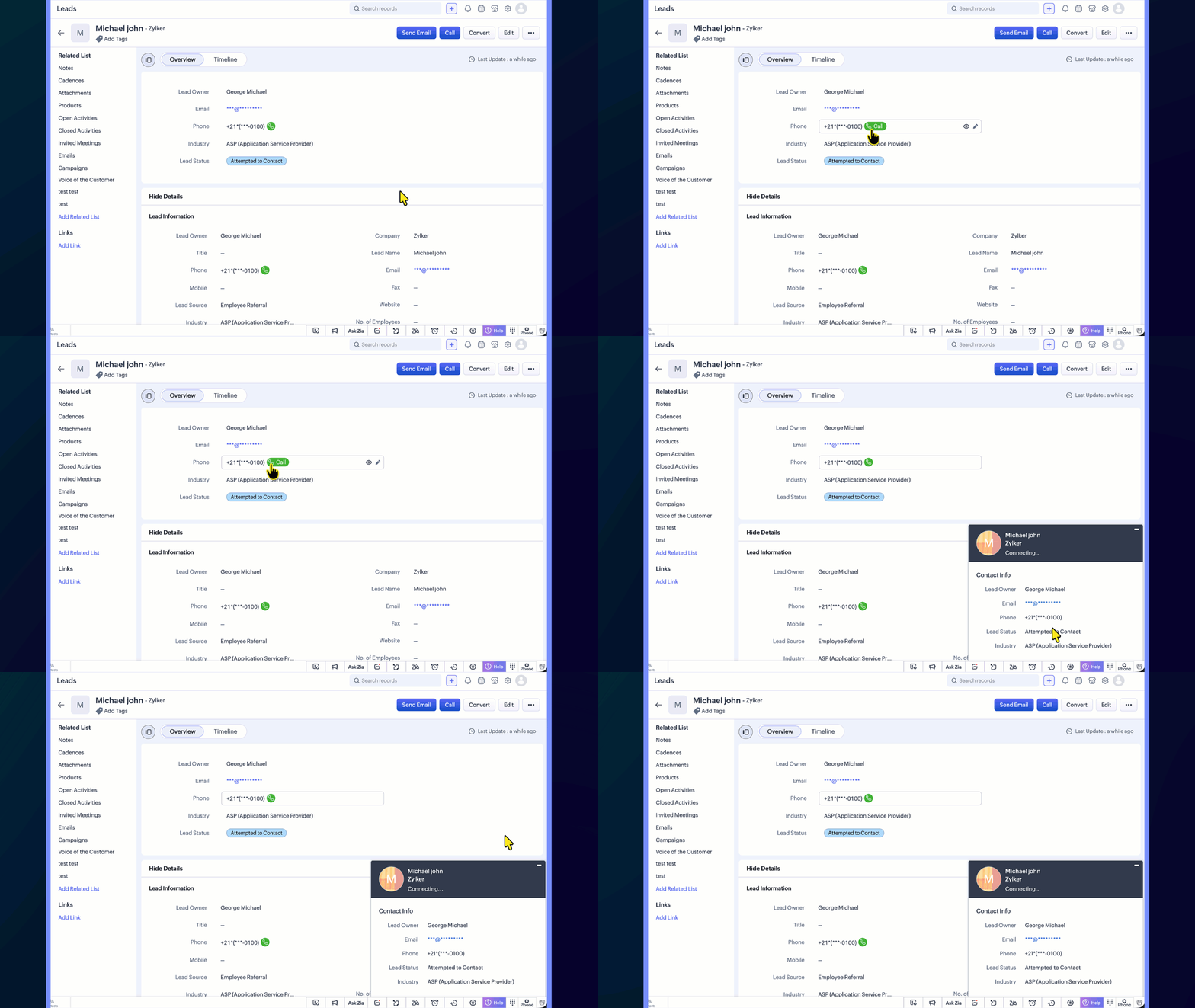
Uninterrupted workflows: Even when a phone number is masked, users can still place calls directly by clicking the call icon, so day-to-day operations are not affected.
Template-level control: In email and other templates, you can choose whether a masked field appears in its masked or unmasked form, giving you flexibility in customer-facing communication.
Report-level control: When viewing or sharing reports, you can choose whether masked field values appear in their masked or unmasked form.
Use Case
Consider a typical support call where the agent needs to confirm the caller's identity without seeing the complete phone number or policy ID. With field masking:
Sensitive fields like phone numbers, account numbers, or policy IDs are masked by default
Agents see only partial values such as the last 4 digits
They can ask, "Can you confirm the last 4 digits of your registered number?" and proceed with verification
Even with the number masked, agents can still place a call directly by clicking the phone icon next to the field, so day-to-day calling workflows remain unaffected
This balances security with usability, ensuring sensitive data stays protected without slowing down day-to-day operations.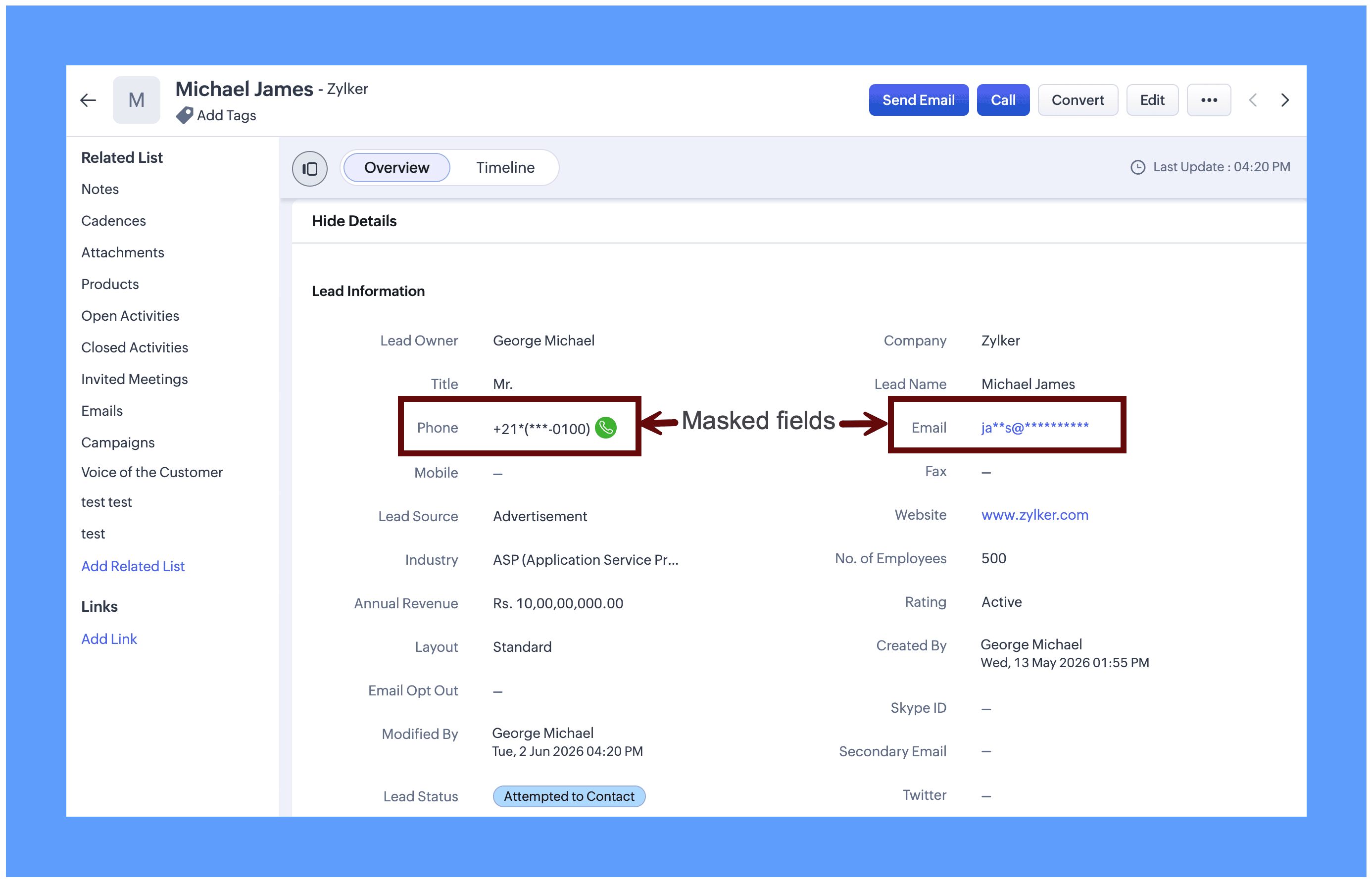
Field masking is equally useful for protecting sensitive data across a range of real-world scenarios: Aadhaar numbers, social security numbers, email addresses, policy numbers, and similar fields. It can be applied to both system-defined fields and custom fields, giving you the flexibility to protect exactly the data that matters to your organization.
Enabling Field masking
Field Masking is enabled in two stages: First you turn the feature on and then you choose which individual fields to mask.
Step 1: After field masking is enabled, you can configure how masked fields behave when data leaves CRM through integrations, APIs, or exports.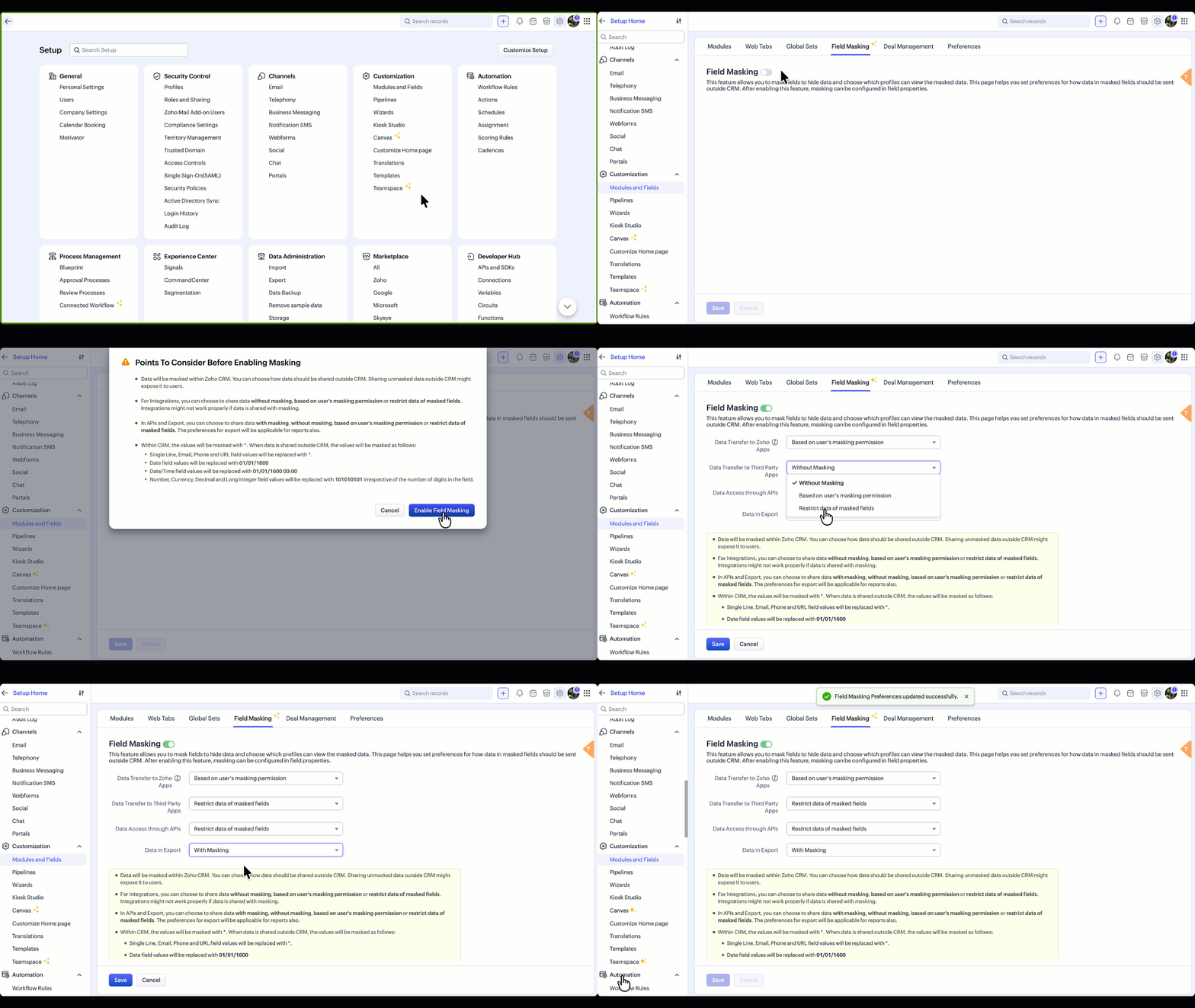
You can update your data sharing preferences anytime from the Field Masking page.
Note: Field Masking can also be enabled in the field properties, which is an alternative way to enable it.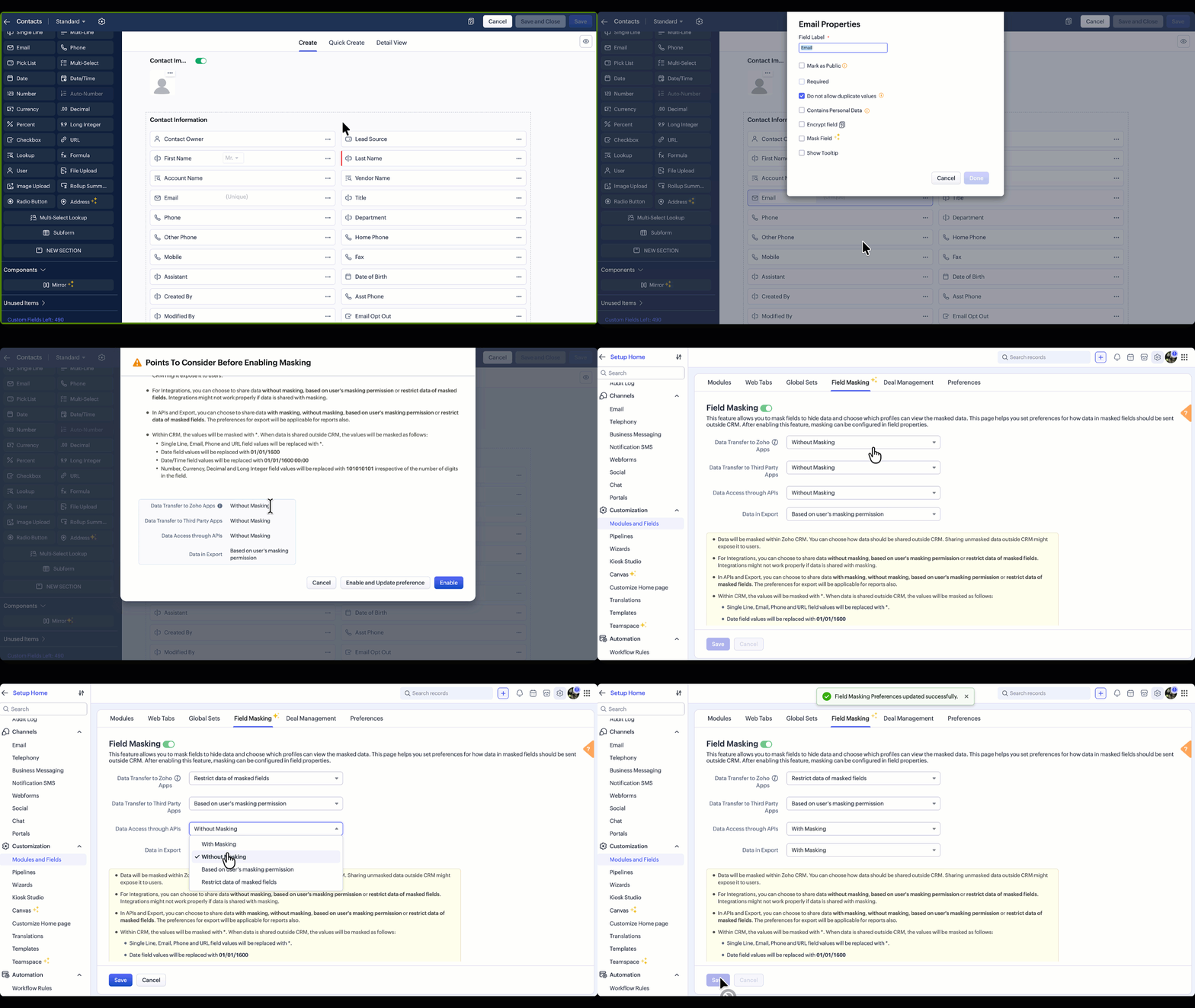
Points to Consider Before Enabling Field Masking
Once enabled, data will be masked within Zoho CRM. However, every time data leaves CRM, whether through an integration, an API call, or an export, you control how masked fields behave at that exit point. For any of these scenarios, three options are available:
Without Masking: The original value is shared as-is. Suitable when the receiving system or user is trusted and needs the complete data.
Based on User's Masking Permission: The masked or unmasked value is shared depending on what that user is allowed to see within CRM. A user who cannot view a phone number in CRM will not receive it in an export or API response either.
Restrict Masked Fields: The field is excluded entirely from the transfer. Useful when there is no legitimate reason for sensitive data to leave CRM at all.
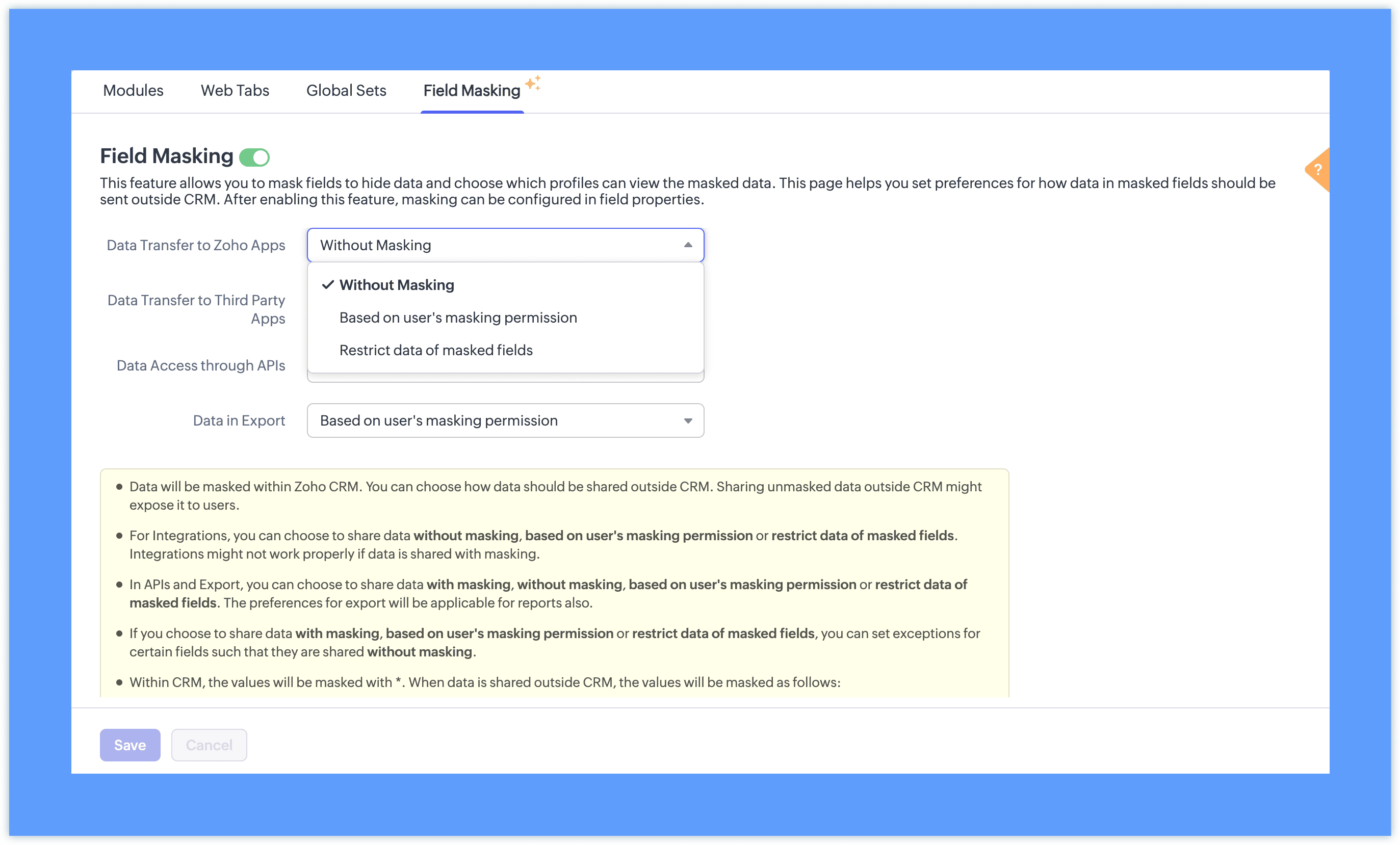
With masking: The masked format (such as 98******21) appears instead of the original value. This option is available only for APIs and Exports, and is useful when sharing data with teams who need to reference records without seeing the underlying values. This is particularly useful when sharing reports with teams who need to reference records without seeing the underlying data.
Note: Setting exceptions for these preferences for specific fields is planned in the future updates.
Step 2: Once field masking is enabled, fields can be masked fully or partially based on your requirements. You can also define which profiles have access to view the unmasked value.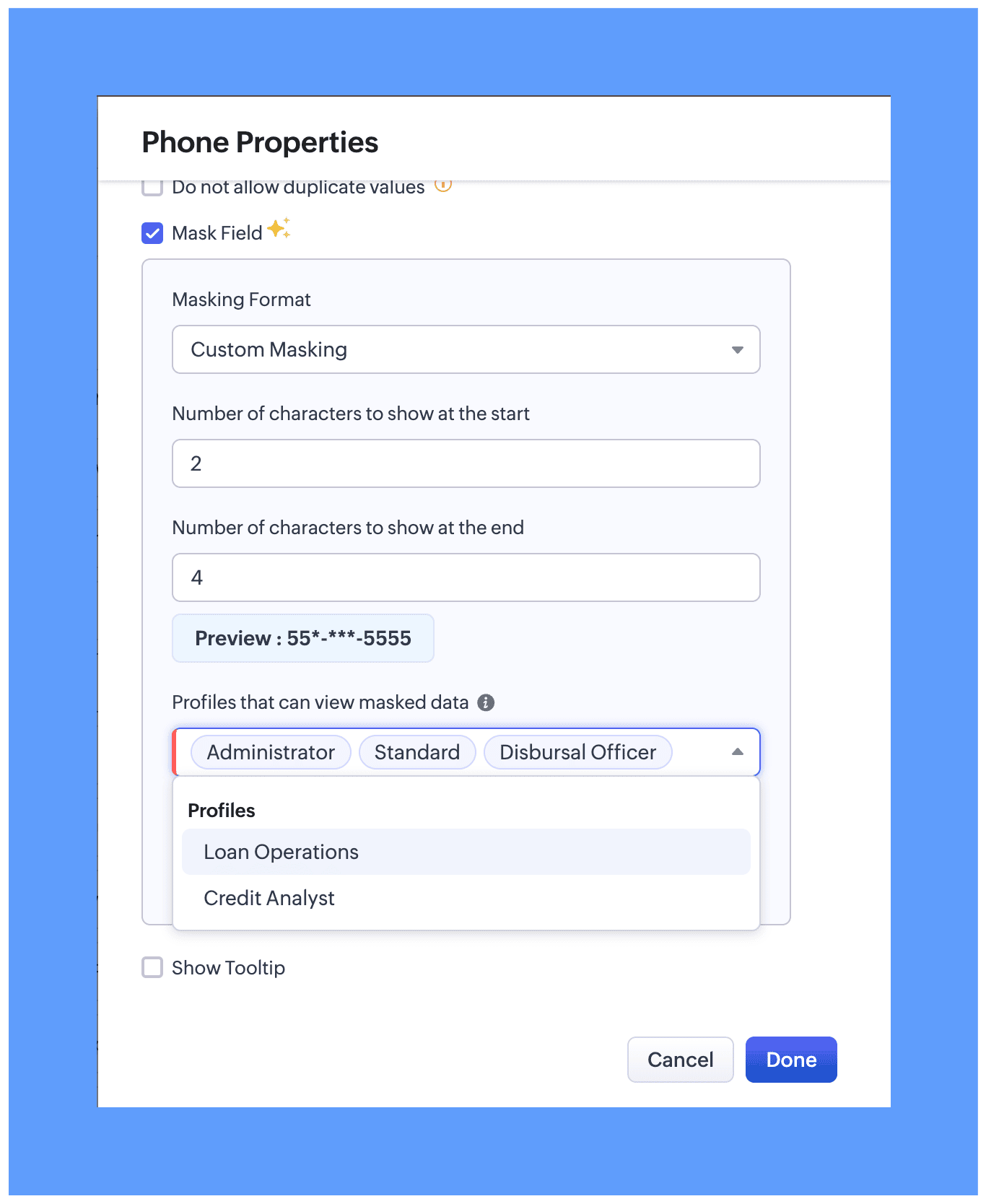
In module layout while editing properties for the preferred field. Two masking types are available:
Full Masking: The entire field value is hidden, for example ********.
Custom Masking: You can choose to mask only the first few characters or only the last few characters of the field value.

While configuring field masking, you can define which users can view the actual unmasked data. All profile types, whether system-defined or custom, are available for selection and will be able to view the unmasked data based on your preference.
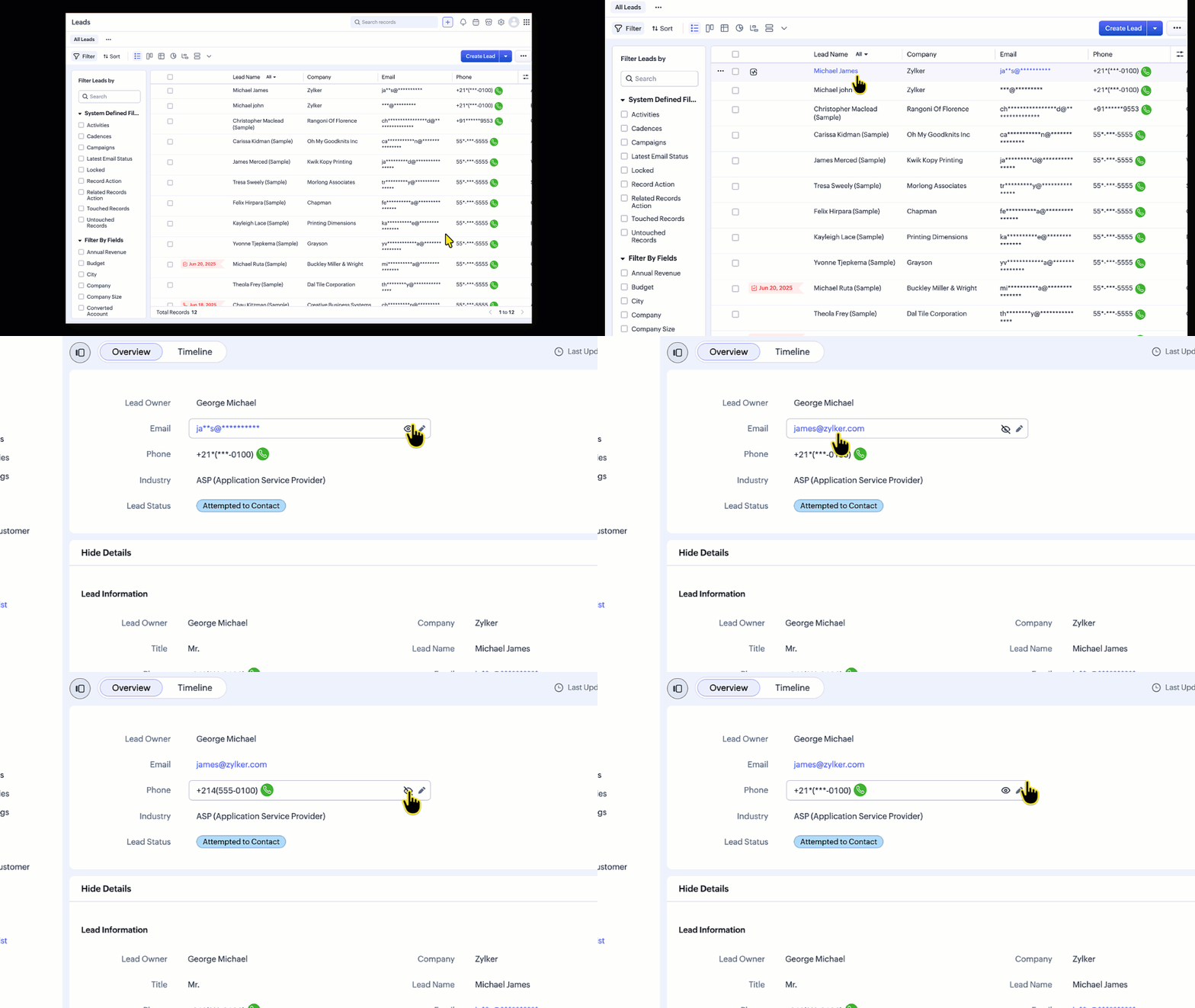
For users with permission to view masked data:
An eye icon (👁️) will be displayed next to the field.
Clicking this icon reveals the actual value.
Can place a call directly even without able to view the masked phone number
List Views
In list views, the data can be unmasked from the hamburger icon available in the column header.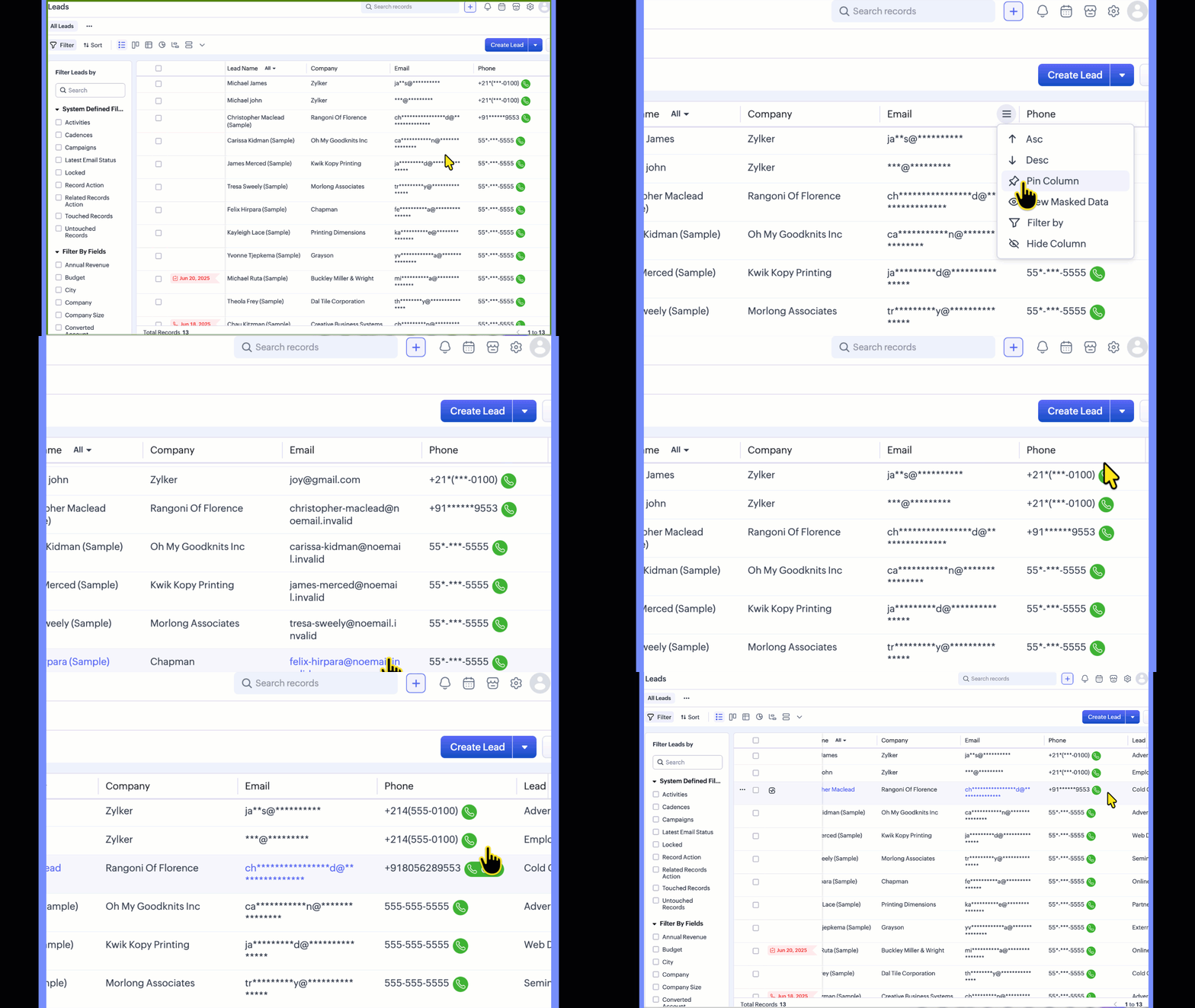
Templates
In templates, the Mail data with Masking preference lets you control how merge field data is shared when mails are sent using the template. This preference applies to all masked fields, regardless of profile permissions.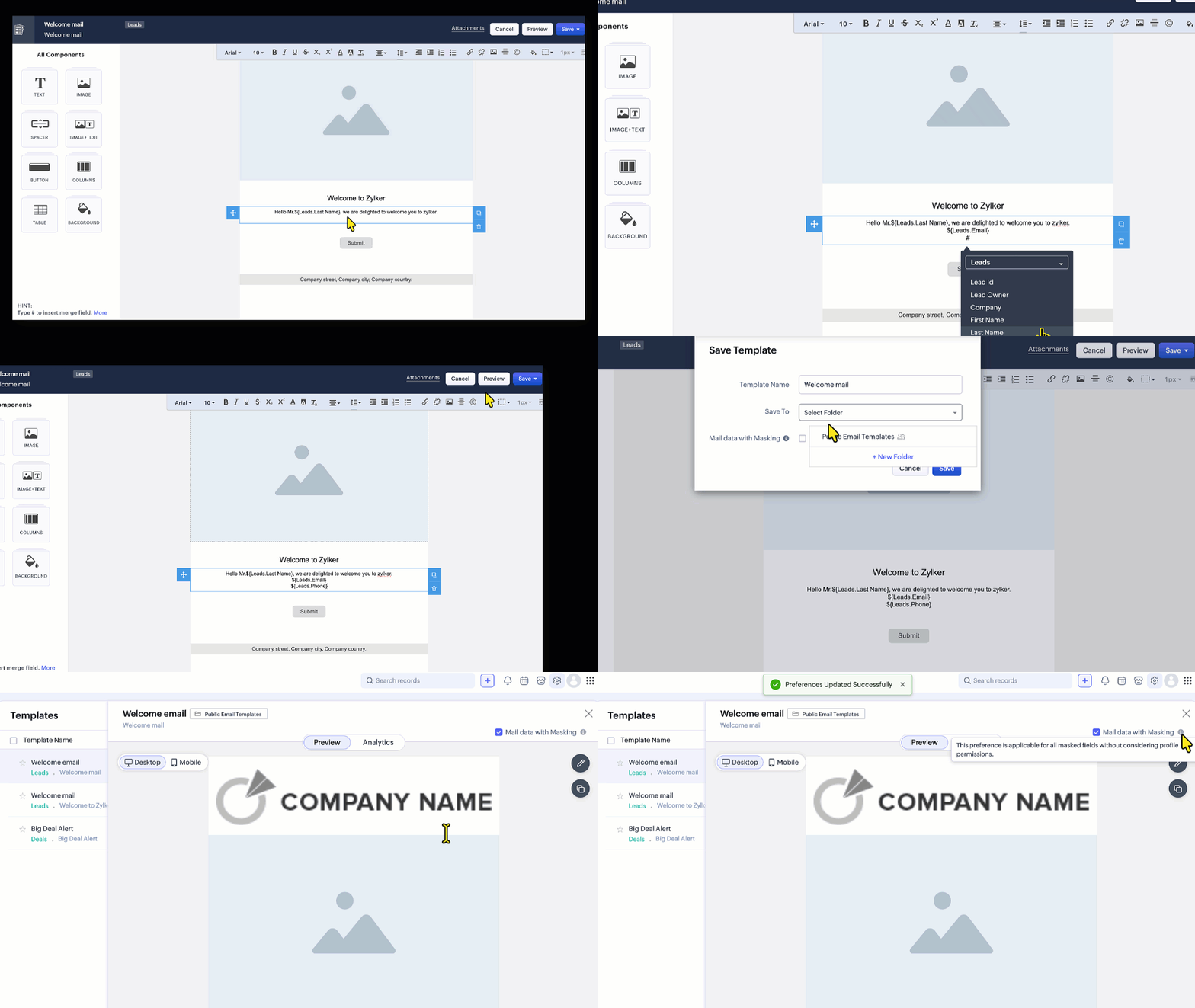
Reports:
When viewing or sharing reports, you can choose whether masked field values appear in their masked or unmasked form.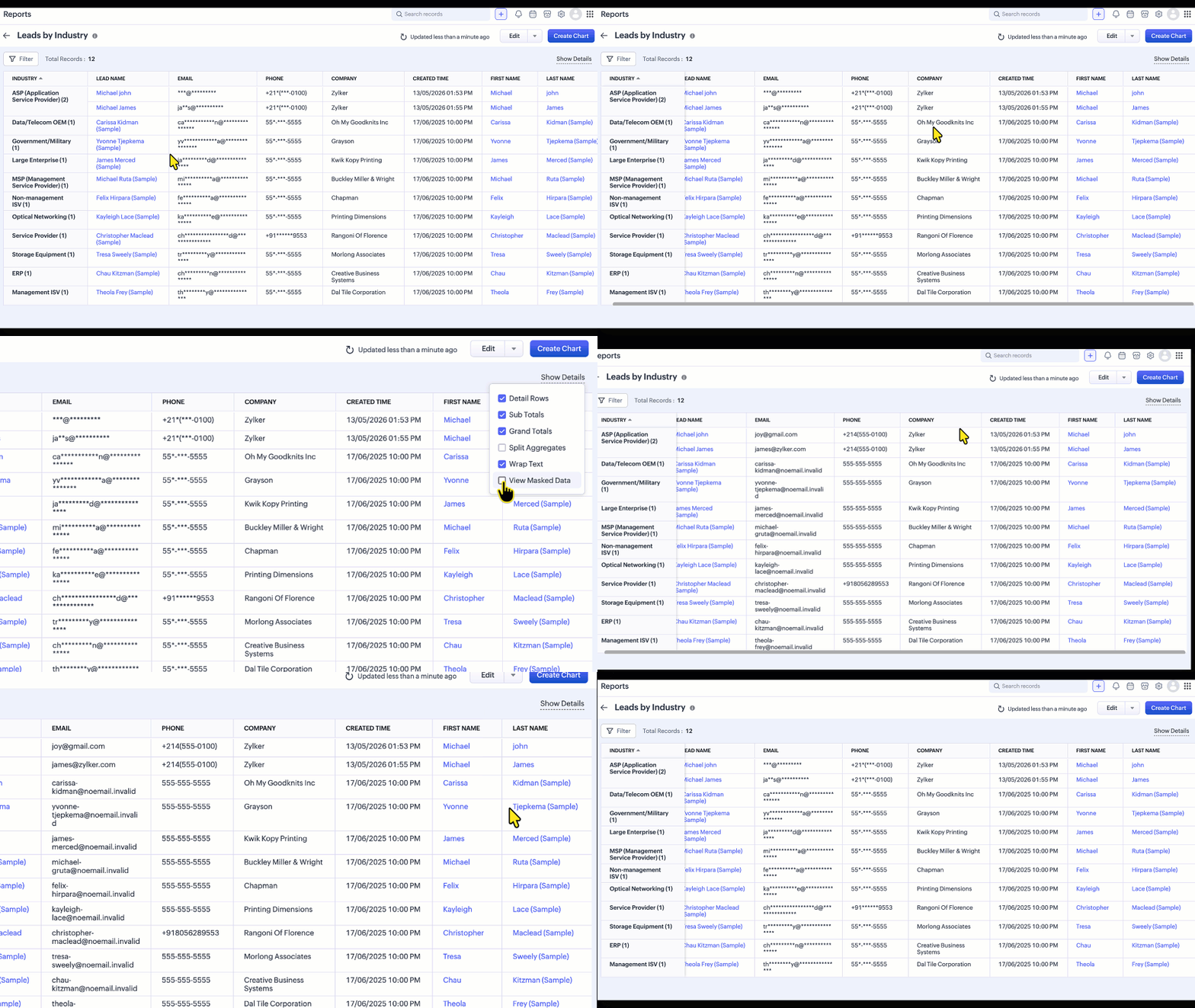
Supported field types
Field Masking can be applied to the following field types:
Single Line, Email, Phone, Date, Date/Time, Number, Currency, Decimal, Long Integer, URL
 Note: Custom Masking is supported for Single Line, Email, and Phone fields.
Limitations
The following are the current limitations of Field Masking, including areas where masking is not yet supported (masking is exposed):
Email Views - Emails Related List,Conversation View, SalesInbox, Mail Magnet, Email Reports, Mass Mail Delivery Stats and record preview in composer.
If the From/To field in the Calls module is masked but the number is not associated with a record, the number will be visible when the call is placed.
Signal notification
Zia Features
Note:
Once this feature is enabled for your org, the phone number is not shown in the call subject in calls module, whether or not Field Masking is enabled.**
If masked fields are used in Layout Rules, Validation Rules, Canvas Rules, or Wizard Conditional Rules, the rules may not execute as expected, because they rely on client-side data. A fix that prevents masked fields from being used in these rules is tentatively expected to go live within a week.
Feature Availability
Edition Supported: Enterprise and Ultimate editions of Zoho CRM,
Limits: Up to 10 masked fields per module in the Enterprise edition and up to 20 masked fields per module in the Ultimate edition.
Note: Field Masking is available across all modules except the Users module.
Topic Participants
Jayant Nath Vatsa
Sticky Posts
Introducing Incentives for Zoho CRM: Build, automate, and track sales commissions
Dear Customers, We are here with an amazing news! We built a direct solution to help manage your commission provisioning activity in your business. From creating commission plans to issuing payouts, this application leverages your sales reps’ performancePresenting ABM for Zoho CRM: Expand and retain your customers with precision
Picture this scenario: You're a growing SaaS company ready to launch a powerful business suite, and are looking to gain traction and momentum. But as a business with a tight budget, you know acquiring new customers is slow, expensive, and often deliversEnhancement in Zoho CRM: Introducing New Return Types for String Fields Based on Character Length
Dear Customers, We hope you’re well! In Zoho CRM, formula field with string return type is used in various scenarios where text is involved like concatenating customers’ first and last names, trimming characters from texts, performing find and replaceTransform your line of items into line items: ICR can now record your table values as subform values
Enhancement in Zoho CRM Dear Customers, We hope you're well! Zia Vision’s ICR capability can now recognize, extract, and store tabulated values in your subforms. An ideal example is a university application form. It has printed fields and handwrittenApprove records efficiently: Useful enhancements to My Jobs module and Approval process in Zoho CRM
Dear Customers, As you might know, approval process is a process automation tool that allows you to automate approvals in your organization and My Jobs is where you approve requests from a single point of view. Here's how you'd go about it: You’d add
Recent Topics
Cross Module Filtering – Use Fields from Lookup modules in Custom Views criteria and Advanced Filters
Hello everyone, Zoho CRM now enables you to achieve deeper filtering of records in a module, using fields of a lookup, thereby enhancing your data management experience manifold. This filtering based on lookup module fields is now available in advancedIntroducing Vibe in CRM: Turn Your Ideas to Live Experience
Hello Partners! AI is changing the way we work and build things every day. Everyone is using AI to build widgets and front-end apps, turning their ideas and requirements into working experiences faster than ever. Imagine simply describing what you wantWhatsApp Business calling in Zoho Voice: handle WhatsApp calls like any other call (IVR, queues, agents, logs, recordings)
Hi team, We hope you are doing well. We would like to request an important enhancement related to WhatsApp Business calling in Zoho Voice. Currently Zoho Voice supports WhatsApp messaging, but not WhatsApp calls (Meta's WhatsApp Business Calling API).Europäische Zeichen: Komma "," anstatt Punkt "." möglich?
In alle Betragsfelder müssen wir mit dem Punkt "." die Beträge erfassen wie 123.34 EUR. Das müssen wir nur in Zoho so machen, weil in anderen Applikationen wird in "Europa" mit dem Komma 123,34 EUR gearbeitet. Das Datumsformat kann kann in Books eingestelltWhatsApp Business Calling API
Dear Zoho SalesIQ Team, I would like to request a feature that allows users to call WhatsApp numbers directly via Zoho SalesIQ. This integration would enable sending and receiving calls to and from WhatsApp numbers over the internet, without the needDecoupling Email Sending from Storage in CRM & Email Storage Add-on Purchases
Hello everyone, We are excited to announce the rollout of the second phase of our email storage management, designed around a simple principle: your business communication should never be disrupted by storage limits. We've decoupled email sending fromConvert Number into Ordinal
Hello Developers, Here is the solution for converting the Number into Ordinal. For Example: This Idea can be used when lets say you are creating the Dashboard where you are showing upcoming celebrations like work Anniversary for you HRMS Application.Closing the Loop: Why Lookup Asymmetry is Harming Data Integrity in Creator
TL;DR: Lookup fields allow users to add new related records inline via the "+" icon, but there's no equivalent ability to edit an existing related record without navigating away and losing form context. Adding a native "Edit" icon—with automatic User"Allow New Entries" button for lookup field enhancement
Hi, When using the "Allow New Entries" option for a lookup field it is sometimes necessary to default certain fields in the related form based on field values in the current form. Would it be possible to add an option to set field values in the Field Properties of the lookup when "Allow New Entries" is selected? This would insure data integrity. Thanks, Damien Cregan Hire an ExpertHow to merge duplicate products?
merge duplicate productsEmail-Data Synchronization with Zoho Analytics
Hello everyone, Thanks to Chad and everyone who shared their feedback. We're excited to announce support for email data synchronization with Zoho Analytics. We have been working hard to bring this highly requested feature to life, and we'd like to walkFeature Request: Soft validation – Alert with Continue/Cancel on form submission
I'd like to propose a soft validation option for Zoho Creator forms. This would be an alert on submission that the user can either continue past or cancel. Today the alert can only cancel. The request has come up in the community for over 15 years (WhatCustomer portal: recommended way to scope lookup fields to the logged-in client?
Hi all, I'm building a customer portal on Creator for our clients (we're a esting lab, so each client has their own sites, contacts and jobs). Planning stage, so I'd rather get the approach right before I build it. The portal forms need several lookupAttachment icon on Meetings and Calls
Hi all One of these meetings has an attachment on it....but which one? Who knows...... Can I ask that if there is an attachment on a meeting, on the Closed Activities it shows an attachment icon? Would make it easier to know we haven't missed something.more native app support for linux
Dear zoho,pls build additional apps like zoho valt,zoho sheets,zoho show,zoho authenticator apps for linux ,because more and more people are increasing switching to linux this days,Kaizen #229: Email-Deal Associations in Zoho CRM
Hi All, Welcome back to another week of Kaizen! Emails are a core channel for customer communication in any CRM system. In Zoho CRM, emails can be associated with records across multiple modules. In this post, we will focus on email associations withThis user is not allowed to add in Zoho. Please contact support-as@zohocorp.com for further details
Hello, Just signed up to ZOHO on a friend's recommendation. Got the TXT part (verified my domain), but whenever I try to add ANY user, I get the error: This user is not allowed to add in Zoho. Please contact support-as@zohocorp.com for further details I have emailed as well and writing here as well because when I searched, I saw many people faced the same issue and instead of email, they got a faster response here. My domain is: raisingreaderspk . com Hope this can be resolved. Thank youSalesInbox attach e-mail to deal
Hello, I have setup and started using the SalesInbox feature in Zoho. I could not figure how to attach an e-mail to a deal in the SalesInbox. Our company is dealing with a lot of partners, and I will for example receive in the same day 5 e-mails from the same contacts but that should be associated with 5 different deals, how would I go about that? At the moment, it seems that the only solution is to use the Outlook Plugin in Outlook to attach those e-mails.Problem with currency field in Zoho CRM
Hi Guys Zoho Books has a feature in currency fields that automatically converts decimal numbers with commas ( , ) to period format ( . ) when pasting them. For example: R$ 2,50 --> R$ 2.50 Is this behavior available in Zoho CRM? I couldn't find any configurationEmail-Data Synchronization with Zoho Analytics
Hello, Enterprise Support Community! We're excited to announce the availability of Email Data Synchronization with Zoho Analytics! This highly requested enhancement allows you to sync email data from Zoho CRM into Zoho Analytics, making it easier to analyzeAction Required: Allowlist New IP Ranges for the EU Data Center
Dear Users, We are adding new IP ranges for the Zoho Analytics EU data center (https://analytics.zoho.eu). These ranges will come into effect in the last week of December 2026. If you connect Zoho Analytics to cloud databases (both Live Connect and Import),Workflows failing / fields not updating by function or action
Any one else having issues like this? All was working fine last week, now all of a sudden the system doesn't like 3 fields in one of my (most important) forms, and won't update these by workflow / deluge / action. Only by manually editing, or bulk edits.Mass Update Option for Changing Work Order Owner
Hello FSM Team/Mr. Abid, We would like to inquire if there is an option to mass update or bulk change the Owner of Work Orders in Zoho FSM. Current Situation: At the moment, the Owner of a Work Order can only be changed individually, which becomes time-consumingZoho Projects - Auto Populate Project on Project Invoices
Hi Projects team, I noticed that when creating an invoice from a Project in Zoho Projects, the project is not selected on the invoice. Is this something which you would consider as a feature request? It seems silly that when you create an invoice fromCloud to cloud folder migration from Sharepoint to Workdrive
I am aware of OneDrive migration: https://help.zoho.com/portal/en/kb/workdrive/migrations/microsoft/articles/migrate-from-onedrive-to-zoho-workdrive#Whats_migrated would this cover a Sharepoint migration meaning I can move a whole Sharepoint (team) folderDYK 16: Set Approval Rules for Timesheet
Did you know you can decide who approves timesheets based on criteria? Yes, enable Time log or Timesheet approval from Set up to create approval rules that govern their approval processes. Approval rules for Time logs and Timesheet help avoid errors inIntroducing Seek Profile & Seek Ad Sync in Zoho Recruit
Hiring on SEEK usually means working in two places. You check a candidate's SEEK Profile in one tab to confirm their work history and credentials, then switch back to Zoho Recruit to move them forward. When you post a new role, you rebuild the ad forZoho Bookings 1.0 is being retired – Switch to Bookings 2.0 by December 2, 2026
Hello everyone! Zoho Bookings 2.0 was launched on April 17, 2025, introducing a simpler, workspace-based interface for managing appointments and scheduling activities. As part of the transition to the new version, Zoho Bookings 1.0 is being retired. If[Webinar] AI-powered writing and automation in Zoho Writer
Live webinar on November 12, 2026 | Time: 2 PM IST | 2 PM EST Hi, When organizations create documents, they often start from scratch. Then they need to proofread and translate them. Doing all of this manually takes time, and errors and hard-to-read writingFeature Request - Ability to Customise Contact Info Card on Ticket Details View
Hi Desk Team, I've added a "Contact Priority" and "Account Prioirty" field and it would be very useful to agents if they could see that information in the Contact Info card on the Ticket Details view. It would be great if we could choose some fields toChatGPT Plugin / MCP Server auth error
Hi all I'm trying to connect the ChatGPT plugin for Zoho CRM but after username stage of the auth process, I get this error from the URL https://mcp.zoho.eu/mcp-client/ {"error_description":"Invalid request url, Request is not as per defined in oauthCriteria-based follow-ups , and additional email response signals in Cadences
Hello all, We've got a couple of updates for Cadences. Until now, the next follow-up in a Cadence was triggered based on the response to the previous follow-up. With this update, when the previous step is a call or a task, you can now also trigger theCan Zoho CRM Emails be used in Zoho Analytics in any capacity?
We're wanting to display details about Lead Activity in regular reports through Zoho Analytics but we're having difficulty integrating Emails at all. We'd like to be able to note when an email is received and when it is sent somewhere other than justShow discounted amount on sales order / invoice against MRP when using Price List
Zoho has this great feature of having different Price Lists. The only thing missing perhaps is that MRP isn't shown when a price list is selected and discounted amount isn't shown on Sales Order / Invoice. This simple feature could be a great tool forTitle: How Are You Managing Sales Order Stock Allocation, Backorders, and Purchase Orders for Multiple Sales Orders in Zoho Inventory?
Title: How Are You Managing Sales Order Stock Allocation, Backorders, and Purchase Orders for Multiple Sales Orders in Zoho Inventory? Hi Zoho Community, We are using Zoho Inventory under our Zoho One subscription, and we are facing challenges with managingZoho CRM mobile updates: Display field settings, query support for kiosks, quick navigation button, and more
Hello everyone, We've made a few updates to the Zoho CRM mobile app to enhance your mobile CRM experience and efficiency. Here's a quick look at what's new: Display field customization (Android) Query support in Kiosk (Android) Quick navigation buttonZoho Inventory – Stock Allocation and Warehouse ManagementAs we implement Zoho One in our organization, we are currently facing a challenge with stock allocation and warehouse management. While the wa
As we implement Zoho One in our organization, we are currently facing a challenge with stock allocation and warehouse management. While the warehouse management part can be handled in Zoho Inventory, our main requirement is the customer-wise stock allocationZoho Desk MCP doesn't expose all functions
Hello, I'd like to be able to draft (rather than send) ticket replies using Claude Cowork. However, the Zoho Desk MCP doesn't currently offer that, despite it being available in the API (https://desk.zoho.com/DeskAPIDocument#Threads#Threads_DraftEmailReply).Total Outstanding via Whatsapp?
Is there a way to Send an automated WhatsApp message to all the customers (for whom outstanding is above 0) on daily basis from Zoho Books directly??Important update regarding public wikis
Hello everyone, We would like to share an important update regarding public access to wikis created under the Zoho Wiki Free plan. Public access was initially available as part of the Zoho Wiki Free plan. Over time, to improve and optimize our services,Next Page