Let’s Talk Recruit: LinkedIn Cheatsheet

Let’s Talk Recruit: LinkedIn Cheatsheet


Welcome to the first edition of Let’s Talk Recruit for 2026. We are kicking off the year by revisiting one of the most asked about topics in Zoho Recruit.

Quote
How our LinkedIn integrations actually work and how recruiters can get the most value from them.

LinkedIn continues to be a critical sourcing and application channel for recruiters. But when it connects with an ATS, the experience depends heavily on how features are activated and used. In this post, we break down LinkedIn integrations in Zoho Recruit, explain when to use each option, and show you how to set them up the right way.

Understanding Our LinkedIn Integrations

Zoho Recruit’s LinkedIn integrations fall into two clear categories. One helps you publish jobs on LinkedIn and the other helps you capture applications from LinkedIn. Understanding this split helps you choose the right setup for your hiring process.
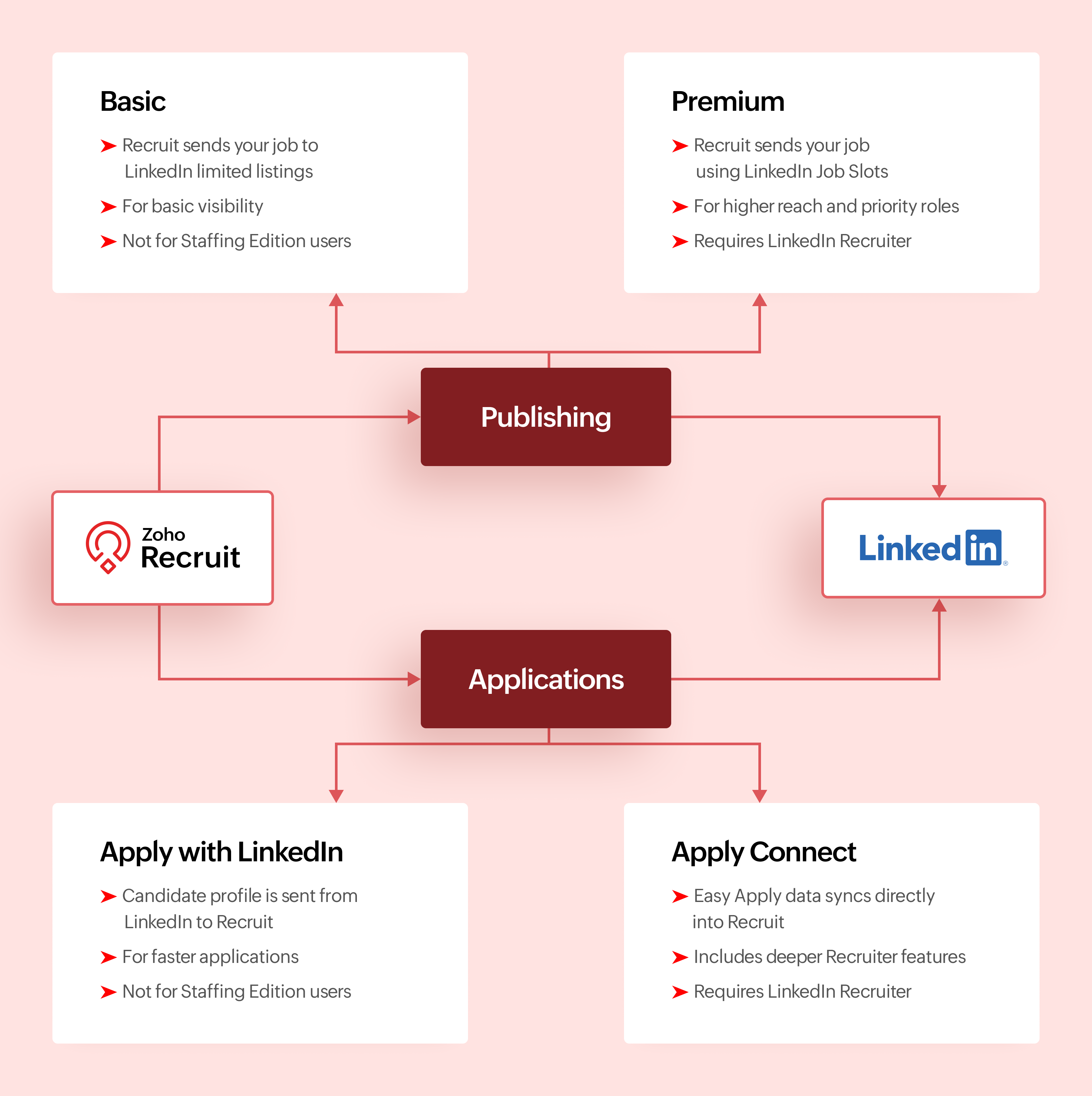

Activation Checklist

Use this checklist to set up LinkedIn with Zoho Recruit so jobs and Easy Apply applications flow correctly.

Step #1: Connect LinkedIn Easy Apply to Zoho Recruit

  1. Connect your LinkedIn account to Zoho Recruit
  2. Turn on Apply Connect so Easy Apply applications are sent directly to Zoho Recruit
Info
Why this matters
This ensures candidates who apply through LinkedIn Easy Apply appear automatically in Zoho Recruit.

Step #2: Choose how you post jobs on LinkedIn

  1. Decide how jobs will be posted from Zoho Recruit.
  2. If you use LinkedIn Job Slots, enable Premium Job Posting
  3. If you do not use Job Slots, enable Basic Job Posting
  4. Do not post the same job manually on LinkedIn outside Zoho Recruit
Info
Why this matters
Posting jobs from Zoho Recruit keeps LinkedIn jobs and ATS records in sync.

Step #3: Test Easy Apply and start hiring

  1. Post a test job to LinkedIn from Zoho Recruit
  2. Apply using LinkedIn Easy Apply
  3. Confirm the candidate shows up in Zoho Recruit
Once verified, please continue posting jobs and managing applications only from Zoho Recruit.

Comparing Integrations

Feature
Basic Job Posting
Premium Job Posting
Apply with LinkedIn
Apply Connect
Primary purpose
Publish jobs
Publish jobs with higher visibility
Simplify applications
Deep LinkedIn and Recruit integration
Category
Job publishing
Job publishing
Application capture
Application capture
Publishes jobs from Recruit
Yes
Yes
No
No
Captures applications into Recruit
No
No
Yes
Yes
Requires LinkedIn Job Slots
No
Yes
No
No
Requires Recruiter contract
No
No
No
Yes for advanced features
Available for Staffing Edition
No
Yes with Job Slots
No
No
Supported with self serve job posts
Yes
No
Yes
No
Candidate applies using LinkedIn profile
No
No
Yes
Yes
In ATS LinkedIn profile widgets
No
No
No
Yes
Applicant notifications
No
No
No
Yes
Best suited for
Standard visibility
High priority roles
Faster applications
End to end LinkedIn sourcing

Make the most of LinkedIn and Recruit together

LinkedIn delivers the best results when it is part of a connected hiring process.

Use Premium Job Posting for roles where visibility directly impacts hiring speed. Combine Apply with LinkedIn or Apply Connect with clear application stages in Zoho Recruit. Track candidate sources to understand where LinkedIn performs best. Keep candidate records clean so
LinkedIn data enriches your database instead of creating duplicates.

When LinkedIn sourcing and Zoho Recruit work together, recruiters spend less time managing tools and more time hiring the right talent.

What's Next?

Recruiter System Connect (RSC) is coming to Zoho Recruit. This upcoming capability will further strengthen how LinkedIn Recruiter data connects with Zoho Recruit, especially for teams that spend significant time sourcing inside LinkedIn Recruiter.

Why wait for RSC? 

  1. Everything in one place
    Post jobs, receive applications, and manage candidates directly in Zoho Recruit without switching tools.
  2. Cleaner data, better tracking
    Candidate profiles come in structured, making it easier to track sources and analyze hiring performance.
  3. Made for consistent hiring
    RSC supports repeat hiring on LinkedIn with reliable workflows and better visibility for recruiting teams.
More updates will be shared soon.

Let’s Talk!

LinkedIn can support hiring in many ways, but the real value comes from choosing the right integration for your Zoho Recruit setup and using it intentionally.

If you are already using any of these features, share what is working well for you. If you are exploring these integrations for the first time, tell us what you would like to learn next.

Questions? Suggestions? Leave a comment below or drop an email to support@zohorecruit.com

    • Sticky Posts

    • Zoho Recruit Community Meet-up - India (Venues Finalised)

      Zoho Recruit Community Meet-up - India (Venues Finalised) Namaste, India. 🙏🏼 The Zoho Recruit team is hitting the road—and we're absolutely excited behind the scenes. Join us for the Zoho Recruit India Meet-up 2026, a morning designed to make your recruiting
    • Zoho Recruit Community Meetup - London 🇬🇧 (Venue Finalised)

      Hello Recruiters! We’re excited to announce that the Zoho Recruit team is coming to the UK for an in-person Zoho User Group (ZUG) Meetup in London! This is your chance to connect with fellow Zoho users, learn from experts, and walk away with actionable
    • An update to improve email delivery | Email Authentication & Relay

      Update Rollout Latest Update: Enterprise users (8th July, 2025) This update is now live for Enterprise plan users in all regions. This includes People Plus, but not Zoho One, which will be covered in an upcoming update. Professional users (31st May 2025)
    • Zoho Recruit User Group Meet-up | INDIA 2025 (Venue Finalised)

      Hello Zoho Recruit users from India, We’re pleased and excited to announce our 2025 edition of Zoho user group meet-up in India in five cities! In this meet-up, our team of experts will help you understand the intricate nuances to use Zoho Recruit better,
    • Zoho Recruit is coming to the UK | Zoho Community Learning Series

      Customers from the United Kingdom, Exciting news: We will be in London for the Zoho Recruit user meet up. Our team will help you better understand the intricate nuances of Zoho Recruit to help you hire faster, inform about new and upcoming features, and
    • Recent Topics

    • how do i get mail.mydomain.com to point to zoho mail web-mail?

      I have started using zohomail, and am loving it. With my previous provider, I used to go to mail.mydomain.com, and it would take me to my webmail. I am not able to find the mapping for zoho's webmail to map to it. It is difficult to go to webmail with
    • Number of decimal places

      Hi Latha, I have added the following three fields to the Company module. Currently, these fields only allow a maximum of 2 decimal places. However, for some of our requirements, we need to enter values with up to 10 decimal places. Could you please help
    • zoho imap connection stopped working 05/28 12pm EST

      Hi, beginning Thursday, 5/28, ~12 pm est imap to siteground stopped working. When I tried to reconnect the account, connection was failing with the following message: Unable to connect SMTP server:gvam1107.siteground.biz, Port: 587. I did notice that
    • Request to Increase URL Field Character Limit

      Hi Arthi, Hope you are doing well. I'm trying to save a URL in the Work Order (WO) module using the URL field, but I receive the following error message: "Please enter a valid Repair File. Maximum 450 characters are allowed." The issue is that the URL
    • User Name in Zoho Cliq Not Updating Across Apps?

      We updated the name of a user in Zoho. (From Sue to Taylor) Her name has not been updated in Cliq on all apps. When in Zoho One, if I go to Cliq directly, it is correct, but if I am in another app, and the Cliq bar pops up on the bottom, it will be the
    • Service currently unavailable

      The Zoho Mail Webmail is working, the Mail Admin Console is not: "Our service is temporarily unavailable, please try after sometime." How long must I wait to retry? edit: To add to this, the Webmail is not working 100% - I can open mail in the inbox,
    • Service currently unavailable

      Service currently unavailable It is not possible to access email; the entire Zohoworkplace platform is down
    • User Permission Log

      Our external auditors are asking for a way to view changes made to user permissions (basically, a user permission change log). Is this feature built into Creator? 
    • E-mail down

      We cannot get into our email inboxes, are you affected by a Microsoft update issue? How long do you think as to restoration?
    • ZOHO MAIL SERVICE NOT WORKING

      Hello i've a problem my zoho mail account says a display with this text "our service is temporally unavaible"
    • ايميل مجانى

      Can I create a free email account on Zahoo?
    • Sign up for email for a domain

      Hi - I thought I had signed up for a domain of <domain>.com, but only see the email of @zohomail.com . How do I get the <domain.com> domain linked to my email?
    • Feature Request: Include Creator-applicable Deluge updates in the Creator Release Notes

      I'd like to put forward a suggestion about how Deluge updates are surfaced to Zoho Creator developers, and I'm hoping the Creator team will consider it. Zoho Creator is built on Deluge. Every workflow, custom function, validation and schedule we write
    • Deluge sendmail in Zoho Desk schedule can't send email from a verified email address

      I am trying to add a scheduled action with ZDesk using a Deluge function that sends a weekly email to specific ticket client contacts I've already verified the email address for use in ZDesk, but sendmail won't allow it in its "from:" clause. I've attached
    • Zoho Books | Product updates | June 2026

      Hello users, Welcome to this month's roundup of what's new in Zoho Books! We have an exciting line-up this time. The highlight is the launch of the all-new France Edition with full ISCA compliance. We're also introducing features such as Layout Rules
    • Partner with HDFC And Sbi Bank.

      Hdfc and sbi both are very popular bank if zoho books become partner with this banks then many of the zoho books users will benefit premium features of partnered banks.
    • name change of company in same GSTIN registration . how to retain historical company name for past transactions?

      hello I have recently change my company name from BHANU DIAM to BHANUMATI IMPEX in same GSTIN registration number While i have update the company name in profile name that change all my historic data like sale invoices and purchase bill , i would like
    • AUTOMATION OF INVOICE PROCESSING

      Dear Zoho Books Product Team, I hope this message finds you well. I’m reaching out as a dedicated Zoho Books user with a product idea that I genuinely believe could transform how businesses handle purchase invoicing — and set Zoho Books apart as the smartest
    • Zoho Books | Product updates | July 2026

      Hello users, We’re excited to bring you the latest updates in Zoho Books for July 2026! This month's release introduces Terminal Payments, CMP-08 filing for composition taxpayers, SEPA Credit Transfer support, the new Receipts and Payments Report for
    • Zoho ERP | Product updates | June 2026

      Hello users, We launched Zoho ERP on January 23, and since then, our goal has been to help businesses streamline and manage their operations with greater efficiency, flexibility, and control. Since the launch, we've continued to enhance the platform every
    • Zoho CRM Layout Rules: Nine New Actions, Profile-Based Execution, and Interactive Preview

      Hello everyone, Availability: This feature is now available for customers in the JP and SA DCs. It is planned to be released for other customers in soon. We’re excited to announce powerful new enhancements to Layout Rules in Zoho CRM - a feature built
    • Solution to Import OST File into Office 365.

      In today’s digital workplace, organizations are rapidly moving toward cloud-based email systems for better flexibility, security, and collaboration. Microsoft 365 has become one of the most widely used platforms for business communication. A common requirement
    • Zia AI capabilities now available in all paid editions

      Hello everyone, We are expanding the availability of AI-powered features in Desk to the other paid subscriptions from 7th July 2026. Right now, the following AI-based features are available for Enterprise edition users: Intelligence: Sentiment analysis,
    • Zoho Contacts *Web Interface Does Not Load* (Tested in Firefox, Safari)

      When trying to load https://contacts.zoho.com the error shown in the console is: The resource from “https://static.zohocdn.com/zmail/zm/newContactsChange11/js/main.js” was blocked due to MIME type (“application/json”) mismatch (X-Content-Type-Options:
    • Introducing Color Coding of Picklist Values

      Dear Everyone, Greetings!! Zoho CRM is uplifting the user experience. Recently, we had some notable aesthetic improvements in CRM like Kanban View UI enhancement, New List view UI enhancement, color coding of tags, and color coding of picklists in meetings.
    • Do Not Disturb status not respected when Cliq bar is enabled across Zoho apps

      Hi Zoho Cliq team, I want to report what appears to be a bug with how the Do Not Disturb status interacts with the embedded Cliq bar in other Zoho apps. **Issue:** When my Cliq status is set to Do Not Disturb, I continue to receive notification tones
    • Admin-Side Calendar Delegation from the Admin Console (Parity with Zoho Mail Mailbox Delegation)

      Summary Zoho Mail already lets organization admins delegate a user's mailbox to another user directly from the Admin Console — no approval from the mailbox owner required (Users > select user > Mail Settings > Delegated to > + Add). Zoho Calendar has
    • Desk Contact Name > split to First and Last name

      I am new to Zoho and while setting up the Desk and Help Center, I saw that new tickets created or submitted from the Help Center used the Contact Name field. This would create a new Contact but put the person's name in the Last Name field only. The First
    • Cliq iOS can't see shared screen

      Hello, I had this morning a video call with a colleague. She is using Cliq Desktop MacOS and wanted to share her screen with me. I'm on iPad. I noticed, while she shared her screen, I could only see her video, but not the shared screen... Does Cliq iOS is able to display shared screen, or is it somewhere else to be found ? Regards
    • How to change column headings in pivot table?

      Hi, Is there a way to rename the column headers of a pivot table? Now some the columns are named with value labels: 'SUM of .....'. We would like to rename those headers. As of now we couldn't find any direct solution to adjust the headers, besides copying and reformat. We want to avoid these extra steps. Best, Tiemen
    • How use .PK12 certifcate for sign

      Hello! Is it possible to use my personal digital certificate (as a COMMODO .pk12) to sign documents? Thank you
    • Automating CRM backup storage?

      Hi there, We've recently set up automatic backups for our Zoho CRM account. We were hoping that the backup functionality would not require any manual work on our end, but it seems that we are always required to download the backups ourselves, store them,
    • Restrict Zoho Cliq Webinars and Announcements to Admins Only

      Hi Zoho Team, We hope you're doing well. We would like to raise a feature request regarding in-app announcements in Zoho Cliq, such as the recent webinar popup about the Cliq Developer Platform: While these announcements are useful, they are not always
    • Blueprint - Mandatory file upload field

      Hi, File upload (as we as image upload) field cannot be set as mandatory during a blueprint transition. Is there a workaround? Setting attachments as mandatory doesn't solve this need as we have no control over which attachments are added, nor can we
    • Completed Calls don't associate with Scheduled Calls

      I schedule calls at specific times so that they are easily viewable on my phone. I open a given call on my phone and use the call icon at the bottom of the screen. I complete the call and select "yes" when asked if I want to log the call. I enter the
    • Integrations of freelancing websites

      It is a customized effort which we require to be implemented on our Zoho recruit. We want that Upwork and Freelancer and other such freelancing websites get integrated into our Zoho Recruit, so that, any communication which we do with the candidates from those websites gets directly recorded on our Zoho recruit and we don't have to move back and forth by opening any other application other than Zoho. If this can be done, we think of managing the entire communication through Zoho recruit and use it
    • Workflow Preventing others from editing

      Using workflows in WorkDrive to implement a document review process has been extremely helpful in my organization. The only problem is that other users who have access to the document via standard document sharing rules are unable to edit the document.
    • MCP > Creator connection failing with Claude

      I'm trying to get claude to access any of my Zoho Creator apps and it keeps failing. I have enabled all tools for creator and ensured in claude settings that everything is authorised. Here is what claude says : Unfortunately, the error messages I'm receiving
    • Zoho Analytics UI Bug

      Hello, all, The Aggregate Formulas in Zoho Analytics' list of fields have a 3-dot menu: If the formula has a long name, the name is not fully visible in the list, and a 3-dot menu is not accessible from it: This is not convenient, especially when the
    • Poor Zoho Support

      Been trying to reach support via telephone and email. The support has always been slow to respond but now its been two weeks without a return call. I have even sent them screen shots of the problem I've having with no results. Is anyone had the same problem.
    • Next Page