Leverage layout rules to customize workflow
 Layout rules in Zoho Sprints primarily aim to customize the field layout of your creation forms to meet complex requirements. But it doesn't stop there. Its customization can push the boundaries of how your fields behave, how data is gathered, how processes are branched out, and how workflow is channeled.
Based on conditions, you can tailor field behavior, direct the life cycle of an item, mandate specific actions, restrict the field options, or auto-assign users. The possibilities are aplenty.
We've tried to provide a few sample scenarios that help you automate your data collection and progress tracking flow. If you have any specific requirements, please state them in the comments, and we'll find out if layout rules can help you.
Use case 1: Restricting item statuses based on work item types
With layout rules, each item type can have its own workflow. This means it can have its own unique set of statuses that align with its specific lifecycle.
Let's assume you have three item types: Bug, Story, and Task.
Each type follows its own lifecycle, represented by the following statuses.
- Bug goes through the To Do, In Progress, Bug Fixing, Bug Testing, and Done statuses.
- Story has To Do, Ideation, In Progress, Development, Review, and Done.
- And Task moves through a simple To Do, In Progress, and Done.
To align with these flows, certain statuses should not be available to specific item types. For instance, a story or a task should not be moved to the Bug Fixing status. Similarly, a bug or a task should not be moved to the Development status.
To enforce this, we can create layout rules that control which statuses are available based on the item type.
So, we'll create three conditions with each item type as the primary field.
- If the item type is Bug, specify the condition with the trigger action to restrict the status pick list to To Do, In Progress, Bug Fixing, Bug Testing, and Done.
- If the item type is Story, specify the condition with the trigger action to restrict the status pick list to To Do, Ideation, In Progress, Development, Review, and Done.
- If the item type is Task, specify the condition with the trigger action to restrict the status pick list to To Do, In Progress, and Done.
Together, these conditions control the status progression for each item type. So, when you create a bug, it will only progress into the statuses that belong to the Bug lifecycle.

Use Case 2: Restricting future statuses based on the item's current status
When your team requires a pre-defined strict workflow where an item can be moved from a specific status to only a few statuses, layout rules can help implement this. For example, an item in the Bug Fixing status should only move to Bug Testing, and no other status. This way, each status controls the next status in the workflow.
To ensure this, create layout rules specifying conditions for each of the item status:
- If the status is To do, specify the condition with the trigger action to restrict the status pick list to In progress and Rejected.
- If the status is In progress, specify the condition with the trigger action to restrict the status pick list to In progress and Development.
- If the status is Development, specify the condition with the trigger action to restrict the status pick list to Review Level 1.
- If the status is Review Level 1, specify the condition with the trigger action to restrict the status pick list to Reopen and Review Level 2.
- If the status is Reopen, specify the condition with the trigger action to restrict the status pick list to In progress.

Use case 3: Making a field mandatory based on item status or item type
Let's assume you want a field to be made mandatory only when the item is moved to one particular status. Which implies the field will remain non-mandatory during other statuses and will be mandatory only at that particular status. So, the progress to that status must be allowed only when the mandatory field is updated.
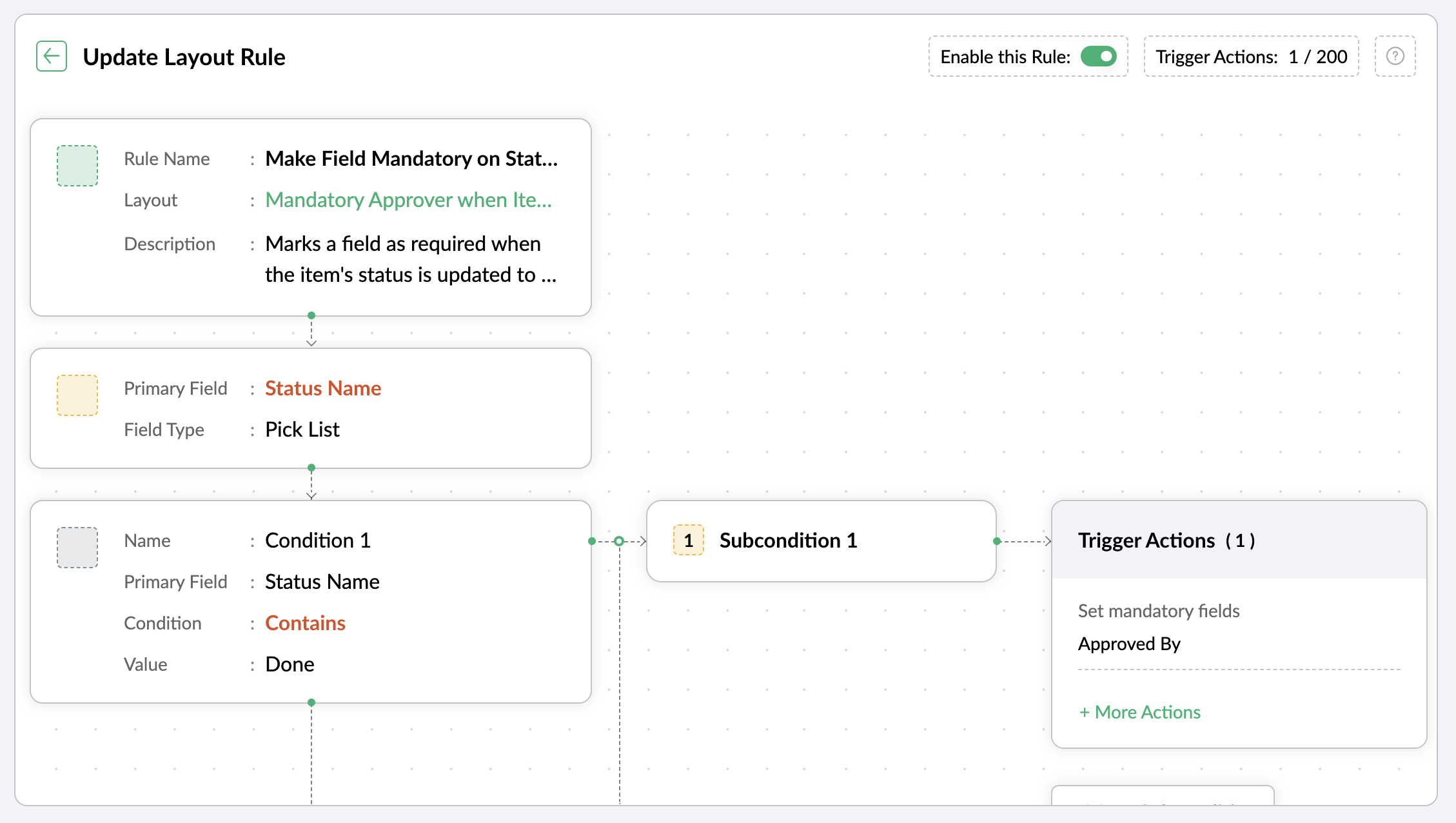
For instance, when an item is moved to the Done status, the Approver field must become mandatory to record completion approval. To ensure that this process is executed, you can create a layout rule where the primary field is the Status Name. If the status field is updated to Done, specify the condition with the trigger action to set the Approver field as mandatory.
Use case 4: Showing or hiding a section or field based on item types
Layout rules enable you to show or hide fields or sections based on item type conditions.
Let's say a section with fields related to a new feature should only be visible when the item type is New Feature.
Similarly, when the item type is Security Issue, the section with fields related to Security issue must be visible.
To achieve this, create a layout rule with Item Type as the primary field.
- Create a condition for the New Feature item type with a trigger action to show the New Feature Details section.
- Create a condition for the Security Issue item type with a trigger action to show the Security Issue Details section.

Use case 5: Selecting specific assignees for item types and priorities
Layout rules can help you assign users based on the item type and priority. Let's say your team has a group of developers with varied levels of experience and expertise. You want to assign the high priority items to a more experienced member like John, while assigning low priority items to a novice like Peter.
If the item type is Bug and the priority level is Critical, you can assign the bug to John. If the priority level is High, it goes to Peter.
To meet this requirement, you can create a layout rule with Item Type as the primary field.
- Create a condition for the item type Bug with a subcondition where the priority level is Critical and the trigger action has the Set Field Value Assignee as John.
- For the same condition, add a subcondition where the priority level is High and the trigger action has the Set Field Value Assignee as Peter.
Similarly, say you want the Task item type with a medium priority level to go to Helen, and a low priority level should go to James.
- Create a condition for the item type Task with a subcondition where the priority level is Medium and the trigger action has the Set Field Value Assignee as Helen.
- For the same condition, add a subcondition where the priority level is Low and the trigger action has the Set Field Value Assignee as James.

These are just a few examples of how layout rules can streamline your project management. Do you have any particular scenario that needs resolution? Please share it with us.
Thanks,
Zoho Sprints Team
Topic Participants
Neethinila R
Sticky Posts
Tip #28 - Plan less and deliver more using WIP limit in Zoho Sprints
Hello, It's been a while since we met with a quick, interesting tip. As the saying goes, "Too much of anything is good for nothing", today the focus is on delivering your outcomes with the right amount of planning. Your plan should be practical, calculative, and achievable for driving a qualitative success. Laura's plan Laura has a habit of planning her project deliverables before assigning work to her team-mates. Once the plan is finalized, she schedules a general meeting with her team andTip # 3- Working on the Scrum board
Continuing from our Tip #2 on leading to a sprint, let's see how to manage the work items on the Scrum board. Once you start the sprint your work items are automatically displayed on the Scrum board where you will actually manage the work items. It is a snapshot of the backlog items identified for the current sprint. The layout of the Scrum board Simply put, the scrum board is just like a physical board with sticky notes on which the work items of the active sprint are displayed. The scrum boardTip#2- Leading you to a Sprint
Product Backlog After the user stories are written and finalized, they are sorted to create the Product Backlog for the project during the Backlog Grooming meeting. This is a master list of all the work items that have been identified for the project and sorted by priority. Requirements are not constant during this period.The Product Backlog is dynamic and is an ongoing process. Every user story in the Product Backlog is customer centric. The Product Backlog includes: User centric stories based onTip #1- Why swimlanes?
Lanes define a clear path to reach your destination. In Agile, swimlane is one such concept that sets a simple and clear process of the work that you do. The concept of swimlane can be related to the pool, where the swimmers gather in their respective lanes to start off. Similar to the pool, work items are grouped in different categories. Each category is referred as a lane and is displayed in horizontal format. Swimlanes are effective in categorizing the work items with respective to specific
Recent Topics
Customize Column in Projects - Default View for Template?
Is there a way to have the columns you'd like to see added to a template? I want my customized columns to show up every single time I create a project from that template. It appears I can customize them in the template but when I create the project they do not transfer over. Template: See below how the columns in order are : Task, Owner, Status, Assigned, Website URL, Blog H1..etc. When I create a project from that same template it comes out as: Task, Owner, Status, Tags, Start Date, End Date, etcAsk the Experts 24: Analytics, data administration, and mobile experience with Zoho Desk
Hello Everyone! Welcome back to the Ask the Experts(ATE) series! We were so focused on our Autumn 2025 release that we didn't host an ATE session last month. In this month's ATE, we'd like to expand our areas for discussion: we'd like to listen to yourMulti-Page Forms in Zoho Creator!
Let’s make long applications easier to handle by dividing them into pages, adding a progress bar, and guiding users step by step through complex data entry. This would be a total game-changer for the user experience and could significantly boost completionEmail login error
Login successfully but email page errorShared Mailboxes Disappeared
Zoho Mail users in our company haven't been able to see their Shared Mailboxes for the past few hours. I've checked with App and Web Access, but they can't access them. When I send emails to their addresses, I get no error messages. They're still visibleRemote Server is misconfigured
Dear Team, I am unable to use email id as remote server is misconfigured. It would be really great if you could help on this and get this resolved. Thanks & Regard Rohit Guptawhy cant i access my email account. it keeps asking me for reverifiying my account by entering my password.
I cant access my account. it keeps asking me for reverifcaton by entering my password. once its entered it asks for it over and over.Free webinar alert on October 16 - Less Complexity, More Security: Workplace + Directory
Hello Zoho Workplace Community! Security and productivity shouldn't be at odds—and with Zoho, they're not. Discover how Zoho Workplace + Directory delivers seamless collaboration with enterprise-grade security, all in one integrated ecosystem. Join ourWorkdrive and ChatGPT Team Synced Connectors
Hi, we want to be able to integrate Zoho Workdrive with OpenAI’s ChatGPT Team plan. Google Drive and OneDrive both offer this, zoho please catch up asap. We dont want to have to put our company files in google drive, we want to allow chatgpt Team editionAlias Name (on items) use case in Zoho inventory
Hey, Hope everyone is well. Wondering if anyone can shed some light on the use case of Alias Names on Products in Zoho Inventory? Cheers, ChrisUpdating an Invoice Line Item's Discount Account via API Call / Deluge Custom Function
I need help updating an invoice line item's discount account via API. Below is a screenshot of the line item field I am referring to. Now the field to the left of the highlighted field (discount account) is the sales income account. I am able to modifySend e-mail with attachments
Dear Zoho, How is that possible in Zoho Flow to send an e-mail with attachment? Just a simple example: Zoho Flow checks my Zoho mails and if the conditions starts the trigger then I would like to send an email with the original email's attachment. Any idea? BR, AdamHow to I get checkboxes on a subform to update via deluge
Hello, would someone be able to tell me what I'm doing wrong here? I am trying to take the contents of a Deals subform and add them to an invoice then update the checkbox on each row so that 'add to invoice' is unticked and 'invoiced' is ticked. The outputUnified customer portal login
As I'm a Zoho One subscriber I can provide my customers with portal access to many of the Zoho apps. However, the customer must have a separate login for each app, which may be difficult for them to manage and frustrating as all they understand is thatZoho Projects - Task Owner filter at Project level
Hi Projects Team, The feature requests I would like to raise is the ability to create a custom view at the project level for projects with tasks owned by a user or users. For example "Ashley's Projects" custom view might contain a list of project in whichCadences
I have just started using Cadences for follow-up up email pipeline. Is it just me or do you find the functionality very basic? For example, it will tell me (if I go looking for it) if someone has replied to a follow-up and been unenrolled; but it won'tWould be really awesome to have Created Time and Modified Time showing for custom functions list
It would be SO HELPFUL to be able to sort custom functions by created time/ modified time. Also seeing a created by/ modified by with the little profile picture would be supremely helpful as well. Just really hard sometimes to find a function you wereTicket Export Does Not Include Ticket Threads
Dear Zoho Desk Support Team, I hope you’re doing well. I would like to report an issue regarding the ticket export functionality in Zoho Desk. Currently, when exporting tickets, the ticket threads or conversation history are not included — only the ticketPayments made notification
This is a really wonderful feature but we can only use it for about 50% of payments made & have to revert to sending statements which is a real chore. Credits applied to the bills paid in the notification aren't included & this causes great confusion in the accounts receivable departments. Please, please add this required feature asap ! .....ZOHO DESK link with Power BI
HI, I am using ZOHO Desk for last two years and now my client is asking to integrate ZOHO desk data to Power BI so that they can use Data for reporting. Kindly guide in details so that i can give access to ZOHO desk export data for more visibility.URLs being masked despite disabling tracking
Hey, We had disabled click tracking from an email update we are sharing with our users. Despite this, the URL the end user is receiving is masked, and looks like "https://qksyl-cmpzourl.maillist-manage.net/click/1d8e72714515cda6/1d8e72714515ca70" insteadDashboard Autorefesh
Good day, I am a dashboard that displays the number of tickets based on "Product Name". This dashboard is displayed on a big TV for the team to monitor. Can the dashboard auto-refresh every few minutes to display the new values? Currently, we have closedDeferred/ Unearned revenue
Dear Zoho Team, Just in case you have missed out my query posted few days ago: We issue invoices relating to 12-month web hosting service. When we issue the invoice, we should record the entire amount of the invoice as DEFERRED/UNEARNED REVENUE (ie. $10Bigin Android app update: Zoho Books integration
Hello everyone! We’re excited to introduce Zoho Books integration on the latest version(v1.8.5) Bigin Android app. Once the integration is completed in the web(bigin.zoho.com), the Zoho Books tab will be visible in detail View of Contacts, Companies,Audit Log enhancements: Increased retention period, better user visibility, and more
Hello everyone, The Audit Log brings in the following enhancements which improve the overall ability to manage data. Why did we make these updates? Extended Data Retention: Audit data can now be filtered and exported for a 60-day period, doubling theQuestion Regarding Managing Sale Items in Zoho Books
Good day, I was wondering about something. Right now, Zoho Books doesn’t seem to have a way to flag certain items as being on sale. For example, if I want a list of specific items to be on sale from October 1 to October 12, the user would have to exportSystem flaws and lack of response from Zoho
I have had to go on here as no-one is replying to my emails regarding my problem (been 10 days and no email reply) and your chat facility online through your Zoho Books software opens and closes immediately, so not functioning properly. I actually calledCustomer Grouping
Hi, how can I group multiple customers into single group. So that I can have idea of accounts receivables of all the customers in single group. Like if there are multiple subsidiaries of same company we have having a business with, and want to view theTwo currencies
More and more I am finding that internattional payments' fees are unpredictable. I would like, on my invoices that are in a foreign currency (eg. USD$ or EUR€) for there to be a GBP£ TOTAL display alongside the invoice's currency total. This would makeGST Slabs Redefined: Stay Compliant Using Zoho Books!
Hello Everyone! The Government of India is rolling out new GST rates, a major reform aimed at simplifying the current tax structure starting 22 September 2025. GST will move from four slabs (5%, 12%, 18%, 28%) to two main slabs (5% and 18%), plus a specialEdit item custom fields
Getting this error : Transactions have been created with the custom field. Hence it cannot be deleted. Not trying to delete it, just trying to change which modules to show in or to not show at all in transactions !Use Zoho Books to bill for work done in Zoho Desk??
I'm trying to see if something is possible (and if yes, how). We use Zoho One to manage our business. We have a lot of clients that will put in a ticket (via portal) to have work done. Out techs will pick up the ticket, do the work, and then log the timeZoho Finance Suite - Customer Custom Tabs - Dynamic Link
Hi Finance Suite team, When creating a Custom Tab for a Client Portal, there is no option to add dynamic parameters. This would be very helpful for adding Zoho Analytics dashboards which can be dynamically filtered through the URL to only show informationBank Receipt Catagorization
Hi, how can I match a bank deposit to multiple customer's invoices ? For e.g. A single person paid to us on behalf of different five customers. I need to keep the separated invoices for each customerPayment on a past due balance
Scenario: Customer is past due on their account for 4 months. We suspend their billing in Zoho books. Customer finally logs into the portal and enters a new credit card. We associate that cardwith their subscription, which will permit the card to be usedHow to export all line-item descriptions for a specific item in Zoho Books?
I am trying to audit a specific item (“Item X”) that has been invoiced multiple times with different line-level descriptions. Here’s the situation: I am using Zoho Books (Professional). Each invoice may contain the same item but with different descriptionsList of hidden features
Hi Friends, I had another support chat today and low and behold the feature that I wanted just simply needed to be "enabled". I thought I'd share, and maybe see if others had some similar experiences. 1. This one is from 5 ish years ago. I asked if thereHow to change a BAS that has been filed
I have discovered that a group of expense transactions were accidentally placed in a asset account rather than an expense account. As a result I need to adjust the transaction and consequently most of my BAS to correct the error. Because the BAS haveHow to Export PDF with a custom Template
I need to export Sales Order with a Custom Template I have created How can I do it? I see an API to export the PDF but how can I choose which template to choose to generate the PDFAssociate email with a potential or project.
I have a pivotal requirement to associate emails from various suppliers (contacts) with different potentials or projects, on an email by email basis as they come in. This question appears to have been raised before but I cannot find a definitive yes "it can be done". Could anyone please tell me, yes or no. If the later I can stop wasting time and look at alternative crm systems. I would love not to have to do this. Thanks in advance.Next Page