Mailbox delegation - A secure way to enable collaboration

Mailbox delegation - A secure way to enable collaboration

Admins often encounter scenarios where a user needs another team member to access and manage their mailbox during extended leave, role transitions, or while handling high email volumes.

In such situations, ensuring business continuity without sharing login credentials or compromising security is critical.

Before enabling access, admins should consider:

  • Sharing mailbox passwords creates serious security and compliance risks.

  • Emails may be missed or delayed if access is not provided promptly.

  • Delegates usually require specific permissions, not full account access.

  • Administrators need visibility into delegation mappings and access controls.

To address these needs, the Mailbox delegation feature in the Zoho Mail Admin Console allows users to securely access and manage emails on behalf of a mailbox owner within the organization.


When a mailbox is delegated:

  • The delegate can read, respond to, and manage emails.

  • No password sharing is required.

  • The delegate does not need to log in as the mailbox owner.

  • Admins can define the level of permissions granted.

Why use mailbox delegation?

Executive assistance & shared responsibility

Executives and key employees often require assistants or team members to manage their inbox. Mailbox delegation enables delegates to read, respond to, and organize emails on their behalf, without sharing passwords, ensuring secure and structured collaboration.

Team-based email handling

For departments handling high volumes of emails (such as support, sales, or operations), delegation allows multiple authorized users to manage a single mailbox efficiently. This ensures faster responses while maintaining clear access control and accountability.

Temporary coverage during absence

When an employee is on leave, traveling, or temporarily unavailable, delegation allows another user to manage their emails seamlessly. This prevents missed communications and ensures business continuity without compromising security.

Steps to enable mailbox delegation

To enable or disable mailbox delegation in an email policy:

  1. Log in to Zoho Mail Admin Console.

  2. Navigate to Mail Settings > Email policy > Policies.

  3. Choose the policy for which you want to enable/ disable Mailbox delegation access.

  4. Navigate to General > Mailbox delegation access.

  5. Turn On/ Off the toggle switch to enable/ disable the access.
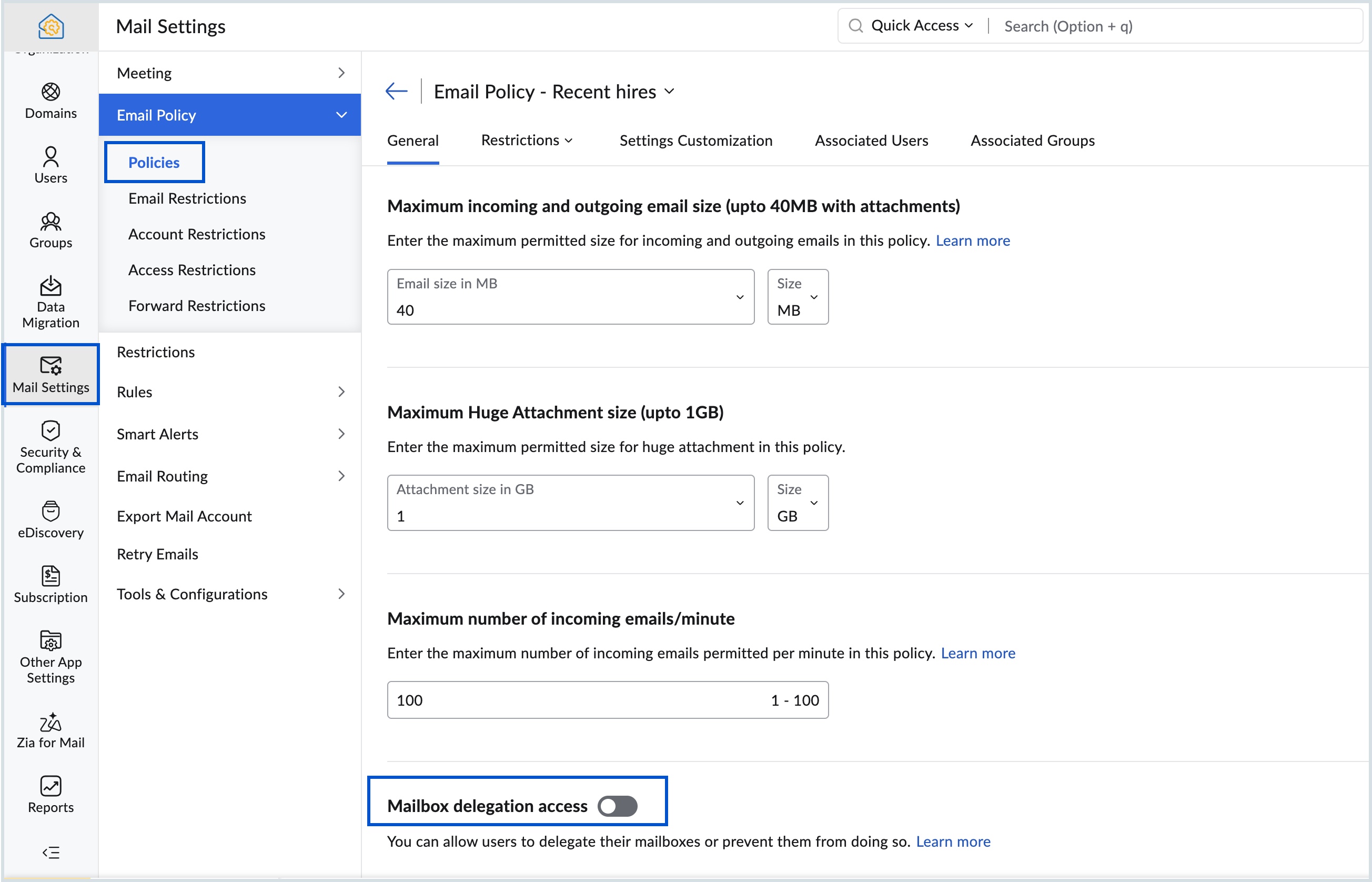

If you disable the mailbox delegation access, users will not be able to view the mailboxes delegated to them or delegate their own mailbox to others.

Know more about the steps to delegate a user's mailbox.


    • Recent Topics

    • Account Blocked due to Suspicious Activity.

      Hello, Trying to get access to my account, I have found this message above in the subject of this message. I am unable to log back to my account (see err. mess. below.) and thus cannot get rif of this following the Zoho procedure : I followed the step
    • SAML authentication in Zoho Mail: Simplify and secure your organization's login management

      Managing login credentials across multiple web applications can be challenging for organizations with a large number of users. Without a centralized authentication system, users are required to maintain separate passwords for each application, increasing
    • How to prepare a balance sheet for a company that has no operations yet?

      .
    • Can't create new account in zoho email

      Hello, i'm trying to create some free accounts to my customers... and since yesterday i can't create a new account, what is wrong? why i can't create free account? Thank You
    • Name autocomplete

      Hi, During searching emails the web tool does not always propose the auto-completion of the saved emails. As a result I either have to go to contacts and look up the exact email, or the exact full name including the middle name and any dots, which is
    • Introducing Incentives for Zoho CRM: Build, automate, and track sales commissions

      Dear Customers, We are here with an amazing news! We built a direct solution to help manage your commission provisioning activity in your business. From creating commission plans to issuing payouts, this application leverages your sales reps’ performance
    • Specific ListView Canvas on Canvas Home Page Always Loads Most Recent ListView, Not the One Specified

      I had mentioned this to ZOHO, but I mainly wanted to see if others in the Community are also facing this problem. I created a Canvas ListView for a Custom Module, and then created a Canvas Home page (technically on a tab item, but I'm not sure if that
    • Reminder Settings - Time Tracker

      On the time tracker in Reminder Settings I created a reminder according to the Zoho manual. But a manager asked me to change the message that goes in the email. Is it possible to change the message? I didn't find that in the Zoho manual. Another question: I configured to receive the reminder everyone who logged in less than 40 hours. Does Zoho consider less than 40 hours of the current week or the whole month? Another situation, I put it so that I and another specific user would receive the notification,
    • Create a single record from multiple images with ICR

      Hello all, Zia's Intelligent Character Recognition can now create a single record from multiple images based on the configured ICR rule. Users can upload up to three images at once, such as an ID, a passport, and a business card, and Zia will extract
    • SPF failure in android app

      I have no domain. I am not admin of anything. All I want to do is send an email from a zohomail.eu address, using the Zoho android app, with all settings as default. I do not use Office 365, or EOP, or Outlook, and I have no domain or domain registrar.
    • Zoho Books | Product updates | August 2026

      Hello users, July has been an exciting month for Zoho Books! This month, we're excited to introduce HTML PDF Templates, Placeholders as Pills, expanded approval workflows for Sales Returns and Journals, and significant compliance updates across the India,
    • Page Not Found error - 404 error

      Hello, I am a first time user of zoho sites.I just published my website dentistinminneapolis.com but its giving me a 404 error.Please look into it ASAP and help with the problem.
    • What's New in Zoho POS - September 2026

      Hello everyone, Welcome to Zoho POS’s monthly update, where we share our latest feature updates, enhancements, events, and more. Let’s take a look at how September went. Global Edition of Zoho POS for Retail is here On September 28, 2026, we launched
    • New in Cadences: WhatsApp follow-ups, upgraded limits, and options for add-ons

      Hello everyone, We're rolling out two key updates to help you engage better and scale smarter with Cadences in Zoho CRM. Reach customers on WhatsApp, directly from Cadences Previously, Cadences have enabled you to automate follow-ups through emails, calls,
    • Announcing new features in Trident for Windows (v.1.43.5.0)

      Hello Community! This release includes a collection of enhancements and feature updates aimed at making your email and collaboration experience smoother. Let’s dive into what’s new! Zoho Desk email notifications as Smart Mail. Zoho Desk Smart Mail is
    • How to Manage Two GST Numbers / Two Companies in a Single Zoho Inventory Organization?

      Hi Team, We currently have two separate legal entities: A Proprietorship Firm with its own GSTIN A Private Limited Company with a different GSTIN However, operationally, both companies deal with the same products, and we would like to manage the physical
    • How To Implement an Auto-Check-out Feature for Attendance?

      If an employee forgets to check out, the system should automatically check out the employee at 6:30 PM
    • Convert an Existing Single Item into an Item with Variants

      Hello Zoho Team, Introducing variants is a great addition to Zoho Inventory. However, we would like to request an option to convert an existing single item into an item with variants. For example, Item A initially comes in only one colour, so we create
    • IP Address List > Sigma

      We have developed a ZohoCRM extension that utilizes API calls to our server from Deluge scripts and Widgets. Our API server has IP restrictions in place. To ensure successful communication, we require a list of IP addresses utilized by Zoho's platform
    • Default Country list suggestions on CRM is different then on Book; how do/did others address this?

      So I already have a support ticket in for this and waiting for a response but figured I'd ask the community also to see if others experienced the same problems and/or how they went about addressing it because sometimes I feel like I'm going crazy with
    • Object-level edit permissions

      Hi, we are currently running into a limitation with permissions inside larger workspaces. Our use case is a central Analytics workspace that contains many tables, Query Tables, reports and dashboards used by different teams. We would like to allow certain
    • Convert Sales order to Delivery Challan

      Dear Developer Team, In Zoho books we cannot convert sales order into delivery challan before making invoices. As a service business we have to get the delivery note signed then only we can make the invoice. In Some cases we don't receive a purchase order
    • What's New in Zoho Inventory | September 2026

      Hello users, September brings a range of new features and enhancements across Zoho Inventory. From improved inventory operations and reporting capabilities to greater customization, automation, and enhancements to Delivery Challans, there’s plenty to
    • Mirror Component in Zoho CRM: Access real-time related data without leaving your record

      Hi everyone, This feature is now available for the JP, CA, SA, UAE, and AU DCs. We're excited to bring to you Zoho CRM's mirror component, which presents relevant data on a record's details page and keeps everything users need in one place without having
    • All new Address Field in Zoho CRM: maintain structured and accurate address inputs

      Availability Update: 29 September 2025: It's currently available for all new sign-ups and for existing Zoho CRM orgs which are in the Professional edition exclusively for IN DC users. 2 March 2026: Available to users in all DCs except US and EU DC. 24
    • Create custom rollup summary fields in Zoho CRM

      Hello everyone, In Zoho CRM, rollup summary fields have been essential tools for summarizing data across related records and enabling users to gain quick insights without having to jump across modules. Previously, only predefined summary functions were
    • How to mix different types of inputs (such as dropdown list and textbox)

      Hi, I'm creating a form called "Room Reservations" for a company. I created a "table" using "Matrix Choice". I created "Room 1", "Room 2" and "Room 3" with the "Questions". I would then like to create two columns with the "Answers", one called "Department"
    • Feature Request: Render Markdown (.md) files in Zoho Cliq

      Hi, We regularly share Markdown (.md) files in Zoho Cliq. However, when we open these files in Cliq, the content does not render as Markdown—it displays as plain text. This forces us to copy/paste the content into an external Markdown viewer to read it
    • Dealing With One-Time Customers on Zoho Books

      Hello there! I am trying to figure out a way to handle One-Time customers without having to create multiple accounts for every single one on Zoho Books. I understand that I can create a placeholder account called "Walk-In Customer", for example, but I
    • Cash Basis VAT RETURN REPORT Required in Saudi Arabia

      Zoho Books in Saudi Arabia not showing TAX RETURNS report on CASH Basis.. It only showing accrual basis. Oforur requirement is both reports (Cash Basis and Accrual Basis ) , same like indian Edition of Zoho Books showing. CASH BASIS RETURN is our Basic
    • Tips & Tricks Series - #4 Customize your manual PDF before export

      Hello everyone! We’re back again with our Tips & Tricks series. Today, we’ll look at how you can customize your manual PDF before exporting it. With Zoho Learn, you can personalize the exported PDF with options such as headers, footers, colors, and custom
    • Digital Marketing Agency: Transforming Your Brand's Online Presence

      Imagine trying to build a house on your own without the necessary tools or expertise—it’s overwhelming, right? Digital marketing is the same.
    • Introducing Zoho Key Service, a simpler way to access LLMs without API keys

      Available in the Professional, Enterprise, and Ultimate editions in the US, IN, AU, JP, and CA DCs. Hello everyone, We are excited to bring Zoho Key Service (ZKS) in Zoho CRM, a simpler way for organizations to access and use third party LLMs. You can
    • Reach us through our official support channels

      Dear Customers, Thanks a lot for choosing Zoho! Our applications are built to help achieve your day-to-day business goals. We are committed to engaging with you, to understand and develop solutions that enhance your productivity. We are happy and ready
    • I cannot add user to my account

      I have an account, I deleted a user from the account and I have one unused licence which lasts for 23 days, I tried adding a new user and it said This user is not allowed to add in Zoho. Please contact support-as@zohocorp.com for further details, please
    • Domain Activation Issue

      I purchased a domain through Zoho, and as I understand it, you were supposed to send me a domain activation link. However, I never received it. As a result, I was unable to activate the domain, and it is now suspended. Because of this, I am not receiving
    • Grouping by Stage *type* in widgets

      Hi Can I ask for a new feature? I'd like to be able to group by stage type in a Deal widget. That is by whether the Deal is in an Open Stage, a Closed Won Stage, or a Lost stage. Currently I can group by Stage, but if we have 10 open stages and one Closed
    • Please release domain bravovietnam.com from an old account

      Hello Zoho Support, I am trying to set up Zoho Mail with my domain bravovietnam.com on my account office@bravovietnam.com. Every time I add the domain, I get: "This domain is already associated with this account" — pointing to a DIFFERENT, older account
    • ChatGPT Plugin / MCP Server auth error

      Hi all I'm trying to connect the ChatGPT plugin for Zoho CRM but after username stage of the auth process, I get this error from the URL https://mcp.zoho.eu/mcp-client/ {"error_description":"Invalid request url, Request is not as per defined in oauth
    • Creator -Dynamic addition of Customer Portal User Licenses

      Hi, We have a Creator App for B2C about to get released. We are experiencing the Portal User license challenge. Unable to predict the number of users who will download and Subscribe. When a User is about Subscribe and the portal licenses does not exists,
    • Next Page