Make record entry more organized with the Sections component in Wizards

Make record entry more organized with the Sections component in Wizards

Hello everyone!

Wizards in Zoho CRM have always helped you break long record-detail pages or large sets of fields into multiple screens, making data entry smoother and more user-friendly. Now, we’re taking a major step forward with a new Sections component—giving you greater flexibility to organize fields, text blocks, subforms, widgets, and more within each Wizard screen.

Why Sections?

Sometimes, even a single step in the Wizard may have too many fields or components. That’s where Sections come in. Instead of lumping everything into one page, you can now group related fields together in dedicated sub-areas. This keeps your Wizard screens uncluttered and easier to navigate.
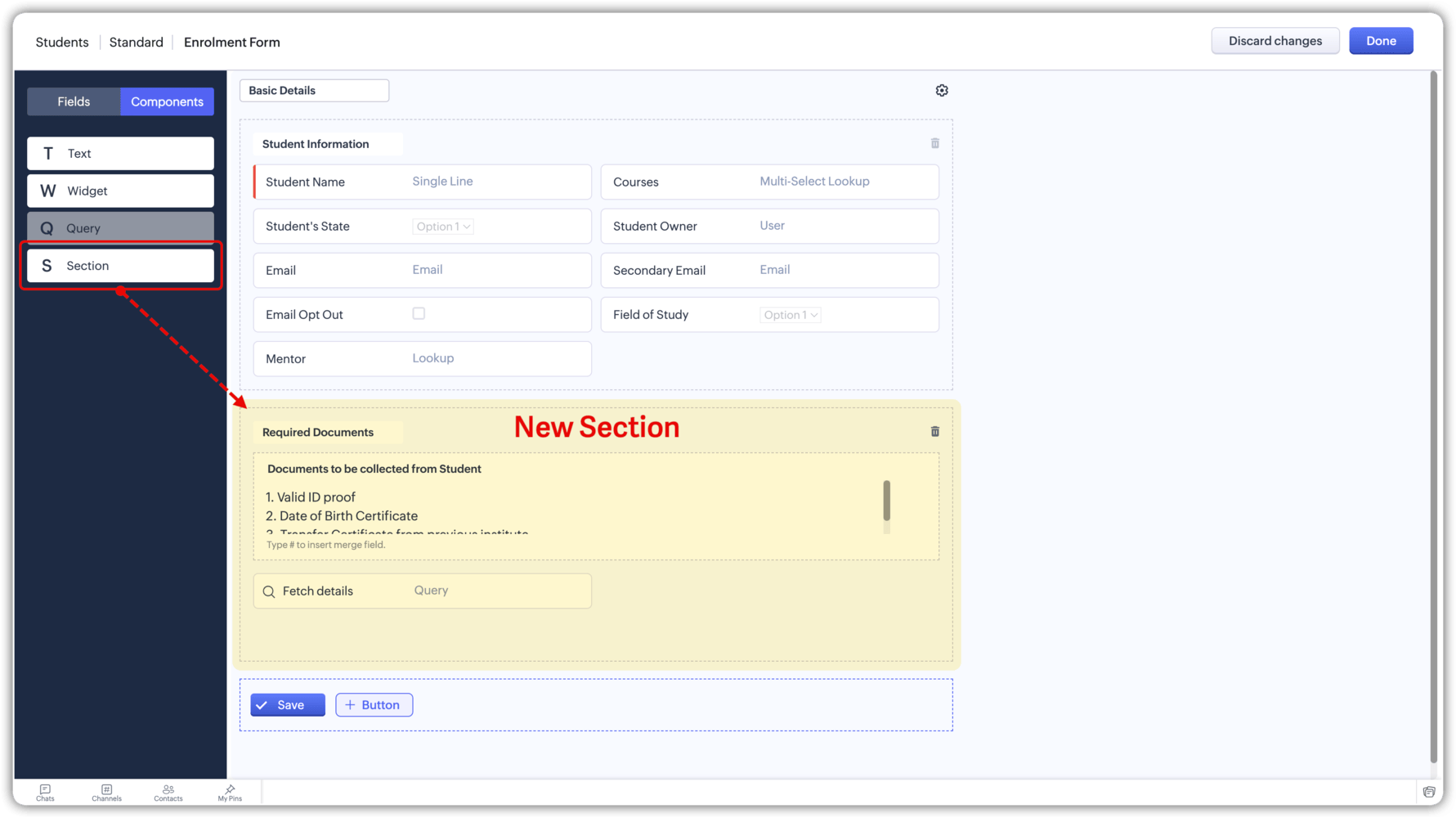


Imagine a Wizard step with two labeled Sections—one for “Personal Details,” another for “Policy Information.” Your users fill in only what’s relevant, see helpful text blocks as needed, and never feel overwhelmed. It’s like giving them mini-forms inside the bigger step, all neatly compartmentalized.


Key benefits
  • Faster, clearer data entry: Users see logically grouped information, so they know exactly where to place each piece of data.
  • Improved user experience: Less scrolling, less confusion—especially helpful for teams handling long or complex forms.
  • Greater flexibility: Whether you’re outlining disclaimers, capturing detailed product info, or grouping complex fields, you’ll have the layout control you need.

Here's everything that’s new

  1. Logical grouping
    You can now create distinct Sections on a single screen, each holding related sets of fields or components. No more cramming all your inputs into one cluttered block.
  2. Nest components inside Sections
    Some processes demand even more hierarchy. To handle this, you can add a widget, subform, or text label inside a section, helping you separate complex data even further—ideal for advanced use cases like patient intake or insurance forms.
  3. Section titles
    Each Section can have a title, making it clear for users what information goes there.
  4. Conditional rule
    Conditional rules are applicable for sections as well. Meaning, you can show or hide entire Sections based on user input (like checking a box or selecting a picklist value). 

Points to be noted:
  • You can add 10 Sections in a Wizard screen, giving you plenty of room to structure your data as needed.
  • A new section component cannot be placed inside another section component.
That's all for the enhancement. Let us know your feedback in the comments below.

InfoResources: Read about the Section component under the Components tab in the Elements of Wizard section.

Thanks,
Nizamuddin

P.S. These enhancements are now available for all users across all DCs.
    • Recent Topics

    • Host Group Appointments Online in Zoho Bookings

      Greetings from the Zoho Bookings team! We’re excited to announce a new enhancement to Group Booking that makes hosting online group events smoother and more professional than ever. You can now conduct online group events with auto-generated meeting links
    • Can't rename groups on Mac desktop app

      I'm working on an up-to-date Mac with a freshly downloaded Notebook app. I'm trying to rename a group within a notebook. Here I have, left to right, a note, a group, and a note. I select the group. On the top left, I select Action. On the dropdown, "Rename"
    • Workdrive Collaboration with an External User

      I would like to know if I can setup a collaboration space with an external user in workdrive or do I need to add them as a user on my system? If I need to add them, can I add them on Workdrive only and give limit access to our space only?
    • FSM integration with Books

      Hi, I have spent a few months working with FSM and have come across a critical gap in the functionality, which I find almost shocking....either that, or I am an idiot. The lack of bi-directional sync between Books and FSM on Sales Orders/ Work Orders
    • Marketing Tip #23: Help customers with how-to guides and usage tips

      Customers don’t stop needing you after they place an order. Helping customers use your product correctly and confidently can improve satisfaction, reduce returns, and increase repeat purchases. Sharing simple how-to guides, usage tips, or care instructions
    • Powering Customer Support with our women

      In Zoho Desk support, women make up 50% of our team. We see this as one of our strengths, reflecting the spirit of this year’s theme, "Give to Gain". Our women find their balance Women carry many responsibilities — they represent frontline support, lead
    • Function #25: Automatically generate purchase orders from a sales order

      We kicked off the "Function Fridays" series with the goal of helping you automate your everyday accounting tasks. As we delve into today's post, I'm delighted to announce that we're here to present the 25th custom function in this series. While it is
    • Looking for Guidance on Building a Zoho Website

      I'm exploring the possibility of building a custom website with specific features using Zoho as an alternative platform. My goal is to create something similar to https://gtasandresapk.com , with the same kind of functionality and user experience. I'd
    • Auto-publish job openings on my Zoho Recruit Careers Website

      I have developed a script using the Zoho Recruit API that successfully inserts new jobOpening records to my Zoho Recruit website, but my goal is to auto-publish to the Careers Website. The jobOpening field data shows two possible candidates to make this
    • ZOHO Reports are taking longer time to get refresh

      Hi Team, Since last few days, I'm facing issues in getting updated reports. For eg: right after making an expense entry or even posting a journal, it is taking longer then expected for the updated reports. Refer below: "You are viewing the report that
    • Sales IQ chat is not working in signed android apk

      I have integrated ZOHO sales IQ support chat and i have followed each step and its working fine in my development build but when i create signed APK for it. Chat does not work in it and showing awaiting for detail. I previously asked the same query but
    • How to add line breaks in zoho.cliq.postToUser(...) message?

      In a CRM function using Deluge I'm sending this message and attempting to add some line breaks but they are ignored. Is there another way to add these breaks? My message: message: New urgent task\nDescription \nThis is a fake description.\n A new line?
    • Enable Free External Collaboration on Notecards in Zoho Notebook

      Hi Zoho Notebook Team, I would like to suggest a feature enhancement regarding external collaboration in Zoho Notebook. Currently, we can share notes with external users, and they are able to view the content without any issue. However, when these external
    • Problem with CRM Connection not Refreshing Token

      I've setup a connection with Zoom in the CRM. I'm using this connection to automate some registrations, so my team doesn't have to manually create them in both the CRM and Zoom. Connection works great in my function until the token expires. It does not refresh and I have to manually revoke the connection and connect it again. I've chatted with Zoho about this and after emailing me that it couldn't be done I asked for specifics on why and they responded. "The connection is CRM is not a feature to
    • Update Existing Records greyed out in Free Version

      Trying to update records from an Excel sheet, and not getting the option to update. Only option is to add as new accounts. All documentation I can see says update should be an option! Accounts, Leads, Contacts, all the same.
    • In Lesson Video

      Can anyone help me with this? I'm not sure what happened. It suddenly became like that. I tried to reupload. I tried create a new lesson. Still the same. Please help!
    • emailing estimates

      Shows up in the customer mail logs as sent but nobody is receiving them, even when I send them to myself I don't get them ??? Something wrong with the mail server or my end ?
    • Help with deluge script

      Hi Community, this is my first Deluge script. I've pieced it together from reading various articles I want to use it in a workflow to 1 Convert a lead to a contact 2. Create a record in a custom module Below is what I have got so far but it does not fire
    • How to use OR when filtering using two fields

      I want to create return a list of Account Names by filtering on Field1 = "yes" OR Field 2 = "no" I can't see how to use the OR in the filter.
    • Mobile phone version not working well

      I am working on the Zoho Site Builder. In the preview the desktop version looks okay, but in the mobile phone preview many words are cut off in the weirdest (wrong) way. How can I fix that?
    • Zoho - Please explain difference between Thread view and Conversation view on Ticket

      I have reviewed the help document here but am still not clear on the difference between the two views. As an example, I just had a back and forth on a ticket: - Customer emails support email. - I email back from Desk. - Customer responds back. - I email back from Desk. On the upper left drop down box on the ticket Zoho Desk now says this is "4 Threads" and "4 Conversations" . How is that 4 threads?? By my count it is 1 thread and 4 conversations (assuming by "conversation" Zoho means number of total
    • I need help to take Reports for tickets moved between departments.

      Hi, I need help to take Reports for tickets moved between different departments. Pls guide Shyam
    • Export to excel stored amounts as text instead of numbers or accounting

      Good Afternoon, We have a quarterly billing report that we generate from our Requests. It exports to excel. However if we need to add a formula (something as simple as a sum of the column), it doesn't read the dollar amounts because the export stores
    • Increase Round Robin Scheduler Frequency in Zoho Desk

      Dear Zoho Desk Team, We hope this message finds you well. We would like to request an enhancement to the Round Robin Scheduler in Zoho Desk to better address ticket assignment efficiency. Current Behavior At present, the Round Robin Scheduler operates
    • Automation #6 - Prevent Re-opening of Closed Tickets

      This is a monthly series where we pick some common use cases that have been either discussed or most asked about in our community and explain how they can be achieved using one of the automation capabilities in Zoho Desk. Typically when a customer submits
    • Zoho Desk EU slow/unresponsive

      Has anyone else got issues with ZohoDesk today in the EU? It takes an age to come back and if you do start typing something and try and send or save it looks like it times out. We are also getting this pic. ot I can't see anything on https://status.zoho.eu/
    • EU DC Partial Outage Resolved: A Detailed RCA

      Incident Summary Due to an overload on one of the nodes in the EU DC for Zoho Desk, the system was unable to handle the heavy load, causing a slowdown in requests and resulting in a partial outage for customers with data residing in that node. On May
    • Perfomance Management - Zoho People

      Hi team, I am looking for performance management data such as KRA, goals, feedback, appraisals, etc., in Zoho Analytics. However, I am unable to find these metrics while editing the setup. Could you please confirm whether these fields are available in
    • Deprecation of the Zoho OAuth connector

      Hello everyone, At Zoho, we continuously evaluate our integrations to ensure they meet the highest standards of security, reliability, and compliance. As part of these ongoing efforts, we've made the decision to deprecate the Zoho OAuth default connector
    • Zoho Mail iOS app update: Display recipient's nickname on contact suggestion

      Hello everyone! In the most recent version(v3.3.1) of the Zoho Mail iOS app update we have brought in support to display recipient's nickname in contacts suggestion. Please update the app to the latest version directly from the App Store or using the
    • Digest Février - Un résumé de ce qui s'est passé le mois dernier sur Community

      Bonjour chers utilisateurs, Le 26 février, nous avons organisé notre première session Ask the Expert de 2026. Nous sommes heureux de partager que ce fut une session très interactive, avec de nombreuses questions intéressantes posées par nos clients. Si
    • Zoho CRM Case Notes - Share to Customer

      Hi team does anyone know the Api to set a note, against a case, to shared with customer? i cant seem to find it  cheers 
    • Synching changes to Stripe when changes are made in Zoho Billing

      We have a situation where we have merged customers in Zoho BIlling and then found out later that the payment in Stripe was not updated and still associated with the old customer record. The card gets updated and billed, but that payment is still associated
    • Send out follow-up email in the same thread (threaded conversations in individual emails) from Zoho CRM

      Hi, I'm new to Zoho. I'm trying to send individual emails to my leads one by one. And I'll send out follow up email if I don't hear back from them later. However, instead of sending a new email, I want to reply in the same email thread so that the recipients
    • Depositing funds to account

      Hello, I have been using Quickbooks for many years but am considering moving to Zoho Books so I am currently running through various workflows and am working on the Invoicing aspect. In QB, the process is to create an invoice, receive payment and then
    • web to lead

      Can anyone help me how to create web to lead from zoho marketing automation
    • Introducing Workqueue: your all-in-one view to manage daily work

      Hello all, We’re excited to introduce a major productivity boost to your CRM experience: Workqueue, a dynamic, all-in-one workspace that brings every important sales activity, approval, and follow-up right to your fingertips. What is Workqueue? Sales
    • UI issue with Organize Tabs

      When looking at the organize Tabs window (bellow) you can see that some tabs are grayed out. there is also a "Add Module/Web Tab" button. When looking at this screen it's clear that the grayed out tabs can not be removed from the portal user's screen
    • I created a signup form in Zoho Marketing Automation with the correct field mapping, but the data is not being reflected under Leads in Zoho CRM.

      web to lead from zoho marketing automation
    • Pasted Images not being embedded in custom mail

      Hi, I'm making a custom report by email based on commentaries. I have the email ready, all working great except for images that are being pasted in the commentaries. Zoho deals with them as temp images and so it requires authentication to view them, something
    • Next Page