Spotlight #7 - Automatic Transitions in Blueprint
Previously, records could not be moved from one state to another without user intervention. With automatic transitions, move records from one state to another automatically, when it elapses its pre-defined time. This Spotlight discusses how automatic transitions optimise your sales conversion process in Blueprints. If you'd like a deeper understanding of how Blueprint works, check this out.
Automatic Transitions in Blueprint
Automatic transition, as the name suggests, auto-moves a record from one state to another state when it exceeds a pre-defined time. We can set the time, varying from 15 minutes to even months for the automatic transition of a record to another state. It fills the process gaps where mistimed or delayed transitions can be triggered, as fail-safe default transitions in a sales process. Thus preventing sales process delays and helping to optimize conversion.
Business use-case
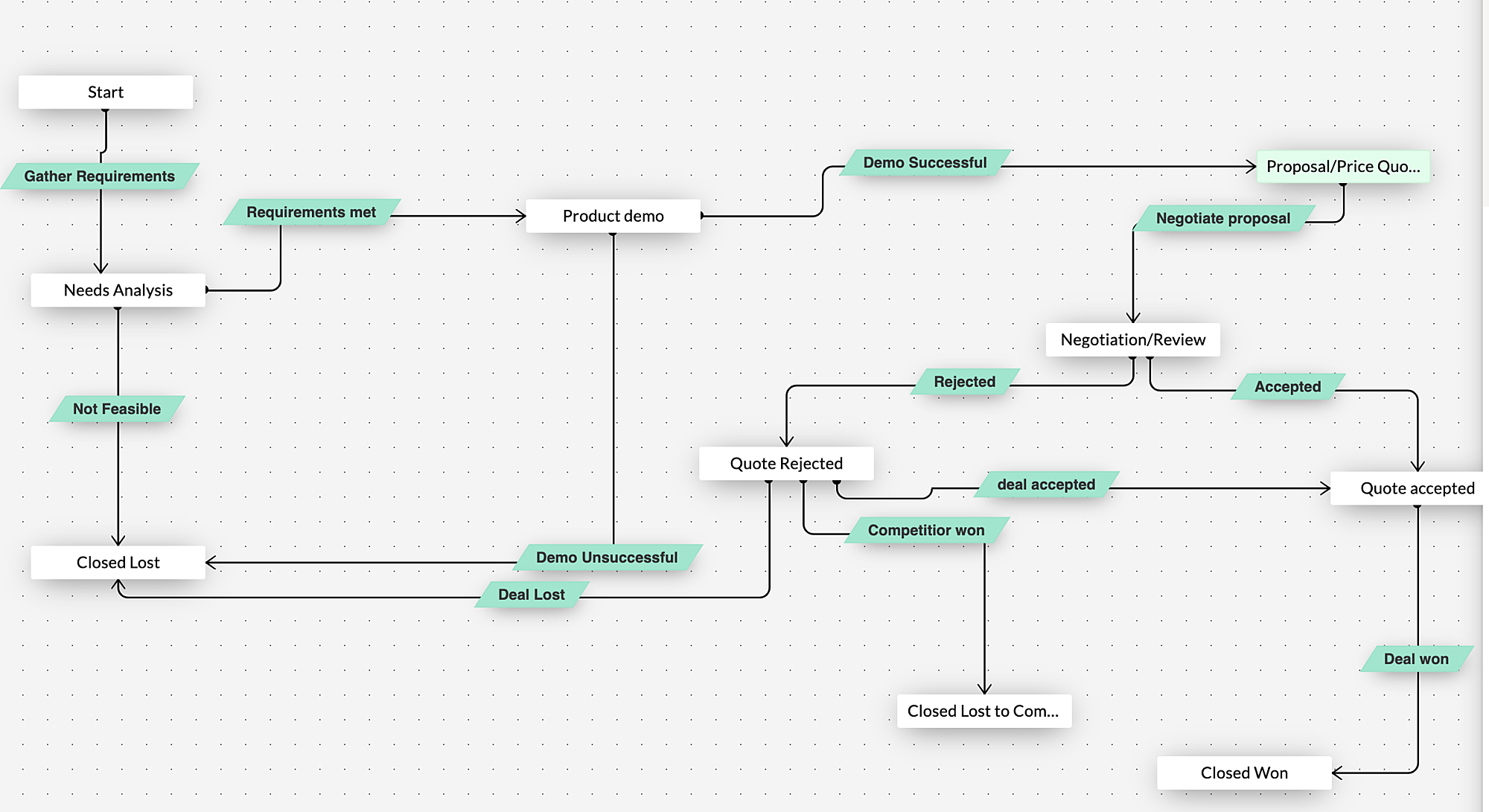
For a better understanding, let us consider the sales process of Zylker, a software product company. The sales team gathers the client requirements and analyses them carefully. Once suitable products are identified, a demo is set up for the client. The client is then sent a quote, post which the record enters the negotiation stage. If the client accepts the quote, the deal gets marked as Won. Most of you must be familiar with Blueprints in Zoho CRM that helps execute this process in a systematic manner.
Assume Joey, one of Zylker's sales reps has gone on an unplanned leave. Before going on leave, he had asked for detailed requirements from the client. Let's say the client has already submitted his requirement through an email. As Joe has not validated the requirements and performed the next transition in the sales pipeline, the deal is stuck in the "Needs analysis" stage. This delays the sales process.
By defining a set time for each stage, Joey can ensure that any record that lapses the pre-set time can then be moved to the next stage automatically. If the deal elapses the wait time in "Need analysis" state, the record gets moved automatically to the
"Negotiation" state.
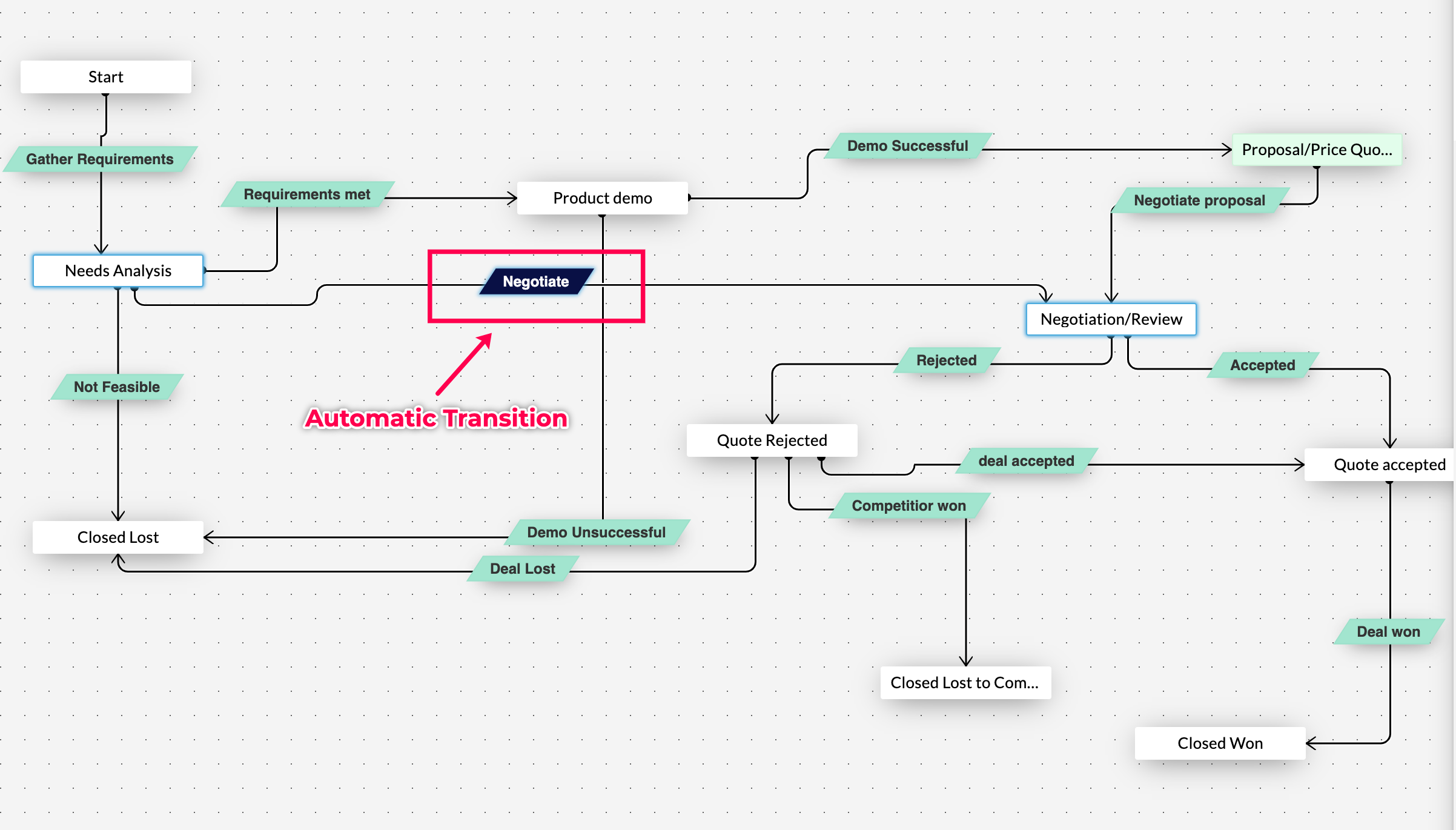
This ensures that the record is not left idle for want of human intervention. Of course, not all stages require an automatic transition. This can be set in line with the sales process.
Now let us check out how to configure automatic transition
- To configure automatic transition, create a new transition between need analysis and negotiation
- Below the transition name, there is a small check box called automatic transition - "Check" and "Save" it.
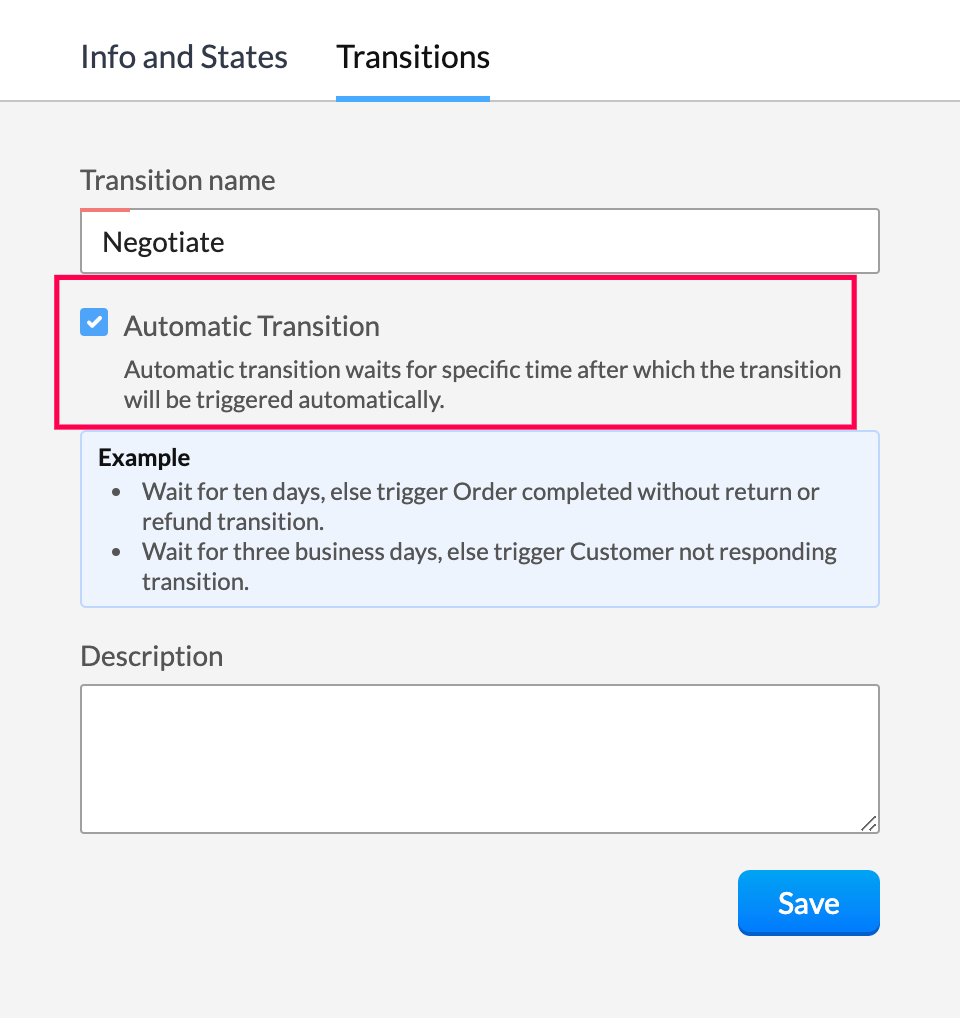
- Choose the wait time - days, hours or minutes.
- If the record stays in the current state for more than the defined time, it will be transferred to the AT configured state automatically.
- Customise actions such as email notification, webhook, actions and much more to get executed upon the transition.
To check how it gets executed. Create a new deal. In case none of the Transitions are selected in the automatic transition configured state, an info message gets displayed that states <this transition> will be executed automatically on <date> and <time>.

Leveraging automatic transition ensures that the record is not stuck beyond a point in a particular state and helps further sales conversion.
Topic Participants
Shaveethira G
Solutions to Success - Milton
Kevin Flynn
marketing
Onsite Ergonomics
Sticky Posts
Zoho CRM Community Digest - February 2026 | Part 2
In this edition, we’re highlighting a few more product enhancements, along with some helpful community discussions that explore everyday CRM scenarios from automating reminders and managing lead outreach to making the most of APIs and client scripts.How to reach the official Zoho Support channels and avoid fake ones.
Dear Customers, Thanks a lot for choosing Zoho! Our applications are built to help achieve your day-to-day business goals. We are committed to engaging with you, to understand and develop solutions that enhance your productivity. We are happy and ready to help you use our services effectively. Understanding and avoiding fake support Just like using popular bank names and financial applications for phishing purposes, using Zoho and claiming to be providing Zoho Support or services with false numbersFunction #35: Close all tasks associated with a lead and create a new task.
Welcome back everyone! Last week, we learnt how to close all tasks of a deal depending upon the deal stage. This week, let's look at a custom function that lets you close all of the tasks associated with a lead while simultaneously creating a new task, like when you need to halt all progress towards a lead while the lead is not available at the moment but create a reminder task. Business scenario: The success of a company, in one way or another, is determined by the leads it gets. Each lead is justZoho CRM Webinar - Redesigning Daily User Experiences with Canvas
<br> Your users across roles use the CRM for day-to-day tasks that are necessary. Whether they perform their tasks on time, the right way, or at all depends on a lot of factors, including User Experience. Many businesses struggle with rigid layouts,Join us at the Canada ZUG Meetup: What’s New in Zoho CRM
Hello Zoho Community! Start your year with fresh insights into Zoho CRM’s latest updates and tools. Whether you're a CRM beginner or a experienced user, this meetup is crafted to help you optimise your processes and leverage new features. Explore practical
Recent Topics
Using Zoho Forms vs Zoho Survey
Hello - I'm looking for advice on whether to use Zoho Survey or Zoho Forms for our small non-profit. We have a Zoho One subscription, so have access to both. The main use case at the moment is application forms for our professional development programs.Custom CSS for Zoho CRM Team Bookings embeded widget
Hello, we are adding Zoho CRM Team Bookings (crm.zoho.com) in our public website. We know that we can change Theme Color, Font Color and Background Color: Zoho CRM Booking Styling But is it possible to change other CSS attributes e.g. Font Family, likeDashboard target enhancements
Often individuals in IT are creating dashboards for their sales team. The ability to create a single dashboard that can be used by multiple people is key. A components for a dashboard have the ability to filter by logged in user which is great. HoweverEnable integration of CRM CPQ functionality for ZohoOne customers using Zoho Finance application
Hi there. I can't believe I'm needing to launch this idea as I would have thought this was a little obvious. Following a number of conversations with the technical team it's become evident that the CPQ functionality within CRM cannot integrate with ZohoZoho Certified Workshops in Berlin | 20. - 21. April
Liebe Mitglieder der deutschen Zoho-Community! Wir freuen uns, Ihnen mitteilen zu können, dass unsere Zoho Certified Workshops am 20. und 21. April nach Deutschland zurückkehren! 📍Wo finden die Workshops statt? Die zertifizierten Workshops finden imZoho Payroll Expansion Plans
Dear Zoho Team, I truly appreciate the continuous innovation and improvements you bring to your suite of products. However, I—and I’m sure many others—would love some clarity on your Zoho Payroll expansion roadmap. Currently, it’s only available in theUsar o Inventory ou módulo customizado no CRM para Gestão de Estoque ?
Minha maior dor hoje em usar o zoho é a gestão do meu estoque. Sou uma empresa de varejo e essa gestão é fundamental pra mim. Obviamente preciso que esse estoque seja visível no CRM, Inicialmente fiz através de módulos personalizados no próprio Zoho CRM,How do I setup the performance review module?
I am pretty adept when it comes to learning software and I've set up quite a few Zoho Apps over the past 3 years. But for the life of me, I can not figure out Zoho People performance reviews. I've figured out the "Organization" & LMS Modules, but theRecurring Addons
Hi, I know you can set the pricing interval for addons to weekly, monthly and yearly & set it for one off or recurring, which these are fine as a base addon item. It really would be helpful if when creating a subscription when you add on the addon itemCancellation Fees
Hi, It really would be good if Billing could take subscription management further with cancellations & being able to apply or set a cancellation fee for a plan that is either fixed or prorated. It is not uncommon in subscriptions for cancellation feesAllow agents to enable or disable feed notifications from certain departments
Hello everyone, Agents who are part of multiple departments receive feed notifications frequently from across the departments. They may not be actively involved in performing every action in all departments. For example, an agent could be a part of bothWorkDrive API returning empty response even after placing file in Team Folder
Hi everyone, I am trying to fetch a file from Zoho WorkDrive using a Deluge standalone function in Zoho People. The API call executes successfully using a configured connection, but the response is coming back empty. I have verified the following: TheAddress Typeahead Extension for Zoho Books
I installed the Address Typeahead extension for zoho books but when I went to configure it, it said that that version was deprecated. Is there a newer version somewhere?Transaction Rules & Customer Payments
So I have a situation as follows. We have many clients who are all invoiced on the 1st of each month on a recurring invoice for 1 of 10 plans. This means that almost all payment dates are the same (some people pay late) and that a lot of the amounts areCan I Integrate ADP Payroll with Zoho Books?
Hi, I am hoping that I can integrate ADP Payroll with Zoho Books so that I do not need to manually input the payroll journal entries. Is this possible? If so, how do I do that?Zoho Books | Product updates | February 2026
Hello users, We’ve rolled out new features and enhancements in Zoho Books. From Advanced Reporting Tags to the ability to mark projects as completed, explore the latest updates designed to improve your bookkeeping experience. Introducing Advanced ReportingDarshan Hiranandani : How many participants can join a Zoho Meeting at once?
Hi everyone, I'm Darshan Hiranandani, trying to find out the maximum number of participants that can join a Zoho Meeting at once. Has anyone here used Zoho Meeting for larger groups and can share their experience or knowledge about the participant limit?Ask The Expert: Deep Dive into Zoho CRM, Desk, SalesIQ, and Campaigns!
Are you using Zoho to power your sales, support, and marketing, and have questions about configuration, automation, or best practices? We have great news: the “Ask The Expert” session is coming to the Zoho Benelux Community! This session is specificallyHow to create a new Batch and update Stock via Inventory?
Hi everyone, We are building an automation where a user enters batch details (Batch Number, Mfg Date, Expiry, and Quantity) into a Custom Module. I need this to trigger an API call to Zoho Inventory to: Create the new batch for the item. Increase theZoho books Inventory valuation report VS Stock GL value
At one client, we track inventory using composite (bundled) items, and in the system settings we have enabled the option to prevent stock from going below zero. After the year-end physical count and quantity adjustments, we identified a mismatch: InventoryZoho Zoom extension for CRM
When meetings are booked through Zoho using the Zoom extension, the Zoom link in the invite is a host start link that contains an expiring ZAK token. The invite should instead use a standard attendee join link or a non-expiring host link - why is thisStereo audio
L.S. Is stereo audio supported in Zoho Meetings? I would like to conduct music lessons with Meetings, but the audio needs to be good (if not great!) and stereo, and not too much compressed and such.Zoho Surveys
Dear Zoho Support Team, I hope this message finds you well. I am writing to inquire about the availability and documentation for the Zoho Survey API. Background: I am currently working on a project that requires programmatic access to survey data andZoho FSM API Delete Record
Hi FSM Team, It would be great if you could delete a record via API. Thank you,Writing SQL Queries - After Comma Auto Suggesting Column
When writing SQL Queries, does anyone else get super annoyed that after you type a comma and try to return to a new line it is automatically suggest a new column, so hitting return just inputs this suggested column instead of going to a new line? AnyoneNew Enhancements to Zoho CRM and Zoho Creator Integration
Hello Everyone, We’ve rolled out enhancements to the Zoho Creator and Zoho CRM integration to align with recent updates made to the Zoho Creator platform. With enhancements to both the UI and functionality, This update also tightens access control byDesk API that can search Merged Tickets
Is there any method that can still search a ticket that was already merged? zoho.desk.searchRecords - doesn't explicitly mentionIssue with "Send Email" from Quotes not loading Email Template data
Hi everyone, I'm currently experiencing an issue when using the "Send Email" option from a Quote record in Zoho CRM. What’s happening: When I go to the Quotes module and select a record, then click Send Email, the attached file (Quote) correctly pullsSuggestions for Improved Table Management and Dashboard Filter Controls in Zoho Analytics
Dear Zoho Analytics Community, I hope you are doing well. I would like to share a few suggestions based on issues I am currently experiencing while working with visualizations and dashboards. Firstly, when I create a new visualization using the Sales-OrderZoho Projects and CRM Integration in Analytics
Hi Team, In Zoho CRM, I’ve integrated CRM with Zoho Projects and associated a project within the CRM. The integration is visible under the Deals module. However, I’m unable to find this data in Zoho Analytics. Does anyone know where this information isCursor lands on disabled fields when tabbing through forms
As of yesterday, form behavior has changed w/ regard to disabled fields. Previously when tabbing through a form the cursor would skip over disable fields (as would typically be desired). But now the cursor is landing on all disabled fields, in all ofPermission query
we have two permission settings i.e 'user permission ' & 'portal user permission' and both have the same setting that we enable for our users, Now those who have access to user permission can see a button on the pivot table, "regenerate" but those whoZoho Forms sheet prefil
I've been using zoho sheet prefill for a week and it was working perfectly, as soon as i deleted the particular sheet and replaced it with another one no matter what I do it cant find the record and i get this message. Could you please assist me to resolve"Create Deal" button should default to the currently selected layout/pipeline
When viewing Deals in Kanban or List view with a specific layout and pipeline selected, clicking "Create Deal" should default to that same layout — not the profile's default layout. Currently it always opens the default layout regardless of context, requiringZoho mail admin panel not opening
Canvas: is it possible to have a fixed header?
Hello. Does Canvas provide the option to have a fixed header, similar to the standard view? It would also be interesting for other parts of the interface, like the header or sidebar of the tab section. Thanks!Removing Related Modules Lookup Fields Assignment / Relationship
Issue: When creating a related list, I accidently selected module itself creating a circle reference. See attached. Situation: I wish to relating a custom module called "Phone Calls" to Leads and Contacts. Outcome: 1) I either want to remove the thisZoho LandingPage pricing update: Essentials plan is now fully free!
Hello Everyone, We have updated the Zoho LandingPage pricing structure. The Essentials plan, previously priced at $9 per month for 1,000 visitors, is now fully free, and the visitor limit has been increased to 5,000. With this change, users can startZOHO.CRM.UI.Record.open not working properly
I have a Zoho CRM Widget and in it I have a block where it will open the blocks Meeting like below block.addEventListener("click", () => { ZOHO.CRM.UI.Record.open({ Entity: "Events", RecordID: meeting.id }).catch(err => { console.error("Open record failed:",Zoho Survey – Page Skip Logic Not Working
Hi everyone, I'm experiencing an issue with the page skip logic in Zoho Survey. Last week, it was working fine, and I haven’t changed anything in the settings. However, today the skip logic is not working at all. I also tried testing it with differentNext Page