Supercharge your VoC analyses with data from anywhere: Modules are now sources for VoC

Supercharge your VoC analyses with data from anywhere: Modules are now sources for VoC

Dear customers,
 
We hope you're well!

Your customers talk about your brand, praise your service, criticize your offerings, or promote your business—literally from anywhere on the internet—and it has become strategically necessary to factor in all possible feedback to improve, optimize, and grow your business.
 
Foreseeing opportunities this feedback could bring, we've developed the ability to use any module as a source to process VoC analyses, and we're excited to talk about it.

A module as a source


Previously, VoC channeled various kinds of responses into Zoho CRM for analysis:
  • Tickets from Zoho Desk
  • Survey responses from Zoho Survey
  • Social media mentions from Zoho Social
  • Email responses from email integrations
  • Calls from PhoneBridge integrations
  • Notes from CRM records
All these are mostly service responses. However, customer opinions aren't just limited to their "official" feedback responses. You probably also receive feedback in the following forms, to name a few:
  • Comments on your social media posts
  • Reviews about your products
  • Discussions on community platforms
  • Messages on networking sites
  • Ideas in forums
  • Blog comments
These represent feedback your business gets externally, and tapping into them can benefit your business—big time.

But how do you do it?

The anchor is your business. By identifying your business's presence online and connecting various platforms with Zoho CRM, you can channelize this feedback as records and ultimately map these destination modules as sources of VoC data.
 
Zoho Marketplace, REST APIs, webhooks, Zoho DataPrep, and Zoho Flow are all various ways you can channelize this data. Here are some examples:

Analyze and act upon YouTube comments using Zoho Flow

Zoho Flow is Zoho's app integration tool, which connects applications and enables data to flow between them based on triggers and actions you can configure. Using it, you can trigger actions in Zoho CRM whenever a YouTube video gets a new comment. The action in Zoho CRM could be that a record is created or a field is updated from where data can be used for VoC processing.


Similarly, using Zoho Flow's gallery of readily available triggers, you can import reviews from Trustpilot, the Collect Reviews app, and Zoho Connect apps available in their gallery.
 

Gather real-time feedback from hotel guests using kiosks

With Zoho CRM's Kiosk Studio, you can collect customer feedback when they check out. Ask about their experiences using the fields available in Kiosk Studio's interface, save that data in dedicated modules or route it into an existing module, and use that module as a source for VoC processing.

Survey responses via Zoho DataPrep

Businesses use surveys for various reasons, and the Zoho Survey integration already funnels survey data into VoC analysis. If you use other data providers—like Zoho Forms or SurveyMonkey—you can identify, clean, and bring responses into Zoho CRM through Zoho's DataPrep application, and then subject it to VoC analysis.
 

Parse reviews from Zoho Marketplace and other B2B app stores

Your apps serve as other sources of customer feedback. Whether it's from a mobile app or a B2B marketplace, these apps are rich sources of reviews. This includes data from apps like Google Business, Amazon, Apple's App Store, the Google Play store, G2, Yelp, and other providers, from which you can derive data via code-based integrations.

Adding modules as sources


Once you have feedback from your desired sources stored in modules in Zoho CRM, it's time to add these modules as VoC sources.


Existing standard sources, like Zoho Desk, Zoho Survey, emails, calls, and social media, are called basic data sources. Any module you select as a source is called an advanced source.
 
NotesNote: Feedback from the Notes source is now nested as and parsed from a child module.
 
Here's how you configure any module as a source:

Under Module as a source, choose the source module that contains your reviews, then fill out the following fields:
  1. Display name: This labels the source module.
  2. Choose field for response to be extracted: This tells the system which field(s) to import data from—typically descriptive multi-line fields.
  3. Choose a response provider: This is your lead or customers. This tells the system whom the feedback should be attributed to and which record to associate the analysis with.
  4. Response time: This defines the time frame from which the system should include feedback data.
That's all you need to do. VoC will start importing your feedback data for analysis. To associate data with existing customers, you can also include them in your settings .

Derive insights from your modules and act on them

The minute your source modules are configured, you can build dashboards that include them, filter records based on their attributes, and automate workflows as you would for any other VoC response.
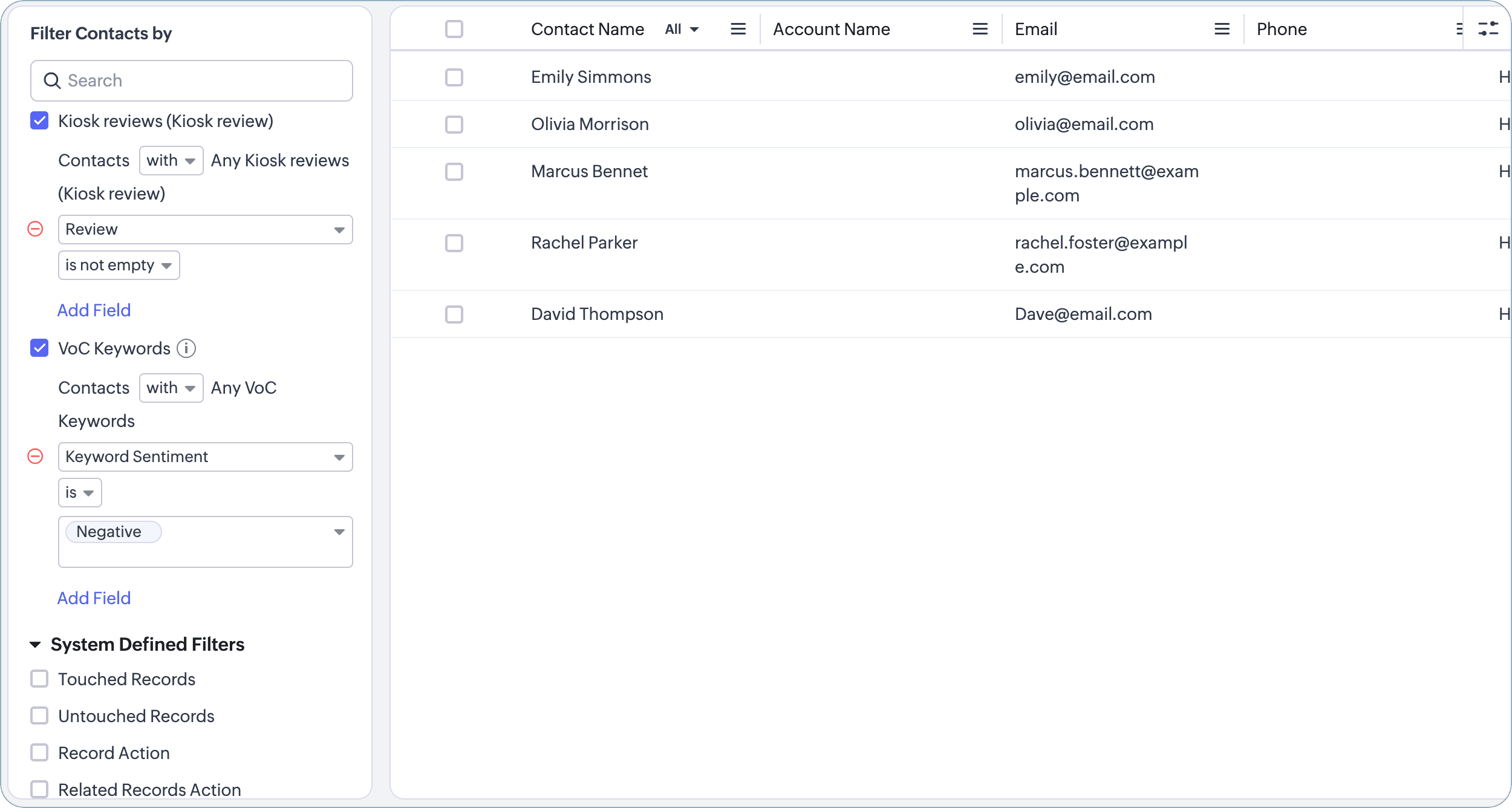

There—that's how you can add bring reviews from the Internet to power your VoC analyses.

With the emphasis on customer experience growing, we are working to boost VoC with more CX-bound capabilities each day. We shall meet you with one such in the near future. See you!

Release: Available for customers in all DCs

Thanks and have a good one!

Kind regards,
Saranya Balasubramanian

    • Recent Topics

    • Analytics : How to share to an external client ?

      We have a use case where a client wants a portal so that several of his users can view dashboards that we have created for them in Zoho Analytics. They are not part of our company or Zoho One account. The clients want the ability to have user specific,
    • Is It Possible to Convert a Custom Module to a Quote?

      I recently created a custom module in our CRM environment for RFQs so that our sales team can submit quote requests directly in Zoho rather than by email/phone. This allows for a cleaner overall process, minimizing potential errors and potentially encouraging
    • All new Address Field in Zoho CRM: maintain structured and accurate address inputs

      The address field will be available exclusively for IN DC users. We'll keep you updated on the DC-specific rollout soon. It's currently available for all new sign-ups and for existing Zoho CRM orgs which are in the Professional edition. Latest update
    • How can Data Enrichment be automatically triggered when a new Lead is created in Zoho CRM?

      Hi, I have a pipeline where a Lead is created automatically through the Zoho API and I've been trying to look for a way to automatically apply Data Enrichment on this created lead. 1) I did not find any way to do this through the Zoho API; it seems like
    • Client Side Scripts for Meetings Module

      Will zoho please add client side scripting support to the meetings module? Our workflow requires most meeting details have a specific format to work with other software we have. So we rely on a custom function to auto fill certain things. We currently
    • Proposal: Actionable API Error Messages to Reduce Support Ticket Volume

      I've encountered a long-standing frustration with how Zoho Creator's API communicates errors to developers, and I'm hoping the Zoho team can address this in a future update. This issue has persisted for over 9 years based on community discussions, and
    • Zoho CRM - Option to create Follow-Up Task

      When completing a Zoho CRM Task, it would be very helpful if there was an option to "Complete and Create Follow-Up Task" in the pop-up which appears. It could clone the task you are closing and then show it on the screen in edit mode, all the user would
    • Dynamic Field Folders in OneDrive

      Hi, With the 2 options today we have either a Dynamic Parent Folder and lots of attachments all in that one folder with only the ability to set the file name (Which is also not incremented so if I upload 5 photos to one field they are all named the same
    • Drag 'n' Drop Fields to a Sub-Form and "Move Field To" Option

      Hi, I would like to be able to move fields from the Main Page to a Sub-Form or from a Sub-Form to either the Main Page or another Sub-Form. Today if you change the design you have to delete and recreate every field, not just move them. Would be nice to
    • File Conversion from PDF to JPG/PNG

      Hi, I have a question did  anyone every tried using custom function to convert a PDF file to JPG/PNG format? Any possibility by using the custom function to achieve this within zoho apps.  I do know there are many third parties API provide this with
    • Allocating inventory to specific SO's

      Is there a way that allocate inventory to a specific sales order? For example, let's say we have 90 items in stock. Customer 1 orders 100 items. This allocates all 90 items to their order, and they have a back order for the remaining 10 items which could
    • Cliq iOS can't see shared screen

      Hello, I had this morning a video call with a colleague. She is using Cliq Desktop MacOS and wanted to share her screen with me. I'm on iPad. I noticed, while she shared her screen, I could only see her video, but not the shared screen... Does Cliq iOS is able to display shared screen, or is it somewhere else to be found ? Regards
    • Closing the Loop: Why Lookup Asymmetry is Harming Data Integrity in Creator

      TL;DR: Lookup fields allow users to add new related records inline via the "+" icon, but there's no equivalent ability to edit an existing related record without navigating away and losing form context. Adding a native "Edit" icon—with automatic User
    • Add the ability to Hide Pages in Page Rules

      Hi, We have Field Rules to show and hide fields and we have page Rules, but we can't hide a page in Page Rules so it isn't completed before the previous page (And then have the Deny Rules to prevent submitting without both pages completed), we can only
    • Enable Free External Collaboration on Notecards in Zoho Notebook

      Hi Zoho Notebook Team, I would like to suggest a feature enhancement regarding external collaboration in Zoho Notebook. Currently, we can share notes with external users, and they are able to view the content without any issue. However, when these external
    • Zoho Desk API - Send Reply to CUSTOMERPORTAL

      Hello! I'll try to send a reply to Customer Portal, But the response is 500 (INTERNAL_SERVER_ERROR in service response). {"Error":"{\"errorCode\":\"INTERNAL_SERVER_ERROR\",\"message\":\"An internal server error occurred while performing this operation.\"}"}
    • using the Client script on the load of the form if service no is empty means then i want to make issue relate to is Service

      using the Client script on the load of the form if service no is empty means then i want to make issue relate to field is Service if Purchae no is empty means then i want to make issue relate to is Purchase
    • Changes to the send mail Deluge task in Zoho CRM

      Hello everyone, At Zoho, we continuously enhance our security measures to ensure a safer experience for all users. As part of our ongoing security enhancements, we're making an important update on using the send mail Deluge task in Zoho CRM. What's changing?
    • Work Order wont mark as Completed

      I have a couple of work orders that won't mark as completed even when I've marked the Service Appointments as completed fully.
    • Item name special charaters <>

      Im trying to input speical characters such as < and > into item name and item description but comes up with following error: Invalid value passed for Item Name and Invalid value passed for Item Description How do i allow speical characters?
    • Zoho Analytics Dashboard - How to hide the user filter

      I am using the same dashboard template across different external clients and applying a user filter to the data by site URL. How can I hide the user filter in View Mode so the external client won't see the list of other clients in the drop-down menu?
    • Customer Parent Account or Sub-Customer Account

      Some of clients as they have 50 to 300 branches, they required separate account statement with outlet name and number; which means we have to open new account for each branch individually. However, the main issue is that, when they make a payment, they
    • Cannot get code to work with v2.mergeAndStore!

      Please can someone help me pass subform items into a repeating mail merge table row using v2.mergeAndStore? I have a mail merge template created in Writer and stored in Workdrive. This template is referenced by a custom CRM function which merges all of
    • Kaizen #229: Email-Deal Associations in Zoho CRM

      Hi All, Welcome back to another week of Kaizen! Emails are a core channel for customer communication in any CRM system. In Zoho CRM, emails can be associated with records across multiple modules. In this post, we will focus on email associations with
    • Deprecation of the Zoho OAuth connector

      Hello everyone, At Zoho, we continuously evaluate our integrations to ensure they meet the highest standards of security, reliability, and compliance. As part of these ongoing efforts, we've made the decision to deprecate the Zoho OAuth default connector
    • Action Required: Update Microsoft SQL Server Security Settings Before February 2026

      Dear Users, We recently deployed security updates in Zoho Analytics that inadvertently caused connection failures for a few customers using Microsoft (MS) SQL Server hosted on older Windows versions (Windows Server 2012, 2012 R2, and 2014). To restore
    • Contacts limit in basic vs standard - what counts? Are customers contacts?

      I’ve been using books for a number years for my small business. I only ever work with 20 clients at any given time. I do purchase services from a number of vendors to run my business, so there are some comtacts there too. I used to use the basic package,
    • Saving issue

      First problem I opened a MS word file in writer. after the work is done, it does not save instantly, I waited for like 10min and it still did not save. second problem When I save a file, then file gets saved as another copy. I just did save, not save
    • Automating Employee Birthday Notifications in Zoho Cliq

      Have you ever missed a birthday and felt like the office Grinch? Fear not, the Cliq Developer Platform has got your back! With Zoho Cliq's Schedulers, you can be the office party-cipant who never forgets a single cake, balloon, or awkward rendition of
    • Create Tasklist with Tasklist Template using API v3

      In the old API, we could mention the parameter 'task_template_id' when creating a tasklist via API to apply a tasklist template: https://www.zoho.com/projects/help/rest-api/tasklists-api.html#create-tasklist In API v3 there does not seem to be a way to
    • How to mix different types of inputs (such as dropdown list and textbox)

      Hi, I'm creating a form called "Room Reservations" for a company. I created a "table" using "Matrix Choice". I created "Room 1", "Room 2" and "Room 3" with the "Questions". I would then like to create two columns with the "Answers", one called "Department"
    • Ability to Set a Unified Tab Order/View for All Users in Zoho Projects

      Hello Zoho Projects Team, We hope you are doing well. We would like to submit a feature request regarding tab/menu organization in Zoho Projects. Current Behavior: The tab (module) order in Zoho Projects is user-specific. Each user (internal or external)
    • Layout Rules Don't Apply To Blueprints

      Hi Zoho the conditional layout rules for fields and making fields required don't work well with with Blueprints if those same fields are called DURING a Blueprint. Example. I have field A that is used in layout rule. If value of field A is "1" it is supposed to show and make required field B. If the value to field A is "2" it is supposed to show and make required field C. Now I have a Blueprint that says when last stage moves to "Closed," during the transition, the agent must fill out field A. Now
    • Task Order

      Hello! I've recently switched to Zoho Projects and a long time user of MS Project, Asana and LiquidPlanner (which has recently been purchased) and I'm running into a frustration I'm hoping someone can assist with. It has to do with how tasks are ordered
    • Automating CRM backup storage?

      Hi there, We've recently set up automatic backups for our Zoho CRM account. We were hoping that the backup functionality would not require any manual work on our end, but it seems that we are always required to download the backups ourselves, store them,
    • Zoho Books | Product updates | January 2026

      Hello users, We’ve rolled out new features and enhancements in Zoho Books. From e-filing Form 1099 directly with the IRS to corporation tax support, explore the updates designed to enhance your bookkeeping experience. E-File Form 1099 Directly With the
    • 2026 Product Roadmap and Upcoming Features

      This is your guide to what is coming in Zoho Vertical Studio throughout 2026. We’ll update this post throughout the year as items move from development to release, and as and when new initiatives are added. Once a feature is released, it will be reflected
    • Vendor legal and DBA names for USA users

      I would like to hear how Zoho Books users are handling DBA names in the vendor profile. If the Company name in the vendor profile has to be the legal name (line 1 of the W-9), whare are you entering the DBA name (the name that checks are made out to)
    • Zoho Books API invoice email bouncing with 'relaying-issues' error

      I have waited over 30 days for zoho books uk to assist with the following and i have had no replies or tickets erronously closed. The service has been terrible - very unlike zoho! So i am raising this here hoping that a community member can assist: Hello,
    • Stop the Workarounds: We Need Native Multi-Step Forms

      After over 17 years of community requests, I'm hoping the Zoho team can finally address the lack of native multi-page form support in Zoho Creator. This has been one of the longest-standing feature requests in the community, with threads spanning nearly
    • Next Page