Building extensions #1: Creating and testing extensions for Zoho Finance Suite applications
Hello developers!
We're excited to announce a new series called "Building extensions" to assist developers in creating efficient extensions for Zoho Finance Suite products. We'll support and guide you through the process of creating an extension and using the features offered in the developer portal.
What are extensions?
Extensions are installable plugins or add-ons that help enhance the existing functionality of your Zoho product or seamlessly integrate and interact with third-party applications for data transmission.
How can you build extensions?
Zoho offers a developer platform called Zoho Developer that allows you to build different types of applications. Sigma is a platform offered within Zoho Developer that is specifically designed for creating extensions for various Zoho products. Throughout this series, we'll look at how to create and develop extensions for the Zoho Finance Suite applications using Sigma.
Get to know all about extensions and building them further in detail.
Sigma extension support
The Zoho Finance Suite consists of seven applications: Zoho Books, Zoho Inventory, Zoho Expense, Zoho Invoice, Zoho Billing, Zoho Checkout, and Zoho Payroll. Currently, the Sigma platform supports creating and building extensions for these five Zoho Finance applications:
- Zoho Books
- Zoho Inventory
- Zoho Expense
- Zoho Invoice
- Zoho Billing
Creating an extension
- Log in or sign up at developer.zoho.com.
- Go to Sigma and access your workspace.
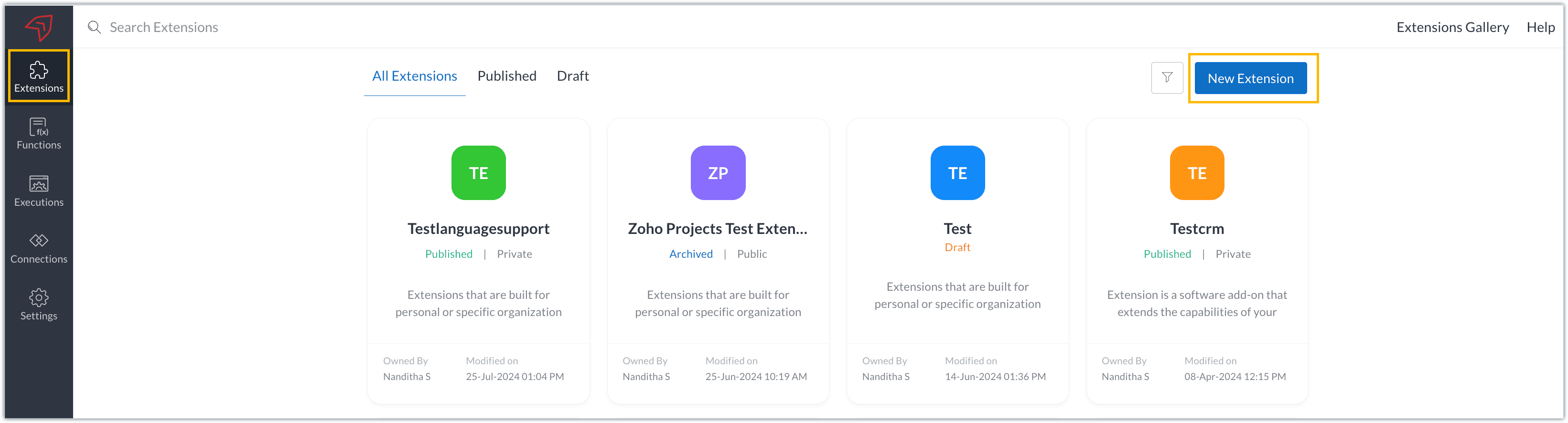
- Once you enter your workspace, you'll be taken to the Extensions section in Sigma.
- Click the New Extension button to start building an extension.
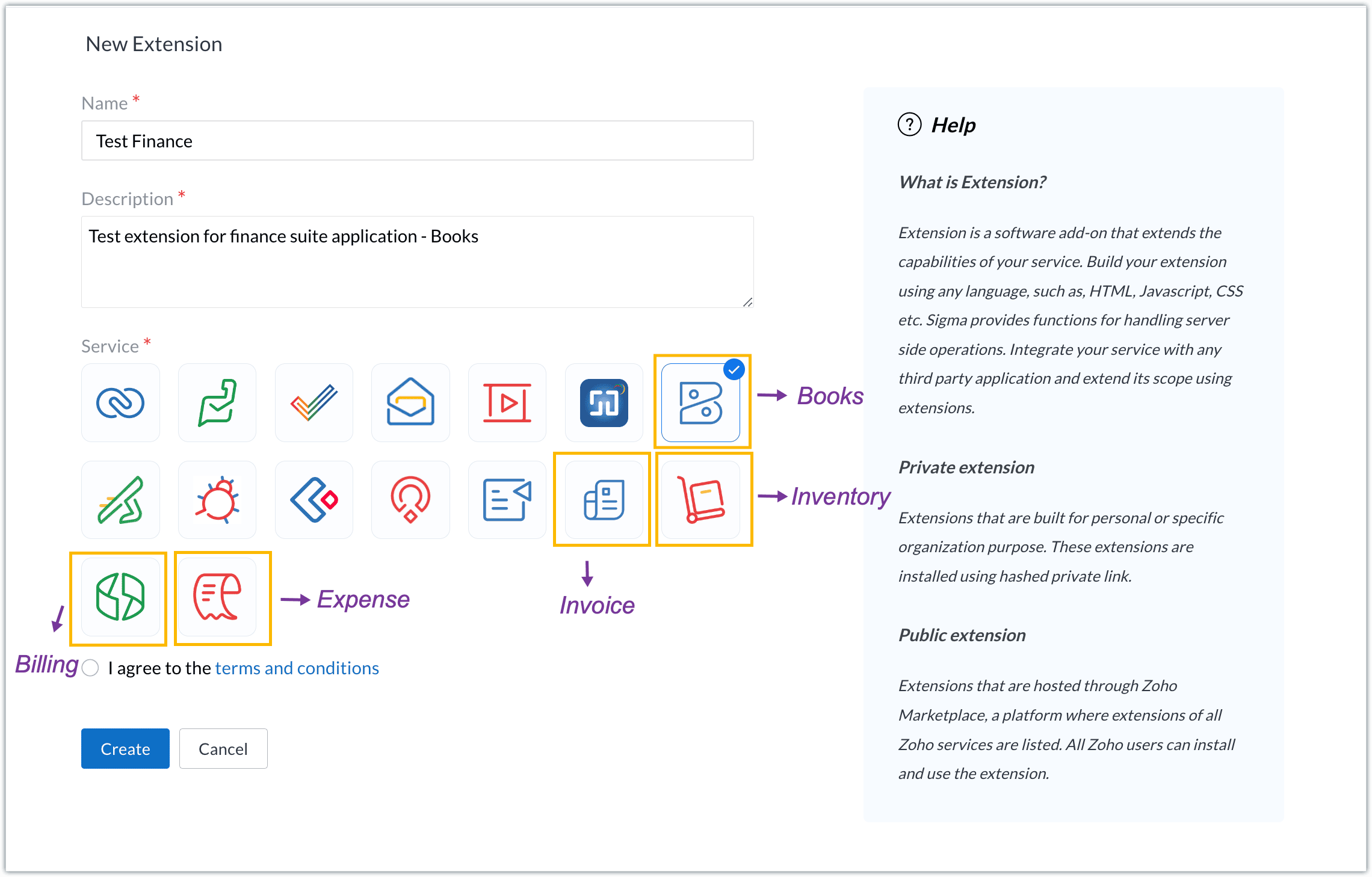
- Enter a name and description for the extension and choose the service you want to build the extension for. As mentioned earlier, Sigma offers support for Zoho Books, Zoho Invoice, Zoho Inventory, Zoho Billing, and Zoho Expense.
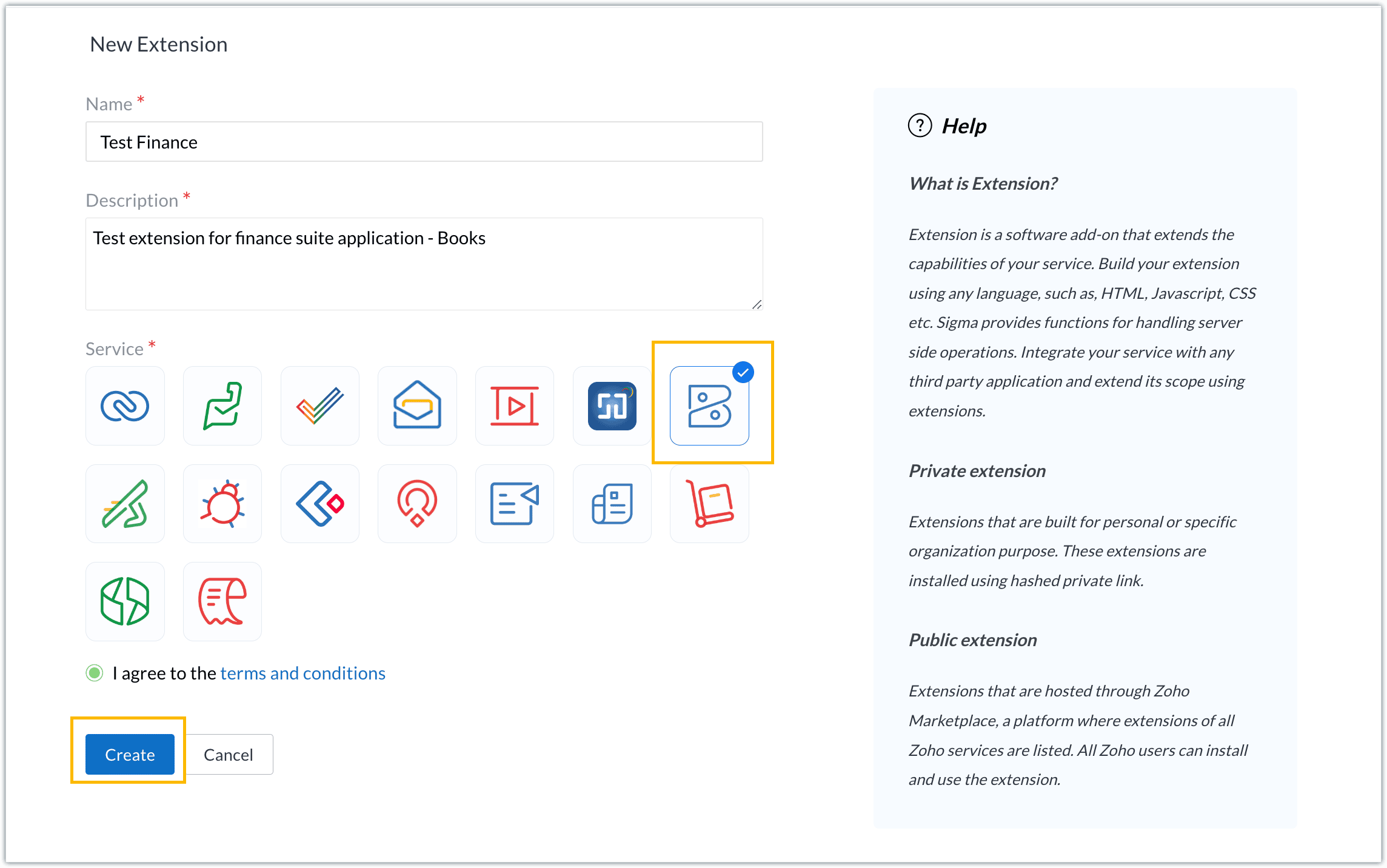
- For our demo, let's choose the service as Zoho Books. Accept the terms and conditions, and then click Create.
- The extension is successfully created. You can click the Extension Details icon to see an overview of the extension.
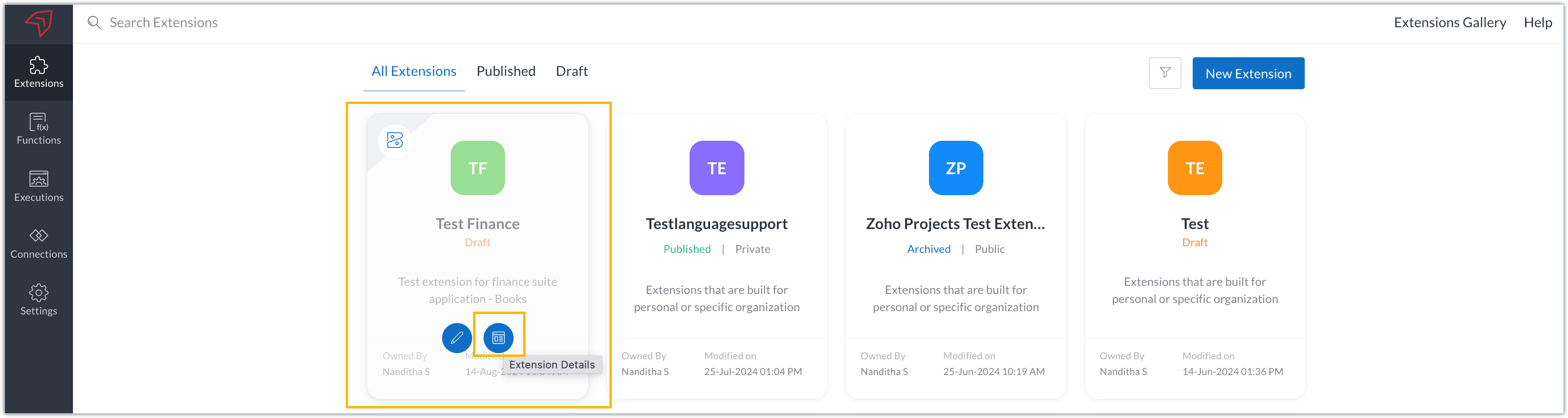
The extension details page shows the general details of the extension, such as creation date, creation time, and version, and allows you to associate developers with the extension.
- Click the Edit Extension icon to start developing the extension.
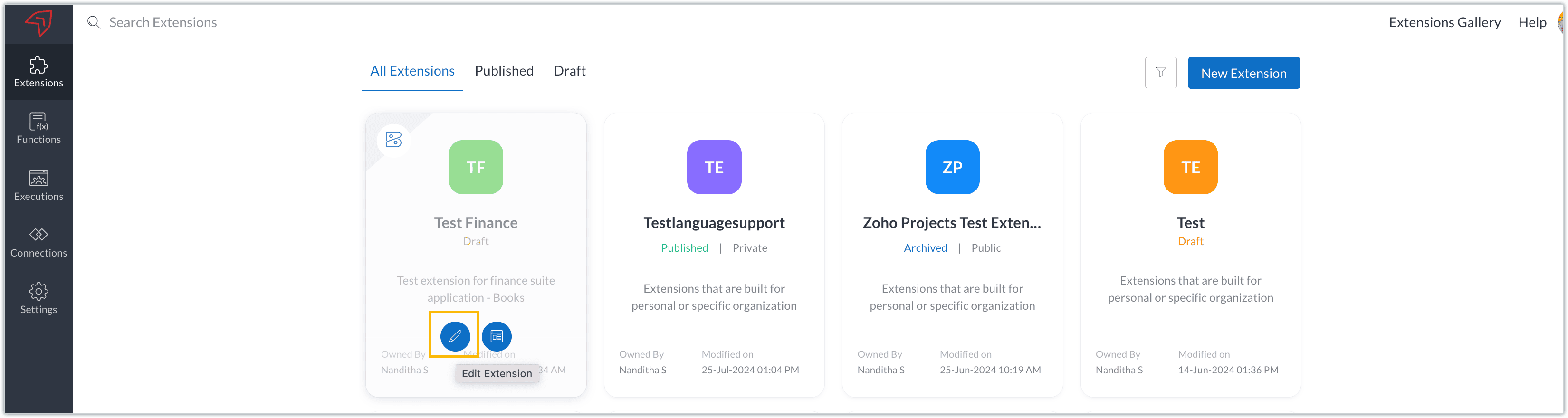
- The Zoho Books Developer Portal opens with the options and native features available to customize, curate, and develop your extension.
Zoho Books Developer Portal sections
The developer portal has four different sections to help customize and build your extension.
Learn: This section lists the native Zoho Books capabilities that can be used to create and develop extensions. Clicking the Set up Now button next to each feature will take you to the feature's development setup page.

Build: This is the development setup section, which includes customization, automation, and components like connections, widgets, schedules, webhooks, and signals. You can customize your extension preferences, establish connections to integrate with other applications, and design custom interfaces to enhance user experience.

Configure: This section assists with handling your extension's required configurations, whether they are generic settings or customizations required from the user. You can add global fields, which can be incorporated as either variables that store static data or through custom widgets that retrieve user inputs. You can also define functionalities that happen during installation and uninstallation.

Publish: Once the extension has been built and configured, you can use this section to publish it for either private or public use. In both cases, the Zoho Books team will review the extension; for public extensions listed on Zoho Marketplace, the Zoho Marketplace approval team will also review them. You can share your privately published extension with other users using the Shared List option.

We will explore more about each of these sections and their features in upcoming posts.
Testing an extension
The Zoho Books Developer Portal offers a dedicated testing environment for each extension, allowing you to test and validate it before publishing.
As a developer, you can use the Test Your Extension option in the top right corner of the portal to access your extension's sandbox environment.

This will redirect you to the sandbox testing environment for the extension you're developing, which is similar to Zoho Books and contains relevant modules to test with.

You can populate necessary data and test your extension functionality. Once everything is validated, you can go ahead and publish your extension for private or public use.
For support or questions related to Zoho Finance Suite extension development, you can email developer@zohofinance.com.
We hope you found this guide useful. Keep following this space for more information!
Topic Participants
Nanditha Somasundaram Somasundaram
Sticky Posts
Building extensions #5: Creating custom connections for extensions
In our previous post, we discussed the significance of connections, identified their types, developed a predefined connection, and demonstrated how it can be integrated with Zoho Books using an example. In this post, we'll walk through the process ofBuilding extensions #4: Integrating Zoho Books with applications using connections
In our last post, we looked at an overview of the key features available for creating a Zoho Books extension, including connections. In this post, we'll go over connections in depth, including their types and applications. What are connections? "Connections"Building extensions #3: Fundamental features of a Zoho Books extension
In our earlier posts, we covered how to create, test, and publish an extension for Zoho Finance suite applications. Moving forward, we'll look specifically at instances relating to one of the products from the Zoho Finance suite: Zoho Books. In this post,Building extensions #2: Publishing an extension
Hello developers, Welcome to our next post about building extensions for Zoho Finance Suite applications. In our previous post, we looked at extensions, their purpose, and how to create and test them. To recap, extensions are installable plugins or add-onsBuilding extensions #1: Creating and testing extensions for Zoho Finance Suite applications
Hello developers! We're excited to announce a new series called "Building extensions" to assist developers in creating efficient extensions for Zoho Finance Suite products. We'll support and guide you through the process of creating an extension and using
Recent Topics
Allocating inventory to specific SO's
Is there a way that allocate inventory to a specific sales order? For example, let's say we have 90 items in stock. Customer 1 orders 100 items. This allocates all 90 items to their order, and they have a back order for the remaining 10 items which couldPartial payments for retainer invoices
When a customer does not pay the entire retainer invoice there is no way to apply a partial payment. PLEASE add this function.Can I export to PDF in Zoho Learn
I have seen help pages where export to pdf options are available but I do not see that option available from the application. I see that exprt is available in my free trial version but that is only to html pages. I need to be able to export my manualsService line items
Hello Latha, Could you please let me know the maximum number of service line items that can be added to a single work order? Thanks, Chethiya.Sending emails via Books
Anyone else getting similar problems recently ??..... Hi, Your message to the following recipient was not delivered. Please find the details below. Bounce Details: Bounced Address : someone@google.com Bounce Reason : other ; Status : 5.0.0 (undefined status) ; Daignostic-Code : smtp;542 someone@google.com Rejected ; Bounced Time : Sep 05, 2017 06:37 PM BST Regards, Zoho Team The email addresses were fine only a few days ago but are now being rejected ?PDF Generator Upgrade
Hi Team, What will happen if I don't make any changes for existing template. Zoho just ask us upgrade but haven't tell the benefit. Zoho CorporationNo Need To Fix Something That Is Working
Zoho Books is a great financial tool which helps businesses to become more efficient and productive with day-to-day operations. As such, every change, upgrade, improvement needs to be carefully thought before implemented in the software and I'm sure ZohoTotal Cost in reports showing zero
The image below shows my issue. The column Total Cost should show the cost to our company based on hours logged and the employee's rate. For instance, if the person working on Subtask 1 is paid 20/hr, then Total Cost should display $160 ($20x8 loggedZoho Books (and other finance suite apps) - Retrospective Linking of Invoice and Sales Orders to Quotes.
In some cases, Quotes and Invoies may be created sperately instead of using the convert feature. In this feature request I am asking for the Finance Suite team to consider adding a lookup field to reference the quote on Invoices and Sales Orders, or someBring real app analytics into Zoho Creator apps with Zoho Apptics
We’re kicking off the year with a release we’ve been looking forward to for a long time. After being in the works for a while, Zoho Creator and Zoho Apptics are now officially integrated, bringing in-depth product analytics directly into the Zoho CreatorEarly Access: Check Printing in Zoho Books
Hello Everyone, Are you constantly writing checks to pay your vendors? We've got a great news to share with you! You can now pay your vendors by writing and printing a check directly from Zoho Books. The feature is ready and we'll be rolling it out to our customers in phases. It is available in the US Edition of Zoho Books and also in the Global edition, where the country is selected as USA and the currency is USD. Here’s a summary of what’s possible: 1. Write and print a check. 2. MakeZohoMail's outbound webhook sends incorrect folderId and messageId
I used a webhook (outbound) from within ZohoMail to send message details when a new message arrives that meets specific criteria. I received this data correctly. Now I want to get the attachment from this email message. When I made an api call using folderUse URL field to populate Image in a Email Template
We have two records Record 1: Appointments (with a Lookup to Doctors module) Related Record 2: Doctors (with a URL field that is an image of the doctor) We would like to populate a CRM email template with the image of the URL field for the related doctorLooking for Guidance on Building a Zoho Website
I'm exploring the possibility of building a custom website with specific features using Zoho as an alternative platform. My goal is to create something similar to https://gtasandresapk.com , with the same kind of functionality and user experience. I'dAbility to add VAT to Retainer Invoices
Hello, I've had a telephone conversation a month ago with Dinesh on this topic and my request to allow for the addition of VAT on Retainer Invoices. It's currently not possible to add VAT to Retainer Invoices and it was mutually agreed that there is absolutely no reason why there shouldn't be, especially as TAX LAW makes VAT mandatory on each invoice in Europe! So basically, what i'm saying is that if you don't allow us to add VAT to Retainer Invoices, than the whole Retainer Invoices becomesZoho Bookings Forge: A hands-on workshop series
Hello all! We’re hosting a five-part, hands-on workshop series to help you optimize Zoho Bookings for your business. In these sessions, we’ll cover key features, practical use cases, and clear steps to get started or improve your current setup. Here areIntroducing parent-child ticketing in Zoho Desk [Early access]
Hello Zoho Desk users! We have introduced the parent-child ticketing system to help customer service teams ensure efficient resolution of issues involving multiple, related tickets. You can now combine repetitive and interconnected tickets into parent-childIntroducing Workqueue: your all-in-one view to manage daily work
Hello all, We’re excited to introduce a major productivity boost to your CRM experience: Workqueue, a dynamic, all-in-one workspace that brings every important sales activity, approval, and follow-up right to your fingertips. What is Workqueue? SalesDelete button
Hi, The delete button were hide into the three dot button. Can I display outside? why Zoho make this update?Zoho Vault CLI for Developers and Automations
Hi everyone, If you're managing credentials in scripts, CI/CD pipelines, or automation workflows, Zoho Vault's Command Line Interface (CLI) can help you securely access and manage secrets directly from your terminal. Zoho Vault was launched in 2013 asZoho Subscriptions -- Zoho Commerce integration
Is there integration between Zoho Subscriptions and Zoho Commerce? I would like to create subscription plans in Zoho Subscritpions and list them for on my Zoho Commerce store.Synching changes to Stripe when changes are made in Zoho Billing
We have a situation where we have merged customers in Zoho BIlling and then found out later that the payment in Stripe was not updated and still associated with the old customer record. The card gets updated and billed, but that payment is still associatedHow can I link Products in a Deal Subform to the Products Module
Hello, I have a pricing subform on our Deals page and use a lookup field to associate a product with each line. I want to be able to look at a product page within the Products module and see a list of the deals connected to that product. I have this workingHelp Center and SEO: Any Benefit to My Domain-Mapped Website Ranking?
First of, I love the Help Center which I've just decided to integrate into my website to replace its old-fashioned FAQs. So much more to achieve there now! Lots of new benefits to the site visitors and to me in terms of organizing and delivering all theBusiness Hours with lunch break
Our business hours are: mon - fri 08:30 - 13:00, 15:00 - 18:30. How can I handle the lunch break? If I use 8:30 - 18:30 it obviously breaks SLA. ThanksAutomatically Update Ticket Status in Zoho Desk Based on Actions in Zoho Projects
Hi Zoho Desk Team, Hope you’re doing well. We’re using the Zoho Desk–Zoho Projects integration to manage tasks related to customer tickets, and it works well for linking and tracking progress. However, there are a few important automation capabilitiesZoho Desktop App- Unable to Minimize/Freezes
I'm having issues with my Zoho Mail desktop app (PC). When go on my desktop and open the app this is what happens: - Unable to minimize and close app (in the screenshot attached you can see at the top right there is no option to minimize/close) - UnableEnable Free External Collaboration on Notecards in Zoho Notebook
Hi Zoho Notebook Team, I would like to suggest a feature enhancement regarding external collaboration in Zoho Notebook. Currently, we can share notes with external users, and they are able to view the content without any issue. However, when these externalZoho Commerce
Hi, I have zoho one and use Zoho Books. I am very interested in Zoho Commerce , especially with how all is integrated but have a question. I do not want my store to show prices for customers that are not log in. Is there a way to hide the prices if notMulti-currency in Zoho CRM Forecast and Reports
As a company we have branches in 4 different countries with as many different currencies. Our Sales Teams would like to work with their local currency as much as possible. The Forecast module using only 1 currency is practically usable only by the salesZoho Sprints iOS app update: Global view, screen capture control, file encryption, tags enhancement
Hello everyone! We are excited to introduce new features in the latest version(v2.1) of the Zoho Sprints iOS app update. Let’s take a quick look at what’s new. 1. Global view Global view brings all your project items into one centralised space. You canZoho Projects Android and iOS app update: Conditional layout rules for Tasks
Hello everyone! Task conditional layout rules configured on the web app(projects.zoho.com) are now applied on the Zoho Projects Android and iOS app. Conditional layout rules can be set for the Add/ edit task form and it allows you to change the propertyHow to account for vat with postponed VAT accounting
Hi everyone, looking for some help with postponed VAT accounting, I use DHL express for my imports and they used to pay the VAT for me and then invoice me. I could then log this as a bill and the VAT element from import was recorded as input VAT, allZobot with Plugs
Hello, I am having a problem with Zobot using Plugs. Here is my current flow: When I run the flow, I should immediately see the messages from the initial cards (Send Message cards), then after running the plug, and finally, see the messages after theIs there a way to show contact emails in the Account?
I know I can see the emails I have sent and received on a Contact detail view, but I want to be able to see all the emails that have been sent and received between all an Accounts Contacts on the Account Detail view. That way when I see the Account detailGood news! Calendar in Zoho CRM gets a face lift
Dear Customers, We are delighted to unveil the revamped calendar UI in Zoho CRM. With a complete visual overhaul aligned with CRM for Everyone, the calendar now offers a more intuitive and flexible scheduling experience. What’s new? Distinguish activitiesZoho mail admin panel not opening
Zoho CRM WooCommerce Integrtation
Looking for a solution for my 50 client to show detailed analytics on source of traffic that led to events, leads, conversions. Hi all, I have not been able to find a workable guide or solution to how exactly step by step integrate the Zoho CRM with WooCommerce500 internal server error on opening an iframe through a deluge script
Hi Team I am trying to open an external url in an iframe through my deluge script which is associated to a custom button . By doing this i am getting an "Internal Server Error" . Please can you help me with this.Kaizen #225 - Making Query-based Custom Related Lists Actionable with Lookups and Links
Hello everyone! Welcome back to another post in the Kaizen series! This week, we will discuss an exciting enhancement in Queries in Zoho CRM. In Kaizen #190, we discussed how Queries bridge gaps where native related lists fall short and power custom relatedNext Page