Hello Zoho Assist Community!
Welcome to the very first community post of June, and we are kicking things off with a feature that gives technicians complete control over a remote machine without ever leaving their session: Power Options.
What are Power Options?
Power Options in Zoho Assist give technicians direct control over the power state of a remote machine during a session. Accessible from the Technician Console, the feature covers six actions, each designed for a specific situation a technician actually encounters in the field.
Start a remote support session and navigate to the Technician Console. Click on Tools in the left sidebar and select Power Options from the dropdown menu.
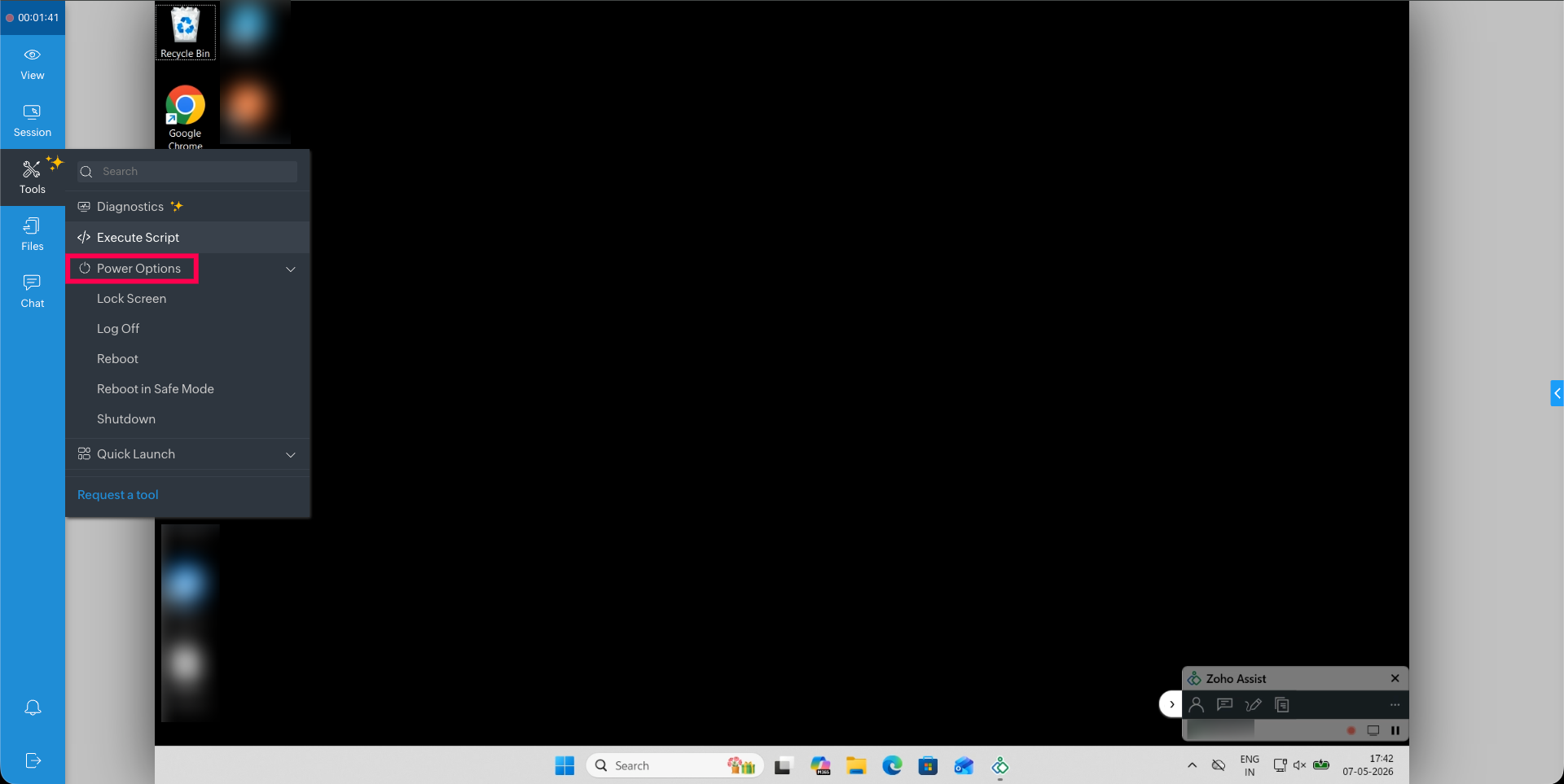
From here you can access the below listed power options:
Shutdown — Turn off the remote computer completely. You have just finished end-of-day maintenance on an office PC. No one is coming back to that desk tonight. Rather than leaving the machine running, you shut it down directly from the console. Power saved, job done.
Restart — You have just finished configuring a Windows machine and the changes need a restart to take effect. Instead of asking the user to reboot manually, you trigger it directly from the Technician Console. Once the machine comes back up, the session reconnects automatically, no new session ID, no fresh invite, no rejoining. You are right back in, ready to confirm everything applied correctly.
Log Off — Sign out the current user from the remote machine. A user is running into profile-related errors that are affecting their session. A full reboot is not necessary — logging them off and back in is enough to reset the environment and clear the issue cleanly.
Lock — Lock the remote screen without ending the session. You have resolved the issue, but the user has stepped away from their desk. Rather than leaving the machine open and accessible, you lock the screen to keep it secure until they return. The session stays active on your end, but the display is protected on theirs.
Sleep — Put the remote device into low-power mode. The machine is idle and will not be needed for a short while. Rather than leaving it running at full power, you put it to sleep to conserve energy. It is ready to wake the moment it is needed again.
Hibernate — Save the current state and power off the system. A user wants to pick up exactly where they left off after a break. You hibernate the machine once the session is complete, preserving every open window and application in its current state. When they return, everything is right where they left it.
The next time you finish a session and the machine still needs attention — a restart pending, a screen to lock, a system to shut down — you do not need to ask. Just open Power Options and handle it yourself.
Which of these actions do you find yourself using most often during remote sessions? Have Power Options changed the way you wrap up support calls? Share your experience in the comments below!
For questions or support, reach out to us at support@zohoassist.com. We are always happy to help!
Recent Topics
Feature Request: Dynamic Date Filter Criteria
Please implement the ability to select a dynamic date for all Filter Criteria. This would be helpful to create views that don't constantly need to be updated (example custom date field on an account) Examples: - Today - Tomorrow - This week - This Month
SalesIQ's Summer '26 Release: For The Moments That Matter
Every customer journey is made up of moments. The moment someone discovers your business. The moment they need help. The moment you decide to reach out. The moment a simple chat turns into something more. And the moments that continue long after the conversation
There is no link between Deals and Projects in Analytics
Hello there, I am trying to link Deals with Projects in a Pivot view on Zoho Analytics. However, there is no relationship, yet on CRM there is a relationship. As you can see below, there is no link between them: However, on CRM, if you go into a Deal,
How to Access Zoho Mail Messages to Microsoft Outlook? - Zoho Mail Converter
Zoho Mail is the free email hosting service which provide mailing with CRM service, so if you are one of them who is trying to import Zoho Mail emails to Outlook then keep reading. In this article we are going to provide accurate solution that will help you to import Zoho Mail emails to Outlook format in Batch. Zoho Mail service provide option to export mailbox in Zip format. So first – Export Zoho Mail emails in Zip format later use Zoho Mail to Outlook Converter to migrate Zoho emails into PST
Zoho Cliq REST APIs v3 : A complete guide to what's changed and why
APIs are not just consumed by a developer with numerous automations and a series of open browser tabs. They are parsed by LLMs, fed into agent pipelines, and auto-completed by AI coding assistants that have zero tolerance for inconsistency. A verb tucked
Feature Request: Include Creator-applicable Deluge updates in the Creator Release Notes
I'd like to put forward a suggestion about how Deluge updates are surfaced to Zoho Creator developers, and I'm hoping the Creator team will consider it. Zoho Creator is built on Deluge. Every workflow, custom function, validation and schedule we write
Zoho CRM Reports Module on Mobil App
I have the mobile app and the reports module doesn't appear in the sidebar for some reason. I saw a Youtube video where the user had the Reports module on mobile. Is there a setting to show it on mobile? Thanks.
Introducing parent-child ticketing in Zoho Desk [Early access]
Hello Zoho Desk users! We have introduced the parent-child ticketing system to help customer service teams ensure efficient resolution of issues involving multiple, related tickets. You can now combine repetitive and interconnected tickets into parent-child
Sigma function call hangs forever from Desk widget — app_install_id/encapiKey are null
Calling ZOHODESK.request() from the widget to invoke a Sigma DRE function URL hangs forever (never resolves, never rejects, no error) until client timeout. Tried with merge fields app_install_id={{sigmaInstallId}}/{{installationId}} and encapiKey={{enCapApiKey}}
Workdrive on Android - Gallery Photo Backups
Hello, Is there any way of backing up the photos on my android phone directly to a specific folder on Workdrive? Assuming i have the workdrive app installed on the phone in question. Emma
Auto sync Photo storage
Hello I am new to Zoho Workdrive and was wondering if the is a way of automatically syncing photos on my Android phone to my workdrive as want to move away from Google? Thanks
Postcode problems
So we were very pleased to see we could limit shipping with postcodes. Brilliant. Unfortunately we have discovered It does not seem fit for purpose. In the UK we write postcodes in various ways Examples BH217NL BH21 7NL Bh217nl bh217NL and many more ways
Getting Notifications but unable to load email
I am getting notifications through the web browser and my phone app that i am receiving emails, but i can not open the email to view. Below is the screen shot of the console panel.
WORKFLOW ISSUE: Zoho Finance Extension
Workflows are no longer triggering in my extension. This is true for the testing environment and 5 other organizations it is installed on. There are no conditions set for the workflow, and this is true for both create and delete related actions. Workflows
Zoho CRM Layout Rules: Nine New Actions, Profile-Based Execution, and Interactive Preview
Hello everyone, Availability: This feature is now available for customers in the JP and SA DCs. It is planned to be released for other customers in soon. We’re excited to announce powerful new enhancements to Layout Rules in Zoho CRM - a feature built
Certain items certain shipping
Me again it would be helpful to have different shipping for different categories. Our example are salt. Delivery is free but have a minimum delivery. Pickup is cheaper so it has its own category- pickup.
Zia Agents looks promising, but I still cannot deploy my first agent or connect WhatsApp after weeks of support tickets
Hi Everyone, I am posting here because I am stuck and need practical help from someone who has successfully deployed a Zia Agent with WhatsApp. Zia Agents looks like a very promising product. I have watched the platform expand quickly, and I have noticed
Cliq iOS can't see shared screen
Hello, I had this morning a video call with a colleague. She is using Cliq Desktop MacOS and wanted to share her screen with me. I'm on iPad. I noticed, while she shared her screen, I could only see her video, but not the shared screen... Does Cliq iOS is able to display shared screen, or is it somewhere else to be found ? Regards
Handling Hard Bounce Contacts with Active Phone-Based Users (WhatsApp Use Case)
In Zoho Marketing Automation, when a contact is marked as “Hard Bounce”, we noticed that the contact stops receiving updates from CRM fields and may be excluded from automations. Is this expected behavior? In our case, the primary identifier and verified
Integration with existing websites
So most companies have existing websites. They want to integrate an online store with their existing site. How is that possible in zoho commerce please.
Subject: Message bar - reducing height and adding scrolling/rotating messages
Hello Zoho Commerce Support, I am building my store (Moksha Collections) and have the Message Bar enabled and positioned at the top. I have two questions: 1. Height: Is there a native setting to reduce the height (thickness) of the message bar? It currently
Moving over to commerce but shipping
In our company we love zoho onebut currently use ECWID for our online shop which is annoying as it requires double entering invoices. our requirements are that we do local deliveries limited by postcode -these are free. we also allow pickup they get a
Website not properly connecting with Zoho Creator app portal (embed & data sync issue)
Hello Zoho Community, I’m currently facing an issue while trying to connect my external website with a Zoho Creator app portal. I have a tool-based website ( https://mygardencalculator.com/ ) where users interact with calculators and dynamic content.
Show current inventory in the item list table for a composite item
Hello. We have many products that are composite items. Quickly determining inventory levels of individual items that make up a composite item would be beneficial. IDEA: Add columns"current inventory" and "available inventory" to the item table of the
Increase the "Maximum Saved Entries per User" Options Limit
Hi, You can create lots of saved entries, yet the Limit when you apply one is 25, we may often expect 32 to be in draft, and therefore want to enforce that, can we increase the limit of this field from 25 to 100 (As you can just turn it off and have more
When Zoho Tables Beta will be open to EU data center
Hello all, We in EU are looking at you all using and testing and are getting jealous :) When we will be able to get into the beta also? We don't mind testing and playing with beta software. Thank you!
Deluge Editor Code Reformatting and Dark Mode Support in Zoho Creator
Hello Zoho Creator Support Team, I’m enjoying Zoho Creator but facing an issue with the Deluge editor—it's automatically reformatting my code (removing spaces, changing brace placement). Is there a way to turn this off? Also, is there any option to enable
Workflow Preventing others from editing
Using workflows in WorkDrive to implement a document review process has been extremely helpful in my organization. The only problem is that other users who have access to the document via standard document sharing rules are unable to edit the document.
Add @Mention Notifications in Zoho Cliq for Zoho Project Mentions
Hello Zoho Projects Team, We hope you are doing well. We would like to submit a feature request regarding "Projects Bot" Cliq bot notifications for @mentions inside Zoho Projects comments (Tasks and Issues). Current Behavior: At the moment, when someone
Canvases Auto-Skewing/Adding Scroll Bars When They Were Not There Prior
Is anyone else noticing rendering issues in their canvases today? It seems to be mainly icons which now have scroll bars added which makes them all look off, though some fields seemed to revert to squished length as well. Were the icons replaced with
How to see exact clicked links in CRM from Zoho Campaigns ?
Hi, I'm wondering how I can see the clicked links from an email sent from Campaigns when I'm in a campaign in the CRM module. I can see the number of clicks but I need the sales team to be able to see which link has been clicked by a prospect or contact.
Zoho CRM custom button function, how to add line breaks/ new lines in the return message
When creating button function in CRM it requires a `return "";` Then when the button is client by the user a message pops up with what ever is returned from the function. But I want to have a message with multiple lines, meaning I need to add a line break
Allow native Webhooks to authenticate via Connections
Allow native Webhooks to authenticate via Connections (Basic Auth) instead of plaintext custom headers Summary Please allow native Webhooks (Workflow Rules > Instant Actions > Webhooks) to authenticate against the destination endpoint using the existing
Improve your booking page visibility with SEO settings
We're excited to introduce SEO settings, helping you optimize how your booking pages appear in search engines and reach more customers organically. SEO settings are available for all booking page types: Business, Workspace, Event Type, and User. With
Related List Expanded View in Zoho CRM: see more related records at a glance, filter and take bulk actions
Hello everyone! Related lists show you the records connected to what you're working on: contacts under an account, activities tied to a deal, products linked to a quote. But until now, you could only see 10 records at a time. If you needed to filter results
Kaizen #250: Introducing write-enabled Queries: Auto-populating lookup fields during Kiosk-driven Blueprint transitions
Hello Everyone, Welcome back to an exceptional edition of the Kaizen series! Today marks Kaizen #250, an exciting milestone in our journey of exploring, learning, and building with Zoho CRM. Over the past 249 editions, we've covered a wide range of features,
Does anyone else wish you could download Mail Merge quotations from the Zoho CRM mobile app?
Is it just me, or has anyone else run into this? I’m in sales, so I’m rarely at my desk. I’m usually in meetings, visiting clients, or travelling. One thing that genuinely frustrates me is that if a client asks me for a quotation, I can’t generate or
How to automatically update a % field according to a dropdown field in the Quote table
Hello there, I have following couples: Success % Status 0% NP 30% No Feedback 50% PR 80% Opp. Concreta 100% A I would like the Success % field (percent) to automatically update based on the item of the Status field (dropdown). The fields are within the
Support for tags on mobile apps?
Hi, please could you suggest when support for tags on the mobile apps is coming?
Zoho Social API for generating draft posts from a third-party app ?
Hello everyone, I hope you are all well. I have a question regarding Zoho Social. I am developing an application that generates social media posts, and I would like to be able to incorporate a feature that allows saving these posts as drafts in Zoho Social.
Next Page