Tip #10: Various time zone settings on the bookings page
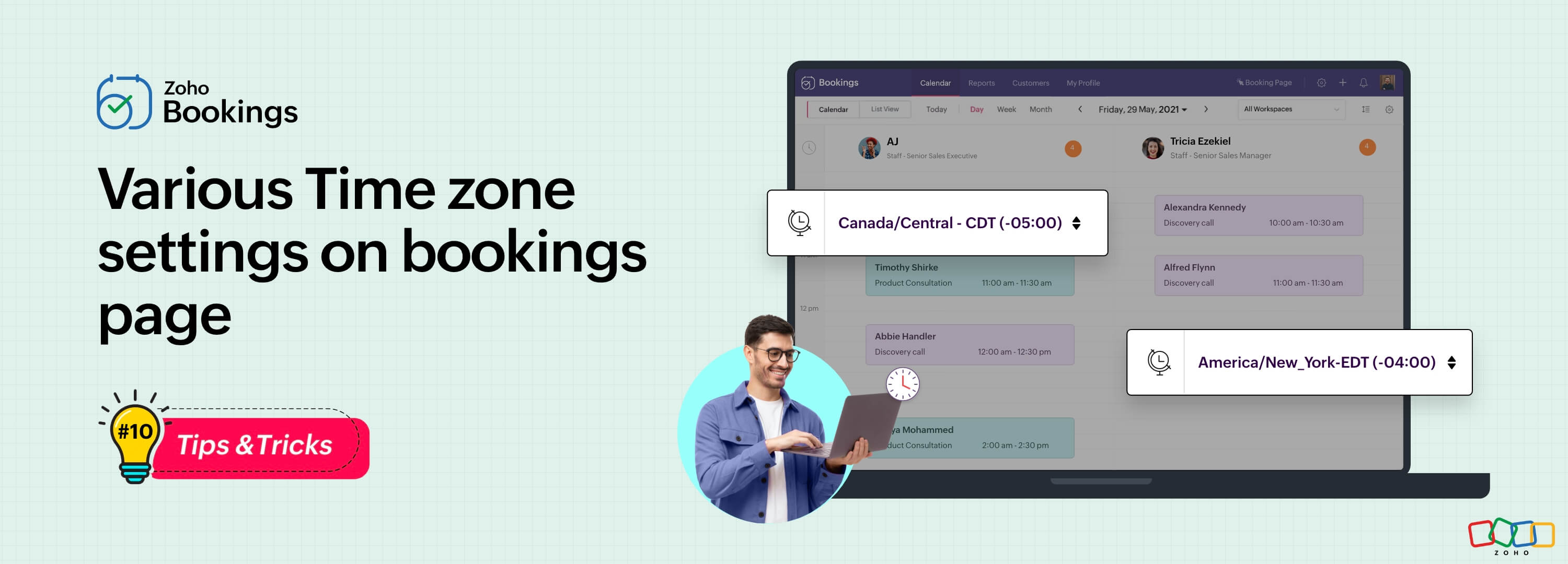
Let's assume you are an IT consultant who works with clients in multiple countries. To schedule appointments and avoid any time-zone related complications, your booking platform should provide automatic time zone conversion. Additionally, your clients should have the option to select their preferred time zones for appointments. This feature can greatly benefit consultants who frequently travel or meet clients and experience varying time zones on different days.
Likewise, a yoga studio can effortlessly arrange online sessions for its global clients, regardless of their time zones.
Zoho Bookings offers a range of time zone settings, simplifying the appointment scheduling process regardless of service provider and customer location.
Benefits
Minimized errors: Automatic time zone conversion reduces the risk of scheduling errors caused by manual time zone calculations.
Time zone selection control: Admins can determine whether the time zone option on the booking should be displayed, hidden, or made editable, offering greater flexibility that is tailored to specific needs.
Time zone-based notifications: Email notifications will be sent to both the staff and customers, according to their preferred time zones. For instance, if the staff works in an Australian time zone and the customer books in an American time zone, appointment emails will be sent to each party based on their selected time zones.
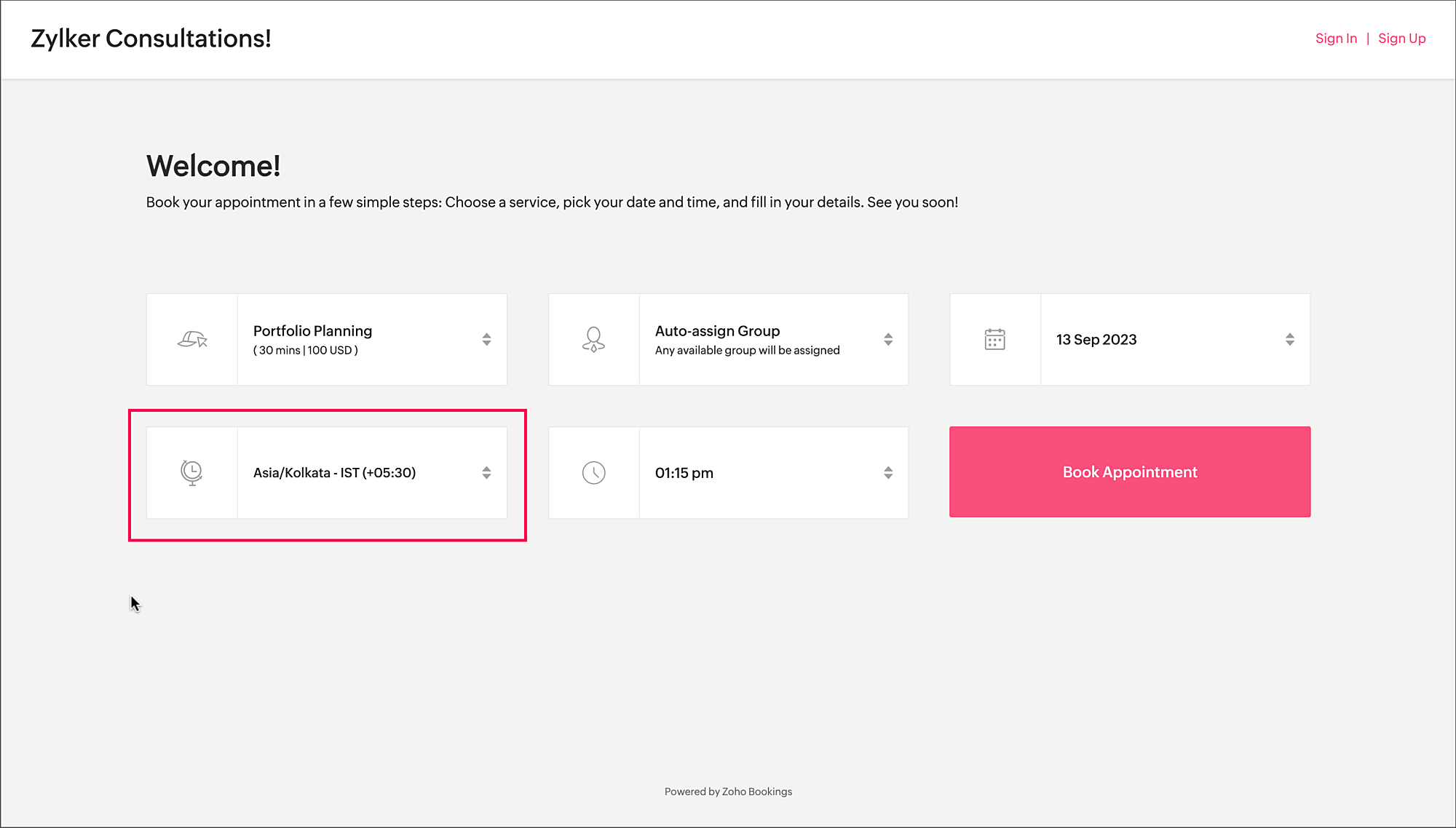
To access the time zone settings
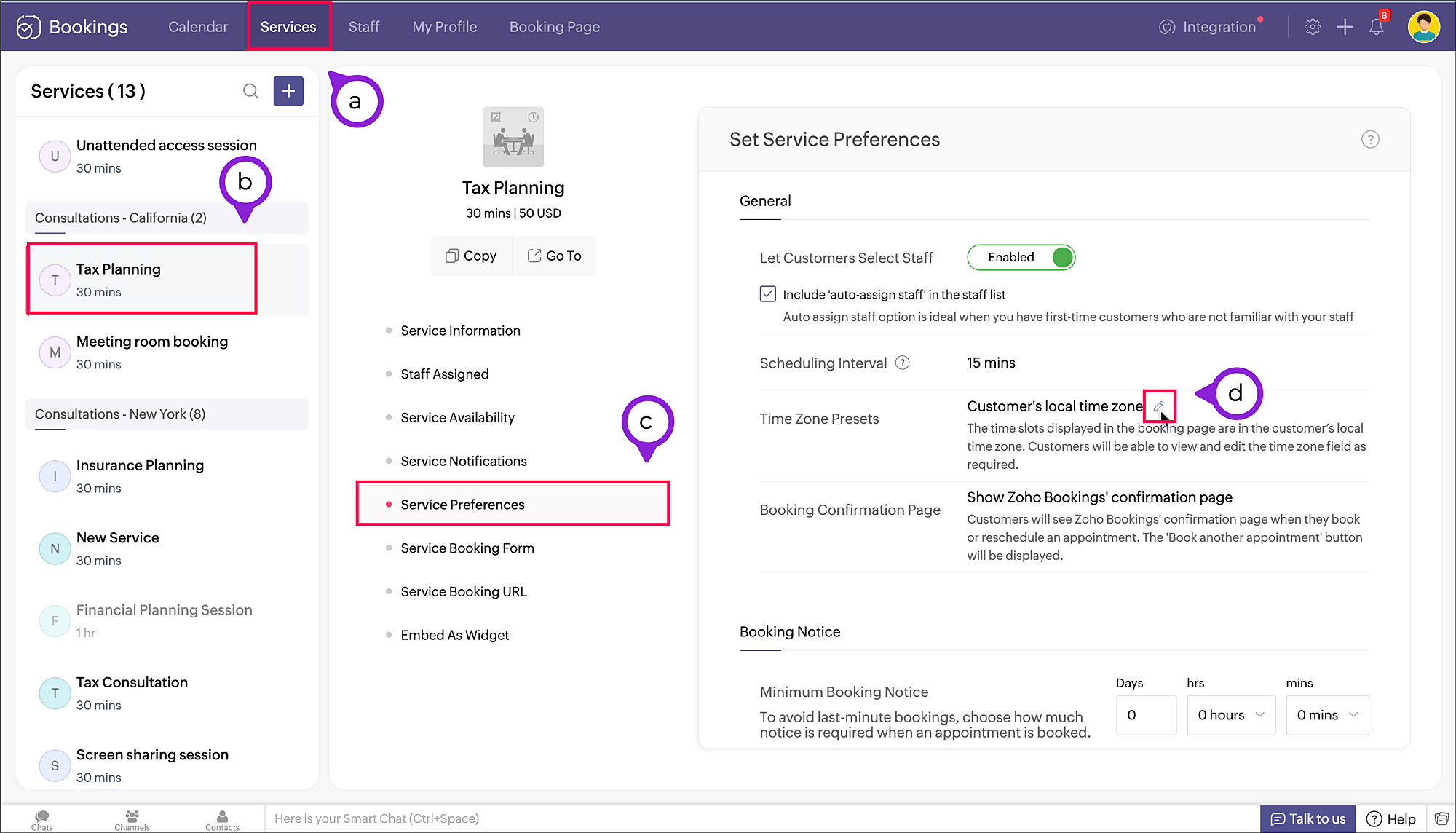
- Navigate to Services > Select the required service > Service Preferences.
Note: For group and resource booking, the time zone settings can to be configured under Workspaces > Policies and Preferences. - Under General section, click the edit icon against Time Zone Presets.
- A pop-up appears where you can configure the time zone settings.
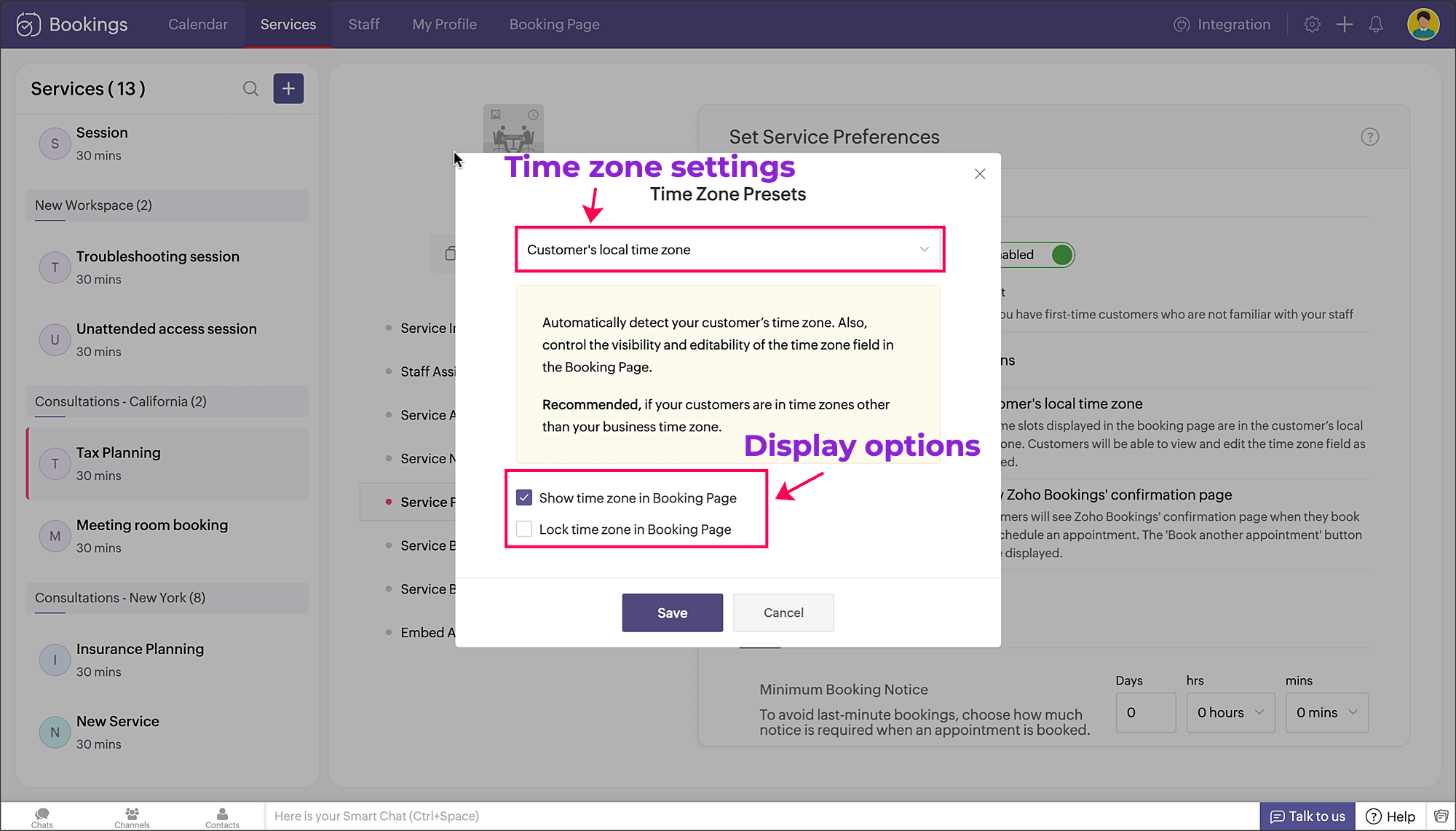
a. Time zone settings: The first dropdown is for choosing the time zone on the booking page. You have three options to choose from.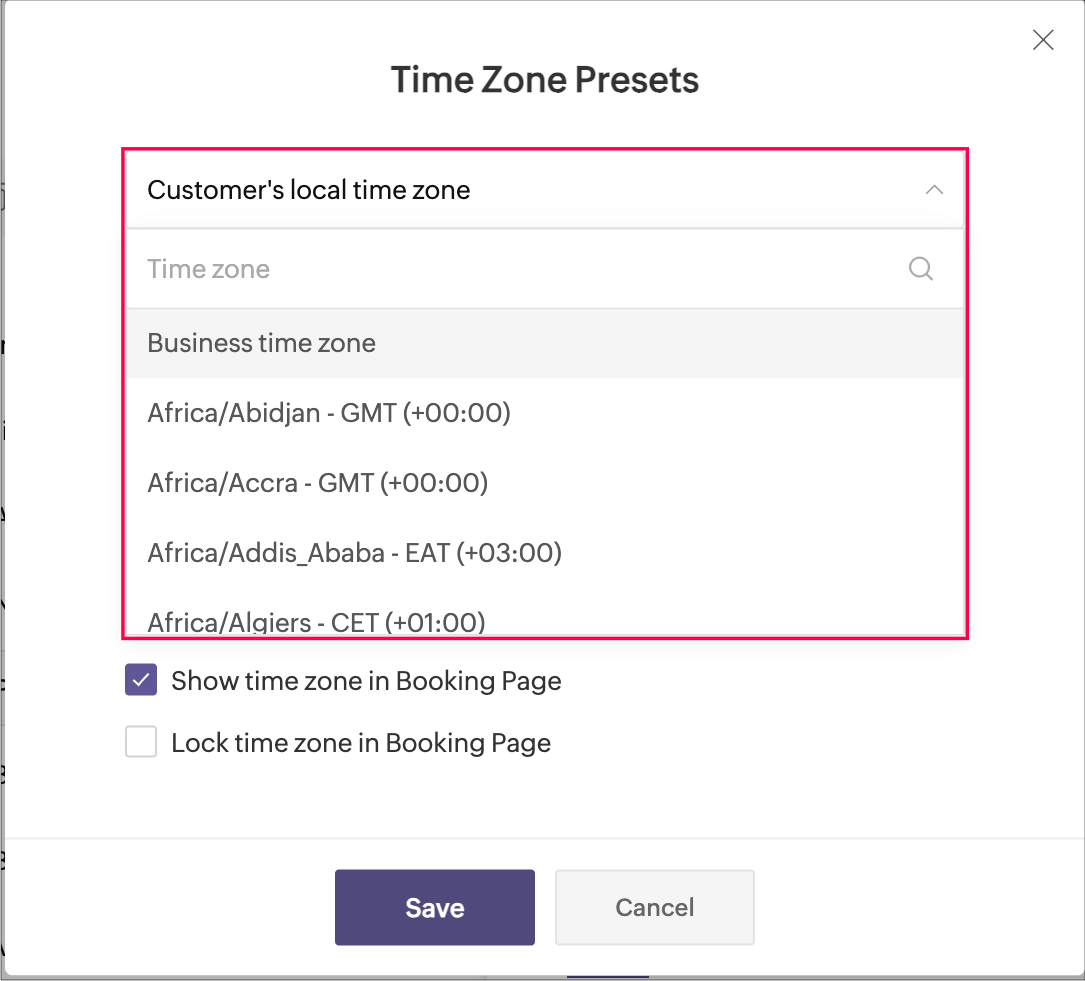
- Customer's local time zone: By choosing this, the customer's location will be detected and the corresponding time zone will be shown on the booking page.
- Business time zone: By choosing this, the default time zone of the business will be shown. This can be accessed under Settings > General > Basic Information > Time Zone.
- Any other time zone: You can choose any other time zone from the list of all time zones.

Visibility options:
- Show time zone: To show the time zone option on the booking page, select the checkbox next to Show time zone in Booking Page. This displays the time zone which is selected in the above pop-up.
- Hide time zone: To hide the time zone dropdown option on the booking page, deselect the checkbox next to Show time zone in Booking Page.
This means that the time zone selected on the above pop-up is suitable for the appointment. However, it's essential to ensure that all parties involved are on the same page regarding the appointment's timing, which might require additional communication or clarification.
Locking options:
- Lock time zone: To prevent the customer from changing the time zone, you can select the checkbox next to Lock time zone in Booking Page.
Here, the booking system displays the specified time zone without the option for customers to modify it. This can be beneficial when strict scheduling adherence is crucial, ensuring that all appointments are synchronized according to a predetermined time zone. - Unlock time zone: To allow the customer to edit/change the time zone, you can deselect the checkbox next to Lock time zone in Booking Page.
This option provides flexibility, allowing customers to select their preferred time zones, which can be particularly useful for businesses with a global customer base. It empowers customers to book appointments that align with their local time, reducing confusion and scheduling errors.
Combining the visibility and locking options, there are three display options as shown below.
Show | Lock | Result |
✓ | ✗ | Shows the time zone and allows customer to modify the time zone on the booking page |
✓ | ✓ | Shows the time zone but restricts the customer from modifying the time zone on the booking page |
✗ | N/A | Hides the time zone |
To conclude, implementing time zone settings and providing visibility or locking options on the booking page can greatly enhance user convenience, minimize scheduling errors, and ensure a smoother experience for both customers and service providers.
Hope this tip is useful, let us know your thoughts in the comments section.
Happy scheduling!
Topic Participants
Praveena Chandran
Michael Tarver
Akshara Amarnath
Sticky Posts
Tip #13: Identify where your bookings come from with Source Tracking
Source tracking is the practice of identifying where your bookings originated. This is important, because online bookings come from a wide variety of sources like social media platforms, your website, email and ad campaigns, partner websites, organicTip #17: How to mandate partial payment for your appointments
When you require partial payments during the booking process, customers can only schedule with you after paying a certain amount in advance. This deposit acts as a commitment between both parties. Apart from that, it has many more advantages. BenefitsTip #18: Organize a group workshop in a few steps
It's the season for workshops—they're everywhere, catering to diverse interests and needs. Whether for more professional goals like leadership development or creative endeavors like painting, there's an abundance of workshops offered every day. A schedulerTip #16: Custom labels for staff, service, and resources
Every industry uses its own jargon. Take healthcare, for example; when you visit a doctor, it's not just an appointment, it's a consultation. The people who provide consultations are the providers. Similarly, in the tranquil world of a spa, a massageTip #15: Customize service prices for each staff member
It's common practice for a service to be priced differently based on the staff member providing it. For example, an experienced hair stylist may charge more for a haircut compared to the other stylists. This pricing strategy allows businesses to charge
Recent Topics
Customer Management: #2 Organize Customers to Enhance Efficiency
When Ankit started his digital services firm, things felt simple. A client would call, ask for a website or a one-time consultation, Ankit would send an invoice, get paid, and move on. "Just one client, one invoice. Easy.", he thought. Fast forward aZoho Mail and Zoho Flow integration to automatically create ToDo tasks from outbound emails
How do i setup Zoho Mail and Zoho Flow integration to automatically create ToDo tasks from outbound emailsAttachments between Zoho and Clickup, using Flow.
Olá suporte Flow, tudo bem ? Estamos usando o flow para integrar Zoho Desk com o clickup. Não localizamos a opção de integrar anexos entre do zoho Desk para o clickup. Gostaríamos de saber se migrando para o plano pago, teremos suporte para fazer a integraçãoAdding an Account on Zoho Mail Trigger in Zoho Flow
I'm trying to create a flow using the zoho mail trigger "Email Receive". My problem is that when I select this trigger, it only shows one account from the account dropdown. I'm planning to assign it on a different email. How can I add other email adLinnworks
Unless I am missing something, the Linnworks integration is very basic and limited. I have reached out to support but the first response was completely useless and trying to get a reply in a timely manner is very difficult. Surely I should be able toTest data won't load
I am using a Flow to receive orders from WooCommerce and add them to a Zoho Creator app. I recently received an order which failed, and when attempting to test the order I found that it just shows a loading animation and shows up in the history as "queued."AddHour resets the time to 00:00:00 before adding the hour.
Based on the documentation here: https://www.zoho.com/deluge/help/functions/datetime/addhour.html Here's my custom function: string ConvertDateFormat(string inputDate) { // Extract only the date-time part (before the timezone) dateTimePart = inputDate.subString(0,19);WhatsApp Link is not integrating
Hello, I am using zoho flow. when new row added in google sheet it sends email to respected person. In email body I have a text "Share via WhatsApp". behind this text I putted a link. But when the recipient receives email and wants to share my given infoZoho flow - Webhook
If I choose an app as a trigger in Zoho Flow, is it still possible to add a webhook later in the same flow?Zoho Flow + Bigin + Shopify
We are testing Zoho Flow for the first time and want to create a flow based in first purchases. When a client makes his first order, we're going to add the "primeiracompra" (first order) tag to his account in Shopify (it's not efficient, but that's theIs it The Flow? Or is it me?
I want to do some basic level stuff, take two fields from a webhook, create a zsheet from a template using one field with date appended, create a folder using both fields as the name, and put the zsheet into that folder. I was going to elaborate - butHaving problem with data transferring from Google sheet to ZMA
When connecting Google sheet with Zoho marketing automation it is having the email as a mandatory field. Can I change it as non-mandatory field or is there any other way to trasnfer data from google sheet to ZMA. I have leads which we get from whatsapp,Dropbox to Workdrive synchronisation
I want to get all the files and folders from Dropbox to Workdrive and each time a new file or folder is added in dropbox i want it to be available in Workdrive and wise versa. Sync Updates to Files Trigger: "File updated" (Dropbox). Action: "Upload file"Microsoft Planner Task to Service Desk Plus Request - error n4001
Hi there. I'm trying to create a flow that will create a new request in ServiceDesk Plus when a new task is created in Microsoft Planner. I have succesfully connected both Planner and ServiceDesk Plus, and have configured the 'create request' sectionTrailing Space in "Date and time scheduled "
I am trying to use the Zoho Projects - Create event action in a flow. It is failing with the output error as: "Action did not execute successfully due to an unknown error. Contact support for more details." The input is: { "Duration - Minutes": 30, "Project":Project name by deal name; project creation via flow
Hello, I want to create a project in zoho projects using flow by a trigger at the crm. My trigger is the update of a deal (stage). The project name should be the account name/ deal name. But I dont find the solution to it. Can you please give me the answerSlack / Zoho Flow; Repl
I am trying to add a comment in a zoho ticket when someone reply's to a message in a thread. The Message posted to public channel trigger doesn't seem to pick up thread messages. I also cannot use the thread_ts field as it doesn't seem to pull that in.Get Holiday ready with Zoho Mail's Templates
As the holiday season approaches, it’s time to step away from work and unwind. You may not be able to respond to every email or send individual messages to wish everyone holidays greetings—but It is still important to stay connected. How do you send thoughtfulCustomize folder permissions in a Team Folder in a Team Folder via zoho Flow
HI All, on the nth level folder of a team folder I would like to Customize folder permissions when it's created in the flow of Creating folders. That last level I only want to grant access to a specific group, goup ID 201XXXXXXXX. Can you help with aAssociating a Candidate to a Job Listing
Hello, I am trying to use Zoho Forms embedded on my website for candidates to apply for a job opening. I want the form then to tie directly with zoho recruit and have the candidate be automatically inputed into Recruit as well as associated with the specificAutomate reminder emails for events
Hi team, I am trying to automate send event reminders via zoho campaign to my attendees 1 day prior to my scheduled events. I used zoho flow, autoresponder in zoho campaign, as well as I used workflow and automation - but none of these methods are working.Update related module entry Zoho Flow not working with custom module ?
Hi everyone. I am facing an issue here on Zoho Flow. Basically what I am doing is checking when a module entry is being filled in with an Event ID. Event is a custom module that I created. If the field is being filled in I fetch the contact with its IDHow to disable time log on / time log off
Hi We use zoho people just to manage our HR Collaborators. We don't need that each persona check in and out the time tracker. How to disable from the screen that ?Zoho Flow - Add to Google Calendar from trigger in Zoho Creator App
Hello! New to Zoho Flow, but I believe I have everything setup the way it should be however getting an error saying "Google Calendar says "Bad Request". Any idea where I should start looking? Essentially some background: Zoho Creator app has a triggerEmail authentication
أريد التحقق من البريد الإلكترونيWhat’s New in Zoho Analytics – December 2025
December is a special time of the year to celebrate progress, reflect on what we have achieved, and prepare for what’s ahead! As we wrap up the year, this month’s updates focus on refining experiences, strengthening analytics workflows, and setting theMarketing Tip #12: Earn trust with payment badges and clear policies
Online shoppers want to know they can trust your store. Displaying trust signals such as SSL-secure payment badges, return and refund policies, and verified reviews shows visitors that your store is reliable. These visual cues can turn hesitation intoThe improved portal experience: Introducing the template view for inventory modules, enhanced configurations, and PDF export support
Availability: Open for all DCs. Editions: All Hello everyone, You can now achieve a seamless, brand-aligned portal experience with our enhanced configuration options and the new template view for inventory modules. Your clients will now be able to viewZoho Analytics Bulk Api Import json Data
HI, I’m trying to bulk-update rows in Zoho Analytics, and below are the request and response details. I’d like to understand the required parameters for constructing a bulk API request to import or update data in a table using Deluge. Any guidance onProject Management Bulletin: December, 2025
The holiday cheer is in the air and it’s time to reflect on the year that was. At Zoho PM Suite, we've been working behind the scenes on something huge and exciting all year and now we are almost ready—with just a bit of confetti—for our grand releaseInventory batch details
Hi there, I'm trying to get the batch details of an item, here's what I've done so far. I've sent cUrl request to the below endpoint and I get a successful response. Within in the response I find the "warehouses" property which correctly lists all theAuto check out after shift complete
i'm just stuck here right now, i wanna know how to do this thing, now tell me, how can i configure a custom function that runs after complete shift time if employee forget to check-out ?How to create a flow that creates tickets automaticaly everyday based on specific times
Hi guys Does anyone know how to create a flow that will create tickets automaticaly in ZOHO Desk when a certain time is reached. Im havin a hard time configuring a flow that will create tickets automaticaly everyday during specific hours of the day ForZOHO FLOW - ZOHO CREATOR - ZOHO WRITER : Get Related records
Bonjour, J'ai besoin que vous m'ajoutiez la solution "Get related Records" dans la liste de choix de zoho creator (sous Zoho flow). En effet, j'ai besoin de récupérer les champs d'un sous formulaire pour l'ajouter à l'impression de mon document. MerWill zoho thrive be integrated with Zoho Books?
titleConnecting email for each department in ZohoDesk
Hi! Could someone help me to go through connecting emails for each department?How do I trigger a Flow based on a campaign response?
Is there a way to trgiider a Zoho Flow based upon a lead opening an email sent via Zoho Campaigns? I see that the data is recorded in the 'Campaigns' section of Zoho CRM under 'Member Status' and I want to trgigger a flow based upon that record changing.All Zoho Flows are filtered
My two flows operate perfectly when I run them as a test, but when they're activated each run ends with a status of neither success, nor fail, but filtered. I haven't set up any filters. I don't see where to turn off filters. When I test run on a sequenceCreating Multiple Items on Sales Order
Hi, I’m trying to automate some processes using Zoho Flow, specifically the creation of sales orders in my Zoho Inventory. However, Zoho Flow's Create Sales Order function can only add one item. I would like to include multiple items in a single salesProblem Connection from Zoho Flow and Gravity Form
I obtained my API key from Gravity Forms via WordPress. However, when I enter my Zoho Flow, it states: Gravity Forms says, 'You are not authorised to access the API." I tried recreating a new API key, but it is still not working.Next Page