Tip #13: 3 important chart customizations to make them more readable

Tip #13: 3 important chart customizations to make them more readable

Charts are great tools for representing data. Visualizing can give you a new perspective, and help you unlock new insights from your data. Here are three customization options that can enhance your charts for maximum impact.

Labels: Cover all the basics

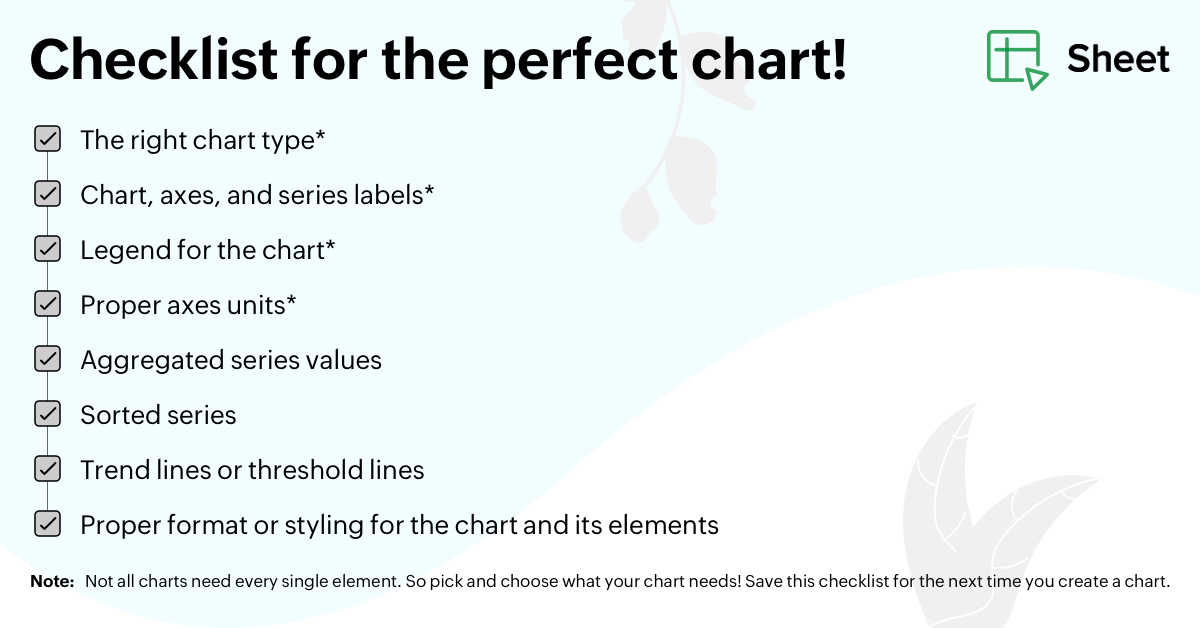
  1. Pick the right chart type for your data. Not all charts have to be pies and bars. 
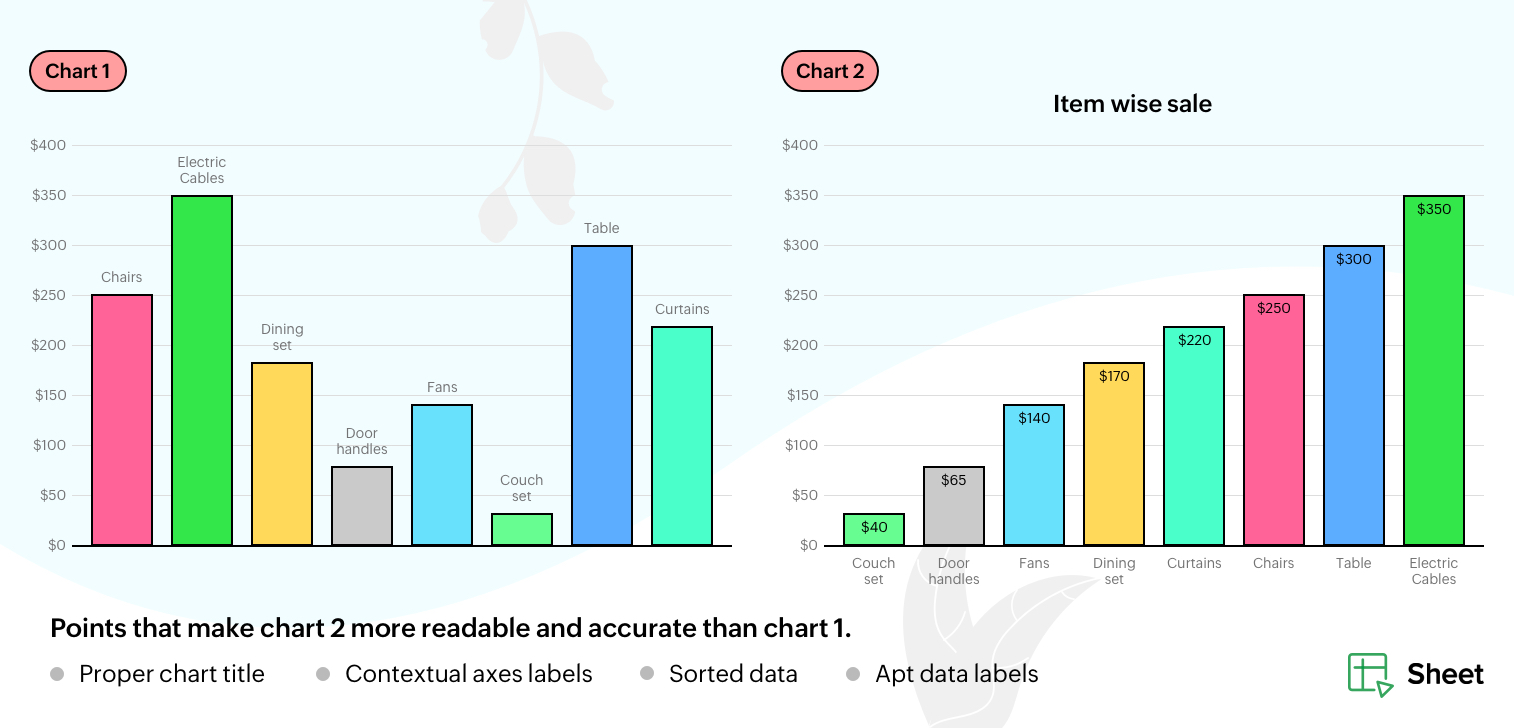
  2. Use explanatory chart and series labels.  
  3. Create a legend for the chart.
Applying labels, and playing around with their formatting and positioning, can make it easier for an audience to understand what the chart is all about—before even looking at the data. 

Axes: Keeping things in line

Most charts are bound by the vertical and horizontal axes. Making them self-explanatory helps you build an easy-to-understand chart. With Zoho Sheet, you can specify the starting point of the vertical axis, the minimum and maximum values the axis will run through, the data interval, scale factor, and number formats. 

Data: Decide the "what" and "how"

When there's too much data, charts cannot function as concise visual tools. It's always best to keep the data simple, sorted, and aggregated. You can depict just a selected portion of the data, either from the top or the bottom. Zoho Sheet helps you sort chart series from either higher to lower or lower to higher, and aggregate to keep your chart clutter free. 
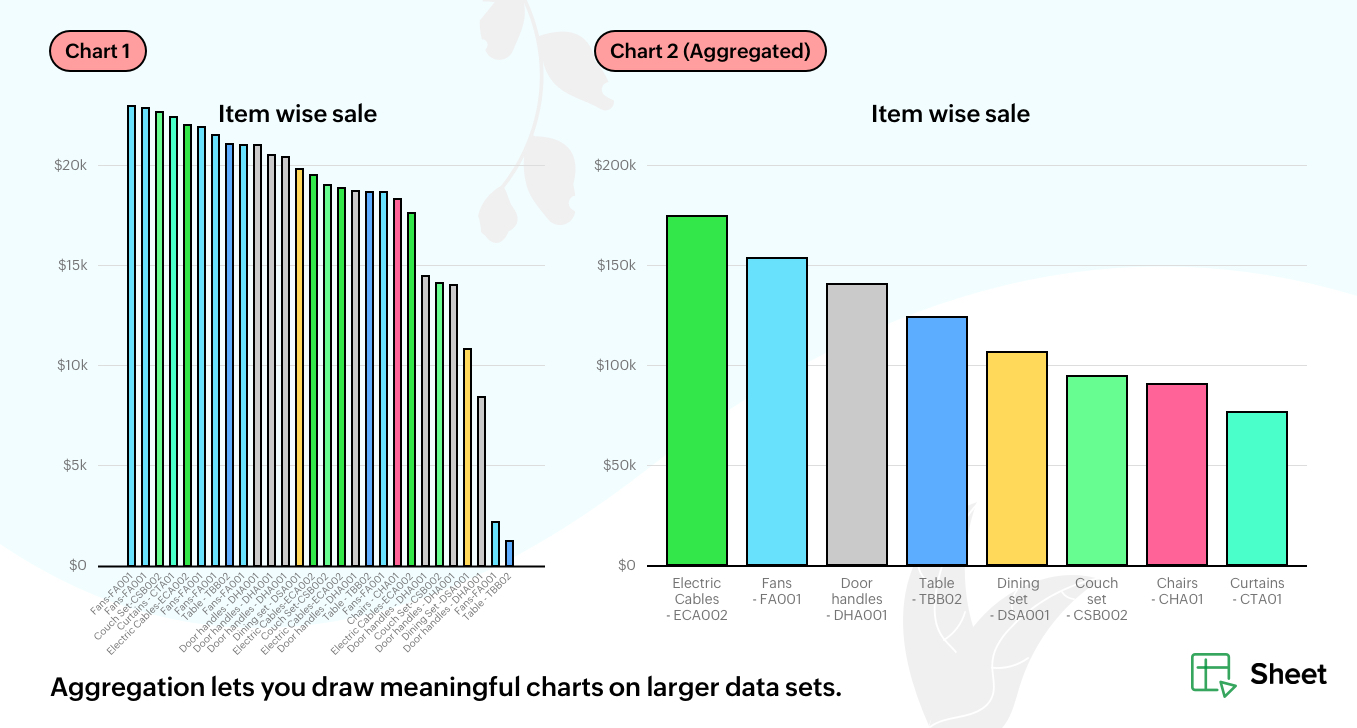


Note: Trend lines and threshold lines can serve as simple, but effective, ways of conveying ancillary information. If you can, try to incorporate them in your charts!

These customizations will ensure that your charts are not only aesthetically pleasing, but highly effective as well. Here's a checklist that you can save for future references.


Share with us the other customization options you use to make charts visually appealing and effective in the comments. Follow our Twitter and LinkedIn spaces for product updates and other spreadsheet related information. Thanks for reading! 

    • Sticky Posts

    • Tip #20 - Three things you probably didn't know you can do with picklists

      Hello Zoho Sheet users! We’re back with another quick tip to help you make your spreadsheets smarter. Picklists are a great tool to maintain consistency in your spreadsheet. Manually entering data is time-consuming and often leaves typos and irregular
    • Tip #18: 6 Trendlines and when to use them in your spreadsheet data?

      Charts are a great tool for visualizing and interpreting large chunks of data in spreadsheets. Zoho Sheet offers you 35+ chart options, along with AI-powered chart recommendations based on the data set you select. There are various chart elements that
    • Tip #17: Easily share spreadsheets with non-Zoho account users

      With efficient, collaboration-friendly options, Zoho Sheet is a popular choice among users. Sheet's external share links help you collaborate more effectively by sharing your spreadsheets with anyone outside your organization, including users who do not
    • Tip #16: Ask Zia your data-related questions and get powerful insights

      Zoho Sheet provides a variety of tools and functionalities to help you analyze your data from end to end. But what if you could analyze all your data sets with a single AI-powered tool? Meet Zia, our smart virtual assistant who will answer all your data-related
    • Tip #7: Four things you didn't know you can do with Conditional Formatting

      Conditional formatting helps you highlight and visualize data in your spreadsheet based on provided rules. Zoho Sheet offers three types of conditional formatting: Classic, Color Scales, and Icon Sets. If you're already familiar with how Conditional Formatting works, here are some bonus tips for Classic formats: Customize rules with formulas Zoho Sheet allows you to create personalized rules based on formulas. For example, in a task list you can use customized formulas to highlight tasks which are
    • Recent Topics

    • Zoho FSM API Delete Record

      Hi FSM Team, It would be great if you could delete a record via API. Thank you,
    • How create a draft via workflow?

      I wish to create a workflow rule for specific emails that creates a draft response - not an automatic email reply, but just a draft with a set response ready to be verified by an agent who can then manually select recipients. Alternatively, the workflow
    • Instant Messaging Update | Now migrate your WhatsApp Business phonenumber from another BSP to Zoho Desk | Dec'23

      Hi All, Everything seems to move at lightning speed these days, and time is certainly flying by for the IM team. But we are delighted at how much ground we covered this year. 🚀 For one, we enabled WhatsApp business phone number migration so that you
    • CRM x WorkDrive: File storage for new CRM signups is now powered by WorkDrive

      Availability Editions: All DCs: All Release plan: Released for new signups in all DCs. It will be enabled for existing users in a phased manner in the upcoming months. Help documentation: Documents in Zoho CRM Manage folders in Documents tab Manage files
    • Upload ticket attachments via Drag-&-Drop

      Hello, if you want to upload a file to the ticket attachment you need to click the button and use the file browser to select and upload the desired file. In many cases, it would be much more efficient if you could simply drag the file to the browser window...
    • Can we disable add to cart in Zoho Commerce?

      Hello, Our sales happen on the phone. During the call the customer is directed to our website to inspect the products together with the sales rep. So we need a way to present our inventory. I figured Zoho Commerce is a good fit for this use case. However
    • Introducing WhatsApp integration in Bigin

      Greetings! In today's business landscape, messaging apps play a significant role in customer operations. Customers can engage with businesses, seek support, ask questions, receive personalized recommendations, read reviews, and even make purchases—all
    • Issues with Zoho Sheet in Mac

      I have downloaded the Zoho App from App Store but It is failing to Save As, Open & Download Operations. App Store
    • Ability to re-order Workflow Rules

      We really need the ability to re-order workflow rules within departments.  Either the ability to drag/drop them into a different order or something.
    • Zoho One account closure vs deactivation

      I wonder what are the best practices and guidelines around deactivating vs deleting Zoho accounts in organisations? Any practical considerations?
    • Global Search placement in the new UI

      Having a hard time with the global search placement in the UI redesign. Surely I can't be the only one. Previously global search placement was perfect. A bar at the top/center of the page. Exactly where you would expect it to be. Since the new UI has
    • Cliq iOS can't see shared screen

      Hello, I had this morning a video call with a colleague. She is using Cliq Desktop MacOS and wanted to share her screen with me. I'm on iPad. I noticed, while she shared her screen, I could only see her video, but not the shared screen... Does Cliq iOS is able to display shared screen, or is it somewhere else to be found ? Regards
    • Can I re-send the Customer Satisfaction Survey after a ticket closure?

      Hello, Some customers does not answer the survey right after closure, is it possible to re-send after a few days or weeks? Best Regards!
    • CRM gets location smart with the all new Map View: visualize records, locate records within any radius, and more

      Hello all, We've introduced a new way to work with location data in Zoho CRM: the Map View. Instead of scrolling through endless lists, your records now appear as pins on a map. Built on top of the all-new address field and powered by Mappls (MapMyIndia),
    • Schedule Zoho CRM reports only on Business Days

      Hello, Is it possible to schedule reports only on business days ? We currently get daily sales reports on weekend which has no value since the sales team doesn't work on weekends. Thanks
    • Missing the "Find & Merge Duplicates" choice

      Hi, I am missing the "Find & Merge Duplicates" choice. I looked under the "More Actions" menu in Contacts, Accounts, Vendors, and Leads and it is not there.  I have full permissions.  Please assist me on finding this feature. Thanks!
    • How to install Widget in inventory module

      Hi, I am trying to install a app into Sales Order Module related list, however there is no button allow me to do that. May I ask how to install widget to inventory module related list?
    • Improved Contact Sync flow in Google Integration with Zoho CRM

      Hello Everyone, Your contact sync in Google integration just got revamped! We have redesigned the sync process to give users more control over what data flows into Google and ensure that this data flows effortlessly between Zoho CRM and Google. With this
    • Cannot see Application from Lookup field

      Hi all, I am trying to access data for an application on our account via a lookup field; however, the application doesn't appear in the dropdown at all. Can anyone shed any light on this, please? I have asked Zoho support; however, they're just as confused,
    • Sharing URLs and direct access

      Hello, I am storing my team's email signature images on Workdrive. I am creating a public image download share and adding “?directDownload=true” so that the image can be accessed without the Workdrive interface. A few questions: 1) Can we generate friendly
    • Deluge Error Code 1002 - "Resource does not exist."

      I am using the following script in a Custom Button on a Sales Return. Basically, the function takes the information in the sales return (plus the arguments that are entered by the user when the button is pushed) and creates a return shipping label via
    • How to track a contact or customer's past product purchases in Bigin Premiere?

      Hello there. I am the sole user of Bigin for a small company (chess club), and would like to track current and past purchases made by a contact (player) or company (family which includes the player). Players may register for multiple tournaments, take
    • LENTITUD EN RECIBIR MAIL

      Buenas tardes, Estamos experimentando lentitud en la recepción de correos electrónicos.
    • Items should display under specific warehouse

      I have configured the multi warehouse but it show all the items under all warehouse which is not correct according to our business logic, so i want that items should only display under that specific warehouse not under all the warehouses not even with zero quantity. Some items should be common but not all so is there any option for that purpose so i can specific the items to its warehouse. Regards
    • Tracking Non-Inventory Items

      We have several business locations and currently use zoho inventory to track retail items (sales and purchase orders). We were hoping to use zoho inventory to track our non-inventory items as well (toilet paper, paper towels, etc). I understand that we
    • Partial refunds

      I am trying to process refund for a one item invoice, however the refund is partial: i am getting this error while creating credit note, can anyone share some wisdom about this
    • Best practice importing items and matching assemblies

      Hi, I was wondering what would be the best practice to import items and composite items (assemblies) From my backup, what should I import first? The items or the composite items? I am on Zoho one, using inventory and books. Kind regards, Sabine
    • Bulk Fill In & Edit PO/Bill/SO/Invoice

      Hello, I am adding stock in bulk on a PO, the system is automatically populating the Rate (price) and Tax from the item data. Problem is that the bill rate is different from the rate on the item data, so I have to manually erase each and enter the price.
    • Separate Items & Services

      Hi, please separate items and services into different categories. Thank you
    • Items Below Reorder Point Report?

      Is there a way to run a report of Items that are below the Reorder Point? I don't see this as a specific report, nor can I figure out how to customize any of the other stock reports to give me this information. Please tell me I'm missing something s
    • Zoho CRM for Everyone's NextGen UI Gets an Upgrade

      Hello Everyone We've made improvements to Zoho CRM for Everyone's Nextgen UI. These changes are the result of valuable feedback from you where we’ve focused on improving usability, providing wider screen space, and making navigation smoother so everything
    • Allocating inventory to specific SO's

      Is there a way that allocate inventory to a specific sales order? For example, let's say we have 90 items in stock. Customer 1 orders 100 items. This allocates all 90 items to their order, and they have a back order for the remaining 10 items which could
    • Cancelled Transfer order problem

      Hello, We've canceled a transfer order, and we can't add the related items to a new Transfer Order. The system tells us that the bin doesn't have the required quantity, but when we check the item, it indicates that there are 2 units in the bin. It also
    • Unified WhatsApp Number Management in Zoho Desk and SalesIQ

      Dear Zoho Desk Support Team, We are currently utilizing both Zoho Desk and Zoho SalesIQ for our customer support operations. While both platforms offer WhatsApp integration, we are facing challenges due to the requirement of separate WhatsApp numbers
    • iOS App doesn't refresh for Document Creation

      Hello Zoho team, I have created a workflow to be used on a mobile iOS device which starts in Zoho Creater and ends with a murge and store function that then opens the newly created document within the Zoho Writer app. This process is working great however
    • Zoho Books Sandbox environment

      Hello. Is there a free sandbox environment for the developers using Zoho Books API? I am working on the Zoho Books add-on and currently not ready to buy a premium service - maybe later when my add-on will start to bring money. Right now I just need a
    • Client Portal ZOHO ONE

      Dear Zoho one is fantastic option for companies but it seems to me that it is still an aggregation of aps let me explain I have zoho books with client portal so client access their invoice then I have zoho project with client portal so they can access their project but not their invoice without another URL another LOGIN Are you planning in creating a beautiful UI portal for client so we can control access to client in one location to multiple aps at least unify project and invoice aps that would
    • Email Insights included in Bigin emals are marked as SPAM everywhere

      Today I noticed that email recipients who use Office 365 never receive emails sent from Bigin. Further examination showed that all Email Insights links in email headers are marked as spam/phishing by Office 365. Example screen included. The problem is
    • Data Import | Zoho Analytics Custom Query Window Size

      Please increase the window size for the Custom Query Data Import. It's impossible to work with such a small query window.
    • Name changed in settings for mailbox but still not changed when typed in To field

      In the email account secretary@ i have updaetd the new staff members details but the old members name still appears when I type secretary@ in the To field. I cant work out where Zoho is finding the old name from. I have deleted the browser cache. If I
    • Next Page