Tip #2: Gestiona tus oportunidades de venta con Bigin
Tip #2: Gestiona tus oportunidades de venta con Bigin

Tips and Tricks #2 para Bigin by Zoho CRM, por Alejandro Mora
¡Hola usuarios!

Continuamos con nuestros Tips and Tricks de Bigin, esta vez con la segunda edición. 

En la última publicación, nos encontrábamos en un escenario en el que acabábamos de empezar con nuestro CRM particular y necesitábamos importar los contactos que hemos ido acumulando sobre clientes, potenciales clientes y antiguos clientes que ya no trabajan con nosotros. Por ahora ya tenemos una parte del proceso de adopción de Bigin completada, pero nos queda mucho por explorar, aprender y adaptar para nuestra empresa.

El siguiente paso que recomendamos realizar en la adopción de nuestro nuevo CRM Bigin es transformarlo y adaptarlo a lo que verdaderamente necesitamos de la herramienta, ser capaces de gestionar de manera eficiente nuestros clientes y sus oportunidades. Para ello, esta vez iremos al apartado de Ciclos de venta. Este módulo de Bigin será a partir de ahora nuestro centro neurálgico para todas las actividades que llevemos a cabo relacionadas con nuestros clientes o las oportunidades relacionadas a los mismos.
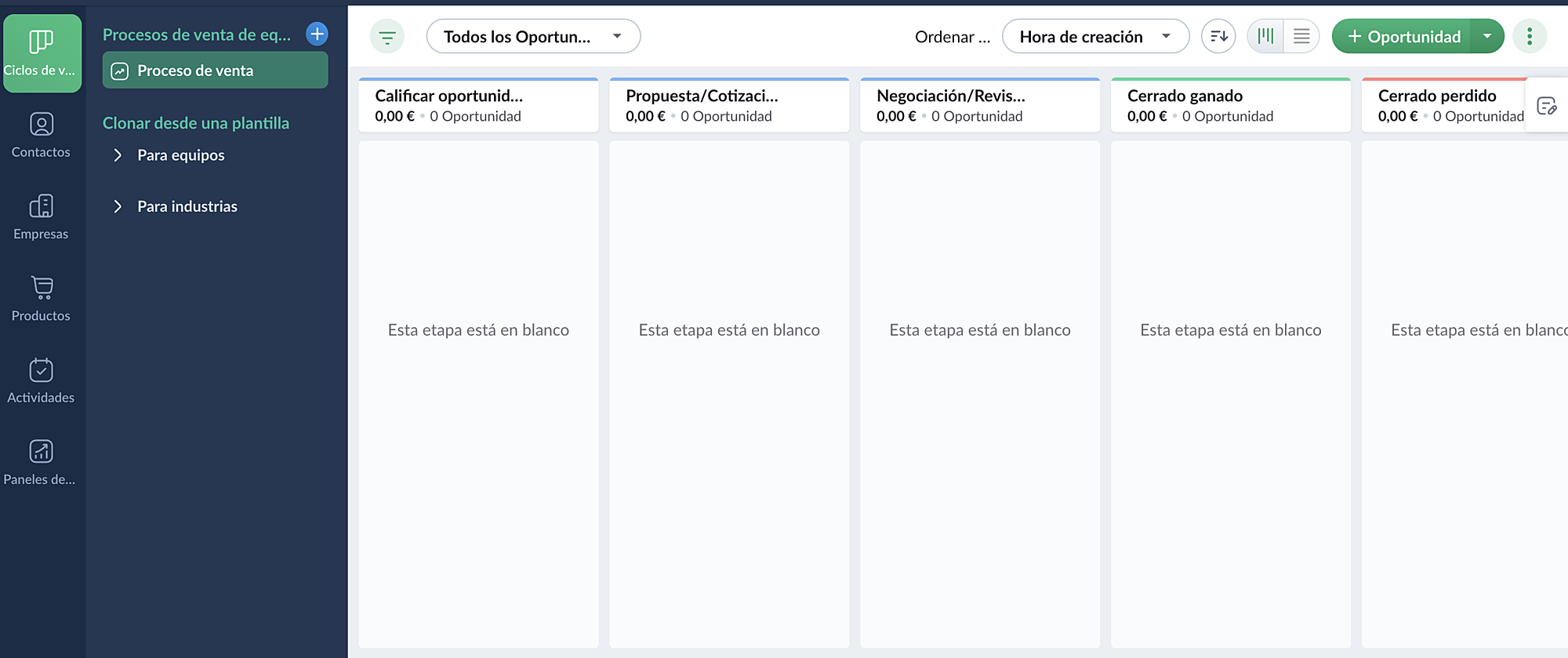


La primera vez que accedamos al módulo, encontraremos algo parecido a la imagen anterior, que se trata de un diseño básico de cómo gestionar las oportunidades de nuestros clientes a través de las diferentes fases del embudo de ventas. A partir de aquí es donde empieza lo divertido y es el punto de partida para poder crear tu 'opera prima' en la gestión de clientes. Para poder hacerlo un poco más sencillo, supongamos que el proceso de ventas de nuestra empresa tiene 7 fases principales que deseamos representar en Bigin. Para ello, disponemos de diferentes alternativas dentro de Bigin para hacerlo lo más sencillo posible:
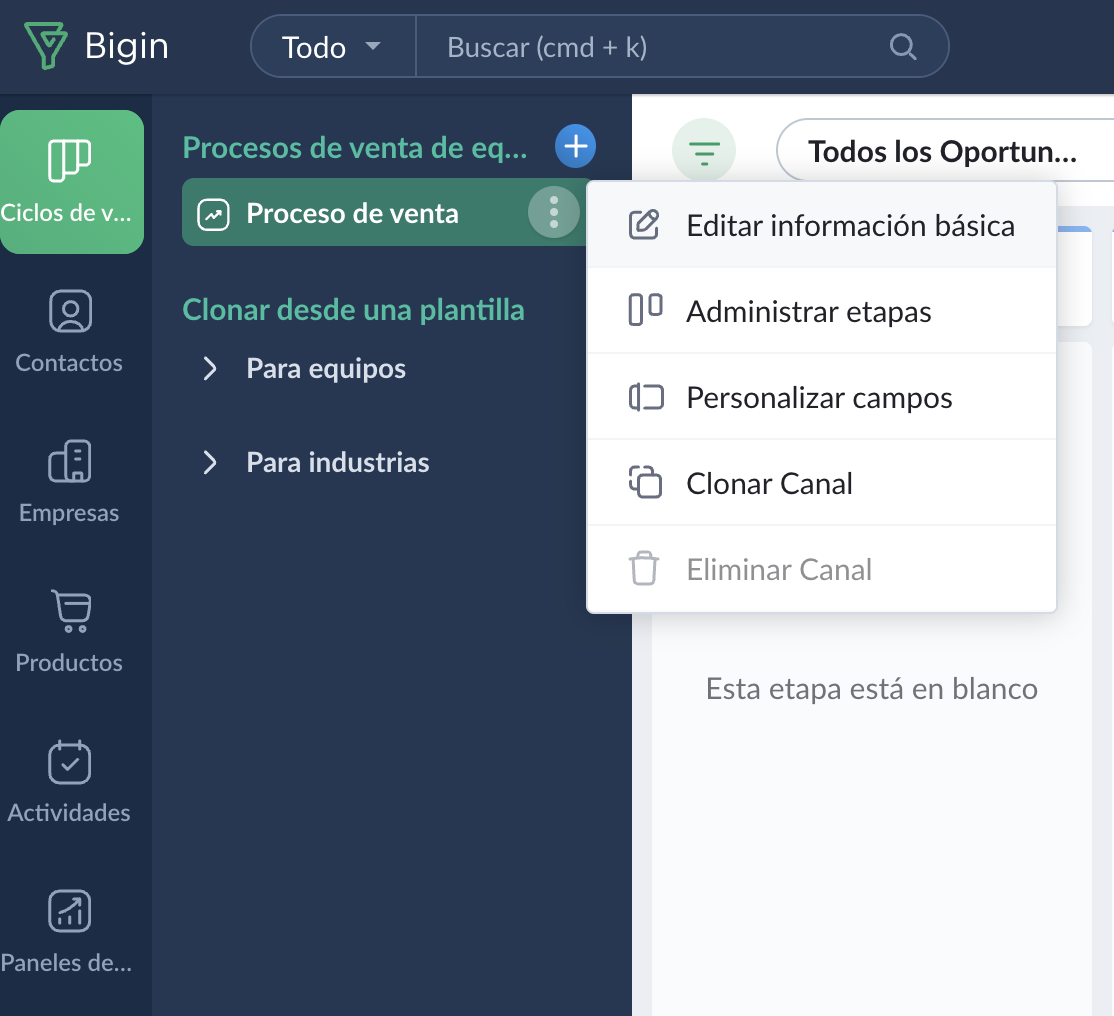
  • La primera de ellas es cambiando los nombres de las fases del proceso de ventas que ya tenemos y añadiendo las fases que sean necesarias para nuestra gestión de clientes eficiente. Para ello deberemos clicar en los 3 puntos de nuestro Proceso de ventas y tendremos la posibilidad de editar la información básica y administrar las etapas.
.     

  • Otra de las maneras en las que puedes crear tu propio proceso de ventas es haciéndolo desde cero. Para ello tenemos que volver a acudir a la misma parte de la página que en el punto anterior, pero en esta ocasión deberemos pulsar en el icono + con sombreado azul. Una vez pulsado el botón, Bigin nos ofrecerá dos alternativas: Crear desde cero o Clonar una plantilla por defecto que incluye Bigin. En esta ocasión clicaremos en Crear desde cero y nos pondremos manos a la obra.
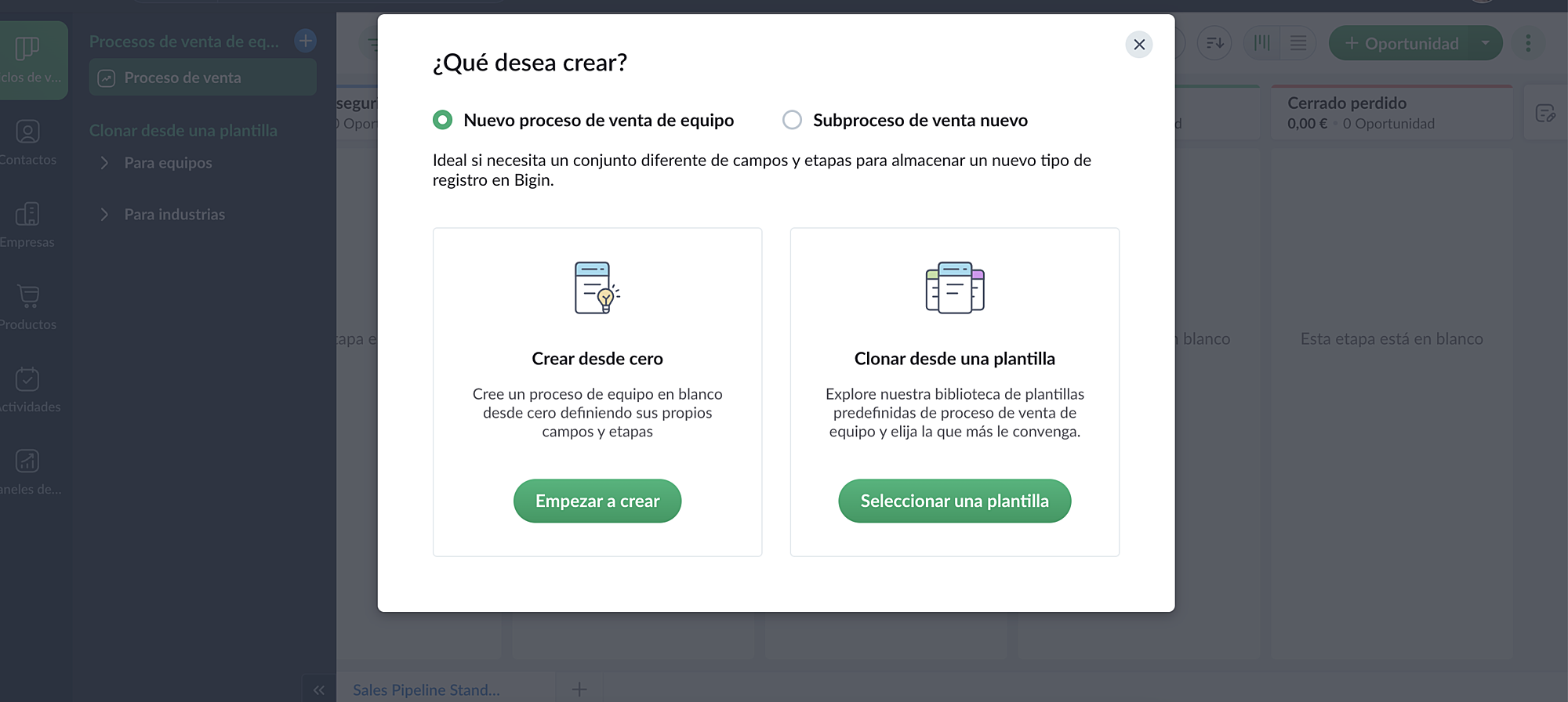

Una vez dentro, tendremos que completar las 3 fases básicas para poder tener nuestro proceso de ventas listo para utilizar. La primera fase consiste en darle nombre a nuestro proceso y a cómo vamos a llamar a nuestras oportunidades, contratos, acuerdos, etc. Además seleccionaremos quiénes tendrán permisos de acceso a dicho proceso de ventas.
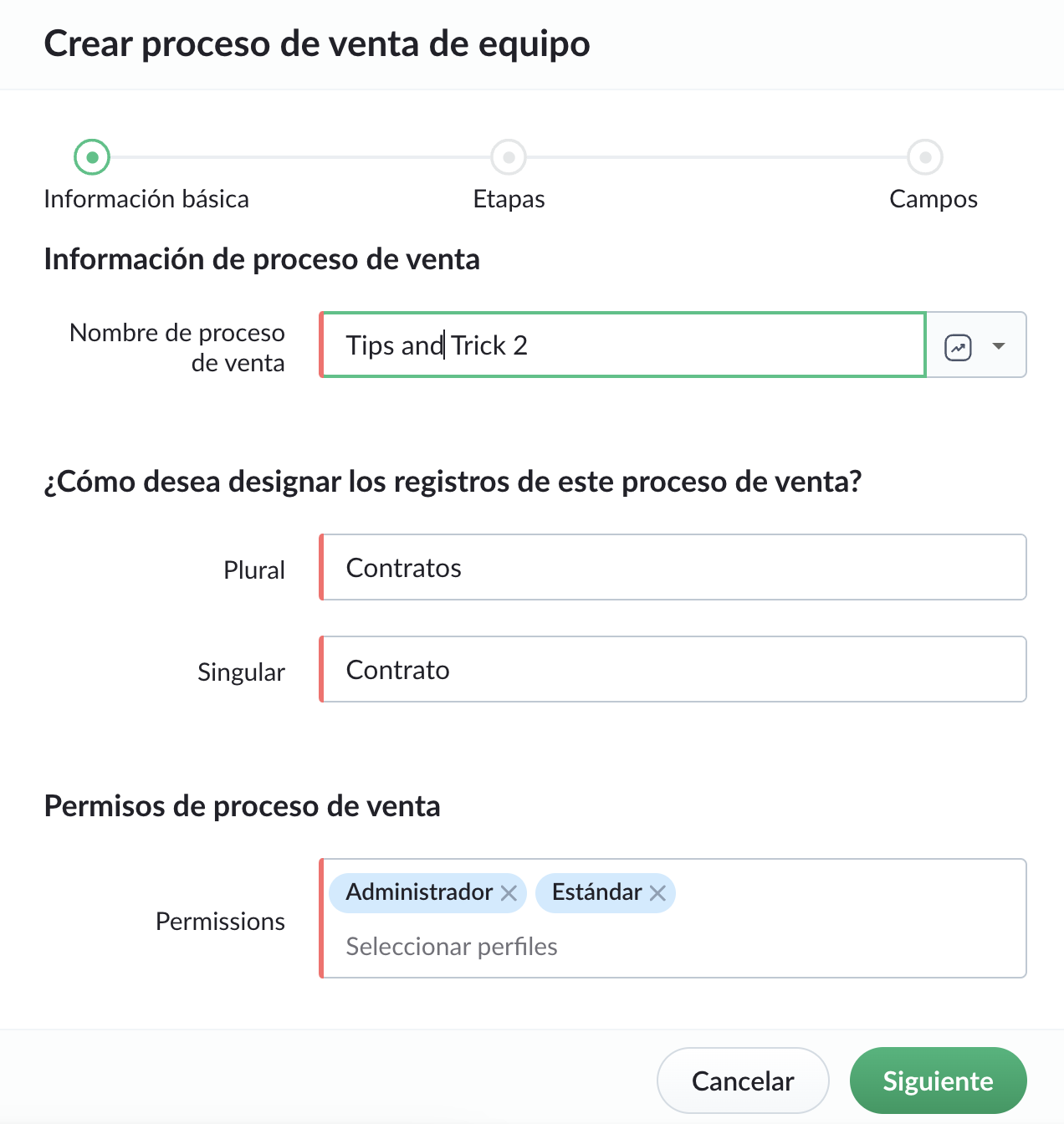


La siguiente fase de creación de nuestro proceso de ventas personalizado se centra en cómo consideramos que se compone nuestro proceso de ventas total. Como ya hemos visto anteriormente, nuestro proceso de ventas se compone de siete fases principales.
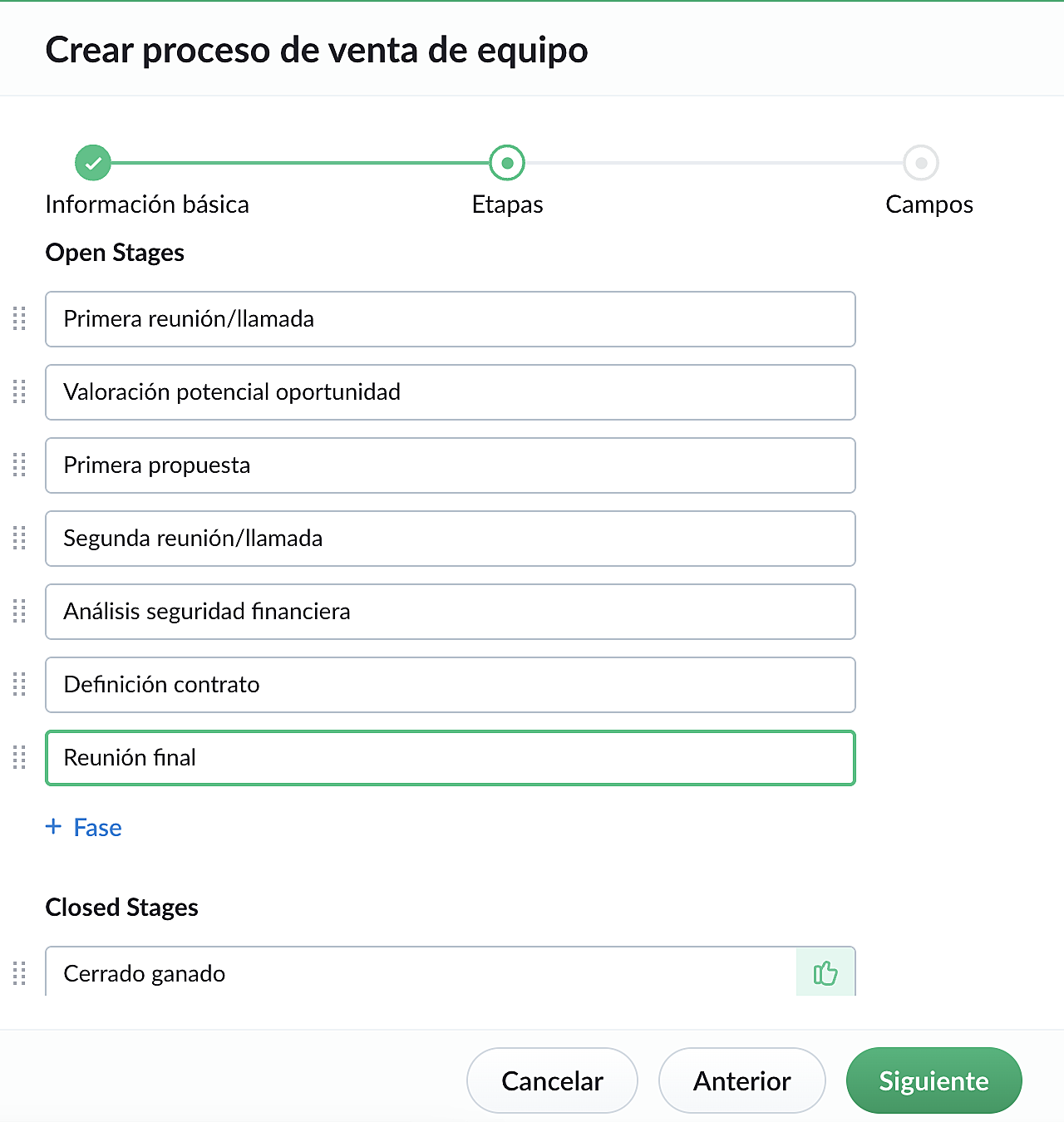

Por último pero no menos importante, deberemos establecer los campos de información más relevantes a conocer dentro de nuestro proceso de ventas. Estos campos pueden ir desde el nombre de la oportunidad hasta el nombre de la empresa asociada, fecha de cierre esperada, probabilidad de cierre, etiquetas de nuestros clientes o incluso campos personalizados. En definitiva las opciones son infinitas. También tenemos la posibilidad de marcar los campos obligatorios que nos permitan tener una imagen rápida de la situación de cada oportunidad y saber a qué cliente se asocia.
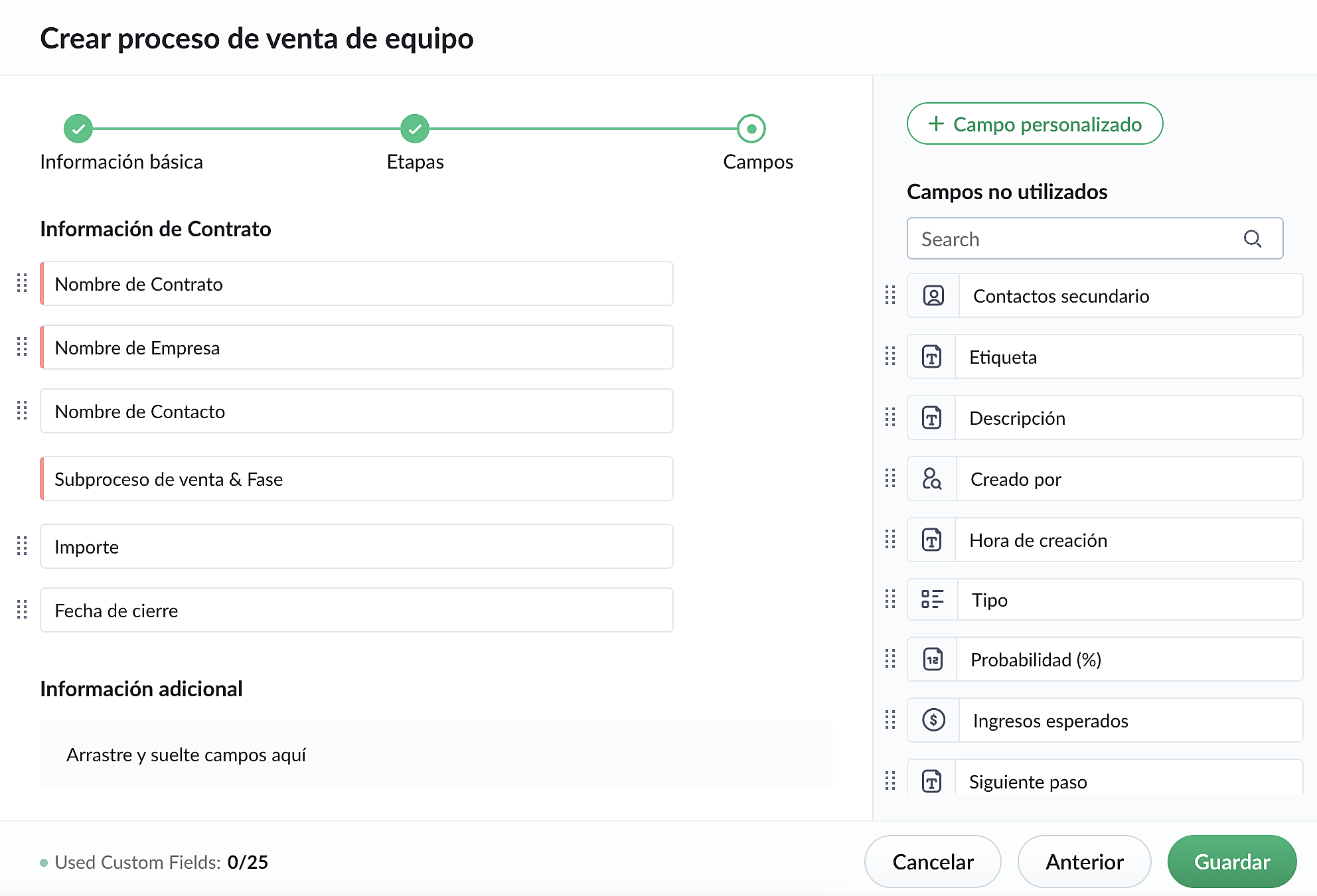


La creación de nuevos embudos no tiene por qué ceñirse exclusivamente a embudos de venta, si no que hay muchas más alternativas para diferentes departamentos tales como Recursos Humanos, Marketing, TI o Atención al cliente entre otros.

Con esto llegamos a la conclusión de la segunda publicación sobre Tips & Tricks de Bigin. ¡Nos vemos en los comentarios!

    • Recent Topics

    • Automation #7 - Auto-update Email Content to a Ticket

      This is a monthly series where we pick some common use cases that have been either discussed or most asked about in our community and explain how they can be achieved using one of the automation capabilities in Zoho Desk. Email is one of the most commonly
    • Learner transcript Challenges.

      Currently i am working on a Learner Transcript app for my employer using Zoho Creator. The app is expected to accept assessment inputs from tutors, go through an approval process and upon call up, displays all assessments associated with a learner in
    • Client and Vendor Portal

      Some clients like keeping tabs on the developments and hence would like to be notified of the progress. Continuous updates can be tedious and time-consuming. Zoho Sprints has now introduced a Client and Vendor Portal where you can add client users and
    • #7 Tip of the week: Delegating approvals in Zoho People

      With Zoho People, absences need not keep employees waiting with their approval requests. When you are not available at work, you can delegate approvals that come your way to your fellow workmate and let them take care of your approvals temporarily. Learn more!
    • Trouble with using Apostrophe in Name of Customers and Vendors

      We have had an ongoing issue with how the system recognizes an apostrophe in the name of customers and vendors. The search will not return any results for a name that includes the mark; ie one of our vendors names is "L'Heritage" and when entering the
    • Why am I seeing deleted records in Zoho Analytics syncing with Zoho CRM?

      I have done a data sync between Zoho CRM and Zoho Analytics, and the recycle bin is empty. Why do I see deleted leads/deals/contacts in Zoho Analytics if it doesn't exist in Zoho CRM? How can I solve this problem? Thanks
    • Nueva edición de "Ask The Expert" en Español Zoho Community

      ¡Hola Comunidad! ¿Te gustaría obtener respuestas en directo sobre Zoho CRM, Zoho Desk u otra solución dentro de nuestro paquete de CX (Experiencia del Cliente? Uno de nuestros expertos estará disponible para responder a todas tus preguntas durante nuestra
    • How to use MAIL without Dashboard?

      Whenever I open Mail, it opens Dashboard. This makes Mail area very small and also I cannot manage Folders (like delete/rename) etc. I want to know if there is any way to open only Mail apps and not the Dashboard.
    • Peppol: Accept Bill (Belgium)

      Hi, This topic might help you if you're facing the same in Belgium. We are facing an issue while accepting a supplier bill received by Peppol in Zoho Books. There is a popup with an error message: This bill acceptance could not be completed, so it was
    • Zoho Books is now integrated with Zoho Checkout

      Hello everyone,   We're glad to be announcing that Zoho Books is now integrated with Zoho Checkout. With this integration, you can now handle taxes and accounting on your payment pages with ease.   An organization you create in Zoho Checkout can be added to Zoho Books and vice-versa. Some of the key features and benefits you will receive are:   Seamless sync of customer and invoice data With the end-to-end integration, the customer and invoice details recorded via the payment pages from Zoho Checkout
    • Sync Issue

      My Current plan only allows me with 10,000 rows and it is getting sync failure how to control it without upgrading my plan
    • Is there API Doc for Zoho Survey?

      Hi everyone, Is there API doc for Zoho Survey? Currently evaluating a solution - use case to automate survey administration especially for internal use. But after a brief search, I couldn't find API doc for this. So I thought I should ask here. Than
    • Add Zoho PDF to Zoho One Tool Applications

      It should be easy to add from here without the hassle of creating a web tab:
    • JOB WISE INVOICE PROCESS

      I WANT TO ENABLE JOB WISE TRACKING OF ALL SALES AND PURCHASE
    • PDF Template have QTY as first column

      I want to have the QTY of an item on the sales orders and invoices to be the first column, then description, then pricing. Is there a way to change the order? I went to the Items tab in settings but don't see how to change the order of the columns on
    • RAG (Retrieval Augmented Generation) Type Q+A Environment with Zoho Learn

      Hi All, Given the ability of Zoho Learn to function as a knowledge base / document repository type solution and given the rapid advancements that Zoho is making with Zia LLM, agentic capabilities etc. (not to mention the rapid progress in the broader
    • Welcome to the Zoho ERP Community Forum

      Hello everyone, We are thrilled to launch Zoho ERP (India edition), a software to manage your business operations from end to end. We’ve created this community forum as a space for you to ask questions, comment answers, provide feedback, and share your
    • In App Auto Refresh/Update Features

      Hi,    I am trying to use Zoho Creator for Restaurant management. While using the android apps, I reliased the apps would not auto refresh if there is new entries i.e new kitchen order ticket (KOT) from other users.   The apps does received notification but would not auto refresh, users required to refresh the apps manually in order to see the new KOT in the apps.    I am wondering why this features is not implemented? Or is this feature being considered to be implemented in the future? With the
    • Consolidated report for multi-organisation

      I'm hoping to see this feature to be available but couldn't locate in anywhere in the trial version. Is this supported? The main aim to go to ERP is to have visibility of the multi-organisation in once place. I'm hopeful for this.
    • IMAP mail after specify date

      Hi My customer's mail server is on premise and mail storage is very huge. So It never finish sync. and finally stop sync. Cloud CRM have a option like zoho mail sync mail after some date.
    • Analytics <-> Invoice Connection DELETED by Zoho

      Hi All, I am reaching out today because of a big issue we have at the moment with Zoho Analytics and Zoho Invoice. Our organization relies on Zoho Analytics for most of our reporting (operationnal teams). A few days ago we observed a sync issue with the
    • Claude + MCP Server + Zoho CRM Integration – AI-Powered Sales Automation

      Hello Zoho Community 👋 I’m excited to share a recent integration we’ve worked on at OfficehubTech: ✅ Claude + MCP Server + Zoho CRM This integration connects Zoho CRM with Claude AI through our custom MCP Server, enabling intelligent AI-driven responses
    • Notes badge as a quick action in the list view

      Hello all, We are introducing the Notes badge in the list view of all modules as a quick action you can perform for each record, in addition to the existing Activity badge. With this enhancement, users will have quick visibility into the notes associated
    • Search Bar positioning

      Why is the Search bar on the far right when everything is oriented towards the left?
    • Basic Mass Update deluge schedule not working

      I'm trying to create a schedule that will 'reset' a single field to 0 every morning - so that another schedule can repopulate with the day's calculation. I thought this would be fairly simple but I can't work out why this is failing : 1) I'm based in
    • The Social Playbook - January edition: Getting started with content creation

      Social media isn’t just about posting some random content. It’s about why certain content works, how brands stand out, and what makes people pause mid-scroll. The Social Playbook is a monthly community series where we break all of that down. Through real
    • Import Error: Empty values for mandatory fields - Closing Date

      Hello, I've tried multiple times to import a CVS Potential list from another Zoho account. But the error message I get is: Empty values for mandatory fields - Closing Date There are valid dates in this field, so I don't understand why this error messages
    • Adding custom "lookup" fields in Zoho Customization

      How can I add a second “lookup” field in Zoho? I’m trying to create another lookup that pulls from my Contacts, but the option doesn’t appear in the module customization sidebar. In many cases, a single work order involves multiple contacts. Ideally,
    • Special characters (like â, â, æ) breaking when input in a field (encoding issue)

      Hey everyone, We are currently dealing with a probably encoding issue when we populate a field (mostly but not exclusively, 'Last Name' for Leads and Contracts). If the user manually inputs special characters (like ä, â, á etc.) from Scandinavian languages,
    • Customizable UI components in pages | Theme builder

      Anyone know when these roadmap items are scheduled for release? They were originally scheduled for Q4 2025. https://www.zoho.com/creator/product-roadmap.html
    • Feature Requests - Contact Coloured Picklist Visibility & Field Visibility During Ticket Creation

      Hi Desk Team, I have 2 feature requests for you. Since Coloured Picklists are now available in Desk, It would be great if the colours were visible on the Related Details (Contact Information) when creating a ticket. In the screenshot below, I have 2 fields
    • How to integrate XML with Zoho CRM

      Hi, I have an eCom service provider that gives me a dynamic XML that contains order information, clients, shipments... The XML link is the only thing I have. No Oath or key, No API get... I want to integrate it into Zoho CRM. I am not a developer nor
    • Feature Request - Ability to Customise Contact Info Card on Ticket Details View

      Hi Desk Team, I've added a "Contact Priority" and "Account Prioirty" field and it would be very useful to agents if they could see that information in the Contact Info card on the Ticket Details view. It would be great if we could choose some fields to
    • Tax in Quote

      Each row item in a quote has a tax value. At the total numbers at the bottom, there is also a Tax entry. If you select tax in both of the (line item, and the total), the tax doubles. My assumption is that the Tax total should be totalling the tax from
    • Zoho Flow integration with Facebook Messenger and Whatsapp

      Hi there,  any plans of adding integrations with Facebook Messenger and Whatsapp into Zoho Flow? Seems that more and more business are delivering automated updates such as "your order is received",  "your order has been shipped" and so on via these two platforms. Not sure if Whatsapp has the API access needed i am pretty sure that Facebook Messenger has... Kind regards Bo Thygesen 
    • Really want the field "Company" in the activities module!

      Hi team! Something we are really missing is able to see the field Company when working in the activities module. We have a lot of tasks and need to see what company it's related to. It's really annoying to not be able to see it.🙈 Thx!
    • Multi-currency and Products

      One of the main reasons I have gone down the Zoho route is because I need multi-currency support.  However, I find that products can only be priced in the home currency, We sell to the US and UK.  However, we maintain different price lists for each. 
    • Campaigns unsubscribe/manage preferences links

      Hi, Where can I edit the unscubscribe and manage preferences link in the footer of the email. I would like it so that when you click 'manage preferences' an form opens up that allows the person to choose what type of emails they do and don't wish to
    • email address somehow still not verified (?!)

      L.S. After creating a new email template in CRM I was about to send a group email to my clients, then Zoho CRM announced that they would change the sender address to some kind of Zoho-e-ddress because my email address "has not been verified". Not only
    • Marketing Tip #17: Add credibility to your online store with Review Widgets

      One of the fastest ways to build trust in an online store is to show real customer feedback right where people are deciding to buy. Third-party widgets let you embed things like Google Reviews, Instagram feeds, or even a WhatsApp chat button. These add
    • Next Page