Unfurling Unlimited Possibilities in Zoho Cliq 🔗
Are you tired of your app links looking plain? Imagine if the shared links came to life with custom previews, organized data, and one-click actions, making chats more interactive. With the Cliq platform's unfurl handlers, let's see how developers can enhance links shared from their apps or tools, allow automatic display of relevant details and metadata, and add intuitive buttons and forms to streamline workflows.
Meeting links with action buttons to add Cliq reminders
When sharing meeting links in any channel, instead of showing a basic preview, you can provide a detailed response via preview handler that includes the meeting title, date, time, description, agenda, and an action button to set a Cliq reminder.
Attribute | Type | Description |
date_time* | String Mandatory | To specify the date and time of the Cliq reminder in yyyy-MM-ddTHH:mm format. Refer to applicable date-time literals |
content* | String | Title of the reminder to be set. |
Syntax
- reminderParams = Map();
- reminderParams.put("date_time",$DATE_TIME);
- reminderParams.put("content",$CONTENT);
- setReminderButton = {"type":"system.api","action":"set_reminder","label":$BUTTON_LABEL,"hint":$HINT,"params":reminderParams};

With the Arattai extension, you can expand Arattai links within your Zoho Cliq conversations, access meeting links interactively to schedule Cliq reminders, and see a detailed preview of channel links, group invitations, and user contacts.

File sharing with post-action access controls

- When a file or attachment is shared in a channel, display a response that shows the metadata (title, type, and size) and prompt a follow-up form to manage access control for the attachment.
- The form can be configured to ask whether the sender wants to share the attachment with all participants in the channel or with specific individuals and the type of access they wish to grant, such as view, edit, or comment.
- This can be implemented using the after-send action handler, ensuring secure file access and eliminating awkward "I'm unable to open this file" follow-ups.
Task management without tab switching
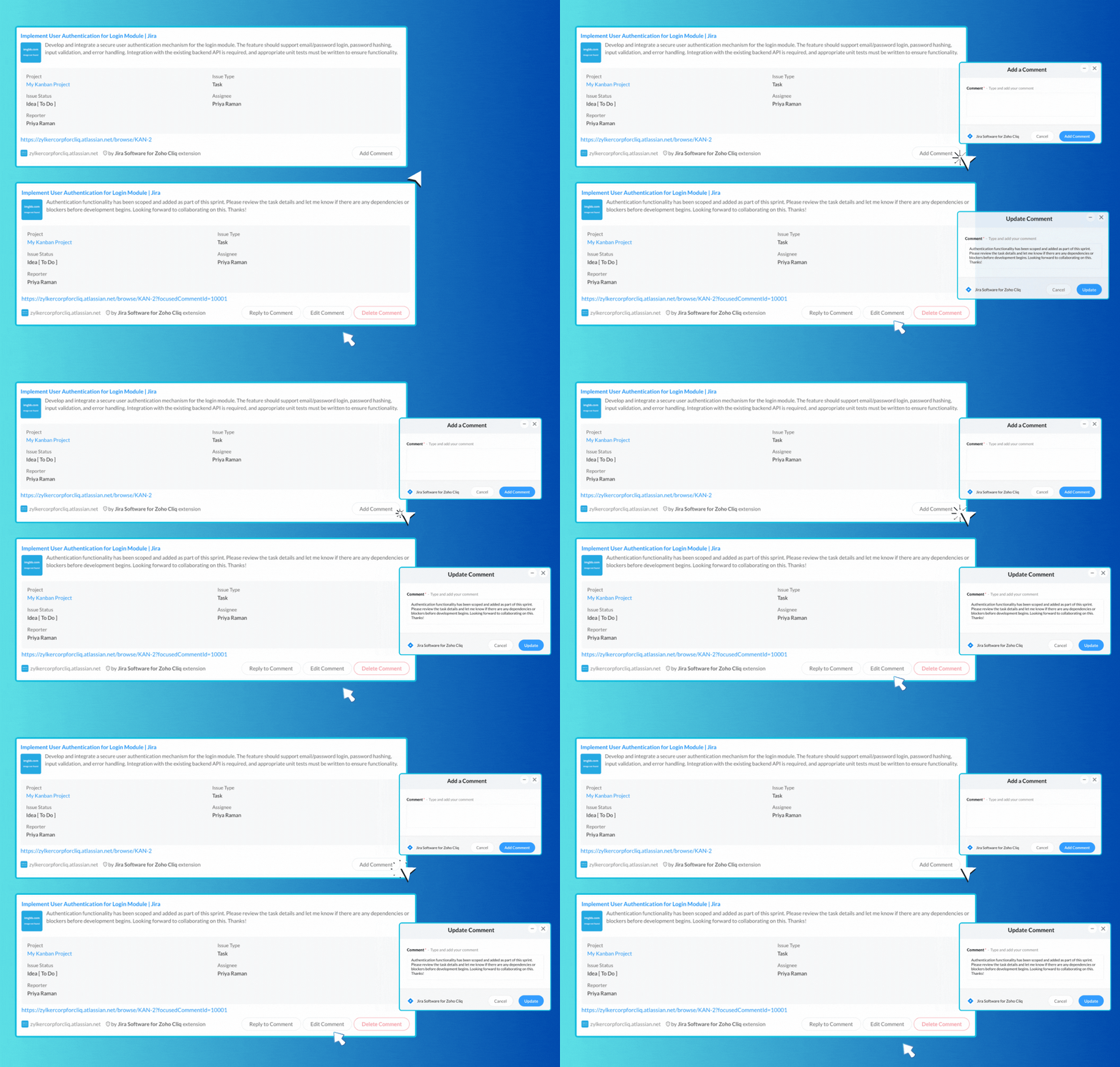
- When managing tasks, it’s important to configure how task links are shared in channels or chat. The preview should display key information, including the task name, due date, and status. Additionally, include intuitive buttons such as "Complete," "Edit," and "Delete."
- The responses for these buttons can be managed in the action handler. The action handler is responsible for executing actions when any of the buttons on the unfurled card are clicked.
- This enables real-time task management directly from chat. Team members can quickly update or complete tasks without switching apps or losing chat context
The Jira Software extension for Cliq allows you to share task links in any chat easily, providing a rich and interactive overview of tasks along with buttons for adding comments. You can enhance collaboration by sharing links to task comments, enabling you to reply, edit, or delete them effortlessly.

Say goodbye to dull app links! With Cliq’s unfurl handlers, you can create engaging previews that energize your workflow. Streamline automation and centralize tasks, allowing your teams to collaborate efficiently and respond faster, whether it’s for scheduling ,task management or file sharing.
We're here to help, so don't hesitate to reach out to support@zohocliq.com with any questions or if you need assistance in crafting even more tailored workflows.