User Tips: Auto-Create Opportunity/Deal upon Quote Save (PART 1)

User Tips: Auto-Create Opportunity/Deal upon Quote Save (PART 1)

Problem:
We use quotes which convert to sales orders but Users / Sales Reps do not create opportunities / deals and go straight to creating a quote. This leads to poor reporting. Implementing this solution improves reporting and makes it easier for users.

Summary Solution:
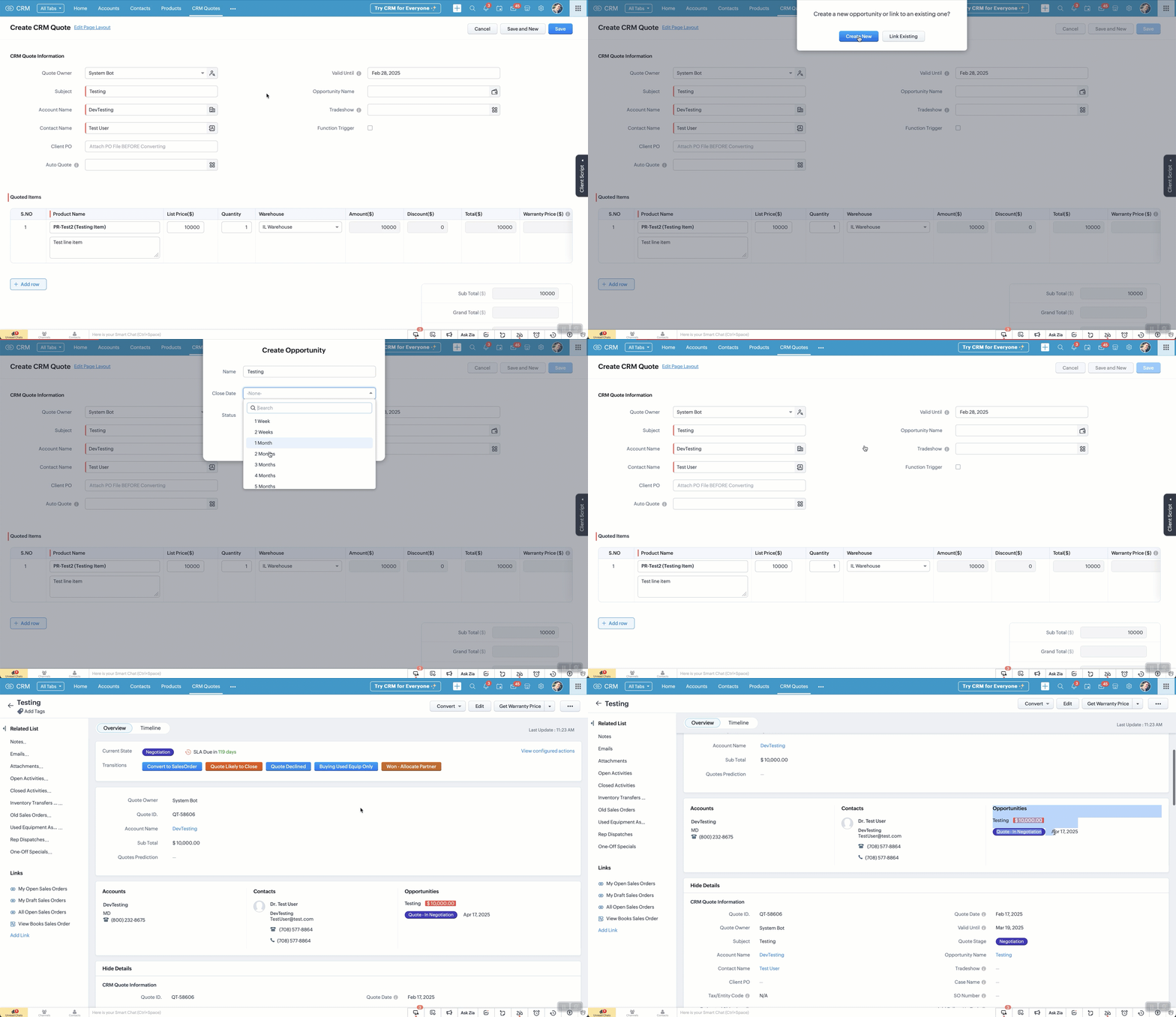
If a quote is created / edited. OnSave a client script checks to see if a deal is linked. If NOT (and it's over $x) then the user is prompted to Create One (via popup) or Link an Existing One. They can't save the quote until this is done.

Prompt options:
  1. If Create One is selected, the user selects options clicks save
  2. If Link One is selected, the user is directed to links an existing deal from the lookup field (manually).
Steps involved.
  1. Create a Client Script for "Edit Page", "Create Page" and paste in the code below.
  2. Change your API names as needed and click save.

Pro's of this method
  1. Opportunities / Deals get auto-created
  2. Allows for more accurate reporting
Con's of this method
  1. It won't help training your reps to create deals before a quote is needed!
  2. If you're not familiar with Client Script, you'll likely struggle

FAQ:
  1. When the quote is marked as won...
  2. When a quote subtotal is updated...
  3. When you have multiple quotes...
  4. When a note is added to the quote... will it update the deal?
    1. No to all of the above BUT you can implement a workflow to achieve this (see PART 2, coming soon)
  5. What will PART 2 of the solution do?
    1. If a quote is marked as won, the deal will update
    2. If quote subtotal is updated, the deal amount will update
      1. If multiple quotes are linked, the quote with highest amount will be used
    3. If a quote note is added, it gets auto-added to the deal
    4. If a quote is marked as Declined the deal is updated, unless it has other active quotes, then it does not change the deal stage
  6. Does it assign the correct Account, Contact and Owner?
    1. Yes. It takes the details from the Quote
  7. Does this solve every scenario?
    1. Absolutely not!!
  8. I don't know Client Script, can I still implement this?
    1. Yes, however it will likely come with some frustration but it's worth it!
  9. Do I need multiple scripts for each action (create, edit, clone?)
    1. Ideally you would have a static resource that you call just once... if you don't know what that is, then it's easier to create one script for each.

Steps for Creating Quote (repeat for edit or clone):
  1. Go to Settings > Client Script
  2. Click "New Script" and add name, description.
    1. Category: Module.
    2. Page: Create Page (Standard)
    3. Module: Quotes
    4. Layout: whichever is relevant to you
    5. Event Details:
      1. Type: Page Event
      2. Event: onSave
  3. Click "Next" and paste in code below (see auto-create-deal.txt)
    1. Note: Please verify all your API names match up.


    • Sticky Posts

    • Function #46: Auto-Calculate Sales Margin on a Quote

      Welcome back everyone! Last week's function was about displaying the discount amount in words. This week, it's going to be about automatically calculating the sales margin for a particular quote, sales order or an invoice. Business scenario Where there is sales, there's also evaluation and competition between sales reps. A healthy rivalry helps to better motivate your employees to do smart work and close deals faster and more efficiently. But how does a sales rep get evaluated? 90% of the time, it's
    • Zoho CRM Functions 53: Automatically name your Deals during lead conversion.

      Welcome back everyone! Last week's function was about automatically updating the recent Event date in the Accounts module. This week, it's going to be about automatically giving a custom Deal name whenever a lead is converted. Business scenario Deals are the most important records in CRM. After successful prospecting, the sales cycle is followed by deal creation, follow-up, and its subsequent closure. Being a critical function of your sales cycle, it's good to follow certain best practices. One such
    • User Tips: Auto-Create Opportunity/Deal upon Quote Save (PART 1)

      Problem: We use quotes which convert to sales orders but Users / Sales Reps do not create opportunities / deals and go straight to creating a quote. This leads to poor reporting. Implementing this solution improves reporting and makes it easier for users.
    • Custom Function : Automatically send the Quote to the related contact

      Scenario: Automatically send the Quote to the related contact.  We create Quotes for customers regularly and when we want to send the quote to the customer, we have to send it manually. We can automate this, using Custom Functions. Based on a criteria, you can trigger a workflow rule and the custom function associated to the rule and automatically send the quote to customer through an email. Please note that the quote will be sent as an inline email content and not as a PDF attachment. Please follow
    • Function #50: Schedule Calls to records

      Welcome back everyone! Last week's function was about changing ownership of multiple records concurrently. This week, it's going to be about scheduling calls for records in various modules. Business scenario Calls are an integral part of most sales routines.. Sales, Management, Support, all the branches of the business structure would work in cohesion only through calls. You could say they are akin to engine oil, which is required by the engine to make all of it's components function perfectly. CRM