Hello Users!!
In this month’s update, we’re raising the bar across multiple touchpoints, from how you bring in data, plan and track projects to how you design and brand your dashboards.
We’ve added the all-new Gantt chart for project visualization, expanded our database integrations, introduced support for modern file formats, redesigned key user experiences with a visual refresh, and a brand new guide for white label solutions.
Let’s dive into what’s fresh this month!
Introducing Gantt Chart 
Manage projects more effectively with the brand-new Gantt Chart in Zoho Analytics. Use it to track tasks, monitor progress, and quickly identify delays in project execution.
You can customize your Gantt charts with:
- Different chart styles to suit your project needs
- Color schemes to visually distinguish tasks in progress and completed tasks
- Flexible date display ranges to match your preferred project view
Database Connectivity
We’ve expanded our support to help you bring in data from more sources, more flexibly.
- Cassandra

You can now import data from Cassandra, a distributed NoSQL database widely used for handling high-volume, high-velocity data. Zoho Analytics automatically normalizes the collections into parent-child table structures, making it easy to analyze your data once imported.
Learn more about importing from Cassandra.
- SAP HANA & ClickHouse

Now import data directly from cloud-hosted SAP HANA and ClickHouse databases. Alongside local server connection, we’ve added cloud server connection as an additional option to give you more flexibility with how and where you connect.
Learn more about importing from SAP HANA.
Learn more about importing from ClickHouse. - Cloud Database Synchronization – Failure Notification Settings

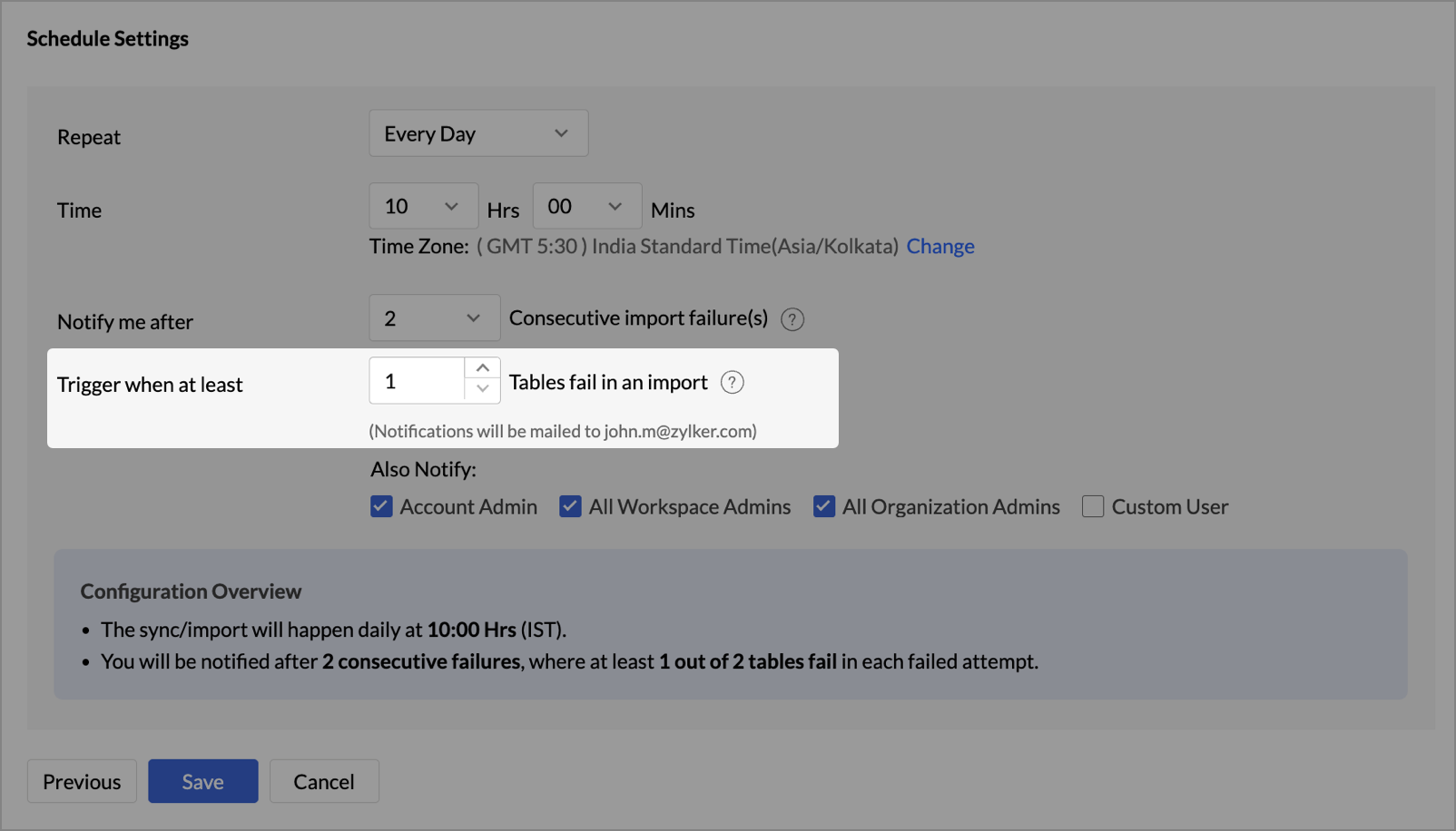
You can now configure synchronization settings to trigger a failure notification when a chosen number of table imports fail. Simply set the value for “n” failed tables, and Zoho Analytics will notify you when the condition is met. This gives you more control over monitoring imports and helps avoid missing critical sync issues.
- Snowflake - New Authentication options

Zoho Analytics now supports two new authentication methods for connecting to your Snowflake data:
These options provide more flexibility and enhanced security when configuring your Snowflake connections.
Local File Formats
Working with local files is now more powerful and flexible.
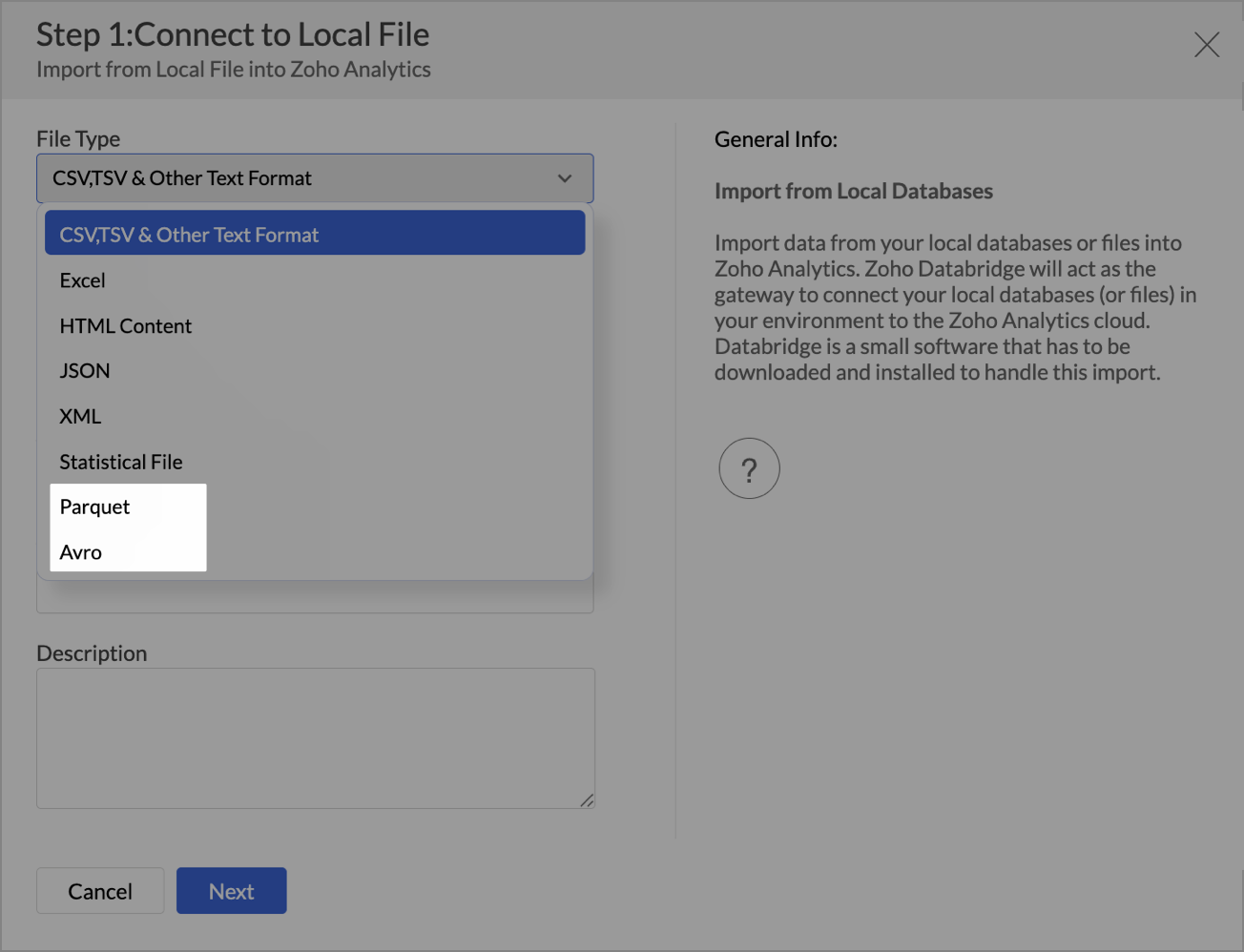
- New File Format Support - Parquet and Avro

You can now import Parquet and Avro files. These modern, columnar file formats are optimized for analytical workloads and are commonly used in big data pipelines.
- Larger file uploads

Until now, Zoho Analytics supported large file uploads only for CSV files. With this update, you can now upload files larger than 100 MB for the following formats through Zoho Databridge: - Excel
- HTML
- JSON
- XML
- Statistical files
This enhancement removes the hassle of file size limits when working with heavy datasets across multiple formats.
Invitation-based User Invite Flow
Zoho Analytics now uses an invitation-based model for adding users to your organization.
You can invite users in multiple ways, based on your workflow:
- From the Organization Settings or Workspace Settings
- While sharing reports or dashboards using email addresses
- By adding users to Groups
Invited users will receive an email and must accept the invitation to join. Access to your organization and its shared content will be granted only after they accept the invite. This ensures better control and visibility over user access.
Dashboard Background Image Customization
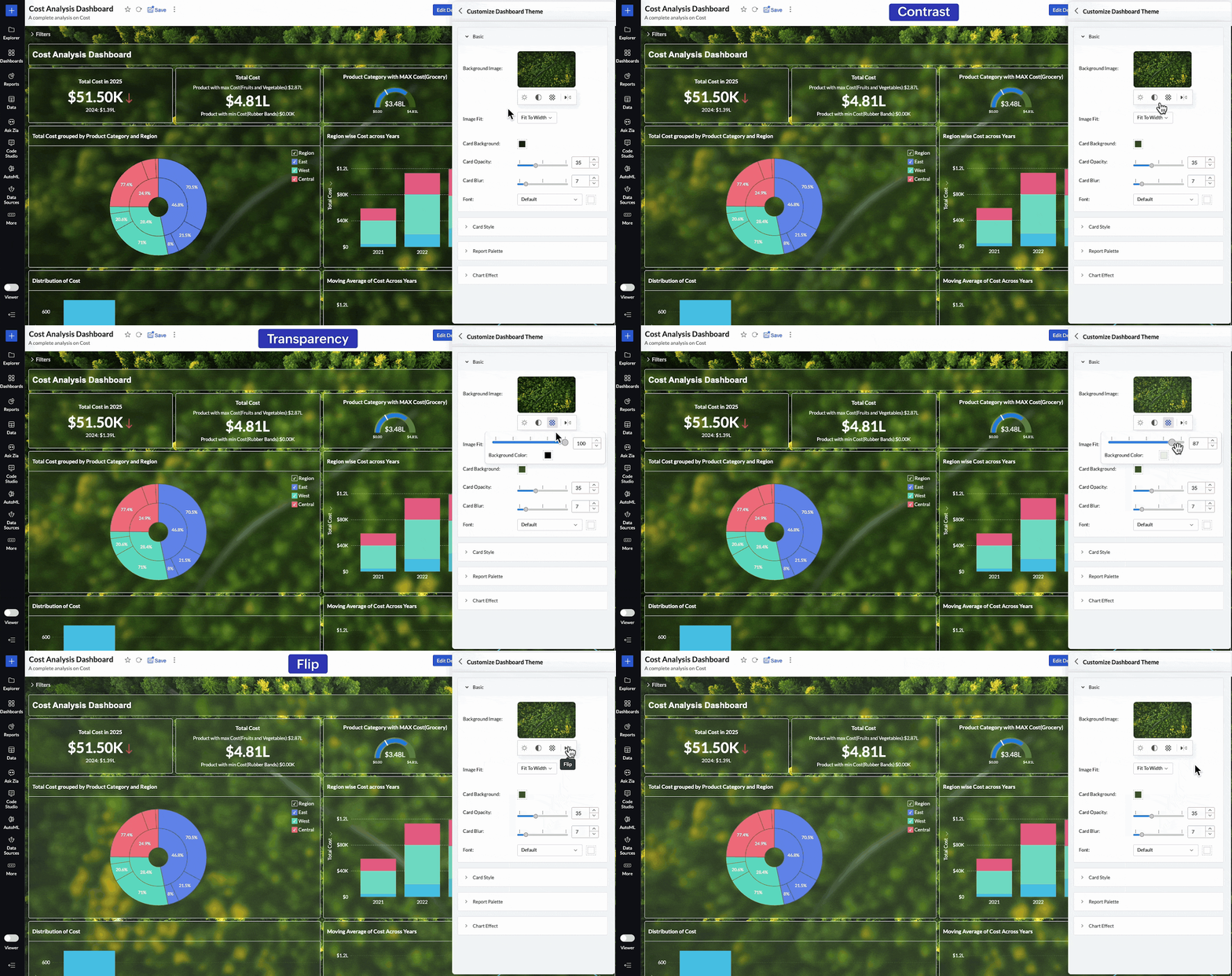
Personalize your dashboards like never before with new background image adjustment options. You now have greater control over how background images appear across your dashboards, helping you fine-tune visual impact and maintain readability.
You can now adjust:
- Brightness – Lighten or darken the image for visual balance
- Contrast – Enhance details and visual clarity
- Transparency – Soften the background to highlight dashboard elements
- Flip – Mirror the image horizontally for better composition
These controls allow you to create cleaner, brand-aligned dashboards that look professional and feel polished.
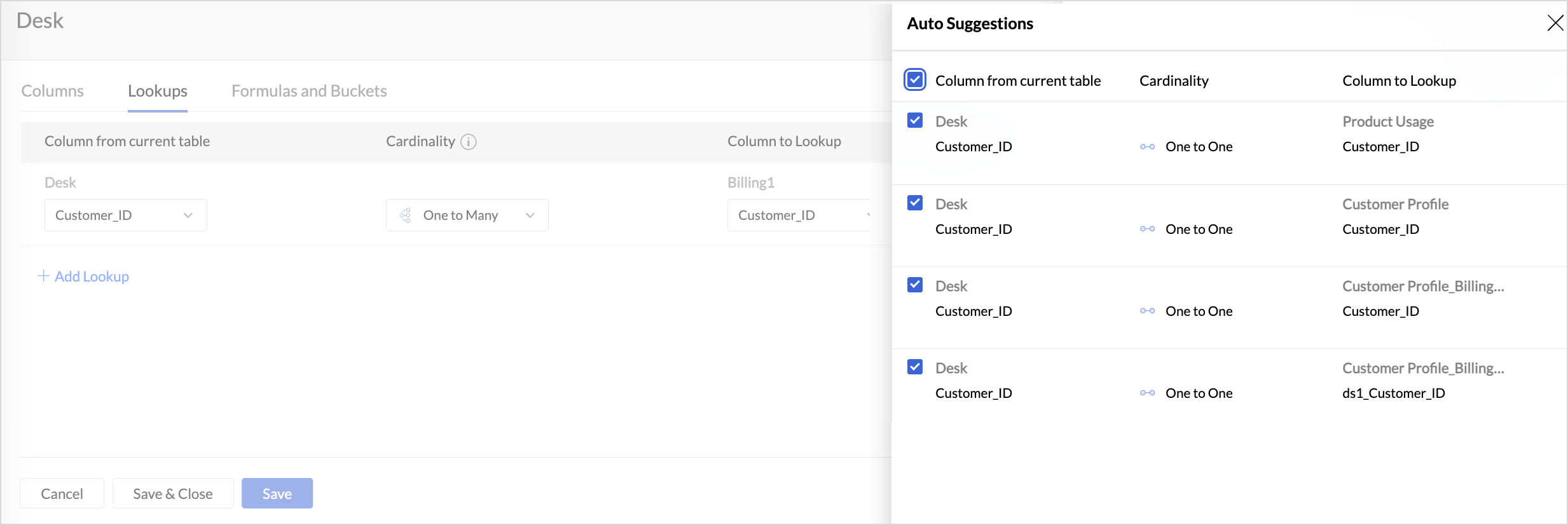
Lookup Suggestions
Creating relationships between tables is now even easier.
Zoho Analytics now offers lookup suggestions based on your table’s metadata. These smart recommendations help you:
- Quickly identify potential relationships between tables
- Reduce manual guesswork
- Simplify your data modelling process

White Label Updates
We have introduced a more modern and consistent experience for white label.
- Zoho Analytics latest UI is now available for White Label
Users who opt for white label deployment can now offer the latest Zoho Analytics user interface to their end users. This includes the updated layout, navigation, and overall design, providing a seamless and branded analytics experience.
Click here to learn more. - Dedicated White Label Guide
To help you make the most of white label capabilities, we’ve introduced a comprehensive guide covering everything from setup to branding best practices. This guide is now available as a separate resource for quick reference.
Click here to access White Label guide.
Access Log Support for Zoho Analytics Mobile BI App
Zoho Analytics now extends access log tracking to the Mobile BI App, giving admins greater visibility into how users interact with reports and dashboards from mobile devices.
These updates are designed to make your Zoho Analytics experience more connected, customizable, and intelligent.
As always, we’re just a click away if you need help or have feedback to share.
Recent Topics
VAT rates - exempt and out of scope
Good Evening, UK based company here. I am a bit confused in respect of setting up VAT rates for exempt goods and services; at present I am simply leaving the VAT rate blank in the transactions in order to prevent any VAT appearing in the VAT return. When
Zoho is blocking emails I subscribe to from one sender
About 4 months ago I stopped receiving newsletters that I subscribe to from @thedispatch.com. They tell me that zoho's server is blocking them. I've added them to my contacts list, but they're not even reaching my inbox. I don't know how to troubleshoot
Introducing Lead Capture: Empower exhibitors to capture leads effortlessly
Events provide a great opportunity for exhibitors to generate awareness and engage with potential customers. Efficiently distributing attendee information to exhibitors through a seamless and secure way is of paramount importance. Introducing Lead Capture
Very long loading times | bad performance [ZOHO DC: EU]
Hello there, we have recently noticed that the loading times have become extremely long when retrieving tickets and ticket details. For example, I open any ticket and get the following view. The subject and standard information (ticket owner, status etc.)
Work Order Creation Issue
Dear Team, I would like to inquire about the daily limit for Work Order creation in Zoho FSM. Yesterday (02/05/2025) at around 6:30 PM GST, I attempted to create a Work Order, but I have been unable to do so since then. Please find the attached image
Double opt-in notifications and customizable confirmation messages for your webforms
Dear CRM Community, We are excited to announce a major upgrade to our Webforms feature. You can now customize the confirmation message shown to your users who double opt-in from your webform and also customize your confirmation emails when they submit
Accessing shared mailboxes through Trident (Windows)
Hi, I have a created a couple of shared mailboxes. The mailboxes are showing up on the browser based Zoho workplace, but I cannot seem to figure out how to access my shared inboxes through Trident (Windows). Am I missing something or is this feature not
URGENT: ChatGPT Extension Failing With “gpt-3 Access Error” (Priority Support)
Appreciate support reviewing this urgently. I am a Priority Support member and need immediate clarification on a recurring issue involving the ChatGPT extensions inside Zoho Desk. Both extensions — including the version created and published by Zoho —
Server error when trying to Data > Sort > Custom Sort
Been using Data > Sort > Custom Sort for a while, now it has suddenly stopped working. When selecting the same data range and trying to execute, I get "Sorry! There was a problem saving your last edit. Please try again."
Zoho Desk iOS update: Custom buttons, follow/ unfollow option on tickets
Hello everyone! In the most recent Zoho Desk iOS app update, we have brought in support to access the custom buttons configured on web app(desk.zoho.com). Using custom buttons you can seamlessly execute predefined actions directly from their mobile devices,
Zoho pdf suit
Pl. design products with following feature: 1. Please add all features given in Ilovepdf website to work on pdf files. It is mandatory to use pdf in court work. 2. Courts have prescribed New Times Roman, pl. add this font as well 3. Indexing, signature
Zoho Not Working
Today Zoho not wokring
Dynamically autofill fields with URL parameters
I have a zoho form embedded in my organization's WP website. Our users find their account with a search tool, and then can select to open this page with the embedded form. The URL of the page holds the parameter that I need, but I cannot figure out how
User Automation: User based workflow rules & webhooks
User management is an undeniable part of project management and requires adequate monitoring. As teams grow and projects multiply, manual coordination for updating users & permissions becomes difficult and can give way to errors. User automation in Zoho
Integrate Projects for Desk KB article release tasks
Could you please look into the possibility of integrating project tasks for Zoho Desk article release processes? We are looking for an internal integration between Zoho Projects and Zoho Desk's KB article drafting, reviewing and releasing tasks. We could
Issue in Annual Leave
We created a policy to credit 21 days at the Start of the Year An employee has taken 16 days of leaves thought the year, so we expect to see 5 Leaves remaining right? But Zoho People is Showing 12 Days of Leave Balance Available If we check the Leave
Use the searchBy parameter to find user by email address
I'm trying to find a user is Zoho Desk via the Api. In the documentation I see that there is the possibility to add a searchBy parameter in the request. But I can't find how the search values should be formatted. I've tried multiple things and get either
Zoho CRM Community Digest - September 2025 | Part 2
Hello Everyone! Mid-September vibes: fresh tips, smart hacks, and practical Zoho CRM updates all in one place. Let’s dive in. Product Updates: The All-New Address Field! The new Address field type makes it easier to capture complete addresses in one structured
Zoho Vault API: Create new Secrets
Hello, I attempt to Post Secrets to the vault, since the encrypted entries are almost impossible to decrypt, since there is no documentation on how to decrypt them. Like with the lack of documentation on how to descrypt, there are missing information regarding on how to create new secrets/post secrets. Source: https://www.zoho.com/vault/api/#create-a-new-secret When I try to send JSON Informationen as a POST-Request I only receive the error message: { "operation": { "result": { "error_code": "",
CRM and Finance Tab - Add Invoice "Subject " Column
When On a contact in CRM, and you click the Zoho Finace tab, how can I put in the invoice subject line? Or even a custom field for this. We need to see what that invoice is for, without opening it. If we have tons of invoices we need a way to quick
Collections Management: #4 Before, During & After Payment Processing
"Mark, I think the payment link isn't working. Can you send it again?" Staring at a message, Mark got on his phone. This was the third time the same customer had asked him that week. A few minutes later, another message came, "Hey, the invoice total seems
Account name not populating when importing contacts
When importing a csv file to add contacts the account name is blank? Every other filed gets mapped and imported correctly, i.e contact name, phone number. However not the account name which I have mapped to "company" field in my csv file
Suggestion to improve zoho writer
I am using your product, I believe it is very useful, however, i was writing a note and I needed to draw an arrow in different angles to explain a point and I couldn't. it would be helpful, to add draw functions to the zoho writer. thanks
Almost all Flows are being queued
A few days ago I saw one of my Flows status was Queued. This was the first time this had ever happened. Now, almost every Flow that triggers is Queued for at least a few minutes. If I re-trigger the Flow (which causes separate problems) they sometimes
Allow Font Size 11 in Editors...
That is basic functionality...
Zoho Analytics & Zoho Creator - Modified Time value
I'm trying to use the Zoho Creator system field 'modified time' in Zoho Analytics, but it's consistently showing 12 hours 'out' In Zoho Creator In Zoho Analytics Is this a constant difference that I just need to correct with a timezone change - or is
webhook basic authentication
II want to use a webhook to send out a SMS. Unfortunately Twilio does not use an authToken but basic authentication. I created the webhook as POST and get this url: https://{username}:{password}@api.twilio.com/2010-04-01/Accounts/{account}/Messages?body=<BODY>&to=+155555555&from=+1555555555
Managing functions
Can someone let me know if there are any plans to improve the features for managing functions in CRM? I have lots of functions and finding them is hard. The search only works on the function name and the filter only works on function type. I have created
Good news! Calendar in Zoho CRM gets a face lift
Dear Customers, We are delighted to unveil the revamped calendar UI in Zoho CRM. With a complete visual overhaul aligned with CRM for Everyone, the calendar now offers a more intuitive and flexible scheduling experience. What’s new? Distinguish activities
Custom function return type
Hi, How do I create a custom deluge function in Zoho CRM that returns a string? e.g. Setup->Workflow->Custom Functions->Configure->Write own During create or edit of the function I don't see a way to change the default 'void' to anything else. Adding
Issue with Hour Calculation in Zoho People Attendance Module
I have noticed an issue in the attendance regularization feature of Zoho People. When trying to regularize past dates, the total working hours are not calculated correctly. For example, if I enter a check-in and check-out time for a previous day, the
Free webinar alert on November 19 - Email driven strategies - Master personality based styles
Hello Zoho Community! Want to make email management easier, smarter, and more you? We’ve got just the session for you! Join our interactive, game-based webinar to discover how Zoho Mail adapts to your personality and work style. Learn practical hacks,
Push Notification for New Bookings in Zoho Bookings App
when a someone schedules an appointment through the booking page, is there any option to receive a push notification in the mobile app?
Automation in Zoho Sprints
Hi. I have a Sprints board with the following statuses: ToDo, InProgress, CodeReview, Testing, Preprod, Live When a ticket is moved from e.g. Testing to Preprod, the following tags should be modified: remove 'tested OK' remove 'ready for Preprod' add
Export Purchase orders as Excel
Is it possible to export purchase orders as excel rather than PDF? Our suppliers don't want orders made in PDF, they need it to be excel
Cliq iOS can't see shared screen
Hello, I had this morning a video call with a colleague. She is using Cliq Desktop MacOS and wanted to share her screen with me. I'm on iPad. I noticed, while she shared her screen, I could only see her video, but not the shared screen... Does Cliq iOS is able to display shared screen, or is it somewhere else to be found ? Regards
Draft & Schedule Emails Directly in Bigin
Greetings, I hope all of you are doing well. We're happy to announce a few recent enhancements we've made to email in Bigin. We'll go over each one in detail, but here's a quick overview: Previously, you couldn't draft or schedule emails in Bigin, but
Integrating External Portal Tickets Into Zoho Desk
A B2B travel company has a customer portal where clients can raise and submit tickets related to their bookings. These tickets need to be handled and managed in the backend through Zoho Desk. Ticket updates and replies from Zoho Desk should also be visible
Create CRM Deal from Books Quote and Auto Update Deal Stage
I want to set up an automation where, whenever a Quote is created in Zoho Books, a Deal is automatically created in Zoho CRM with the Quote amount, customer details, and some custom fields from Zoho Books. Additionally, when the Sales Order is converted
Auto sync Photo storage
Hello I am new to Zoho Workdrive and was wondering if the is a way of automatically syncing photos on my Android phone to my workdrive as want to move away from Google? Thanks
Next Page