What's New in Zoho Analytics - November 2025

What's New in Zoho Analytics - November 2025

We're thrilled to announce a significant update focused on expanding your data connectivity, enhancing visualization capabilities, and delivering a more powerful, intuitive, and performant analytics experience. Here’s a look at what’s new.
Explore What's New!

Accessibility

Introducing a new Accessibility section in Zoho Analytics. It gives you full control over how you view and interact with your Zoho Analytics interface. This update brings enhanced usability and helps ensure a more comfortable, efficient, and accessible reporting experience.
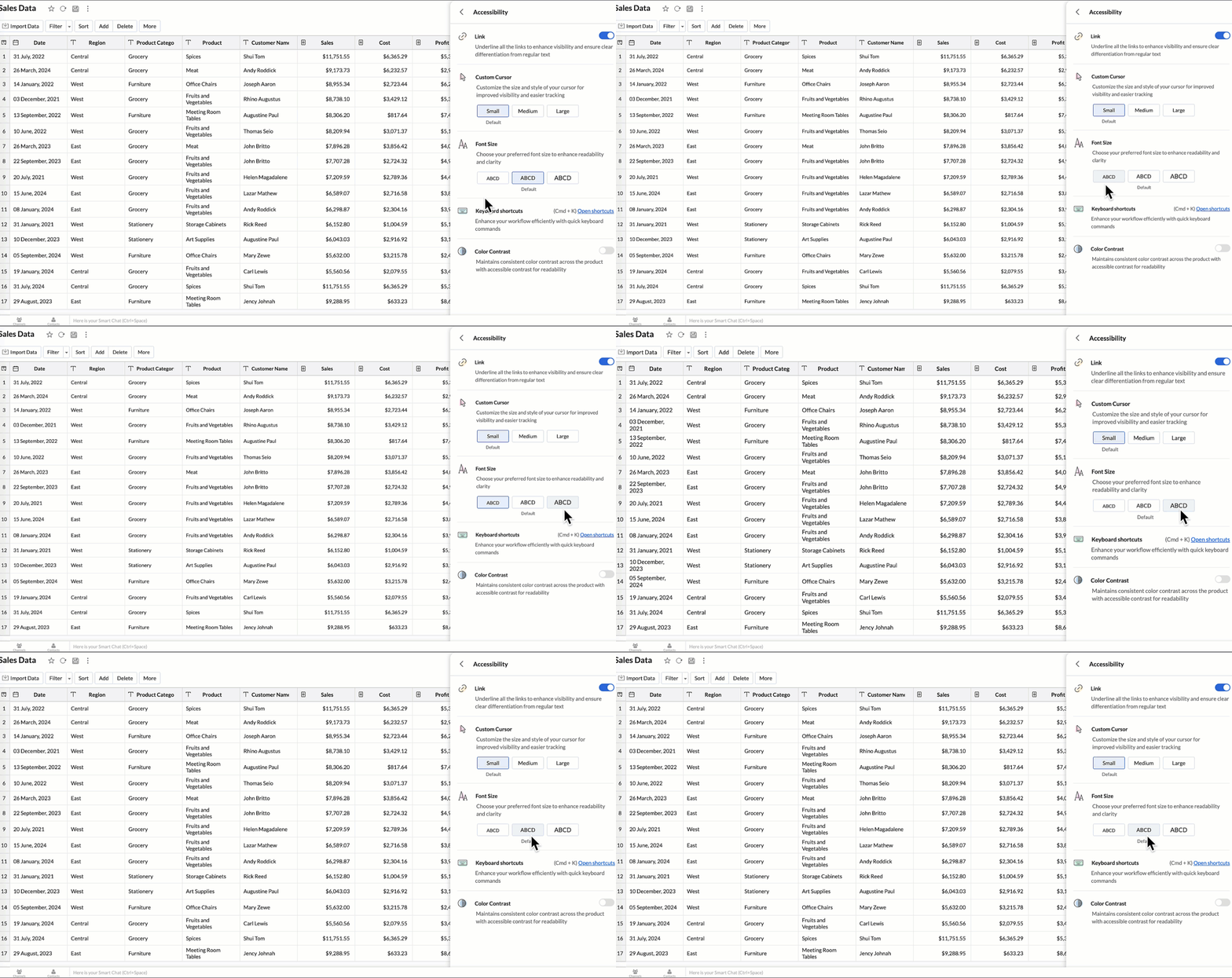
You can now personalize your interface with these new settings:

  • Highlight Links - Underline all links to distinguish them clearly from regular text.
  • Custom cursor - Choose the size of your mouse cursor (Small / Medium / Large) for better visibility and easier navigation.
  • Font size - Adjust the font size of the interface to suit your reading comfort.
  • Color contrast - Enable high-contrast mode to improve readability and support users with visual impairments.
  • Keyboard shortcuts - Access a full list of built-in shortcuts, to speed up your workflow and navigate quickly using the keyboard.
    Learn more.


New Data Connectors

Bring data from more sources into your analytics ecosystem with these new native connectors.

Qntrl Connector

Effortlessly bring workflow and process data from Qntrl into Zoho Analytics. Build reports to analyze task progress, approvals, and operational efficiency.
Learn more.

Asana Connector

Sync your Asana tasks, projects, and workflows seamlessly. Create visual dashboards to track productivity, timelines, and team performance.
Learn more.

Zoho Community Spaces Connector

Import engagement and activity data from Zoho Community Spaces. Analyze member participation, content performance, and community growth trends.
Learn more.

Zoho Finance Connector - New Modules

Gain deeper financial insights with newly added modules, enabling more granular reporting and analysis across your Zoho Finance suite.
Learn more.


Data Sync & Live Connect Enhancements

Incremental Fetch Enhancements

  • From Other Workspaces: Users can now configure incremental fetch for data imported from another workspace, bringing in only new or updated records. This improves sync efficiency and reduces load times.
  • For Custom Queries: Incremental fetch is now supported for data imported via custom queries, retrieving only new or updated records to enhance performance and reduce processing time.

Learn more.


Developer Hub Enhancements

API – Ruby Language Support

Zoho Analytics SDK now supports Ruby, enabling developers to build Ruby-based integrations and automation with native methods.
Learn more.

JS API - Tab Switch

Enhance embedded dashboard navigation. The JavaScript API now allows you to switch between tabs programmatically, enabling a better navigation control and interactive dashboard experiences.
Learn more.


Map & Geo Analytics Enhancements

Map-Layering Enhancements

Map Layering now includes drill-through for individual layers, options to fix unresolved locations, and the ability to use layered maps as filters in dashboards. These updates deliver deeper and more interactive geo-analysis.
Learn more.

Map Chart – Tooltip Enhancements

Map chart tooltips have been refined by removing Latitude/Longitude values. Users now see cleaner, more meaningful data highlights.


Reporting & Visualization Enhancements

Drill Through Enhancements

Drill-through is now supported for both Public Views and Embedded Views, enabling viewers to seamlessly access related reports for deeper data exploration and enhanced analytical context.

Previously, drill-through functionality was limited to shared reports. With this enhancement, viewers can now open linked drill-through reports, provided those reports have also been made Public.
Learn more.

Tooltip / Info Icon in Widgets

Widgets now support tooltips and Info icons to display additional descriptions or context. This helps dashboard viewers understand metrics instantly.
Learn more.

Anomaly Detection for Dimensional Fields

Zoho Analytics now supports enhanced anomaly detection when a dimension field (category) is added to the Color shelf. Users can choose from multiple detection modes to better analyze deviations across different perspectives

  1. Overall data
  2. Each X-Series
  3. Each Color-Series Individually
  4. Each Combined Series of X and Color Columns
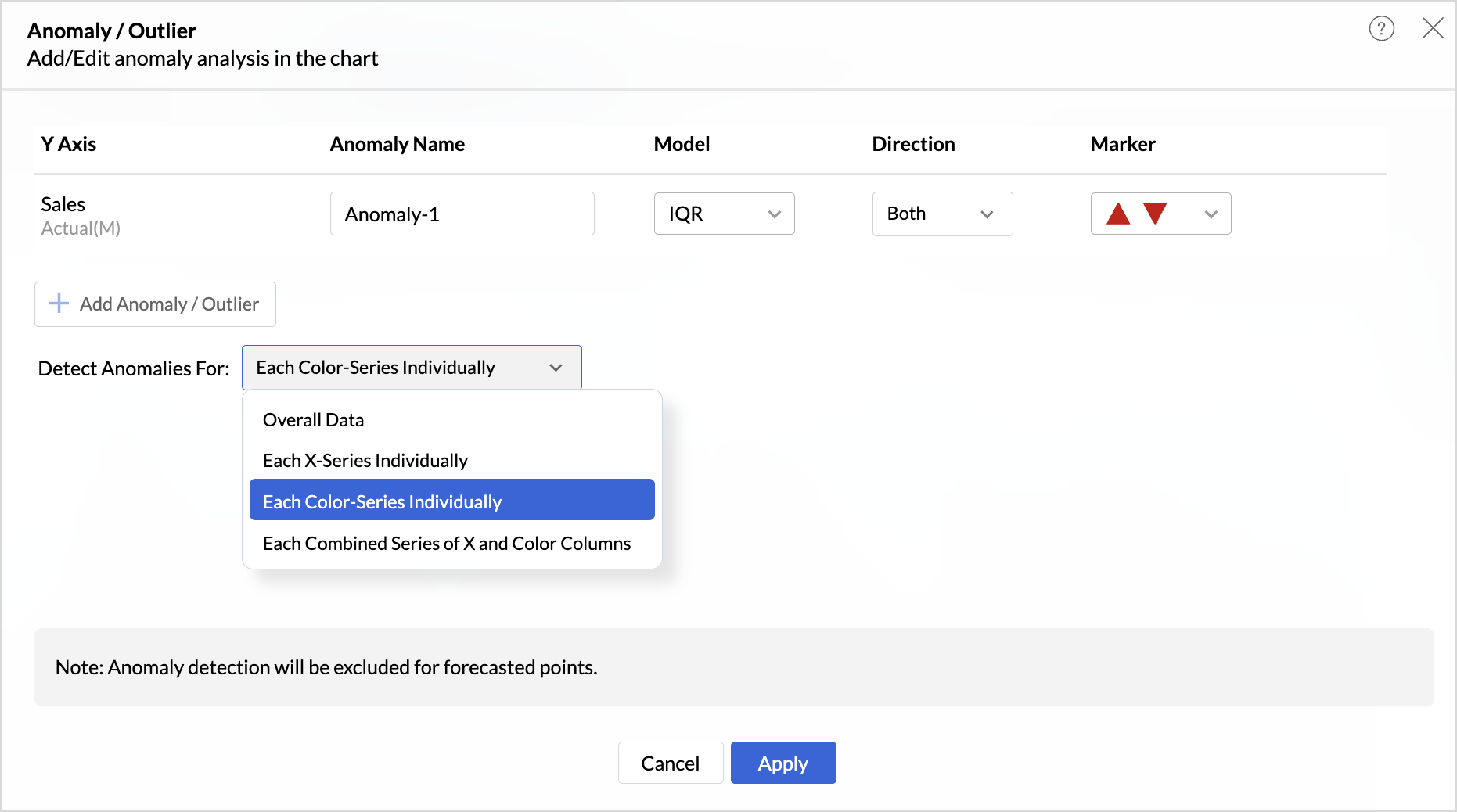


These enhancements offer greater flexibility and precision in uncovering unusual trends and outliers across segmented data visualizations.

Learn more.

Sorting of Values Across Group in Pivot Views

We have added a new option called Sort across Group which helps you apply clearer and more consistent sorting in Pivot Tables.

Earlier, sorting worked only inside each group. With Sort across Group, you can now sort the entire pivot table based on the selected column, regardless of how the groups are arranged.

Freeze Column Support in Pivot & Summary Views

We have added Freeze Column support in Pivot and Summary Views to help you work more comfortably with wide reports. This feature keeps selected columns fixed on the left side of the table while you scroll horizontally, allowing you to compare key columns with other metrics without losing context.

Report-Level Fiscal Year Option

Align individual reports with your organization's financial calendar by defining the Fiscal Year start month at the report level. This setting applies only to the selected report and appears when a date column is used, enabling accurate time-period analysis.
Learn more.

Dynamic Thresholds with Variables in User Filters

Aggregate formulas can now be used with variables inside thresholds. When paired with User Filters, threshold values are calculated dynamically based on each user’s filter selections ensuring every user sees context-relevant threshold boundaries instead of a fixed value.

Datatype-based Variable Suggestions for Default User Filters

When configuring default values in User Filters, only variables matching the filter’s datatype are now listed. This prevents configuration issues such as assigning a text variable to a numeric filter, and ensures accurate default value mapping.
Learn more.


AI & ML Enhancements

AutoML – 128GB Server Support

AutoML now runs on high-power 128GB servers in the US Data Center. This enables faster model training and support for significantly larger datasets.
Learn more.


Zia Insights - Enhancements

Customize Zia Insights 

Users can now tailor Zia Insights by selecting specific metrics and dimension columns for insight generation and choose the types of insights to focus on:

  • Contribution Analysis: Understand key factors impacting outcomes.
  • Time Series Insights: Detect trends, seasonality, anomalies, and forecast future values.
  • Comparison Between Dimensions: Analyze performance and variance across different dimensions.
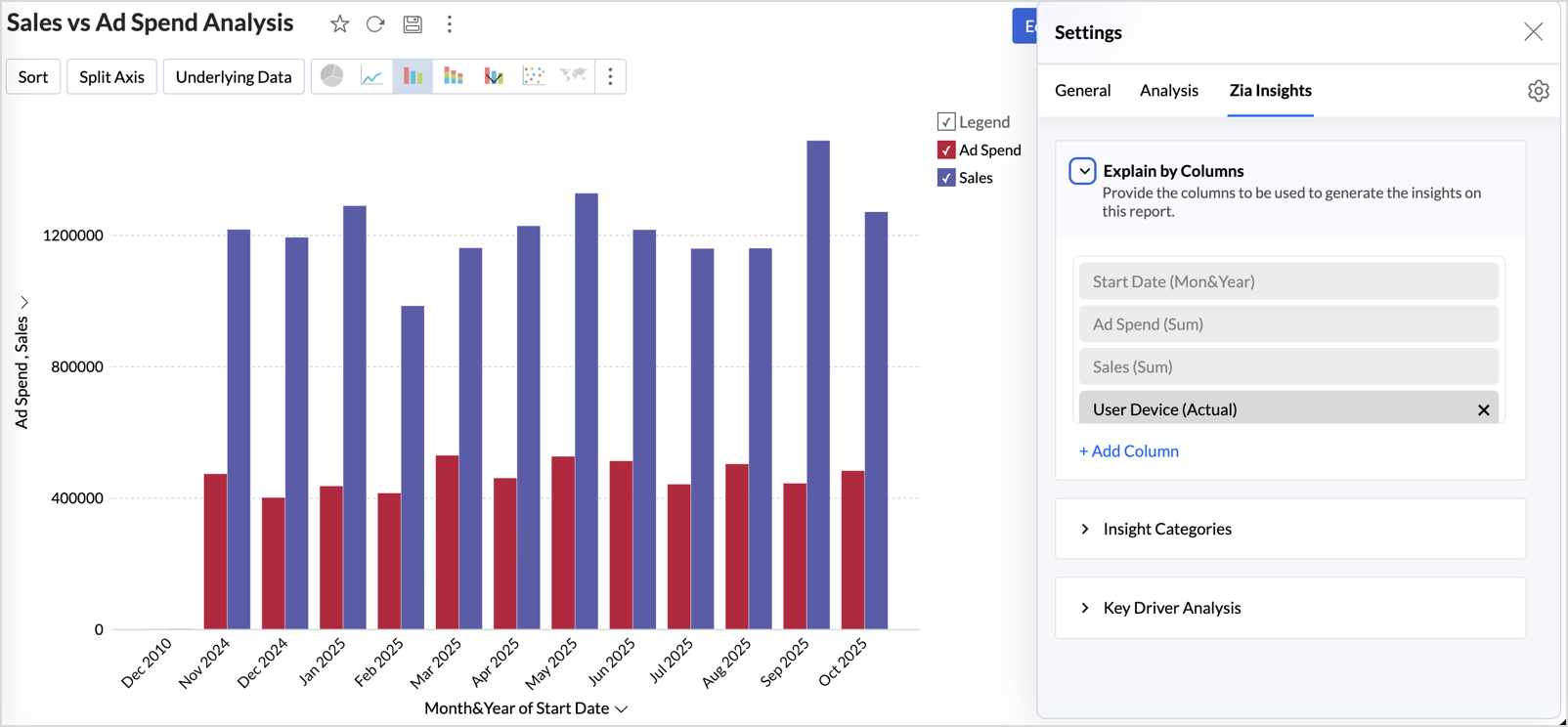

This customization ensures insights are focused, relevant, and tailored to the report’s context.
Learn more.

Diagnostic Insights Now Available for Multiple Time Series Analyses

Previously, diagnostic insights were available only for Recent Time Period Analysis. With this update, users can now access diagnostic insights across multiple time series analyses like, Anomalies/Outliers, Largest Incline/Decline, Period-over-Period Changes, and Start vs End Period Analysis revealing the “why” behind the data for more informed decisions.


Other Updates

Audit Logs for White label Users

Track administrative actions with greater precision. All activities performed in the White Label admin console are now comprehensively logged in the Audit Logs for improved security and compliance.

New Language Support

Zoho Analytics is now more accessible globally, with support for 29 international and 11 Indian languages.
Learn more.


    • Sticky Posts

    • What's New in Zoho Analytics - February 2026

      Hello Users! We're back with another round of updates for Zoho Analytics. This month's release focuses on giving you greater flexibility in how you visualize, manage, and act on your data - with new features like custom visualizations, remote MCP server,
    • What's New in Zoho Analytics - January 2026

      Hello Users! We are starting the year with a strong lineup of updates, marking the beginning of many improvements planned to enhance your analytics experience. Explore the latest improvements built to boost performance, simplify analysis, and help you
    • What's New in Zoho Analytics - November 2025

      We're thrilled to announce a significant update focused on expanding your data connectivity, enhancing visualization capabilities, and delivering a more powerful, intuitive, and performant analytics experience. Here’s a look at what’s new. Explore What's
    • What's New in Zoho Analytics - October 2025

      Hello Users! We're are back with a fresh set of updates and enhancements to make data analysis faster and more insightful. Take a quick look at what’s new and see how these updates can power up your reports and dashboards. Explore What's New! Extreme
    • What’s New in Zoho Analytics – September 2025

      Hello Users!! In this month’s update, we’re raising the bar across multiple touchpoints, from how you bring in data, plan and track projects to how you design and brand your dashboards. We’ve added the all-new Gantt chart for project visualization, expanded
    • Recent Topics

    • Inventory batch details

      Hi there, I'm trying to get the batch details of an item, here's what I've done so far. I've sent cUrl request to the below endpoint and I get a successful response. Within in the response I find the "warehouses" property which correctly lists all the
    • How do I edit the Calendar Invite notifications for Interviews in Recruit?

      I'm setting up the Zoho Recruit Interview Calendar system but there's some notifications I don't have any control over. I've turned off all Workflows and Automations related to the Calendar Scheduling and it seems that it's the notification that is sent
    • Unable to send emails from iPhone and iPad

      Curious, all of a sudden I'm unable to send emails from iPhone and iPad. I keeps asking for my password again and again. No problems from my MacBook Pro.
    • Journal Entries Do Not Show Multiple Entries to the Same Account

      Another basic accounting function that Books ... Accountants sometimes write journal entries, debiting and/or crediting the same account in the same entry. This is due to the need to record specific activity in an account when we pull reports especially
    • Create static subforms in Zoho CRM: streamline data entry with pre-defined values

      Last modified on (9 July, 2025): This feature was available in early access and is currently being rolled out to customers in phases. Currently available for users in the the AU, CA, and SA DCs. It will be enabled for the remaining DCs in the next couple
    • Partial customer Refund via customer Credit Card used to pay invoice

      How can we process a partial refund through the same credit card that a customer used to pay the initial invoice? - In other words, say a customer was sent an invoice for $1200.00 and they paid it through Zoho with our online credit processor, PayFlow
    • Partial refunds

      I am trying to process refund for a one item invoice, however the refund is partial: i am getting this error while creating credit note, can anyone share some wisdom about this
    • How in the heck do i record a (partial) refund???

      I have a client. wrote an invoice for 3 services totalling $520. He paid it online (we use zoho to authorize.net) We went out and couldn't do one of the services I didn't see a way to initiate a refund through zoho books, so i did a $250 refund through authorize.net. Tried to edit the payment on zoho books, but it won't let me b/c "this payment was made on line" When i try to edit the invoice i get a popup about it no longer matching the payment. What do I do??? And why is it so hard to do something
    • Action Required: Update your Zoho Projects – Zoho Analytics integration

      Dear Zoho Projects integration users, We would like to inform you about an upcoming update to the Zoho Projects–Zoho Analytics integration. Read the full migration announcement here. As shared in the announcement, we are updating the integration to support
    • Mirror Component in Zoho CRM: Access real-time related data without leaving your record

      Hi everyone, This feature is now available for the JP, CA, SA, UAE, and AU DCs. We're excited to bring to you Zoho CRM's mirror component, which presents relevant data on a record's details page and keeps everything users need in one place without having
    • Workflows fail silently in Zoho CRM and there is no native way to know

      Workflow automation is honestly one of the biggest reasons my clients choose Zoho. But there is one problem I keep running into across almost every implementation. When a workflow fails, nobody finds out. Email alerts hit daily limits and just stop. Custom
    • Office365(outlook emails) Zoho CRM integration

      Hi guys We're looking to buy Zoho CRM and are currently trialling. I'm working from a MacBook fyi. I've so spent 3 hours on live chat today with Zoho as we couldn't get the two to integrate properly, even with the plug in installed but finally managed
    • When adding subform records, how do I access member fields of a name field

      I have the following code (runs when a record is added to a form) if (input.P_liza != null) { input_deal = input.P_liza; rec = form_mapping[deal_name == input_deal]; id = input.N_mero_de_documento_de_Identificaci_n_Alfanum_rico; contact = -----redacted------.get_crm_contact_by_id(id);
    • Making "All Day Events" not default

      When I go to schedule an event, the All Day checkbox is ticked by default. Generally, I don't plan all day events, so is there a way to make that not checked by default? I couldn't find a setting for this...
    • Create custom field in multiple modules

      I am trying to create some custom fields that will be in both leads and contacts module without having to create them separately and then mapping them. How is that performed? it is too time-consuming to create 20+ fields and then do the same thing in a different module when they carry the same info. The idea is that when we get a lead from web site, there are items that we capture and once that lead is a client and moved to Contacts, that info should come over. So trying to find an easy way to create
    • Allow 2 logos for Branding, one for Light Mode and one for Dark Mode?

      Our logo has a lot of black text on it. If we leave the background transparent, per recommendation of Zoho, when a user is viewing a file and turns on dark mode, our logo is not really visible and looks really weird. It would be really great if we could
    • Compensation | Salary Packages - Hourly Wage Needed

      The US Bureau of Labor Statistics says 55.7% of all workers in the US are paid by the hour. I don't know how that compares to the rest of the world, but I would think that this alone would justify the need for having an hourly-based salary package option.
    • In Desk KB article, how do include an image in a numbered list without using a number or bullet?

      We need to include images in our KBA steps as a numbered list. Here I have numbered steps. I want the image no numbering or bullet. Open Purchase Order Entry. Select the mail icon: Select the Save button. I see your own articles have images in number
    • Video Interview features

      I tested the video interview feature. It's supported only on desktop version of chrome/firefox. Most of the times, the candidates are available on their cellphone. Need to have this for mobile devices too.
    • POS and payments

      Have i missed the point can i not use zoho POS as a payment terminal back into stripe like we can in Books?
    • Delugeサーバーページ(HTML)での関数の使用方法

      Zoho Creator、Deluge並びに初心者です。 題名の通りDelugeサーバーページ(HTML)で関数が使用する方法を教えて頂きたいです。 ざっくりと説明します。 現在、1週間だけカレンダーを表示するページをelugeサーバーページ(HTML)内で作っております。 カレンダー内のボタンには翌週や先週を表示するボタンを追加しようとしています。 それらのボタンを押下した際、現在の日時に±7日をしてページを表示しなおす処理が走るようにさせたいです。 ボタンが押下されたとき、用意していた関数でその処理を実行する想定です。
    • Automatically remove commas

      Team, Please be consistent in Zoho Books. In Payments, you have commas here: But when we copy and paste the amount in the Payments Made field, it does not accept it because the default setting is no commas. Please have Zoho Books remove commas autom
    • Why does my salesiq dashboard doesn't look like the one on the admin guide?

      https://help.zoho.com/portal/en/kb/salesiq-2-0/for-administrators/setup-brand/articles/setting-up-the-website-channel#Launcher
    • ENDPOINT ZOHO CREATOR

      I created a function to perform the action of POST, GET and PUT in order to use it outside our portal and create more dynamic forms using a cloud server. Params = “qAvhbBBJJsQysd45DdkvTR34A” Curl = “https://www.zohoapis.com/creator/custom/admin2844/vallesalud_julaje_private?publickey=”;
    • MCP > Creator connection failing with Claude

      I'm trying to get claude to access any of my Zoho Creator apps and it keeps failing. I have enabled all tools for creator and ensured in claude settings that everything is authorised. Here is what claude says : Unfortunately, the error messages I'm receiving
    • Gantt Chart - Multiple Projects

      Hello, I have about 6 projects set up in Zoho and I am looking to see if it is possible to see all my projects on one gantt chart? Thanks Alex
    • milestone dependencies

      It would be exceptionally useful to be able to assign dependencies on milestone/tasks. For example, if within a project I have three milestones for creating three ads for publication, but each ad also requires the logo to be finished by the graphic designer (a separate milestone), it would be useful to have the start dates of the later items dependent on another prerequisite component. That way, not only would I not have to enter the logo creation as a separate task for each of the three milestones,
    • Need Easy Way to Update Item Prices in Bulk

      Hello Everyone, In Zoho Books, updating selling prices is taking too much time. Right now we have to either edit items one by one or do Excel export/import. It will be very useful if Zoho gives a simple option to: Select multiple items and update prices
    • Upgraded sentiment analysis model for more accurate detection

      Hello everyone! Sentiment Analysis in Zia is being upgraded to a newer model to improve how customer sentiment is detected and interpreted. This transition is aimed at getting better contextual understanding across all supported channels. As part of this
    • Notebook Al

      Why was our organisation's Notebook AI disabled, even though our admin said it wasn't done on their side?
    • Dashboard Filtering with 2 query tables using one filter field

      Hi There, I have been using user filters on the dashboard and for the most part they are fine. However I have one issue I would like to see if there is a fix for it. I have a main query that most of my widgets use. Then I have a second query for another widget. The dashboard uses the field "brand" in the main query for the filter.  The second query uses the main_query.brand field alongside fields from a second table. I have set the widget to use main_query.brand as a filter, but when the dashboard
    • How to get static reports via Desk API

      Hello, we are hoping to use the Desk API to automatically export the default static reports in Zoho Desk, or reconstruct them via other API calls. What's the best way to do this? For example, if I want to recreate the Response Time static report via the
    • What's New in Zoho POS - April 2026

      Hello everyone, Welcome to Zoho POS’s monthly update, where we share our latest feature updates, enhancements, events, and more. Let’s take a look at how April went. Access and manage other web applications in Zoho POS with Web Tabs You can now access
    • Issue with adding “Roblox” as an answer option in Zoho SurveyО

      Hello Zoho Support Team, I’m experiencing an issue while editing a survey in Zoho Survey. For some reason, I’m unable to add “Roblox” as an answer option. The same issue occurs with any answer option that contains this exact combination of letters, regardless
    • How to import MBOX to Gmail?

      In order to import or restore MBOX file backup Gmail account you can go for Advik MBOX to Gmail Import utility. This utility will import MBOX to Gmail or G Suite account without any configuration. This tool is considered as the most easiest and simplest process to perform email migration. Key Feature of this tool Import MBOX to Gmail in Bulk Maintain folder struture Retain Key elements Single Panel Interface 100% accuracy rate Download source : http://www.adviksoft.com/mbox/gmail.html
    • Free webinar! Accelerate deals with Zoho Sign for Zoho CRM and Bigin by Zoho CRM

      Hello, Paperwork shouldn’t slow you down. Whether you’re growing a small business or running a large enterprise, manual approvals and slow document turnaround can cost you time and revenue. With Zoho Sign for Zoho CRM and Bigin by Zoho CRM, you can take
    • Automatically set the default VAT percentage on a quote

      Every time I create a quote, I have to manually adjust the VAT and activate the checkbox for 21%. But all of our quotes include 21% VAT. So now occasionally, it happens that the checkbox is forgotten, and the customer receives an incorrect quote (without
    • Don't understand INVALID_REQUEST_METHOD when I try to post up an attachment

      When I make the POST request (using python requests.post() for files): https://www.zohoapis.com/crm/v8/Calls/***************01/Attachments I get this response: r:{ "code": "INVALID_REQUEST_METHOD", "details": {}, "message": "The http request method type
    • Bigin & Booking. Associate the appointment with existing customers in bigin.

      I tried to change the stage of the pipeline associated to a existing contact after he book a appointment in Booking. I use flow to create a event in booking when a appointment is done. But.... How can I relate the appointment with the existing contact
    • Can Zoho Books support an Asset account as an item's purchase/COGS account? (Prepaid reseller use case)

      Hi everyone, I run a prepaid digital plan reseller business where I fund a vendor account upfront and draw it down as I make sales — essentially a float-based model, similar to a gift card or prepaid airtime reseller. The correct accounting treatment
    • Next Page