What's New in Zoho Billing | Q3 2025

What's New in Zoho Billing | Q3 2025

Hello everyone, 

We are excited to share the latest set of updates and enhancements made to Zoho Billing in Q3 2025. From the latest GST updates to multi-level discounting, Zia-powered report summaries, and customizable web forms, these updates are designed to make your billing operations faster and more intuitive.

If you missed the previous updates, you can check out What's New in Zoho Billing Q2 2025.

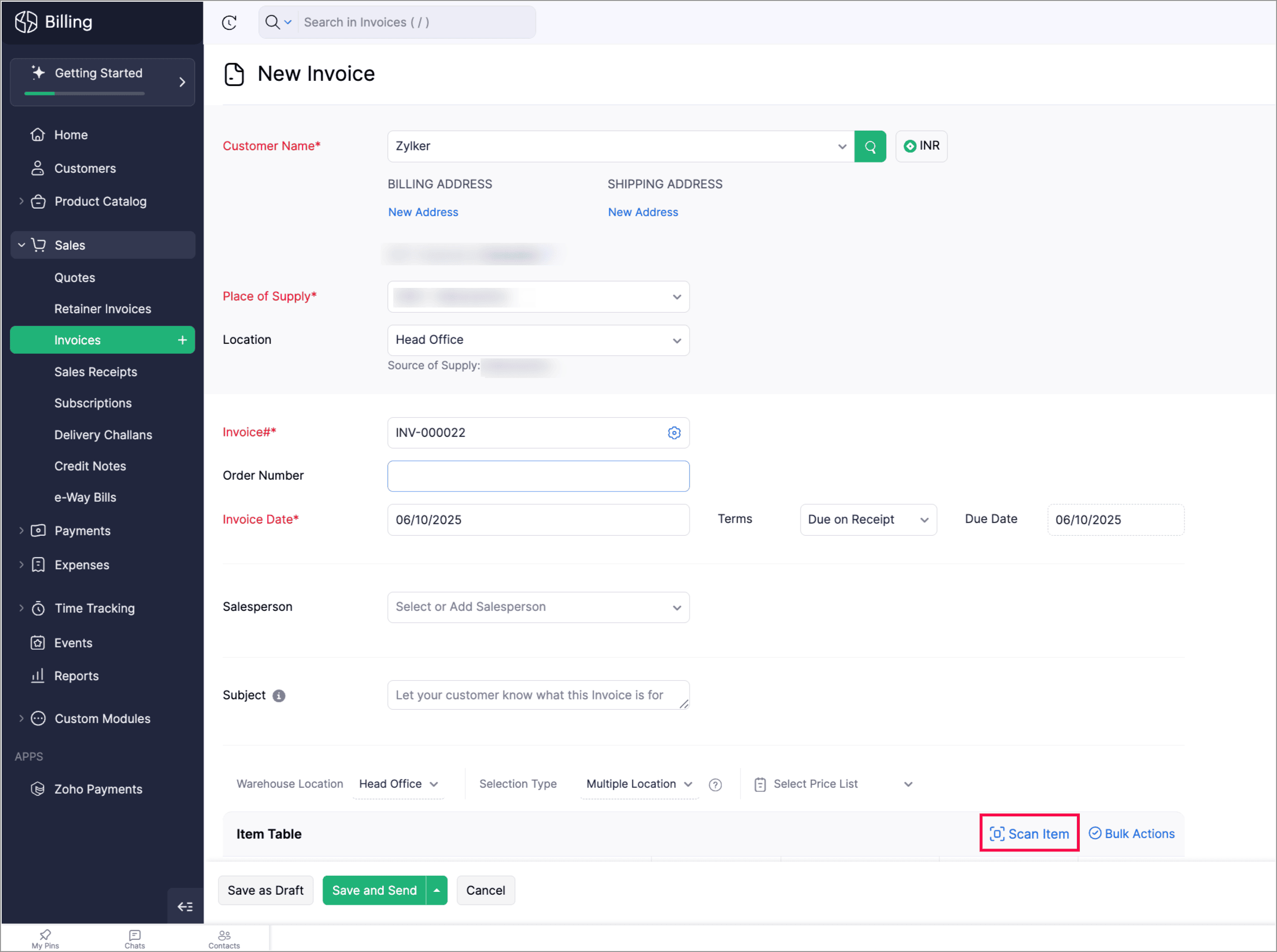
Scan To Add Items in Invoices

Zoho Billing now supports the Scan Items option in invoices, allowing you to quickly scan and add them to invoices. You can also scan an item multiple times to increase its quantity in the existing line item.

You can find it in: Sales > Invoices > Edit or create an invoice > Scan items. 


Apply Multi-Level Discount to Transactions

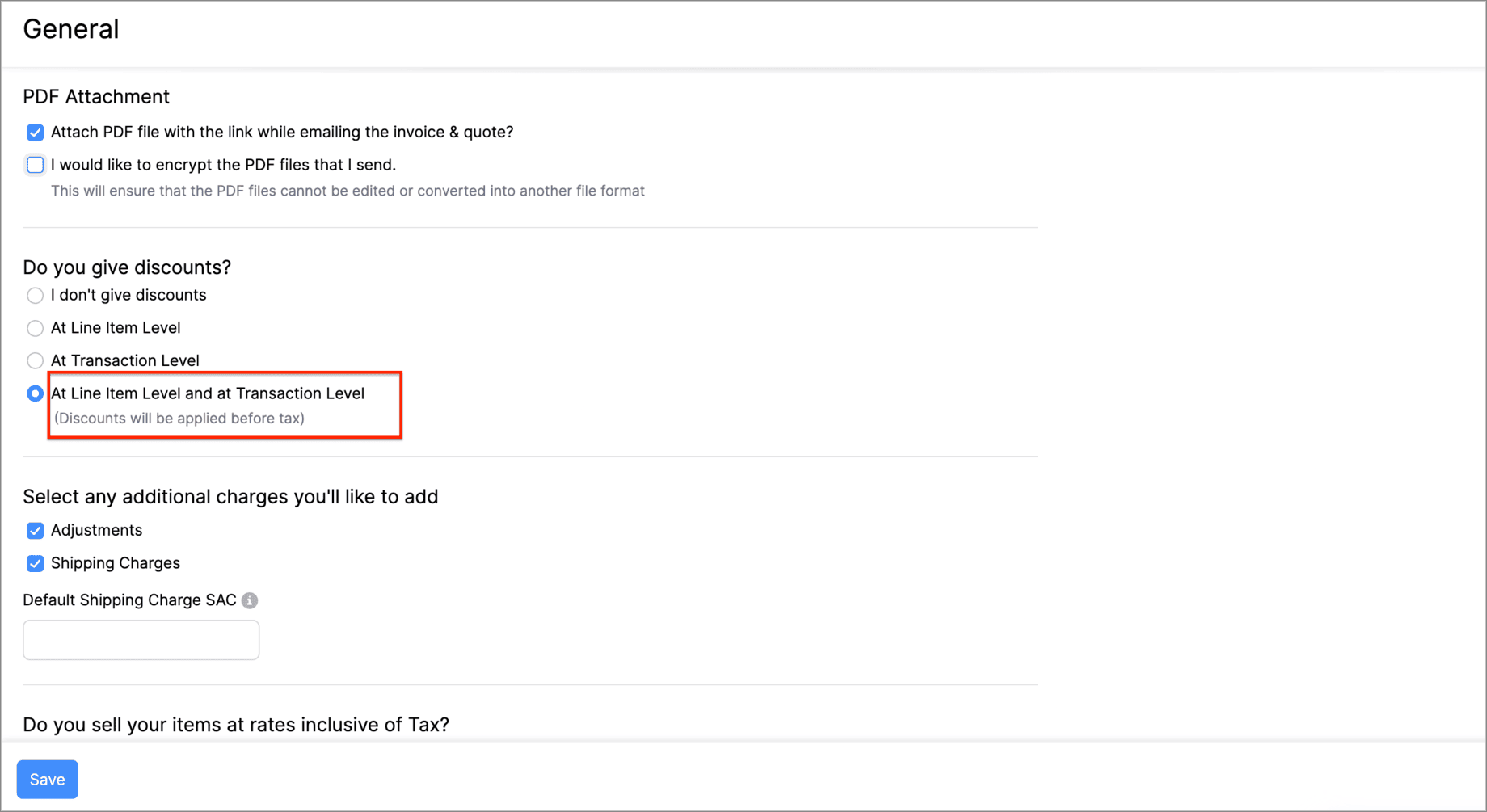
You can now apply discounts at both the line-item level and the transaction-level simultaneously. This means that you can offer specific discounts on individual items or services while also applying an overall discount to the entire transaction. 

Let's say you run a weekend sale and would like to provide a 10% discount for some items and offer a 5% transaction level discount as a part of your weekend sale. You can do this using the Multi-Level Discount option.

Go to Settings > General > Do you give discounts? > At Line Item Level and at Transaction level.


Gold Movements is Now Supported in e-Way Bills [India Edition]

You can now generate e-way bills for gold intra-state movements in Zoho Billing.  

Set the threshold value for generating e-way bills when transporting gold items within the same state. You can then start creating e-way bills for gold movements from the e-Way Bills module under Sales on the left side bar.
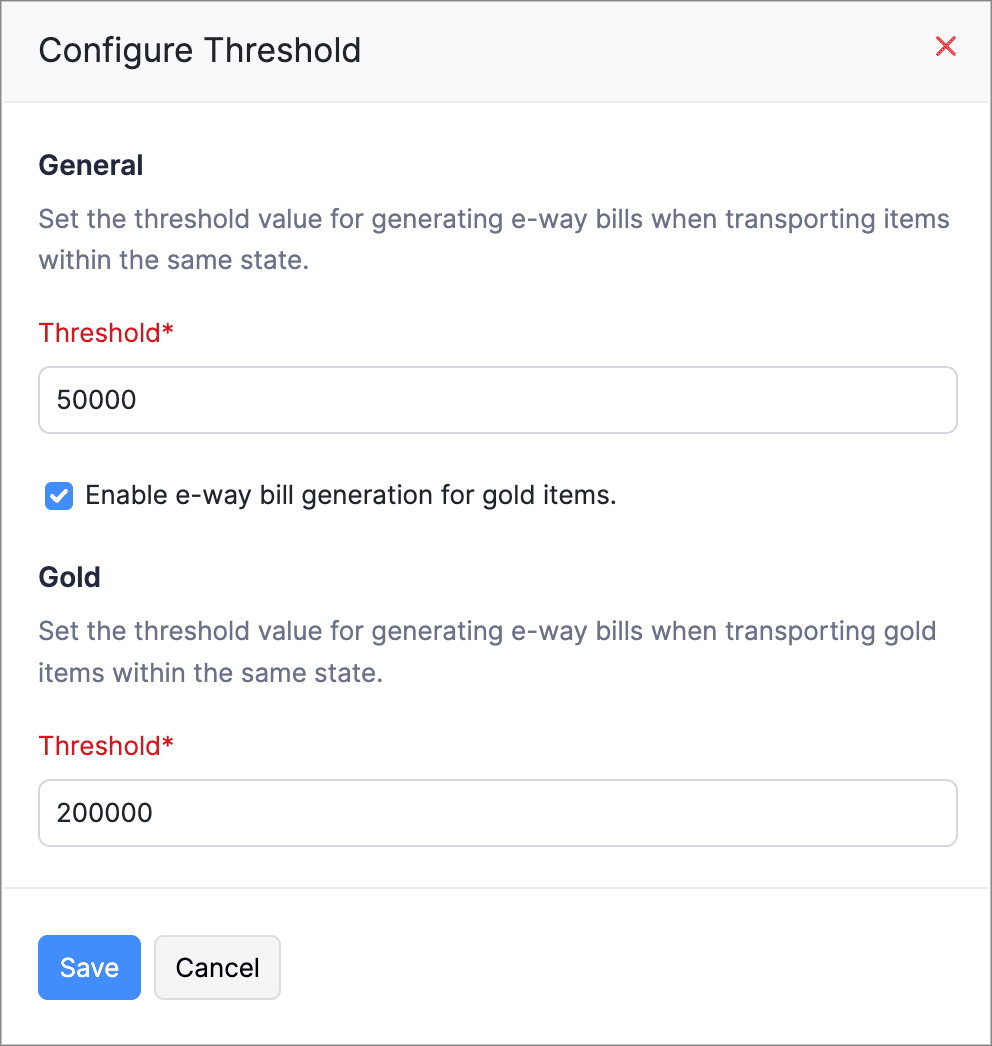
Here's how you can configure the threshold: Go to Settings > e-Way Bills > GSTIN which is connected to the e-Way Bill portal > Configure Threshold.


Access Widgets in Your Preferred Language

We’ve enhanced language customization to help you have a localized experience when accessing widgets.

You can define key–value pairs in language-specific JSON files (for example, en.json, ta.json, etc.) and display the widget content based on your organization’s language.
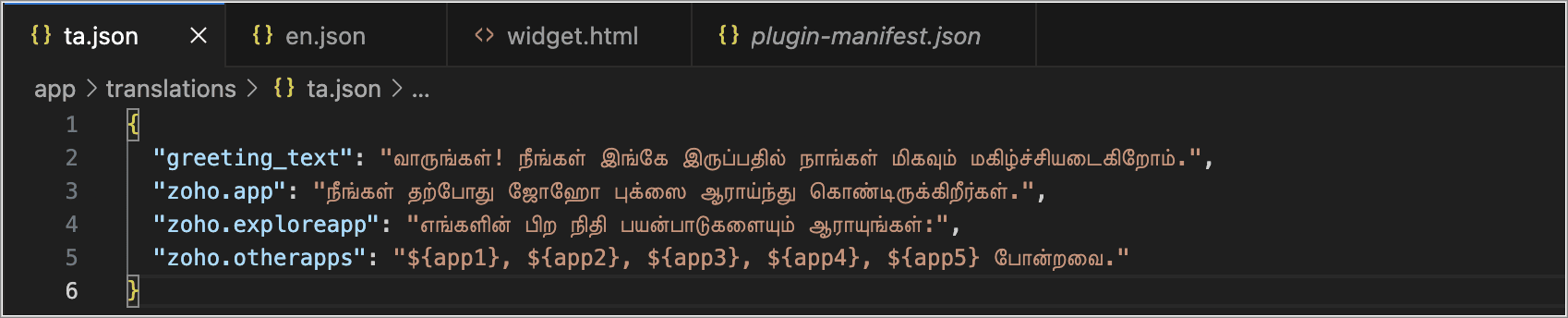
Create language-specific JSON files with key–value pairs and upload them into your widget when you access the widget, and the content in your widgets will automatically appear in that language.


Postpone Subscriptions' Billing Date

You can now change the Next Billing Date of subscriptions. When you change, it you can view the charges for the extended period and choose how you would like to handle the charges.

You can:

  • Choose to charge for the extension; a prorated child invoice will be generated based on the length of the extension.

  • Or, you can choose only to change the billing date. This will add the prorated amount to the invoice generated on the next billing date.
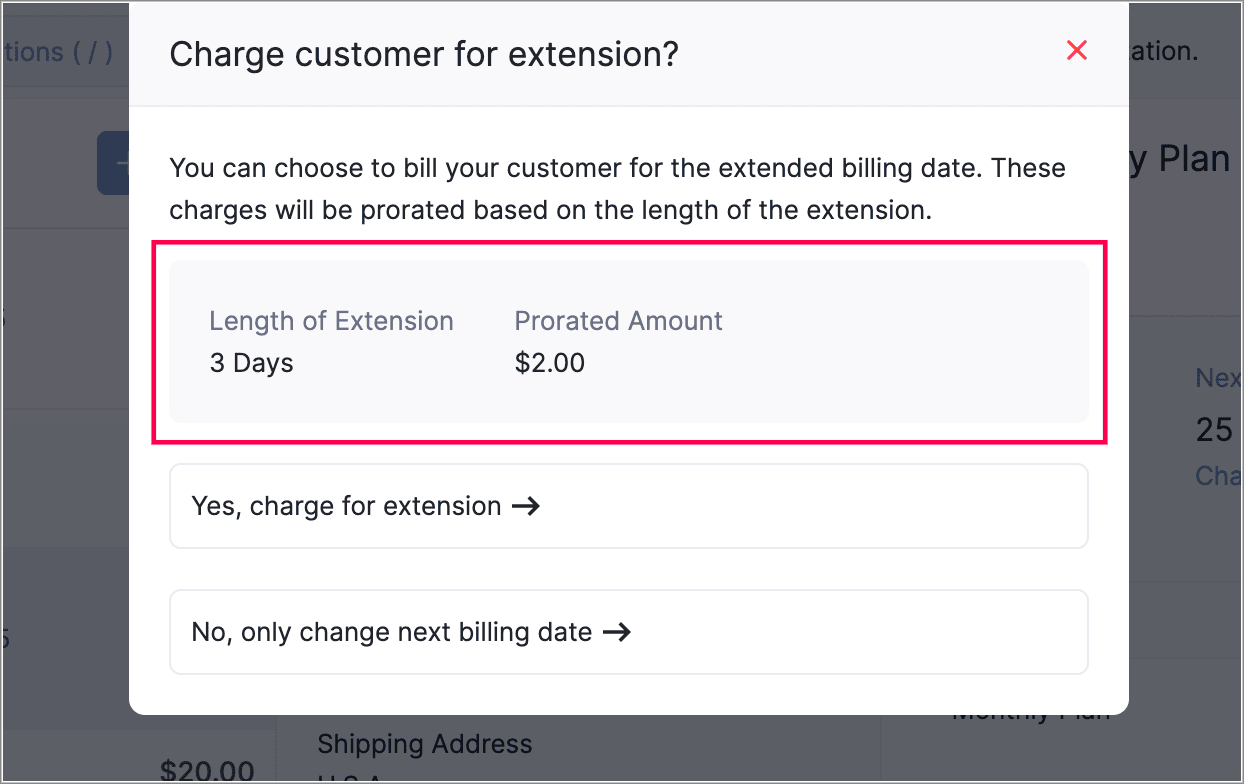
This gives you more flexibility in managing billing dates. You can also view the prorated amount for the adjusted days before charging your customers.


View Proration Break-Up in Subscription Summary
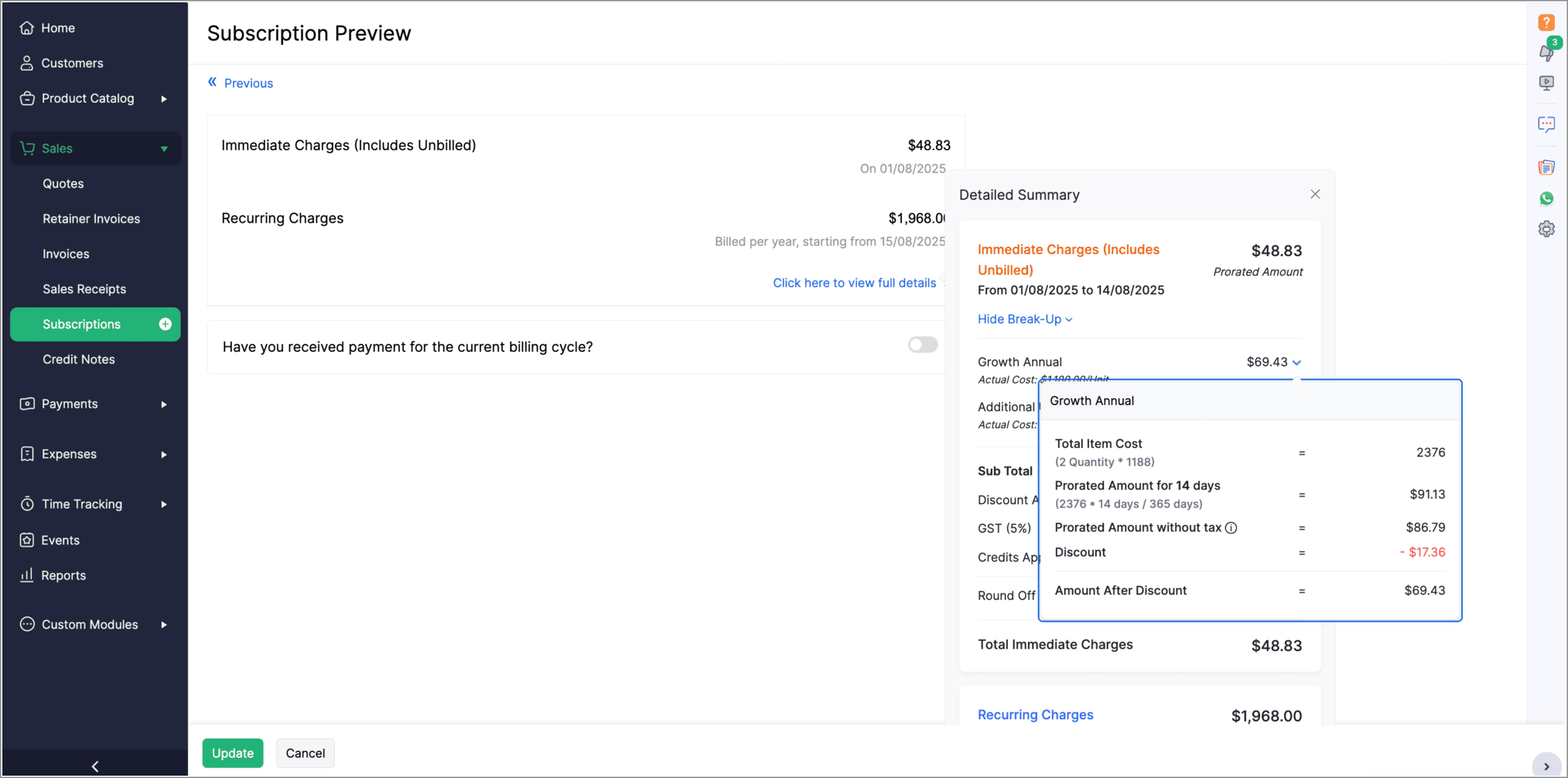
The Subscription Preview page has been enhanced to give a clearer view of prorated charges for plans and addons. The summary section now shows the detailed proration break-up for each plan and addon. To see this, go to the view full details in the Subscription Preview page.


Introducing PayNow Payment Method

We now support PayNow as a payment method via Stripe integration. PayNow is a Singapore-based payment option that lets your customers pay in SGD by scanning a QR code through supported banks and non-bank financial institutions.

Note: This payment method is not supported in the India edition of Zoho Billing.

Generate AI Summaries with Zia Insights

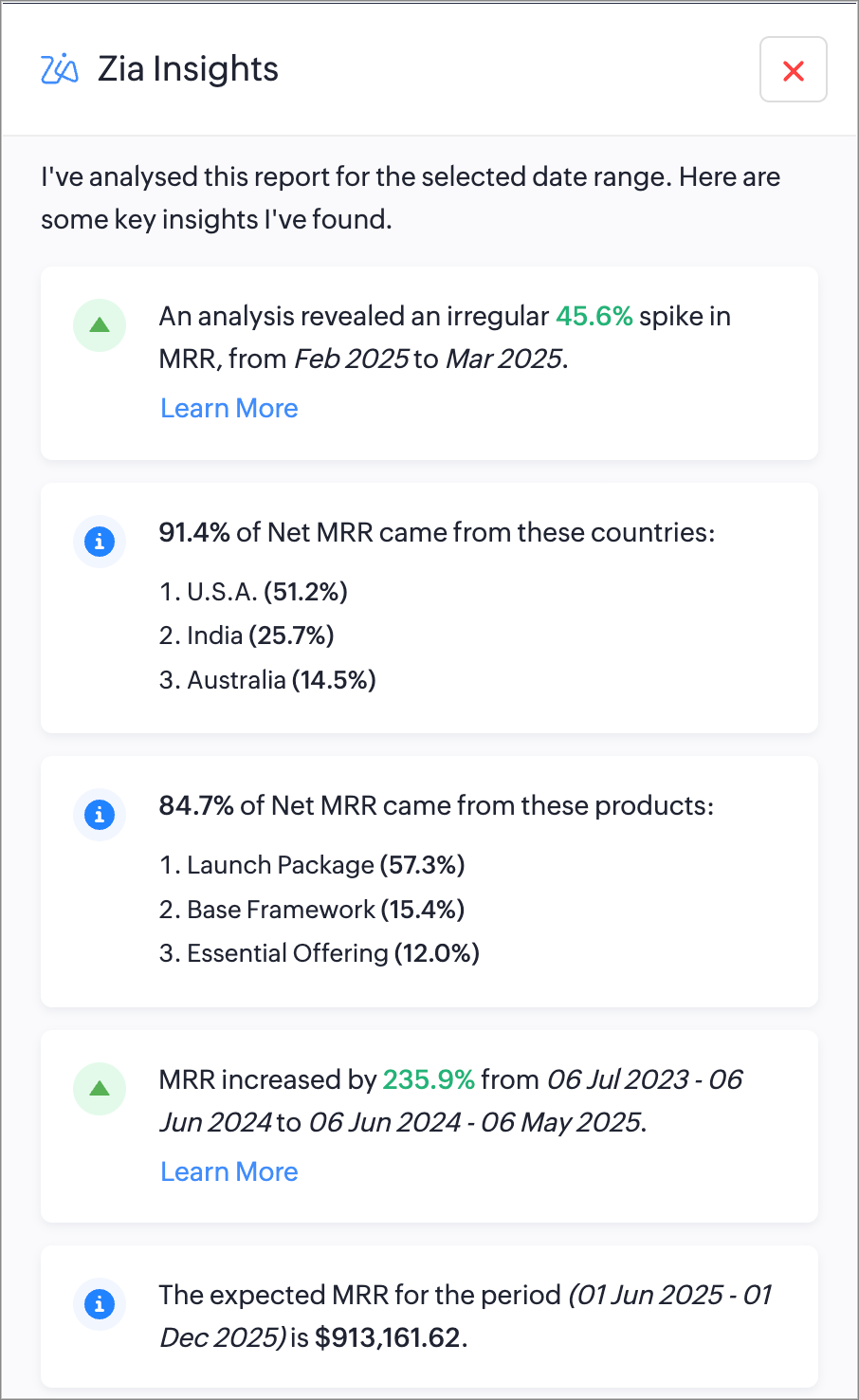
You can now use Zia Insights to generate AI-powered summaries, detect anomalies, spot top contributors, compare performance over time, and forecast trends within reports. Zia Insights can identify any unusual spike or dip in your reports, highlight the possible cause, give region-specific analysis, and can also predict future trends based on your organzation's records. Learn More

Increase API Limits From the API Dashboard

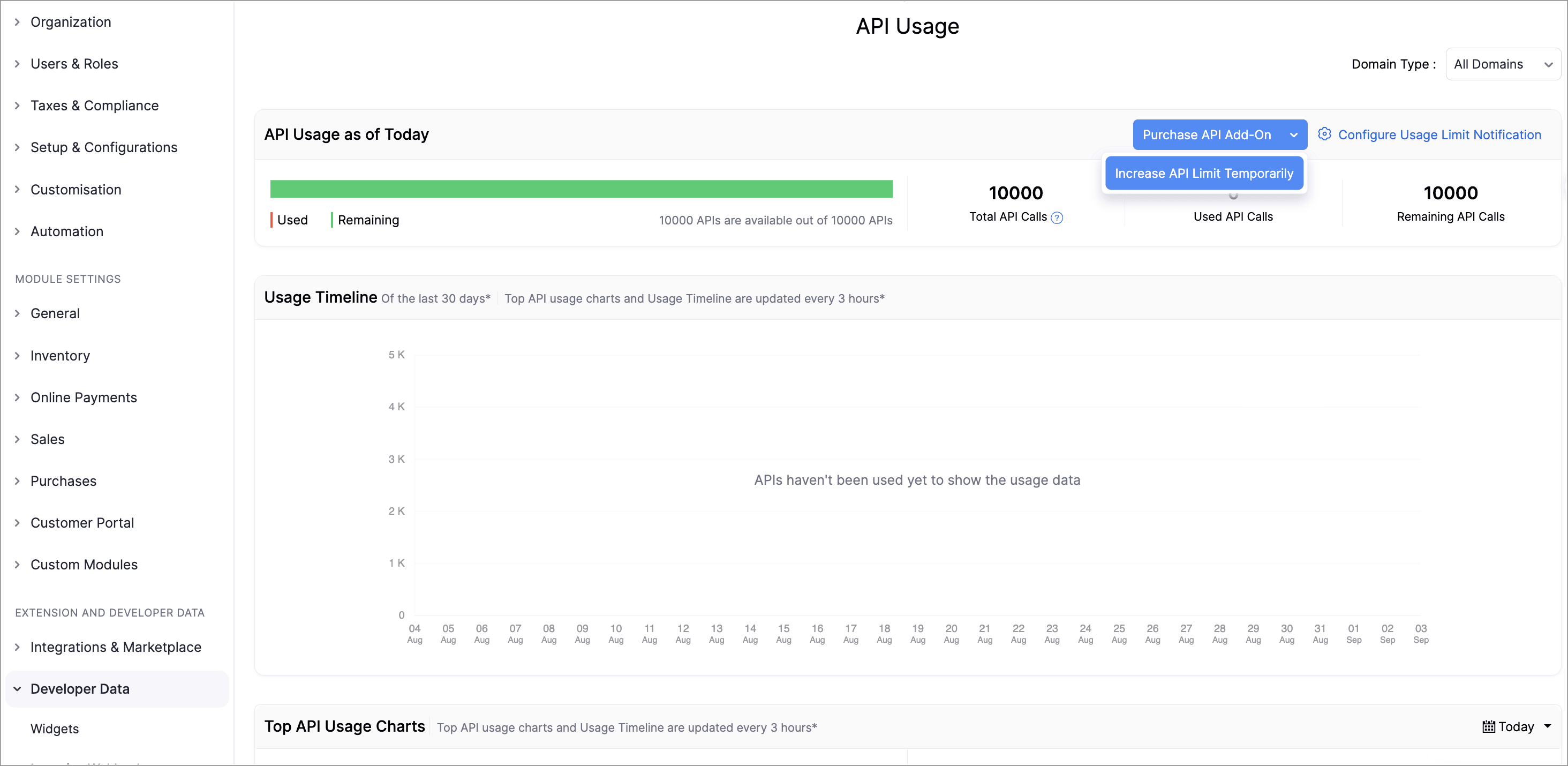
Admins can now temporarily increase API limits directly from the API Dashboard. You can boost your API limit by 50% of your current plan for one week, with automatic reset afterward. You can request multiple boosts consecutively once the previous one expires and can also purchase additional API addons directly from the dashboard.

This enhancement provides greater control, faster response to usage surges, and a streamlined workflow to keep your operations running smoothly.

To increase your API limits, go to Settings > API usage > Purchase API Add-on or Increase API Limit Temporarily.
Lookup Custom Fields Support for Locations

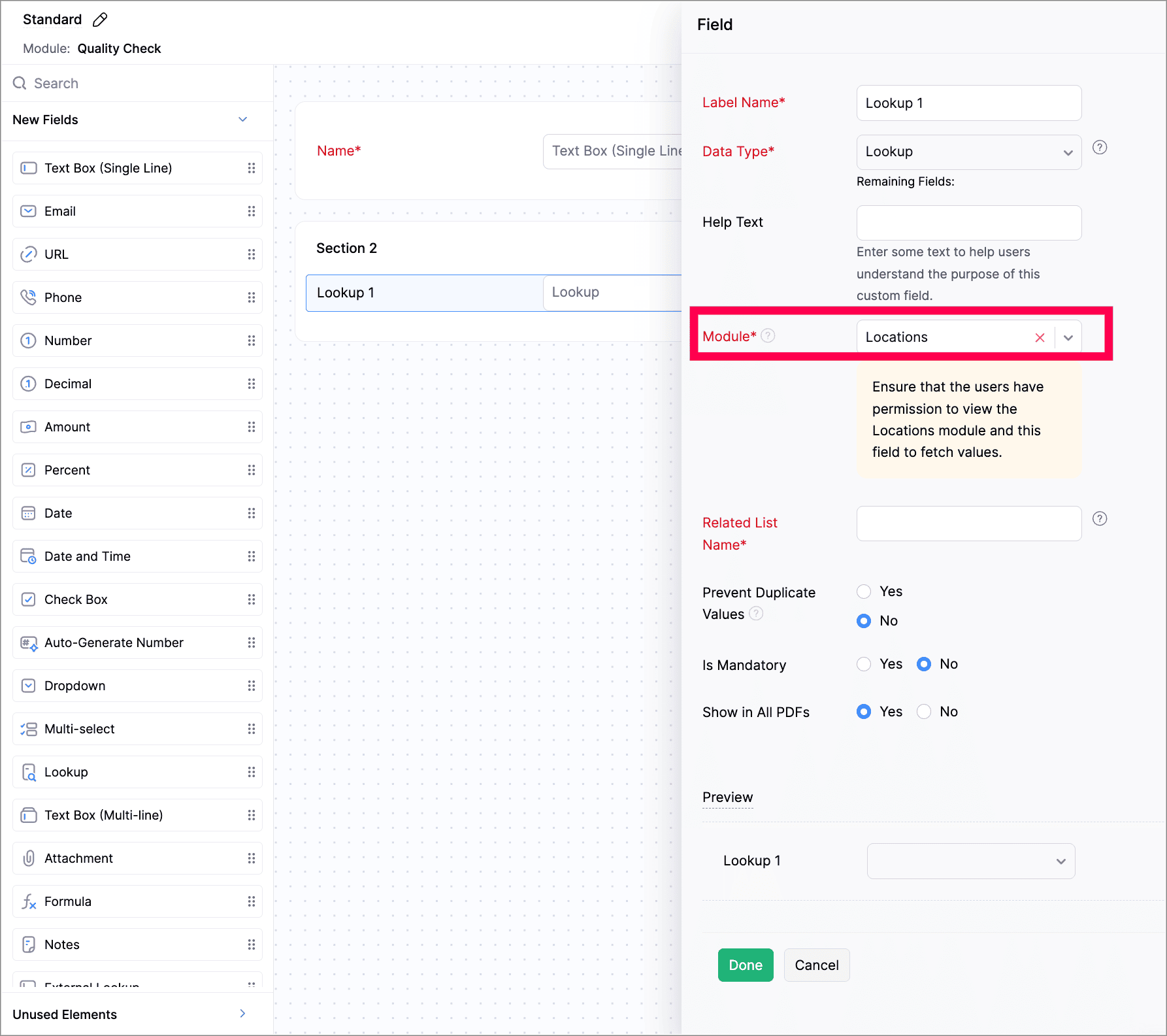
We've now introduced lookup custom fields for Locations. You can now use lookup custom fields for Locations in both Custom Fields and Custom Modules.

While creating a new custom field, select Lookup as the data type and select Locations from the Module dropdown. While creating a custom module, add a section to your module and select Locations.

Customize PDF File Names

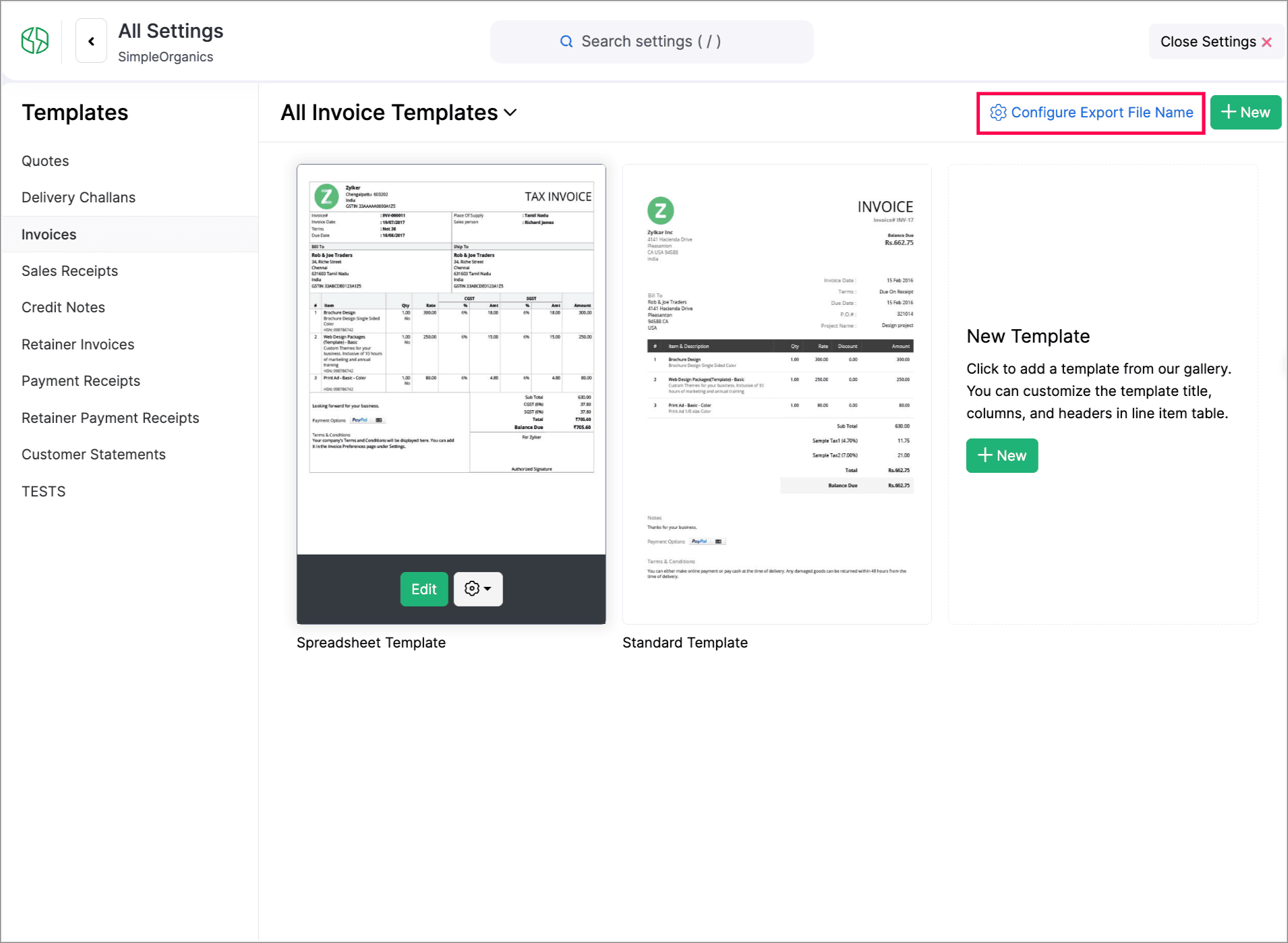
You can now customize PDF file names during export. You can set how your PDFs should be named using placeholders of transaction numbers, dates, customer names, organization names, and salesperson names.

To do this, go to Settings > Customization > PDF Templates > Configure Export File Name to set it up.


Create Web Forms for Custom Modules

We have introduced Web forms to collect and create records directly in a custom module via a unique link. You can configure layouts, success actions, and CAPTCHA. Once the web form is created and the unique link is generated, users can access and submit data. The submitted data will be stored in the module upon approval. Learn More
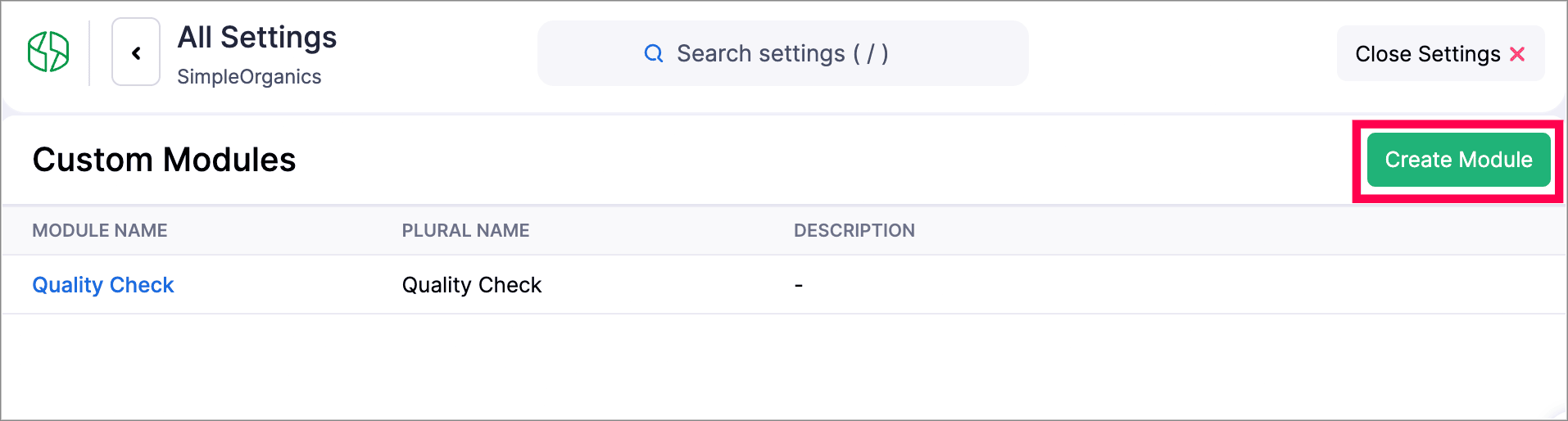
Navigate to Settings > Developer & Data > Web Forms to create a new Web form.


Other Feature Enhancements

  • Zoho Billing now supports the new GST slabs. Migrate to the revised 18%, 5%, and 40% slab, using the banner of your organization to update rates (via HSN/SAC), preview changes, schedule migration, track progress, and download audit-ready files.

  • You can now use the column customization and custom views in Timesheet, allowing users to select preferred columns and create personalized views for easier timesheet management.

  • We have enhanced our Custom Modules, you can now attach up to 10 documents for each record in your custom modules. Learn how it works.

  • Zoho Billing now supports custom views for Sales Receipts, allowing you to personalize and organize your sales receipt list view.


We hope you enjoy exploring these new features and enhancements in Zoho Billing! Each update is designed to make your billing experience simpler, smarter, and more efficient.


We’ll be back with even more improvements as we continue to elevate your billing and subscription management experience.


You can also visit the What's New timeline for bite-sized information about our previous feature updates and enhancements. If you require any assistance, please write to our dedicated support team at support@zohobilling.com – we'd be happy to help!


    • Sticky Posts

    • What's New in Zoho Billing - February 2024

      Hello everyone, We are excited to share the first set of updates for Zoho Billing in 2024. Read along to know more about a wide range of updates, from the Aging Summary in customer statements to Apple Pay support in Stripe. One-Time Invoice with Plans
    • Zoho Finance Workshop 2023 is coming to the USA. Get exclusive training on Zoho Finance apps, one-on-ones, and more.

      Hello all, We'd like to invite you to our biggest Zoho Finance workshop in the United States. After a brief break, we are excited to be back. This year, we're bringing together our customers and community members for two days of curated hands-on sessions,
    • Zoho Subscriptions wins IDC's 2020 SaaS CSAT Award for Subscription Billing

      Dear customers, We're excited to share that Zoho Subscriptions has won IDC's 2020 SaaS Customer Satisfaction Award! As a team, we cherish each and every milestone with our customer community. And this particular award, focusing on customer satisfaction,
    • Introducing: SMS notifications via Zoho Subscriptions

      Dear customers, We hope you are doing well! We are happy to announce that you can now send SMS notifications to your customers right from Zoho Subscriptions. To facilitate this, we've integrated with Twilio, a leader in the business communication space.
    • What's new this December in Zoho Subscriptions

      The year is almost over and we here at Zoho Subscriptions have released new features and updates on the month of November. Let's take a look at the features we have worked on in the past month. Zendesk Integration The Zoho Subscriptions app for Zendesk allows your customer support executive to access customer details in an instant. You will be able to view the customer information from Zoho Subscriptions right from your ticket view. On enabling the integration, you will be able to: Get your customer
    • Recent Topics

    • Contact not saved after editing

      Hi. I discovered a couple of problems with Zoho contact. (1) BUG. Contact is not saved after editing. If you edit an existing contact by putting a bracket in one of the fields you get the message "Contact updated successfully" but nothing is saved. All updates (including the other fields) are lost. Steps to reproduce. Go to an existing contact and change the first name to "Robert (Bob)". (2) In the phone number fields you can only save numeric data (0 to 9). This seems an unneccessary restriction.
    • Zoho Mail Android app update: UI revamp

      Hello everyone! We are excited to share that the first phase of the Zoho Mail Android UI revamp is now live. In this update, we have redesigned navigation bar at the bottom to quickly access the Email, Calendar, Contacts, and Settings modules. Also, the
    • Opt-out from mailing list means can't email at all??

      It seems that if a contact unsubscribes from a mailing list the only way to email them is to uncheck the email opt-out box first, then re-check after the email has been sent. I've been through a chat with support and they confirmed this. This seems bizarre.
    • Email Opt Out Question

      Has the problem where if a customer is emailed opt out prevents you sending standard emails? For me this feature is simply to stop any email marketing and should not block people from receiving emails via Zoho mobile, which makes no sense.
    • Search API filter/sort ignores comment-triggered modifiedTime updates

      Summary When a comment is added to a Call or Account, the parent record's modifiedTime is correctly bumped. This bumped value is visible in: GET /api/v1/calls/{id} ✅ GET /api/v1/calls/search without a filter ✅ — the record's response body shows the new
    • Items Landed Cost and Profit?

      Hello, we recently went live with Zoho Inventory, and I have a question about the Landed Cost feature. The FAQ reads: "Tracking the landed cost helps determine the overall cost incurred in procuring the product. This, in turn, helps you to decide the
    • Bank Feeds

      Since Friday my bank feeds wont work. I have refreshed feeds, deactivate and reactivate and nothing is working
    • Show backordered items on packing slip

      Is it possible to show a column on the Packing Slip that shows number of backordered items when a PO is only partially filled? I would also like to see the Backordered column appear on POs after you receive items if you didn't get ALL of the items or partial amounts of items. And lastly, it would be nice to have the option of turning on the Backordered column for invoices if you only invoice for a partial order. -Tom
    • Users I've shared the sheet with cannot use the Custom Functions

      Hi, I have a Zoho Sheet worksheet that I shared to 2 colleagues, giving them full access: In that worksheet, I created a button with a custom Deluge function and it works flawlessly for me: For those I shared the worksheet to, when they click the button,
    • Introducing parent-child ticketing in Zoho Desk [Early access]

      Hello Zoho Desk users! We have introduced the parent-child ticketing system to help customer service teams ensure efficient resolution of issues involving multiple, related tickets. You can now combine repetitive and interconnected tickets into parent-child
    • Newby Questions

      Q1. The top bar of Zoho Books has a "Search in Banking (/) " field. What is the proper use of this text box? - Searching for Amazon for example has no results but there are transactions. - Is the search case sensitive? - Are regular expressions allowed?
    • Add Custom Fields only in Customer module and not on supplier module!? Is not there a way to do that!?

      I am trying to create custom fields on clients module but it also gets created on suppliers module; which of course does not make sense at all as a lot of custom fields are client or supplier specific but never both. I am missing something? This seems
    • Inventory "Bulk Actions" button - add more fields to "Bulk Update > Select a field"

      Can we not get a lot more actions that are commonly used by customers into the "More Actions" button on the Inventory list? More fields listed in the Bulk Update > Select A Field? Possible Bulk update Fields Preferred Supplier ( to quickly move items
    • Using Email Triggers on Zoho Flow

      Hello, I'm sending the email to create the variables as this article says: https://help.zoho.com/portal/en/kb/flow/user-guide/create-a-flow/articles/email-trigger#How_email_trigger_works But the collection of the variables only seems to work when the
    • Zoho Bookings - Provide Appointment System ID in Zoho Flow Variable

      Hi Bookings Team, It would be great if you could provide the system record ID for appointments as a variable in Zoho Flow trigger outputs and Fetch Appointments action. This would allow us to create a dymanic URL which can be clicked by a staff user to
    • Tip #7: Customize the appointment confirmation page

      A confirmation page plays a crucial role in creating the first impression, as that's where customers land when booking with you. It shows your brand identity, engages your audience, and drives more conversions. Yet, this section is often overlooked when
    • WhatsApp Calling Integration via Zoho Desk

      Dear Zoho Desk Team, I would like to request a feature that allows users to call WhatsApp numbers directly via Zoho Desk. This integration would enable sending and receiving calls to and from WhatsApp numbers over the internet, without the need for traditional
    • Show backordered items on packing slip

      We send out a lot of large orders, and often there are one or two things backordered. How can I fix the packing slips to show quantity ordered  & quantity packed There should also be the ability to "ship" 0 of an item so the receiver knows that things
    • How do you create an event/meeting in a different time zone?

      Does anyone know how do you create an event/meeting in a different time zone? 
    • Deluge Learning Series – Mastering file handling in Deluge | April 2026

      The Deluge Learning Series is conducted on the fourth thursday of every month. In each session, we discuss built-in functions and statements in Deluge and demonstrate how they are used across different Zoho products. With practical examples and real-world
    • Multi-currency and Products

      One of the main reasons I have gone down the Zoho route is because I need multi-currency support. However, I find that products can only be priced in the home currency, We sell to the US and UK. However, we maintain different price lists for each. There
    • Editing recurring tasks

      Hi there, I use recurring annual tasks quite often but sometimes I have a contact leave an organization so I want to re-assign that annual task to a new contact. When I go into the task to change the contact it only does so for the current year. Future
    • Cross Module Filtering – Use Fields from Lookup modules in Custom Views criteria and Advanced Filters

      Hello everyone, Zoho CRM now enables you to achieve deeper filtering of records in a module, using fields of a lookup, thereby enhancing your data management experience manifold. This filtering based on lookup module fields is now available in advanced
    • On Duty Requests - Zoho People Data

      Hello Team, We are currently using the On Duty Form to record Work From Home (WFH) requests in our organization. However, we are facing an issue where pending On Duty requests are not appearing in the Attendance Module. For example, if I submit On Duty
    • Business Day Logic Update: More Accurate Scheduling for Your Workflows

      Hello everyone, We’re improving how business-day calculations work in workflows, especially when triggers happen on weekends. This update ensures that offsets like +0, +1, and +2 business days behave exactly as intended, giving you clearer and more predictable
    • Styling for Subform Fields using client script

      Currently we can add styles to list and detail page for fields using .addstyle in the Client Script But that is missing for fields of Subform We would really like the feature to addstyle for subforms in the detail page Can you please consider adding it,
    • Zoho Commerce -

      Zoho Commerce currently only allows merchants to define the United Kingdom as a single shipping zone, which creates a significant issue for businesses operating between the EU and the UK. Under the Northern Ireland Protocol, Northern Ireland follows EU
    • Add a way to connect Log360 Cloud logs with Zoho analytics

      Hi, Several month ago Log360 Cloud was added to zoho one - and this is great. But as far as I see there is no prebuilt way to connect Zoho analytics to the logs we have in Log360 Cloud. Please add a prebuilt connection like we have for so many other zoho
    • IP flagged as abusive

      I'm getting the error that 136.143.188.15 is listed as abusive. I've checked with mxtoolbox.com and it is indeed in the list
    • date & datetime client script getInput types

      Please add date & datetime as available types for the getInput client script function. https://www.zohocrm.dev/explore/client-script/clientapi/Client#getInput
    • Approval Workflow Not Triggering When Status Updated via Custom Button

      Hi Team, I’m facing an issue with an approval workflow in my application. I have a workflow that updates a record’s Status field from “Pending” to “Waiting for Approval.” I have configured an Approval Workflow with the condition: Status = "Waiting for
    • Automate the file import step

      Hello everyone, I have a Sales - 'Account' category, and currently import the file to update it as follows: Import Accounts - From File - Update existing Accounts only - select and match the field the CRM. Since we have been using Microsoft 365 SharePoint.
    • Data Import

      Hello Latha, Is there any option to enable data import option in Equipment module? Best regards, Chethiya.
    • Unable to Access /crm/v7/taxes – OAuth Scope Mismatch in Zoho CRM API

      I am currently integrating Zoho CRM (v7 API) with our system and I need clarification regarding the Taxes API and OAuth scopes. Context: We are creating Quotes via the API (/crm/v7/Quotes) Each quote contains line items with taxes (e.g., TVA 19%, 10%,
    • Email from CRM being Blocked or Marked as Spam by Google (and maybe more)

      In the past 24 hours we’ve noticed that emails sent via Zoho CRM are being blocked or flagged as phishing, particularly by Google. The issue seems to occur specifically when emails contain links. URLs like www.domain.com or www.example.com are automatically
    • Marketing Tip #29: Make it easier to shop by grouping products into collections

      A well-organized store helps customers find what they want faster, which directly improves conversions. When products are grouped into clear categories or collections, shoppers don’t have to scroll endlessly or search manually. It also makes your store
    • 【無料/オンライン】4/30開催|Zoho ワークアウト(オンライン勉強会)

      ユーザーの皆さま、こんにちは。 コミュニティグループの中野です。 4月開催の「Zoho ワークアウト」のご案内です。 本イベントは、Zohoユーザー同士で交流しながら 設定・運用・活用に関する課題解決を目指すオンライン勉強会です。 「設定を進めたいけれど、一人だと手が止まってしまう」 「他社がどう活用しているのか知りたい」 「相談できる相手がおらず、運用に悩んでいる」 そんな方におすすめのイベントです。 ▶︎参加登録はこちら(無料) https://us02web.zoom.us/meeting/register/qIH1ut8aTnq-R7-21eF3BQ
    • Zoho Desk - Support Plan by Time Log Hours

      Hi Desk Team, When creating a Support Plan, it would be great to have an option under Plan Type for Time Based Plan. This would be based on the number of work logs created for a customer account. It's very common to offer a support contract which has
    • Help Center and SEO: Any Benefit to My Domain-Mapped Website Ranking?

      First of, I love the Help Center which I've just decided to integrate into my website to replace its old-fashioned FAQs. So much more to achieve there now! Lots of new benefits to the site visitors and to me in terms of organizing and delivering all the
    • How to set custom Sales Order numbers

      I am trying to create Sales Orders with data from Jotform submissions. Auto number generation is disabled within Books. Whereas the flow Input recognizes the number (40732 in this example), the Output does not. How can I fix this? I'd like the number
    • Next Page