What's New in Zoho Inventory | July & August 2026
Hello users,
The July and August 2026 releases bring a range of new features and improvements across the product. From the Nigeria Edition and Super Admin enhancements to Sri Lanka IRD-compliant invoicing, Loyalty Program Management, and improvements to the Android app, there’s plenty to explore in this release.
New Releases
Nigerian Edition of Zoho Inventory Is Now Live
We’re excited to announce the successful launch of the Nigerian Edition of Zoho Inventory, expanding our inventory management solution to businesses in Nigeria. With this launch, Zoho Inventory continues to expand its regional availability and provide businesses with inventory management capabilities tailored to their local requirements. Explore the help documentations
Custom Dashboards for Zoho Inventory
Custom Dashboards are now available in Zoho Inventory, along with entity-level permissions for Reports within Roles. Users can personalize their dashboards by adding the required predefined panels and report panels, while role-based permissions ensure they can access only the reports and data they’re authorized to view. This provides a more flexible dashboard experience, giving users faster access to the inventory insights most relevant to their day-to-day operations.
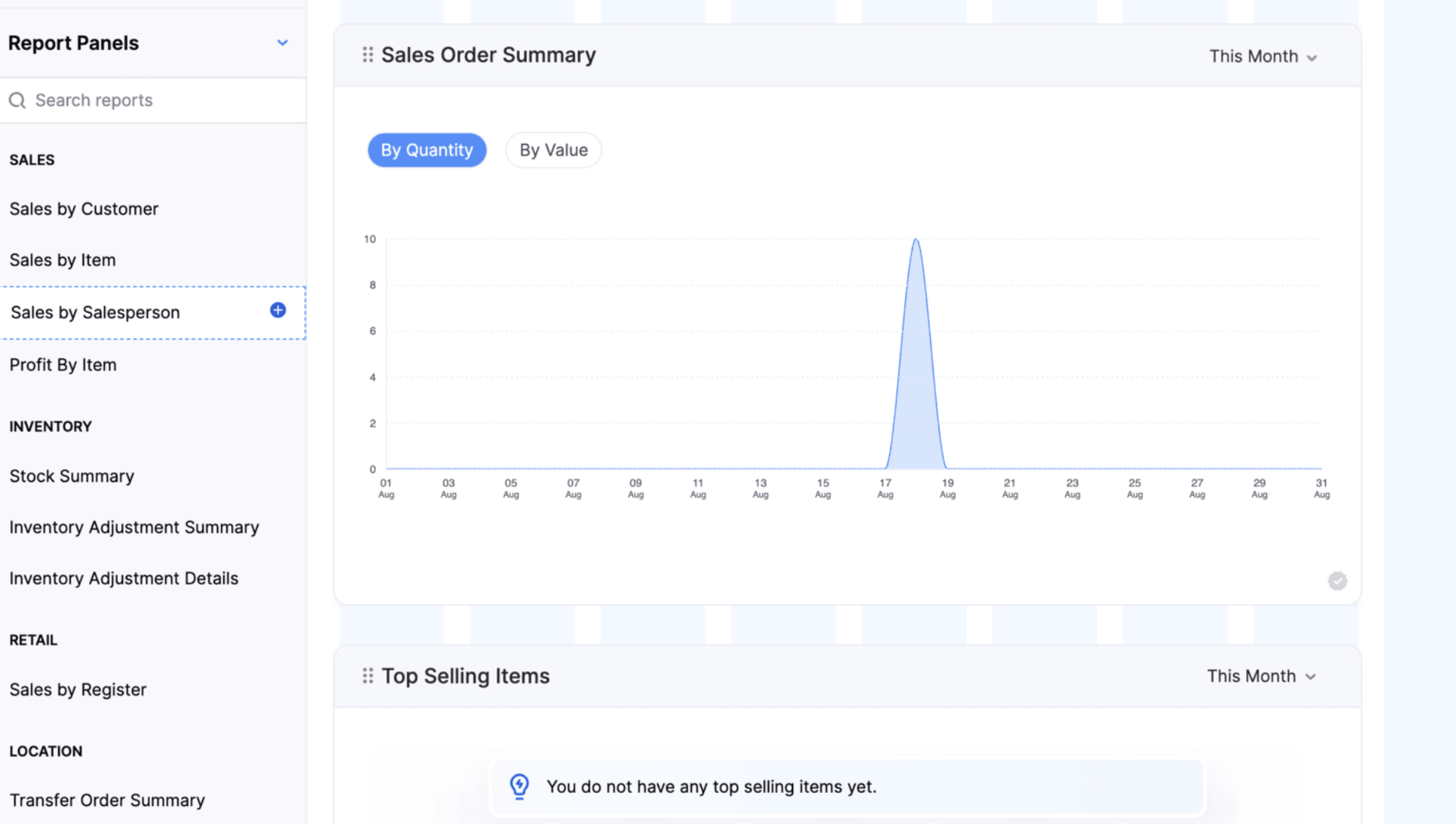
Note: This feature is available only on the Enterprise plan.
Introducing Super Admin
Super Admin is a high-level privilege assigned to an administrator, giving them exclusive control over other admins and the ability to set up and manage the organization across all Zoho Finance applications. Learn More
Customer & Users Management
Loyalty Program Management
Create and manage loyalty programs and associate them with customers to reward purchases with loyalty points. Customers can earn and redeem points across supported sales channels, helping businesses improve customer retention and engagement.
Configure organization-wide loyalty preferences, including point adjustments, rounding rules, redemption behavior, return handling, and the loyalty points tracking account. Set up individual programs with earning and redemption rules, schedules, minimum redemption points, and redemption windows. Customers earn points automatically on eligible sales based on their associated loyalty program. Points earned from the original sale are automatically reversed when a Credit Note is created for a return. Customers can redeem available points partially or fully on invoices and during Retail Store checkout, and pay the remaining balance using other payment methods.
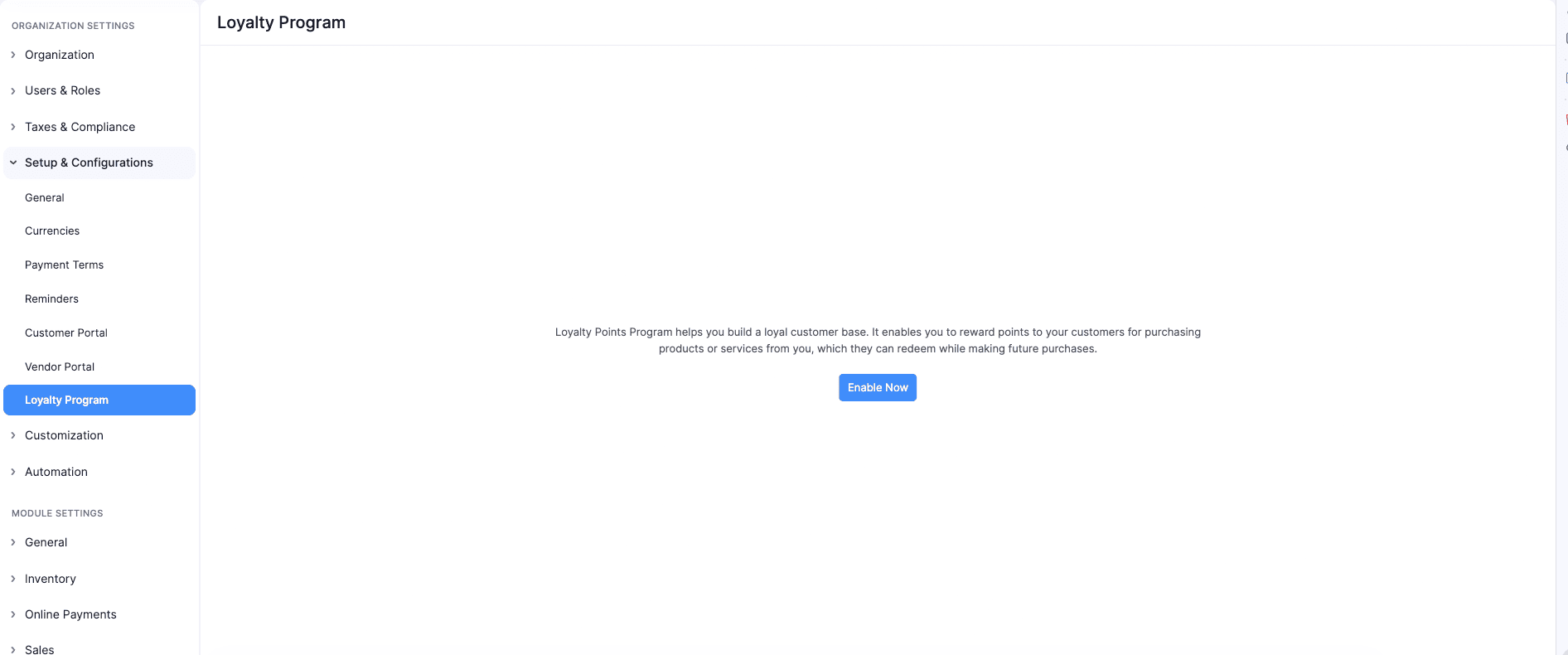
To enable Loyalty Program Management > Go to Settings > Navigate to Setup & Configurations > Click Loyalty Program > Click Enable Now.
Role-Based Access for Extension Installations
You can now control which user roles can access an extension during installation. Administrators can select the roles that can access the extension components and restrict access for others. Access can also be modified later from the extension details page. Organization-wide backend components are not covered by role-based access.
Vendor Hierarchy
You can now organize related vendors into a hierarchy by associating sub-vendors with a parent vendor. This makes it easier to manage and track transactions across vendors from a single parent vendor.
Note: Vendor Hierarchy is available in Early Access on the Enterprise plan. Contact support@zohoinventory.com to enable it for your organization.
Contact Person Custom Fields
You can now create custom fields for Contact Persons to capture additional information specific to your business needs. Custom fields can be created and managed from the Customer and Vendor Custom Fields page and are available for both primary and other contact Persons. You can also display Contact Person custom fields on the Customers and Vendors details page, list view page, and portals.
The custom fields are also supported in Contact Person import and export, audit trails, and integrations with Zoho Analytics, Microsoft, Zoho CRM, and Bigin.
Items & Item Setup
Create and Sell Item Groups [Early Access]
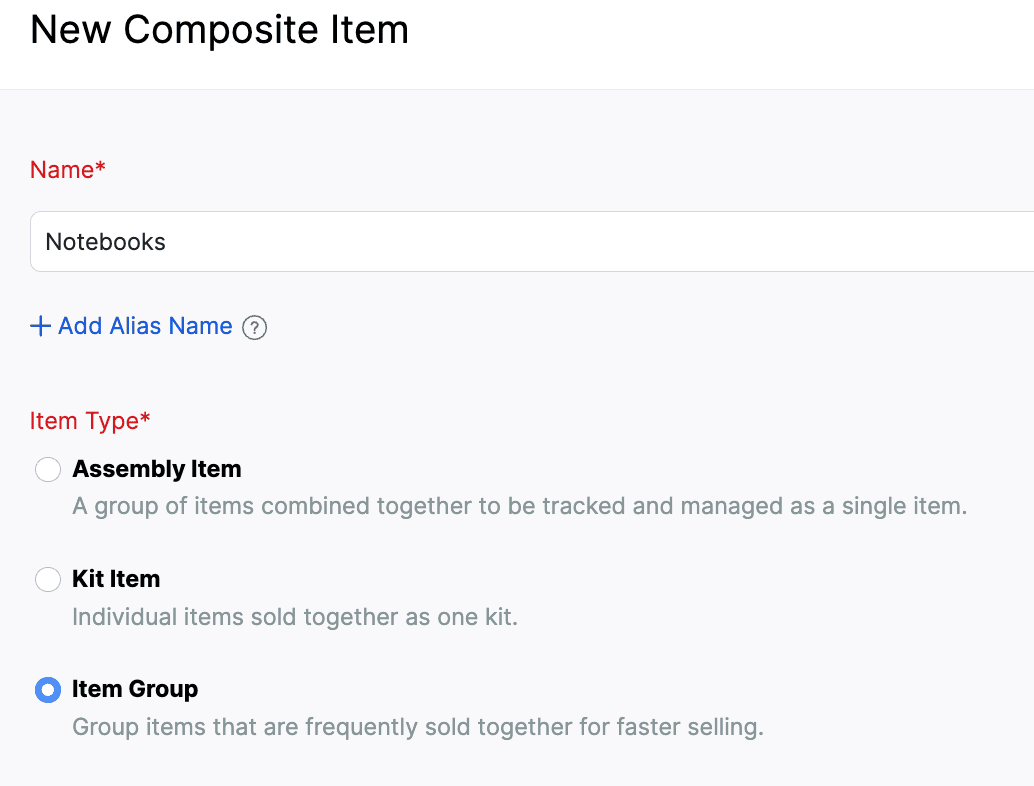
Create Item Groups to combine individual items that are commonly sold together. Add the group to sales transactions to automatically include its components with predefined quantities.
Item Groups do not have standalone pricing, taxes, inventory tracking, or accounting. These are managed for individual components. You can add or remove components, edit their quantities, rates, taxes, and discounts, and rearrange them during transaction creation. In packages, picklists, purchase returns, backorders, dropshipments, and reports, only the individual components are considered. You can display group components in transaction PDFs using the Show Item Components option in PDF customization.
To create an Item Group > Go to Inventory > Composite Items > Click + New > Select Item Group > Enter the group details and add component items > Click Save.
Create and Manage Item Modifiers
We’ve introduced a new Item Modifiers module that lets you customize items during transactions using predefined options. Create reusable modifier groups, configure selection rules and additional prices, and associate them with one or more items.
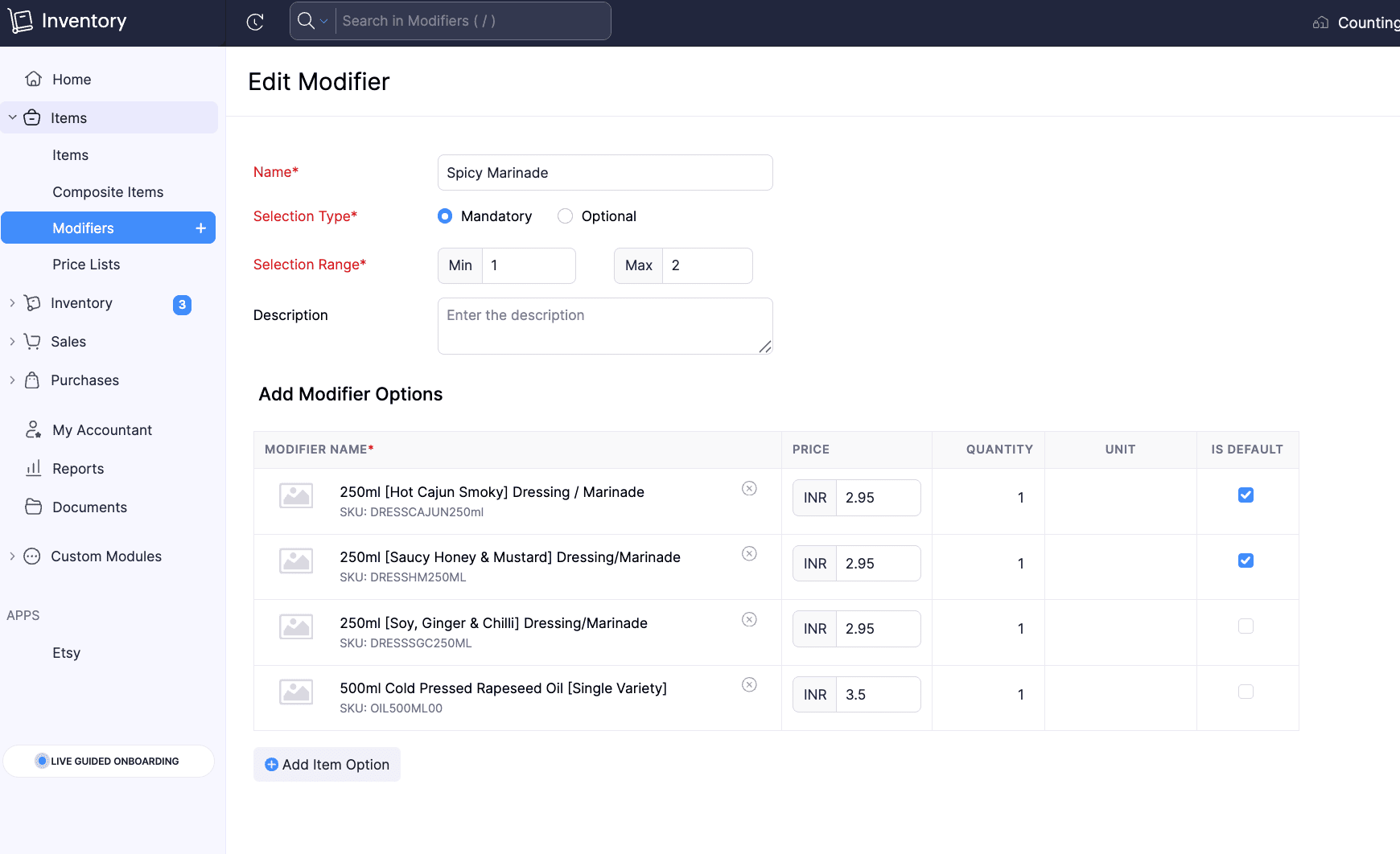
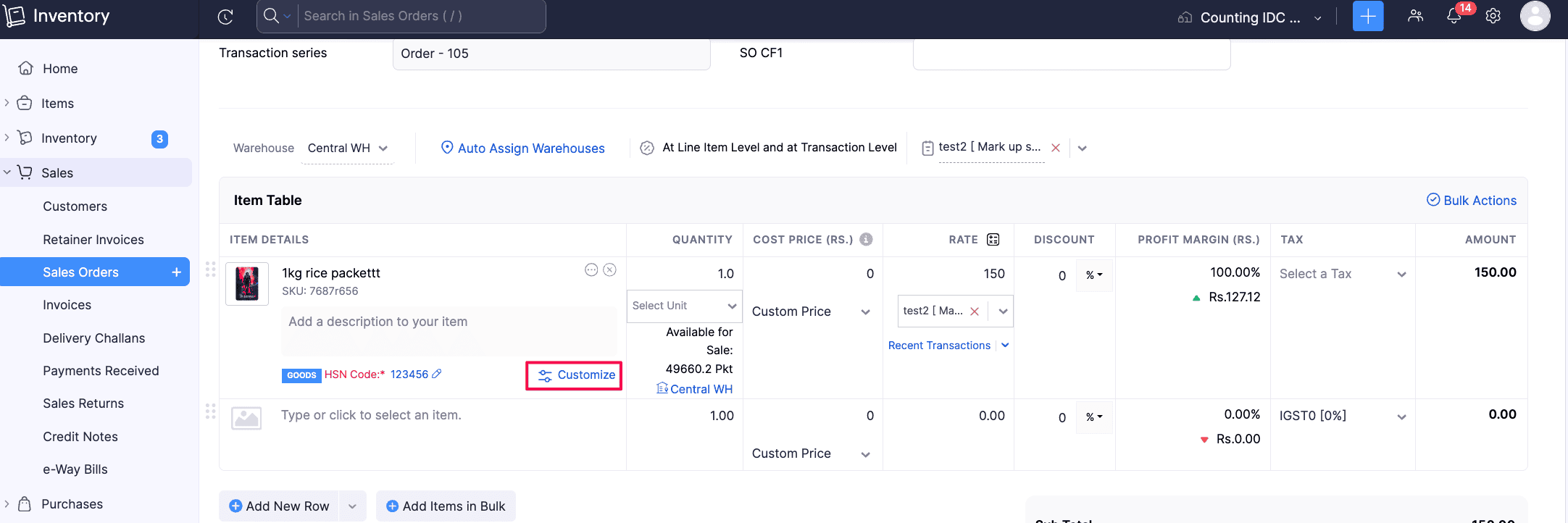
Selected modifiers are displayed under the parent item and are included separately in packages, picklists, returns, PDFs, and the Sales by Item report.
To create Item Modifiers: Go to Items > Click Modifiers > + New, configure the modifier group and options, associate it with items, and save.
Note: This feature is in Early Access and is available only to users on the Enterprise plan. Contact support@zohoinventory.com to enable it for your organization.
Customize Item Identifier Fields and Access
Customize the UPC, EAN, MPN, and ISBN item identifier fields, including their display names. Configure each field to be mandatory, active, or inactive, and set role-based access to show or hide them. The SKU field is also included in this customization framework.
To customize item identifier fields > Go to Settings > Module Settings > General > Items > Navigate to Item Identifier Fields (UPC, EAN, MPN, ISBN, SKU) > Mark fields as Mandatory
Introducing Combo Items [Early Access]
You can now create Combo Items, a new Composite Item Type that lets you sell multiple products together while providing flexibility in the components included. Unlike Kits, where all components are predefined, Combo Items allow you to configure multiple component groups with different options. During a transaction, you can select one option from each group to create the combo. You can also customize the selected components, manage their quantities and tracking details, and handle packing, backorders, returns, PDFs, and reports for Combo Items.
Note: This feature is in Early Access and is available only to users on the Enterprise plan. Contact support@zohoinventory.com to enable it for your organization.
Purchases
Create Purchase Returns [All Editions]
The Purchase Returns module is now available for all editions. Create returns as standalone documents or directly from existing Purchase Orders with pre-filled details. Once confirmed, generate picklists, packages, shipments, and vendor credits to track physical movement and financial adjustments. The Purchase Return Summary and Purchase Return Details reports provide visibility into return transactions and item-level data. Learn More
To enable the Purchase Returns module: Go to Settings > Click General under Setup & Configurations > Enable Purchase Returns
Filter Purchase Receives by Approval Status
Filter Purchase Receives by their approval status to quickly locate and manage records. You can filter records by Draft, Pending Approval, Approved, In Transit, Billed or Rejected status from the Purchase Receive list page, custom views, advanced search, Item transaction details, and Vendor transaction details.
Sales & Returns
Configure Approval Workflows for Sales Returns
Configure simple multilevel and custom approval workflows for sales returns to control their status changes. Set approvers, manage the movement of returns to Accepted or Declined status, and filter the Sales Returns lists view page and history reports by approval status. Users with the necessary permissions can save, submit, or accept returns based on the configured workflow.
To configure Sales Return approvals > Go to Settings > Preferences > Approvals > Select Sales Returns > Choose Simple, Multi-Level, or Custom workflow > Add approvers and conditions > Save and Enable
Allocate Stock to Sales Orders [Early Access]
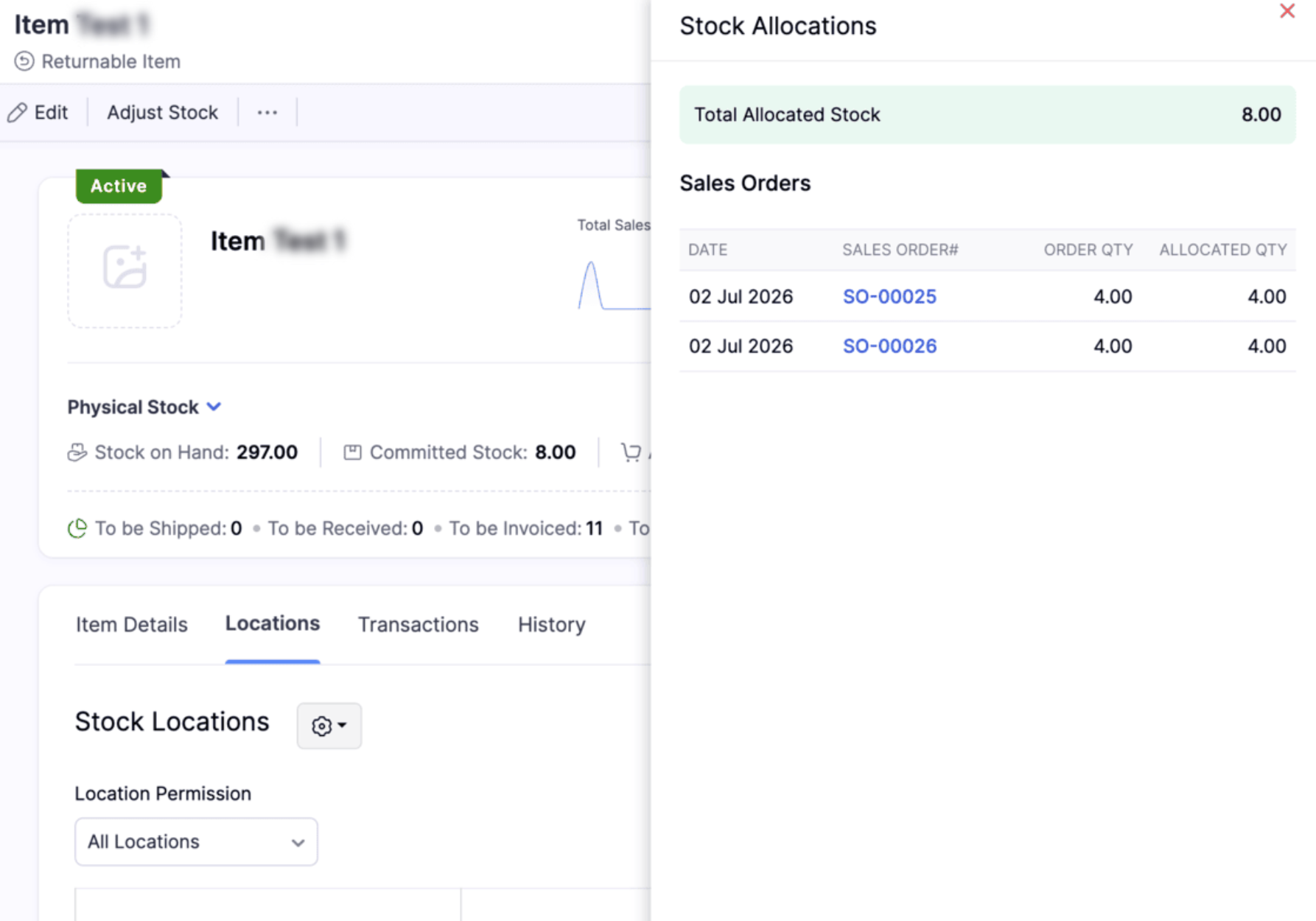
Allocate available inventory to confirmed sales orders to reserve stock for specific customers. This prevents the same stock from being allocated to multiple sales orders. You can track allocated quantities for each order and item, including batch and serial-tracked items. Allocated stock remains available in your physical inventory until it is shipped. Allocations are automatically updated as items are fulfilled, and you can remove allocations before picking or packing starts. You can also filter Sales Orders by allocation status and view allocation details by item and location.
To view the available stocks for an item, Go to Items > Select the item > Click Allocated Stock in the details page
Inventory Operations and AI Enhancements
Adjust Inventory Value to Zero
You can now adjust an item's total stock value to zero using Value Adjustment. Previously, adjusted values of zero or below were restricted. With this enhancement, only negative values are restricted, allowing you to accurately reflect inventory with no remaining financial value, such as damaged, obsolete, expired, or fully written-off stock.
Role Permissions for Assemblies
Assembly permissions are now available as a separate entity under Roles & Permissions. Admins can now manage access to each Assembly action separately instead of assigning all Assembly permissions together under the Composite Items module.
Manage Inventory with CoCreate Agent
We’ve introduced the CoCreate Agent, which helps you create sales transactions such as sales orders, invoices, and credit notes using simple prompts. Instead of entering details in each field manually, you can describe the transaction in simple English, and the agent creates it for you. Learn More
Note: This feature is available only on the Enterprise plan.
Templates & Customization
Sri Lanka IRD-Compliant Invoice Template [Global Edition]
You can now generate Sri Lanka IRD-compliant invoices from the Templates Gallery under the Global Edition. The template reflects the mandatory Tax Invoice requirements set by the Sri Lanka Inland Revenue Department and includes supplier and purchaser details, invoice serial number, date of supply, tax values, and total consideration in Sri Lankan Rupees.
Create Custom Barcode Templates
Create fully customizable barcode labels using HTML and CSS. Design flexible layouts, define custom label sizes, and use placeholders to display organization details, item custom fields, batch custom fields, and serial custom fields. Create separate templates for item, batch, and serial number barcodes based on your requirements.
To create a custom barcode template > Go to Settings > PDF Templates > Item Barcodes > Click New Template > Select Build from Scratch > Open the Code Editor
Note: This feature is available only for the Premium and Enterprise plans
Currency Support in Oman
Currency symbol support is now available for the Omani Rial (OMR) or transactions with up to 200 line items, the respective currency symbol will be displayed automatically. For transactions exceeding 200 line items, the currency codes SAR, AED, and OMR will continue to be displayed.
Enhanced Zoho Analytics Integration
Enable Weighted Average Cost Module in Zoho Analytics
Enable the Weighted Average Cost (WAC) module in Zoho Analytics to access inventory transaction valuation details. The module includes a Current WAC column that provides the valuation cost of outward inventory transactions for custom reports and queries. Organizations using the WAC valuation method can use this data for accurate Profit and Loss, inventory valuation, and other accounting reports.
To enable the WAC module: Go to Settings > Integrations & Marketplace > Zoho Apps > Zoho Analytics > Click Edit for the Analytics configuration > Select the Weighted Average Cost module > Click Save.
Sync Picklists, Move Orders, and Putaways with Zoho Analytics
Sync picklists, move orders, and putaways with Zoho Analytics to access and analyze their data in custom reports and dashboards.
Report Enhancements
Purchase Order By Item Report
The new Purchase Order By Item report provides an overview of purchase order data by item for a selected date range. Use customizable columns, advanced filters, multi-level grouping, and export options to analyze purchase order details. You can also create custom reports and schedule the report for automatic delivery.
View In-Transit Quantities in Inventory Summary Report
View the quantity of purchase receives that are in transit in the In-Transit column of the Inventory Summary Report. When the Shipment and Receipts filter is selected, this column displays the combined quantity of in-transit purchase receives and Transfer Order stock.
Minor Enhancements
Include Credit Notes in the Profit by Item Report using the Report By filter. This ensures that returns are considered when calculating item-level profit.
Select months or years as the time interval in the Inventory Aging Summary Report to analyze inventory age over longer periods.
Schedule the Batch Details Report to generate and send automatically at your preferred intervals. Set a recurring frequency schedule and select the recipients for report delivery.
The Order Fulfillment by Item Report now includes Sales Order Number, Customer Name, and Sales Order Custom Fields in the Advanced Filters. Users can apply specific filters to quickly identify and analyze order fulfillment data based on sales orders, customers, and business-specific custom fields.
The FIFO Cost Lot Tracking Report now includes an Age column under the Product In section. It shows how long each stock has been held based on its received date, providing better visibility into stock age under the FIFO valuation method.
Taxes & Payments
Terminal Payments
Terminal Payments via Zoho Payments are now available in the India edition. You can accept customer payments through supported terminal devices directly from the web, Windows app, and Retail app.
Import and Export TDS Rates
Import and export TDS and TDS Group tax rates to manage tax rates more efficiently.
To import or export TDS rates > Go to Settings > Direct Taxes > Income TDS Rates > Import or Export the required tax rates
TDS Summary in Invoice and Bill PDFs [IN Edition]
Invoice and Bill PDFs can now include a dedicated TDS Summary table, displaying the TDS rate, taxable amount, TDS amount, and total taxable & TDS amount. The table appears when Show TDS Summary is enabled in the PDF template and the transaction contains TDS, making it easier to view the complete TDS breakdown directly in the generated PDF.
E-Way Bill Support for Purchase Transactions [IN Edition]
E-Way Bills can now be created for Bills and Vendor Credits in the India edition, including purchase transactions that exceed the applicable threshold. You can also select the required address while generating the E-Way Bill, making it easier to create and manage E-Way Bills for purchase transactions.
Direct Avalara Integration Updates [US & CA Editions]
The direct Avalara integration now supports customer codes. You can use customer codes to match the correct customer record in Avalara when customers have branches, partner customers, or naming differences across systems. This ensures the correct exemption certificate is applied during tax calculation without manual adjustments.
Android App Updates
Picklist Item Grouping: The Picklist module now supports item grouping, so users can view items grouped by sales order and filter by sales order or assignee.
Credit Note Template Selection: Users can now change the template directly in the Credit Notes module, making it easier to align templates with their document needs.
Alias Name for Items: Items can now include an alias name, and that value can be used during item search for quicker lookups.
Onboarding Dashboard Order: The onboarding dashboard now follows the sequence of sales order, package, shipment, and purchase order for a clearer workflow view.
That's a wrap for now, folks! We hope these updates make your inventory management smoother and more powerful. Try these features out and let us know what you think in the comments below. If you have any questions, feel free to reach out to us at support@zohoinventory.com.
Best regards,
The Zoho Inventory Team
Topic Participants
Rithiga devi S
jason
Sonny Jelinek
Ashley Bell
Dinesh
Recent Topics
Zoho Desk MCP doesn't expose all functions
Hello, I'd like to be able to draft (rather than send) ticket replies using Claude Cowork. However, the Zoho Desk MCP doesn't currently offer that, despite it being available in the API (https://desk.zoho.com/DeskAPIDocument#Threads#Threads_DraftEmailReply).Email-Data Synchronization with Zoho Analytics
Hello, Enterprise Support Community! We're excited to announce the availability of Email Data Synchronization with Zoho Analytics! This highly requested enhancement allows you to sync email data from Zoho CRM into Zoho Analytics, making it easier to analyzeKeeping phone number text format exporting from Books to Sheet
We have a custom function that copies data from our customers in Books to Sheets. In the process the customers' phone numbers (unless they contain a space) get treated as numeric values, so leading zeros get stripped off, and in some cases scientific#22 I Sent It to the Wrong Person
Meera was sending an invoice to a client when she mistyped the email address. She noticed the mistake a week later, when the payment had not come in. She corrected the email address on the customer record and waited for the payment to arrive. But nothingBuild a historical inventory snapshot in Google BigQuery using Zoho DataPrep
Businesses using Zoho Inventory may want to transfer their inventory data to Google BigQuery to maintain an up-to-date data warehouse. While scheduled pipelines help keep BigQuery updated with the latest inventory data, businesses that also need to trackZoho writer tabs
I'm trying to post a list of actions for my team to share online. For this I need to set tabs -- can't find a way of setting tabs anywhere. Would prefer not to go to the formality of a table. Can anyone tell me how to set tabs? greiggAbility to Set Text Direction for Individual Cells in Zoho Sheet
Dear Zoho Sheet Team, We hope you are doing well. We would like to request an enhancement in Zoho Sheet that allows users to set the text direction (right-to-left or left-to-right) for individual cells, similar to what is available in Google Sheets. UseKeep Zoho Books data in sync with Google BigQuery
Businesses using Zoho Books may need to transfer their financial data to a data warehouse like Google BigQuery for reporting and analysis. Zoho DataPrep helps automate this process by preparing Zoho Books data and syncing it with BigQuery at scheduledWhat's New - October 2026 | Zoho Backstage
Hello everyone, The last few months of the year are usually the busiest for events, with more people to reach and more details to manage. This month, we’ve made a few changes that should save you some time and back-and-forth along the way. Here’s what’sIntroducing user-based authentication across Zoho CRM
We have introduced two enhancements to simplify authentication and enable user-specific access when working with Connections and executing CRM operations across different developer tools. 1. Enable user-based authentication for Connections ConnectionsSet connection link name from variable in invokeurl
Hi, guys. How to set in parameter "connection" a variable, instead of a string. connectionLinkName = manager.get('connectionLinkName').toString(); response = invokeurl [ url :"https://www.googleapis.com/calendar/v3/freeBusy" type :POST parameters:requestParams.toString()Allow Multiple usage units to items while adding them to sales/purchase transactions
The usage unit of items added in zoho books are static right now and can not be changed. But certain items are received or sold in multiple usage units. One example is fabric. It can be bought in Meters, inches, kgs or other units. Another example wouldZoho Inventory – Stock Allocation and Warehouse ManagementAs we implement Zoho One in our organization, we are currently facing a challenge with stock allocation and warehouse management. While the wa
As we implement Zoho One in our organization, we are currently facing a challenge with stock allocation and warehouse management. While the warehouse management part can be handled in Zoho Inventory, our main requirement is the customer-wise stock allocationHow to restore deleted campaigns?
I accidentally deleted my first campaign that went out today (08/21/18). How do I restore it?Using IMAP configuration for shared email inboxes
Our customer service team utilizes shared email boxes to allow multiple people to view and handle incoming customer requests. For example, the customer sends an email to info@xxxx.com and multiple people can view it and handle the request. How can I configureNew in Cadences: Option to Resume or Restart follow-ups when re-enrolling records into a Cadence, and specify custom un-enrollment criteria
Managing follow-ups effectively involves understanding the appropriate timing for reaching out, as well as knowing when to take a break and resume later, or deciding if it's necessary to start the follow-up process anew. With two significant enhancementsAutomatic Invoice Number generation for createRecord
Hello, while testing some custom Buttons in my Zoho Books application, I noticed that I get an error that previously did not occur. After some further digging I found that the automatic transaction numbering of invoices no longer work in my organization.Stop completed task lists from disappearing?
Is there any way to stop projects from making tasks lists disappear when all the tasks in the list are completed? That's one of those little things where we're constantly fighting the product. For instance we have some projects which are ongoing - no start and end date. We use Kanban view to show the various task lists. We don't want the kanban list to disappear every time the items on it happen to be closed out. ThanksApproval Processes, Now in Standard and Professional
We encourage existing Approval Process users to switch to the new UI to access enhanced capabilities, including naming each rule and stage, setting stage-specific field updates and tasks, sending email notifications upon rejection, and tracking progressZoho Inventory - Backorder Report
I am requesting a backorder report in Zoho Inventory to show all backorders by Sales Order and/or Customer, including the quantity of each line item ordered and quantity fulfilled. This is important for businesses who operate a lean business model andCan we do Image swatches for color variants?
We want to do something like the attached screenshot on our new zoho store. We need image swatches instead of normal text selection. We want to user to select an image as color option. Is this doable? I don't see any option on zoho backend. Please hEmail-Data Synchronization with Zoho Analytics
Hello everyone, Thanks to Chad and everyone who shared their feedback. We're excited to announce support for email data synchronization with Zoho Analytics. We have been working hard to bring this highly requested feature to life, and we'd like to walkUpdate on Using Extensions in Custom Modules
Extensions in Zoho Projects now support custom modules. You can add extensions to custom module records and configure where each extension appears and who can access it during installation. Supported Extensions: Checklist, Google Drive, SharePoint Configure【初開催】Zoho Mail / Workplace 活用勉強会 |11/27オンライン・無料
ユーザーの皆さま、こんにちは。 ゾーホージャパンの中野です。 11月27日(金)、Zohoコミュニティでは初めてとなる「Zoho Mail / Workplace 活用勉強会」をオンラインで開催します! すでにZoho Mail / Workplaceをご利用中の方はもちろん、Zoho Oneをご利用中で、Zoho Mailの利用を検討している方も歓迎です。 Zoho社員が製品の概要に触れながら、具体的な利用場面に沿って活用方法をご紹介します。 ■ メール対応のミスや手間を減らす 添付忘れや誤送信の対策など、日々のメール業務に役立つ便利機能を取り上げます。Trigger a Workflow Function if an Attachment (Related List) has been added
Hello, I have a Case Module with a related list which is Attachment. I want to trigger a workflow if I added an attachment. I've seen some topics about this in zoho community that was posted few months ago and based on the answers, there is no triggerBreaking Change Announcement: Users API Response Restricted for Client Portal Users
Hi all, We are introducing a breaking change to the Users API when it is accessed by Client Portal users. Status: Live This change is now live in production. Please review your integrations and make the necessary updates. Affected endpoints: GET /usersautomatic email reminder
in need of an email reminder to participants having trained for a course but have not paidSharedmail box access via an api
Hi, I am trying to access a sharedmailbox via an API. I am the moderator and creator of this shared mailbox. I have created a self client but when when i try to get list of all emails, it does not list the sharedmailbox. Help me to resolve this or provideDuplicate Record Creation
Hello Team, I would like to check whether there are any options available in Zoho FSM to prevent duplicate record creation in the following modules: Assets Companies Contacts Ideally, we would like the system to check for existing records before allowingHiding old CRM Contacts in Desk
I have an issue with contacts in Desk. We sync contacts from CRM with DESK and we have old contacts, eg staff members that have left businesses. The issue is when adding a ticket (most of our tickets are raised over the phone), staff sometimes pickCC'd User Receiving Both Regular Email Chain Response & Reply Notification
Hi, I am trying to set up the notifications for users and I'm a bit confused. I'm testing with personal accounts and my Desk agent, and I'm noticing that CC'd users are receiving both the regular email chain that the requester (contact) receives, butDefault View for Email Sent
Hi, can the default view for email sent to candidates be "ALL" instead of the current user? I have to click the dropdown menu every time so that I can see if other recruiters have already sent an email to a candidate. Thanks!KB Articles - Can't See Content or Trigger Immediate Sync
Once a file has been submitted to the KB, there's no way to check what it actually contains. There's also no way to force an immediate sync with the source document. These are issues when one is developing and testing an agent. It makes troubleshootingEnable Screen Recording in Zoho WorkDrive Mobile Apps (Android & iOS)
Hi Zoho WorkDrive Team, How are you? We are enthusiastic Zoho One users and rely heavily on Zoho WorkDrive for internal collaboration and content sharing. The screen-recording feature in the WorkDrive web app (similar to Loom) is extremely useful- however,Add Comprehensive Accessibility Features to Zoho Writer
Hello Zoho Writer Team, We hope you are doing well. We would like to submit a feature request to enhance Zoho Writer with a full set of accessibility tools, similar to the accessibility options already available in the Zoho Desk agent interface. 🚧 CurrentProblem with currency field in Zoho CRM
Hi Guys Zoho Books has a feature in currency fields that automatically converts decimal numbers with commas ( , ) to period format ( . ) when pasting them. For example: R$ 2,50 --> R$ 2.50 Is this behavior available in Zoho CRM? I couldn't find any configurationAbility to Attach Images When Reporting Issues to Zoho Projects from Zoho Desk
Hi Zoho Desk Team, Hope you’re doing well. We’re using the Zoho Desk–Zoho Projects integration to report bugs directly from support tickets into the Zoho Projects issue tracker. This integration is extremely useful and helps us maintain smooth coordinationIs it possible to convert regular pick-list to multi-select pick list?
I have a regular drop-down pick-list and we realized that we need this info as a multi-select pick-list. I don't think there is a way to convert from one type to the other, but what is the simplest way of moving the data over? Meaning, whatever valueMake Camera Overlay & Recording Controls Visible in All Screen-Sharing Options
Hi Zoho WorkDrive Team, Hope you are doing well. We would like to request an improvement to the screen-recording experience in Zoho WorkDrive. Current Limitation: At the moment the recording controls are visible only inside the Zoho WorkDrive tab. WhenVENDORS ARE NOT SYNCHED WITH CONTACTS IN CRM
Hello, While the ACCOUNTS and CONTACTS (Including the primary contact) are synced with the CONTACTS module in CRM, the vendor's CONTACTS are not synced with CRM - which basically forces the users to re-enter all vendor's contacts twice and then updateNext Page