What's New in Zoho Inventory | June 2026
Hello users,
June 2026 introduces a range of exciting enhancements to Zoho Inventory. With the full rollout of the Zoho Inventory Windows application, the launch of Terminal Payments, and new tracking combinations in Advanced Inventory Tracking, you can manage inventory more efficiently, streamline fulfillment operations, and gain greater control over your business.
Collect Invoice Payments Using Payment Terminals (IN, US & CA)
Self-Billed Credit Notes and Self-Billed Debit Notes [Global Edition]
Inventory & Sales Management
Introducing Package Types
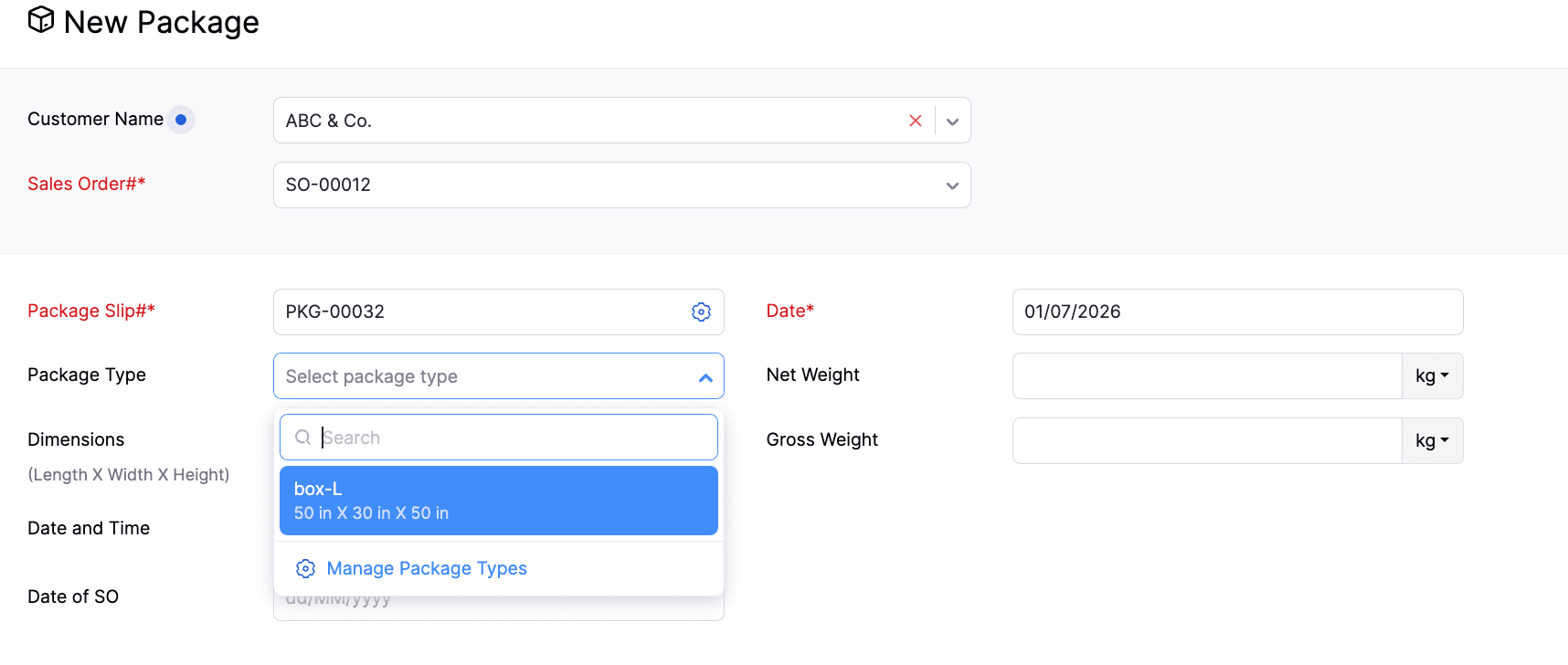
Package Types are now available in Zoho Inventory, making it easier to standardize packaging during creation. You can create predefined package types with dimensions and weight, and associate them with packages as you create them. You can also edit, delete, mark as active, and inactive the package types directly from the package creation page.
We've also enhanced package weight tracking by splitting the existing Weight field into Net Weight and Gross Weight, providing more accurate weight information for your packages and shipments.
To select package type > Go to Packages > Click +New > Select the Customer and Sales Order > Navigate to the Package Type field
Payment and Compliance
Collect Invoice Payments Using Payment Terminals (IN, US & CA)
Invoice payments can now be collected through payment terminals and dynamic QR codes across the web, Windows, and mobile apps. Once configured, payments can be initiated directly from the Invoice Details page using the Pay with Terminal option. The app will automatically track the payment and update the transaction status.
To configure the payment gateway, go to Settings > Online Payments > Customer Payments > Enter your credentials for the gateway.
Self-Billed Credit Notes and Debit Notes [Global Edition]
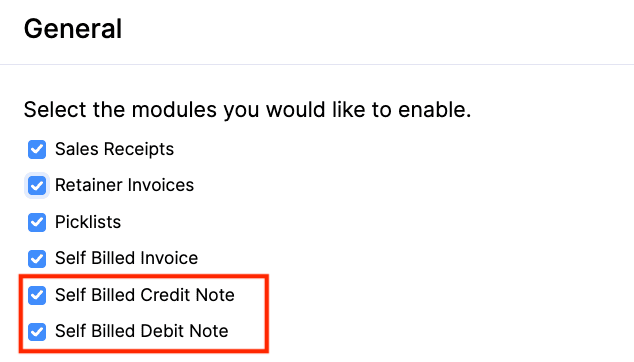
Introducing Self-Billed Credit Notes (SBCNs) and Self-Billed Debit Notes (SBDNs) for organizations complying with Malaysia's E-Invoicing regulations.
A Self-Billed Credit Note can be created by the buyer when the payable amount decreases or when a supplier invoice needs to be cancelled. A Self-Billed Debit Note can be created when the payable amount increases. They are also included in the relevant reports, with SBCNs appearing in Vendor Credit Reports and SBDNs in Bills Reports.
To enable the options > Go to Settings > Setup & Configurations > General > Enable Self-Billed Credit Note and Self-Billed Debit Note
Applications
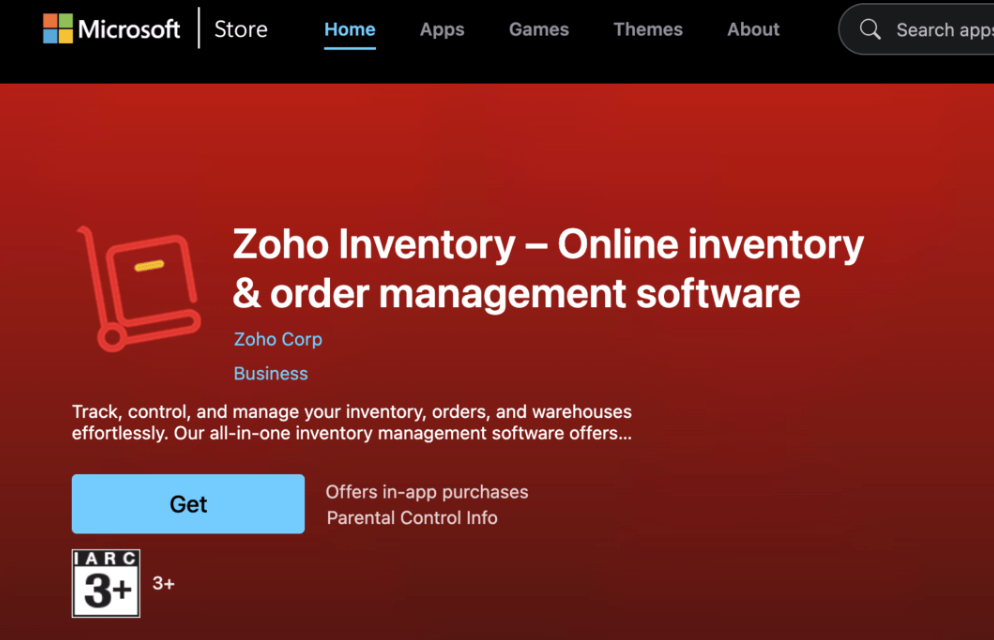
Introducing Zoho Inventory Windows Application
The dedicated Windows application for Zoho Inventory is now available on the Microsoft Store. It offers built-in support for Warehouse Management, Batch Tracking, Serial Number Tracking, Bin Tracking, and Barcode Scanning across the relevant modules, enabling a seamless desktop inventory management experience.
Enhancements in Advanced Inventory Tracking
Manage Serial-Tracked Items with UOM
Unit of Measurement (UOM) conversion is now available for Serial Tracked Items. You can transact serial-tracked items in your preferred unit of measurement. The batch and bin allocation screen displays available quantities in the selected transaction unit.
Enhancements in Batches List View
You can now use Custom Views, Column Customization, and Advanced Search for batch-tracked items. These options give you more control over how you organize and filter batch records.
Note: The enhancements are available in Advanced Inventory Tracking-supported plans.
Export Bin Details in Transactions
You can now export bin details for the transactions and entities, including Bills, Packages, Purchase Receives, Sales Returns, Items, Opening Balance, Credit Notes, Vendor Credits, and Invoices.
Reports & Insights
We have introduced the Weighted Average Costing (WAC) Valuation Transactions report, providing greater visibility into item valuation over time. It also displays the opening and closing Weighted Average Costing (WAC) values for items within a selected date range. You can drill down into an item to view its transaction history and see how the WAC is recalculated after each transaction.
Additionally, it also includes Stock Availability filtering, Multi-Level Group By, Advanced Filters, and Show/Hide Columns, making it easier to analyze inventory valuation based on your business needs.
The Picklist Details Report now includes both Bin details and Batch details, giving warehouse teams a more comprehensive view of item locations and batch information during the picking process.
Workflow & Automation
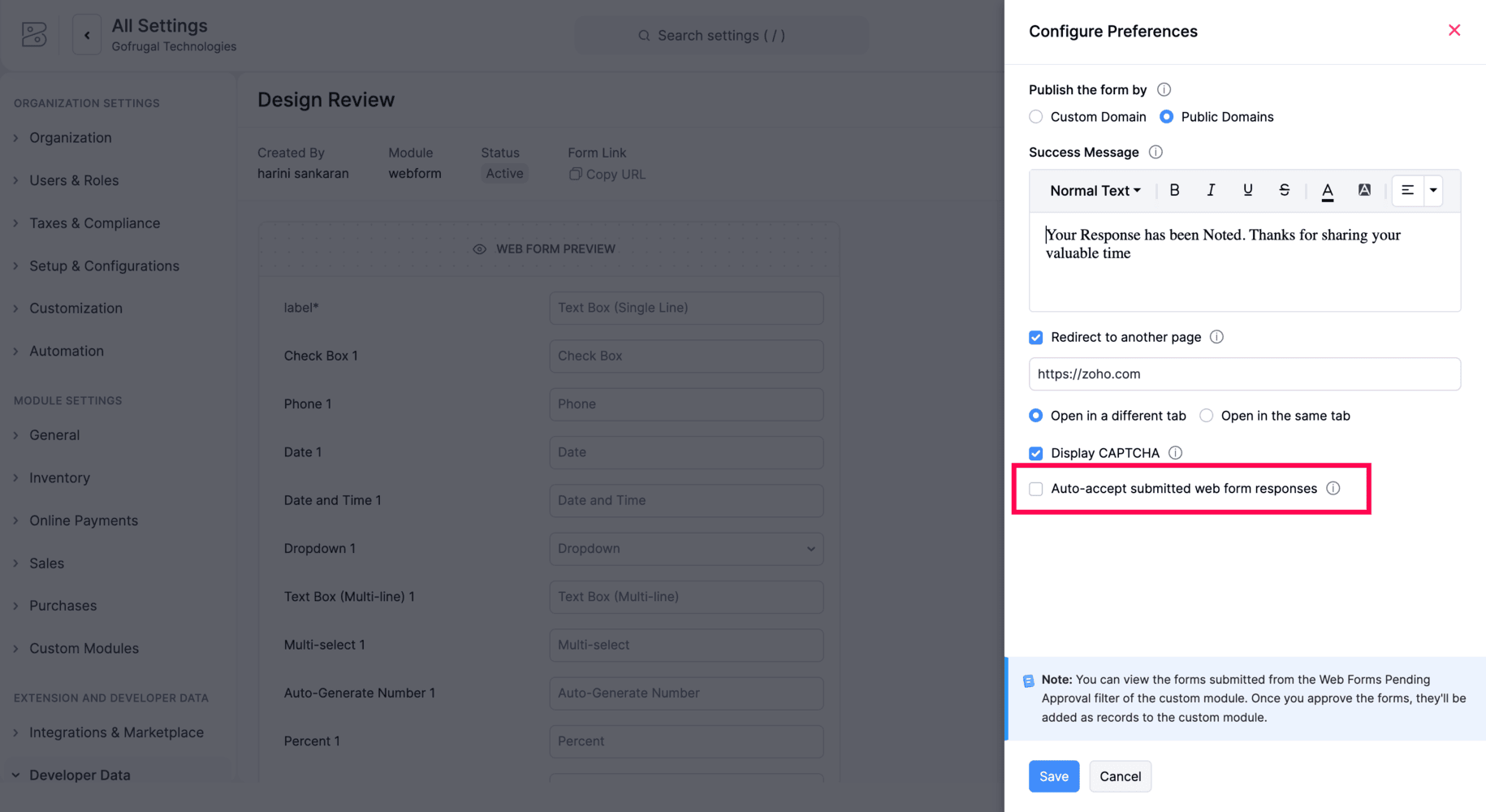
Automatic Acceptance for Web Form Submissions
Zoho Inventory now includes an Auto-accept submitted web form responses option for Web Forms. When enabled, incoming submissions are automatically accepted and created as records in the associated custom module, eliminating the need for manual review before record creation.
Early Access Features
Introducing Material Requests & Material Issues
We're introducing two new modules that help businesses manage internal material movement more efficiently.
-
Material Requests
-
Material Issues
Users can create a material request by specifying the required items, quantities, expected date, and location. Once the request is approved, the warehouse can fulfill it through a material issue, either fully or partially, with the issued quantity automatically deducted from available stock. If unused materials are returned, they can be recorded using the Material Returns option. After approval, the returned quantity is added back to the available stock.
These modules support Projects, Reporting Tags, Batch Tracking, Serial Number Tracking, Bin Locations, and Item-Level Accounts, and are compatible with both simple and multi-level approval workflows.
To enable it, go to Settings > Setup & Configurations> General > Enable Material Requests and Material Issues
Note: This feature is available in Early Access. Contact support@zohoinventory.com to enable it for your organization.
Enhanced Inventory Tracking with Batch and Serial Combinations
Advanced Inventory Tracking now allows you to enable both batch and serial tracking for an item, along with bin tracking. For outward transactions, users can select serial numbers directly or filter them by batch for easier inventory allocation.
For inward transactions, serial numbers can be entered directly, with the serial number count linked to the batch quantity. Additionally, the Serial Number Details report now includes batch information for each serial number, improving inventory traceability.
Note: This feature is available for plans that support Advanced Inventory Tracking. Contact support@zohoinventory.com to enable it for your organization.
Introducing the New Networking Flow[India Edition]
The new version of Networking in Zoho Inventory enables your businesses to exchange transactions with their partners using Network Keys. To establish a connection, both businesses must exchange and verify their Network Keys. Once connected, a Push via Network option is available on supported transactions, allowing users to send them directly to their partners. Incoming transactions are displayed in a dedicated Received tab and are not imported automatically. Users can review each transaction and choose to accept or reject it. When a transaction is accepted, a co-creation page opens with the transaction details pre-filled, making it easy to review and complete. The sender is notified of the recipient's decision and can re-push the transaction if required.
Note: This feature is currently available in the India Edition. Contact support@zohoinventory.com to enable it for your organization.
Integrate Zoho Inventory with Mercado Libre
Zoho Inventory now integrates with Mercado Libre, enabling you to streamline order fulfillment and inventory management across one of Latin America's leading marketplaces. Sync products, orders, invoices, payments, shipments, and inventory automatically, with configurable sync schedules, customer mapping preferences, tax persistence, and comprehensive sync history reports.
Note: This feature is available in Early Access. Contact support@zohoinventory.com to enable it for your organization.
Introducing Myntra Integration
We’ve introduced the Myntra integration in Zoho Inventory, allowing you to manage your marketplace operations from a single platform. Automatically sync products, sales orders, invoices, payments, shipments, and stock updates while configuring sync preferences, customer mapping, location mapping, and tax persistence. The integration also includes detailed sync history reports for easier monitoring.
Note: This feature is available in Early Access. Contact support@zohoinventory.com to enable it for your organization.
Minor Enhancements
-
Bulk Actions in Inventory Adjustments: You can now submit, approve, and convert inventory adjustments to the Adjusted status in bulk, with support for up to 25 adjustments at a time.
-
Comments in Stock Counts: Comments are now available in Stock Counts, allowing users to add or delete comments directly within a stock count.
-
Add Items Using Identifiers - Search and add the item to a transaction using any of its identifiers.
Mobile Updates
Updates for Both Android and iOS
-
Comments in Stock Counts: The Stock Counts module now supports comments, allowing you to add and manage comments during stock count activities.
-
Custom Fields for Batch Items: Custom fields are now available for batch-tracked items and can be viewed directly within transactions for better visibility of batch-specific information.
Android Specific Updates
-
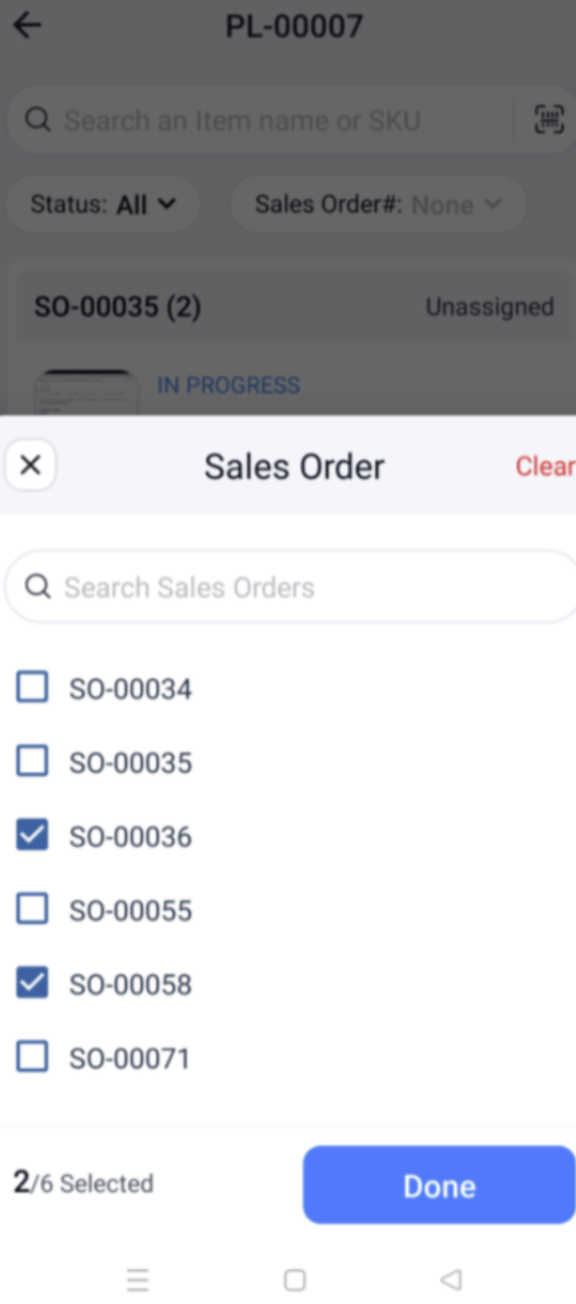
Multi Sales Orders in Picklists: Picklists now allow you to select multiple sales orders during creation, making it easier to pick items from multiple orders in a single picklist
-
Bin Location Details Report: View item-wise quantities across bins within a location using the Bin Location Details Report for improved inventory visibility.
iOS Specific Updates
-
Default Price List for Locations: Assign a default price list to each location, ensuring the appropriate pricing is applied automatically during transactions.
-
Multi-Dated Price Lists: Create and manage multiple price lists with different effective dates, allowing pricing changes to take effect automatically as scheduled.
That's a wrap for now! We hope these updates make your inventory management smoother and more powerful. If you have any questions or would like to learn more, feel free to reach out to us at support@zohoinventory.com. We'll be back soon with more updates from Zoho Inventory!
Best regards,
The Zoho Inventory Team.
Topic Participants
Rithiga devi S
Donald Love
Rithiga devi S
Tirumala Reddy
info
Recent Topics
Sheet co-edit: no live presence — also on Collaborate demo?
Two Sheet co-edit sessions open OK (same document_id, document.edit: true), but there’s no real-time collaboration: no cell highlights, Group Chat → Users stays empty. Writer co-edit works on the same Office Integrator setup. We see the same on the officialZoho Mail Android app not receiving push notifications on multiple devices
I'm using the latest version of the official Zoho Mail app on two different Android devices: Samsung Galaxy S25 running One UI 9.0 Motorola G41 running Android 12 Unfortunately, I'm not receiving any push notifications on either device. I've already followedZohoのAIエージェント、作り方から使いどころまで。デモとユーザー事例で学ぶ|12/8東京・無料
ユーザーの皆さま、こんにちは。 ゾーホージャパンの中野です。 12月8日(火)、Zohoコミュニティで初めてとなる「Zoho コミュニティ ユーザー総会 2026」を開催します。 年に一度、ユーザーとZoho社員が集まる総会として、今回は100名規模での開催を予定しています。 ユーザー企業の実践事例、AIエージェント / Zoho MCP のデモ、CRM・Campaignsの活用セッションなど、 日頃の交流会よりも幅広いプログラムをご用意しました。 以前のご案内から新たに予定している内容も含め、当日の見どころをご紹介します。How to sync Organisation Contacts to Android / AES
After migration form Exchange compatible server, I got Org Contacts: I've turned on EAS Organisation contacts sync. But on my phone they don't appear and there is no contacts folder to select for these contacts. Only personal contacts. They do appearZoho Inventory | Can't uncheck/turn off Advance Tracking
Hi, I wanted to know if there's a way to turn off Advanced Tracking (such as Serial Number or Batch Tracking) for an item in Zoho Inventory. I’ve read that you might need to delete associated transactions and clear the opening stock to disable these features.How to Disable this Pop-up
We believe this has been added recently, correct? How to disable this? we receive lot of complaints from our team from SG & MYCategorize Items with Item Headers
Hello customers, Did you ever want to classify items based on specific categories to help your customers understand your invoice better? With the new Item Header feature, you can easily categorize items in your invoices and estimates and give them a common title. Item Headers are available in the Invoices, the Recurring Invoices and the Estimates module. It can be carried forward from estimates to invoices at the time of converting the estimates. To add an item header: Go to the Estimates, InvoicesA way to report on all leads for a given month
Is there a way to report on ALL leads created in one month by source. I need to include both open, closed lost and converted leads. Right now I can only see source of non converted lead and cannot find a way to add the converted leads to the same report. I'm trying to do this to gain insight into my sources of leads, volume in and disposition of each lead.Unable to delete domains from Zoho Campaigns
This error occurs while deleting a domain "This domain cannot be deleted because we've found $1sender addresses associated to it." But I have no more sender addresses of this domain anymore. I can't delete the domain.Ability to translate Zoho CRM Kiosks
Hi team, Is support for translating kiosk text and screen names in the Zoho CRM translation tool planned on the roadmap? Thanks,[Critical] Massive delays with e-mail
It takes half an hour or longer for emails to arrive or replies to go out! Another thing I have noticed with outgoing e-mails is that I see an error message when I click on "Show original" (tab "HEADER"). If I click on the "CONTENT" tab, the mail bodyWorkDrive Desktop Sync Is Being Deprecated: Move to WorkDrive TrueSync for a Smarter Experience
Hi everyone, We are excited to share a better, smarter way to access and manage your files directly from your computer! We’re transitioning from our legacy Desktop Sync app to WorkDrive TrueSync, designed to give you faster performance,greater flexibility,Automating CRM backup storage?
Hi there, We've recently set up automatic backups for our Zoho CRM account. We were hoping that the backup functionality would not require any manual work on our end, but it seems that we are always required to download the backups ourselves, store them,Account for Cryptocurrency Holdings in Zoho Books/Custom Currencies?
Hello, I've recently started using Zoho to run my small business and I've really been enjoying all of its features. However, I've been struggling to find a way to account for cryptocurrencies in Zoho Books. My company mines a Cryptocurrency token calledCNIL - Suivi de Pixel
Bonjour à tous, À la suite de la nouvelle recommandation de la CNIL sur les pixels de suivi dans les e-mails, savez-vous si Zoho Campaigns permet : de conditionner le suivi des ouvertures au consentement de chaque contact ; de proposer un lien permettant#21 The Customer Sent Part of It Back
Ravi delivered 200 trays to a customer and raised an invoice for the full order. Two days later, the customer returned 60 trays. The customer had also paid an advance against the invoice. Ravi now needs to account for the returned items, adjust the amountZoho Assist Feature Update: November 2026
Screen Analyzer Zoho Assist’s Screen Analyzer, part of Answer Bot, helps technicians troubleshoot faster during live sessions. Capture the full remote screen or a specific portion, and it instantly analyzes the snapshot to detect errors and issues. ItZoho Assist Feature Update: October 2026
H.265 support for Native Viewer and Mobile Viewer H.265 (HEVC) delivers sharper screen sharing at lower bandwidth than H.264. Already live in the Web Viewer, the codec is now available for the Windows Native Viewer and Mobile Viewers too. Support is inTrident Missing
No way you guys get so close to having trident complete for over a year then just kill it off. Wow just wowFeature Request: Fully customizable record layouts in Zoho FSM (movable sections and custom subform tables)
Hi Zoho FSM Team and Community, We’d like to suggest a feature that we think would help many FSM users: full control over the layout of record detail pages, starting with the Work Order view. Current situation When you open a Work Order, its sectionsKB Articles from Zoho Learn - Import as .md
I love the concept of being able to use articles from Zoho Learn as knowledge base articles for Zia Agents. This will absolutely help with proper documentation and organization of company processes and SOPs. This was a great concept. However, even whenWhy don't Zia agents support file uploads?
I am trying to build a Zia Agent that allows uploading of a PDF file and uses the GLM5 model to process it and extract information. But agents.zoho.com has no way to enable file uploads on the agent. Additionally, GLM5 based agents keep outputting theirBuilding Toppings #10 - Using signals to build real-time notifications between Bigin and Zoho Desk
Hello Biginners! In our previous post, we covered Bigin Variables and Widgets. In this post, we'll explore another component: Signals. To show how Signals work, we will build a real-time use case integrating Bigin and Zoho Desk. It connects Zoho DeskCliq iOS can't see shared screen
Hello, I had this morning a video call with a colleague. She is using Cliq Desktop MacOS and wanted to share her screen with me. I'm on iPad. I noticed, while she shared her screen, I could only see her video, but not the shared screen... Does Cliq iOS is able to display shared screen, or is it somewhere else to be found ? Regards¡Gracias por acompañarnos en los Workshops de Zoho España!
Los pasados 3 y 4 de noviembre celebramos una nueva edición de los Workshops de Zoho España en el Hotel NH Las Ventas de Madrid. Dos jornadas de formación práctica, demostraciones en directo y encuentros con expertos de Zoho en las que compartimos conocimientos,Mass Update Option for Changing Work Order Owner
Hello FSM Team/Mr. Abid, We would like to inquire if there is an option to mass update or bulk change the Owner of Work Orders in Zoho FSM. Current Situation: At the moment, the Owner of a Work Order can only be changed individually, which becomes time-consumingNever miss a follow-up with personal reminder agent | Zoho Cliq AI Use Case #03
A task mentioned mid-conversation rarely survives the conversation. Someone asks you to follow up, you say you will, and by the time you remember, the message is three hundred lines back, buried under two meetings and a dozen other threads. Personal TaskCalendar won't load
I run into this problem about once a week, where I try to open my Zoho calendar in a web browser, and it just gets stuck, waiting forever to load (see attached screenshot). I'm usually using Edge or Duck-Duck-Go browser. Sometimes it loads just fine,Change 'default' project dashboard
Is it possible to change the default project dashboard for all projects? Both in layout and in what widgets are shown? We have a lot of (short-running) projects and I want to quickly see the tasks and milestones when I open a Project, but I don't want to change the layout for all my projects manually. Thanks, MennoMultiple subscription plan line items in Zoho Billing quotes
I run an IT company and sell a lot of licences. A client might have multiple subscription plans including software licences in different categories. A client might have Microsoft licences, antivirus licences, web hosting and maintenance package services.[ZohoDesk] Improve Status View with a new editeble kanban view
A kanban view with more information about the ticket and the contact who created the ticket would be valueble. I would like to edit the fields with the ones i like to see at one glance. Like in CRM where you can edit the canvas view, i would like to editLive connection to DS files in Zoho Creator / ChatGPT
As an idea, we are using ChatGPT to build with Zoho Creator (outside of Zia), which is works brilliantly to assist write deluge, provide test suggesitons etc. Currently we are uploading the DS files which are very point in time, it would be great to haveUnable to integrate Whatsapp Messaging into Zoho CRM - Business Messaging
Hello, I want to set up Business Messaging in our Zoho CRM and am struggling to set it up. I have logged into the account and our facebook business page, our business shows in the dropdown for WhatsApp Business Account but does not for WhatsApp BusinessFiles in Teamspaces: keep your team's documents where the work happens
Release Note: This feature is available for all accounts across all DCs Hello Everyone, A Teamspace is built around a specific team and a shared objective, and it holds the modules and projects that team works with every day. The document that team dependsScript to access a CBPX file from zoho crm
Hello everyone, I'm planning to write a script in Python or Java in Zoho CRM functions, to access a CBPX file. Is it possible to write this script in the dev console of Zoho? What are the best practices to do this ? Would you have references in the ZohoCalculate hours
Is there any chance that the the "formula" will have the ability to do calculation using the "time" field in the future? Our company has a form set up for tracking hours worked and we use 2 time fields currently. One for the clock-in time, and one for the clock-out time. It's great for keeping that record, but if there were a way to calculate the hours to show on the report would be awesome. Previously we had used JotForm and their calculator had that ability, but it seems that Zoho doesn't acceptIntroducing parent-child ticketing in Zoho Desk [Early access]
Hello Zoho Desk users! We have introduced the parent-child ticketing system to help customer service teams ensure efficient resolution of issues involving multiple, related tickets. You can now combine repetitive and interconnected tickets into parent-childZoho Books | Product Updates | November 2026
Hello users, As the year winds down, we've introduced several enhancements to make compliance, inventory management, and everyday bookkeeping easier in Zoho Books. This month's updates include an improved TDS experience, a new way to exchange transactionsZoho Writer workflows now support custom stages, parallel reviews, and external approvers
Hello everyone, Zoho Writer now lets you build your own approval chains. The pre-built workflows also get new review modes, completion criteria, and external approver support. What’s new Custom workflows: Design review and approval processes from scratch,Expanding sales, marketing, and support capabilities in Zoho CRM Plus 3.0
Hey everyone, It's been more than 10 years since we launched Zoho CRM Plus back in 2014. This is quite a milestone, and we've come a long way in empowering you with everything you need to offer an exceptional customer experience. On that note, we expandedNext Page