Zoho Book’s native record page is now rendered in CRM
Refashioned Zoho Books integration with Zoho CRM
Dear Customers,
We're pleased to announce a significant upgrade to the Zoho Books integration in Zoho CRM, offering greater convenience.

TL;DR:
Zoho Books record's information is now accessible directly inside CRM. This paves the way to access all the controls available in Book’s record interface from within the comfort of Zoho CRM.
You can submit, approve, or reject invoices, apply retainer into an existing invoice, update shipping information and such, without ever actually leaving CRM.
Why this update?
Until now, when you opened a Books transaction—such as an invoice, estimate, or sales order—from inside CRM, you'd see a PDF preview of the record alongside a fixed set of CRM-side buttons like Send Email and Mark as Sent. These buttons were displayed over the record space and covered only a small, fixed set of Books actions; anything beyond that meant switching over to Zoho Books.
Also, if you had an approval process configured in Books, the only signal in CRM was a "Pending Approval" tag on the PDF preview; you still had to log into Books to act on it.

This created two problems:
- Every time Books added or refreshed an action, the CRM side had to be re-implemented to match. Customers waited for the catch-up.
- The CRM record view stayed thin. Users could see the record, but not act on it.
How this update solves
With this update, we've changed the model. Instead of duplicating Books actions inside CRM, the actual Books record page now loads inside CRM as an embedded view. Any action available on a Books record page is now accessible from within CRM. And the approval process flows through automatically.
1. Richer Books record details inside CRM
Alongside the header information—status, customer, totals, due date, and balance—you'll see the record's Books-native action set (Edit, Send, Mark as Sent, and so on) and any linked transactions related to the record (for example, the invoice generated from an estimate, or payments recorded against an invoice). You can also apply retainer amount to an invoice, update shipping information, achieve synchronization of transaction status—all from within CRM.
- For sales reps, this means you can check the live status of an estimate or invoice tied to a deal—whether it's been sent, accepted, paid, or is overdue—without leaving the CRM record context.
- For finance and admin users, routine actions on a Books record happen in the same place where the surrounding CRM context (the account, the deal, the contact's history) already lives, reducing the back-and-forth between products.
And, because the CRM side no longer maintains its own duplicate set of buttons for these actions, new Zoho Books capabilities will appear inside CRM as soon as they're available in Books.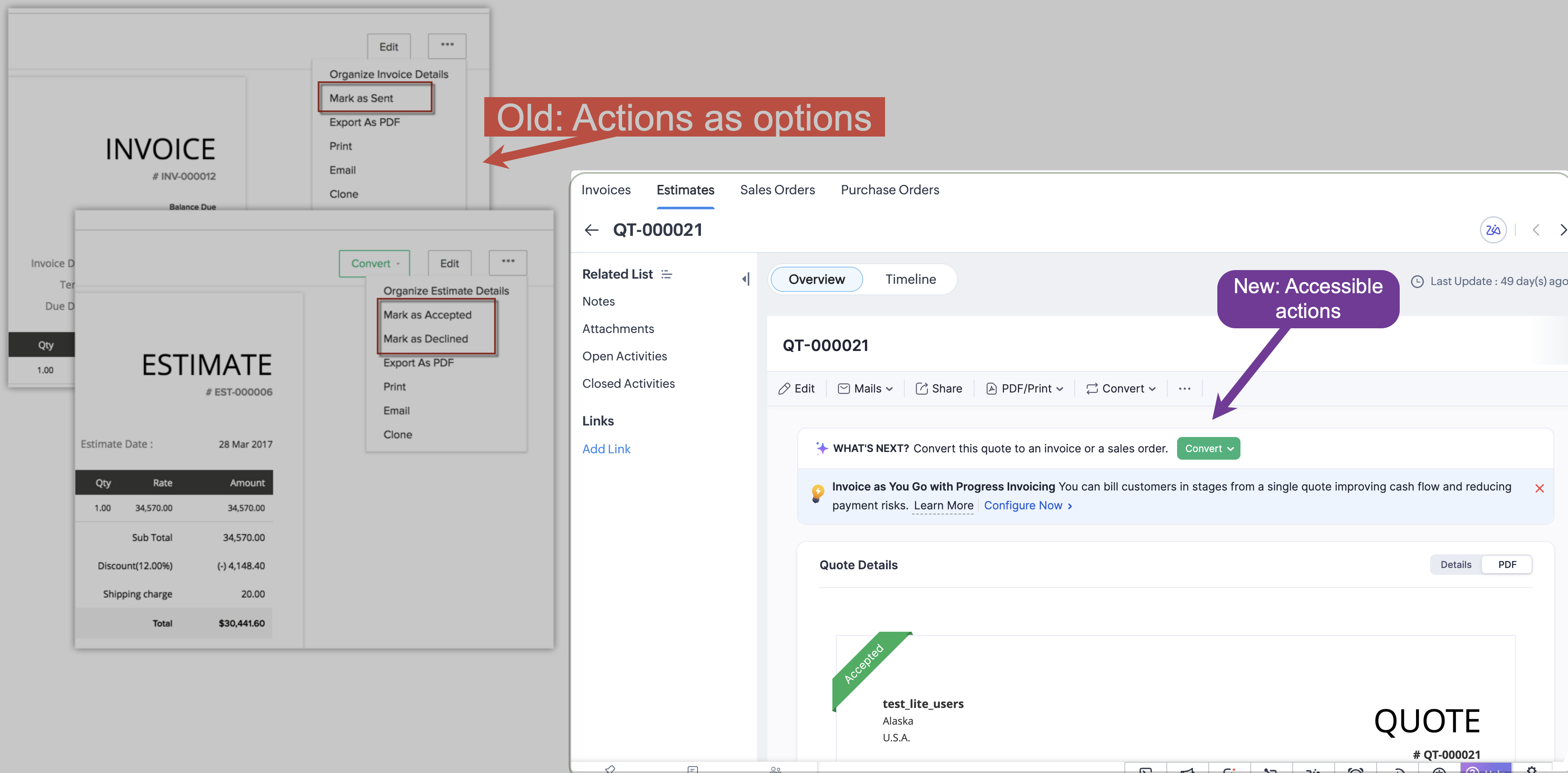
2. Approval process, end-to-end inside CRM
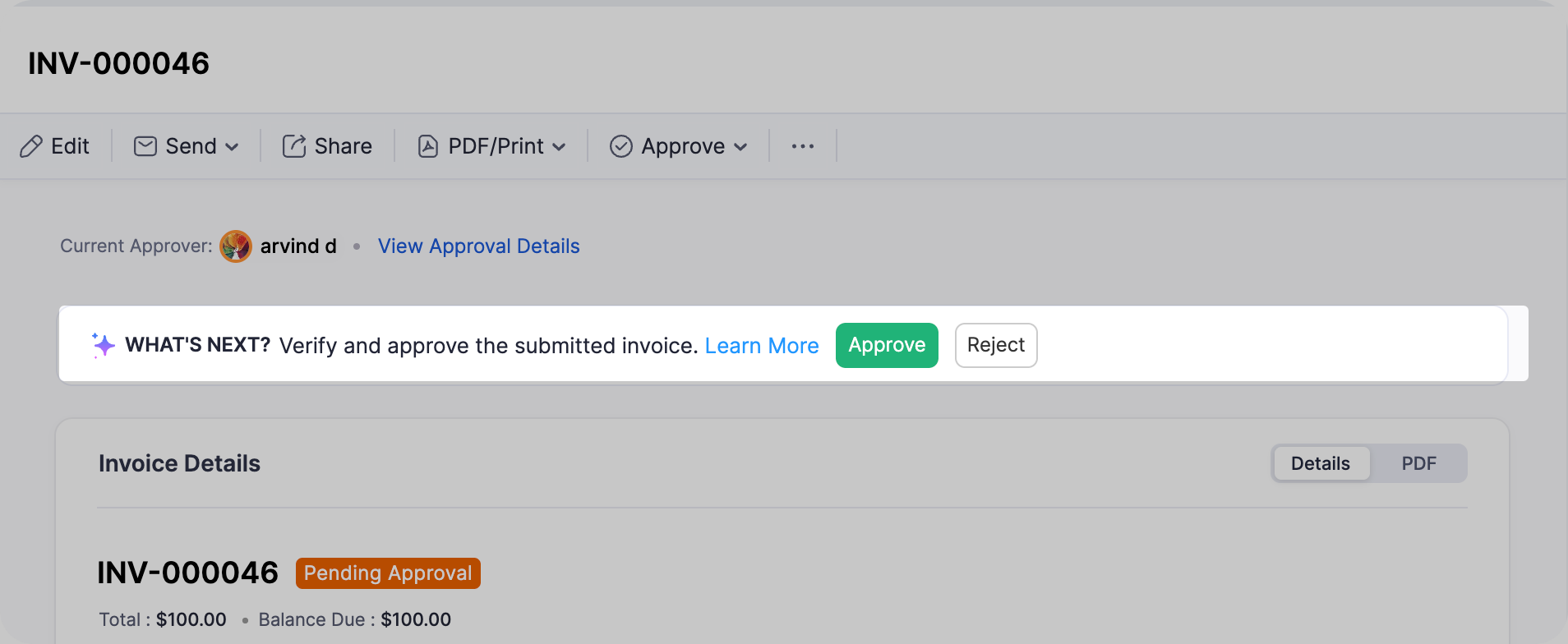
As a result of rendering Book’s UI from within CRM, Approval processes are also accessible/ actionable from CRM’s interface.
- Submit for approval from the CRM record page. Before submission, a Submit for Approval option replaces the usual action set.
- Approve or reject the transaction directly from CRM, if you have approval permission in Books.
- See approval state at a glance, like who has already approved, who the next approver is, and where the record stands.

For example, a sales rep closes a deal in CRM and generates an invoice.
In Books, an approval process is configured for invoices above a certain value, with the finance manager set as the approver. Previously, the rep would create the invoice and the finance manager had to switch over to Books, locate the record, and approve it there. Now, the finance manager sees the same record inside CRM with an Approve / Reject option directly on the page, and the rep sees the updated status the moment the approval goes through.
3. Item-level details on transactions
Item-level information on records is now part of the embedded view, giving you full visibility into the line-by-line breakdown of a transaction without having to navigate elsewhere.

Who can approve from CRM
Any user who is:
- Synced between Zoho Books and Zoho CRM as part of the integration, and
- has approval permission for that module in Zoho Books
can approve or reject records from within Zoho CRM.
One restriction to note: Integration users themselves cannot be configured as approvers in Books. This is a Books-side rule, not a CRM limitation. Only regular Zoho Books users can be set as approvers. If you're configuring an approval process and don't see an integration user in the approver list, this is expected.

Points to be noted
- The Books approval process is configured per module inside Zoho Books. This release does not auto-enable approvals, you'll need to enable the approval flow for each module manually (Estimates, Invoices, etc.) where you want it.
- If approvals are not configured for a module, the approval controls won't appear on the CRM record page. The rest of the embedded Books page continues to work as usual.
- Approval notifications continue to be raised inside Zoho Books and will not surface as CRM notifications. The approval banner on the CRM record page itself is the in-CRM signal that an approval is pending.
Release plan
This update is open for customers in all DCs.
That's all for this enhancement. Let us know your feedback in the comments below.
Thanks
Saranya Balasubramanian
Topic Participants
Saranya Balasubramanian
DJ
Sticky Posts
Introducing Incentives for Zoho CRM: Build, automate, and track sales commissions
Dear Customers, We are here with an amazing news! We built a direct solution to help manage your commission provisioning activity in your business. From creating commission plans to issuing payouts, this application leverages your sales reps’ performancePresenting ABM for Zoho CRM: Expand and retain your customers with precision
Picture this scenario: You're a growing SaaS company ready to launch a powerful business suite, and are looking to gain traction and momentum. But as a business with a tight budget, you know acquiring new customers is slow, expensive, and often deliversEnhancement in Zoho CRM: Introducing New Return Types for String Fields Based on Character Length
Dear Customers, We hope you’re well! In Zoho CRM, formula field with string return type is used in various scenarios where text is involved like concatenating customers’ first and last names, trimming characters from texts, performing find and replaceTransform your line of items into line items: ICR can now record your table values as subform values
Enhancement in Zoho CRM Dear Customers, We hope you're well! Zia Vision’s ICR capability can now recognize, extract, and store tabulated values in your subforms. An ideal example is a university application form. It has printed fields and handwrittenApprove records efficiently: Useful enhancements to My Jobs module and Approval process in Zoho CRM
Dear Customers, As you might know, approval process is a process automation tool that allows you to automate approvals in your organization and My Jobs is where you approve requests from a single point of view. Here's how you'd go about it: You’d add
Recent Topics
Error AS101 when adding new email alias
Hi, I am trying to add apple@(mydomain).com The error AS101 is shown while I try to add the alias.VENDORS ARE NOT SYNCHED WITH CONTACTS IN CRM
Hello, While the ACCOUNTS and CONTACTS (Including the primary contact) are synced with the CONTACTS module in CRM, the vendor's CONTACTS are not synced with CRM - which basically forces the users to re-enter all vendor's contacts twice and then updateTransaction rules for "Owner's Contribution" ?
I have a bank account where a lot of the deposits are "Owner's Contributions" (i.e., the business owner investing money in the company). Is it possible to create a Transaction Rule to automatically recognize these? They all have the same verbiage fromPrint a price list or price book
Hi Community. Am I right in concluding that Zoho has no functionality to print a price list from either Zoho CRM, Zoho Inventory or Zoho Books? I won't get stuck on the fact that Zoho doesn't sync price books between Zoho CRM and Books/Inventory (moreThe Social Wall: October 2026
Hello everyone This month, we're making it easier to organize your monitoring workspace with Monitor Groups in Zoho Social. Organize your monitor columns into groups You can now organize your monitor columns into custom groups based on your preferences.Field of Lookup - 5 Field Association Limit.
This query relates to the post at: https://help.zoho.com/portal/en/community/topic/introducing-the-field-of-lookup-in-crm-public-early-access-2023 My simple (and common) scenario: I select an account / customer lookup and want their address pulled intoDuplicate Record Creation
Hello Team, I would like to check whether there are any options available in Zoho FSM to prevent duplicate record creation in the following modules: Assets Companies Contacts Ideally, we would like the system to check for existing records before allowingFeature Request - Electronic submission of tax returns in Canada
Allow the user to submit Canada Revenue Agency GST/HST returns with NETFILE. Provide the same functionality for provincial revenue agencies for PST/RST remittances. Today Zoho Books only provides the math required to calculate each line, requiring theAbility to translate Zoho CRM Kiosks
Hi team, Is support for translating kiosk text and screen names in the Zoho CRM translation tool planned on the roadmap? Thanks,Files in Teamspaces: keep your team's documents where the work happens
Release Note: This feature is available for all accounts across all DCs Hello Everyone, A Teamspace is built around a specific team and a shared objective, and it holds the modules and projects that team works with every day. The document that team dependsRequest for Zoho Desk Version and Module Details
Kindly help us confirm the version of Zoho Desk currently being used in our portal, along with the module/edition name. We require this information urgently for our internal documentation.ZohoMail_get_mail_attachment corrupts binary attachments (PDFs) over MCP
Hi all, The Zoho Mail MCP tool ZohoMail_get_mail_attachment returns binary attachments as UTF-8 text, so PDFs come back corrupted and an AI client can't read or save them. What we see: - The response header is content-type: application/octet-stream;charset=UTF-8.Request: Custom CSS Theme
I would really like a custom CSS theme that enables me to completely customize the look and feel of the survey page based on the typography of my company brand. Unfortunately, there does not appear to be complete customization with existing themes. ThisKB Articles - Can't See Content or Trigger Immediate Sync
Once a file has been submitted to the KB, there's no way to check what it actually contains. There's also no way to force an immediate sync with the source document. These are issues when one is developing and testing an agent. It makes troubleshootingRebrand your CRM with the all-new custom domain mapping setup
UPDATES TO THIS FEATURE! 19th Jan, 2024 — Custom domain mapping has been made available for portal users in Zoho One and CRM Plus. 23rd June, 2023 — Custom domain mapping has been made available for all users, in all DCs. Hello everyone! We are elatedDécouvrez le nouveau Zoho Analytics : l’analytique agentique pour toutes les entreprises
Nous sommes ravis de vous annoncer le lancement du tout nouveau Zoho Analytics ! Cette nouvelle version marque un tournant majeur dans l’évolution de la plateforme. Initialement conçue comme une solution de BI en libre-service permettant de créer desZia Agents in Zoho CRM: a better way to set up digital employees
Hello everyone, If you've been using Zia Agents in Zoho CRM, so far using Connections was the only deployment method you're familiar with. You create an agent in Zia Agents (define its objective, write instructions, use tools, add knowledge base) andKeeping phone number text format exporting from Books to Sheet
We have a custom function that copies data from our customers in Books to Sheets. In the process the customers' phone numbers (unless they contain a space) get treated as numeric values, so leading zeros get stripped off, and in some cases scientificAdmin Logging in as another User
How can a Super Admin login as another user. For example, I have a sales rep that is having issues with their Accounts and I want to view their Zoho Account with out having to do a GTM and sharing screens. Latest Update (27th April 2026): With the earlyTool Parameter UI - Freeze Header
When one has a number of tools with a number of parameters, scrolling down hides the heading information, forcing one to scroll back up to get confirmation which radio button is which: Seems like simply freezing the header would eliminate that issue.Cannot replace custom tools
This is so incredibly frustrating. Create a tool group. Add your custom schema to create your custom tools. Attach to an Agent. Now you need to update your schema to make an adjustment? You can't edit the schema or even re-upload a new schema. It blocksTesting Tools - Can't View Response
When adding a custom tool and trying to test it, one can see whether or not the test has a successful http response, but the actual payload cannot be viewed to verify the tool's performance. I thought that's what the little hover link was for, but mousingmore native app support for linux
Dear zoho,pls build additional apps like zoho valt,zoho sheets,zoho show,zoho authenticator apps for linux ,because more and more people are increasing switching to linux this days,Unbundle feature for composite items
We receive composite items from our vendors and sell them either individually or create other composite items out of them. So, there is a lot of bundling and unbundling involved with our composite items. Previously, this feature was supported in formQuick Reference Guide on join.zoho.com
Joining a remote session can be difficult for the people who need it the most. Please add a quick reference guide and better documentation that my Grandma can read on the join.zoho.com site. It's not uncommon to spend 10minutes or longer in a sessionZoho Projects - Auto Populate Project on Project Invoices
Hi Projects team, I noticed that when creating an invoice from a Project in Zoho Projects, the project is not selected on the invoice. Is this something which you would consider as a feature request? It seems silly that when you create an invoice fromTimes prepopulating in Date/Time field on deal records
Support tells me that there is no workaround to having the time auto-fill on a date/time field in our deal records -- that is HUGELY inconvenient and creates massive opportunity for error. Our deals involve several parts over various days/times, noneEmail-Data Synchronization with Zoho Analytics
Hello, Enterprise Support Community! We're excited to announce the availability of Email Data Synchronization with Zoho Analytics! This highly requested enhancement allows you to sync email data from Zoho CRM into Zoho Analytics, making it easier to analyzeMulti-Day Installations
We schedule technicians on multi-day installations. A single appointment from Monday 8 AM through Friday 5 PM counts as 105 working hours, causing false overbooking. We need one appointment spanning five days but only 40 hours counted toward technicianMaking shared forms available offline
Hi, We used to be able to have our forms available offline even if it was a shared form. now we can't. Is this a new bug?Zoho Forms API
Is there any way to get all form entry list using API? Looking forward to hear from youDocuments greater than 40MB Preview
hello, Documents bigger than 40 MB cannot be previewed in WorkDrive Web App or Mobile App. would it be resolved in future?Calendar Booking - Related Deal
Is it possible to automatically associate a Calendar Booking with an existing Deal in Zoho CRM? We're trying to use the native Calendar Booking feature. Our goal is to send a booking link to a customer from an existing Deal record, so that when the customerApproval Process configuration is now more flexible and fully customizable
Hello everyone! Approval Process is back with a better user experience that makes it easier to add rules to your processes. This enhancement includes some UI updates that help you create highly structured approval stages—and more. Let's look at the enhancementsKaizen #268: Using Zoho MCP to Build and Configure Zoho CRM Cadences
Hi everyone! Welcome back to the Kaizen series! In the previous Kaizen posts, Kaizen #265 and Kaizen #266, we explored how Zoho MCP can be used to work with Zoho CRM records, retrieve metadata, customize CRM, configure automation, and even coordinateDeliverability Update: Impact of the Ongoing Microsoft 365 Service Disruption on Email Delivery
Update (November 16, 2026): This incident is resolved. In its final update on November 14, Microsoft confirmed that all affected services have fully recovered and the backlog of email messages has been processed. Microsoft lists the end of impact as NovemberTrigger a Workflow Function if an Attachment (Related List) has been added
Hello, I have a Case Module with a related list which is Attachment. I want to trigger a workflow if I added an attachment. I've seen some topics about this in zoho community that was posted few months ago and based on the answers, there is no triggerZoho Inventory - Imporoved Order Fulfillment Reporting
Hi Inventory Team, i've tried to contact you through support@eu.zohoinventory.com but haven't received a response. I am contacting you on behalf of a client. Our client is a car parts wholesale business and we set them up on Zoho Inventory earlier thisSay Hello to Telephony in Zoho FSM
Zoho FSM now brings complete telephony support so your team can manage inbound and outbound calls without switching tabs. Faster responses, smarter routing, and total call visibility—all in one place. Choose the telephony setup that works for you Zoho’sIncreasing API Credits
Hello everyone! Organizations consume Zoho CRM APIs for various business needs, and it's a show-stopper when you exhaust your API credits before the 24-hour rolling window replenishes your credits. To meet your growing needs and help you keep your businessNext Page