📣📣 Zoho Bookings - Feature Roadmap 2024

📣📣 Zoho Bookings - Feature Roadmap 2024

Hi Everyone,

Thank you for all the support you have been showing Zoho Bookings. We had a fabulous 2023, with a bunch of new features and over 60K new users. In 2024, our prime focus will be on user experience, and we have a few vital features coming in as well.

Below is our projection for the year so far (we'll be adding more items once they're prioritized and slotted for release).

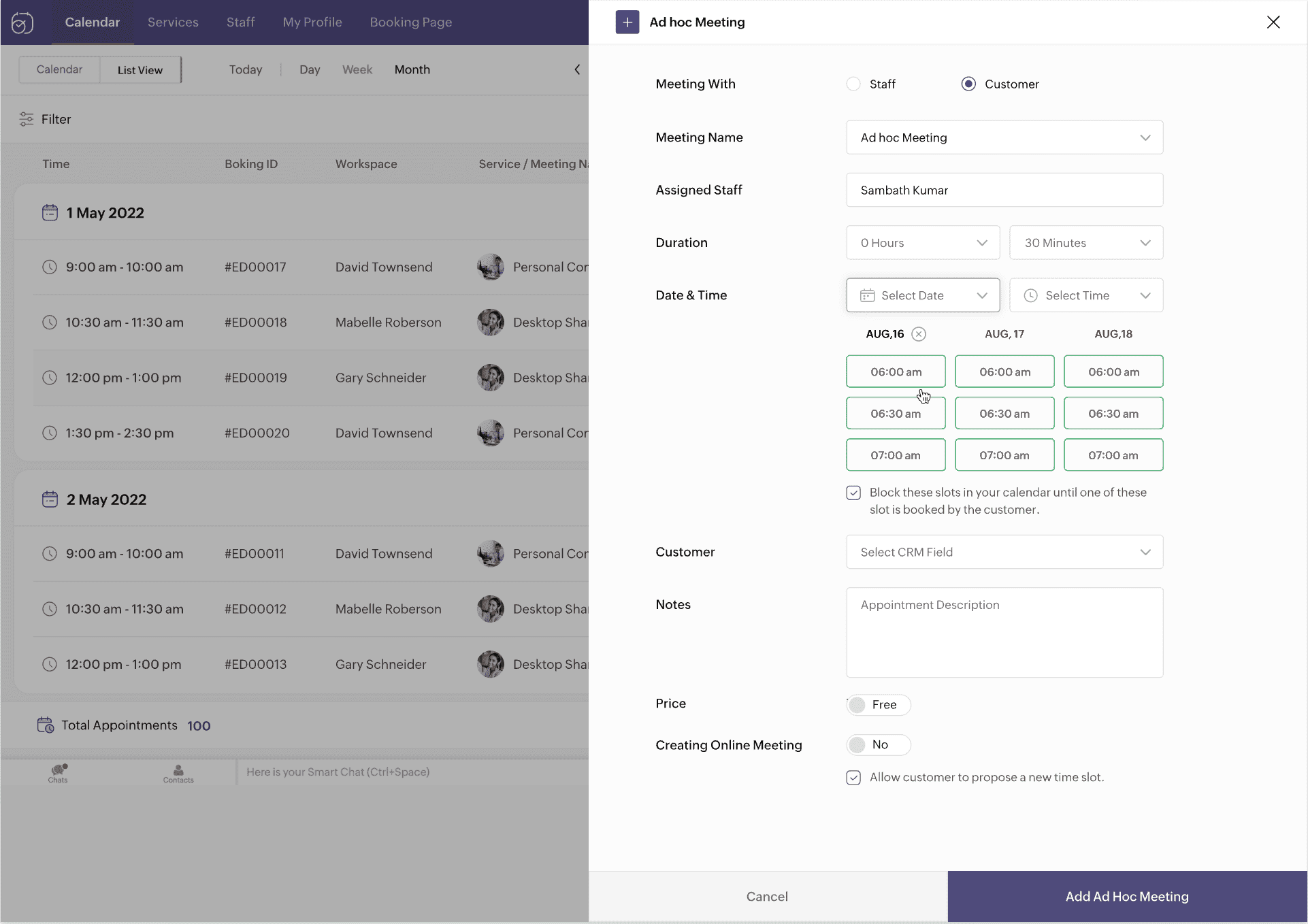
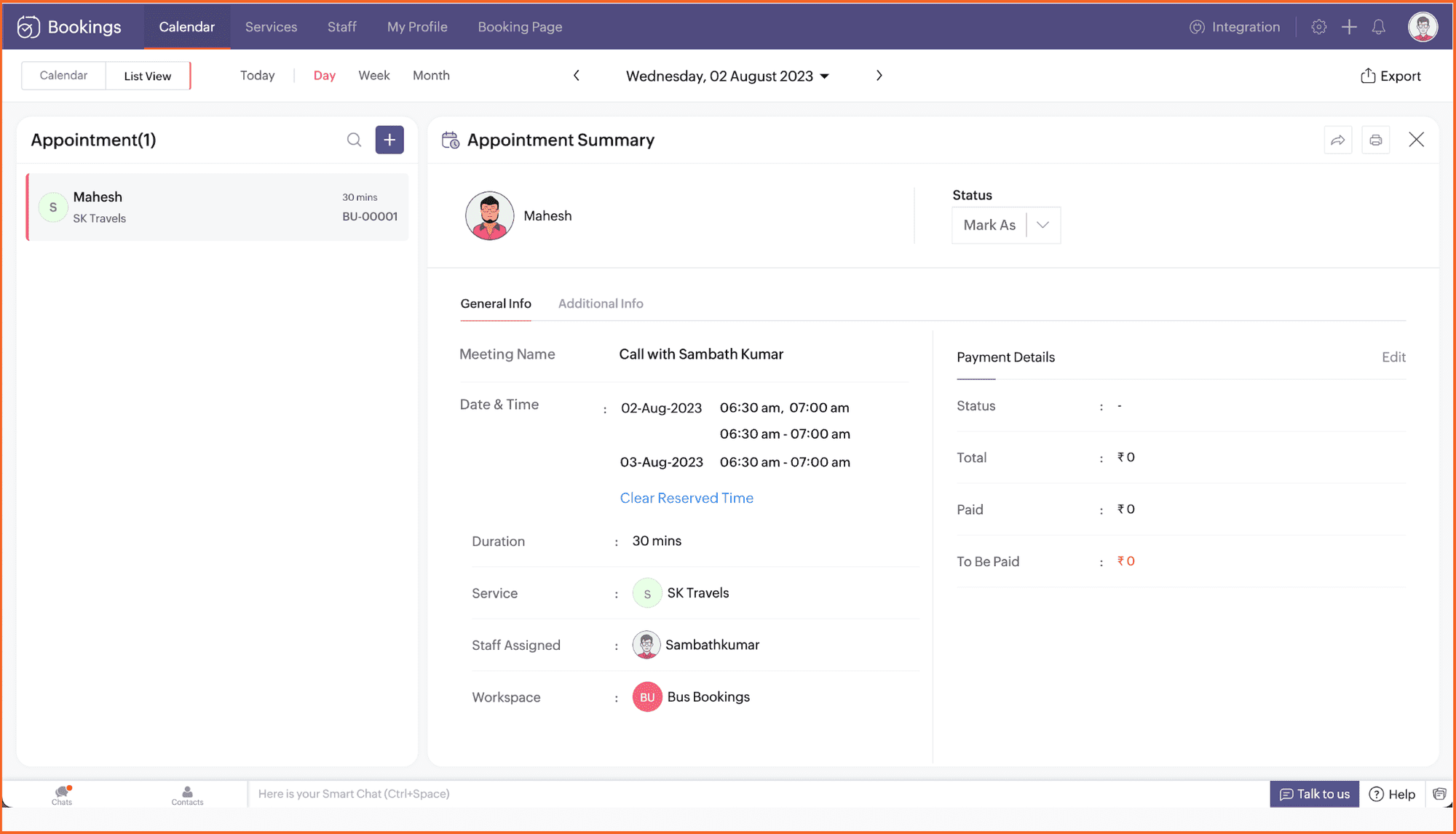
1. Ad-hoc meetings

It's common to get meeting requests outside your schedule. Ad-hoc meetings allow you to reserve time slots and share them with specific clients or prospects you want to meet with.

Not just clients—you can book internal meetings with your own staff too. Plus, keep time slots hidden from the person you're sharing your availability with.


2. Recurring one-on-one meetings

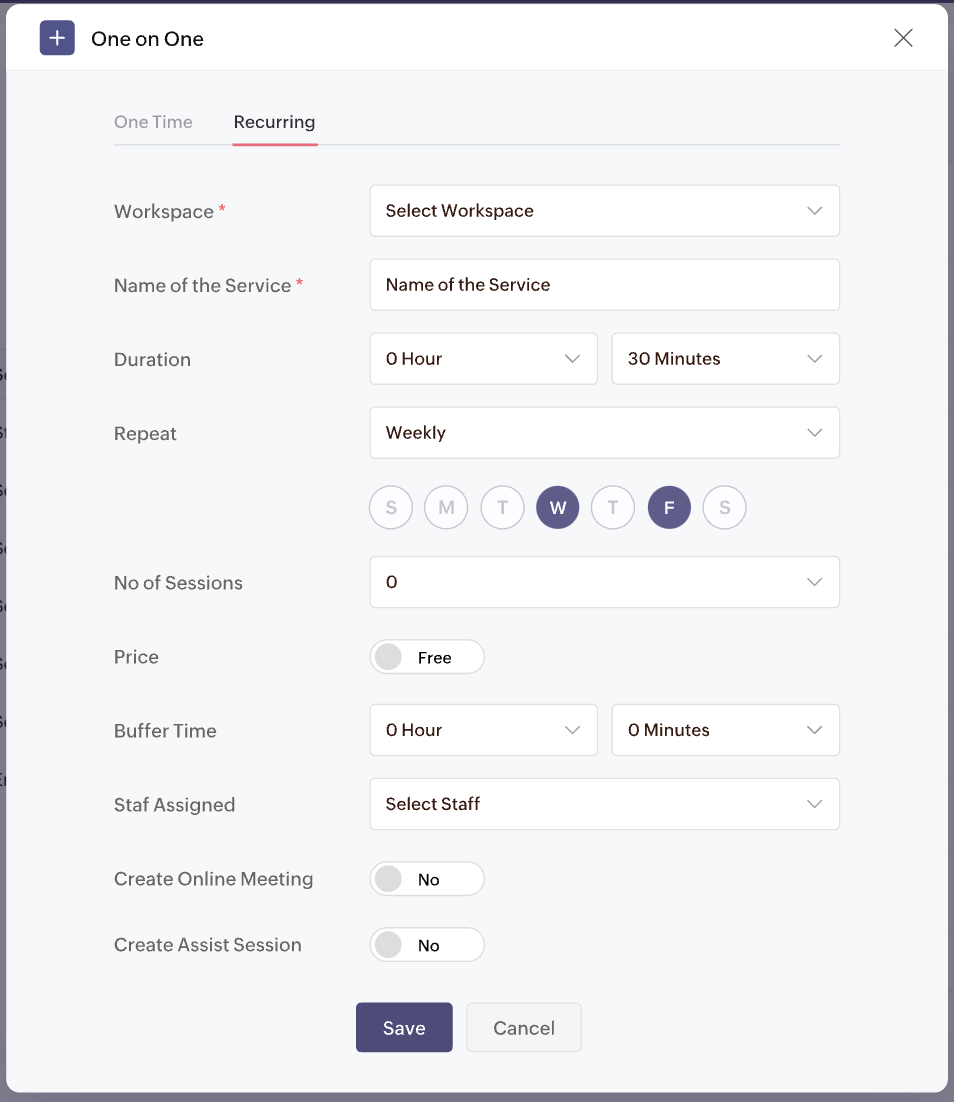
Looking to offer one-on-one meetings on repeat for your clients? Don't book separate appointments.

Set up a package and let your clients choose the desired time slots with recurring one-one-one meetings. 
Customize meetings to recur on desired days and times. Collect payments for all the sessions upfront and have clients show up during the set schedule.


3. Appointment restrictions

Too many appointments a day can really decrease the quality of your work. Take control of your time with appointment restrictions. Restrict the number of appointments you receive for any staff, service, or resource, right down to the customer (using their email address).

Limit appointments for:
  • One-on-one services
  • Collective booking services
  • Group booking services
  • Resource booking services

4. Enhanced browser extension

We recently launched our free Chrome extension so you can book appointments, check your schedule, and book time off right from the browser. Now, we're extending its capabilities to:

  • Copy desired time slots into your Gmail messages
  • Share booking links inside LinkedIn

You can extend your outreach to clients over social media and email with the upcoming features.

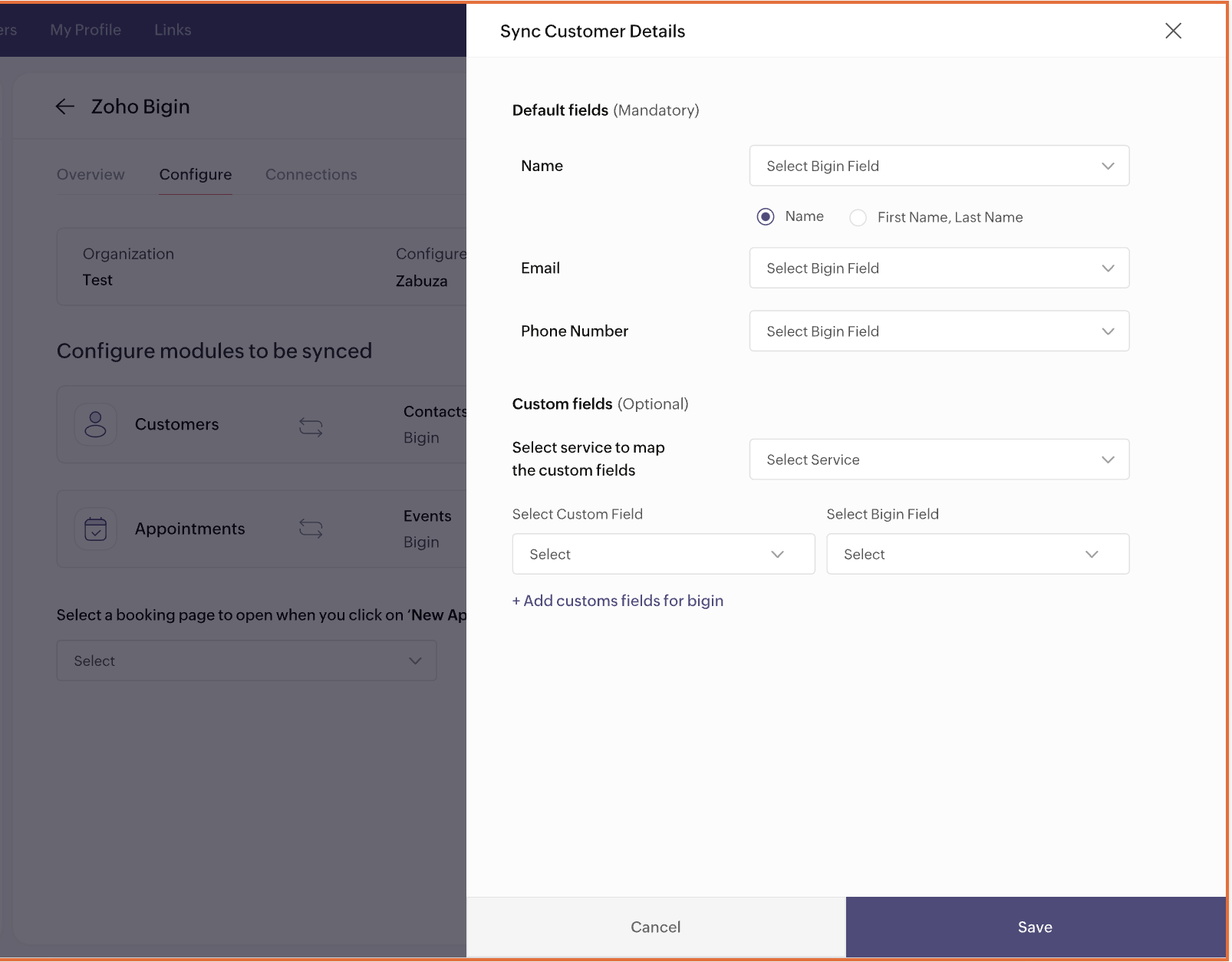
5. Integration with Bigin


Love 
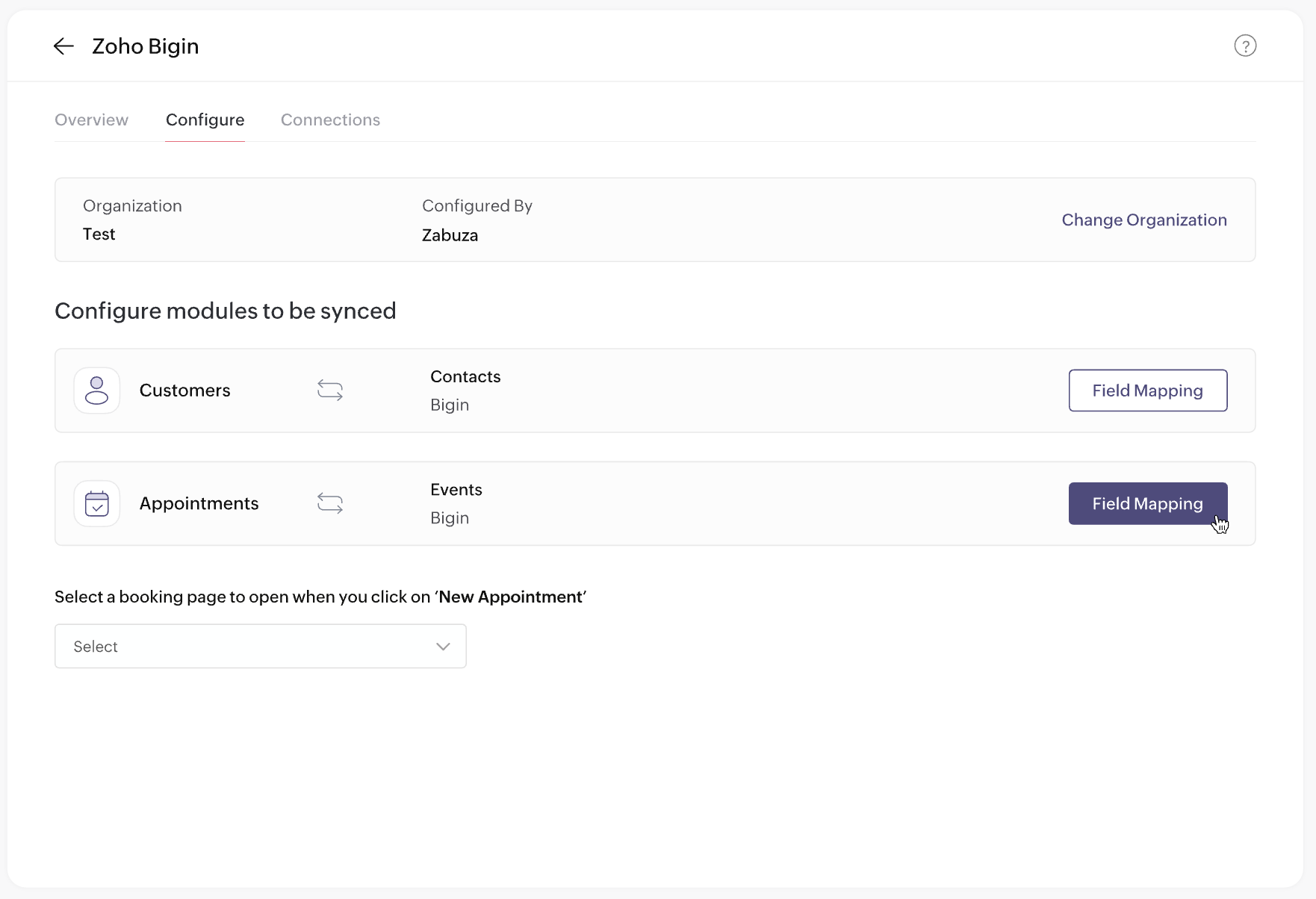
Bigin? You'll love Zoho Bookings too. Automatically collect qualified leads when they schedule with you in Zoho Bookings, and manage those leads using Bigin—the perfect lead-gen and sales machinery for your business!

Plus, book appointments right inside Bigin and manage all your customers from one place.


6. Preview email templates

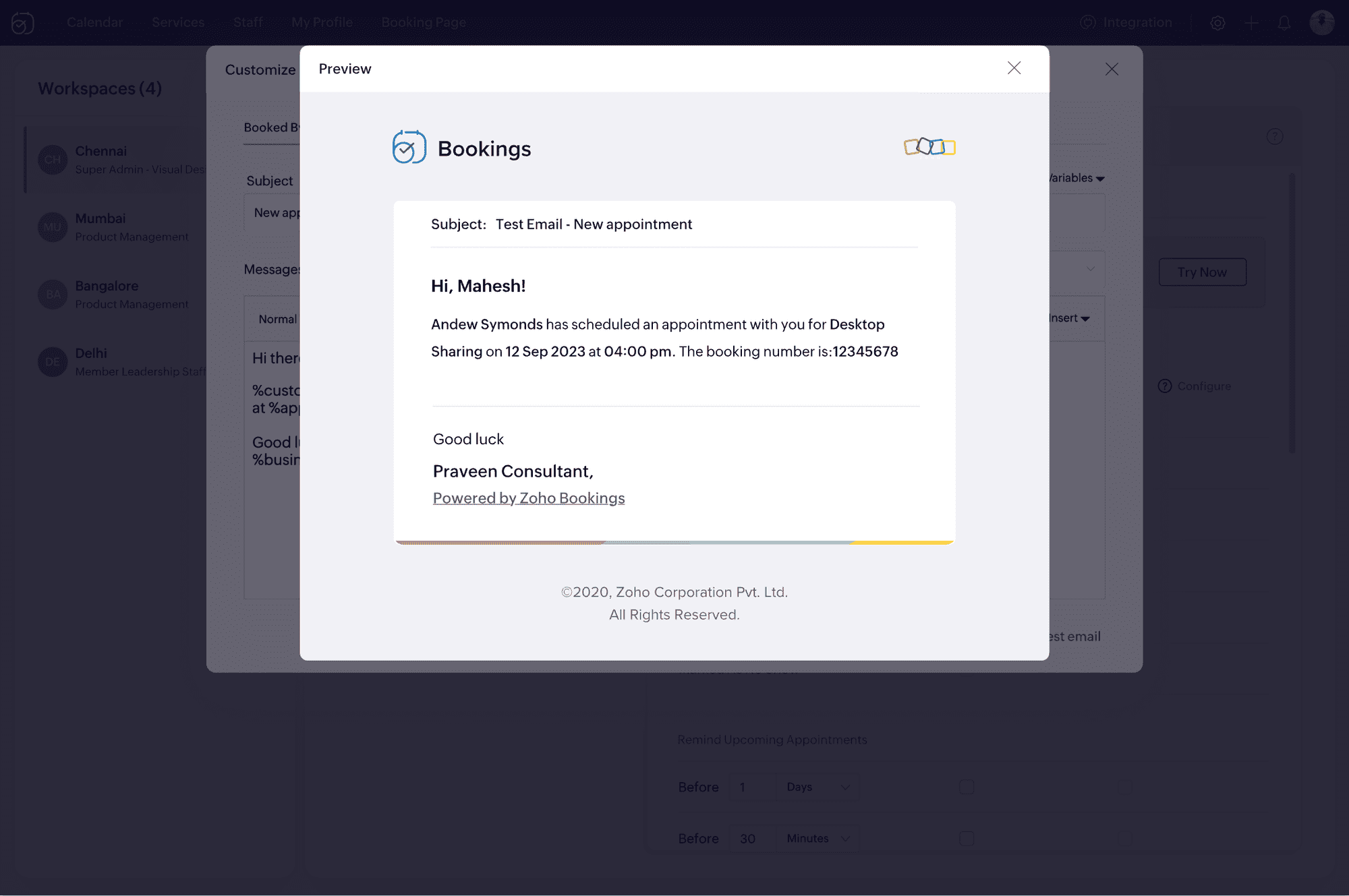
It's important to ensure your email notifications load well with all visual elements in place. Now, you can upload your HTML content and preview your email notifications before sending them to your clients.

No more broken emails!


7. Event title customization


We've heard your requests for customizable event titles on calendar invites. Now, you can use placeholders to add dynamic values like the event name, time, and host in titles. This is expected to be released before March 15, 2024.

8. Extended custom functions


There's a lot you can do with Zoho Bookings when you use custom functions:
  • Create a Cliq notification when an appointment is rescheduled.
  • Send Zoho WorkDrive documents to clients when you mark an appointment as complete.
How do you do it?
  • Pick the Zoho app to integrate with (e.g., Zoho Books, Zoho Cliq)
  • Decide on the desired result (e.g., create an invoice, send a message)
  • Choose a trigger (e.g., booked, canceled, rescheduled)

With custom functions, connecting Zoho Bookings with other Zoho apps will be a breeze. Below is the list of apps you can connect to through custom functions.

Zoho CRM
Zoho Invoice
Zoho Books
Zoho Docs
Zoho Sign
Zoho Recruit
Zoho Cliq

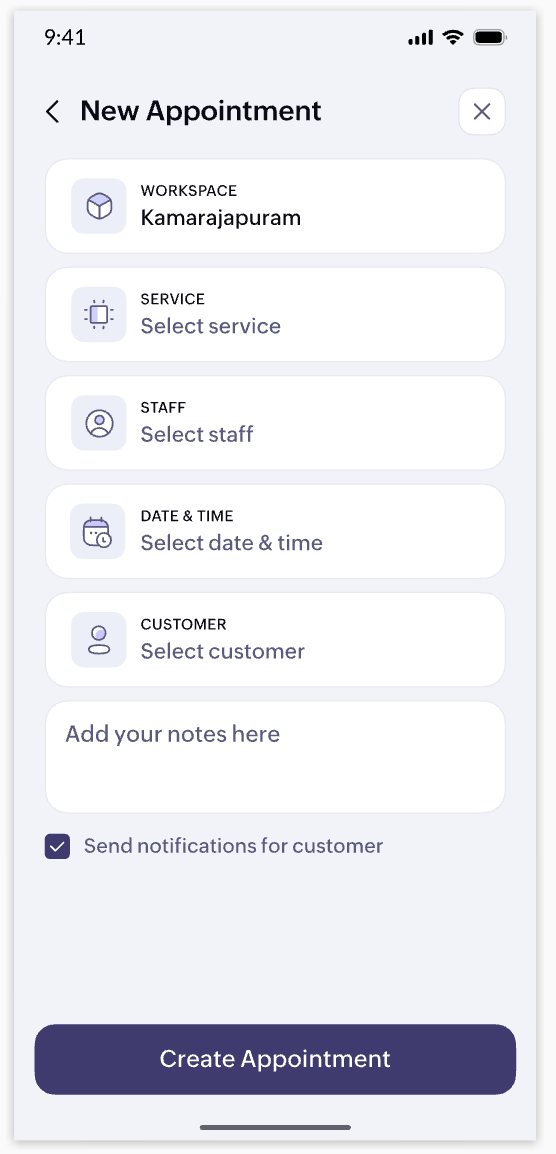
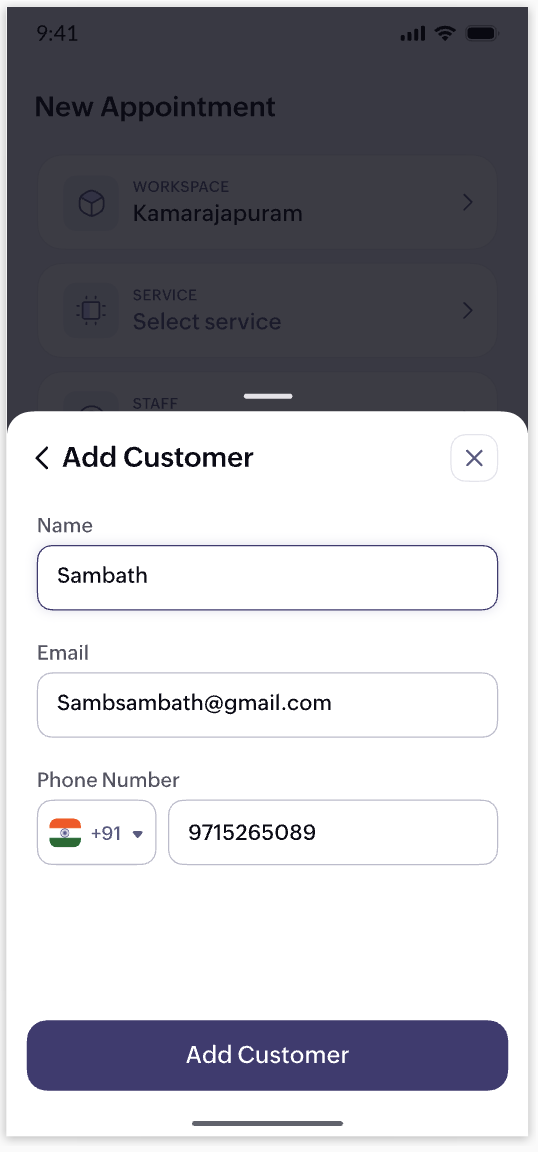
9. Mobile app revamp


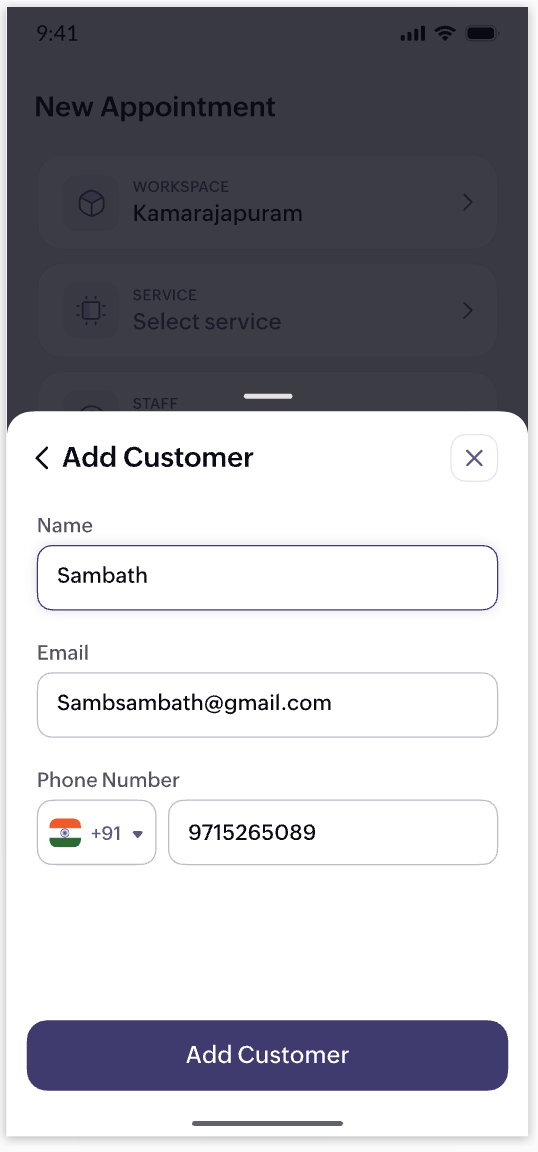
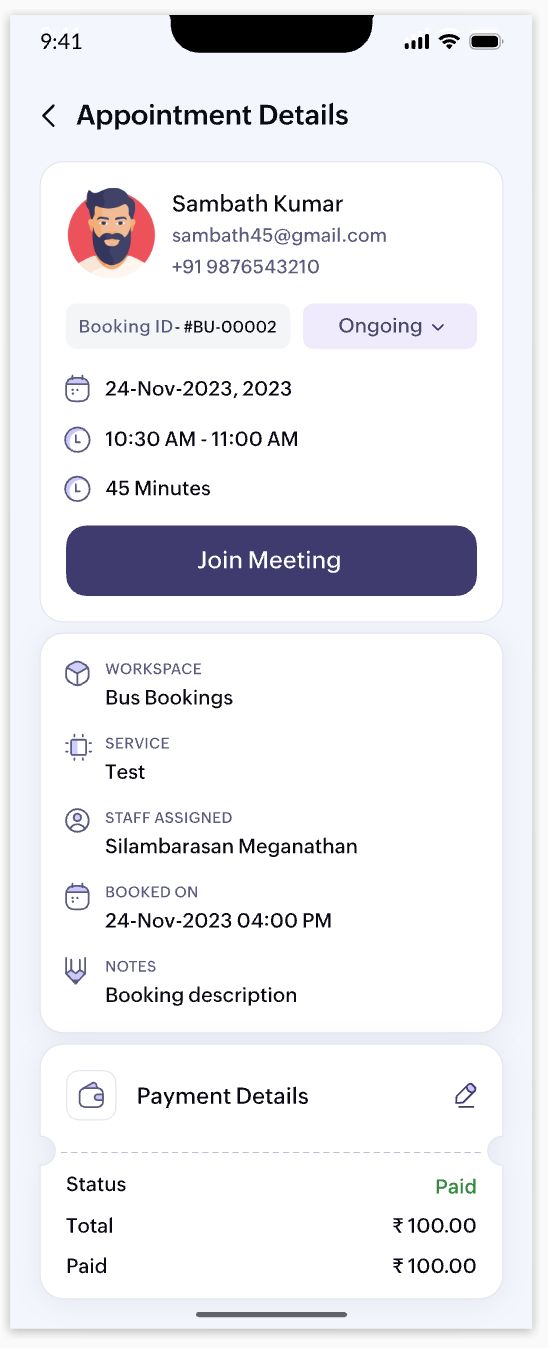
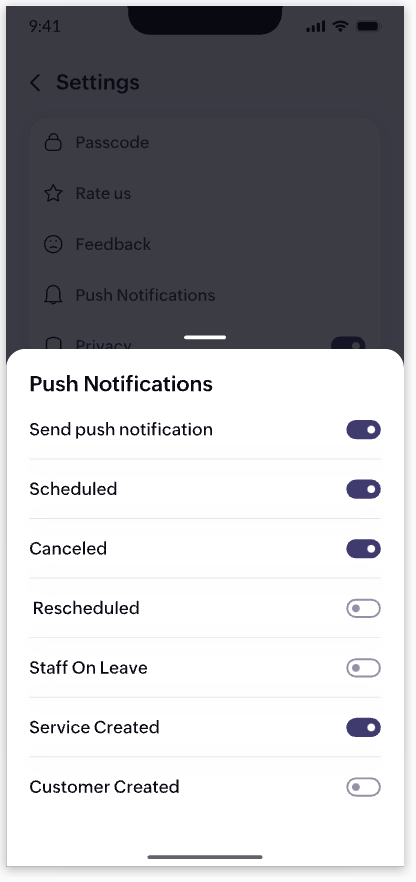
Your business staff should be able to access appointment details, check availability, and book time-offs on the go. That's why we're launching a completely revamped Zoho Bookings app (both iOS and Android) with a fresh UI and enhanced user experience. Here's a teaser of some of the screens.


10. UI/UX enhancements


We've identified areas in the web app where we can elevate your user experience. We are doing a major revamp of the look and feel of the web app to complement the changes we're bringing to our mobile app.

Note that the items listed above are in no particular order for our projected roadmap, 2024. We'll make announcements when they're live and when there are new additions to our planned updates. Have a great year ahead!

Cheers,
The Zoho Bookings Team

    • Sticky Posts

    • 📣📣 Zoho Bookings Schedulathon 2025 is here!

      Hey Zoho Bookings fam, We're excited to invite you to our first-ever hackathon: Yes, Zoho Bookings Schedulathon 2025 is live now. This is a virtual event and you can participate anywhere from the world. Businesses should be able to set up meetings from
    • 📣 [Webinar] Spikra shows how businesses leverage Zoho Bookings to increase revenue

      [Webinar] Spikra shows how businesses leverage Zoho Bookings to increase revenue Hi all, Service-based businesses need to be on top of their client experience game to stay ahead. Spikra, one of our Advanced Zoho Partners, has been helping businesses deliver
    • 📣📣 Zoho Bookings - Feature Roadmap 2024

      Hi Everyone, Thank you for all the support you have been showing Zoho Bookings. We had a fabulous 2023, with a bunch of new features and over 60K new users. In 2024, our prime focus will be on user experience, and we have a few vital features coming in
    • Attention: Important updates to the payment gateway integrations

      Greetings from the Zoho Bookings team! We have a few important updates to the payment gateway integrations that allow you to collect online payments for your appointments. The following payment gateways will be updated, and we encourage you to make the
    • Attention: Scheduled Maintenance at US DC on Dec 19, 2024

      Dear Bookings users, We would like to inform you that we've scheduled maintenance activity at our US data centers on Thursday, December 19th, 2024, from 5:30 PM to 5:45 PM PT. During this period, Zoho Bookings will be completely unavailable for the accounts
    • Recent Topics

    • Missing the "Find & Merge Duplicates" choice

      Hi, I am missing the "Find & Merge Duplicates" choice. I looked under the "More Actions" menu in Contacts, Accounts, Vendors, and Leads and it is not there. I have full permissions. Please assist me on finding this feature. Thanks!
    • OAuth integration issues

      I'm experiencing persistent OAuth errors when trying to connect Make with Zoho API. I've tried multiple approaches but keep encountering the following issues: First error: 'Invalid Redirect Uri - Redirect URI passed does not match with the one configured'
    • Bigin, more powerful than ever on iOS 26, iPadOS 26, macOS Tahoe, and watchOS 26.

      Hot on the heels of Apple’s latest OS updates, we’ve rolled out several enhancements and features designed to help you get the most from your Apple devices. Enjoy a refined user experience with smoother navigation and a more content-focused Liquid Glass
    • Zoho CRM for Everyone's NextGen UI Gets an Upgrade

      Hello Everyone We've made improvements to Zoho CRM for Everyone's Nextgen UI. These changes are the result of valuable feedback from you where we’ve focused on improving usability, providing wider screen space, and making navigation smoother so everything
    • Ability to Edit Ticket Subject when Splitting a Ticket

      Often someone will make an additional or new request within an existing ticket that requires we split the ticket. The annoying part is that the new ticket maintains the subject of the original ticket after the split so when the new ticket email notification
    • Marketing Tip #16: Ideal sizes and formats for adding images to your online store

      Images can make (or break) your storefront experience. When your banners and product photos follow the right sizes and aspect ratios, your store looks cleaner, loads faster, and feels more trustworthy—especially on mobile. Here are recommended image sizes
    • Improve WhatsApp Module in Zoho CRM

      The current WhatsApp module UI in Zoho CRM feels cluttered and complex, especially when handling high volumes of conversations. It would be great to enhance the WhatsApp module UI/UX by adopting a clean and simplified interface similar to Bigin CRM’s
    • Blueprint transitions on locked records

      We use the ability to automatically lock records (quotes, sales orders, etc.) based on criteria, such as stage. For instance, if a quote has been sent to a client, the quote is then locked for further edits. Our ideal quote stage process is: Draft>Sent>Won.
    • Enhance productivity with the revamped Zoho Sheet View

      Hello folks, For some time now, you've been able to use the Zoho Sheet View to quickly edit multiple records or to insert a batch of new records. Its tabular interface allows users to engage in these tasks productively. Despite this, the existing Sheet
    • No OR Filter for Views with a Related Modules Criteria

      We would like to create a Deal View where the User can see all their deals. For that, we would need an OR to connect the criteria. One of the Fields is a "multiselect User", these (Related Modules Criteria) can only be Filter with an AND. Even between
    • Notes badge as a quick action in the list view

      Hello all, We are introducing the Notes badge in the list view of all modules as a quick action you can perform for each record, in addition to the existing Activity badge. With this enhancement, users will have quick visibility into the notes associated
    • Good news! Calendar in Zoho CRM gets a face lift

      Dear Customers, We are delighted to unveil the revamped calendar UI in Zoho CRM. With a complete visual overhaul aligned with CRM for Everyone, the calendar now offers a more intuitive and flexible scheduling experience. What’s new? Distinguish activities
    • How to apply customized Zoho Crm Home Page to all users?

      I have tried to study manuals and play with Zoho CRM but haven't found a way how to apply customized Zoho CRM Home Page as a (default) home page for other CRM users.. How that can be done, if possible? - kipi Moderation Update: Currently, each user has
    • Limit maximum entries for subform - depending on fields entry

      Hi Zoho! I have a form with a subform in it. I'd like to have limitation for the row number depending on an entry in a drop-down field in the main form (If the field in the main form is marked "Answer1" - Limit the entries to 1 row, if the field is "Answer2" to have 2 rows limitation, "Answer3" = no limitation at all) Can this be done? Thanks Ravid
    • Save HTML Snippet Page as PDF with Dynamic Data in Zoho Creator (Working Solution)

      Hi Zoho Creator Community 👋, I faced a common challenge while working with HTML Snippet Pages — I needed to generate a PDF with dynamic data and save it back into the record automatically. Here’s the working solution that might help others. Use Case
    • How to loop through Multiple Upload and Display Actual File Name

      I have been reading the help on the File Upload Control and reviewed the Deluge help on files and I can not figure out how to loop through the uploaded files and do anything but get the automatically created file names. The code below will run but each
    • Cliq Networks users can see all other network users contact information

      Is there a way to hide user contact information from each user in networks? I would only like the users to see the admin's contact information, not other users. Network users information shared by default
    • Make Camera Overlay & Recording Controls Visible in All Screen-Sharing Options

      Hi Zoho WorkDrive Team, Hope you are doing well. We would like to request an improvement to the screen-recording experience in Zoho WorkDrive. Current Limitation: At the moment the recording controls are visible only inside the Zoho WorkDrive tab. When
    • Cannot connect to imap.zoho.eu on iOS26

      Hey, I recently migrated to another iPhone and since then use iOS26. Every since then, I was not able to connect to "imap.zoho.eu" from Apple Mail. I tried deleting the account and adding it again, did not work. I tried creating an app password, didn't
    • Pieds de page personnalisé - Document Zoho Writer

      Bonjour à tous, Je rencontre un souci avec l’ajout d’un pied de page personnalisé dans un document Zoho Writer. Je souhaite insérer les informations de mon entreprise (notamment un logo + adresse) dans le pied de page. Le problème, c’est que lorsque j’ajoute
    • Rebranding Options for Zoho One

      We need the addition of rebranding and white-labeling settings directly within the Zoho One Admin Panel. This feature should allow organizations to customize the unified portal with their own logo, brand colors, and custom domain mapping (e.g., portal.company.com).
    • Tip #57- Accessibility Controls in Zoho Assist: Mobility- 'Insider Insights'

      Remote support should be easy to navigate for everyone. For users with mobility-related accessibility needs, long sessions and complex navigation can be challenging. Zoho Assist’s Mobility Accessibility Controls simplify interaction through keyboard-based
    • To print Multiple delivery notes in batches

      In Zoho Books, we can print a Delivery Note from an Invoice using the Print Delivery Note option, but it is non-editable and always prints all line items from the invoice. Our requirement is to deliver invoiced items in batches and print delivery notes
    • Open sub form from a button as a popup form

      Is there a way within a form to use similar code as below to show a button in the form when clicked opens the subform for data to be added to the record being viewed in the form OpenUrl("#Form:<Customer_Delivery_Address>?<Delivery_Address>=" + input.ID,"popup
    • UPLOAD A CREATED PDF AUTOMATICALLY

      Using the html header pdf+print button, I have managed to find a way to have a user create a pdf using entered form data. Using the schedule button, I can have a "file uploaded" pdf mailed to someone as an attachment. The missing piece is to be able to add the pdf, created in that html page to a file upload field automatically? Right now one has to save it to computer and then upload it in a FILE UPLOAD FIELD. Any help would appreciated !  
    • Fix the speed

      It takes ages to load on every step even though my dataset is quite small.
    • Consolidated Department-wise Payroll Cost Summary Report

      Hello Zoho Payroll Team and Community, I am writing to discuss a reporting requirement regarding department-level expense tracking within Zoho Payroll. As we scale and manage salary distribution for employees across multiple departments, such as Accounts,
    • Write-Off multiple invoices and tax calculation

      Good evening, I have many invoices which are long overdue and I do not expect them to be paid. I believe I should write them off. I did some tests and I have some questions:  - I cannot find a way to write off several invoices together. How can I do that,
    • What's new in Zoho Sheet: Simplify data entry and collaboration

      Hello, Zoho Sheet community! Last year, our team was focused on research and development so we could deliver updates that enhance your spreadsheet experience. This year, we’re excited to deliver those enhancements—but we'll be rolling them out incrementally
    • CRM gets location smart with the all new Map View: visualize records, locate records within any radius, and more

      Hello all, We've introduced a new way to work with location data in Zoho CRM: the Map View. Instead of scrolling through endless lists, your records now appear as pins on a map. Built on top of the all-new address field and powered by Mappls (MapMyIndia),
    • Easier onboarding for new users with stage descriptions

      Greetings, I hope all of you are doing well. We're happy to announce a recent enhancement we've made to Bigin. You can now add descriptions to the stages in your pipeline. Previously, when creating a pipeline, you could only add stages. With this update,
    • How to remove chat icon from knowledge base?

      I have set up a knowledge base to hold FAQs and documentation. It is currently standalone, and not integrated into our website. On every page there is a chat button in the bottom left corner that says "We're offline, please leave a message." How can I
    • [ZohoDesk] Improve Status View with a new editeble kanban view

      A kanban view with more information about the ticket and the contact who created the ticket would be valueble. I would like to edit the fields with the ones i like to see at one glance. Like in CRM where you can edit the canvas view, i would like to edit
    • Automated Dismissal of Specific Notifications and Centralized Control of Toast Notification Settings

      Dear Zoho Team, I hope this message finds you well. We would like to request two enhancements related to notification handling within Zoho Desk: Automatic Dismissal of Specific Notifications: Currently, when certain actions are taken in the ticket list
    • Knowledgebase SEO

      We have a custom-domain mapped help center that is not restricted via login. I have some questions: a) will a robots.txt file still allow us to control indexing? b) do we have the ability to edit the sitemap? c) do category URLs get indexed by search
    • Create case via email

      Good Afternoon, I have just registered and am taking a look around the system. Is it possible to create a case via email.  I.e. an employee/client/supplier emails a certain address and that auto generates the case which then prompts a member of staff
    • Show field in spreadsheet view depending on other field value

      Hello. Not sure if this is possible but let's say i have spreadsheet view in Creator with four different fields Field A, B, C and D Then i have a field named Response which for one record could contain only one of the pre-definde choices below A, B, C
    • Improved Contact Sync flow in Google Integration with Zoho CRM

      Hello Everyone, Your contact sync in Google integration just got revamped! We have redesigned the sync process to give users more control over what data flows into Google and ensure that this data flows effortlessly between Zoho CRM and Google. With this
    • Introducing Assemblies and Kits in Zoho Inventory

      Hello customers, We’re excited to share a major revamp to Zoho Inventory that brings both clarity and flexibility to your inventory management experience! Presenting Assemblies and Kits We’re thrilled to introduce Assemblies and Kits, which replaces the
    • Intergrating multi location Square account with Zoho Books

      Hi, I have one Square account but has multiple locations. I would like to integrate that account and show aggregated sales in zoho books. How can I do that? thanks.
    • Next Page