Zoho Payroll | Quarterly Product Updates For 2024
As we navigate through the ever-changing payroll landscape, we bring you the latest updates that span the first quarter of 2024, tailored to meet the diverse needs of employers and employees in India, the UAE, and the US. From useful integrations to refined functionalities, each enhancement aims to simplify your day-to-day payroll operations.
Zoho Payroll - Zoho Sales IQ Integration
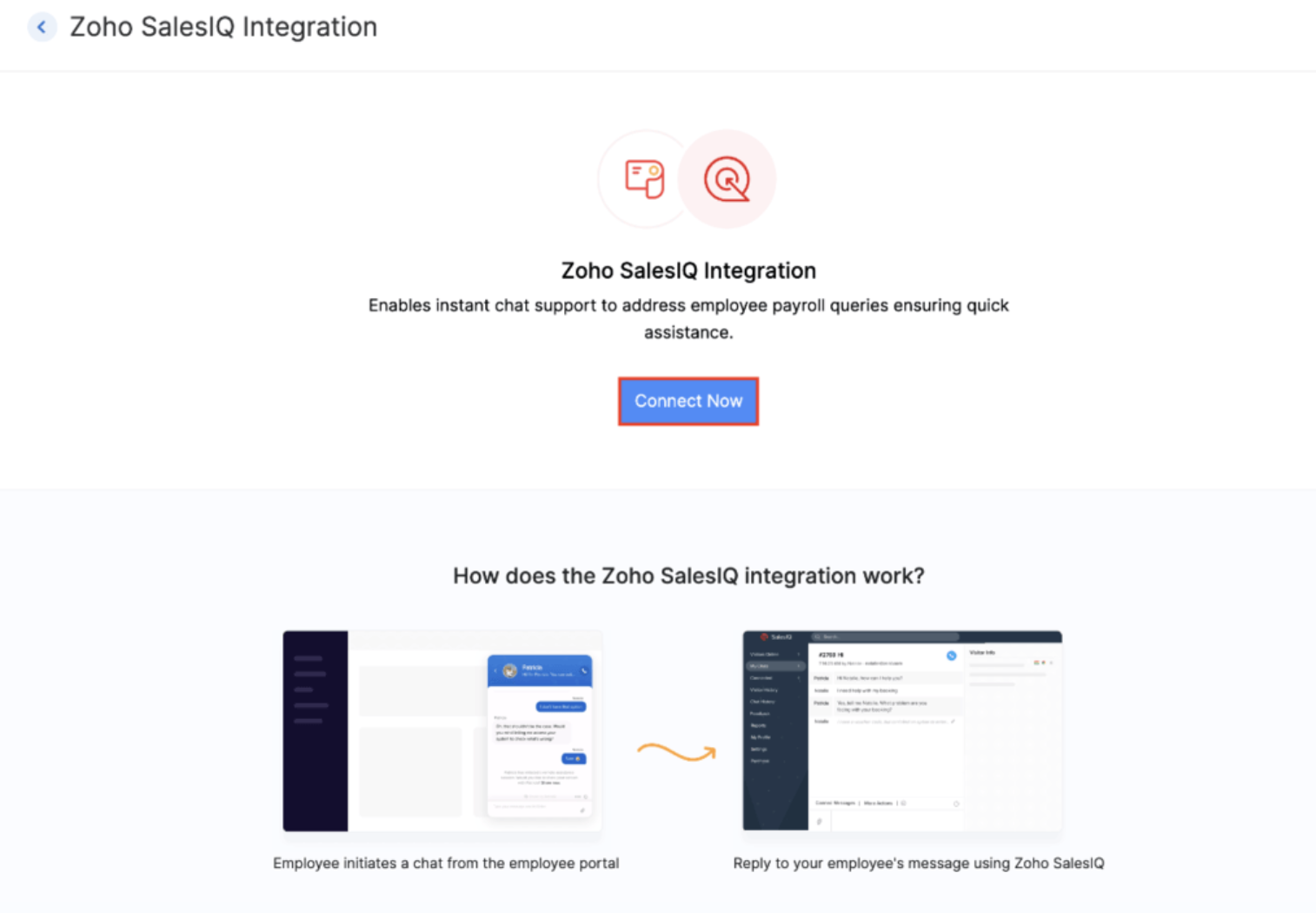
In today's fast-paced world, effective communication and instant support are crucial for employers and employees. That's why we're excited to introduce the Zoho Payroll - Zoho Sales IQ integration, designed to streamline communication and support between you and your employees in the employee portal.
How? The integrations enables your employees to reach out to you in real-time for queries or concerns regarding payroll via chat or call, from the Zoho Payroll employee portal ensuring immediate support.
That's not all. You can also attach relevant help documents and frequently asked questions (FAQs) are readily accessible within the chat interface. You will also be able to automate conversations with the enterprise-ready AI Sales IQ chatbot platform.
Introducing Ohio state support (Early Access)
We're thrilled to announce the latest addition to Zoho Payroll's US edition: support for the Ohio state. This update ensures that businesses operating in Ohio can effortlessly navigate the intricacies of payroll management specific to this region.

Note: Currently, Zoho Payroll is tailored to support businesses operating within a single state. We understand that operating across multiple states presents unique challenges, and while we're continuously enhancing our platform, multi-state support is not yet available.
Here's the list of all the states we support in US:
- California
- Florida
- Illinois
- Kansas
- New Hampshire
- New York
- North Carolina
- South Dakota
- Tennessee
- Texas
- Utah
- Washington
- Alaska (Early Access)
- Georgia (Early Access)
- Minnesota (Early Access)
- Montana (Early Access)
- Nevada (Early Access)
- North Dakota (Early Access)
- South Carolina (Early Access)
- Wyoming (Early Access)
- Wisconsin (Early Access)
- Virginia (Early Access)
- Ohio (Early Access)
If you'd like to access Zoho Payroll for your business in the Ohio state or the other states in the early access mentioned above, submit a request, and we'll enable it for you. And yes, we are working on a lot more states, and we'll share it with you in this space.
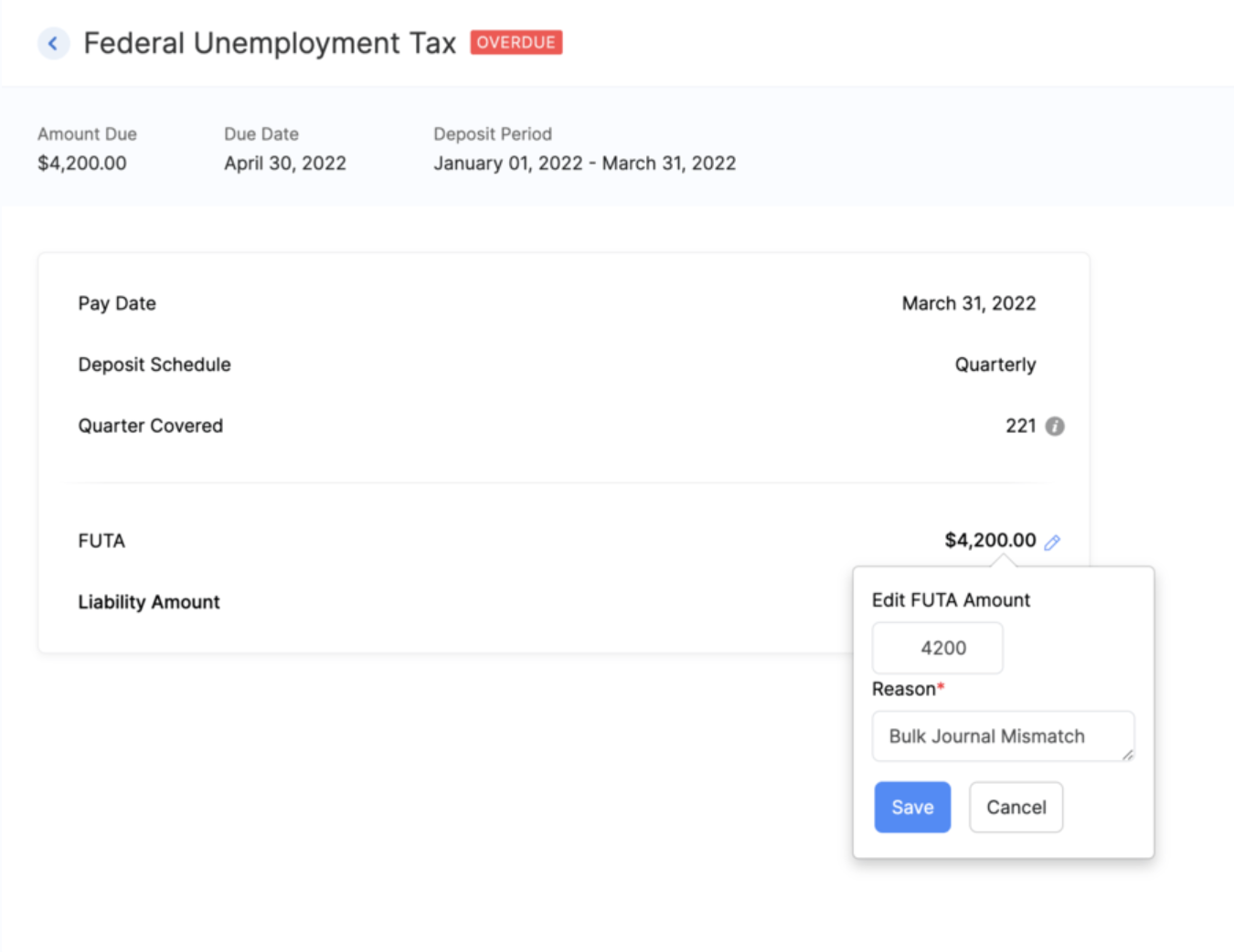
Edit FUTA Rate
You now have the option to edit the FUTA rate in the Taxes section of Zoho Payroll, according to your specific requirements, ensuring accuracy and compliance.
Notable Enhancements in India and UAE:
1) Import/Export Tax Regime Preferences of Employees
Now, you can import and export tax regime preferences for your employees in bulk via CSV or XLS files, eliminating the need for manual entry for every employee.
Here's a sample CSV file which you can use as a reference for the import file you upload in Zoho Payroll.

2) View Pre-Tax Deductions/Benefits in the Employee Portal [IN, UAE]
Your employees can now view the pre-tax deductions or benefits in the salary structure section of the employee portal.
3) Enhanced Filtering Options
We've introduced new filters in the employee list page. Users can now filter employees based on their work location, department, and designation, streamlining the search process for specific criteria. Similarly, in the Approvals section, for proof of investments, users can now filter employees based on their tax regime, whether it's old or new, allowing for more efficient management of investment approvals.
4) Annual CTC Projection
You now have the ability to project employee CTC details annually. By default, users can view monthly earnings, gross pay, and CTC. Click Show Yearly Projection to reveal the annual projection, providing comprehensive financial insights at your fingertips.
5) Petty Cash Account for Employee Payments
Organisations using the Zoho Payroll-Zoho Books integration to post journal entries for their payroll, can nowselect petty cash as the designated account for employee payments.
6) Cost of Goods Sold Account for Payroll Earnings
Another enhancement for users utilizing the Zoho Payroll-Zoho Books integration, is the capability to select Cost Of Goods Sold as the credit account for syncing payroll earnings.
7) Customizable Headers and Footers for Payslips (Early Access)
You can now personalize the headers and footers of the payslips sent to your employees. Customize important details such as company logo, address, and contact information in the header while adding legal disclaimers or special messages in the footer. With placeholders and other customization options available, you have full control over the look and feel of your employees' payslips.
Dive into our What's New page if you'd like to see all the features and enhancements we've released so far.
That's a wrap for now! We are always eager to hear your suggestions so we can help you better. If you have a feature request, please share it in the comments below.
If you require assistance, please write to us at support@zohopayroll.com, and we'll get back to you. Stay tuned for more updates from Zoho Payroll!
With a shared purpose,
The Zoho Payroll Team
Topic Participants
Bennet Noel L
Sticky Posts
Zoho Payroll | Quarterly Product Updates For 2024
As we navigate through the ever-changing payroll landscape, we bring you the latest updates that span the first quarter of 2024, tailored to meet the diverse needs of employers and employees in India, the UAE, and the US. From useful integrations to refinedIntroducing Academy 🎉: your go-to hub for all things payroll
Hello! We're thrilled to launch our newest payroll resource hub - Academy by Zoho Payroll [for India] - the information repository where you can go to learn everything about payroll. Introducing Academy by Zoho Payroll Why did we build Academy? Payroll
Recent Topics
Uploading Files from uploads api
I tried uploading the image from the API call but its giving me unauthorized error even i have given valid token in header. After uploading i need that id to pass in create ticket api uploads but its not uploading that file. Please help me out in thCategorize Items with Item Headers
Hello customers, Did you ever want to classify items based on specific categories to help your customers understand your invoice better? With the new Item Header feature, you can easily categorize items in your invoices and estimates and give them a common title. Item Headers are available in the Invoices, the Recurring Invoices and the Estimates module. It can be carried forward from estimates to invoices at the time of converting the estimates. To add an item header: Go to the Estimates, InvoicesChange format of quantity format
Hi, I would like to change the qunatity format from 1,00 to 1. Is this possible? thanks!square up and Zoho books
Since we set up the app connection between square up and Zoho books we have realised that when the amounts are getting transferred Zoho is adding VAT again making the numbers 20% more than they should be. We have checked our settings and they VAT/ TaxHow to provide Access rights to specific Bank accounts
We have several bank accounts. I want to provide certain members access to only 2-3 accounts. It appears that when I give permissions, they are for ALL bank accounts. How do I do that?Errors Getting a Bank Transaction
Using Postman(for testing), I am receiving errors when attempting to get a single bank transaction. I am able to receive the list of bank transactions with https://www.zohoapis.com/books/v3/banktransactions/?organization_id={org_id} but when I try toSubscriptions Plans and CRM Products Integration?
Is there any way to set up plans and pricing in Zoho Subscriptions and have those available as Products in the CRM? We are trying to set up the CRM and the Products seem to be more geared toward selling products that are not subscription based. So if we sell annual or monthly contracts which are $10/seat/month, I can set this up as a plan in Subscriptions, but how can I set the same thing up in the CRM for the salespeople to sell/quote? What is the best practice for setting up the CRM Products toMapping Zoho Subscription Plans and Products to CRM and Books
We have products that are one time products and subscription products. 1) We would like to have the ability to create an opportunity in CRM that includes both one-time charge products and subscription products. Currently the only way of creating a subscription product is by defining a "Product->Plan" hierarchy in Zoho Subscription. It appears that the only SYNC between Subscription and CRM is around contacts and the Product->Plan hierarchy doesn't sync to CRM, thus, you would need a duplicateBulk update fields based on date
Hi! I need all the quotes with "Quote Stage" set to "Next Year" to update to "Draft" every January 8 (every year). Can you help?Target for a campaign
Hi, Hope you can help me. I need to create a report (for a marketing campaign) that combines Deals and Contacts to export all the contacts with closed deals. I can easily do that, what I cannot do is to remove from the target the contacts that have moreZoho Desk + Jira integration - Email notifications and comments posted by administrator instead of real user
Dear All, I set up the integration under my admin account, and now when users leave comments in Jira (to created tickets in Zoho Desk), the email notifications show that the ‘Administrator’ left a comment, not a real user. The same happens in the ticketCelebrating the power of visuals
On World Photography Day, we would like to highlight the power of visuals in customer service. Visuals promote learning and understanding in less time. A photograph can rekindle a memory, convey more than words, and give a fresh perspective. How doesCustomer address in Zoho Bookings
Hello, Is it possible to add customer address information to the Zoho bookings appointment screen? Or have it pull that information automatically from the CRM? We are wanting to use this as a field management software but it is difficult to pull the address from multiple sources when it would be ideal to have a clickable address on the appointment screen that opens up the user's maps. It would also be advantageous for the "list view" to show appointment times instead of just duration and bookingBlocking / black listing customers
Hi, We have a situation, we observed that certain customers are blocking multiple appointments with our advsiors but not showing up. Some of these are repeat offenders. This leads to those service hours getting blocked and not available for genuine customers.Feature Request: Email Templates for notifications accross all services
Currently in Zoho Bookings, email notifications (such as booking confirmations, reminders, and cancellations) must be customized individually for each service. This becomes time-consuming and error-prone when managing multiple services that require consistentApproval-based booking with Zoho Creator and Zoho Bookings
Hi community members, We have developed a workaround for approval-based booking using Zoho Creator and Zoho Bookings! This provides a temporary solution as we work on the native feature, and it's useful for anyone needing an approval workflow when confirmingMember Accounts in Related List
Hi Team, Currently, when a parent account is associated with an account in FSM, there is no related list displaying the associated member accounts under the parent account’s related list section. To view member accounts, I have to manually search usinghow do i remove a specific Zoho Service from my account
I no longer need Zoho CRM, ZRM Assist nor ZRM BugTracker. How do I remove them from the list of apps for my account?I Want migarte all invoice details to zoho sheets
I want to migrate all existing invoice details to Zoho Sheet, and automatically update the sheet whenever a new invoice is created.were can i find my invoices i need this for my accountant
were can i find my invoices i need this for my accountant, how can i get id direct to my email?ONLY email field not populating Writer fillable document (randomly)
I have a Zoho Writer fillable document that has pulled all my data from my Zoho Sheets file, EXCEPT the email column. It pulled every data before and after that column with no issues. Screenshots attached. It's not my first time using the app or the feature,My number is marked as spam
Hello Zoho Mail Support, My phone number was incorrectly flagged as “spam” during sign-up. This is my personal number, and I have not engaged in any spam activities. Kindly review and verify my account so I can proceed with my email setup. Thanks.Personnalisation des paramètres dans Zoho Mail
Pourquoi cela compte-t-il ? La personnalisation des paramètres dans Zoho Mail permet aux administrateurs de configurer l’environnement de messagerie en fonction des besoins spécifiques de leur organisation. Que ce soit pour alléger l’interface pour certainesHow To Save Data Into Zoho CRM Sandbox
Hi Community, I want to save data into my zoho sandbox , for this I am using this api endpoint - https://www.zohoapis.com/crm/v8/Patients but I am getting this error - { "success": false, "message": "Zoho API request failed", "error": { "code": "INVALID_MODULE",Automate pushing Zoho CRM backups into Zoho WorkDrive
Through our Zoho One subscription we have both Zoho CRM and Zoho WorkDrive. We have regular backups setup in Zoho CRM. Once the backup is created, we are notified. Since we want to keep these backups for more than 7 days, we manually download them. TheyQuestion about retrieving unsubscribed contacts (outside of lists) via API
Hello, I am currently using Zoho Marketing Automation and would like to integrate it with our company’s core system. For this purpose, I am exploring the API options available to retrieve contact information. Specifically, I would like to know if thereGetting “mandatory field missing: Service_Line_Items” When Creating Work Order via Zoho Flow Deluge
Hi Team, I’m trying to create a Work Order in Zoho FSM with only a Service Line Item (no Parts). However, I keep getting this error: Work Order Response: {"code":"MANDATORY_NOT_FOUND","details":{"api_name":"Service_Line_Items"},"message":"required fieldHow to customize the colors of the Client Portal login screen and add the company logo?
As title, how to customize the colors of the Client Portal login screen and add the company logo?Daily updates/fixes and how to see what was changed?
When I receive the notification that zoho was updated and I need to refresh it. How can I see what was changed or fixed? Sometimes they change things that effect my books and I need to know what they did. For example over this past weekend something wasUpcoming Change: Snowflake Username/Password Authentication Deprecation – Action Required
Hello Users, Snowflake has officially announced that username and password-based authentication will be deprecated by November 2025. You can find the official announcement [here]. If you're using a Snowflake connection in Zoho Analytics to import data,Why should I choose Zoho Inventory vs Odoo?
Hello there! I have used Zoho in different companies I've worked in, and I have a positive perception of it. I am starting a new import business for pipes, tubes, fittings, valves, elbows, etc., which all have serial numbers, cast numbers, etc., so IProduct Updates in Zoho Workplace applications | July 2025
Hello Workplace Community, Let’s take a look at the new features and enhancements that went live across all Workplace applications this July. Zoho Mail Import bookmarks from Pocket Worried about losing your Pocket bookmarks? Don't worry we have got you.PLEASE FIX YOR BUGS
PICTURES ARE BEING REJECTED DESPITE THEM FOLLOWING THE GUIDELINES ON DIMENTIONS.Kaizen# 204 - Answering Your Questions | Perform Field Updates before Blueprint transition via Client Script
Hello everyone! Welcome back to another exciting Kaizen post. One of the questions we received through your Kaizen feedback was: “How can I update fields before Blueprint transition and how to prevent a transition based on a condition using Client Script?”Create online meetings for Booking Pages with Zoho Meetings and Zoom
Greetings, We hope you're all doing well. We're excited to share some recent enhancements to Bigin's Booking Pages. As you know, Booking Pages let you create public pages to share your availability so that your customers can easily book time slots withFilters in audit logs
Greetings, I hope all of you are doing well. We're happy to announce a few recent enhancements we've made to Bigin. We'll go over each one in detail. Previously, there were no filters available to narrow down data in audit logs. Now, we've introducedEnhanced help options in Bigin
Greetings, We're excited to introduce a new enhancement to Bigin's Help section: a comprehensive Help Options panel that brings together all your support resources in a single, well-organized space. Previously, the Need Help? menu provided only a limitedZoho FSM API Developer Needed
Hi, I’m looking for a developer with experience using Zoho FSM APIs. Scope: Connect WordPress website booking form to Zoho FSM Check availability (date, time, region) Create Work Orders + Service Appointments automatically Notify both customer and schedulerRevenue Management: #4 What if there are uncertainties in project or service delivery?
Our previous post taught us how Zoho Billing makes life easy for businesses with its automated revenue recognition rule. However, certain businesses have more challenges that an automated system cannot handle, and there are certain situations where automatedThis mobile number has been marked spam. Please contact support-as@zohocorp.com
Bom dia, estou tentando colocar o número 11 94287-6695 e esta com erro "This mobile number has been marked spam. Please contact support-as@zohocorp.com" pode me ajudar, por favor?Next Page