Zoho Projects Coming to CRM Teamspaces

Zoho Projects Coming to CRM Teamspaces

Alert
Availability: The US DC Standard Edition is now available. It will be rolled out to customer accounts in all DCs in phased manner.

Hello all,

You are probably already familiar with Teamspaces, the dedicated workspaces where teams organize the CRM modules they rely on and collaborate on records tied to their specific function or initiative.

While modules help teams manage operational data, many teams also work on projects that involve planning, coordination, and task execution. Previously, these projects were managed outside of the Teamspace environment, typically through Zoho Projects and accessed from individual record contexts such as Accounts or Contacts.


To extend the scope of collaboration within Teamspaces, projects can now be brought directly into a Teamspace. This allows teams to work on their ongoing projects alongside the modules already present in their workspace. This enhancement helps teams manage both record-based work and project-based collaboration within a single workspace, improving coordination and overall team productivity.

Know more about Teamspaces and Project Integration in Zoho CRM.


Why bring Zoho Projects into Teamspaces?

With this enhancement, teams can now bring projects directly into their Teamspace, making them accessible alongside the modules already present in the space.

This helps teams:

  • Access project work from their shared Teamspace

  • Collaborate on tasks without switching between multiple views

  • Keep project execution aligned with CRM records and team activities

  • Organize both internal and customer-related initiatives within the same workspace


When would teams use Projects in a Teamspace?

Projects become especially useful in Teamspaces where teams already manage operational modules and need a structured way to track execution and collaboration.


Marketing Teamspace:

A marketing Teamspace may include modules such as Campaigns, Case Studies, Influencer Outreach, and Customer Feedback.

Projects can be used to manage campaign execution and related activities. For example:

  • Product Launch Campaign – Tracks tasks such as campaign planning, content creation, ad deployment, and partner outreach.

  • Customer Case Study Initiative – Coordinates activities like customer outreach, content drafting, and publication schedules.

These projects allow the team to manage campaign records while tracking execution progress within the same workspace.


Customer Delivery Teamspace:

Customer-facing teams often manage modules such as Accounts, Deals, Case Studies, and Customer Feedback.

Projects can help coordinate customer onboarding or implementation work. For example:

  • Customer Implementation Project – Tracks setup activities, milestone completion, and delivery timelines for a customer.

  • Customer Onboarding Project – Manages onboarding tasks such as configuration, training sessions, and adoption monitoring.

This enables delivery teams to monitor milestones and collaborate on project tasks alongside the relevant customer records.


When working with a key customer on implementation or onboarding activities, the team can bring the related customer project into their Teamspace. This allows the delivery team to monitor milestones and collaborate on project tasks alongside the relevant customer records.


Types of projects supported

Projects added to a Teamspace can fall into two categories.

Client Projects : Client projects are projects that are already associated with CRM accounts or contacts.

Within a Teamspace:

  • Existing client projects can be brought into the space

  • Teams can monitor project progress directly from their workspace.

  • The project continues to remain associated with the related CRM records.

This helps teams working with key customers track ongoing implementation or delivery projects without repeatedly navigating to individual records.


Internal Projects Internal projects are projects that are not associated with any external client or CRM record. They are created purely for collaboration among CRM users within the team. These projects are typically used to plan and track internal initiatives such as feature development, documentation updates, campaign planning, or operational improvements.

Example: Sales Enablement Teamspace

A Sales Enablement Teamspace may include modules such as Leads, Deals, Sales Collateral, and Customer Feedback.

In addition to managing sales records, the team may work on several internal initiatives that require structured coordination. For example:

  • Sales Playbook Development – Organizes the creation and updates of sales scripts, pitch decks, and competitive positioning guides.

  • Quarterly Sales Training Program – Plans internal training sessions, certification programs, and onboarding materials for new sales representatives.

  • Lead Qualification Framework Update – Tracks improvements to lead scoring rules and qualification guidelines used by the sales team.

By creating these internal projects within the Teamspace, the team can coordinate training, documentation, and process improvements while working alongside their CRM data.


How Projects work inside a Teamspace

Projects can be added to a Teamspace in two ways:
  • Create a new project directly from the Teamspace

  • Bring an existing project into the Teamspace
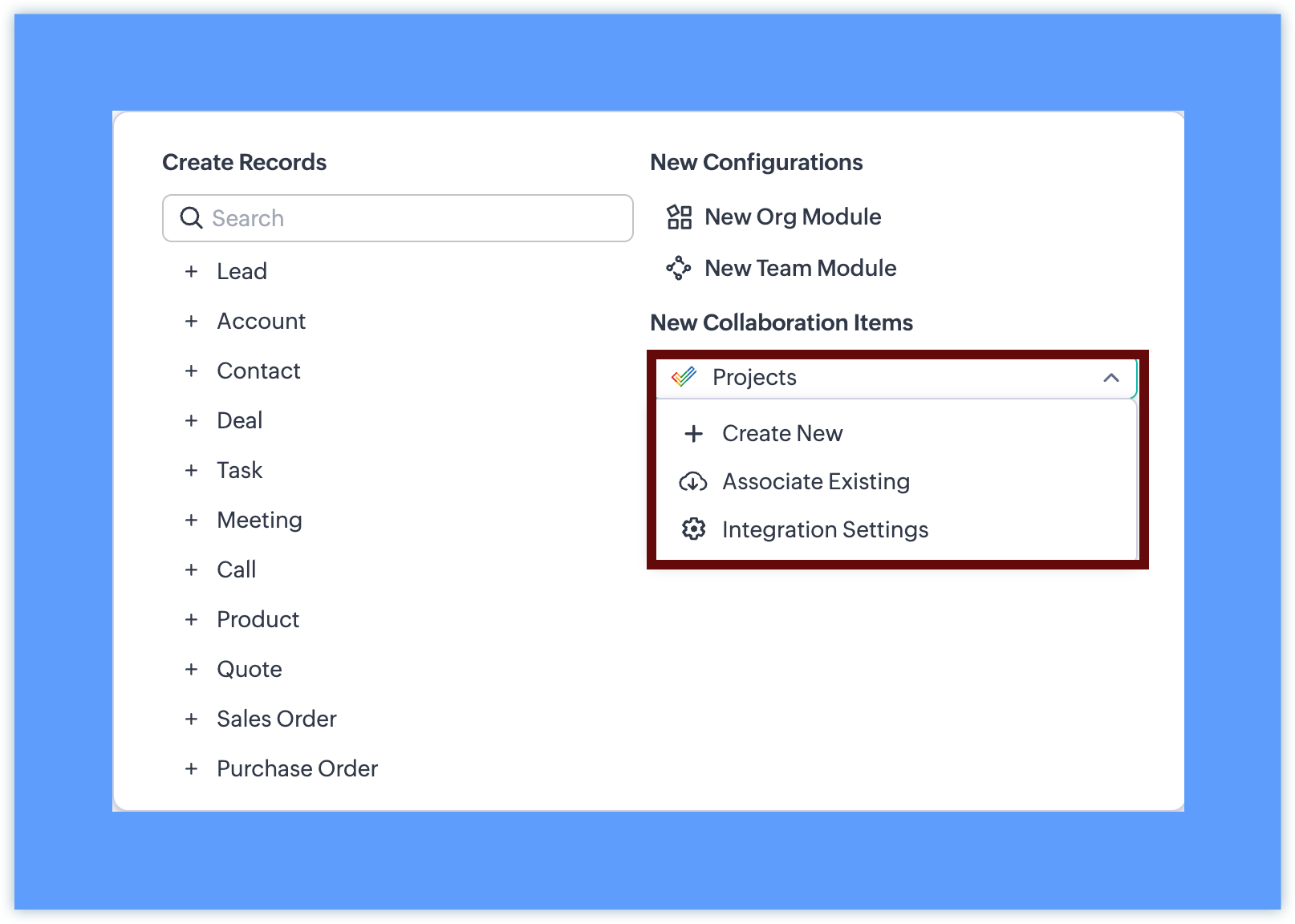

Once a project is added:


  • Once added, the project appears in the Teamspace navigation panel. Projects can be placed inside any folder within the Teamspace, alongside modules or other projects.
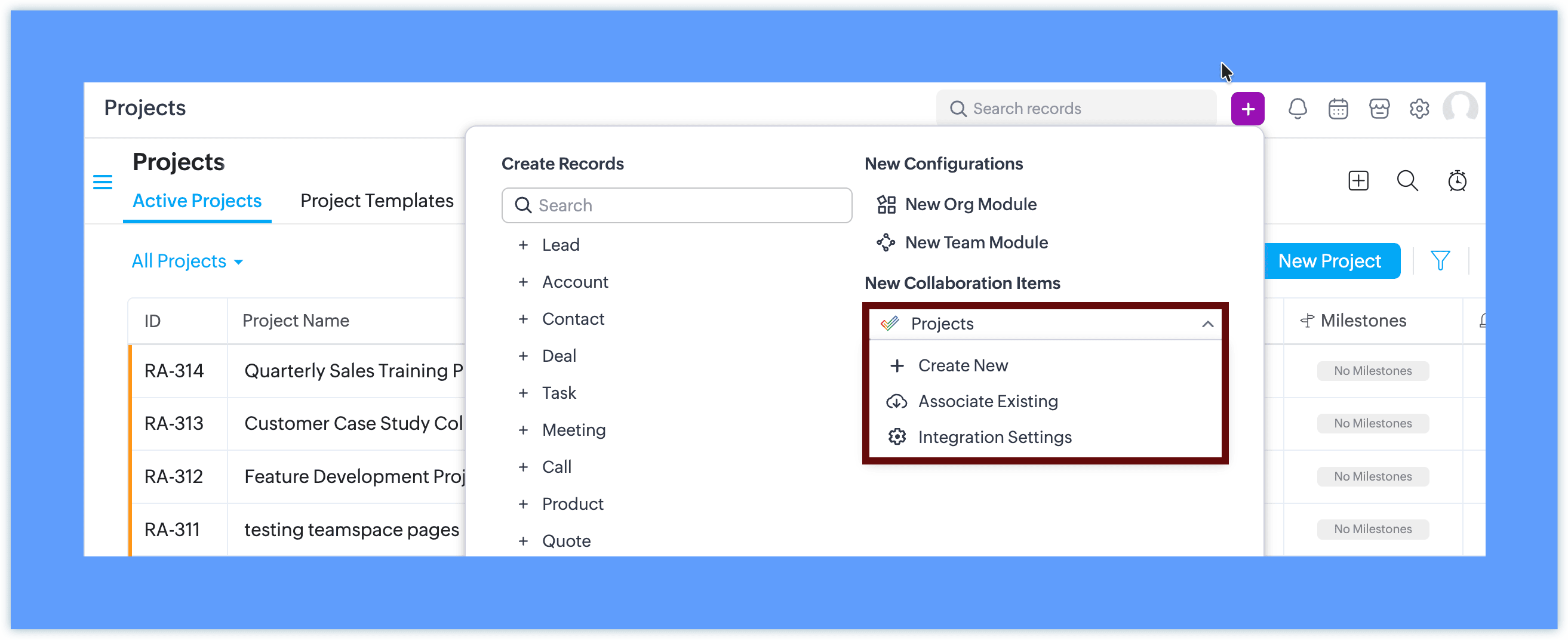
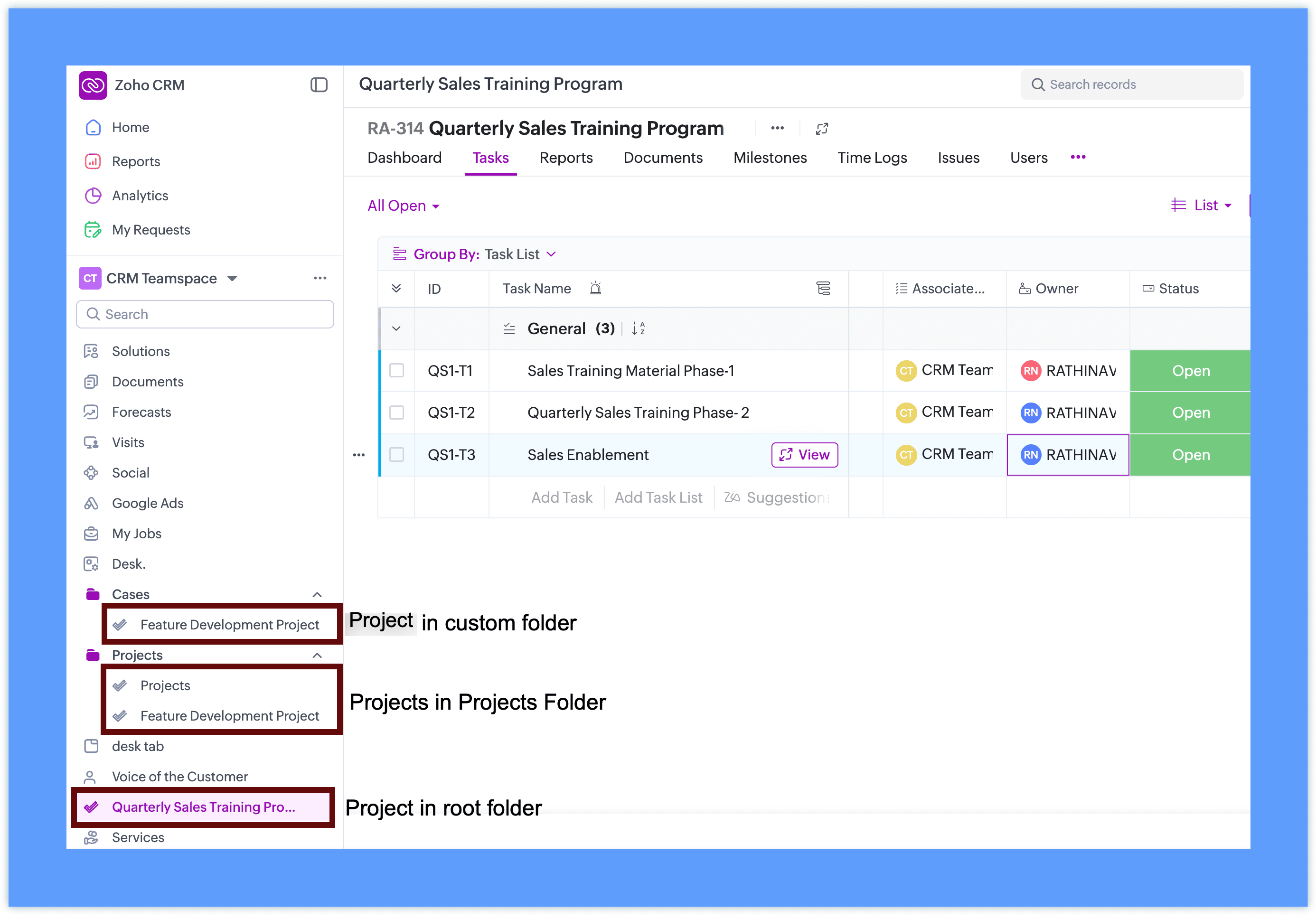

  • Team members can open and work on the project without leaving CRM

  • The project interface is displayed within the Teamspace using the Zoho Projects view
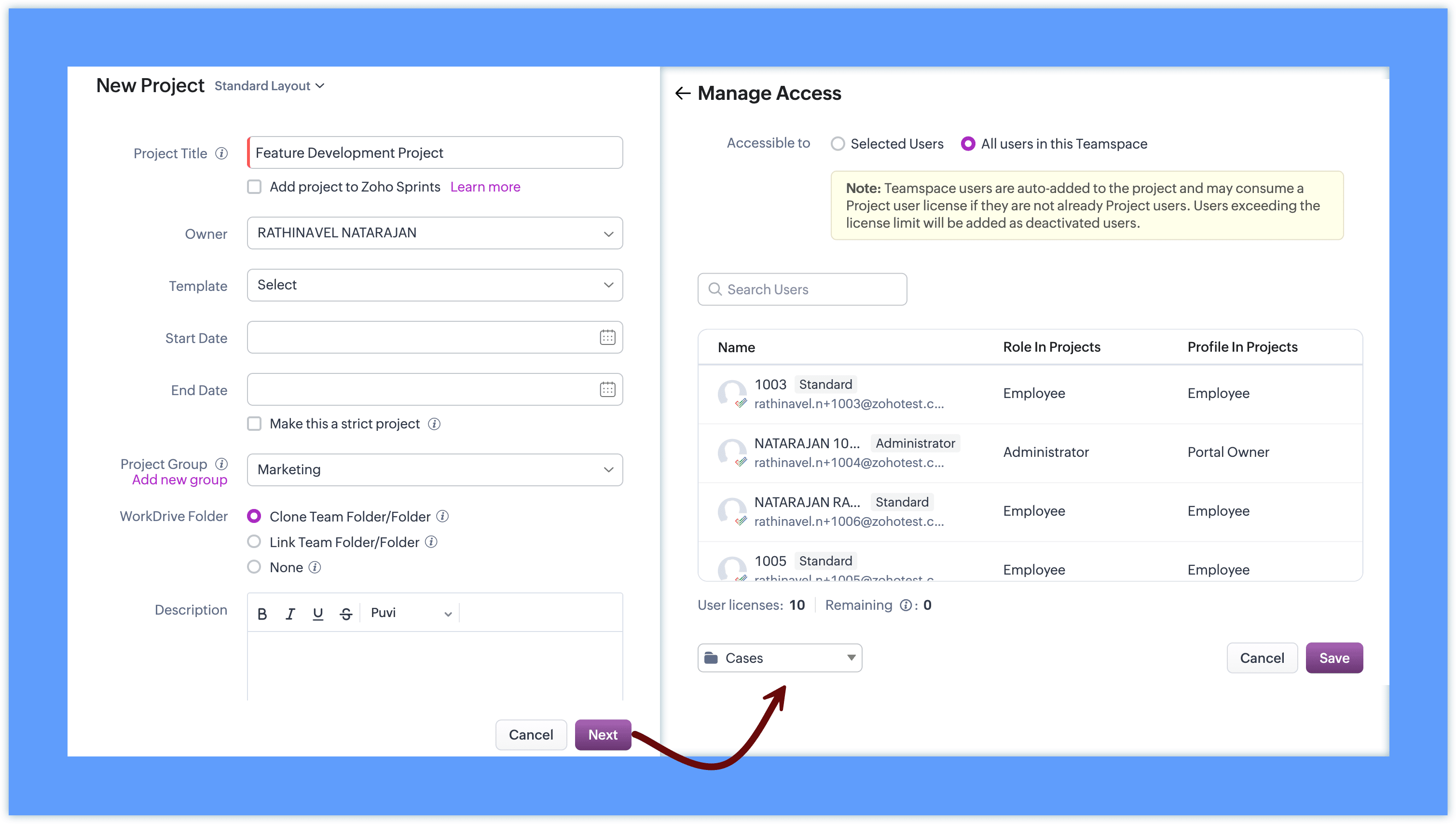
This allows teams to work with familiar project capabilities while accessing them directly from their workspace.


Project behavior inside CRM

Projects added to Teamspaces continue to follow the existing Zoho Projects behavior.

  • Projects remain managed through Zoho Projects

  • CRM surfaces the project interface inside the Teamspace

  • Client projects retain their association with CRM records

  • Internal projects can be created without selecting a client


This ensures that teams can continue using the same project functionality while accessing it within their Teamspace.

Access and collaboration

To add projects to a Teamspace, integration with Zoho Projects is required. If it is not already configured, you can set it up directly from the Teamspace in a single step.
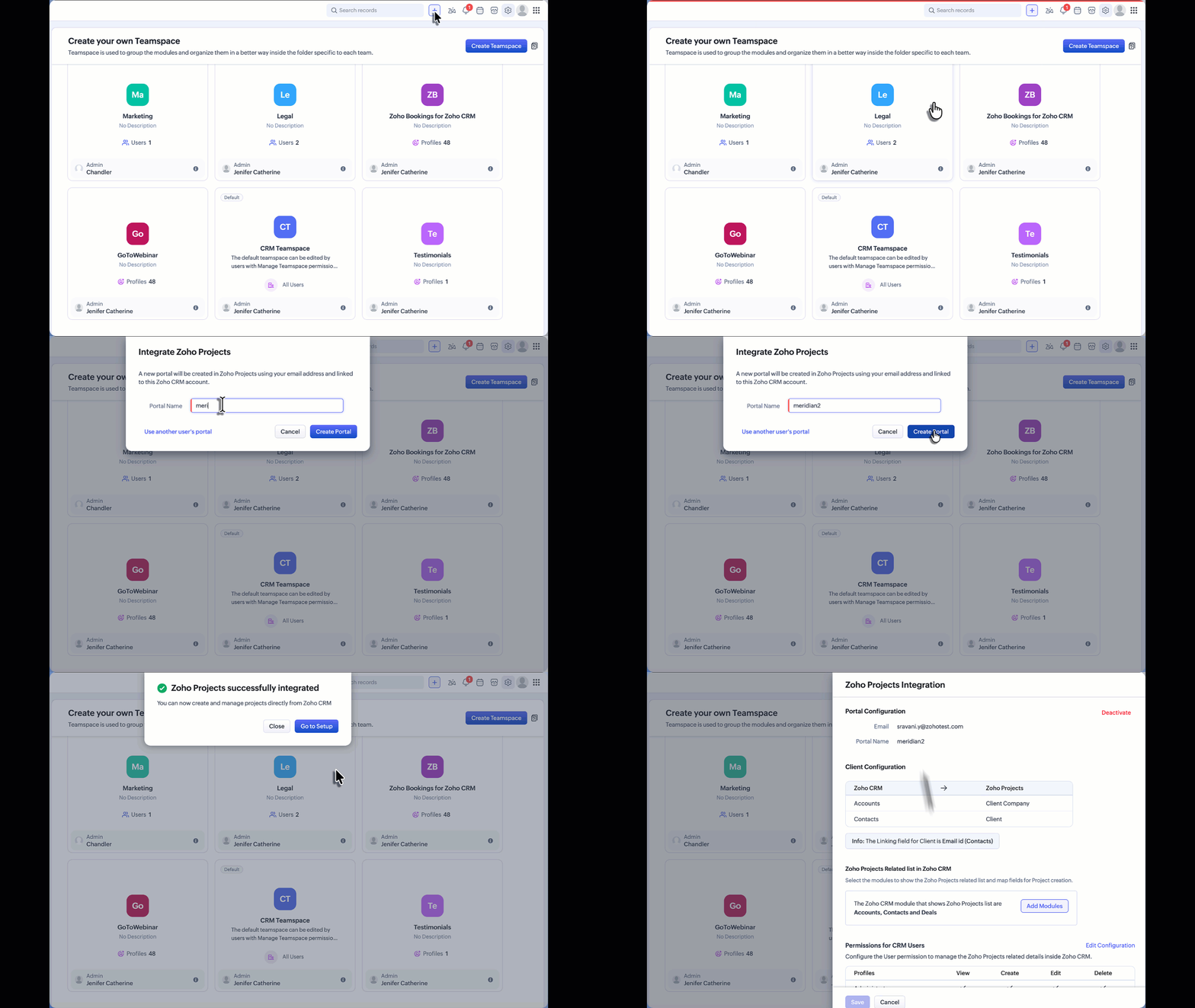

For detailed instructions on the complete setup and how Zoho Projects works, refer to the Zoho Projects integration help documentation. If Zoho Projects is available for the CRM account:

  • Users can create or associate projects within the Teamspace.

  • Project visibility follows Zoho Projects user access permissions.

  • Team members can collaborate on tasks and monitor project progress directly from the Teamspace.

Additional Notes:

  • User Access: Project user access depends on the number of available user licenses in Zoho Projects. If the license limit has been reached, Teamspace users will be added as inactive users in Zoho Projects. These users can be activated later once additional licenses are available through subscription.

  • Updated Project UI: The Create Project and Associate Project interfaces accessed from the Accounts or Contacts related list have also been updated to align with the new Teamspace project UI. This ensures a consistent project creation and association experience across CRM.


    • Recent Topics

    • Ability to select the attachment of a record when sending an email from FSM

      Hello FSM Team, FSM allows us to add attachments to any record (Estimate, Work Order, etc.). However, when we're sending an email from FSM, it is currently not possible to choose from the attachment in FSM to add to the email. When sending an estimate,
    • Temporary Telegram Messaging Restriction in India

      The Government of India has temporarily restricted access to Telegram in India. This action has been communicated by the National Testing Agency (NTA) through an official public notice. Read the full notice here. Impact As a result, Telegram messaging
    • Zoho Creator + LLMs using Zoho MCP: Bring contextual AI into your apps

      Hello everyone, We're excited to share that Zoho Creator can now be integrated with leading AI models(like Claude) using Zoho MCP. As you know, Zoho Creator has been a pioneering low-code platform with a razor-sharp focus on making it easy to build business
    • The 3.1 biggest problems with Kiosk right now

      I can see a lot of promise in Kiosk, but it currently has limited functionality that makes it a bit of an ugly duckling. It's great at some things, but woeful at others, meaning people must rely on multiple tools within CRM for their business processes.
    • Use Secure Public Links for Sharing Transactions

      Public links are the quickest way to send invoices or quotes to your customers. You can drop the link in an email, SMS, or WhatsApp message. But, links can be forwarded, and once they leave your customer's inbox, you can no longer control who sees your
    • 【開催報告】大阪 Zoho ユーザー交流会 NEXUS 2026/6/4(木)ZendeskからZoho Deskへ移行しコスト削減

      ユーザーの皆さま、こんにちは。コミュニティGの中野です。 6月4日(木)に、大阪 Zoho ユーザー交流会を開催しました。 本投稿では、その様子をお届けします。 当日の登壇資料などもこちらに共有しますので、参加できなかった皆さまもぜひご参照ください。 今回の大阪 ユーザー交流会では、ビープラスシステムズ株式会社 石井さんによるユーザー活用事例セッションのほか、 「Zohoで"これだけは外せない"ルーティーン」をテーマにしたグループワークを実施しました。 登壇いただいた石井さん、そしてご参加いただいたZohoユーザーの皆さま、ありがとうございました!
    • When will Zoho Books offer native NFS-e issuing, now with Brazil's National Standard?

      Hello Zoho Team and Community, I'd like to follow up on my previous suggestion regarding the critical need for Zoho Books to natively issue Brazilian Service Invoices (NFS-e). My original idea was that this could be achieved by extending the same integration
    • Zoho CRM custom button function, how to add line breaks/ new lines in the return message

      When creating button function in CRM it requires a `return "";` Then when the button is client by the user a message pops up with what ever is returned from the function. But I want to have a message with multiple lines, meaning I need to add a line break
    • ZOHO FSM - Dispatch Console Drive time

      Is there a way to view drive time on a tech or estimate drive time from location to location? I need to see this on the Dispatch Console
    • Is there a way to update the forecast category independently from the deal's stage through an API?

      Hello, We're experimenting with the Forecast module and we've created custom categories to signal the top 10/50/100 deals currently in the pipeline. We would like to assign these categories automatically using custom functions but I found that the only
    • Small one person business needs everything in one place

      I just purchased a business and have a couple of your services. I would like to get everything in one place. I am a state trainer. I would like to get my invoices, payments, online classes, calendar for scheduling, maintenance, etc. in one place. can
    • Super Admin Logging in as another User

      How can a Super Admin login as another user. For example, I have a sales rep that is having issues with their Accounts and I want to view their Zoho Account with out having to do a GTM and sharing screens. Latest Update (27th April 2026): With the early
    • Re-Apply SLA When Ticket Reopened from Closed Status?

      If you have an SLA applied, timers are deactivated when going to "On Hold" status type and reactivated when going back to an Open status type. What we discovered is when a customer replies to a closed case and it reopens, the SLA is not applied and timers
    • Conditional Drop Downs

      Am I the only one that has a problem when setting up the same project for multiple customers - resulting in a HUGE number of projects (e.g. Project A - customer 1, Project A - customer 2, Project A - customer 3 etc.). OR, am I doing it wrong? What results
    • Automating CRM backup storage?

      Hi there, We've recently set up automatic backups for our Zoho CRM account. We were hoping that the backup functionality would not require any manual work on our end, but it seems that we are always required to download the backups ourselves, store them,
    • Zoho developer edition does not work for us

      Hi Is anyone else having this problem? I'm signed in with our admin/super user account. When I click on the link on this page: https://www.zoho.com/crm/developer/docs/dev-edition.html I am asked to agree to Terms and Conditions. Clicking Agree to Terms
    • Lead score decay timing and excluding specific campaigns from scoring

      Hi team, I have two quick questions about lead scoring: 1. When does a lead's score start going down? Like, after how many days of no activity does the score begin to drop? 2. Is there a way to stop certain campaigns from adding points to a lead's score?
    • Summer release '26 should be called Enterprise Summer Release '26

      Summer release '26 should be called Enterprise Summer Release '26 because almost all updates or the more useful ones, are limited for Enterprise subscriptions. us with Basic or Premium susbcriptions are basically left in the cold.
    • ZoHo Mail & MCP connectors

      Is ZoHo working an MCP connector for mail?? I find it very useful in Gmail to have Claude summarize messages for me. Thanks Jim P.S. Sorry if this is the incorrect forum. Mods please adjust as necessary.
    • FINALLY! 100% Responsive iFrame for HTML Page Snippet

      For the past two years or so I have been battling with Page Snippets' responsiveness (HTML, Embed, and ZML). Furthermore, if you use the native embedded reports, especially more than one report on a page, you have to set a static height because they're
    • Associate project with timer on iPhone

      When I start the timer without first associating a project (on my iPhone), its starts fine but now when I need to associate a project, and click on the link, I get a list of EVERY project I've ever put into Zoho Books. It used to just show active projects.
    • Import and Export of website.

      Hi, i have raised this ticket regarding challenges i am facing while importing a website on zoho sites. I have created my website on Squarespace and now i want to move it to zoho sites so i want to know what i am supposed to do whats the correct step
    • Add multiple users to a task

      When I´m assigning a task it is almost always related to more than one person. Practical situation: When a client request some improvement the related department opens the task with the situation and people related to it as the client itself, the salesman
    • Important update on our transition to the new video platform framework

      As part of our ongoing platform changes, users in select regions, including the United States and other supported data center locations, have been migrated to our new video platform framework. Due to this migration, some participants may notice changes
    • What is a realistic turnaround time for account review for ZeptoMail?

      On signing up it said 2-3 business days. I am on business-day 6 and have had zero contact of any kind. No follow-up questions, no approval or decline. Attempts to "leave a message" or use the "Contact Us" form have just vanished without a trace. It still
    • Deleted User Emails

      I need to delete a user as I need to re-use their license, but I'd like to keep all their emails that are attached to various contacts in the CRM. Their emails are hosted externally on an M365 license. Anyone any idea how best to engineer this? TIA
    • #14 Get Paid Without Spending Time on Manual Follow-ups

      It's the end of the month. Payroll is due next week. A software subscription is about to renew. A vendor payment is waiting for approval. On paper, the business is doing great. Projects are getting completed. Customers are happy. Invoices have already
    • Client Script | Update - Client Script Support For Custom Buttons

      Hello everyone! We are excited to announce one of the most requested features - Client Script support for Custom Buttons. This enhancement lets you run custom logic on button actions, giving you greater flexibility and control over your user interactions.
    • Function #11: Apply unused credits automatically to invoices

      Today, we bring you a custom function that automatically applies unused credits from excess payments, credit notes, and retainer payments to an invoice when it is created. Prerequisites: Create a Connection named "zbooks" to successfully execute the function.
    • Add spaces to input format

      In Zoho Inovices, I am trying to do a custom input format for a custom field. I have tried a few variations, but this is my most recent: ^[a-z][A-Z][0-9][,][-][_][:][ ]$ In this field, I will be entering different alphanumeric information, depending on
    • Zoho CRM Deal API returning null pipeline in case of default pipeline

      Hey team, We are writing to report an issue with the Deals module pipeline API behavior that we believe stems from how the default (Standard) pipeline is handled when no custom pipelines have been configured. When the "Manage Pipelines" page under CRM
    • Quebec Canada Tax GST and QST

      Hello Expert, Whenever we I create invoice for Quebec, Canada, it calculating wrong tax amount, can you please validate Attached the screenshot, which is calculating wrong tax amount on QST
    • Function #1: Convert an accepted Estimate to Sales Order automatically in Zoho Books

      As you’re aware, Zoho Books provides a default option to have the estimates automatically converted to invoices once your customer accepts them. Many of you wanted a similar option for sales orders, so here’s a workflow that converts accepted estimates
    • Facturation électronique 2026 - obligation dès le 1er septembre 2026

      Bonjour, Je me permets de réagir à divers posts publiés ici et là concernant le projet de E-Invoicing, dans le cadre de la facturation électronique prévue très prochainement. Dans le cadre du passage à la facturation électronique pour les entreprises,
    • Adding Taxes to paid consultations in Zoho Bookings

      I created a 'paid' consultation under Zoho Booking and integrated it with payment gateways for online/instant payment before a booking is done. How can I add 'taxes' to the price of consultation? I can add taxes to other Zoho apps (liks Books, Checkout,
    • What's New in Zoho Forms

      Hey there, We've been heads-down shipping this quarter. Because every update we ship is about making your forms do more, with less effort from you. This quarter too, we expanded what Zoho Forms can do. Here's everything that shipped. Spotlight Forms Some
    • Zoho Creator and Bluetooth Beacons?

      Hi all, Has anyone developed anything in Zoho Creator that leverages Bluetooth? Specifically to detect bluetooth beacons (iBeacon, Eddystone, etc.)? Thank you, Josh
    • Zoho Books | Product updates | June 2026

      Hello users, Welcome to this month's roundup of what's new in Zoho Books! We have an exciting line-up this time. The highlight is the launch of the all-new France Edition with full ISCA compliance. We're also introducing features such as Layout Rules
    • API to post drafts for social media

      I we want to post draft posts to our zoho social account and then approve and schedule them within Zoho social. is this possible with for example: https://apis.zoho.com/social/v2/post TIA Jon
    • Updating Zoho Books UI when a field is changed

      I have this script to update Quotes Expiry date. estimateID = estimate.get("estimate_id"); numberDaysTobeExtended = 14; estimatedate = estimate.get("date").toDate(); organizationID = organization.get("organization_id"); estDate = estimate.get("date");
    • Next Page