What if your webinar platform could connect directly with your business tools, automate routine tasks, trigger actions across your workflows, and support every stage of your webinar lifecycle?
That’s the question we’ve been answering so far this year. And today, with the Summer Broadcast 2026, we’re showing you what we’ve built.
Co-organizers are essential for any webinar. They ensure that every webinar runs smoothly by helping with attendee engagement, answering questions, managing chats, conducting polls, and offering support wherever needed. This summer, we wanted our features to act as a co-organizer at every stage of the webinar.
Every update in this release is designed to support you as a trusted co-organizer, present before your webinar starts, sharp during the session, and thorough long after it ends.
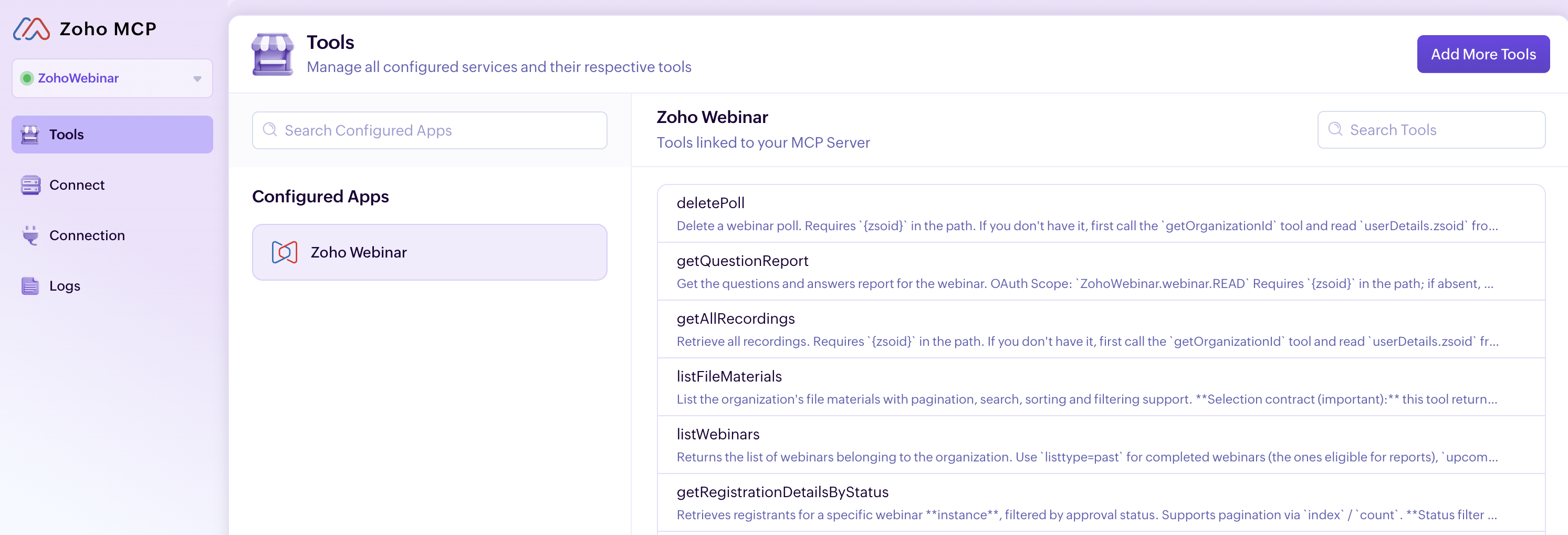
MCP
This is the feature at the heart of everything we’ve been building. Zoho Webinar MCP lets your AI assistant connect directly to Zoho Webinar and manage your entire webinar operation through simple, natural language.
Think of it as a webinar assistant that works alongside you before, during, and after every webinar. Whether you’re scheduling sessions, bulk-registering attendees, or coordinating multi-session events, your AI assistant handles it. Type something like: “Schedule a product demo, next Thursday at 10:00 am, schedule a campaign to promote it my leads, and add the registrants to my CRM” and it will happen instantly.
Workflows
Stop doing the same webinar tasks over and over
Every webinar comes with repetitive work: confirmations, reminders, follow-ups, recording distribution, and attendee updates. What if these tasks could run automatically while you focus on creating great content? That’s exactly what Workflows enables you to do. Zoho Webinar Workflows automates these routine tasks so your team can focus on delivering great sessions instead of managing manual processes. Set a trigger, choose who it applies to, and define the action. Workflows takes care of the rest.
Automate the entire webinar lifecycle
Setting up a workflow is simple. Give your workflow a name, choose the event that should trigger it, decide whether it applies to everyone or only a specific group, and define the action to take. Automate the entire webinar lifecycle, from registrations and attendance to recordings, transcripts, summaries, and engagement activities such as poll responses. Whether you need real-time notifications or scheduled follow-ups days after the event, workflows help you stay organized and responsive.
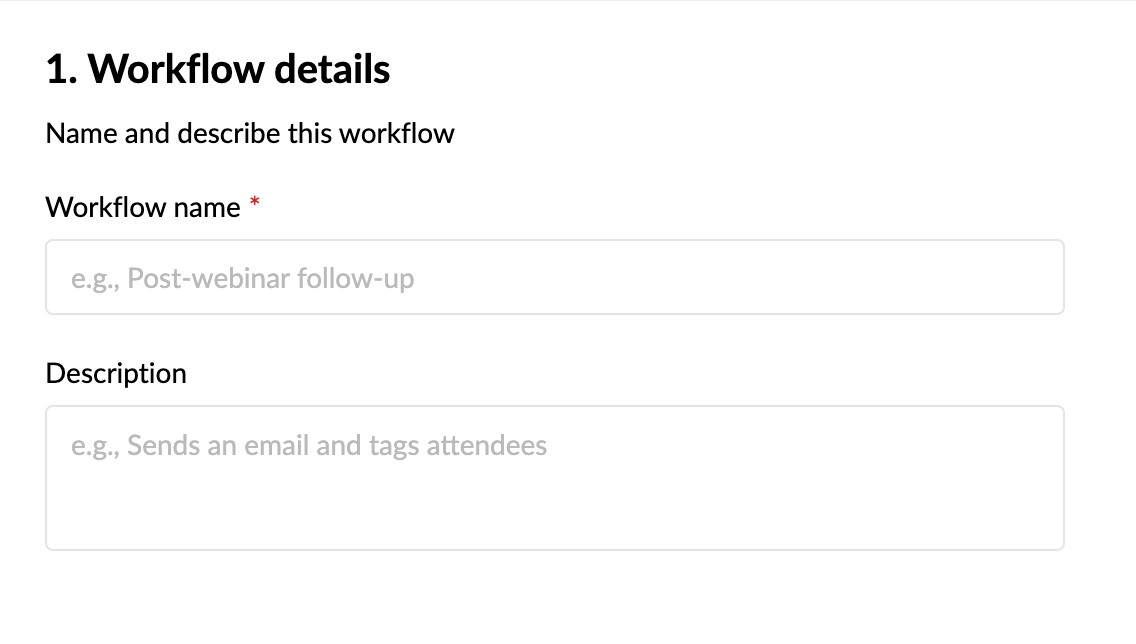
Trigger
Triggers are organized into five modules: Webinar, Registration, Attendee, Recording, and Engagement. Select the module that matches the event you want to automate, then choose the specific trigger action within it.
Conditions
Conditions are used to determine when the workflow should run. You can choose to run the workflow without adding any condition, or narrow it down to a specific subset.
Actions
Actions define what happens when the trigger fires and the condition is satisfied. Two types of actions are supported in Workflows: Instant and Scheduled actions. Choose the action type that fits your automation.
With these three tasks, you can automate the entire webinar lifecycle, from registrations and attendance to recordings, transcripts, summaries, and engagement activities such as poll responses. Whether you need real-time notifications or scheduled follow-ups days after the event, workflows help you stay organized and responsive.
Here’s a few workflow examples for you to try:
1. Recording is added > Add file to Dropbox.
2. Recording transcript > Post in on Medium.
3. Registrant details with attendance and poll response > Zoho Analytics.
AI writing assistant
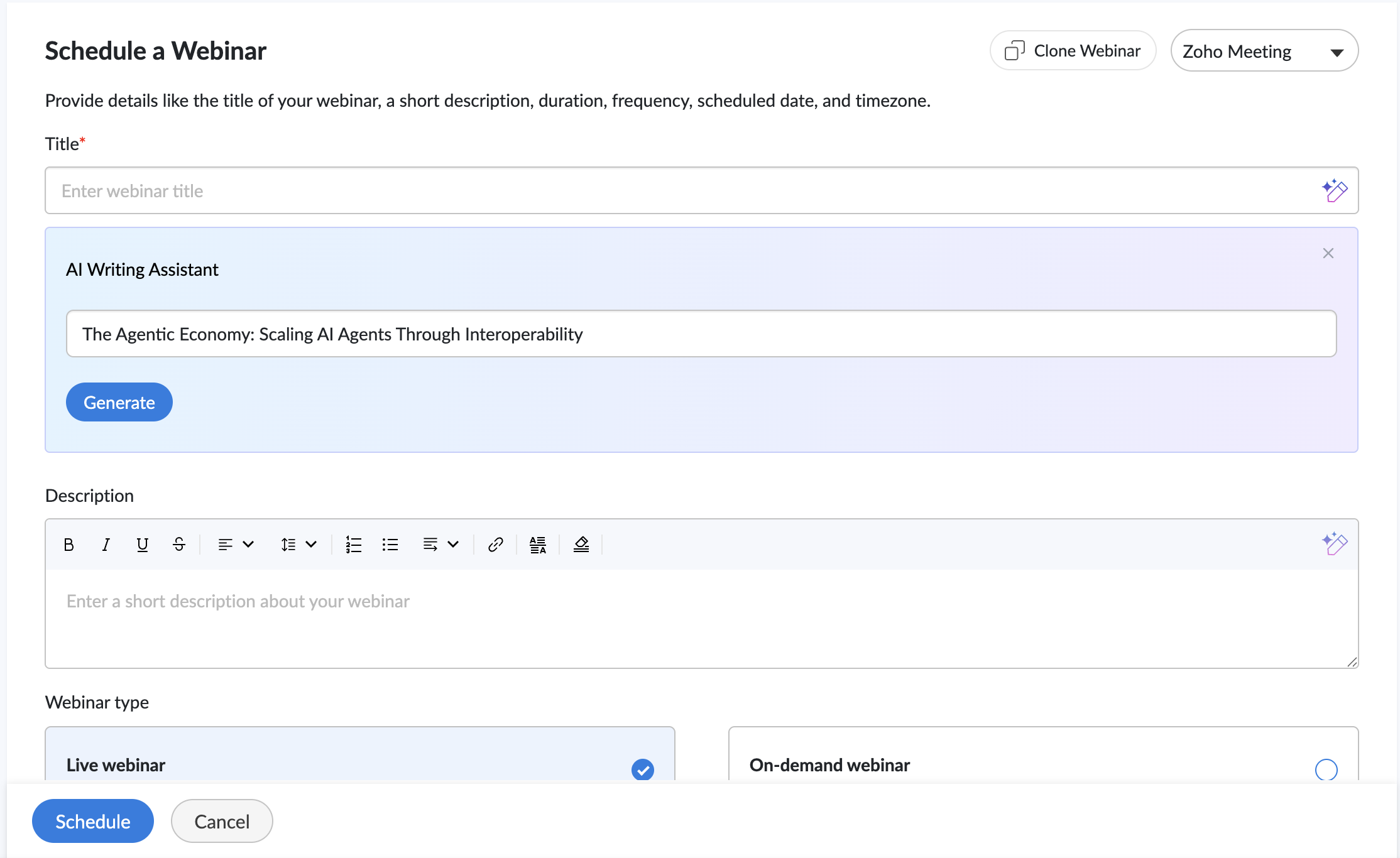
Our AI companion helps you create compelling webinar titles and descriptions in seconds. Instead of starting with a blank page, simply provide a keyword or a brief overview of your webinar, and the assistant generates ready-to-use content that you can review, refine, and publish.
- Choose from five tones: Professional, Conversational, Friendly, Optimistic, or Curious.
- Adjust the length to make content shorter or more detailed.
- Regenerate suggestions with a single click until you find the version that fits your webinar
Quick Email Templates
We’ve also introduced Quick Email Templates in Zoho Webinar, making it easier to customize emails without editing every message from scratch.
- Tailor subject lines to fit your webinar.
- Add personalized opening and closing notes.
- Create polished attendee communications in minutes.
From registration confirmations to webinar reminders and follow-ups, quick email templates help keep attendees informed while reducing the effort required to manage event communications.
AI recording
Your webinar’s value shouldn’t end when the live session does. Meet your AI co-organizer that stays back after every webinar to organize, summarize, and highlight what matters most for your audience. Our AI recording feature:
- Picks out the key moments worth revisiting as Highlights.
- Keeps recordings organized with Smart Chapters for easy navigation.
- Takes notes for your audience with summaries and transcripts.
Whether you’re running training sessions, product demos, or educational webinars, these AI features help attendees revisit key insights, navigate content more easily, and get more value from every recording.
Branding
With our registration page branding feature, you can design registration pages that align with your brand, feature your speakers, and build credibility with attendees from the moment they land on your registration page.
Wrapping up
Behind every successful webinar is a team working together to create a great experience for attendees. With this release, we hope to join your team.
We’ve introduced a collection of features designed to support organizers throughout the webinar journey—from planning and promotion to engagement, follow-ups, and post-event analysis.
Everything we’ve shipped this summer, including Workflows, Quick Email Templates, AI Recording, Branding, and Zoho Webinar MCP, is built around a simple idea: Webinar organizers shouldn’t have to do everything on their own. These features are designed to work alongside you, helping with preparation, engagement, and follow-up so you can focus on delivering a great webinar experience.
Recent Topics
Why can't we choose Fixed Asset account for Purchased Items? (eTims issue?)
Hello, When the company purchase items not for sale and not supposed to be in the inventory stock, like equipment for operational use, there is no way to access the Fixed Asset accounts in the drop down list. Is that an eTims limitation again? Or something
"Track Inventory for this item" is forced checked by default for goods items (eTims issue?)
Hello, Since connecting our Zoho books to eTims (Kenya) the "Track Inventory for this item" is forced checked by default (eTims issue?) in the Item creation page for any type of goods. So when purchasing anything that the company does not intend to sale,
Zoho CRM Functions: Redesigned Interface, Rich Analytics, and Multi-Language Support
Hello everyone! We have given Functions in Zoho CRM a major overhaul with a new interface that makes it easier to build, organize, monitor, and troubleshoot your functions throughout their lifecycle. As part of this revamp, we have also introduced a unified
Can you import projects into Zoho Projects yet?
I see some very old posts asking about importing project records into Zoho Projects. But I can't find anything up to date about the topic. Has this functionality been added? Importing tasks is helpful. But we do have a project where importing projects
reset password
Hi I need to reset my password and need help
Is it possible to set a value to a field based on certain conditions
Greetings Say i have a field that i want to set its value based on the value of another field.. for example if "number" field has value greater than 10, i want to set my field's value to X. Or if radio group had option 1 selected, then i want to set my
Native SMS and MMS Channel Support
89% of US consumers say they prefer to communicate with businesses via SMS / MMS (aka "texting"). (link) Unfortunately, Zoho Desk does not currently support the most popular channel for consumer communications in the United States. For those of us in
Zoho CRM Layout Rules: Nine New Actions, Profile-Based Execution, and Interactive Preview
Hello everyone, Availability: This feature is now available for customers in the JP and SA DCs. It is planned to be released for other customers in soon. We’re excited to announce powerful new enhancements to Layout Rules in Zoho CRM - a feature built
Global Sets for Multi-Select pick lists
When is this feature coming to Zoho CRM? It would be very useful now we have got used to having it for the normal pick lists.
How to add line breaks in formula with Concat?
I am trying to combine different fields with a formula field, but want to add line breaks. I.e. the current code looks like: Concat(${Contacts.Company_Name}, ' ' ,${Contacts.First_Name}, ' ' ,${Contacts.Last_Name}) And the result should be: John Doe
Introducing spam detection for webforms: An additional layer of protection to keep your Zoho CRM clean and secure
Greetings all, One of the most highly anticipated feature launches—Spam Detection in webforms—has finally arrived! Webforms are a vital tool for record generation, but they're also vulnerable to submissions from unauthenticated or malicious sources, which
Is Zoho Assist Secure Connect even practical for 1 person shop?
I was gun ho with Zoho Assist to replace my existing Remote Access product I have been using but I need to implement MFA on each unattended connection. Right now each of these connections in my other product has a rotating token that I have enter off
Join the Zoho Desk Virtual Classroom Training (VCRT)
Hello everyone, Have you heard about Zoho's Virtual Classroom Training (VCRT)? Zoho Desk's Virtual Classroom Training offers end-to-end training for Zoho Desk users. Join the VCRT and get hands-on guidance for setting up Zoho Desk and getting your business
Zoho CRM's revamped timeline view now extends to 3 years and support notes, filters, and email statuses
Editions: All DCs: All Release plan: These enhancements are being rolled out to customers in a phased manner. They will be available to most organizations by the end of May. For organizations with huge volumes of data, they will be available by the end
Zoho Mail App Unable to connect to server
Hi all, For the last two weeks, my Zoho Mail App on my iPhone which has worked fine up to this point has been unable to connect to the mail server. I can't access my emails even though I will get notification banners on the screen saying that they have been received. I can open Safari on my phone and then log in that way. This issue happens when I'm connected to wifi and on my phone data. I've tried deleting the app several times and reinstalling, and have updated to the latest version. But it still
Specific ListView Canvas on Canvas Home Page Always Loads Most Recent ListView, Not the One Specified
I had mentioned this to ZOHO, but I mainly wanted to see if others in the Community are also facing this problem. I created a Canvas ListView for a Custom Module, and then created a Canvas Home page (technically on a tab item, but I'm not sure if that
Add the Zoom Option to the Camera
Hi, I use the ZOHO Forms Camera so I can manage metadata, compression, etc. but this doesnt have the zoom parameter activated, so when we have photos in a tight space and want to use 0.5 for example, we can't, can this be enabled please. Thanks Dan
Manage booking pages from your Android phone
Hello everyone! We are happy to announce that users can now add and manage booking pages from their Bigin Android app. It is a multi-step form that users can create for purposes like booking appointments, scheduling calls or meetings, conducting webinars,
New UI - Color Preference Not Saving Permanently
Small, not very urgent problem I'd like to share regarding the new UI theme color. I've changed my theme preference to the default blue color around 20 times by now. It always reverts to a green color theme. I've followed the instructions of changing
Automating Employee Birthday Notifications in Zoho Cliq
Have you ever missed a birthday and felt like the office Grinch? Fear not, the Cliq Developer Platform has got your back! With Zoho Cliq's Schedulers, you can be the office party-cipant who never forgets a single cake, balloon, or awkward rendition of
Unbundle feature for composite items
We receive composite items from our vendors and sell them either individually or create other composite items out of them. So, there is a lot of bundling and unbundling involved with our composite items. Previously, this feature was supported in form
Inventory Barcode Creation - Add Picture of Item
Hi I am trying to set up bar code labels and include a picture of the item on the label - any idea on how to add that field to the barcode generator?
Gemini Action - Add "inineData" Support
Thank you guys for adding a Gemini action. I like Gemini models for the "grunt work" of AI, as they have the cheapest tokens of the trustworthy providers One thing that's missing in the action, though, is the ability to pass file data. If you pass a base64-encoded
Protect backed up and exported data using password encryption
Hello everyone, Protecting live data is crucial for any organization or product, as it contains sensitive customer information. However, protecting data does not end within the platform. Backup and export files often contain sensitive information and
Smarter holiday planning with yearly-specific Holiday Lists
Hello everyone! Managing holidays and business hours is now easier and more efficient. Holiday Lists now support holidays that fall on different dates every year, while business hours now supports more than one holiday list. This helps businesses manage
Zoho Projects - Cloning a task does not trigger task workflow when created
Hello! I have a Project where my team uses a set of tasks from a tasklist as templates, so we could simply clone it and drag it to another list in kanban view to avoid creating a new one from scratch. The process works well, but after cloning it the new
Best way to setup Inventory bin tracking for products with multiple boxes/crates
Hi - we need some advice from the community on setting up Items in the Inventory for products with multiple crates. We have large products in our warehouse where the product is delivered as two large (double pallet) crates. We've setup the Items for these
Cliq iOS can't see shared screen
Hello, I had this morning a video call with a colleague. She is using Cliq Desktop MacOS and wanted to share her screen with me. I'm on iPad. I noticed, while she shared her screen, I could only see her video, but not the shared screen... Does Cliq iOS is able to display shared screen, or is it somewhere else to be found ? Regards
not able to access Zoho from home WIFI
for some reasone i am not able to access Zoho on my laptop or my iphone while i am connected to my home Wifi, i am able to access these sites both on laptop as well as Iphone and associated apps on any other Wifi as well as when I am on my 4G connection
Five Guided Conversations Updates in Zoho Desk
Hello everyone, Guided Conversations is getting updates that make it easier to create more inclusive customer experiences, retain important conversation context, customize your widget, keep track of changes, and connect with external services. Here are
zoho desk
Hello, Did Zoho Desk have any issues today? Are tickets coming in late? I have an email account linked, and messages seem to be arriving with a delay—some email threads aren't coming through completely, and so on.
An important update for Zoho Cliq desktop users
The latest version of the Zoho Cliq desktop app (v1.8.0) will no longer be supported on macOS 10.15 Catalina and earlier versions. This is because the framework we use (Electron) no longer supports some older macOS versions. If you’re using macOS 10.15
Simplify eSignatures: Automate document workflows with Zoho WorkDrive
Hello everyone, We’re excited to invite you to our upcoming live webinar, where Zoho WorkDrive and Zoho Sign will come together to show you how to simplify and automate document workflows. From creating and collaborating on documents to approvals, e-signatures,
Function #7: Fetch a value from Deal in Zoho CRM to the related Estimate in Zoho Books
We're here with another function for those using the integration with Zoho CRM. You know that potentials can be linked to transactions in Zoho Books. But if you're including additional details about a Deal (potential) in Zoho CRM and you want to inherit
Turn off workflow Applied pop-up
hi We are new to Desk. I have a rule to set to "waiting for customer" when agent sends reply. This comes up every time. How to i turn off? Or am i seeing as admin.
Workflows being applied and the Large unwanted popup
When a workflow is being applied do to an action, then the Agent is left with a large Window asking if they would like the see the changes this workflow did. Is there any way to disable this prompt from appearing?
Maintenance notice for Zoho CommunitySpaces US data centers on August 23, 2026
Dear customers, We have scheduled a maintenance activity for Zoho CommunitySpaces in our United States (US) data centers on August 23, 2026, from 1:30 a.m. to 2:00 a.m. During this 30-minute maintenance window, Zoho CommunitySpaces will be temporarily
Knowledge base: The nitty-gritty of SEO tags
A well-optimized knowledge base with great SEO can benefit your company by allowing customers to find help articles and support resources using search engines. This enables customers to quickly and efficiently find the information they need without direct
zoho desk: Can tickets be created from Microsoft Teams messages?
I am trying to see if there is a way to integrate Microsoft teams with zohodesk. we have a few customers who prefer to communicate requests through Teams, and it would be great to create tickets when they do.
´´Send Email Reply´´ action does not work when the message body contains placeholders.
Hi Community, I am working on a workflow where the Customer contact is notified via email when their ticket status goes On Hold. To do that, I chose the Send Email Reply action, and the minute I add a placeholder, the workflow does not work and the ticket´s
Next Page