¡Muchas gracias por participar a los Meetups de Usuarios de Zoho! Y Novedades del ecosistema Zoho
¡Hola Comunidad de Zoho en Español! 👋
Después de un breve lapso de tiempo, volvemos con una nueva edición de nuestro Community Digest, donde te contamos las novedades de los productos de Zoho en los últimos meses. Estas mejoras se centran en nuestros productos como CRM, Projects, Forms y Commerce, y refuerzan tres pilares clave del ecosistema Zoho: la IA, la automatización y la experiencia de usuario.
Meetup de Usuarios de Zoho
Primero, queremos agradecer a la comunidad de usuarios de Barcelona y Valencia por una sesión muy productiva: durante nuestro Meetups de usuarios de Español Zoho Community, hablamos de funcionalidades clave de SalesIQ y CRM, descubrimos nuevas formas de optimizar procesos y además aprovechamos para hacer networking. ¡Todo un lujo de jornada en la mejor compañía!
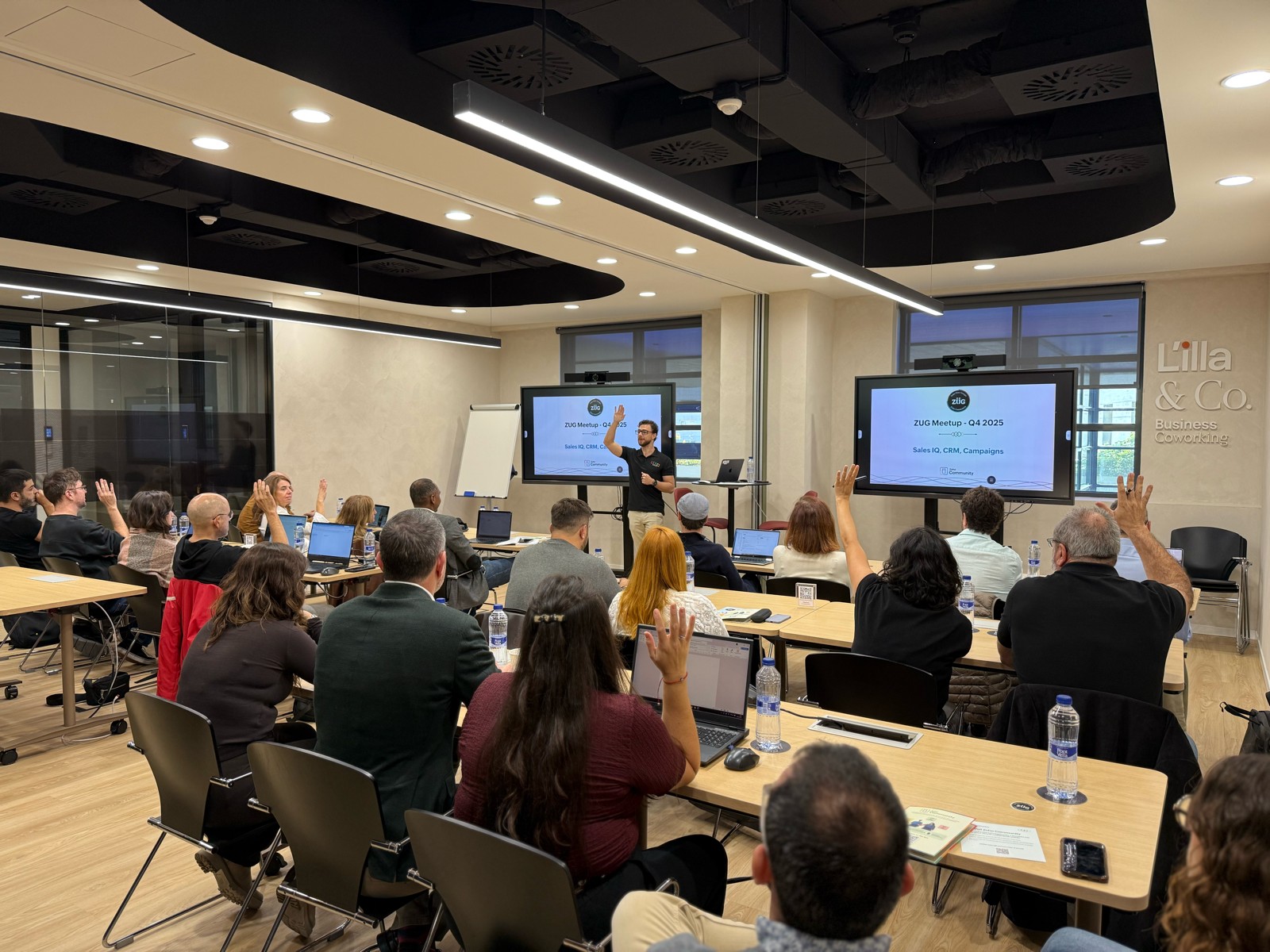

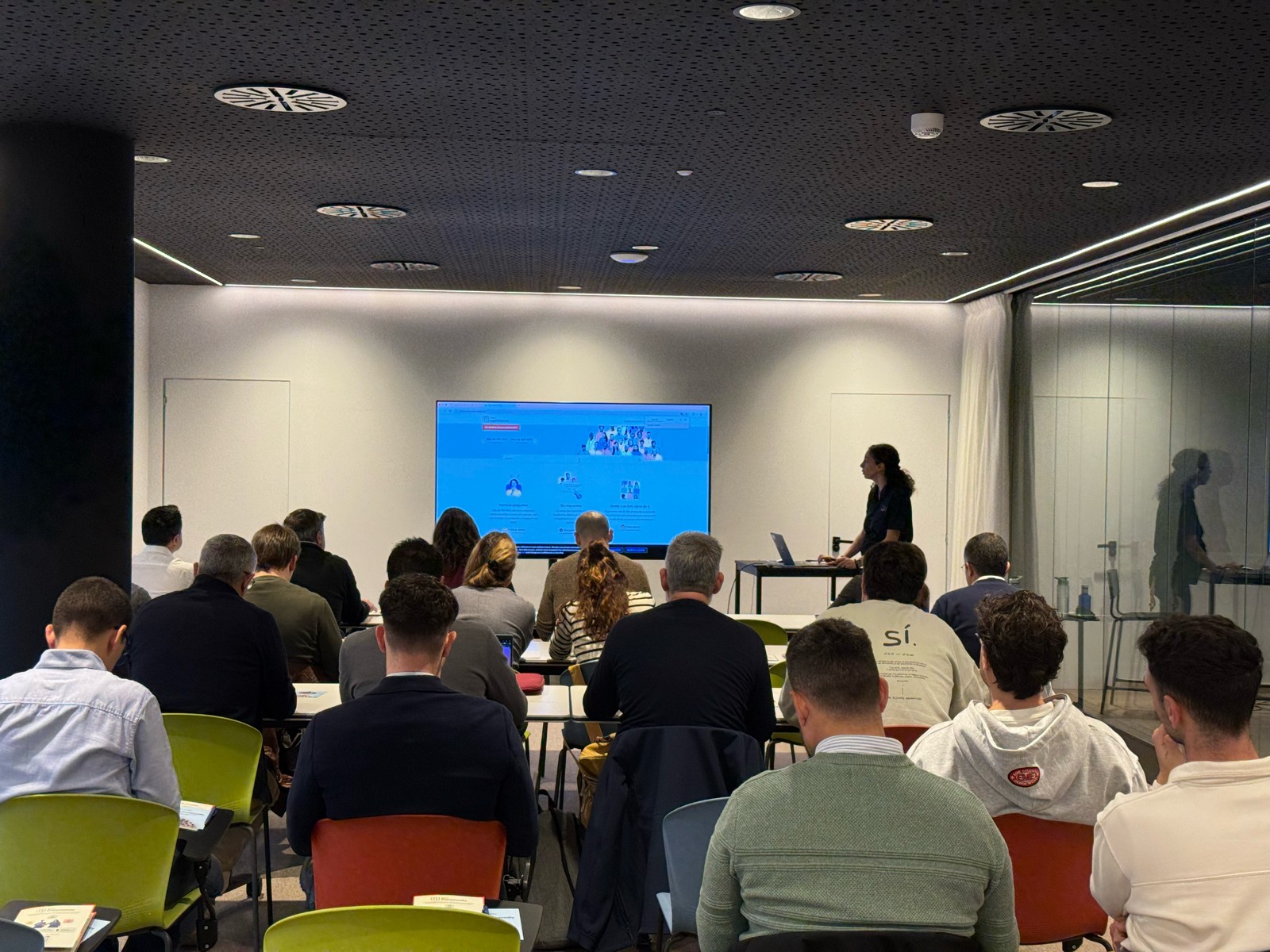

Y ahora sí, vamos con las novedades de nuestras herramientas. Prepárate, porque en estos últimos 6 meses han pasado muchas cosas:
1) Zoho CRM: Más inteligencia, más control y más flexibilidad
Nuestro producto estrella ha presentado algunas mejoras muy relevantes para una mejor gestión de los datos de clientes y de tu ecosistema Zoho:
- CommandCenter 2.0. Para que puedas automatizar mejor tus recorridos, CommandCenter ha presentado las siguientes actualizaciones: 1) Una nueva interfaz más visual e intuitiva. 2) El uso de “signals”, que te permiten activar transiciones basadas en eventos provenientes de diversas fuentes. 3) Los “stages” ya no dependen de un único módulo, sino que permiten transversalidad entre varios.
- Zia LLM: Nuestra IA también se ha actualizado y ahora ZIA te ofrece sugerencias más seguras y rápidas y funciones de IA generativa integradas para no depender de de inteligencia artificial proveedores externos.
- Control de visibilidad: Ahora puedes dar permisos basados en los perfiles de los usuarios para gestionar quién puede ver la línea de tiempo y el historial de interacciones.
- Canvas mejorado: Hemos añadido un nuevo componente en formato cuadrícula para organizar datos de manera más flexible. Y Soporte para layouts responsivos mediante “breakpoints”.
- CRM for Everyone: Llevamos ya tiempo anunciando CRM for everyone, y desde el Q2 ya está aquí. Descubre una nueva forma de habilitar a tus equipos de marketing, atención al cliente o finanzas para que puedan colaborar dentro del CRM de forma más ágil.
- Integración con Microsoft Graph API: Ahora aseguramos una mejor conectividad con Outlook/Microsoft 365 mediante la conexión con Graph API.
2) Zoho Projects: Mejor control y mayor claridad en la gestión del trabajo
En los últimos meses, Zoho Projects ha introducido mejoras directamente relacionadas con productividad, permisos y organización.
- Access Control en Time Logs: Gracias a la jerarquía de usuarios ahora puedes definir quién puede ver, añadir, editar o eliminar registros de tiempo dentro de su equipo y realizar acciones masivas para borrar time logs propios.
- Campos URL ampliados: Los campos URL en layouts de tareas ahora admiten hasta 1.000 caracteres, permitiendo enlaces más completos.
- Reutilización de listas de tareas: Puedes utilizar listas de tareas ya existentes dentro de tus plantillas, agilizando la creación de nuevos proyectos.
- Integración mejorada con Zoho Flow: Ahora puedes usar Zoho Flow para automatizar acciones desde reglas de workflow o blueprints dentro de Projects.
3) Zoho Forms: Mejor accesibilidad en tus formularios, ahora más modernos y conectados
Zoho Forms también ha presentado una gran cantidad de novedades durante estos últimos meses:
- Diseño en cuadrícula (grid layout): Ya puedes organizar tus formularios en 1, 2 o 3 columnas, mejorando su estética y su legibilidad.
- Verificación OTP integrada: Los formularios pueden solicitar OTP (para email/teléfono) sin salir de la pantalla.
- Múltiples cuentas de WhatsApp Business (para Zoho One) : Hemos ampliado la compatibilidad en cuanto a las cuentas de Whatsapp para aquellos equipos que manejan más de un canal de WhatsApp Business.
- Accesibilidad WCAG 2.2 AA : Zoho Forms ahora cumple con el estándar de accesibilidad WCAG 2.2 nivel AA, haciendo los formularios más inclusivos.
- Configuraciones mejoradas de Data Push: Ahora es posible enviar datos de campos específicos mediante configuraciones más precisas en “Post Submission Tracking”.
4) Zoho Commerce 2.0: Más rápido, más global, más personalizable
Hemos presentado oficialmente Commerce 2.0, una actualización de alto impacto que mejora rendimiento, diseño y capacidades globales:
- 15+ temas profesionales: Ahora puedes elegir entre más de 15 temas totalmente personalizables para construir tiendas modernas sin necesidad de utilizar código.
- Rendimiento optimizado: Ahora puedes hacer uso de CDN (Content Delivery Network) y además hemos implementado un código más ligero, reduciendo los tiempos de carga.
- Nuevas integraciones de envío
- Checkout multimoneda: Te facilitamos vender fácilmente en distintos mercados internacionales con el checkout multimoneda.
- Nuevos informes y auditoría: Informes más detallados (p. ej., ventas por cupón) y activity Logs / Audit Trail para un seguimiento completo de acciones en la tienda.
Es increíble todo lo que avanza la tecnología en 6 meses, y nuestras mejoras siguen enfocadas a hacer mejor uso de la automatización, la colaboración entre equipos y la creación de experiencias más inteligentes y ágiles, sin perder el foco en el uso de la IA.
¿Qué te parecen estas actualizaciones? ¿Hay alguna que vayas a implementar? ¡Cuéntanoslo en comentarios!
¡Nos vemos en el próximo Digest!
Topic Participants
Lorenza Pasca
Recent Topics
Missing Import Options
Hello, do I miss something or is there no space import option inside of this application? In ClickUp, you can import from every common application. We don't want to go through every page and export them one by one. That wastes time. We want to centralizeZoho CRM Portal Field Level Permission Issue
Hi Support Team, I am using the Zoho CRM Portal and configuring field-level editing permissions. However, we are unable to restrict portal users from editing certain fields. We have created a portal and provided View and Edit (Shared Only) access forCustom Fonts in Zoho CRM Template Builder
Hi, I am currently creating a new template for our quotes using the Zoho CRM template builder. However, I noticed that there is no option to add custom fonts to the template builder. It would greatly enhance the flexibility and branding capabilities ifCollaboration with customers made easy with Zoom Meeting and Zoho Desk integration
Hello everyone! We are happy to announce that you can now integrate your Zoho Desk account with Zoom Meeting. The integration bridges the gap between digital communication and human connection, empowering teams to deliver timely support when it mattersCRM Canvas - Upload Attachments
I am in the process of changing my screens to Canvas. On one screen, I have tabs with related lists, one of which is attachments. There doesn't appear to be a way to upload documents though. Am I missing something really obvious? Does anyone haveTrueSync regularly filling up my local disk
Seems that WorkDrive's TrueSync randomly starts filling up my local hard drive space. None of the folders have been set as "Make Offline" but still it seems to randomly start making file offline. The settings of the app is so minimal and is of no realKaizen #194 : Trigger Client Script via Custom buttons
Hello everyone! Welcome back to another interesting and useful Kaizen post. We know that Client Scripts can be triggered with Canvas buttons and we discussed this with a use case in Kaizen#180. Today, let us discuss how to trigger Client Script when aPicklist field shows "none" as default
Hello, Is there an option to avoid showing "none" as the default value in a picklist field? I also don't want to see any option displayed. My expectation is to have a blank bar, and then when I display the drop-down list, I can choose whichever I waStage-probability mapping feature in custom module
Hi, I'm building a custom module for manage projects. I would like to implement the stage-probability feature that Potentials has. Is this possible?Field Description is very small
Hello, The field Description in the activity is very small. Why don't try open a new window, or a bigger popup, or increase the width of the "popup". Example:StatusIQ
Please add StatusIQ to data sources. We using site24x7 and StatusIQ together and site24x7 integration is already there. Thanks and regards, TorstenIn Zoho People, the Operations buttons are frequently not visible or do not appear consistently.
In Zoho People, the Operations buttons are frequently not visible or do not appear consistently. We request you to please investigate and address this issue, as it is affecting daily HR operations and user access.Marketing Tip #14: Increase cart value with product bundles
Bundling products is a great way to increase average order value while giving customers more convenience. Think “camera + tripod + memory card” or “soap + lotion + bath salts.” Bundles make shopping easier and feel like a better deal. It’s a win-win forProblem with Workdrive folders
I'm having a problem a problem accessing files in a Zoho work drive folder when using the Zoho writer app. The problem folder appears grayed out in the Zoho work drive window in both the online and writer application. However I can open the folder inPre-orders at Zoho Commerce
We plan to have regular producs that are avaliable for purchase now and we plan to have products that will be avaliable in 2-4 weeks. How we can take the pre-orders for these products? We need to take the money for the product now, but the delivery willCan multiple agents be assigned to one ticket on purpose?
Is it possible to assign one ticket to two or more agents at a time? I would like the option to have multiple people working on one ticket so that the same ticket is viewable for those agents on their list of pending tickets. Is something like this currentlyEdit default "We are here to help you" text in chat SalesIQ widget
Does anyone know how this text can be edited? I can't find it anywhere in settings. Thanks!Feature Request: Sync Leave Tracker to Zoho Mail / Calendar or provide option to download information
Zoho Leave Tracker offers the option to sync the leave Calendar to Microsoft 365 and Google Calendar. Adding an option to sync to Zoho-Mail Calendar would avoid duplication and add significant value for users. An alternative would be to allow users toCompensation | Salary Packages - Hourly Wage Needed
The US Bureau of Labor Statistics says 55.7% of all workers in the US are paid by the hour. I don't know how that compares to the rest of the world, but I would think that this alone would justify the need for having an hourly-based salary package option.Multiple currencies - doesn’t seem to work for site visitors / customers
I am trying to understand how the multiple currency feature works from the perspective of the website visitor who is shopping on my Zoho Commerce site. My site’s base currency is US Dollars (USD) but my store is for customers in Costa Rica and I wouldArchiving Contacts
How do I archive a list of contacts, or individual contacts?How do people handle using Outlook and Zoho Project calendar at the same time?
We have an ongoing problem in our organisation where we use Zoho Projects to plan all of our projects tasks and that also allows us to look forward using the workload report to see which of our consultants are overstretched etc and which are available.10GB Email Storage Limits in Zoho CRM
We’ve had Zoho One for almost 5 years and have always synced our emails from Gmail via IMAP… As of late, we’ve run into issues with our emails not syncing, due to being over the 10GB storage cap… What’s very odd is that we haven’t changed a thing? I knowHow to set page defaults in zoho writer?
hi, everytime i open the zoho writer i have to change the default page settings to - A4 from letter, margins to narrow and header and footer to 0. I cannot set this as default as that option is grayed out! so I am unable to click it. I saved the documentEnable History Tracking for Picklist Values Not Available
When I create a custom picklist field in Deals, the "Enable History Tracking for Picklist Values" option is not available in the Edit Properties area of the picklist. When I create a picklist in any other Module, that option is available. Is there a specific reason why this isn't available for fields in the Deals Module?Vault crashes on Android Devices
Vault is continuously closing after entering the master password on my Android device. After several attempts I get a system message that says there is a bug in the app. I've uninstalled and reinstalled the app, and cleared the app cache, but nothing¿Cómo puedo configurar las contraseñas creadas bajo una directiva para que nunca caduquen y no aparezcan como caducadas en los informes?
¿Cómo puedo configurar las contraseñas creadas bajo una directiva para que nunca caduquen y no aparezcan como caducadas en los informes? La razón por la cual contraseña estas no deben caducar es porque su actualización depende de mi cliente y no de mí.Camera access
My picture doesn't appear in a group discussion. (The audio is fine.) The guide says "Click the lock icon on address bar," but I can't find it. Advise, pleaseAre static links available
I'm still using Zoho Meeting in trial mode. My previous webinar software provided a static link, and I made the mistaken assumption that I could send out my link and start a meeting later. Mass confusion, but my fault. With a paid version do you get aWhy is Zoho Meeting quality so poor?
I've just moved from Office 365 to Zoho Workplace and have been generally really positive about the new platform -- nicely integrated, nice GUI, good and easy-to-understand control and customisation, and at a reasonable price. However, what is going onIntegration between "Zoho Sprints Stories" and "Zoho Projects Tasks/Subtasks"
We have two separate teams in our organization using Zoho for project management: The Development team uses Zoho Sprints and follows Agile/Scrum methodology. The Infrastructure team uses Zoho Projects for traditional task-based project management. InWhere can we specify custom CSS in Zoho Forms custom theme ?
I'm using a form with a dark theme. The OTP popup window is unreadable, because for some reason, the OTP popup background fixes color to white, but still takes the font color specified in the custom theme. This ends up as white on white for me, renderingTeam Gamification
Would love to motivate, engage and encourage our team with our social media posts. Would like to include Gamification features of Social Media in Zoho Social or Marketing Automation. And also bring in Social Advocacy tools/tracking/management to these,Sync Data from MA to CRM
Currently, it's a one-way sync of data from the CRM to MA. I believe we should have the ability to select fields to sync from MA to the CRM. The lead score is a perfect example of this. In an ideal world we would be able to impact the lead score of aUpdate CRM record action
Currently, MA only offers a "Push Data" action to push data to a CRM module. This action is built to cover the need to both create a new record and update an existing record. Because it has been implemented this way all required fields on the CRM modulePro Lite Upgrade - Quick Access Tray
Hello, I was going to upgrade to Pro Lite but the Quick Access Tray feature isn't available for Windows. Of the four features not available for Windows, the QAT is what I'm most interested in. Are there plans to add this feature for Windows anytime soon?Boost your CRM communication with new font types, sizes, and default reply-to options while composing emails
Hello Everyone, We’re excited to introduce a series of impactful enhancements to the email composer settings in Zoho CRM. These updates enable you to personalize and optimize your customer interactions with greater efficiency. So what's new? Add customFeature Enhancement Request – Text Formatting Options in Item Description (Zoho Books/Quotes Module)
Dear Zoho Development Team, Greetings from Radiant360 Integrated Technical Services LLC. We would like to bring to your attention a functional limitation we've encountered within the Item Table / Quote Description section of Zoho Books (and Zoho CRM Quotes).3 year sick leave cycle
How do you set up a sick leave cycle for South Africa? In SA the sick works like this for the first 6 months you get 0.83 paid sick days a month, then after 6 months you sick leave balance is reset to 30 days that can be used over a 36 month cycle. ThisWorkDrive and CRM not in sync
1/ There is a CRM file upload field with WorkDrive file set as the source: 2/ Then the file is renamed in WorkDrive (outside CRM): 3/ The File in CRM is not synced after the change in WorkDrive; the file name (reference) in CRM record is not updated (hereNext Page