¡Muchas gracias por participar a los Meetups de Usuarios de Zoho! Y Novedades del ecosistema Zoho
¡Hola Comunidad de Zoho en Español! 👋
Después de un breve lapso de tiempo, volvemos con una nueva edición de nuestro Community Digest, donde te contamos las novedades de los productos de Zoho en los últimos meses. Estas mejoras se centran en nuestros productos como CRM, Projects, Forms y Commerce, y refuerzan tres pilares clave del ecosistema Zoho: la IA, la automatización y la experiencia de usuario.
Meetup de Usuarios de Zoho
Primero, queremos agradecer a la comunidad de usuarios de Barcelona y Valencia por una sesión muy productiva: durante nuestro Meetups de usuarios de Español Zoho Community, hablamos de funcionalidades clave de SalesIQ y CRM, descubrimos nuevas formas de optimizar procesos y además aprovechamos para hacer networking. ¡Todo un lujo de jornada en la mejor compañía!
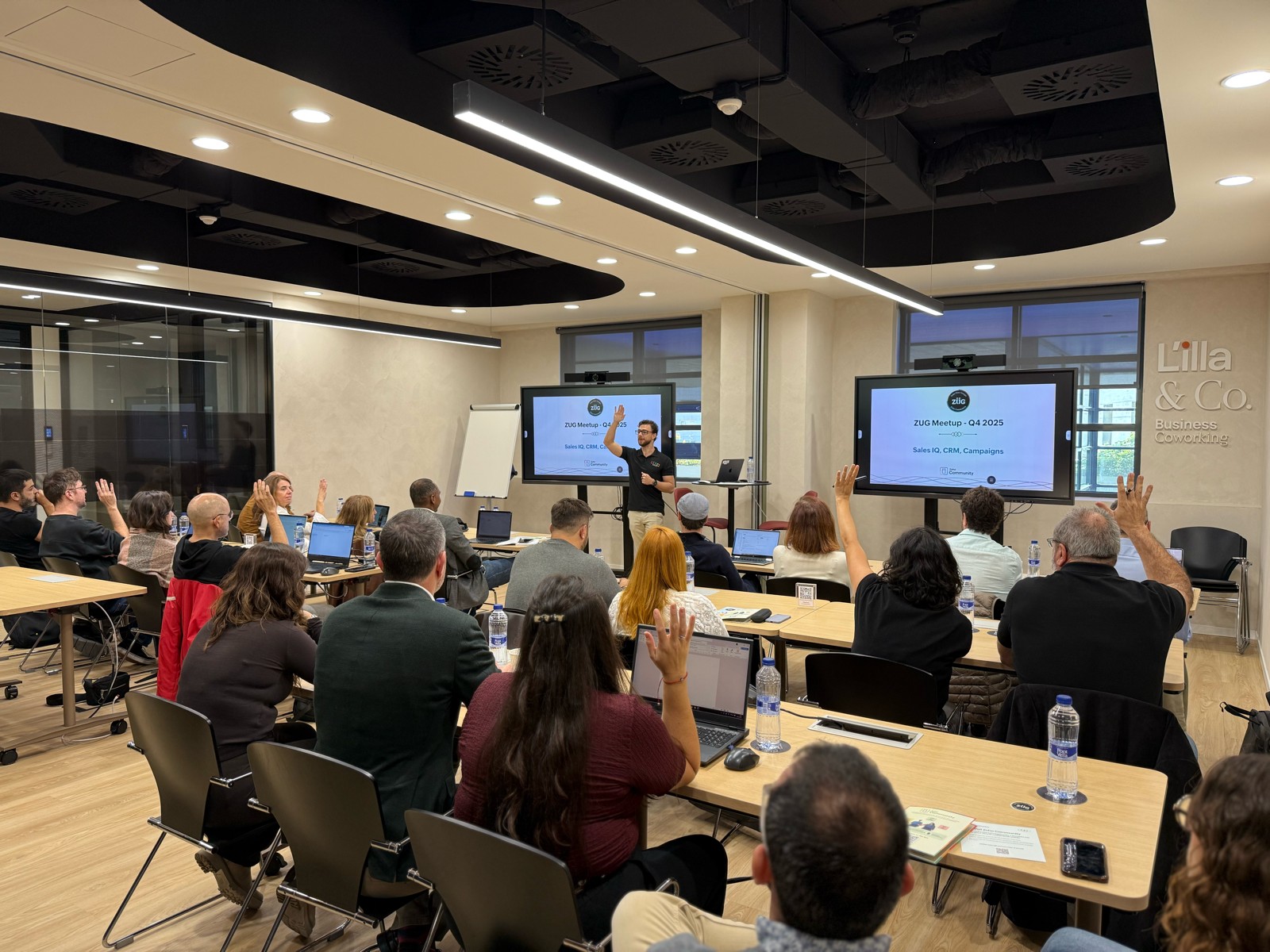

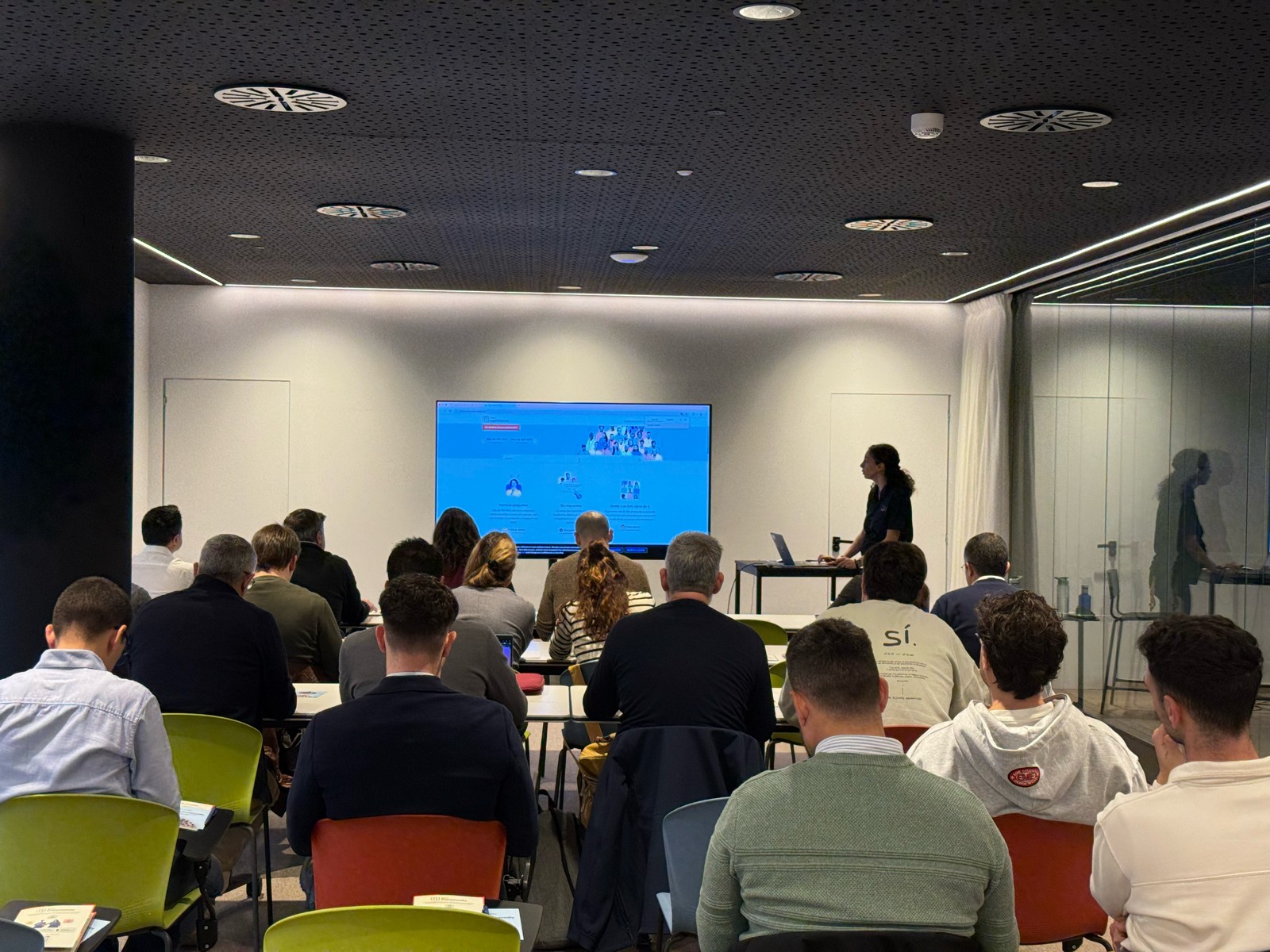

Y ahora sí, vamos con las novedades de nuestras herramientas. Prepárate, porque en estos últimos 6 meses han pasado muchas cosas:
1) Zoho CRM: Más inteligencia, más control y más flexibilidad
Nuestro producto estrella ha presentado algunas mejoras muy relevantes para una mejor gestión de los datos de clientes y de tu ecosistema Zoho:
- CommandCenter 2.0. Para que puedas automatizar mejor tus recorridos, CommandCenter ha presentado las siguientes actualizaciones: 1) Una nueva interfaz más visual e intuitiva. 2) El uso de “signals”, que te permiten activar transiciones basadas en eventos provenientes de diversas fuentes. 3) Los “stages” ya no dependen de un único módulo, sino que permiten transversalidad entre varios.
- Zia LLM: Nuestra IA también se ha actualizado y ahora ZIA te ofrece sugerencias más seguras y rápidas y funciones de IA generativa integradas para no depender de de inteligencia artificial proveedores externos.
- Control de visibilidad: Ahora puedes dar permisos basados en los perfiles de los usuarios para gestionar quién puede ver la línea de tiempo y el historial de interacciones.
- Canvas mejorado: Hemos añadido un nuevo componente en formato cuadrícula para organizar datos de manera más flexible. Y Soporte para layouts responsivos mediante “breakpoints”.
- CRM for Everyone: Llevamos ya tiempo anunciando CRM for everyone, y desde el Q2 ya está aquí. Descubre una nueva forma de habilitar a tus equipos de marketing, atención al cliente o finanzas para que puedan colaborar dentro del CRM de forma más ágil.
- Integración con Microsoft Graph API: Ahora aseguramos una mejor conectividad con Outlook/Microsoft 365 mediante la conexión con Graph API.
2) Zoho Projects: Mejor control y mayor claridad en la gestión del trabajo
En los últimos meses, Zoho Projects ha introducido mejoras directamente relacionadas con productividad, permisos y organización.
- Access Control en Time Logs: Gracias a la jerarquía de usuarios ahora puedes definir quién puede ver, añadir, editar o eliminar registros de tiempo dentro de su equipo y realizar acciones masivas para borrar time logs propios.
- Campos URL ampliados: Los campos URL en layouts de tareas ahora admiten hasta 1.000 caracteres, permitiendo enlaces más completos.
- Reutilización de listas de tareas: Puedes utilizar listas de tareas ya existentes dentro de tus plantillas, agilizando la creación de nuevos proyectos.
- Integración mejorada con Zoho Flow: Ahora puedes usar Zoho Flow para automatizar acciones desde reglas de workflow o blueprints dentro de Projects.
3) Zoho Forms: Mejor accesibilidad en tus formularios, ahora más modernos y conectados
Zoho Forms también ha presentado una gran cantidad de novedades durante estos últimos meses:
- Diseño en cuadrícula (grid layout): Ya puedes organizar tus formularios en 1, 2 o 3 columnas, mejorando su estética y su legibilidad.
- Verificación OTP integrada: Los formularios pueden solicitar OTP (para email/teléfono) sin salir de la pantalla.
- Múltiples cuentas de WhatsApp Business (para Zoho One) : Hemos ampliado la compatibilidad en cuanto a las cuentas de Whatsapp para aquellos equipos que manejan más de un canal de WhatsApp Business.
- Accesibilidad WCAG 2.2 AA : Zoho Forms ahora cumple con el estándar de accesibilidad WCAG 2.2 nivel AA, haciendo los formularios más inclusivos.
- Configuraciones mejoradas de Data Push: Ahora es posible enviar datos de campos específicos mediante configuraciones más precisas en “Post Submission Tracking”.
4) Zoho Commerce 2.0: Más rápido, más global, más personalizable
Hemos presentado oficialmente Commerce 2.0, una actualización de alto impacto que mejora rendimiento, diseño y capacidades globales:
- 15+ temas profesionales: Ahora puedes elegir entre más de 15 temas totalmente personalizables para construir tiendas modernas sin necesidad de utilizar código.
- Rendimiento optimizado: Ahora puedes hacer uso de CDN (Content Delivery Network) y además hemos implementado un código más ligero, reduciendo los tiempos de carga.
- Nuevas integraciones de envío
- Checkout multimoneda: Te facilitamos vender fácilmente en distintos mercados internacionales con el checkout multimoneda.
- Nuevos informes y auditoría: Informes más detallados (p. ej., ventas por cupón) y activity Logs / Audit Trail para un seguimiento completo de acciones en la tienda.
Es increíble todo lo que avanza la tecnología en 6 meses, y nuestras mejoras siguen enfocadas a hacer mejor uso de la automatización, la colaboración entre equipos y la creación de experiencias más inteligentes y ágiles, sin perder el foco en el uso de la IA.
¿Qué te parecen estas actualizaciones? ¿Hay alguna que vayas a implementar? ¡Cuéntanoslo en comentarios!
¡Nos vemos en el próximo Digest!
Topic Participants
Lorenza Pasca
Recent Topics
Marketer's Space: Why mobile optimization deserves a place in your email strategy
Hello Marketers, Welcome back to Marketer's Space! Today, we'll talk about the importance of creating mobile-friendly email designs. While mobile phones were once used only to make phone calls, today they're used for almost everything, including texting,Enhancements in Canvas
Dear All, Greetings! Canvas lets you design the record details page to suit your brand or business preferences. We are glad to introduce the following enhancements to uplift your design experience. Reusable Components Style Presets Let's go! ReusableIntroducing Dark Mode / Light Mode : A New Look For Your CRM
Hello Users, We are excited to announce a highly anticipated feature - the launch of Day, Night and Auto Mode implementation in Zoho CRM's NextGen user interface! This feature is designed to provide a visually appealing and comfortable experience forABN with Legal Entity Name
Hi, How can I execute this? The ABN number is entered in Accounts Module and ideally, it should display or suggest the correct Legal Entity Name based on the ABN lookup. ex. Account Name: JPG Resources ABN Number: 65 067 761 871 Legal Entity Name: (autoIssue: Ticket Export Does Not Include Ticket Threads
Dear Zoho Desk Support Team, I hope you’re doing well. I wanted to bring to your attention that the current ticket export feature in Zoho Desk does not seem to include the ticket threads or conversation history. When exporting tickets, only the summaryPushover Notification Module
Hello, it would be good if there would be a "Pushover" (https://pushover.net/) module besides the standard SMS module. Pushover is now very well known, especially in IT, and is becoming more and more popular. The biggest advantage are the customizableForward - no Ticket Number
Hello, when I send an email to Zoho Desk via Reply or Reply All, the ticket number is in the subject line. But if I use forward then not. Is there an option to change this? We often forward e-mails and a reply to this will of course create a new ticketCheckout: Adding Images
Hello everyone, I’m trying to add a small GoGreen logo in the shipping section of the checkout to promote our sustainable shipping. While I can insert text without any issues, it seems that adding images is not supported in this area. Is there currently[solved] #original_sender trick not working for us
Hello community ! We really like DESK.. it's working like a charm for us but I have a request. Some users are sending emails personnaly to me (instead of using the support adress).. and I saw there was a possibilty to use : #original_sender {mail@mail.com}SalesIQ Chat Notifications
I am the admin of our salesIQ implementation. About two weeks ago, I started hearing/seeing notification for ALL chats messages from monitored agents/chat participants. I don't need to see these, we have a manager who deals with this. I can't stop theCorrelated subqueries not supported in Zoho Analytics. This creates huge limitations
Running into a major limitation in Zoho Analytics: correlated subqueries simply don’t work, even in completely standard SQL patterns inside a JOIN. Example: LEFT JOIN "Bills" b ON d."Id" = b."Deal ID" AND EXISTS ( SELECT 1 FROM "BillBatch Emails in CRM Plus without using a template?
Hi guys. Is it possible to send the same email to multiple people at the same time within CRM Plus without using an email template? At the moment we create a custom view in Contacts to display the people that we need. We then click the boxes on the left, and click 'Send Mail', but always need to select a template. Sometimes its better to write a quick one off message, without needing to set up a template first. Thanks.bank charge
a charge to my account was made that I did not authorize, of $16.46, for something that looks like "computer maintenance or something to that matter". please refund.[Free Webinar] Product Updates: Quick Catch-Up Session - Part II - Creator Tech Connect
Hello Everyone! We welcome you all to the upcoming free webinar on the Creator Tech Connect Series. The Creator Tech Connect series is a free monthly webinar featuring deep-dive technical sessions designed for developers, administrators, and app builders.Introducing Liquid Glass UI on the Zoho Mail iOS app
Hello everyone! We're excited to announce that the Zoho Mail app is now fully optimised for iOS 26's Liquid Glass design on both iPhone and iPad! The updated interface features transparent layers, smooth animations, and refined visual elements that enhancePlan change from Zoho One to Zoho Workplace
Hello Zoho, Following the recent pricing update for Zoho One, we are interested in transitioning to Zoho Workplace products. Please inform us about the necessary steps for this process so we can proceed promptly. Kind regards,Links in Instagram
Hi there, I have been using Later for a while now but keen to come back to Zoho Social as Later doesn't offer tagging of pages on Facebook but they offer something Zoho doesn't. You can add a link to your bio which opens up your profile feed where imagesSpotlight #7 - Automatic Transitions in Blueprint
Previously, records could not be moved from one state to another without user intervention. With automatic transitions, move records from one state to another automatically, when it elapses its pre-defined time. This Spotlight discusses how automaticSub Folders
It would be great if there could be sub-folders in reports. We have a ton of individual reports and folders that would be easier to navigate this wayZoho CRM Community Digest - November 2025 | Part 2
Hello Everyone! Second half of November brought several exciting updates, especially around Zia, making AI assistance smarter, faster, and more context-aware. We also feature engaging community snippets highlighting members who went the extra mile toZoho CRM - Writing Assistant Tone
Hi Zoho CRM Team, Text in my emails often gets underlined in yellow because I tend to use a more informal tone with my client's, like using "I'm" instead of "I am". Is there some way for me to tell the system that this is my preferred writing tone, soHide Contact Number for Field Users & Agents
Is it possible to hide the contact number in both the Service Appointment and Work Order modules for field users and agents? The agents are using the Zoho FSM mobile app, and we want to restrict them from viewing the contact number.Form Submission Emails
Is there a current delay with submission emails being sent? We've had 10-20 forms completed today but only a handful of emails.Subform edits don't appear in parent record timeline?
Is it possible to have subform edits (like add row/delete row) appear in the Timeline for parent records? A user can edit a record, only edit the subform, and it doesn't appear in the timeline. Is there a workaround or way that we can show when a user【Zoho CRM for Everyone】設定画面のアップデート
ユーザーの皆さま、こんにちは。コミュニティチームの藤澤です。 今回は「Zoho CRM アップデート情報」の中から、Zoho CRM for Everyone の設定画面のアップデート情報をご紹介します。 目次 設定ホーム画面の追加 設定画面での検索結果の表示形式の変更 設定画面でのよく使用する機能の表示 設定メニューの展開/折りたたみ状態の保持 1. 設定ホーム画面の追加 ホーム画面の設定項目は、直感的に分類できるように"カテゴリごと"で分けられています。 このような一元化された表示により、各ツールが1つの画面に集約され、必要な機能をより簡単に見つけられるようになりました。What's New - November 2025 | Zoho Backstage
A new month, a new set of updates. With a mix of new features and thoughtful improvements, you get smoother workflows and better control across registrations, exhibitors, and communications. Let's take a look at what's new and enhanced in Zoho BackstageZoho Checkout - Duplicate Customer record created for each payment received
Hi All. We are using Zoho Checkout to capture online payments for a club membership form (in Zoho Forms). We've noticed that each new payment seems to create a new customer record, regardless of whether the customer already exists in the Zoho FinanceTemplates for Zoho Desk - Knowledge Base
We are looking at migrating our Knowledge base into Zoho Desk. Is there a way of creating templates for article in Knowledge base. We want to be able to set templates for certain types of content. Is this possibleImport KB template OR Export template for zoho desk?
Greetings. Can you tell me if there is a way to get an EXPORT of my KB articles? OR is there a template you supply for importing KB articles into my zoho desk? I am looking for a method of understanding what fields can be imported, and what their possibleWhat KPIs Do You Use to Measure Your Support Team’s Performance in Zoho Desk?
Hi everyone, We hope you’re all doing well. We are trying to improve how we measure the performance and effectiveness of our support department, and we would really appreciate learning from the community. We assume there are several common and widely-usedBackorder quantity change
New Purchase Order × Almost there, but... Quantity of items in this purchase order is greater than the quantity that can be backordered from that sales order. Why can't I change the quantity of a backorder purchase? It looks like a normal order form and I would like to use it as one because I increased the amount and added some items.How to Associate multiple contacts with deal in Sales Inbox
Hello, I have many deals that have multiple potential customers associated with a single deal, for example an engineer and a manager. The manager is the Deal's primary contact in CRM and the Engineer is added to the deal in the "Contact Roles" Associated"code": "500","description": "Account not exists", mail api
I have been through all the steps and have a functioning Oath access_token etc etc... I then GET https://mail.zoho.com/api/organization And get my zoid then GET http://mail.zoho.com/api/organization/<hidden>/accounts and get the account details, whichRTL Support for Webforms in Zoho CRM
Dear Zoho CRM Support Team, We are writing to request an enhancement to the webform builder functionality within Zoho CRM. Currently, to create a webform in a right-to-left (RTL) language, the entire CRM instance must be set to RTL, which can be inconvenientImported contacts succesful but contacts do not show up in Contacts
I imported +300 contacts. I can see them in import history. When clicking on a contact in import history I see all the imported contact details for any given contact. So import seems to be successful. However the imported contacts do not show up in the contacts tab. Not in All contacts, and not in a filtered view where they absolutely should show up. The search function also does not find any imported contact. Help?Saving sent email campaign as PDF
I'm looking to add all campaigns sent to an archive folder in sharepoint. Is there anyway to accomplish this in Zoho Flow ? I'm falling at the first hurdle ... can I automatically save a sent campaign as a PDF to a folder location ?Zoho Voice lance BYOC (Bring Your Own Carrier) : intégrez votre opérateur
Pour accompagner sa croissance, une entreprise a besoin d’une infrastructure téléphonique flexible et évolutive. Les solutions de téléphonie s’adaptent aux exigences du centre de contact, tout en intégrant aisément les opérateurs locaux de votre choix.Zoho Social API for generating draft posts from a third-party app ?
Hello everyone, I hope you are all well. I have a question regarding Zoho Social. I am developing an application that generates social media posts, and I would like to be able to incorporate a feature that allows saving these posts as drafts in Zoho Social.Digest Novembre - Un résumé de ce qui s'est passé le mois dernier sur Community
Bonjour chers utilisateurs, Avec l'arrivée du dernier mois de l'année, il est temps de résumer les activités de novembre dans la communauté Zoho France. Ce mois-ci, Zoho Webinar se dote de deux nouvelles intégrations ! La première est avec Zapier : connectezE-Invoicing in Belgium with Zoho Books
Starting January 1, 2026, Belgium is introducing mandatory electronic invoices (e-invoicing) for all B2B transactions between VAT-registered businesses. This means that invoices and credits notes must be exchanged in a prescribed digital format. How E-InvoicingNext Page