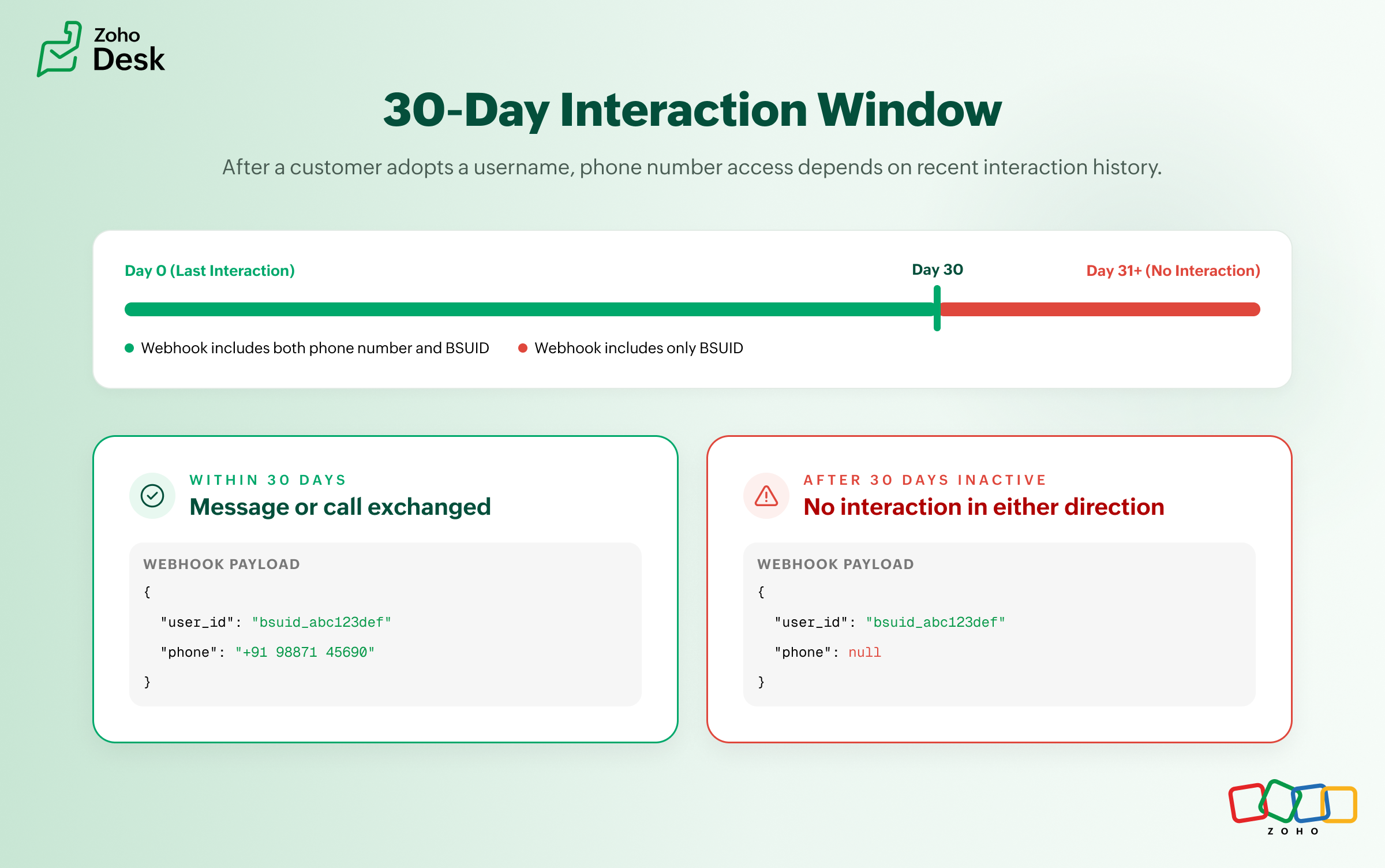
Action required: WhatsApp now uses BSUID as the primary identifier

Action required: WhatsApp now uses BSUID as the primary identifier

 Important
If your support team uses WhatsApp to engage with customers, there is an important platform change you need to know about. BSUID support is now mandatory for all WhatsApp Business Platform partners and businesses.

WhatsApp is introducing usernames, which allow customers to interact with businesses without sharing their phone numbers. To handle this, supporting the Business-Scoped User ID (BSUID) is now mandatory for all WhatsApp Business Platform partners and businesses, including Click-to-WhatsApp (CTWA) advertisers.

Going forward, BSUID should be treated as the primary customer identifier, while phone numbers should be stored as supporting information whenever they are available. See Meta's official documentation ↗


What is a BSUID?

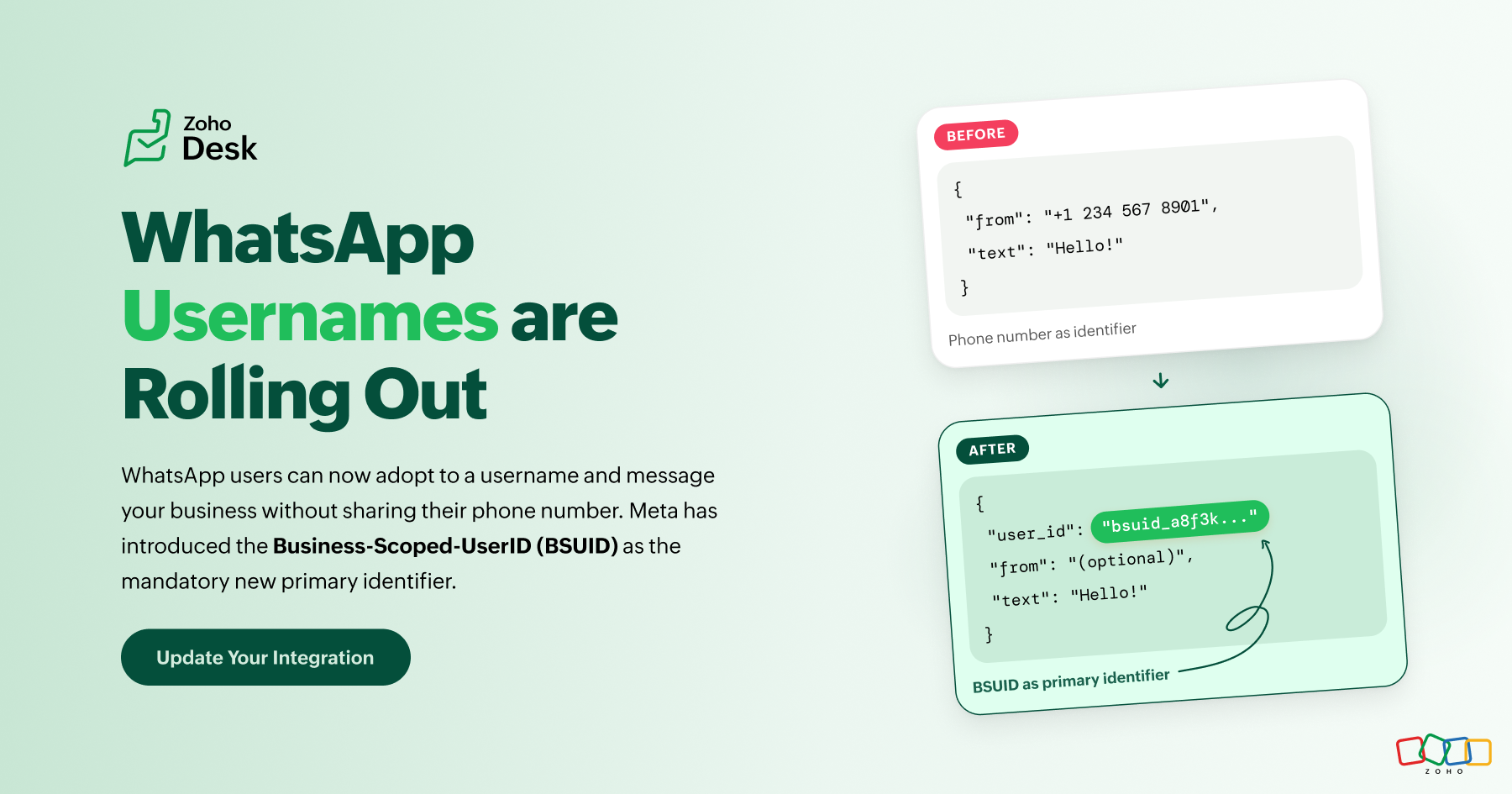
A Business-Scoped User ID (BSUID) is a unique identifier that Meta generates for every customer and business relationship. It appears in webhook payloads as the user_id parameter and can be used to identify and message WhatsApp users even when their phone number is unavailable.

Note
A note on storing BSUID: IM receives the BSUID in the user_id webhook field, but storing it against a contact record requires your integration to be explicitly configured to do so. See the Action Checklist below.

When will you still see a phone number?

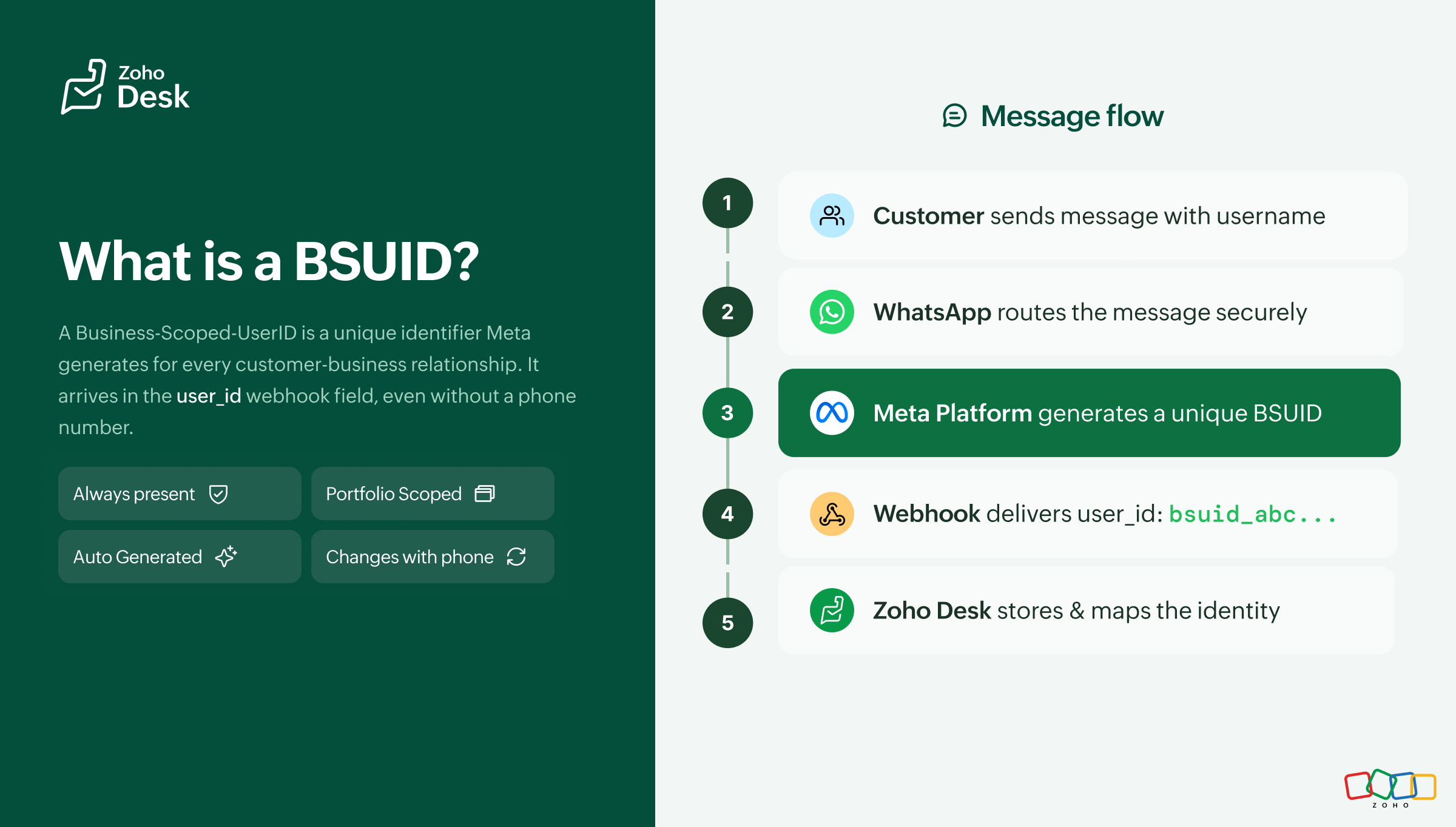
Phone numbers are no longer guaranteed in every webhook payload. A phone number will continue to appear when one of the following conditions is met:

Condition Explanation
30-day interaction window Your business phone number has sent a message or call to the customer, or received a message or call from the customer, within the previous 30 days. The window resets with each qualifying interaction in either direction.

Important
The 30-day interaction window is evaluated per business phone number, not per business portfolio. If a customer interacts with one business number, another number under the same portfolio does not automatically inherit that window. Reference ↗
Condition Explanation
Contact Book mapping exists The customer's phone number and BSUID have been stored in Meta's Contact Book through a real interaction after April 2026.


What is the Contact Book?

The Contact Book is a Meta-hosted mapping between a customer's phone number and their BSUID. It is enabled by default, scoped to the business portfolio level, and requires no additional integration work. Any real message or call between your business and a customer after April 2026 automatically stores the phone-to-BSUID mapping. This helps preserve phone number visibility in future webhooks, even after a customer adopts a username.

  1. Interactions that occurred before April 2026 are not recorded retroactively. Customers returning after a long gap who now use a username may initially appear as new contacts.
  2. Disabling the Contact Book permanently removes all stored mappings and they cannot be recovered. To manage this setting, go to Meta Business Suite > Business Settings > Business Info.
  3. Contact Book data is scoped per business portfolio. Any interaction between any business phone number within the portfolio and a customer triggers storage. Mappings are not shared across different portfolios, even when those portfolios belong to the same Meta Business Account.

See also: Learn more about Contact Book ↗


The three scenarios you will encounter

As usernames become more common, businesses are likely to encounter one of the following scenarios. Refer to the diagram in the original article for a visual breakdown.
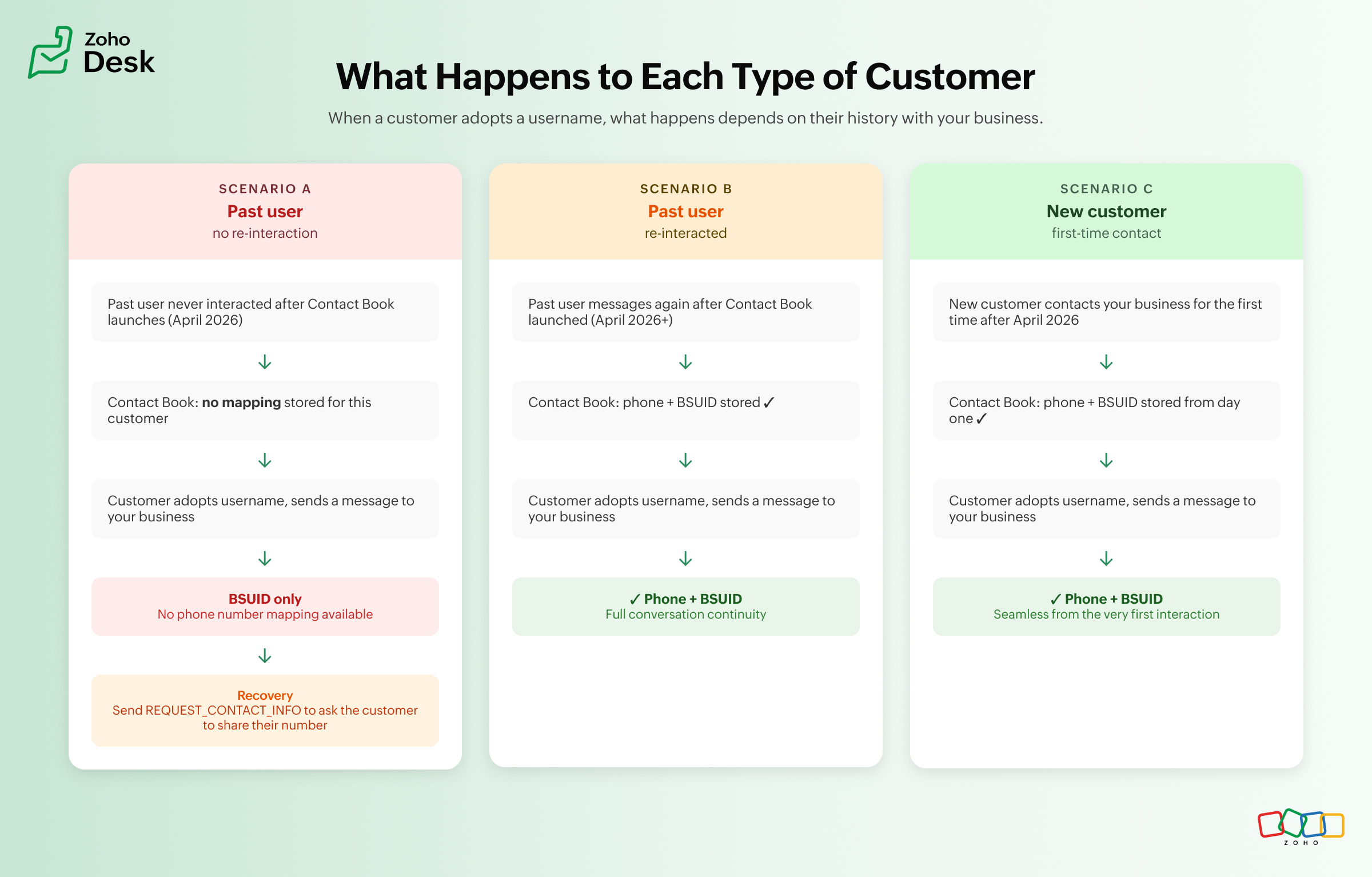


What happens when you only have a BSUID?

A BSUID allows your business to continue existing conversations, route tickets while maintaining conversation history, and send most WhatsApp message types.

Info
The only exception is one-tap, zero-tap, and copy code authentication templates, which continue to require a phone number.

If your business process depends on a phone number, you can request it using the REQUEST_CONTACT_INFO button, available in utility and marketing templates and interactive messages. When the customer shares their number, a contacts webhook is triggered and the phone number and BSUID mapping is stored in the Contact Book automatically. If the customer declines, the conversation continues using the BSUID.


What this means for your day-to-day work in Zoho Desk

Area Impact
Finding customers Searching by phone number may no longer work for customers who have adopted usernames and fall outside the phone number sharing window. Searching by BSUID becomes increasingly important.
Conversation history Customers who last interacted before Contact Book became available and return using a username may initially appear as new contacts.
Automations and workflowsz Any custom workflow, macro, integration, or automation that relies exclusively on phone numbers should be reviewed to ensure it also supports BSUIDs.
Click-to-WhatsApp ads Zoho Desk IM does not currently support CTWA. Until it is available, conversations from CTWA ads where the customer has adopted a username and falls outside the phone number sharing window may not be processed correctly. No action is needed from administrators at this stage.
Broadcast messages Existing broadcasts to known phone numbers continue to work without any change. Broadcasting to BSUID-only contacts requires the outbound BSUID API, which went live in July 2026. Review your broadcast workflows if you plan to reach customers who do not have a phone number on record.
Authentication workflows No change. One-tap, zero-tap, and copy code authentication templates still require phone numbers.
Multiple business portfolios Without Parent BSUID, the same customer appears as separate identities across different portfolios.

Managing multiple business portfolios

If your organization manages more than one Meta Business portfolio, Parent BSUID links customer identities across portfolios that belong to the same Meta Business Account. See Meta's guidance on Parent BSUID ↗


Parent BSUID is not enabled by default. Your team will need to request access through your Meta point of contact. If eligible, your portfolios can be enrolled and parent BSUIDs will begin appearing in all message webhooks alongside the standard BSUID.
Note
Without Parent BSUID, the same customer appears as separate identities across different portfolios. Contact your Meta point of contact to check eligibility and request enrollment.

Action checklist

Use the following checklist to prepare your IM WhatsApp integration for BSUID support:

           ✅  Action Checklist
Confirm your IM WhatsApp integration parses and stores the user_id (BSUID) field from all incoming webhook events.
Update customer records to store BSUID alongside phone numbers.
Review workflows, routing rules, automations, macros, and integrations that currently depend only on phone numbers.
Keep Contact Book enabled. It is on by default and preserves phone number to BSUID mappings.
If you manage multiple business portfolios, check with your Meta point of contact about enabling Parent BSUID.
Decide how your business will request phone numbers for BSUID-only customers when required for downstream processes.
Test your webhook handling using Meta's App Dashboard, which now supports BSUID-only, username-enabled, and Parent BSUID scenarios.
Actively interact with existing customers through your WhatsApp business numbers to maintain the 30-day window. Sending or receiving a message or call in either direction resets the window and helps preserve phone number visibility for customers who adopt usernames.
This article is based on Meta's official WhatsApp Business Platform documentation, last updated June 29, 2026. As Meta continues its phased rollout of usernames and BSUID support, some implementation details and timelines may change. We recommend reviewing Meta's latest documentation for the most up-to-date information.
    • Recent Topics

    • How to change an employee mail id

      Hi, Does the administrator have the rights to edit an  employees mail id. 
    • Cousin Domain Verification in Zoho Mail: Identify and block look-alike domains

      Phishing attacks often rely on domain names that closely resemble legitimate ones. This makes it difficult for users to identify fraudulent emails at first glance. Zoho Mail's Cousin Domain Verification feature allows administrators to define trusted
    • Zoho Publish is now available in Zoho One!

      Hello Zoho One users, We’re excited to announce that Zoho Publish is now included as part of the Zoho One suite! As businesses grow, keeping their business information accurate across online platforms can become challenging. Updates may be missed, details
    • How do I add 2 agents under the same email?

      I have 2 agents who use the same email address. I added one, but when adding the second agent, it says that the email is already registered. How do I configure this properly?
    • Zoho Desk API modifiedTimeRange returns HTTP 500 around 2026-03-08T02:00:00.000Z

      Hello Zoho Support Team, We are experiencing a reproducible HTTP 500 Internal Server Error when querying the Zoho Desk API search endpoint with a specific modifiedTimeRange boundary. ### API Endpoint GET /api/v1/tickets/search ### Reproduction Steps &
    • Updating an Invoice Line Item's Discount Account via API Call / Deluge Custom Function

      I need help updating an invoice line item's discount account via API. Below is a screenshot of the line item field I am referring to. Now the field to the left of the highlighted field (discount account) is the sales income account. I am able to modify
    • Collaborate Visually with Whiteboard in Zoho Projects

      Whiteboard in Zoho Projects allows you to collaborate visually by creating diagrams, annotating designs, and sketching project workflows using shapes, text, and images within project modules. Team members can work simultaneously, improving productivity
    • Associate project with timer on iPhone

      When I start the timer without first associating a project (on my iPhone), its starts fine but now when I need to associate a project, and click on the link, I get a list of EVERY project I've ever put into Zoho Books. It used to just show active projects.
    • Sales Tax Refund on Commerce Order

      I've looked high and low. Relatively new to ZOHO but not to systems in general. How do we produce a refund for sales tax charged and paid for by a customer in error? This does not impact inventory stock. Simply for accounting and getting the $ back to
    • Importing Chart of Accounts from Quickbooks -- "Debit or Credit"?

      I'm trying to switch from QB to Zoho Books. I've prepped my chart of accounts and put it into the format following the structure of the sample CSV file. But one thing that does not exist at all on the Quickbooks side is the Zoho column for "Debit or Credit".
    • Long term pricing for customers managing multiple organizations

      I've been using Zoho extensively for quite some time and genuinely think it's one of the most powerful and customizable business platforms available. Between Zoho Books and Zoho Analytics, I've invested a significant amount of time building automations,
    • Default Status for Appointments to Completed

      We use Zoho Bookings integrated with Zoho Desk to book time for tech support sessions, we've configured it to only allow for a contact to book a single session to avoid customers overbooking time that may not be needed. The trouble is, once a session
    • Customer User Fields for use in Rules

      Hi, I would like to be able to add custom fields to the users, such as Department or Role, which can then be used in Rules, Reports, etc. as a condition. A use case is limiting Global lists or Choices based on the users Custom Field, so one form can be
    • Add ZeptoMail to Zoho One

      Hi Zoho Team, I would like to request that ZeptoMail be added as a fully included application within Zoho One. Why this is important Zoho One is positioned as a unified business operating system that brings the applications an organization needs under
    • Item image on document

      I know what I am asking may not be possible, but I will ask anyway, maybe I will get lucky, and someone else is doing it. My business is based on special orders only from various online stores. When I send a quote to a client, I generate a separate quote
    • Dashboard Metric Drill-Down Shows Stale Data

      Summary: When clicking between different metric components on a custom dashboard, the drill-down list shows data from the previously opened metric instead of the one just clicked. Steps to Reproduce: Create a custom dashboard with multiple pre-defined/templatized
    • Zoho Marketing Automation WhatsApp Campaign Import Sync for Zoho Analytics

      WhatsApp is a critical channel in modern marketing, yet WhatsApp Campaign metrics from Zoho Marketing Automation currently cannot be natively imported into Zoho Analytics via the default advanced analytics connector. Integrating this into the standard
    • Allow Reauthorizing CRM Connections Without Revoking First

      Currently, when a Zoho CRM connection needs to be reauthorized or authorized with another account, we first have to revoke the existing authorization and then authorize it again. This creates a gap where the connection is unavailable, and any functions,
    • Programmatic Itemized Expenses?

      It does not appear that it is possible to create itemized expenses programmatically (via the API)? Is this correct, or am I misunderstanding the situation?
    • Prefix & Suffix on Single Line, Number, etc.

      Hi, I would like to have the same Prefix and Suffix that was added to the Unique ID on Text and Number Fields. Use case could be as basic as temperature, as per another Idea I have to use Single Line (Text) for a number that might have leading zeros today,
    • Handle Leading Zeros in a Number Field

      Hi, If I use a Number Field, set with Min 7 Digits and Max 7 Digits, and enter 0000001, it will result in 1 and an error as it removes the leading zeros, the same with entering 0012340 will result in 12340 and error. So I have to use a Text Field and
    • Is there a way to show contact emails in the Account?

      I know I can see the emails I have sent and received on a Contact detail view, but I want to be able to see all the emails that have been sent and received between all an Accounts Contacts on the Account Detail view. That way when I see the Account detail
    • Virtual Option for Fields

      Hi, I would like to be able to choose another option other than Read-Only or Disabled, such as Virtual. And with Virtual, the field is shown on the form and avilable in rules, but NOT saved to the Database. A use case is having multiple Large Lists of
    • Zoho Marketing Automation Cannot Sync Lookiup Fields

      Hello all, It seems that Zoho MA cannot sync Lookup fields from the CRM. Can you confirm if this is the case? Is there a workaround? Do you know if Campaigns can sync with custom modules and also with Lookup field in the CRM? Thank you!
    • Specific ListView Canvas on Canvas Home Page Always Loads Most Recent ListView, Not the One Specified

      I had mentioned this to ZOHO, but I mainly wanted to see if others in the Community are also facing this problem. I created a Canvas ListView for a Custom Module, and then created a Canvas Home page (technically on a tab item, but I'm not sure if that
    • Announcing the new SKILL.md for Zoho CRM and the updated OAS repository!

      We are introducing a new zoho-crm skill to make working with Zoho CRM Developer tools (like APIs, functions, widgets, client scripts, queries etc) easier and faster, with the help of AI in your preferred AI harness like Claude Code, Codex, Cursor, VSCode
    • Zoho Campaigns EU Topics API returns HTTP 200 with empty topicDetails

      Hello, Our Zoho Campaigns EU organisation has two custom topics visible in the Campaigns UI, and contacts are subscribed to them. However, an OAuth request with ZohoCampaigns.contact.READ to https://campaigns.zoho.eu/api/v1.1/topics returns HTTP 200 with
    • Caso de Éxito: Cómo Toyota Financial Services unificó la atención al cliente con Zoho

      "Después de seis meses con el CRM en producción estamos encantados." Miriam Cárdenas, Responsable Departamento ATC Toyota Financial Services es la división financiera de Toyota encargada de gestionar la financiación de vehículos y, junto con KINTO España,
    • Zoho Books - France

      L’équipe de Zoho France reçoit régulièrement des questions sur la conformité de ses applications de finances (Zoho Books/ Zoho Invoice) pour le marché français. Voici quelques points pour clarifier la question : Zoho Books est un logiciel de comptabilité
    • Sending Zoho form link from custom function in Zoho CRM

      Hello,  We intend to send a Zoho form link to certain Contacts using a custom function. The Zoho Form must be pre-filled with the Deal information and contacts receiving it should be able to modify the values and upon submission, those modifications must
    • Automatically remove commas

      Team, Please be consistent in Zoho Books. In Payments, you have commas here: But when we copy and paste the amount in the Payments Made field, it does not accept it because the default setting is no commas. Please have Zoho Books remove commas autom
    • Zoho ERP | Product updates | July 2026

      Hello users, We're back with another round of updates to help you streamline your operations. This month's release brings new features and enhancements designed to help you work more efficiently. Read on to discover everything that's new in Zoho ERP this
    • Zoho CRM

      Cuándo voy a adjuntar un archivo .pdf en un registro en el campo Archivo obtengo el siguiente error:
    • Can I hide some products from a particular customer

      HI I want ot give a customer access to the portal but I need to hide some products from them that are not available for them to buy- is this possible ?
    • Dashboard/Component filter by probability

      Hi all Can I request the ability to add a Component or Dashboard filter for Deal Probability? Would be useful to be able to see data of deals more than 60% probable. Olly
    • Admin Logging in as another User

      How can a Super Admin login as another user. For example, I have a sales rep that is having issues with their Accounts and I want to view their Zoho Account with out having to do a GTM and sharing screens. Latest Update (27th April 2026): With the early
    • OpenAI Is Moving to the Responses API: Here's What It Means for SalesIQ

      OpenAI has deprecated its Assistants API and is moving to the Responses API. If you're using OpenAI Assistants with SalesIQ, you may be wondering if you need to make any changes to your existing setup. You don't. SalesIQ has already taken care of the
    • Free webinar: Zoho Sign for Microsoft apps

      Hello, Did you know Zoho Sign works right inside the Microsoft apps you already use? A signature request shouldn't mean leaving Teams for another tab, or downloading an Outlook attachment just to sign it. Zoho Sign integrates with Microsoft 365, Teams,
    • Billing Status and WO Status Field Colors -

      Hello Team, I noticed that the colors of the Billing Status and WO Status fields in the WO module have been changed. (Org ID:170000078905) This is not urgent to correct, but I wanted to bring it to your attention so you can check whether this is a system
    • Introducing throw statements in Deluge

      Hello everyone, We're introducing a powerful addition to Deluge that gives you more precise control over error handling in your scripts. Whether you're calling an external API, validating user input, or enforcing a business rule, there are moments when
    • Next Page