Introducing Stage Automation - an easier way to automate actions on stage transitions.
Greetings,
Previously, if you wanted to trigger any automated actions for stage transitions, you had to use Bigin's workflows. With this new feature, you can now create automations for stage transitions in just a few easy steps.
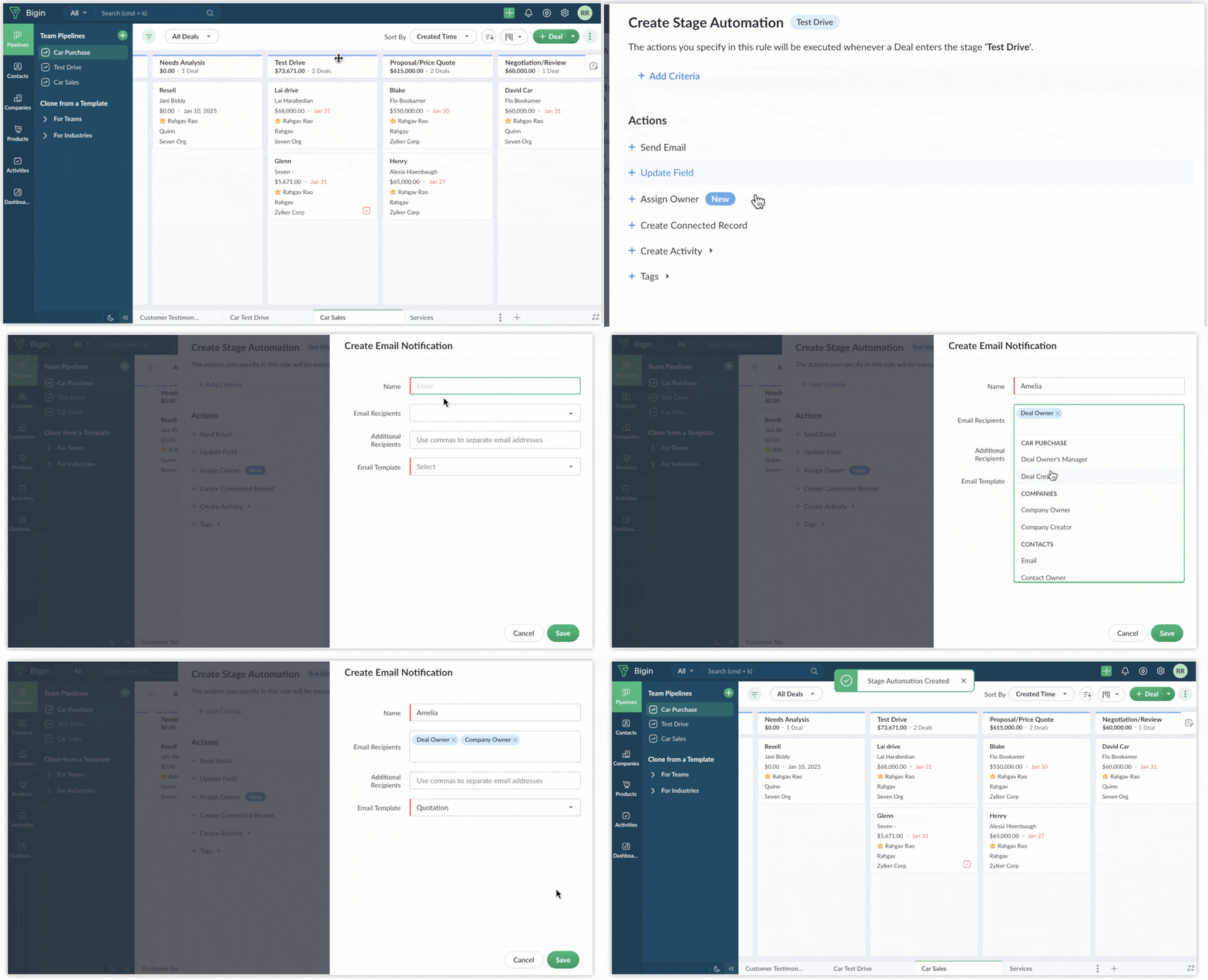
If you want to trigger a set of actions whenever a deal enters a specific stage, you can use the stage automation feature, which enables you to create actions directly in the pipeline view and specify their criteria as required.
To create a stage automation:
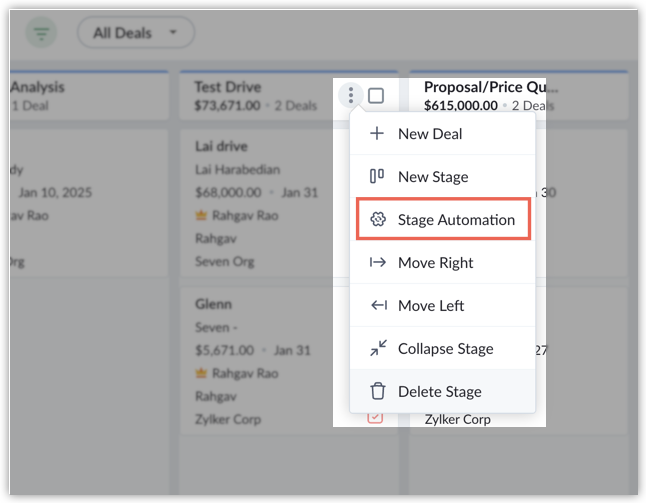
1. From the pipeline view in the Pipelines module, go to the desired stage and click on the more (...) button for that stage.
2. Click on Stage Automation in the menu.
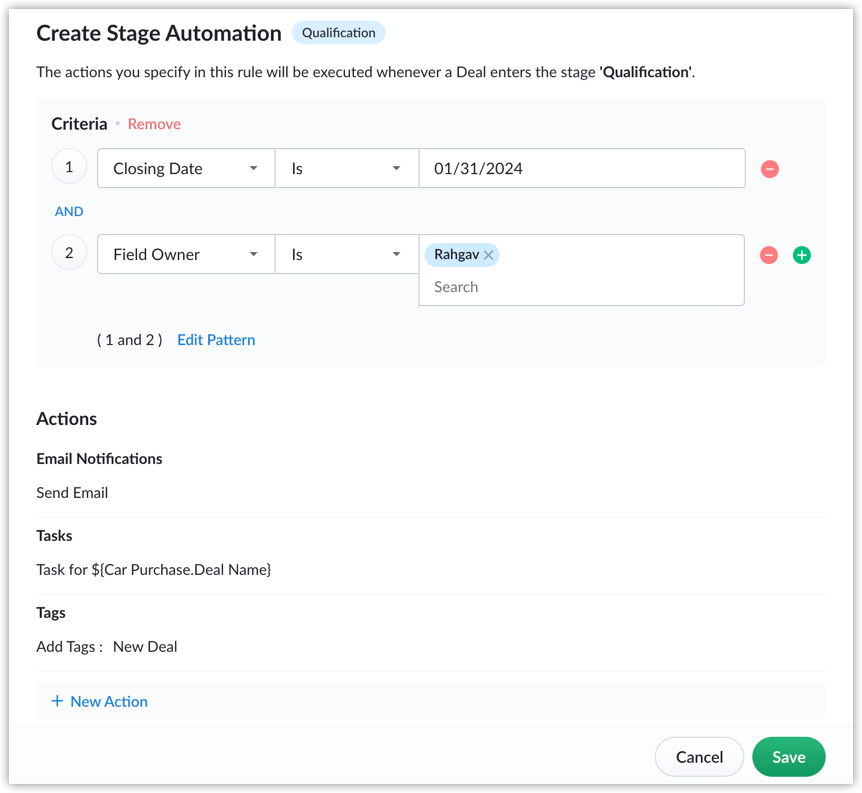
3. From the Create Stage Automation panel, select which actions need to be triggered when a deal enters the current stage from the list of options available under the Actions section. The actions that you can trigger in stage automations are similar to the actions that you can trigger in workflows. Except for custom actions and topping-related actions, you can trigger additional actions like the following:
Send email
Update field
Assign owner
Create connected record
Create activity
Create task
Create event
Tags
Add tags
Remove tags
Apart from these actions, you can also include additional criteria as required.
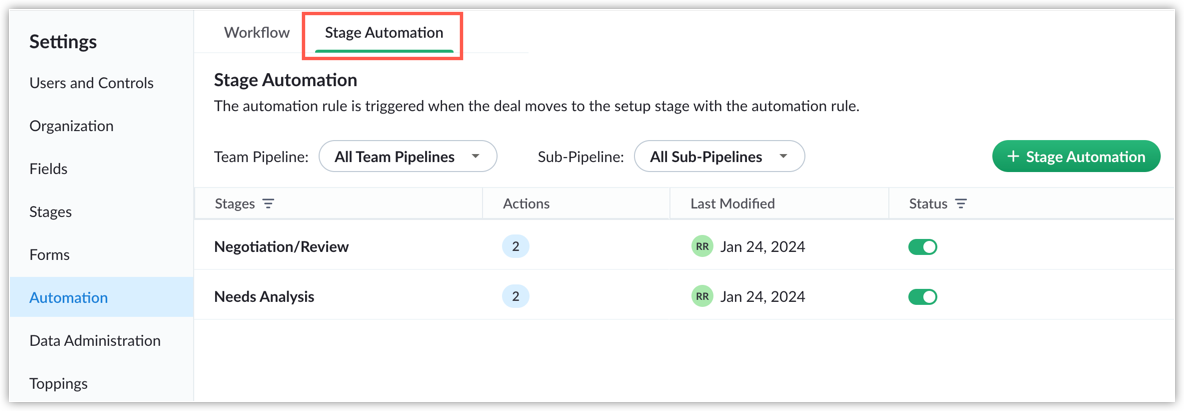
Please note that we have also renamed the Workflows tab in the Settings menu to Automations, which will now house both workflows and stage automations.
You can also comprehensively manage all of the stage automations you've created in your Bigin account from the automation settings by navigating to Setup > Automations > Stage Automations.
Permissions:
Everyone with access to the Automations tab will be able to access stage automations. Automation rule limits
Previously, we set a limit on the number of workflow rules per account, but with this enhancement, your overall automation rule limit will count both workflow rules and stage automation rules together.
The table below highlights the old and new rule limitations of each edition of Bigin:
Before
After
Bigin Free
3 rules
3 rules
Express
10 rules
30 rules
Premier
30 rules
50 rules
Zoho One
30 rules
50 rules
Note:
To accommodate the introduction of stage automations, we're increasing the maximum number of rules by 20 for paid plans.
That's all for this enhancement. We sincerely hope you find these improvements useful. Please give them a try and leave your feedback in the comments section below. Watch this space for future announcements.
Hello everyone, Mass emails help you communicate with multiple customers in a couple of clicks. We have introduced a Mass Emails dashboard in Bigin so that users can see the status of the mass emails like how many emails were opened, clicked and bounced.
Dear Biginners Club, Today, we're pleased to launch a brand-new pricing edition called Bigin 360, our highest pricing edition that will sit on top of Express and Premier editions. It's been over four years since our launch, and we're receiving some great
Do you often find yourself manually entering customer information in your business documents like invoices and contracts? This can be a time-consuming process that can take up valuable time from your business operations. With Zoho Writer's Merge Templates
Exciting news, Bigin enthusiasts! #BiginnersClub meetups are back, and we're hitting some major cities this time, starting from October. Here's what you can expect: Meet our experts face-to-face Deep dive into Bigin and its advanced features Personalised
Hello everyone, Bigin's web forms just got a makeover! We are excited to introduce Forms: an online form builder designed to meet all your data collection need. This revamp was inspired by your feedback, resulting in an upgraded and versatile version
Hi there, any plans of adding integrations with Facebook Messenger and Whatsapp into Zoho Flow? Seems that more and more business are delivering automated updates such as "your order is received", "your order has been shipped" and so on via these two platforms. Not sure if Whatsapp has the API access needed i am pretty sure that Facebook Messenger has... Kind regards Bo Thygesen
Hi team! Something we are really missing is able to see the field Company when working in the activities module. We have a lot of tasks and need to see what company it's related to. It's really annoying to not be able to see it.🙈 Thx!
One of the main reasons I have gone down the Zoho route is because I need multi-currency support. However, I find that products can only be priced in the home currency, We sell to the US and UK. However, we maintain different price lists for each.
Hi, Where can I edit the unscubscribe and manage preferences link in the footer of the email. I would like it so that when you click 'manage preferences' an form opens up that allows the person to choose what type of emails they do and don't wish to
L.S. After creating a new email template in CRM I was about to send a group email to my clients, then Zoho CRM announced that they would change the sender address to some kind of Zoho-e-ddress because my email address "has not been verified". Not only
One of the fastest ways to build trust in an online store is to show real customer feedback right where people are deciding to buy. Third-party widgets let you embed things like Google Reviews, Instagram feeds, or even a WhatsApp chat button. These add
How can we add several team members to one opportunity for collaboration? I have researched and only found something called Deal Team which I cannot find in my CRM to configure.
Hello all, We've introduced a new way to work with location data in Zoho CRM: the Map View. Instead of scrolling through endless lists, your records now appear as pins on a map. Built on top of the all-new address field and powered by Mappls (MapMyIndia),
Reviewing PDFs just got a whole lot easier. You can now annotate PDFs directly in Zoho Notebook. Highlight important sections, add text, insert images, apply watermarks, and mark up documents in detail without leaving your notes. No app switching. No
Dears, What should we do if we add new forms or reports and need to update more than 20 permissions? Updating them one by one feels pretty harsh, doesn’t it?
Hello Everyone, We are excited to announce a new addition to your Canvas in Zoho CRM - Print View. Canvas print view helps you transform your custom CRM layouts into print-ready documents, so you can bring your digital data to the physical world with
Hi Zoho One Team, We would like to raise a concern about the current overlap of core functionalities across various Zoho applications. While Zoho offers a rich suite of tools, many applications include similar or identical features—such as shift management,
We have installed the Jira extension so we can maken Jira issues from Zoho desk. In Zoho desk I can also see the Jira issue status for example but I can not filter on this field. I would like to setup an filter showing me the closed Jira issues. How can
Is there a way to make the full text of a text field appear in the list report on mobile and tablet? With custom layouts, the text is always truncated after a certain number of characters.
I'm asking you all for any feedback as to the logic or reasoning behind drastically limiting portal users when Zoho already meters based on number of records. I'm a single-seat, Zoho One Enterprise license holder. If my portal users are going to add records, wouldn't that increase revenue for Zoho as that is how Creator is monetized? Why limit my customer portal to only THREE external users when more users would equate to more records being entered into the database?!? (See help ticket reply below.)
Hello, I want to do a survey on all my customers of 2025. For that I want to select all contacts linked to accounts who where billed in 2025. How to I create this link to I can then use Zoho Survey with this database of contacts?
Hi, I know there's a way to export manuals in Zoho Learn, but I want to export everything in one go so it won't take so long. I can't see a way to do this, can I get some assistance or is this a feature in the pipeline? Thanks, Hannah
Hello Zoho People Product Team, After a deep review of the Zoho People Shift module and a direct comparison with Zoho Shifts, we would like to raise a feature request and serious concern regarding the current state of shift management in Zoho People.
My company has been using Zoho One since 2021, with sales data going back through 2020. However, we have been in business much longer, and we have historical sales information that we want to have at our fingertips when talking with customers (usually
Hello Zoho People Product Team, Greetings and hope you are doing well. This feature request is related to Zoho People - please don't move it to zoho one! We would like to submit a feature request regarding the shift assignment and management view in Zoho
Is there a way to control the JSON response returned by the CRM function REST API? If I call a function using either OAuth or an API key it returns a 200 OK response with a string in the format shown below. I am using a particular feature of an external
Hello Zoho People Product Team, Greetings and hope you are doing well. We would like to submit a feature request to enhance the Zoho People Shift module by adding employee availability management, similar to the functionality available in Zoho Shifts.
I have several different SKU's that share a common MPN and would like to track inventory by MPN. SKU1 has MPN1 assigned SKU2 has MPN1 assigned Here is an example If I start with 5 of MPN 1 in stock I want each SKU1 and SKU2 to show as 5 in stock, If I
Whenever I try to access my application from the desktop, say I am editing it and want to test something in the desktop environment I get: An error has occurred. An internal error has occurred. Please check the URL , or try refreshing the page I can edit
Hi all, I am trying to access data for an application on our account via a lookup field; however, the application doesn't appear in the dropdown at all. Can anyone shed any light on this, please? I have asked Zoho support; however, they're just as confused,
I have moved my domain from one provider to another and after that zoho mail stopped working (expected). Problem is, zoho mail admin panel still shows (10 hours after move) that all records are correct while I haven't changed anything in my domain DNS
We have a use-case that is very common in today's world, but won't work in Zoho CRM. We have an SDR (Sales Development Rep) who makes many calls per day to Leads and Contacts, and schedules meetings for our primary Sales Reps. He does this by logging
Hi Zoho Community & Zoho Support We just tried to get a sync some products into Zoho Books from CRM using the native sync and we're getting an error: "It looks like some mandatory fields you're trying to map are empty. Please provide valid field names
Hi There, I am hoping that someone can help, I am looking for report that can show the bill and expense details along with project its as assigned to and the invoice number that the sales has been raised in. The goal is I can filter a customer/project
Hello, We sell equipment that we track the unique serial numbers on using Sales Orders. We can charge the customers an advanced payment, then the balance on delivery. We cannot figure out a way to do this in Books/Inventory: - Cannot part invoice a SO
I have segmented data in my CRM and I want to allow different users to be able to see only parts of it based on some criteria. I've tried to create and share a custom view, but then there is always an option for user to see all open lead for example.
Hello, one of my coworkers is having issues logging into ZOHO, she has requested a code when entering and the email is correct but she has not received the code. can you help us with this?
Hello Zoho Pagesense Team, We hope you're doing well. We’d like to submit a feature request to enhance Zoho Pagesense’s popup editor with Google Fonts support. Current Limitation: Currently, Pagesense offers a limited set of default fonts. Google Fonts
Hello Zoho PageSense Team, We would like to request improved reporting for popup interactions. Current Limitation: PageSense currently provides conversion data, but there is no clear visibility into: Popup rejections Popup closes (✕ button clicks) Dismissals
Hello Zoho PageSense Team, We would like to request the ability to manually reset popup cookies. Current Limitation: At the moment, it is not possible to initiate a new popup cookie from the our side. Visitors who rejected or closed a popup will not see
Hello Zoho PageSense Team, We would like to request an enhancement related to popup cookie management. Current Limitation: Currently, PageSense popup cookies remain active for 365 days, and this duration cannot be modified by us. If a visitor closes or
Hello Zoho PageSense Team, We hope you’re doing well. We would like to request an enhancement that allows popup designs to be reused across different PageSense projects. Problem Statement: Currently, Zoho PageSense allows popups to be duplicated only
Clicking a hyperlinked cell in Sheet creates this little pop-up with the actual hyperlink inside. Is it possible to have a 1-click link where if you click the cell it opens the link directly with no pop-up?